
.webp)
Data Processing Agreement: SaaS Guide


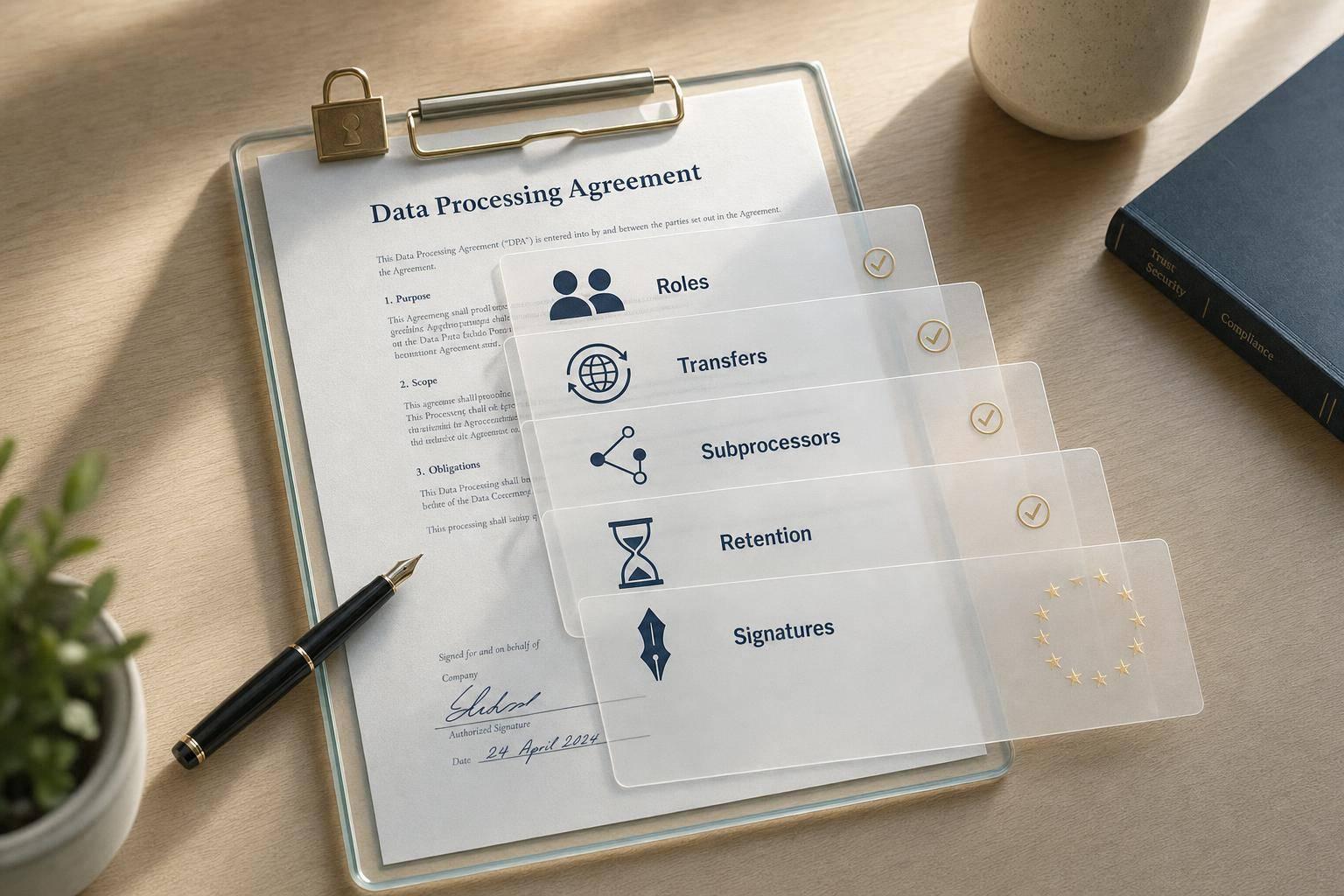
If a vendor handles EU lead data for me, I should have a signed DPA in place before that processing starts. That is the core point. In a SaaS lead gen stack, I need to check roles, Article 28 terms, cross-border transfer terms, subprocessors, and who signs and stores the document.
Here’s the short version:
- My company is usually the controller.
- My form tool, email platform, and CRM are usually processors when they act on my instructions.
- A DPA should cover:
- processing scope and duration
- documented instructions
- confidentiality
- security controls
- subprocessor terms
- help with data subject requests
- breach notice timing
- data return or deletion
- audit access
- If data moves outside the EEA, I should check for SCCs, the Data Privacy Framework, or another valid transfer method.
- An unsigned DPA is not enough.
- I should store the signed DPA with the MSA, order form, and vendor records.
One point stood out to me: the article notes a €45 million fine in Germany in 2025 tied in part to weak processor oversight. That’s a clear reminder that vendor review is not just paperwork.
| Tool | What I should check first | Main risk area |
|---|---|---|
| Form tools | log retention, subprocessors, routing | IP data, raw logs, enrichment |
| Email tools | list use, suppression list retention, breach timing | engagement tracking, sending partners |
| CRM systems | access controls, deletion rules, audit trails | long-term record storage, broad staff access |
If I’m reviewing a tool like Reform, I’d treat it as the first point where lead data enters the stack and line up its DPA terms with the CRM and email tools that receive the same records.
GDPR Data Processing Agreements Simplified Quickly
sbb-itb-5f36581
What a DPA Must Include for Form Tools, Email Tools, and CRM Systems
Now that the roles are clear, the next step is to check the contract terms that make the vendor relationship compliant. A DPA should clearly lay out the processing scope and the Article 28 terms that apply to form submissions, email lists, and CRM records. That means it should state the subject matter and duration of processing, what the vendor does with the data and why, the types of personal data involved, and the categories of people whose data is processed.
Core DPA Contract Terms to Verify
Every DPA for a lead generation tool should cover a core set of terms.
Documented instructions: the vendor should use lead data only based on your setup and workflows, not for its own marketing.
Confidentiality: employees and contractors who can access your data should be under a duty to keep it private, with role-based access controls that limit who can see what.
Security measures: the DPA should point to Article 32 and spell out controls such as encryption in transit and at rest, access logging, backups, and incident response procedures.
It should also cover subprocessor controls. That means a disclosed list of third parties that handle your data, such as cloud hosts, email delivery providers, and analytics tools, plus advance notice before new subprocessors are added. Data subject rights assistance should also be there, with the vendor agreeing to help you locate, export, correct, or delete a specific lead's records when asked. Breach assistance should set a notification window, often within 24 to 48 hours, and require cooperation on investigation and impact analysis.
Two other terms matter just as much. Data deletion or return should explain what happens when you cancel, including whether lead data is exported, deleted, and when backup copies are removed. Audit rights should give you a way to check compliance through security certifications, questionnaires, and, if needed, onsite audits.
How DPA Clauses Apply to Lead Capture and Follow-Up Data
Each tool handles a different kind of data, so the review focus changes with the tool. landing page form submissions often include names, work emails, phone numbers, IP addresses, and campaign attribution tags. Email platforms store engagement logs, including opens, clicks, and geolocation approximations, along with suppression lists. CRM systems hold job titles, company names, activity history, sales notes, and meeting records.
Those data types lead to different review priorities. IP addresses and campaign source tags collected by form tools tie closely to retention and log-access rules, so check how long raw logs are kept and who can query them. Engagement data in email tools is behavior-based, so the DPA should spell out retention periods and whether that data is kept in aggregate or at the individual level. CRM activity history can get quite detailed, which makes archiving, anonymization, and post-deletion record retention worth a close look.
Suppression lists need extra care. Email tools often have to keep these longer than other contact data so opt-outs are honored. That's a valid exception, but the DPA should say so plainly instead of leaving it vague.
DPA Review by Tool Category: Comparison Table
Use this table to compare form, email, and CRM reviews at a glance.
| Tool Category | Typical Data Processed | Common Risk Areas | Subprocessor Exposure | Key DPA Terms to Inspect |
|---|---|---|---|---|
| Form Tools | Names, work emails, IP addresses, device info, campaign attribution, form responses | Raw log retention, enrichment, spam and bot protections | Cloud hosting, email notification services, analytics, enrichment providers | Processing instructions, security measures, subprocessor list, log retention rules |
| Email Tools | Contact lists, engagement metrics (opens, clicks), suppression lists, campaign content | Unauthorized use of contact lists, cross-tenant data isolation, deliverability partner access | Sending infrastructure, bounce processing, anti-abuse services | Confidentiality, subprocessor controls, breach notification timeline, suppression list retention |
| CRM Systems | Job titles, company names, activity history, sales notes, lead scores, workflow events | Stale data retention, wide internal access, support escalation access to records | Search indexes, backup storage, call recording integrations, in-app messaging | Audit rights, data deletion/return terms, access controls, activity log retention |
Use these differences to decide whether a vendor belongs in the DPA review path covered next.
When You Need a DPA in a SaaS Setup
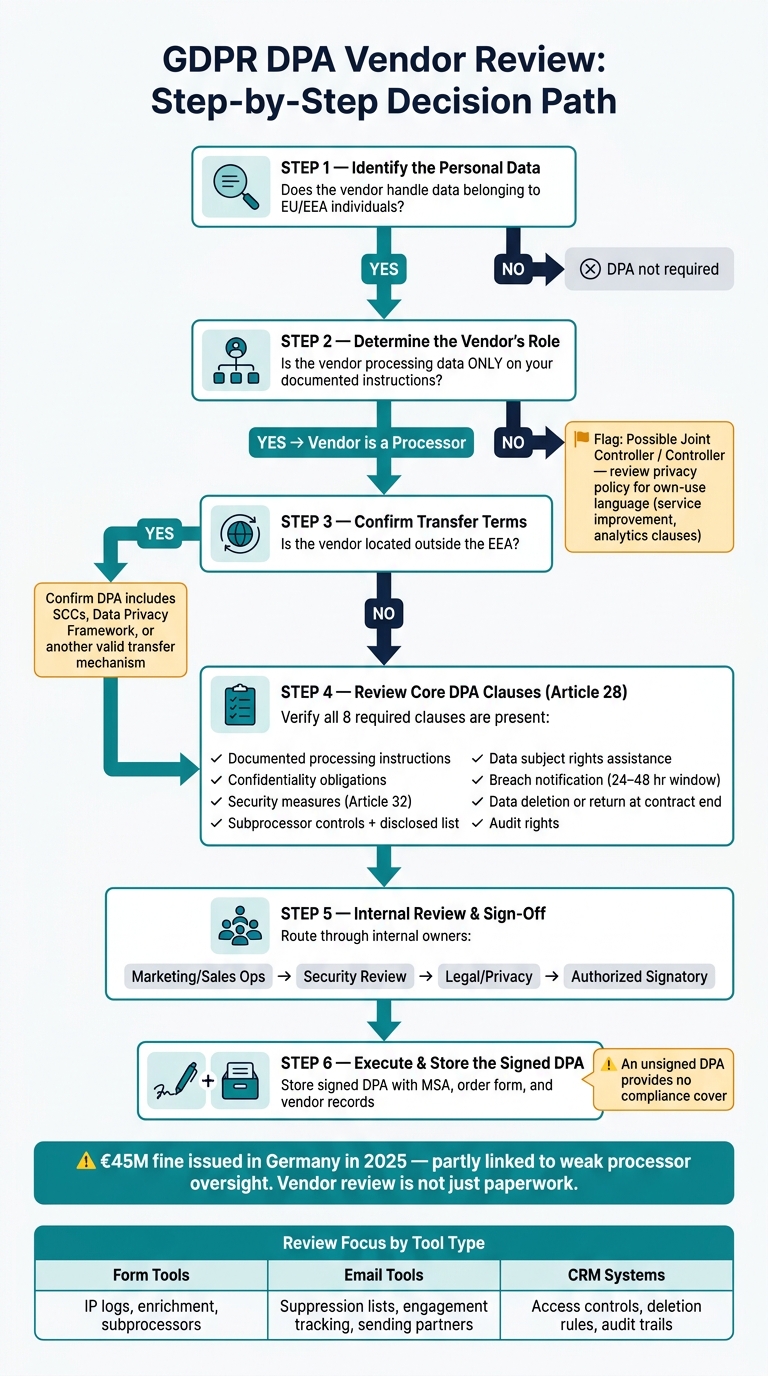
GDPR DPA Vendor Review Process for SaaS Lead Gen Stacks
Use this test to figure out whether a vendor should go through your DPA workflow. Run it after you review the contract terms.
Scenarios Where a DPA Is Required
Hosted forms, email platforms, CRM systems, and enrichment services need a DPA when they process EU personal data on your instructions. If the vendor is not acting only on your instructions, the next step is to check whether the service starts to look more like controller activity.
When a Vendor May Not Be Acting Solely as a Processor
Some vendors act as controllers for limited processing, especially when they use customer data for their own purposes. Look closely at whether the vendor keeps the right to reuse customer data for its own purposes. Any "service improvement" or "analytics" language in the privacy policy is a red flag. Read that language before signing a standard DPA.
A Step-by-Step Decision Path for Legal and Ops Review
Use this sequence before procurement or renewal.
- Identify the personal data. Confirm whether it belongs to EU or EEA individuals.
- Determine the vendor's role. Is the vendor processing data only on your documented instructions to deliver the service, or does its policy leave room to use that data for its own purposes?
- Confirm transfer terms. If the vendor is outside the EEA, confirm the DPA includes SCCs or another valid transfer mechanism.
Processor reviews should happen on a recurring, risk-based basis, not as a one-time sign-off.
Next, map the DPA to the right internal owner and vendor signatory.
Who Signs the DPA and How to Use It in Vendor Review
Once you know a DPA is required, the next step is simple: decide who reviews it and who signs it.
On your side, the signer must have the authority to bind the company. In most teams, that means legal counsel, a privacy officer, a procurement lead, or another person with delegated signing authority under your internal policy. On the vendor side, the DPA should be signed by an authorized signatory for the SaaS provider.
Internal Owners and External Signatories
It helps to split this into two parts: review and execution.
Those are not the same thing. A tool can pass internal review and still sit unsigned, which means the DPA is not in place.
In many companies, marketing ops or sales ops starts the process by confirming that the tool meets a business need. From there, security reviews the vendor’s controls and incident response terms. Legal or privacy then reviews the DPA language itself. After those internal reviewers approve the document, the authorized signatory signs the agreement.
Store the signed DPA with the MSA and order form in your contract system and signature records.
Vendor Review Checklist for Forms, Email, and CRM Tools
Use these checks to clear vendors before procurement.
- Processor role: Check whether the vendor processes data only on your instructions, or whether its policy leaves room for its own use.
- Security documentation: Ask for SOC 2 Type II or ISO 27001 certification, plus details on encryption standards and access controls.
- Subprocessor list: Make sure the list is current, names each subprocessor, and covers hosting, email delivery, analytics, and enrichment providers.
- Breach notification terms: Look for a clear timeline, such as 24–48 hours to notify you, instead of loose wording.
- Deletion and return rights: Confirm how long data and backups stay in place after contract termination and whether you can request deletion.
- Transfer mechanisms: If data moves between the U.S. and EU/EEA, the DPA should refer to SCCs, the Data Privacy Framework, or another valid transfer method.
Also check that the DPA is signed through the same workflow as the MSA. If the DPA is sitting in someone’s inbox unsigned, it is not approved.
Due Diligence Checks by Tool Type: Comparison Table
Apply the same due diligence lens to each tool category.
| Review Area | Form Tools | Email Tools | CRM Systems |
|---|---|---|---|
| Consent capture | Verify consent fields are captured and logged at submission. | Confirm subscriber consent is recorded and linked to contact records. | Check that consent status syncs from upstream tools and is stored accurately. |
| Access and retention | Confirm who can view or export submitted lead data and how long submissions are retained. | Check list access permissions, export controls, and retention of engagement history. | Review field-level permissions, profile access, admin roles, and record retention policy. |
| Tracking and audit logs | Check whether form analytics or session tracking creates additional data collection. | Review click and open tracking scope; confirm opt-out handling. | Verify activity logs, field-level edit history, and access audit trails. |
| Enrichment processing | Identify whether enrichment runs at submission and who the enrichment subprocessor is. | Review any deliverability-related processing and the related subprocessors. | Review any built-in or integrated enrichment features and their subprocessors. |
| Long-term storage and deletion | Confirm how long submission data is retained and whether deletion is supported. | Check retention of suppression lists, bounce data, and engagement history. | Confirm backup schedules and deletion request handling. |
This table gives procurement and renewal teams a straightforward way to compare vendors side by side.
Applying This Process to Reform and Next Steps
How to Review Reform in a GDPR-Aligned Workflow
Start with the same DPA checklist here. Reform is the point where lead data first enters your stack, so it deserves a close review.
For lead capture, treat Reform as the processor and your organization as the controller. Then look at routing, enrichment, spam prevention, validation, analytics, and file uploads. Each one can change where personal data goes, who handles it, and what needs to be covered in the DPA.
For EU data, confirm SCCs and document where Reform stores and processes personal data. After that, compare those terms with the CRM and email tools receiving the same data.
| Review Step | Focus Area for Reform | Compliance Goal |
|---|---|---|
| Role Confirmation | Confirm Reform as Processor; your team as Controller | Establish roles |
| Feature Audit | Review enrichment, spam prevention, routing, and analytics | Map processing scope |
| Transfer Review | Check subprocessor locations and transfer mechanisms (e.g., SCCs) | Confirm cross-border transfer terms |
| Stack Alignment | Compare Reform DPA with CRM and email tool DPAs | Align contracts |
| Final Approval | Store signed DPA with vendor renewal records | File signed DPA |
Keep DPA Terms Aligned Across Your Full Stack
Once you know Reform’s scope, check that its retention and transfer terms line up with the rest of your stack. Reform, your email platform, and your CRM are part of one processing chain. A lead comes in through Reform, lands in your CRM, and often kicks off an email sequence. If the DPAs don’t match, gaps show up fast.
The most common issues are retention periods and subprocessor lists. For example, if Reform deletes lead data after 12 months but your CRM keeps the same records forever, your governance approach doesn’t match. The same problem shows up with subprocessors. If Reform’s subprocessor list and transfer terms don’t line up with your email platform, your cross-border transfer assessment gets split across systems and becomes harder to support.
A simple fix is to set a baseline processing policy. That policy should define standard retention periods, such as 18 months for unqualified leads, minimum security expectations, and approved transfer mechanisms. Then check each tool’s DPA against that baseline before approval or renewal.
Conclusion: Minimum Actions to Take Before Approval
Before you sign or renew any tool in your lead generation stack, complete these five actions first:
- Confirm controller and processor roles for each vendor.
- Decide whether a DPA is required. If the tool processes personal data on your behalf, it is.
- Review the main DPA clauses against GDPR Article 28: processing on documented instructions, confidentiality, security measures, subprocessor controls, support for data subject rights, breach notification timelines, and deletion or return of data at the end of the contract.
- Check transfer mechanisms and subprocessor lists, including whether those lists stay current and whether you’re notified about material changes.
- Store the signed DPA with your vendor records in your vendor management system so it’s easy to find during audits and renewals.
A DPA that exists but is unsigned does not give you much cover. The same goes for an outdated subprocessor list. Paperwork alone isn’t enough. The process has to be finished, checked, and documented.
FAQs
Do I need a DPA for every SaaS vendor?
You need a Data Processing Agreement (DPA) for any vendor that handles personal data on your behalf. In controller-processor relationships under laws like GDPR, a DPA is a required legal safeguard.
As part of your initial risk review, check whether the vendor handles personal data. If they do, put a DPA in place before you sign the contract.
What makes a vendor a processor rather than a controller?
It comes down to who decides the purpose and means of processing personal data.
A controller decides why the data is processed and how that processing happens.
A processor handles the data for the controller and acts on the controller’s documented instructions. In plain terms, the controller is the one calling the shots on the main data protection duties, while the processor must follow those instructions and support the controller’s compliance work.
What should I do if a vendor’s DPA is unsigned?
Treat it as a red flag. Every controller-processor relationship needs a signed, compliant Data Processing Agreement, so this should go through your normal escalation process right away.
Bring in legal counsel, document the exact compliance gaps, and spell out the steps needed to fix the vendor’s non-compliance. If a vendor handles lead data without a signed, compliant agreement, the safest move is to avoid using that vendor to limit liability risk.
Related Blog Posts
Get new content delivered straight to your inbox

The Response
Updates on the Reform platform, insights on optimizing conversion rates, and tips to craft forms that convert.


Drive real results with form optimizations
Tested across hundreds of experiments, our strategies deliver a 215% lift in qualified leads for B2B and SaaS companies.
