
.webp)
Access Control for Form Data: Best Practices



Protecting form data is critical to prevent breaches and ensure compliance. Here's what you need to know:
- Access control is essential for safeguarding data collected via online forms. Weak controls can lead to attacks like SQL injection, XSS, or CSRF.
- Role-Based Access Control (RBAC) assigns permissions based on user roles (e.g., Admin, Editor), simplifying management and reducing risks.
- The Principle of Least Privilege (PoLP) ensures users only have access to what they need, limiting potential damage from breaches.
- Attribute-Based Access Control (ABAC) uses contextual factors like location or time for more precise permissions but is complex to set up.
- Combine multi-factor authentication (MFA) and TLS encryption for added security.
- Stay compliant with regulations like GDPR, HIPAA, and PCI DSS by denying access by default, maintaining audit logs, and validating permissions server-side.
Quick Tip: Use tools like Reform Pro for centralized access control and advanced security features.
These strategies not only protect sensitive data but also help avoid hefty fines and reputational damage.
Access Control Principles Explained
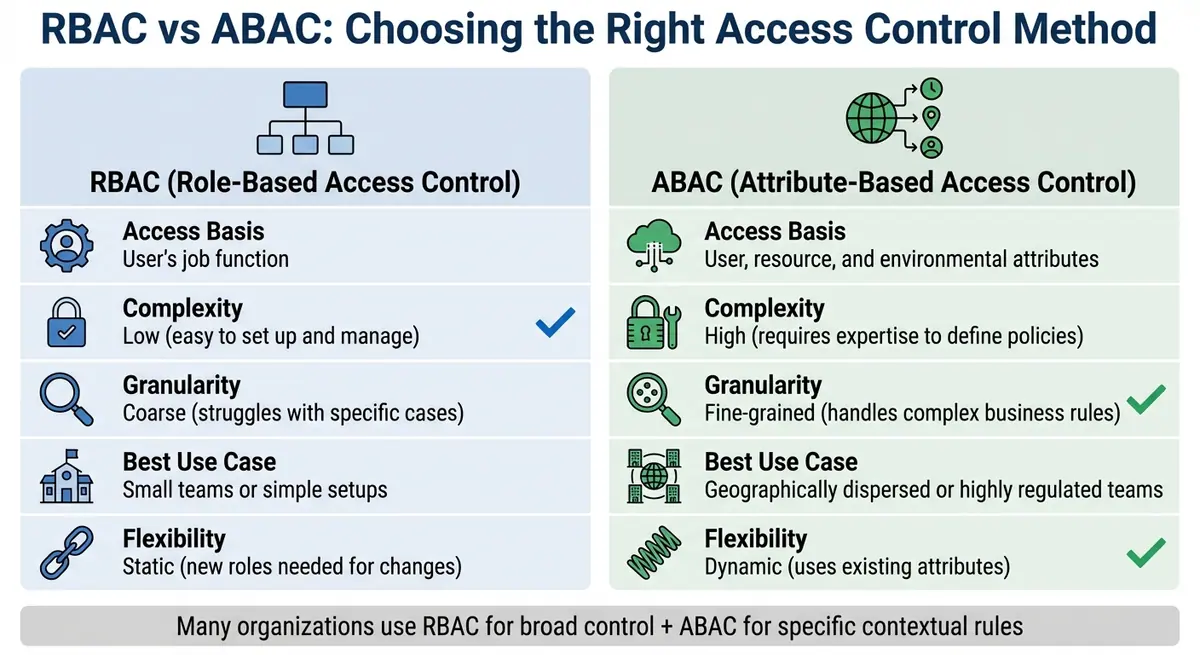
RBAC vs ABAC Access Control Methods Comparison
Let's break down three key access control methods that organizations use to manage permissions. These principles are essential for setting up secure form access within Reform.
Role-Based Access Control (RBAC)
Role-Based Access Control (RBAC) organizes permissions around job roles. Think of roles like "Admin", "Editor", or "Viewer", each with its own set of permissions. RBAC determines who can create or edit forms, who can access published forms, and who can view or modify specific fields in submitted data. Users are assigned roles, and their actions are limited to what their role allows.
"RBAC eliminates the need to provision each individual user with a customized set of user permissions. Instead, defined RBAC roles determine access rights." - IBM Think
RBAC not only simplifies permission management but also strengthens security. Insider breaches, for instance, cost an average of $4.92 million per incident, which is higher than the overall breach average of $4.44 million. To keep it flexible and auditable, avoid hardcoding roles. Instead, use dynamic permission checks like user.hasAccess("DELETE_FORM_DATA").
Principle of Least Privilege
The Principle of Least Privilege (PoLP) is all about limiting access to the bare minimum needed for a task. For example, if a user only needs to view form submissions, they shouldn't have the ability to delete them. This reduces the potential damage in case of a breach. If an account is compromised, attackers can only access limited resources.
"The Principle of Least Privilege encourages system designers and implementers to allow running code only the permissions needed to complete the required tasks and no more." - OWASP
To implement PoLP effectively, follow these steps: start with a "deny by default" approach, validate permissions with every request, and regularly review user permissions to avoid privilege creep.
Attribute-Based Access Control (ABAC)
Attribute-Based Access Control (ABAC) takes a more nuanced approach by analyzing various attributes - like a user's department, time of access, or location - before granting permissions. For instance, ABAC can restrict access to sensitive forms to business hours or specific IP addresses. While ABAC offers precise control, it’s more complex to implement and requires well-defined policies. Many organizations use a mix of RBAC for broader access control and ABAC for more specific, contextual rules.
| Feature | RBAC | ABAC |
|---|---|---|
| Access Basis | User's job function | User, resource, and environmental attributes |
| Complexity | Low; easy to set up and manage | High; requires expertise to define policies |
| Granularity | Coarse; struggles with specific cases | Fine-grained; handles complex business rules |
| Best Use Case | Small teams or simple setups | Geographically dispersed or highly regulated teams |
| Flexibility | Static; new roles needed for changes | Dynamic; uses existing attributes |
Setting Up Role-Based Permissions in Reform
Reform's Pro Plan takes role-based access control (RBAC) to the next level, making it easy to manage permissions for forms and submissions at the team level. This centralized approach ensures consistent security policies across your workspace. Let’s dive into how you can assign roles within Reform to align with your access policies.
How to Assign Roles in Reform
Reform offers four roles: Team Owner, Admin, Editor, and Viewer. Each role comes with specific permissions:
- Team Owners have full control, including centralized branding options like logos, colors, and default URL slugs.
- Admins, Editors, and Viewers have progressively fewer permissions based on their role.
To configure team-wide settings, head to Team Settings > General or Team Settings > Branding. Here, you can establish default security policies and branding elements for all forms. If you want to customize settings for an individual form, go to Form Settings in the Reform builder. This is also where you can enable features like email-authenticated Save Progress.
For more advanced control, such as limiting who can submit forms, you can use the Code section. For example, the onInput event can restrict submissions to specific email domains, like @mycompany.com.
Access Control Features Across Reform Plans
Reform’s plans offer different levels of access control. The Basic Plan provides standard form-building tools but lacks team access or role-based permissions. The Pro Plan, however, unlocks advanced security and customization features, including JavaScript event handlers for tailored input validation and transformation.
Here’s a quick comparison of features:
| Feature | Basic Plan | Pro Plan |
|---|---|---|
| Team Access | Single User Only | Full Team Capabilities |
| User Roles | Not Available | Team Owner, Admin, Editor, Viewer |
| Save Progress | Not Available | Included (via Email Link) |
| Custom Event Handlers | Not Available | Included (JavaScript) |
| Branding Management | Form-level Only | Team-level with Form Overrides |
The Pro Plan also supports conditional logic, ensuring that users only see the pages relevant to them. This helps protect sensitive data and aligns with the principle of least privilege, keeping your forms secure and efficient.
Strengthening Access Control with Encryption and Authentication
Access control by itself isn't enough to safeguard sensitive data. By combining it with encryption and multi-factor authentication (MFA), you create a layered defense system. Building on principles like Role-Based Access Control (RBAC) and the Principle of Least Privilege (PoLP), adding MFA and Transport Layer Security (TLS) ensures that form data is protected from unauthorized access.
Adding Multi-Factor Authentication (MFA)
MFA adds an extra layer of security, requiring users to verify their identity in addition to providing a password. This could involve using a device, biometric data, or an authenticator app. Microsoft’s research shows that MFA could have prevented 99.9% of account compromises.
Standards like the Payment Card Industry Data Security Standard (PCI-DSS) version 3.2 mandate MFA for administrative access to Card Data Environments, even when users operate within trusted networks. Similarly, the European Union's Payment Services Directive (PSD2), effective since September 14, 2019, requires “strong customer authentication” for most electronic payments.
For better security, use authenticator apps that generate time-based one-time passwords (TOTP). These are more secure than SMS-based MFA, which is vulnerable to SIM swapping and other network-based attacks.
Be mindful of MFA fatigue attacks, where users might unintentionally grant access due to repeated prompts. To counter this, implement rate limiting on authentication attempts and require users to input a numerical code - displayed on the sign-in screen - into their authenticator app.
TLS Encryption for Data in Transit
While MFA secures user access, TLS encryption protects data as it moves between servers and clients. This ensures that even if data is intercepted, it remains unreadable.
"HTTPS is considered secure because traffic between servers and clients is encrypted to prevent third parties from reading the data." - David Zomaya, Technical Writer, Sucuri
Always opt for TLS 1.3 or, at a minimum, TLS 1.2, and disable outdated protocols like SSL 3.0 and TLS 1.0, which are prone to vulnerabilities. TLS 1.3 also improves connection speed by reducing handshake delays. Configure your web server to redirect all HTTP traffic to HTTPS using a permanent (HTTP 301) redirect, ensuring that every form submission is encrypted end-to-end.
Additionally, implement Secure cookies, HTTP Strict Transport Security (HSTS), and proper cache-control headers to maintain encryption throughout the transmission process.
sbb-itb-5f36581
Meeting Data Protection Compliance Standards
To meet data protection compliance, organizations must go beyond basic access control practices. Compliance with data protection regulations is not optional; it’s a legal requirement. Whether you're handling customer data from California or the European Union, implementing the right measures shields your business from hefty fines and reputational harm.
Data Access and Consent Requirements
Modern privacy laws impose strict rules on how personal data is collected, stored, and accessed. Regulations like GDPR and CCPA demand explicit consent for data collection and provide individuals with rights such as data erasure and access.
In the UK, UK GDPR requires organizations to restrict personal data access to authorized personnel only. This includes formal user provisioning processes and regular reviews of access rights. For healthcare data in the U.S., HIPAA sets rules for the use and disclosure of protected health information (PHI). Federal agencies, on the other hand, must follow FISMA, which enforces strict access controls and account management practices.
The risks of non-compliance are clear. Regulatory fines can be enormous, and Broken Access Control was ranked as the #1 web security vulnerability in the OWASP Top 10 for 2021. This highlights the importance of properly configuring access controls.
To align with these standards, systems should be configured to deny access by default, allowing access only when explicitly permitted. Access should be limited to essential functions, and permissions must be validated server-side for every request, regardless of the source - be it AJAX, server-side processing, or other methods.
Breach Notification and Audit Trails
Compliance isn’t just about access control - it also requires monitoring and documenting user actions. Regulations mandate keeping detailed logs of all data access events, including account creation, modification, and deletion activities. These audit trails play a dual role: they help detect unauthorized access in real-time and provide evidence of compliance during audits.
All administrative actions should be logged automatically. Look out for unusual activity patterns, such as access at odd hours, inconsistent geographic locations, or unexpected data transfers - these could signal breaches or insider threats. Logs should be exported to a centralized SIEM system for real-time monitoring and analysis.
Under CMS guidelines, high-risk accounts must be disabled within 30 minutes of detection. Accounts inactive for 60 days should also be automatically disabled for moderate-level systems. Additionally, users are required to log out manually if they anticipate being inactive for more than 90 minutes.
Accurate timestamps are critical, so system clocks should always be synchronized. Security teams and system administrators must coordinate closely to report any potential incidents as soon as they’re discovered. With the UK Data (Use and Access) Act set to take effect on June 19, 2025, organizations should start preparing for updated guidance on records management and security requirements.
Conclusion: Key Takeaways for Secure Form Data Management
Protecting form data effectively requires a combination of strategies that work together to minimize risks. Start with role-based permissions to define exactly who can view, edit, or delete form submissions. Always enforce the principle of least privilege, ensuring users only access the data they genuinely need for their tasks.
To strengthen security further, use multi-factor authentication (MFA) and TLS encryption. MFA adds an extra layer of identity verification, while TLS ensures that data remains secure during transmission. These measures work together to block unauthorized access at critical points.
For those using Reform Pro, event handlers like onPageSubmitted and onInput allow for real-time validation and submission restrictions. These scripts operate directly within the form page, enabling immediate data sanitization and ensuring compliance with business rules.
Finally, adhere to data protection compliance standards by keeping detailed audit logs, denying access by default, and verifying permissions on the server side for every request. Proper configuration not only helps you meet legal requirements but also protects your organization from potential fines and damage to its reputation.
FAQs
What’s the difference between Role-Based Access Control (RBAC) and Attribute-Based Access Control (ABAC)?
Role-Based Access Control (RBAC) works by assigning permissions to users based on predefined roles, such as "Admin" or "Sales." When a user is assigned a role, they automatically inherit all the permissions tied to that role. This makes RBAC straightforward to implement and aligns well with an organization’s hierarchy. However, it can lack flexibility - adjusting permissions often means creating new roles or reassigning users, which can become cumbersome over time.
Attribute-Based Access Control (ABAC) takes a different approach by using attributes like a user's department, location, time of access, or even the sensitivity of the data being accessed. These attributes are evaluated dynamically to grant or deny permissions. ABAC provides a more detailed and adaptable control system, making it ideal for complex or context-sensitive scenarios. That said, setting up and managing ABAC can be more demanding compared to RBAC.
Many organizations begin with RBAC due to its simplicity and later incorporate ABAC when they need more nuanced, context-aware access controls.
How does multi-factor authentication improve the security of form data?
Multi-factor authentication (MFA) strengthens security by requiring users to confirm their identity using multiple methods - like combining a password with a one-time code sent to their phone. This additional verification step makes it much harder for attackers to gain access, even if a password has been stolen or exposed.
For businesses, adopting MFA helps protect sensitive information, reduces the chances of data breaches, and ensures that only approved individuals can view or alter submitted form data. It's an important measure for maintaining safe and reliable data management practices.
How can I ensure my form data complies with data protection regulations?
To align with data protection laws like GDPR, CCPA, or HIPAA, adopt a privacy-first design approach. Collect only the data you absolutely need, and be transparent about why you're collecting it. Avoid asking for unnecessary personal details. Use straightforward, clear consent checkboxes for each purpose, and maintain a record of user consent for potential audits. Make sure to publish an easy-to-understand privacy policy that explains what data you collect, how it's used, who it’s shared with, and how users can access, correct, or delete their information.
Protect your data with technical and administrative safeguards. Always use HTTPS for any pages that involve forms, encrypt both stored and transmitted data, and apply role-based access control (RBAC) so only authorized personnel can access sensitive information. Require multi-factor authentication for high-risk accounts, update encryption keys regularly, and keep an eye on access logs for any unusual activity. Regularly review and update your policies to ensure they meet current regulations and security best practices.
Related Blog Posts
Get new content delivered straight to your inbox

The Response
Updates on the Reform platform, insights on optimizing conversion rates, and tips to craft forms that convert.



Drive real results with form optimizations
Tested across hundreds of experiments, our strategies deliver a 215% lift in qualified leads for B2B and SaaS companies.
