
.webp)
Ultimate Guide to Secure Form Submissions


Securing forms is non-negotiable. Why? Users trust you with sensitive data, and a single breach can cost millions, destroy trust, and lead to legal penalties.
Here’s what you need to know:
- Data breaches cost $4.88M on average in 2024.
- 89% of users abandon forms with security warnings.
- Regulations like GDPR, HIPAA, and CCPA demand strict compliance - or face fines up to $1.2M per violation.
Key takeaways for secure forms:
- Collect only the data you absolutely need.
- Use HTTPS, validate inputs, and encrypt data during transmission and storage.
- Block bots with tools like reCAPTCHA and honeypot fields.
- Prevent attacks like SQL injection, XSS, and CSRF with server-side defenses.
- Regularly audit and monitor form activity to catch threats early.
This guide covers all the steps to protect your users, comply with laws, and safeguard your business. Let’s dive in.
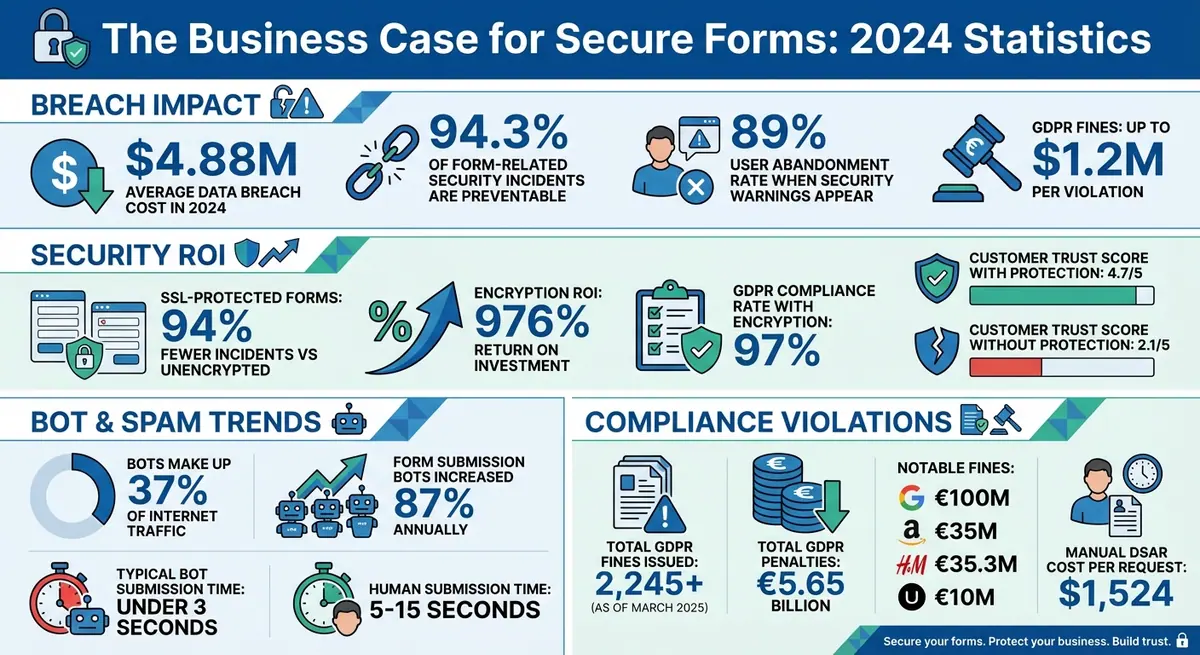
Form Security Statistics: Breach Costs, User Behavior, and ROI Impact 2024
How to Secure Form Submissions: Prevent Spam & Protect Data Integrity
sbb-itb-5f36581
Core Principles of Form Security
Creating secure forms isn’t just about plugging technical gaps - it’s about making strategic choices that protect both your users and your business. By following some key principles, you can reduce vulnerabilities before they even become a problem.
Collecting Only Necessary Data
Every extra field on a form increases risk, which is why multi-step forms are often used to manage complex data collection without overwhelming users. As web.dev states: "Less data means less risk, less cost, and less liability". The fewer details you collect, the smaller the attack surface for hackers and the less damage a breach could cause.
Before adding any field, ask yourself: Do I really need this information? For instance, if you’re just signing people up for a newsletter, asking for a phone number is overkill. Similarly, a birthdate might not be relevant for a one-time purchase. It’s worth noting that around 70% of web applications have vulnerabilities related to access control issues, and collecting unnecessary data only makes these vulnerabilities worse.
Data minimization isn’t just a smart strategy - it’s often a legal requirement. Regulations like GDPR emphasize collecting only what’s absolutely necessary, which helps reduce risk and liability. So, before you add another field, think critically: if it doesn’t serve a clear purpose, remove it.
Once you’ve trimmed down the data you collect, the next step is making sure the users submitting your forms are who they claim to be.
User Authentication and Verification
Authentication adds a protective layer between your forms and potential attacks. Tools like reCAPTCHA or honeypot fields can help filter out bots from genuine users.
For forms involving sensitive actions - like account changes - require users to log in. This ensures submissions come from verified accounts rather than anonymous sources. To add an extra layer of security, consider multi-factor authentication (MFA), such as SMS codes or WebAuthn.
Email validation is another must-have. Implement double opt-in for email signups, requiring users to confirm their email address by clicking a link before their submission is finalized. For login forms, you can take it a step further by integrating services like "Have I Been Pwned" to alert users if their passwords have been compromised in past data breaches.
Secure Communication Channels
Minimizing data collection and verifying users are essential first steps, but protecting data during transmission is just as critical.
Every form should use HTTPS with SSL/TLS encryption. Without HTTPS, any data sent through your forms travels in plain text, leaving it vulnerable to interception by attackers. HTTPS not only encrypts the data but also ensures its integrity, preventing it from being altered during transmission.
Make sure your web server redirects all HTTP traffic to HTTPS. Additionally, always use the POST method for submitting sensitive information. Unlike GET, which appends data to the URL (making it visible in browser history or logs), POST keeps data hidden in the request body and can handle larger payloads.
Implementing Security Measures
Once you've set up a secure foundation, it's time to focus on the technical defenses that actively protect your forms. These measures work together to create layers of security, making it harder for attackers to exploit vulnerabilities.
Input Validation and Sanitization
"Rule zero of secure form design: never trust user input"
This golden rule should guide every decision when handling form data.
Input validation should happen on two levels: syntactic and semantic. For example, syntactic validation ensures a Social Security Number follows the XXX-XX-XXXX format, while semantic validation confirms logical relationships, like a start date occurring before an end date [15,17]. Always validate on the server side since client-side checks, while helpful for user experience, can be bypassed.
Use an allowlist approach to define acceptable input. For instance, if you're collecting U.S. ZIP codes, use a regular expression like ^\d{5}(-\d{4})? to ensure only valid formats are accepted. Avoid denylists, as attackers often find ways to bypass them.
When interacting with databases, always use prepared statements with parameterized queries. This ensures user input is treated as data, not executable code, reducing the risk of SQL injection [8,16]. Similarly, when displaying user-generated content, apply context-aware encoding to sanitize data based on where it appears on the page.
A cautionary tale: In 2011, the TimThumb vulnerability compromised over 100,000 websites because a PHP script only checked if URLs began with "trusted" domains like blogger.com. Attackers exploited this by using shadow domains like blogger.com.badsite.com to upload malicious files.
Lastly, keep error messages vague to avoid giving attackers clues. Instead of specifying "username not found" or "password incorrect", use a generic message like "Invalid username or password" to prevent user enumeration.
These validation practices form a strong base for defending against more advanced threats like CSRF and XSS.
Preventing CSRF and XSS Attacks
Defending against Cross-Site Request Forgery (CSRF) and Cross-Site Scripting (XSS) is essential to secure your forms. These two common attacks exploit weaknesses in how forms handle requests and scripts.
CSRF attacks manipulate authenticated users into performing unintended actions. The best defense is the synchronizer token pattern, which embeds a unique token in a hidden form field and validates it on the server [19,21]. Additionally, configure session cookies with SameSite=Strict or SameSite=Lax to control when cookies are sent during cross-site requests [19,20]. Ensure sensitive actions use POST requests to avoid exposing data.
XSS attacks inject malicious scripts into forms, potentially compromising users’ browsers. For example, in 2005, Samy Kamkar exploited weak validation on MySpace to create a worm that added over 1 million friends in just 20 hours [16,18]. To prevent XSS, escape special characters (e.g., < becomes <) before displaying user input. Adding a Content Security Policy (CSP) header can also restrict which scripts execute on your pages, acting as a safety net if vulnerabilities exist. Avoid using regular expressions to sanitize HTML - rely on trusted libraries like DOMPurify instead.
"Cross-Site Scripting (XSS) can defeat all CSRF mitigation techniques!"
Spam Prevention and Bot Protection
Form security isn't just about stopping direct attacks. You also need to block automated abuses like spam and bot submissions. With bots making up 37% of internet traffic and form submission bots increasing by 87% annually, layered defenses are more important than ever.
Honeypot fields are a simple yet effective strategy. Create hidden fields using CSS (e.g., position: absolute; left: -9999px; or opacity: 0;) and disable autocomplete. If a bot fills out this field, silently reject the submission. Avoid using display: none; as advanced bots may recognize it as a trap.
Invisible CAPTCHA tools like Google reCAPTCHA v3 and Cloudflare Turnstile analyze user behavior, such as mouse movements and interaction speed, to detect bots [23,24,26]. For example, reCAPTCHA v3 assigns a risk score between 0.0 (likely a bot) and 1.0 (likely a human). You can flag scores between 0.3 and 0.7 for review, balancing security and usability.
Time-based validation is another effective method. Bots often submit forms in under 3 seconds, while legitimate users typically take 5–15 seconds [23,25]. Setting a minimum submission time (e.g., 5 seconds) helps identify automated attempts.
Rate limiting restricts the number of submissions from a single IP address, such as 3 requests per 5 minutes, to prevent brute-force and denial-of-service attacks. For high-traffic sites, you can also use keyword blocklists to scan for spammy terms like "crypto" or "viagra".
| Protection Method | User Friction | Effectiveness | Best For |
|---|---|---|---|
| Honeypot Fields | Zero | Moderate | All forms as baseline defense |
| reCAPTCHA v3 | Zero (invisible) | High | Forms needing strong protection |
| Cloudflare Turnstile | Zero to low | High | Privacy-conscious options |
| Time-Based Validation | Zero | Moderate to High | Combined with other methods |
| Rate Limiting | Zero (normal users) | High | Preventing brute-force attacks |
Tools like Reform combine techniques such as email validation and behavioral analysis to protect your forms from spam, all without adding unnecessary friction for genuine users.
Advanced Security Features
Protecting sensitive information requires robust measures that go beyond the basics. These advanced security features add multiple layers of defense throughout the data lifecycle, ensuring comprehensive protection.
Data Encryption at Rest and in Transit
Encryption is a critical tool for safeguarding sensitive data, converting it into unreadable ciphertext to prevent unauthorized access, even if intercepted or breached. While encryption during transmission (using protocols like TLS 1.3) ensures secure communication between a user's browser and your server, encryption at rest protects inactive data stored on hard drives, databases, or cloud servers. For example, 256-bit AES encryption is commonly used to secure stored data. To further enhance security, configure your server to enforce HTTPS and implement HTTP Strict Transport Security (HSTS) headers.
For highly sensitive fields, such as Social Security Numbers, consider using field-level encryption or data masking. Keep in mind that standard encryption tools may not automatically secure file uploads or signatures, so additional measures like antivirus scanning or sandboxing may be required. It’s also crucial to manage encryption keys carefully - losing them renders encrypted data unreadable. To limit potential risks, implement data retention policies that automatically delete encrypted data when it’s no longer needed. For forms that deliver responses via email, S/MIME encryption ensures messages can only be read by the intended recipient.
The good news? Robust encryption only adds about 5–15 milliseconds to form processing time - barely noticeable to users. While SSL certificates range from free to several hundred dollars annually, their implementation costs vary depending on the scope of your project.
Role-Based Access Control (RBAC)
RBAC is a powerful way to minimize internal risks by restricting access to sensitive form data based on user roles. This approach follows the principle of least privilege, granting users only the access they need to perform their tasks. For example, instead of giving full administrative access, assign permissions like view, edit, or delete to specific roles. Regularly audit these roles to remove access for employees who have left or whose responsibilities have changed. Sensitive fields can also be hidden from users who don’t need to see them.
RBAC enhances accountability by requiring individual login credentials, avoiding the risks associated with shared accounts. Creating unique accounts for every user establishes a clear audit trail, which is critical for tracking who accessed or modified data. For instance, in early 2021, a breach affecting Microsoft Exchange servers highlighted the dangers of storing sensitive data in environments without proper access controls.
For added security, restrict logins to specific IP addresses, such as those from a known office or VPN. When integrating forms with tools like HubSpot or Salesforce, ensure your RBAC policies remain consistent to maintain secure workflows. Advanced RBAC systems often include dashboards for administrators to monitor account activity and review access logs.
| Capability | Security Function |
|---|---|
gravityforms_view_entries |
Restricts data visibility to authorized personnel |
gravityforms_edit_entries |
Prevents unauthorized data changes |
gravityforms_delete_entries |
Protects records from accidental or malicious deletion |
gravityforms_export_entries |
Limits bulk data downloads to reduce leak risks |
gravityforms_view_entry_notes |
Controls access to internal notes on submissions |
File Upload Security
File uploads can be a weak point if not properly secured, as attackers may disguise malicious scripts as seemingly harmless files like PDFs or images. To prevent exploitation, employ multiple layers of protection.
Start with extension allowlisting - only permit essential file types, such as .jpg, .pdf, or .docx. Validate files by checking their extension, MIME type, and magic bytes (file signatures) since headers like Content-Type can be spoofed.
"List allowed extensions. Only allow safe and critical extensions for business functionality."
– OWASP
Rename uploaded files using random strings (e.g., UUIDs or hashes) to avoid path traversal attacks and guessing of file locations. Store files on a dedicated server or outside the webroot to prevent the execution of malicious scripts. You can also use server configurations like .htaccess to disable script parsing in upload directories.
Set strict file size limits to prevent Denial of Service (DoS) attacks. For example, résumés could be capped at 5 MB, while platforms like Guidewire Cloud Platform set a default maximum of 25 MB. To deter bots, implement rate limiting or CAPTCHAs.
Scan all uploaded files with antivirus software, such as ClamAV, or process them in a sandboxed environment before making them available. For added safety, remove metadata from images and use Content Disarm and Reconstruction (CDR) for documents to strip out embedded scripts or macros. Use the Content-Disposition: attachment header to force browsers to download files instead of executing them inline, reducing risks of cross-site scripting (XSS).
Store files in uniquely named folders - generated using methods like salted HMAC-MD5 - to prevent brute-force discovery. Avoid providing detailed error messages that reveal server configurations or directory paths, as these can aid attackers during reconnaissance. Lastly, ensure all file transfers occur over HTTPS, and protect files at rest with strong encryption like AES-256.
Compliance and Privacy Best Practices
Pairing strong technical defenses with well-thought-out compliance and privacy measures is key to ensuring both security and user confidence.
Adhering to legal standards isn’t just about avoiding penalties - it’s about earning the trust of users who share their personal data with you. Three major frameworks guide how organizations manage form data: GDPR (General Data Protection Regulation) for EU residents, HIPAA (Health Insurance Portability and Accountability Act) for health information in the US, and CCPA (California Consumer Privacy Act) for California residents.
Understanding GDPR, HIPAA, and CCPA
GDPR applies to any organization handling data from EU residents. It emphasizes minimizing data collection, ensuring transparency, and using data only for clearly defined purposes. Non-compliance can lead to severe penalties - fines can hit €20 million or 4% of global annual revenue, whichever is higher. Since March 2025, over 2,245 GDPR-related fines have been issued, totaling approximately €5.65 billion. Notable cases include France’s CNIL fining Google €100 million and Amazon €35 million for placing advertising cookies without proper consent or clear information.
HIPAA governs Protected Health Information (PHI) in the US, enforcing a "minimum necessary" rule - organizations can only collect health data essential to their purpose. If a third-party form provider handles any of the 18 PHI identifiers (like names, dates, or IP addresses), a signed Business Associate Agreement (BAA) is mandatory before launching the form.
CCPA protects California consumers by requiring businesses to provide opt-out options for data sales and systems to process access and deletion requests. Financial institutions also need to adhere to the Gramm-Leach-Bliley Act (GLBA), which mandates clear privacy notices detailing how sensitive financial data is safeguarded.
| Feature | GDPR (EU) | HIPAA (US Health) | CCPA (California) |
|---|---|---|---|
| Primary Focus | General personal data | Protected Health Info (PHI) | Consumer privacy rights |
| Consent Type | Explicit opt-in (active) | Authorization for non-TPO use | Opt-out for data sales |
| Key Requirement | Data minimization | Business Associate Agreement | Right to know/delete |
| Penalty Basis | Global revenue percentage | Tiered by culpability | Per violation/consumer |
Consent Management and Transparency
Under GDPR, consent must be freely given, specific, informed, and unambiguous. Pre-checked boxes are prohibited, yet 63% of consent mechanisms fail compliance due to manipulative design practices like dark patterns. Instead, use unchecked checkboxes for consent and offer separate options for different purposes (e.g., one for terms of service and another for marketing communications). For example, H&M faced a €35.3 million fine in Germany for collecting excessive employee data, including medical records and personal family details.
"Consent means users actively agree to data processing for specific purposes."
– Bogdan Sandu, Author
To ensure transparency, place a link to your privacy policy near the submit button - ideally no more than two taps away on a mobile device. Write disclosures in plain, easy-to-understand language, especially for younger users. Evaluate every form field and remove any that aren’t essential; for instance, 37% of users abandon forms that require a phone number unless it’s clearly marked as optional; using multi-step forms can also help reduce this friction. Always provide a straightforward way for users to withdraw consent, whether through the form itself or follow-up emails.
Once consent is obtained, it’s equally important to manage how long the data is retained.
Data Retention Policies
GDPR Article 5(e) states that personal data should only be kept as long as necessary, with retention periods justified by legal or contractual obligations. In 2024, the Dutch Data Protection Authority fined Uber €10 million for failing to disclose specific retention periods for data collected from European drivers.
To stay compliant, create a formal Data Retention Schedule that outlines details like the type of data, storage location, purpose, legal basis, retention period, and disposal method. When data reaches its retention limit, it must be securely deleted or anonymized to prevent re-identification. Automated tools can help by tagging data with retention periods during collection and scheduling deletions or anonymizations as needed. This is critical, as manually handling a single Data Subject Access Request (DSAR) costs organizations around $1,524. Remember, pseudonymized data is still considered personal data and must follow retention rules, while truly anonymized data can be retained indefinitely for statistical purposes.
| Data Category | Typical Retention Period | Reason / Justification |
|---|---|---|
| Customer account data | Duration of contract + legal requirement | Contract administration, legal obligations |
| Marketing data | Until consent withdrawal or inactivity (12–24 months) | Legitimate interest and consent management |
| Recruitment applications | 6–12 months (unless consent allows longer) | Future roles, legal defense |
| Website logs | 30–90 days | Security monitoring, troubleshooting |
| Support tickets & emails | 1–3 years | Service history, legal defense |
Monitoring, Auditing, and Reform Integration
Security isn’t a one-and-done process - it’s an ongoing effort that requires constant attention. Keeping an eye on form activity through real-time monitoring and performing regular audits ensures that you can catch potential threats early and respond effectively when incidents occur.
Real-Time Analytics and Insights
Tracking key metrics like submission surges, invalid email rates, and unusual geographic patterns is crucial for spotting suspicious activity quickly. For instance, if a form designed for U.S. users suddenly experiences a 300% spike in submissions from unexpected regions, that’s a red flag worth investigating immediately.
Reform’s real-time analytics dashboard helps you stay ahead of such anomalies. It tracks metrics like conversion rates, drop-off points in multi-step forms, and lead quality scores using built-in email validation and enrichment tools. This allows you to differentiate between genuine traffic and potential threats. Once unusual activity is identified, you can act fast - whether that means blocking specific IP addresses or adjusting spam filters - to restore normal traffic patterns, often within just a few hours.
Audit Logs and Security Reviews
While real-time monitoring is essential, audit logs provide the historical data you need for deeper analysis. These logs keep a permanent, tamper-proof record of all form-related activity, which is critical for compliance with regulations like GDPR and for investigating incidents after they occur. Key data points to log include form submissions, IP addresses, timestamps, user agents, access attempts, and any changes to form data.
Set up automated alerts for unusual patterns, such as an IP submitting more than 50 forms in a single day. Conduct manual security reviews every quarter, and retain logs for at least 12 months to meet regulatory standards. To ensure compliance with GDPR, use tools that anonymize IP data during analysis. These practices not only enhance security but also lay the groundwork for integrating tools like Reform for a seamless security strategy.
Using Reform for Secure Form Submissions
Reform takes form security a step further by combining real-time analytics with comprehensive audit logging. Its monitoring tools are part of a broader security suite designed to protect your forms. The platform uses machine learning-based spam prevention, much like invisible reCAPTCHA, to analyze user behavior and apply rate limiting, automatically blocking bots. Reform’s real-time dashboards also log every blocked attempt, giving you the ability to review block rates - typically around 15% of traffic - and fine-tune your settings to maintain high-quality leads.
Reform integrates seamlessly with CRMs like HubSpot and Salesforce, automatically syncing validated leads into your database while logging every sync event. This ensures a complete record of data flow without exposing raw personally identifiable information (PII).
For advanced monitoring, Reform supports webhooks secured with SHA-256 HMAC signatures, which verify that incoming data hasn’t been altered and comes from a trusted source. You can even configure multiple webhook URLs to send submission data to both your main database and a dedicated audit log simultaneously, creating redundant records for added security. With unlimited form responses included in all Reform plans, you can maintain detailed monitoring and logging without worrying about submission limits.
Security Checklist for Form Submissions
Keep your forms secure by following this checklist, which includes both essential and advanced security practices. These steps summarize key measures to protect your forms and user data.
Basic Security Measures
Start with these essential protections for all web forms:
- Use HTTPS/SSL encryption: Redirect all HTTP traffic to HTTPS to secure data in transit.
- Validate and sanitize inputs: Check and clean data on both client and server sides to block injection and XSS attacks. Ensure inputs like email addresses meet expected formats and stay within set character limits.
- Add CAPTCHA or honeypot fields: These tools help block bots from submitting forms.
- Minimize data collection: Only gather the information you absolutely need. This reduces your exposure in case of a data breach.
- Use POST requests for sensitive data: Avoid GET requests for sensitive information to keep it out of browser histories and server logs.
"A form is among the first contact points users have with your organization. Following the checklist... will ensure you'll make a positive first impression."
Advanced Security Measures
For forms dealing with sensitive or regulated data, implement these advanced protections:
- Multi-Factor Authentication (MFA): Use one-time passwords sent via email or SMS for account access or critical submissions.
- Role-Based Access Control (RBAC): Restrict access to form entries and admin settings based on user roles.
- Encryption at rest: Hash and salt passwords before storage, and encrypt database backups to safeguard data.
- Secure file uploads: Whitelist file extensions (e.g., .pdf, .jpg), validate actual file types, randomize filenames, and store files outside the web root or on a separate server.
- CSRF protection: Use cryptographic tokens that refresh every 12 hours to ensure submissions come from legitimate sources.
- Rate limiting: Limit submissions or login attempts from a single IP address to prevent brute-force and denial-of-service attacks.
- Generic error messages: Use messages like "authentication failed" to avoid revealing usernames or other sensitive details.
Conclusion
Securing form submissions isn't just a technical necessity - it's a cornerstone of doing business in today's digital world. With the average cost of a data breach projected to hit $4.88 million in 2024, and 94.3% of form-related security incidents preventable through proper encryption and validation, the stakes couldn't be higher.
But the good news? The benefits of secure forms are undeniable. For instance, SSL-protected forms experience 94% fewer incidents compared to unencrypted ones. Businesses that invest in encryption report an impressive 976% ROI when weighing encryption costs against potential breach expenses. Moreover, encryption boosts GDPR compliance rates to 97% and significantly improves customer trust scores - rising to 4.7 out of 5, compared to just 2.1 for unprotected forms.
To ensure your forms are secure, focus on the essentials: enforce HTTPS with TLS 1.3, perform server-side input validation, collect only the data you truly need, and implement bot protection measures. These steps, discussed in detail throughout this guide, are the foundation of effective form security. They help you stay compliant, protect your users, and safeguard your business's reputation.
It's worth remembering that 89% of users abandon forms when faced with a security warning. This highlights just how critical these measures are. As web.dev aptly puts it:
"Less data means less risk, less cost, and less liability"
FAQs
What’s the minimum I need to do to secure a form?
To make your forms more secure, the first step is to use HTTPS. This ensures that data transmitted between users and your server is encrypted. To do this, you'll need an SSL/TLS certificate, which safeguards sensitive information during transit.
Beyond encryption, it's crucial to validate and sanitize user inputs. This prevents harmful data from being submitted and protects your system from potential attacks. Also, limit the data you collect to only what's absolutely necessary - this minimizes exposure and reduces risks.
By following these steps, you create a strong starting point for secure form submissions.
How do I stop bots without hurting conversions?
To keep bots at bay without hurting your conversions, focus on anti-spam techniques that strike a balance between security and user experience. Some effective approaches include honeypot fields, email verification, advanced validation rules, and multi-step forms. For a more sophisticated touch, tools like behavioral analysis and device fingerprinting can identify suspicious activity without inconveniencing legitimate users. By layering these strategies, you can block spam submissions while keeping the process smooth for real users.
When do I need GDPR, HIPAA, or CCPA compliance for forms?
When collecting personal data through forms, compliance with regulations like GDPR, HIPAA, or CCPA is essential, especially if you're operating in specific regions or dealing with sensitive information such as health data. Following these laws not only ensures you're meeting legal requirements but also safeguards user privacy and helps you steer clear of potential fines or penalties.
Related Blog Posts
Get new content delivered straight to your inbox

The Response
Updates on the Reform platform, insights on optimizing conversion rates, and tips to craft forms that convert.



Drive real results with form optimizations
Tested across hundreds of experiments, our strategies deliver a 215% lift in qualified leads for B2B and SaaS companies.
