
.webp)
5 Steps to Build a Behavioral Scoring Model



Behavioral scoring helps you identify high-intent leads by assigning points to specific actions, like visiting pricing pages or requesting demos. It focuses on what prospects do, not just who they are. This method improves lead qualification efficiency and aligns marketing and sales teams by using the same scoring framework.
Here’s how to build your model:
- Map Customer Journey: Identify funnel stages (Awareness, Interest, Consideration, Sales Ready) and assign score ranges based on intent.
- Collect Engagement Data: Centralize data from high-converting lead forms, emails, and website interactions in a CRM or automation tool.
- Assign Point Values: Use a 0–100 scale to weigh actions based on intent. Add points for engagement (e.g., demo requests) and subtract for disengagement (e.g., unsubscribes).
- Group Leads by Score: Categorize leads as Cold (0–20), Warm (21–50), or Hot (51+), and set thresholds for sales handoff.
- Automate and Refine: Connect tools, automate workflows, and review scores regularly to improve accuracy.
A well-structured scoring model can reduce lead qualification time by 30% and increase MQL conversions by 20%. Focus on actions that indicate genuine buying intent and update your system consistently to keep it effective.
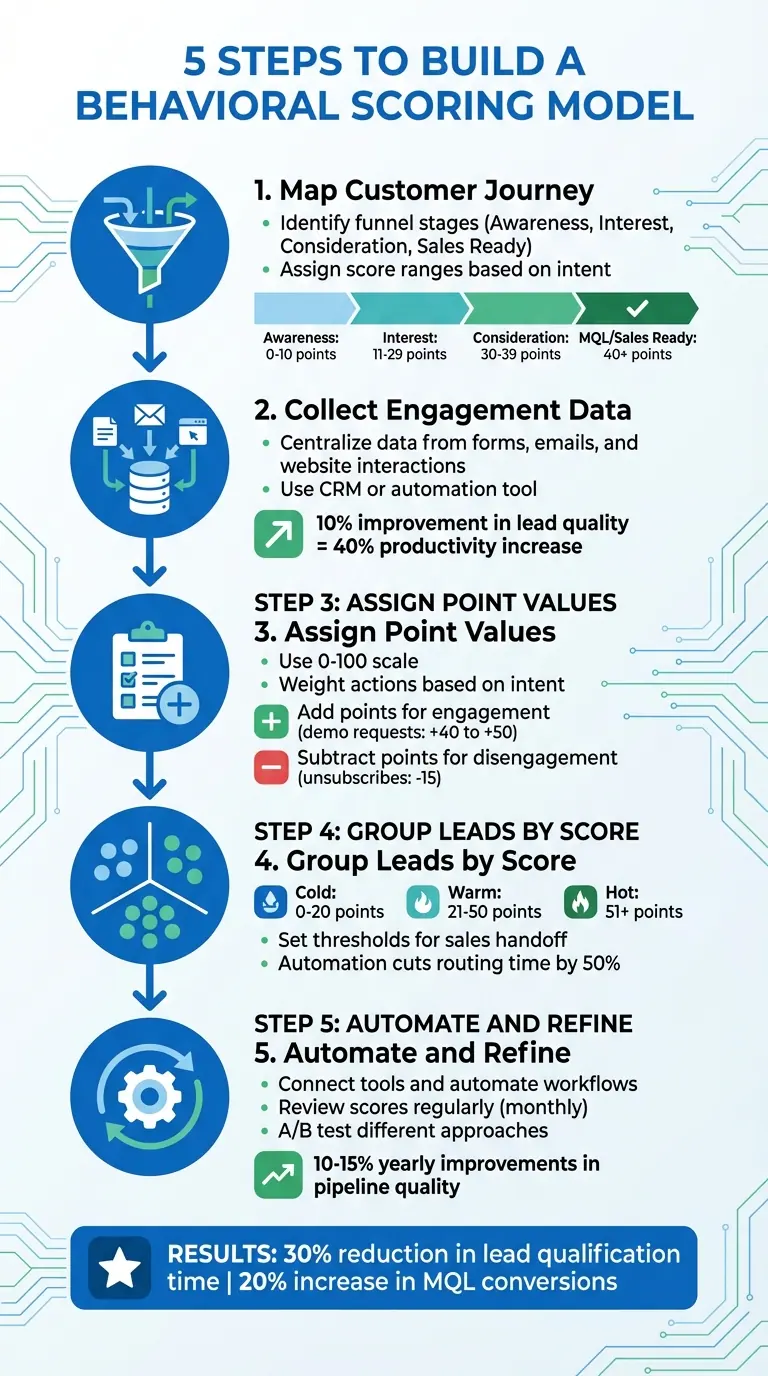
5 Steps to Build a Behavioral Scoring Model for Lead Qualification
How To Build a Lead Scoring Model & Example - Directive R&D
sbb-itb-5f36581
Step 1: Map Your Customer Journey and Identify Key Actions
Understanding your customer journey is the foundation of accurate behavioral scoring. It’s about charting the path from awareness to purchase and pinpointing actions that show real progress.
"Behavioral scoring only works when tied to clear stages in your customer's journey, ensuring that every score reflects progress toward a decision." - Inbound Optimization
The key here? Focus exclusively on actions that indicate intent. By separating these behaviors from irrelevant ones, you ensure your scoring system reflects genuine interest.
Map Out Your Funnel Stages
Start by outlining the natural steps your customers take when making decisions. Typically, this begins with a comfortable Status Quo and moves through Disruption (recognizing a need), Research, Deliberation, and ultimately, a Decision. These stages translate into four main funnel levels, each with its own score range:
- Awareness (0–10 points): Tracks low-intent actions like reading blog posts or engaging on social media.
- Interest (11–29 points): Captures moderate engagement, such as downloading eBooks, attending webinars, or signing up for newsletters.
- Consideration (30–39 points): Signals stronger interest, like viewing case studies or product pages.
- MQL/Sales Ready (40+ points): Flags high-intent actions, such as requesting demos or visiting pricing pages.
| Funnel Stage | Score Range | Example Behaviors | Intent Level |
|---|---|---|---|
| Awareness (Top of Funnel) | 0–10 | Reading blogs, social media engagement | Low / Educational |
| Interest (Middle of Funnel) | 11–29 | Downloading eBooks, webinar attendance, newsletter sign-up | Moderate / Exploratory |
| Consideration (Bottom of Funnel) | 30–39 | Viewing case studies, visiting product/service pages | Strong / Evaluative |
| MQL / Sales Ready | 40+ | Requesting a demo, visiting pricing pages | High / Buying Intent |
With these stages defined, the next step is to identify the specific actions that help prospects move from one level to the next.
List and Group Behaviors to Track
Once your funnel stages are set, focus on the behaviors that truly indicate progress. For example:
- Awareness Stage: Monitor blog reads and social media engagement.
- Interest Stage: Track content downloads, webinar sign-ups, and email interactions (assign more points for clicks than opens).
- Consideration Stage: Look for case study views or repeated visits to product pages.
- Decision Stage: Prioritize demo requests and visits to pricing pages - these actions should carry enough weight (40+ points) to instantly qualify a lead as sales-ready.
To keep your scoring system accurate, group behaviors by:
- Frequency: How often the behavior occurs.
- Recency: When the action last happened.
- Impact: How strongly the behavior predicts conversion.
Use rolling date ranges (like 90 or 180 days) to let scores naturally decay over time, ensuring they reflect current interest rather than outdated activity. Skip penalizing irrelevant actions (like visiting a careers page); instead, use segmentation tools to filter out those contacts from your sales funnel. This keeps your scoring clean and focused on meaningful engagement.
Step 2: Gather and Review Engagement Data
The next step is to collect the engagement data that will fuel your scoring model. This involves pulling information from every interaction prospects have with your brand - whether it’s filling out forms, clicking links in emails, visiting your website, or more. By integrating this data, you refine the behaviors you mapped earlier, ensuring your model becomes more precise with every touchpoint.
Often, this data is scattered across different systems. For example, form submissions might go into one platform, email engagement into another, and website activity into a third. To create a reliable scoring model, you need to bring all this information together in one place - usually your CRM or marketing automation platform. Tools like HubSpot, Marketo, or Creatio can centralize these interactions, combining them into a single, cohesive view. This consolidation not only simplifies your process but can also significantly improve sales performance. A 10% improvement in lead quality, for instance, can increase productivity by up to 40%.
"Behavioral scoring becomes actionable when it's paired with proper segmentation, enabling you to target groups effectively with tailored content." - Inbound Optimization
Consider this example: In 2024, a software company added webinar attendance and demo requests to their behavioral scoring model. By syncing these scores with their funnel stages, they cut lead qualification time by 30% and boosted Marketing Qualified Lead (MQL) conversions by 20%. The secret? Real-time syncing, which ensured their CRM was always up-to-date with the latest engagement data.
Connect Your Data Sources
The first step in centralizing your data is identifying all the platforms where prospects interact with your business. This includes both explicit data (such as job titles provided in forms) and implicit data (like tracking page visits or email opens).
Forms often serve as your richest source of data. For instance, when someone requests a demo or downloads a resource, you’re capturing their contact details while also tracking their intent. Platforms like Reform simplify this process by offering real-time analytics and lead enrichment, automatically pulling in additional firmographic details to give you a more complete picture of each prospect as soon as they submit a form.
Once identified, connect all these data sources to your CRM. This ensures every interaction - whether it’s an email click, webinar attendance, or pricing page visit - feeds into a single engagement score. This step extends the funnel actions you’ve already defined, giving you a more comprehensive and centralized view of prospect behavior.
Clean and Verify Your Data
After consolidating your engagement data, the next critical step is cleaning and verifying it. Raw data is rarely flawless - think duplicate records, fake email addresses, or spam submissions. These issues can throw off your scoring model and waste valuable time chasing unqualified leads.
Start by removing duplicates and fixing obvious errors, like misspelled domains or placeholder emails. Tools like Reform can help by offering built-in spam prevention and email validation, catching errors before they even enter your system.
Take it a step further by automating the cleaning process. Deduplication tools and rules can handle incomplete or outdated records, ensuring your database stays accurate. Reliable scoring depends on clean data, so investing time in this step now can save you from pursuing dead-end leads later.
Step 3: Set Up Your Scoring System
With your behaviors defined and data cleaned, it’s time to assign point values to lead actions. This step transforms engagement data into measurable scores, helping your team identify leads that are truly ready for sales. Collaborate closely with your sales team to ensure the scoring reflects actual buying signals, not just marketing assumptions.
For example, does visiting the pricing page multiple times indicate higher intent than reading a blog post? Sales input is crucial here to prioritize actions that historically lead to conversions. This alignment ensures your scoring system is grounded in reality.
Most teams use a 0–100 point scale. Start by deciding what score qualifies a lead as "Sales Ready" - whether it's 50, 100, or another number - and work backward. Actions with high intent, like requesting a demo, should heavily influence the score, while lower-intent actions, such as email clicks, should require multiple interactions to make an impact. Assign point values based on how much each action contributes toward the qualification threshold.
Create Your Point Values
When assigning points, think about the level of intent each action represents. High-intent actions - like demo requests or multiple visits to the pricing page - should carry significant weight since they indicate readiness to buy. On the other hand, lower-intent actions, such as email opens, should have minimal or even zero points. Why? Many email clients auto-preview emails, which can skew the data with false positives. For genuine engagement, focus on clicks rather than opens.
For instance, in July 2024, Turtl updated their scoring model to better differentiate between varying levels of engagement.
Don’t forget that not all actions are positive. Your scoring system should account for both engagement and disengagement.
Add Points for Engagement and Subtract for Disengagement
Actions that show interest should increase a lead’s score, but actions signaling disinterest or low intent should decrease it. For example:
- Email Unsubscribes: Deduct 15 points. This is a strong sign of disengagement.
- Career Page Visits: Subtract 10 to 15 points, as these visits often suggest job-seeking rather than buying intent.
- Short Page Visits: For interactions lasting less than 30 seconds on key pages, deduct 5 points to account for shallow browsing or accidental clicks.
Additionally, implement score decay by using a rolling date range, such as 90 days. This ensures older interactions gradually lose their impact, preventing outdated leads from appearing active.
Build a Scoring Reference Table
To keep your scoring system consistent across teams, create a reference table that clearly outlines point values and the reasoning behind them. This transparency helps everyone understand how scores are assigned and ensures the system is applied uniformly.
Here’s an example table:
| Behavior Type | Action | Points | Rationale |
|---|---|---|---|
| High Intent | Request a Demo / Contact Sales | +40 to +50 | Indicates strong sales readiness; often meets the threshold immediately. |
| High Intent | Pricing Page Visit (3+ times) | +20 | Shows active evaluation of your product or service. |
| Moderate Intent | Webinar Registration/Attendance | +15 to +35 | Reflects significant interest and time investment. |
| Low Intent | Email Click/CTA Click | +5 to +7 | Suggests curiosity or general engagement. |
| Negative Intent | Career Page Visit | -10 to -15 | Likely indicates the visitor is a job seeker, not a buyer. |
| Negative Intent | Email Unsubscribe | -15 | A clear signal of disengagement. |
| Negative Intent | Short Time on Key Page (<30s) | -5 | Suggests accidental clicks or lack of interest. |
Review this table regularly - ideally every quarter - with both sales and marketing teams. This ensures your scoring model stays relevant and continues to identify high-quality, sales-ready leads effectively.
"Your threshold number should be large enough so that a person needs to complete multiple interactions with your brand to meet it." – Christina Zuniga, Marketing Operations Manager, and Katja Keesom, Principal B2B Consultant
Step 4: Group Leads by Score and Set Thresholds
Now that you've assigned point values to behaviors, the next step is organizing leads by their scores. This grouping helps your team quickly determine which leads need nurturing and which are ready for direct sales engagement. It ensures every lead gets the right amount of attention at the right time.
Create Lead Score Groups
To make things manageable, divide leads into three categories based on their scores:
- Cold (0-20): Basic engagement, just entering the funnel.
- Warm (21-50): Moderate interaction, showing interest but not ready to commit.
- Hot (51+): High-intent actions, indicating readiness to make a decision.
These categories align with the typical funnel stages, from awareness at the top to decision-making at the bottom. The key is ensuring your thresholds reflect real-world conversion rates. For instance, hot leads should convert at rates three to five times higher than warm leads. If that’s not happening, you may need to tweak your scoring ranges.
Here’s an example: One marketing team broke their funnel into three stages - Awareness (0-10), Interest (11-29), and Decision (30+). They then created tailored drip campaigns for each group. The result? A 32% increase in sales-qualified leads by concentrating their efforts where they had the most impact.
Set Up Automatic Lead Routing
Manually sorting leads is time-consuming and prone to errors. Instead, let automation handle it. Use conditional routing tools to automatically direct leads based on their scores and other data. For example:
- Cold leads (0-20): Route to nurturing campaigns.
- Warm leads (21-50): Assign to sales development reps for further qualification.
- Hot leads (51+): Send directly to account executives for immediate follow-up.
If your CRM (like Salesforce or HubSpot) is integrated with these systems, scores can update in real time, triggering workflows automatically. For instance, when a lead crosses the 51-point threshold, your CRM can assign them to a sales queue and notify the appropriate rep. This approach can cut routing time by up to 50% while increasing sales productivity by 30-50%. With automation in place, high-intent leads are always prioritized, ensuring no opportunity slips through the cracks.
Step 5: Launch, Automate, and Improve Your Model
Now that you’ve defined your model and segmented your leads, it’s time to bring it to life. This step is all about automating your system and fine-tuning it over time. By integrating, automating, and continuously improving, you can turn your scoring framework into a dynamic tool that responds to real customer behavior. Here’s how to make it happen.
Connect to Your Marketing Tools
Start by integrating your scoring model with tools like your CRM and marketing automation platforms. Whether it’s through webhooks or built-in integrations, these connections allow you to trigger actions based on lead scores. For instance, if someone fills out a multi-step form on Reform, you can automate next steps: leads scoring above 70 points can be routed directly to a sales follow-up, while those scoring between 30 and 69 points might enter a retargeting campaign. Reform’s lead enrichment feature also adds firmographic data during form submissions, refining scores in real time. This ensures your CRM always has the most accurate and actionable data. In fact, seamless data flow between systems has been shown to boost conversion rates by 20-30%.
Review and Update Your Scores
Once your model is integrated, it’s crucial to keep it up to date. Make it a habit to review your scoring system every month with input from both marketing and sales teams. Focus on metrics like MQL-to-SQL conversion rates and revenue performance by score band. For example, if you notice that leads who visit your pricing page convert at a 40% higher rate, you might want to increase the score assigned to that behavior. Use time-decay functions to adjust the weight of older actions - this ensures your model prioritizes recent and relevant engagement. Before implementing any changes, backtest them using historical data to confirm they’ll drive better results.
Test Different Approaches
A/B testing is your best friend when it comes to refining your model. Experiment with different score thresholds and behavior weights to see what delivers the best outcomes. For example, test whether setting your MQL threshold at 50 points versus 60 points leads to faster pipeline movement and better win rates over a few weeks. Similarly, testing the impact of late-stage behaviors, like pricing page views, has been shown to improve MQL-to-SQL rates by 25%. Don’t forget to account for seasonal trends - if email engagement dips after the holidays, adjust your decay settings to reflect that. Regular tweaks like these can lead to 10-15% yearly improvements in pipeline quality when you stay data-driven.
Conclusion
Creating a behavioral scoring model involves five essential steps: mapping out your customer journey, collecting clean engagement data, assigning point values, categorizing leads by their scores, and implementing automation. Each step ensures your model focuses on the behaviors that truly drive conversions - those actions that show genuine buying intent rather than generic activity.
The secret lies in aligning your scoring system with your business objectives and customer behaviors. For instance, a SaaS company might give higher scores to demo requests or visits to the pricing page, while an e-commerce brand could prioritize actions like adding items to carts or browsing product pages. By linking scores to activities that historically lead to sales, businesses can improve efficiency by 20–30%.
Once your scoring system matches your business goals, the right tools can simplify the process. Platforms like Reform help by offering no-code multi-step forms, conditional routing, and lead enrichment to capture behavioral data automatically. Real-time analytics track actions like form completions and page visits, while CRM integrations enable instant responses based on scores. For example, a lead scoring 70+ points from a pricing page submission can be sent directly to sales, while mid-tier scores might trigger nurture campaigns. These automated workflows have been shown to increase completion rates by 40% through tailored conditional logic.
Consistency is key to keeping your model effective. Review your thresholds monthly to ensure they still align with conversion data, adjust point values as needed, and test new approaches to see what works best. Incremental adjustments and regular reviews can lead to sustained pipeline improvements of 10–15% every year.
Start with a simple setup, leverage automation, and make ongoing refinements. A well-crafted behavioral scoring model transforms engagement data into revenue - and with the right tools, achieving this becomes more manageable than ever.
FAQs
Which behaviors should I score first?
Scoring behaviors that indicate strong engagement or a clear intent to purchase is a smart way to prioritize leads. Actions like repeated visits to pricing pages, active email conversations, demo requests, consuming targeted content, or joining webinars are powerful signals of interest. These behaviors allow you to pinpoint the leads most likely to convert, helping you focus your efforts where they matter most.
How do I choose my MQL score threshold?
To determine the right MQL (Marketing Qualified Lead) score threshold, start by digging into your historical CRM data and analyzing buyer signals. Look for patterns that indicate when leads are most likely to convert into customers. This data-driven approach helps you set a baseline for scoring.
Keep in mind that buyer behaviors and market conditions can shift over time. Regularly review and tweak your threshold to stay aligned with these changes. Leverage tools like CRM platforms and lead enrichment services to fine-tune your scoring process. This ensures your sales team spends their time on high-potential leads, cutting down on wasted effort and boosting efficiency.
How often should I update my scoring model?
To maintain the accuracy and effectiveness of your scoring model, make it a priority to update it at least every quarter or whenever there are noticeable changes in customer behavior or market trends. By regularly fine-tuning thresholds and integrating fresh data, you can ensure the model stays in sync with your sales and marketing objectives while consistently pinpointing high-potential leads.
Related Blog Posts
Get new content delivered straight to your inbox

The Response
Updates on the Reform platform, insights on optimizing conversion rates, and tips to craft forms that convert.




Drive real results with form optimizations
Tested across hundreds of experiments, our strategies deliver a 215% lift in qualified leads for B2B and SaaS companies.
