
.webp)
5 Steps to Build HIPAA-Compliant Forms


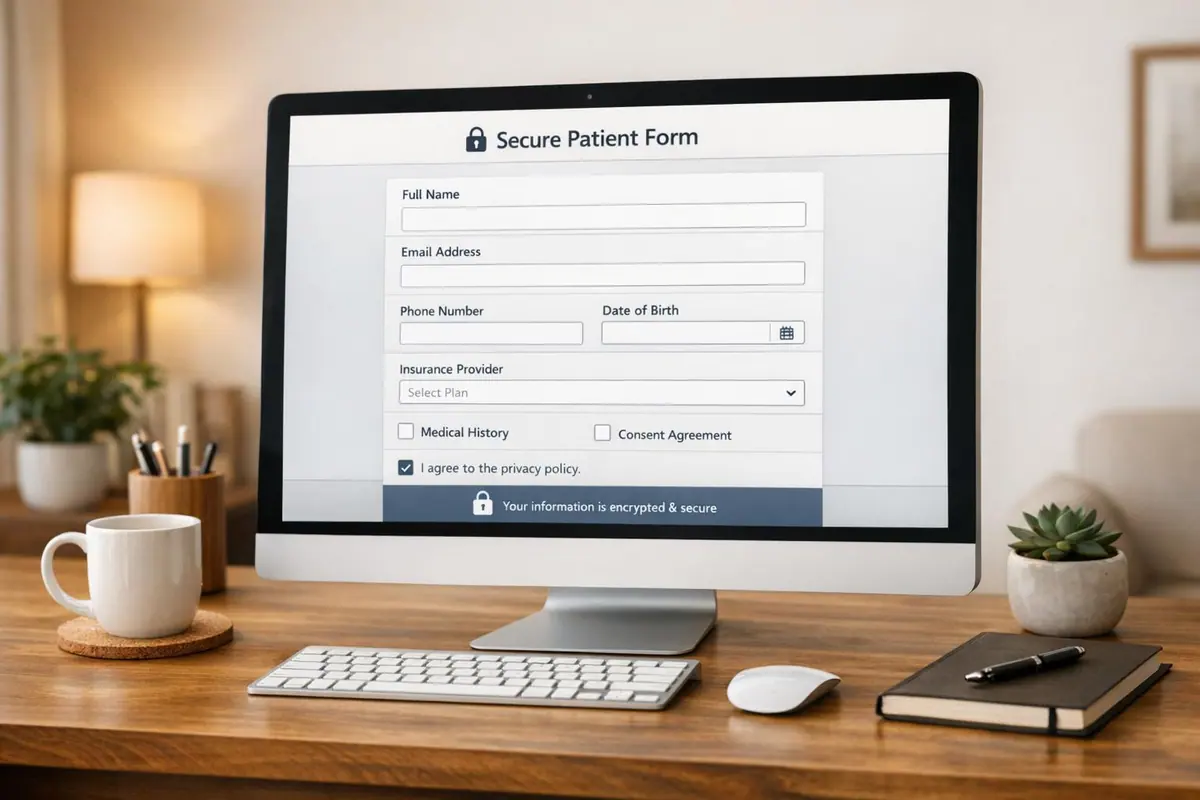
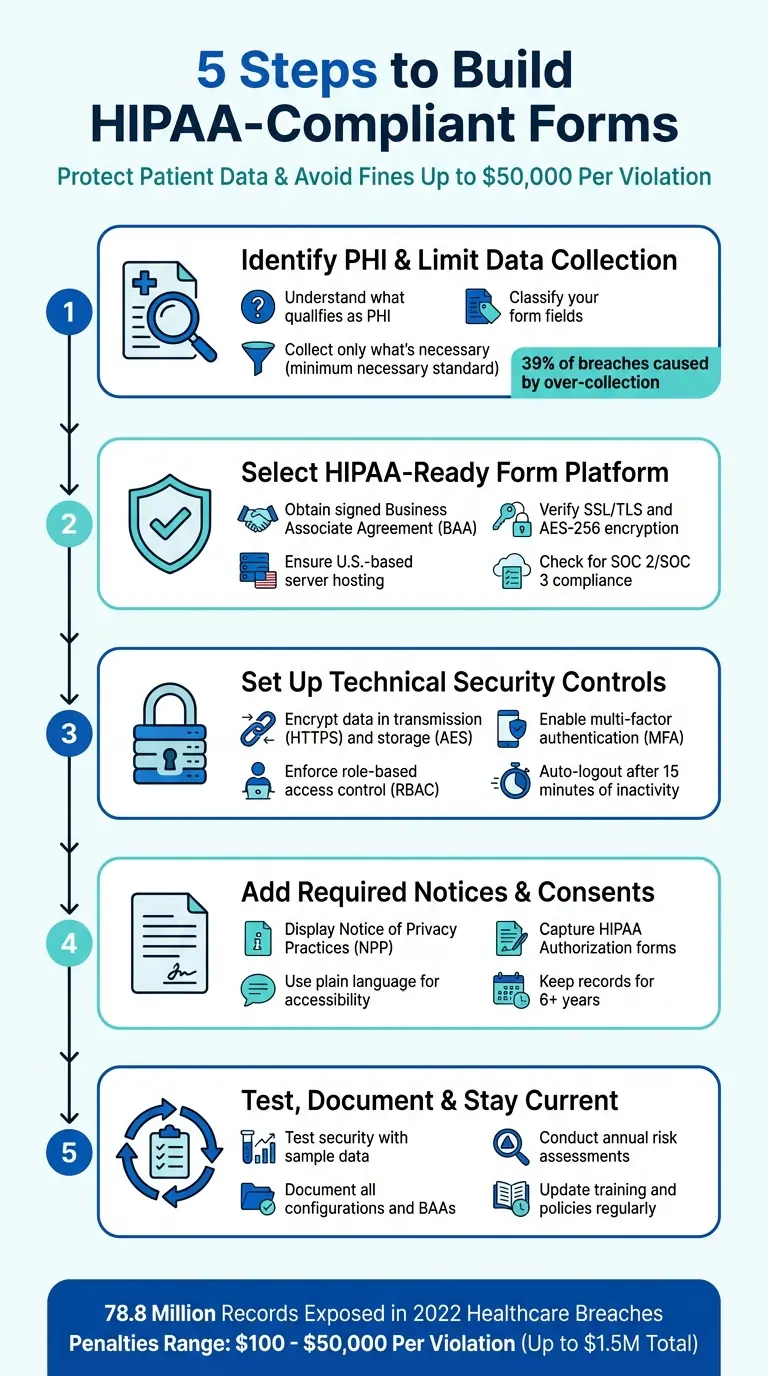
Creating HIPAA-compliant forms is essential for any healthcare provider handling sensitive patient data. Failure to comply can lead to fines of up to $50,000 per violation and damage your reputation. Here's a quick breakdown of the process:
- Identify Protected Health Information (PHI): Understand what qualifies as PHI and limit data collection to only what's absolutely necessary.
- Choose a HIPAA-Compliant Platform: Use a form builder that offers encryption, secure hosting with U.S.-based servers, and a signed Business Associate Agreement (BAA).
- Implement Security Measures: Encrypt data during transmission and storage, enforce role-based access, and use multi-factor authentication.
- Include Notices and Consents: Provide a clear Privacy Notice and obtain HIPAA-compliant patient authorizations.
- Test and Maintain Compliance: Regularly test for vulnerabilities, document processes, and update policies to stay compliant.
Key Stat: In 2022, healthcare breaches exposed 78.8 million records, underscoring the importance of stringent security measures.
5 Steps to Build HIPAA-Compliant Forms for Healthcare Providers
Step 1: Identify Protected Health Information and Limit Data Collection
What Counts as Protected Health Information
Protected Health Information (PHI) refers to any "individually identifiable health information" that’s held or shared by a covered entity or business associate, regardless of whether it’s in electronic, paper, or oral form. For information to qualify as PHI, it must meet two key criteria: it must identify an individual and relate to their past, present, or future physical or mental health condition, healthcare services received, or payment for those services.
Common examples of PHI include patient names, birthdates, contact details (like addresses, phone numbers, and emails), Social Security or insurance numbers, biometric data, treatment dates, photographs, and even IP addresses linked to health information.
Classify Your Form Fields
Take a close look at every form field to determine whether it involves PHI or not. Fields should be classified as PHI if they both identify an individual and tie back to health-related details. For instance, patient intake forms that gather demographics and insurance information would classify as PHI, while general feedback forms usually wouldn’t.
Once you’ve identified which forms and systems contain PHI, document them thoroughly. This ensures you can implement the right security measures for the areas where sensitive data is stored. Understanding where PHI resides is a critical first step in safeguarding it.
Collect Only What You Need
The minimum necessary standard is a key principle that limits the collection, use, and sharing of PHI to only what’s absolutely required for a specific purpose. As Liyanda Tembani of Paubox explains: "An appointment scheduling form should only ask for information related to scheduling, not extraneous details".
"The minimum necessary standard... is based on sound current practice that protected health information should not be used or disclosed when it is not necessary to satisfy a particular purpose or carry out a function." - Office for Civil Rights (OCR), HHS
Audit all form fields to ensure you’re not gathering unnecessary information. For example, a scheduling form should only request details like contact information and preferred appointment times - there’s no need to ask about medical history unless it’s directly relevant. Over-collection of data is a common issue, with healthcare employees responsible for 39% of medical data breaches due to gathering more information than necessary.
Here’s a quick guide to help you streamline data collection:
| Form Type | Purpose | What to Collect | What to Skip |
|---|---|---|---|
| Appointment Scheduling | Book patient visits | Contact info, preferred time | Full medical history, Social Security number |
| Patient Intake | New patient registration | Demographics, insurance details | Unnecessary lifestyle questions |
| Treatment Consent | Permission for procedures | Patient name, specific treatment details | Unrelated medical conditions |
| Lab Test Request | Diagnostic orders | Patient ID, specific test type | Complete medical record |
Step 2: Select a HIPAA-Ready Form Platform and Hosting Setup
Check Your Form Builder's HIPAA Compliance
When choosing a form platform, the Business Associate Agreement (BAA) is your first priority. This legally binding document shifts the responsibility for protecting Protected Health Information (PHI) to the vendor, as required by HIPAA. Amanda Doherty, a Web Designer, highlights its importance:
"Without a signed BAA, you're on the hook, even if the breach happens on their end. So anytime you use a third-party tool that touches client info, the BAA is your starting line."
Beyond securing a BAA, ensure the platform employs essential technical safeguards. These should include encryption standards like SSL/TLS for data transmission and AES-256 for data storage, which protect sensitive information. Multi-factor authentication (MFA) is another must-have to reduce the risk of unauthorized access. Additionally, features like detailed audit logs and role-based access controls help enforce the principle of least privilege, ensuring that only those who need access to specific data can view it. These measures form the backbone of a secure and HIPAA-compliant form builder.
Use Secure Hosting and U.S. Data Storage
Your hosting setup must meet HIPAA's physical and technical safeguard requirements. Start by confirming that your hosting provider uses U.S.-based servers for data storage. To assess their security, review their SOC 2 or SOC 3 audit reports, which detail the controls in place to protect data.
Check the provider's privacy policy and terms of service for clear statements about data residency and storage. Make sure the forms you create use a URL starting with "https://" - this ensures data is encrypted during transmission. Lastly, confirm that the BAA covers all subcontractors involved. Overlooking this detail could lead to penalties reaching up to $1.5 million.
How Reform Supports HIPAA Compliance

Reform is designed with HIPAA compliance in mind. It includes features like conditional logic to minimize PHI collection, secure data handling processes, role-based access controls, and safe PHI routing through integrations. To ensure compliance, configure your setup with a signed BAA, disable PHI in email notifications, and enforce strict access controls. These steps help protect sensitive data while staying within HIPAA guidelines.
Step 3: Set Up Technical Security Controls
Encrypt Data During Transmission and Storage
To comply with HIPAA, you need to implement technical safeguards that protect electronic protected health information (ePHI) from unauthorized access during transmission. Start by ensuring your forms use HTTPS with a valid SSL/TLS certificate. This encrypts the connection between the patient’s device and your server, keeping data secure as it moves across the internet.
For stored data, apply AES encryption. While encryption is technically "addressable" under HIPAA, it should be implemented whenever it’s reasonable and appropriate - or you must document an equivalent alternative. Encrypting sensitive health data ensures it remains protected, even in the event of unauthorized access.
"Encryption makes data unreadable without its key, providing robust protection even if data is leaked or accessed without authorization." - AxCrypt
Control Access by User Role
HIPAA requires that every individual accessing ePHI has their own unique login credentials. Credential sharing is strictly prohibited, as it compromises audit logs and makes it impossible to track who accessed specific information.
To limit access, implement Role-Based Access Control (RBAC) so users can only view the data necessary for their roles. Add an extra layer of security with Multi-Factor Authentication (MFA) and configure devices to log out automatically after 15 minutes of inactivity. These steps are critical, especially given that healthcare employees account for 39% of all medical data breaches.
Secure Connections to Other Systems
When integrating with CRMs, EHRs, or other external systems, confirm that each third-party tool has signed a Business Associate Agreement (BAA) and uses encrypted channels for data transmission. Conduct audits on all integration points.
For secure communication, use TLS 1.2 or higher for API connections or set up VPNs for system-to-system interactions. Enable audit logs to monitor all integrations. Apply the "minimum necessary" principle - only share the specific data fields required for the integration to work. If you rely on a Managed Service Provider (MSP) for these integrations, clearly define their security responsibilities in your service agreement.
These technical safeguards form a strong starting point for achieving HIPAA compliance and protecting sensitive health information effectively.
How to make a HIPAA-Compliant Form For Doctors, Clinics, & Developers (Website Integrated Forms)
sbb-itb-5f36581
Step 4: Add Required Notices, Consents, and Patient Rights
When forms handle Protected Health Information (PHI), they should do more than just secure data - they must also inform patients about their rights and provide clarity on how their information will be used.
Display a Privacy Notice
Include a Notice of Privacy Practices (NPP) that explains how PHI is used, the rights patients have, and the legal responsibilities of your organization. The notice should begin with this statement:
"This notice describes how medical information about you may be used and disclosed and how you can get access to this information. Please review it carefully".
Your NPP should provide detailed information, including:
- How PHI is used for treatment, payment, and healthcare operations (with at least one example for each).
- A requirement for written authorization for activities like marketing or research.
- Instructions on how patients can file complaints.
- Contact details for the Privacy Officer.
- Information on the patient’s right to breach notifications.
- The effective date of the notice.
For digital forms, consider using a layered approach: a concise summary on the first page, with the full details available on subsequent pages. If your organization has a website that offers information about services or benefits, prominently post the NPP there. For services provided online or via email, automatically send an electronic version of the notice when the service begins.
"The notice is intended to focus individuals on privacy issues and concerns, and to prompt them to have discussions with their health plans and health care providers and exercise their rights." – HHS.gov
Once the privacy notice is in place, the next step is securing clear and compliant patient consents.
Capture Required Consents
When PHI is used for purposes beyond treatment or payment, a formal HIPAA Authorization is required. This document should outline all key details, including the type of PHI involved, who will access it, the purpose, expiration date, and include the patient’s signature and date.
The form must also:
- Clearly state that patients can revoke their authorization in writing.
- Indicate whether treatment or payment depends on the signing of the form.
- Use checkboxes and electronic signatures to simplify the consent process.
- Acknowledge receipt of the NPP through a signed return receipt or electronic signature.
Keep all HIPAA Authorization forms on file for at least six years.
"If a HIPAA Authorization Form lacks the core elements or required statements, if it is difficult for the individual to understand, or if it is completed incorrectly, the authorization will be invalid." – Steve Alder, Editor-in-Chief, The HIPAA Journal
For patients who don’t speak English, ensure translated versions of the authorization forms are available. This ensures they fully understand the terms before providing consent. Clear, well-documented consents are the foundation of patient trust and accessibility.
Make Forms Clear and Accessible
To help patients make informed decisions, write NPPs and Authorization forms in straightforward, plain language. Avoid overwhelming them with dense legal jargon by using formats like booklets or full-page layouts with clear headings and design elements.
Offer multiple ways for patients to exercise their rights, such as secure web portals, email, or mail. For online portals, make sure to include authentication measures to confirm the identity of those requesting access.
"Providing individuals with easy access to their health information empowers them to be more in control of decisions regarding their health and well-being." – HHS.gov
Step 5: Test, Document, and Keep Forms Compliant
Once your HIPAA-compliant forms are up and running, the work doesn’t stop there. The next steps are all about testing, documenting, and keeping everything up to date to meet ongoing regulations. Compliance isn’t a one-and-done process - it requires consistent effort to ensure your forms function correctly and remain secure as rules evolve.
Test Security and Functionality
Start by testing your forms using sample data. This ensures key features like HTTPS encryption, password protection, and audit logs are working as they should.
Simulate breach scenarios to test your Incident Response Plan (IRP). These mock exercises can reveal weak points in your protocols, giving you the chance to fix them before a real incident occurs. On top of that, conduct regular vulnerability scans to confirm your hardware and systems are in good shape.
"A single breach (even unintentional) can result in fines of up to $50,000 per violation, reputation loss, and even license risk." – Amanda Doherty
Once you’ve confirmed your forms are secure, make sure to document every configuration. This step is critical for maintaining compliance over time.
Document Form Setup and Data Management
Keep detailed records for each form, including its purpose, the type of PHI it collects, where the data is stored, and who has access to it. Also, store key documents like Business Associate Agreements (BAAs), risk assessments, policy manuals, training records, and incident response plans. These records are essential during audits by the Office for Civil Rights (OCR) and can help protect your organization from penalties ranging from $100 to $50,000 per violation.
Stay Current with Regular Updates
Plan annual risk assessments to uncover new vulnerabilities and make necessary updates to BAAs, access controls, and employee training. Reviewing BAAs and access permissions once a year ensures your systems stay compliant.
It’s also important to update training programs to address the latest phishing tactics and other threats. After all, healthcare employees account for 39% of all medical data breaches. Lastly, establish clear guidelines for securely disposing of PHI when it’s no longer needed for treatment or legal purposes.
Conclusion
Creating HIPAA-compliant forms isn’t just about ticking boxes - it’s about protecting sensitive information and maintaining trust. Start by identifying what qualifies as Protected Health Information (PHI) and ensure you’re using a platform that’s ready for HIPAA compliance, complete with a Business Associate Agreement (BAA). From there, implement technical safeguards like strong encryption and role-based access controls to keep data secure, even if it’s intercepted. On the administrative side, clear privacy notices and properly obtained patient consents help maintain transparency and uphold patient rights. Regular testing, thorough documentation, and timely updates are also critical to staying ahead of security risks and adhering to changing regulations.
FAQs
What are the consequences of not using HIPAA-compliant forms?
Failing to use HIPAA-compliant forms can lead to severe consequences, including hefty civil fines, criminal charges that may carry up to a year of prison time per violation, and even professional repercussions like sanctions or job termination.
But it doesn’t stop there - businesses also face the risk of damaging their reputation and losing the trust of clients or patients. This kind of fallout can disrupt operations and strain relationships, making compliance not just a legal requirement but a critical step in safeguarding your organization and the sensitive information it manages.
What steps should I take to ensure my forms are HIPAA-compliant?
To make sure your forms comply with HIPAA regulations, start by identifying any forms that collect protected health information (PHI) - like patient intake or consent forms. Only gather the information absolutely necessary for the form's purpose. Then, confirm that your form platform adheres to HIPAA's security requirements, such as end-to-end encryption, secure data storage, and robust access controls like multi-factor authentication and audit trails.
You'll also need a Business Associate Agreement (BAA) with any platform or vendor that handles PHI. This agreement ensures they're following HIPAA guidelines. Platforms like Reform simplify this process by offering features such as encryption, role-based access, and audit logs, as well as the ability to execute a BAA - all without requiring custom development.
To maintain compliance, conduct regular risk assessments, train your team on privacy policies, and include clear consent and privacy notices on your forms. Additionally, establish secure data retention and disposal practices to protect PHI and minimize the risk of violations.
What details should be included in a HIPAA Authorization Form?
A HIPAA Authorization Form must contain key details to ensure compliance and clarity. This includes the patient's full name and identifying information, such as their date of birth. It should clearly outline the protected health information (PHI) being disclosed and identify the individuals or entities authorized to share the information. The form must also specify who will receive the PHI, the purpose of the disclosure, and an expiration date or event that limits the authorization's validity.
Additionally, the form should explain the patient’s right to revoke the authorization at any time. It requires the patient’s signature and date, and if someone else is signing on the patient’s behalf, their signature and authority to do so must also be included.
Related Blog Posts
Get new content delivered straight to your inbox

The Response
Updates on the Reform platform, insights on optimizing conversion rates, and tips to craft forms that convert.




Drive real results with form optimizations
Tested across hundreds of experiments, our strategies deliver a 215% lift in qualified leads for B2B and SaaS companies.
