
.webp)
Checklist For Third-Party Cookie Compliance Audits



- Identify Applicable Laws: Understand regulations based on user location (e.g., GDPR for EU, CCPA/CPRA for California).
- Audit Scope: Review all domains, subdomains, tools, and embedded technologies for cookie tracking.
- Cookie Scans: Use tools like CookieYes or browser developer tools to detect and categorize cookies.
- Consent Mechanisms: Block non-essential cookies until explicit user consent is obtained.
- Vendor Management: Ensure contracts with third-party vendors include data processing agreements and compliance clauses.
- Continuous Monitoring: Regularly update cookie inventories, test consent systems, and monitor regulatory changes.
Key takeaway: A structured audit process ensures compliance, builds trust, and prevents costly penalties. Regularly review and update your practices to keep up with regulatory and browser updates.
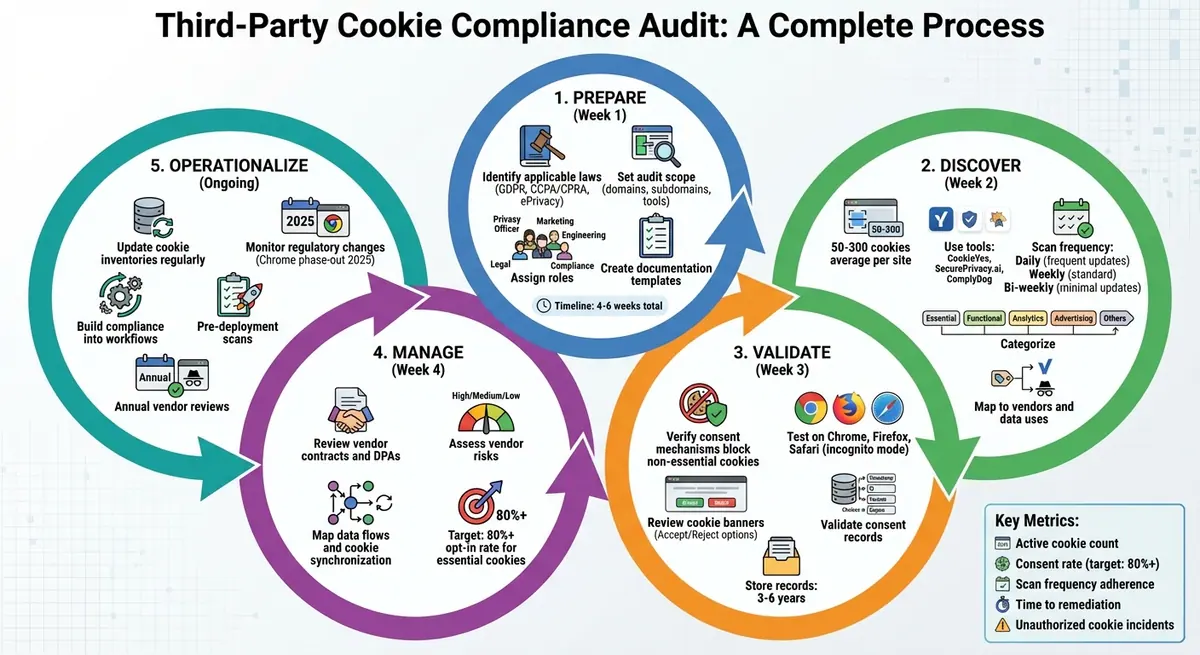
Third-Party Cookie Compliance Audit Timeline and Process
Preparing for Your Audit
Identify Applicable Regulations
Start by identifying the privacy laws that apply based on where your users are located and how their data is being processed. For instance, if you have visitors from the EU, regulations like GDPR and the ePrivacy Directive require explicit opt-in for non-essential cookies. In California, the CCPA and CPRA mandate clear disclosures and opt-out options, while states like Colorado and Virginia have introduced similar rules. To ensure compliance, use geo-targeted scans to analyze your regional traffic. For example, U.S. companies generating over $25 million in revenue must include a prominent "Do Not Sell or Share My Personal Information" link. Similarly, under GDPR, third-party analytics cookies like Google Analytics should be blocked until explicit consent is obtained. Once you’ve mapped out the applicable regulations, document them as part of your audit scope to ensure nothing is overlooked.
Set Your Audit Scope and Documentation
Define the scope of your audit to include all domains, subdomains, third-party tools (such as Google Tag Manager or consent management platforms), and embedded technologies like forms that may introduce tracking. Don’t forget to account for server-side tracking and cookie synchronization activities.
Prepare detailed templates to keep everything organized. For example, create a cookie inventory template with columns for details like the cookie name, domain, purpose, type, vendor, duration, and whether or not consent is required. Similarly, develop risk assessment templates that outline risk levels, mitigation strategies, and assigned responsibilities. Use U.S. date formats (MM/DD/YYYY) and include dollar signs ($) for tracking costs. These templates not only help ensure your audit is thorough but also provide solid documentation to back up your compliance efforts if they are ever questioned. This step also sets the stage for assigning roles and scheduling the audit effectively.
Assign Roles and Create a Timeline
Assigning clear roles is critical for a smooth audit. The Privacy Officer should take charge of the overall process, while Marketing can review tags and vendor relationships. Engineering can handle technical tasks like scanning for cookies and implementing cookie-blocking mechanisms. Legal should map out the relevant regulations, and Compliance can manage the documentation. Involving a cross-functional team ensures both the technical and non-technical aspects of tracking are covered.
Plan your audit timeline over 4 to 6 weeks. For example:
- Week 1: Identify the relevant regulations and define the audit scope.
- Week 2: Conduct cookie scans and classify the cookies.
- Week 3: Review consent mechanisms and vendor relationships.
- Week 4: Develop a remediation plan.
Set milestones to keep the process on track, like completing the cookie inventory by Day 10. Keep all audit records for 3 to 6 years to meet requirements for consent proof. For websites that are frequently updated, schedule weekly re-scans after the initial audit to catch any new cookies introduced by updates. With a well-defined scope, clear roles, and a structured timeline, your team will be ready to carry out a thorough and effective audit.
Discover and Classify Third-Party Cookies
Run a Cookie and Tracker Scan
To get started, use your browser’s developer tools (in Chrome, check the Application tab; in Firefox, look under Storage inspector) while in an incognito window with built-in blockers turned off. Focus on key pages like the homepage, checkout, login, and contact sections. These tools help you inspect cookies manually. For a more thorough approach, combine this with automated tools like CookieYes, SecurePrivacy.ai, or ComplyDog. These tools can detect cookies, trackers, web beacons, and local storage elements across various devices, browsers, and user scenarios. This includes elements tied to analytics, advertising networks, social media plugins, and server-side integrations.
On average, a website can use anywhere from 50 to 300 cookies, making automated scanning essential. The frequency of your scans should align with how often your site is updated - daily for websites with frequent changes, weekly for standard updates, and bi-weekly for sites with minimal updates. Automated alerts can also be set up to notify you whenever new scripts or cookies are added.
This thorough scanning process lays the groundwork for categorizing cookies accurately.
Categorize Cookies by Type and Purpose
Once all cookies are identified, organize them into clear categories based on their function:
- Essential: Required for core site functionality, such as session management.
- Functional: Used for user preferences and interface customization.
- Analytics: Tracks user behavior and provides usage insights.
- Advertising/Marketing: Powers targeted ads and retargeting efforts.
- Others: Includes tools like social media pixels or CDNs.
Make sure to note the domain of each cookie - this helps differentiate between first-party cookies (set by your domain) and third-party cookies (set by external domains like google.com or facebook.com).
For each cookie, document key details such as its provider (e.g., Google for _ga cookies), purpose (e.g., tracking user behavior), and lifespan (e.g., session cookies that expire when the browser closes versus persistent cookies lasting up to two years). For instance, Google Analytics cookies like _ga and _gid typically persist for two years, while Facebook Pixel's _fbp may either be session-based or persistent.
To keep everything organized, create an inventory table listing each cookie’s name, type, provider, duration, and purpose. This table will help you quickly identify which cookies require user consent under laws like GDPR or CCPA and which are strictly necessary for your site to function.
With your cookies categorized, the next step is to connect them to their respective vendors and data uses.
Map Cookies to Vendors and Data Uses
Now that your cookies are classified, link each one to its vendor and the specific data it collects. This might include details like IP addresses, browsing activity, device information, or location data. Take time to review each vendor’s privacy policy to understand how they process and retain data. For example, a Google Analytics cookie might track user behavior with a two-year retention period, while a Facebook Pixel cookie could collect data for advertising purposes.
It’s also essential to define the legal basis for each cookie. Essential cookies are typically justified by necessity, while analytics cookies might fall under legitimate interest. Advertising cookies, on the other hand, often require explicit user consent. For compliance with laws like the CCPA and CPRA, identify cookies that involve the “sale or sharing” of personal information, as these require clear disclosures and opt-out options.
Pay close attention to cookie synchronization, where third parties share user identifiers across platforms to build detailed tracking profiles. For each vendor, record their name, the specific cookies they use, the data they collect, their privacy policy URL, and their contractual status with your organization. This mapping not only ensures compliance with privacy regulations but also helps uncover hidden integrations that could pose risks to your data practices.
Check Consent and User Controls
Verify Consent Mechanisms
Make sure to block all third-party and non-essential cookies until users explicitly give their consent. For visitors from the EU or UK, GDPR and ePrivacy rules require prior opt-in consent that must be freely given, specific, informed, and unambiguous. In contrast, for California and broader US visitors, CCPA/CPRA regulations emphasize providing clear notice and opt-out options for cookies related to the "sale" or "sharing" of personal information.
Test your consent setup on major browsers like Chrome, Firefox, and Safari in incognito mode. Confirm that no non-essential cookies are loaded until users choose an option. Also, ensure that selecting "Accept" or "Only necessary" triggers the correct cookie behavior. Perform these tests on critical pages, such as the homepage, key landing pages, checkout pages, and those with embedded forms, to ensure consistent functionality.
If you're using a Consent Management Platform (CMP), double-check its configuration. Verify that each cookie is properly categorized and that features like auto-blocking or script pre-blocking are enabled and working as intended.
These steps ensure your site is set up to communicate cookie practices effectively.
Review Cookie Banners and Policies
Your cookie banner should be easy to understand and clearly state its purpose. It should offer equally visible "Accept" and "Reject" options, along with a "Customize settings" link for more detailed controls. Include links to your Cookie Policy and Privacy Policy in a prominent location on the banner.
For US visitors, where applicable, include a "Do Not Sell or Share My Personal Information" link to meet CCPA/CPRA requirements. Your detailed cookie policy should outline the types of cookies used (e.g., necessary, functional, analytics, advertising), their purposes, whether they are first-party or third-party, how long they are retained, and - if relevant - vendor names with links to their policies. Organize this information in a table that lists each cookie family, its provider, purpose, type, lifespan, and whether it’s used for cross-site tracking or data sharing.
To keep your documentation accurate, review it quarterly or whenever there are significant changes to vendors or tags. This ensures your banner and policy always reflect your site's actual behavior.
Validate Consent Records and Preferences
Once your consent system is configured, maintain detailed records of user choices. These records should include a timestamp, a user or device identifier (like a pseudonymous ID), the consent version, the user’s region, and the specific preferences selected (such as accepted categories). Your CMP or custom logging system should be able to generate audit-ready reports showing when and how consent was captured, as well as how consent versions have evolved over time.
Provide users with accessible "Cookie settings" links to allow them to adjust their preferences at any time. Confirm that changes are reflected across subdomains and that all consent records - timestamp, identifier, version, region, and choices - are stored in a central location. Additionally, ensure that third-party scripts, such as those for analytics, ad tags, or embedded tools, only activate when the relevant consent category is granted. Review your tag manager setup (e.g., Google Tag Manager) to ensure it includes consent checks, and confirm that embedded tools respect these settings across your site.
How-to Audit Your Third Party Cookie Usage
sbb-itb-5f36581
Manage Vendors and Third-Party Risks
After addressing cookie identification and consent verification, it's essential to take a closer look at your vendor relationships and the risks they may pose.
Review Vendor Contracts
Any third-party service that places or accesses cookies on your site - like analytics tools, ad networks, social media widgets, chat services, or CRM integrations - should have a Data Processing Agreement (DPA) in place. These agreements need to clearly outline cookie-related processing responsibilities, including consent management, data retention, security protocols, and handling user rights requests.
Ensure contracts include key provisions such as:
- Vendor processing only after valid consent.
- Immediate notification in case of data breaches.
- Clear terms for sub-processors, cross-border data transfers, and liability for privacy incidents.
Conduct a contract audit using a detailed checklist. This checklist should verify the presence of a DPA, cookie-specific clauses (e.g., consent integration and data minimization), and alignment with the vendor's privacy policies. Identify and document any gaps, such as missing sub-processor notifications or insufficient security measures. Prioritize renegotiating contracts with high-risk vendors to address these issues.
For websites targeting U.S. users, ensure contracts comply with CCPA/CPRA requirements to classify vendors as "service providers" or "contractors." This helps prevent the unintended "sale" or "sharing" of personal information. Finally, align vendor contracts with the cookie practices documented in your cookie inventory.
Assess Vendor Risks
Not all vendors pose the same level of risk. Evaluate each vendor based on factors like how they use data, their compliance track record, data retention policies, and security measures. High-risk vendors often include:
- Ad networks involved in behavioral tracking.
- Social media pixels used for cross-site profiling.
- Services that engage in cookie synchronization, where multiple vendors share IDs to create cross-platform profiles.
Use a risk matrix to score vendors based on criteria like data sensitivity and profiling activities. For vendors identified as high risk, implement additional controls such as:
- Enhanced monitoring.
- Contract modifications.
- Auto-blocking scripts until valid user consent is obtained.
For vendors with medium risk, consider stricter settings like IP masking or shorter data retention periods. Document these assessments and mitigation steps to maintain a clear record of how vendor risks are managed.
Map Vendor Data Flows
Track how cookie data moves from users’ browsers to vendors and downstream systems like marketing platforms, CRMs, or data warehouses. Create visual data flow diagrams to map out these processes, paying special attention to paths involving cookie synchronization or server-side data sharing.
Here’s how to approach vendor data flow mapping:
- Start with cookie scans to identify all vendors.
- Review vendor documentation to understand how data is used.
- Test integrations across different pages and devices.
- Record each data flow with details on its purpose, retention period, and recipients, including any onward transfers to partners like ad exchanges or measurement services.
Expand your mapping efforts by visualizing data flows across platforms to get a comprehensive view. Regularly update these data flow maps and set up alerts for new or modified third-party scripts. This ensures you can investigate changes quickly and maintain control over your vendor ecosystem.
Maintain Continuous Compliance
Keeping up with cookie compliance isn’t a one-time task - it’s an ongoing process. Websites often juggle a variety of cookies that change frequently as marketing teams introduce new tools, developers add integrations, or vendors update their scripts. Manual checks simply can’t keep up, which is why automated monitoring and regular updates are essential. This continuous oversight ensures your audit findings align with daily operations.
Update Cookie Inventories Regularly
Automated scanning plays a key role in tracking cookie changes. The frequency of these scans should match how often your site is updated. For instance:
- Frequently updated sites: Daily scans
- Standard sites: Weekly scans
- Less active sites: Bi-weekly reviews
Make sure to run these scans across different devices and incognito modes for a complete picture.
As part of these reviews, document any new third-party trackers, such as analytics tools, ad networks, or chat widgets. Classify each addition by type - essential, functional, or tracking - and confirm that your consent management platform (CMP) blocks non-essential cookies until users give their permission. This ensures new scripts respect user preferences right from the start.
To measure how well your compliance efforts are working, keep an eye on key metrics like changes in cookie counts, category-specific consent rates (aim for at least 80% opt-in for essential cookies), how often scans are conducted, and how quickly issues are resolved. Also, maintain detailed audit logs to prove consent validity, as regulators increasingly require this documentation during investigations.
Monitor Regulatory and Browser Changes
Privacy laws and browser policies are constantly evolving, and they can have a big impact on your cookie strategy. For example, Google’s Chrome phase-out of third-party cookies, now extended into 2025, is pushing organizations to explore Privacy Sandbox alternatives. Meanwhile, browsers like Safari and Firefox already block cookies without user consent through features like Intelligent Tracking Prevention and Enhanced Tracking Protection, requiring immediate adjustments to CMP settings.
Stay informed by subscribing to updates from regulatory bodies on GDPR, ePrivacy, and browser vendor announcements. For U.S.-based websites, pay close attention to developments around CCPA/CPRA, particularly regarding disclosures for "sale" and "sharing" of data in cross-context behavioral advertising.
When regulations or browser policies shift, take proactive steps such as re-scanning your cookie inventory, updating CMP configurations, revising privacy policies, and retesting consent mechanisms. Acting quickly helps you avoid compliance gaps before they lead to enforcement issues.
Build Compliance into Your Workflows
To avoid scrambling for compliance at the last minute, bake it into your regular development and marketing processes. For instance:
- Add pre-deployment scans to your development pipeline to flag new trackers before code goes live.
- Require compliance checks before marketing teams introduce third-party scripts for campaigns.
- Include cookie audits as part of agile sprints or quarterly privacy reviews.
Take Reform’s no-code form builder as an example. Its deployment process includes cookie scanning to ensure even data collection tools comply with privacy requirements. Conditional routing respects user consent preferences, and analytics cookies are monitored through regular updates to maintain GDPR-compliant lead capture. This approach ensures privacy standards align with business goals.
Set up automated alerts through your CMP tools to catch unauthorized changes, and establish clear procedures for vendor breach notifications. Conduct annual vendor reviews to confirm GDPR compliance, consent integration, and accurate data flows. By embedding these practices into your workflows, you make compliance a seamless part of daily operations rather than a reactive effort.
Conclusion
Conducting a third-party cookie compliance audit helps establish a structured approach to managing your site's tracking and privacy practices. A comprehensive audit should provide you with a real-time inventory of all cookies and trackers in use on your site. From there, it’s essential to ensure that consent mechanisms block non-essential third-party cookies until users opt in, as required by GDPR and ePrivacy regulations. Additionally, your disclosures should accurately outline any "sale" or "sharing" practices in line with CCPA and CPRA requirements. This process creates a solid foundation for maintaining compliance over time.
Think of the audit as an ongoing cycle: prepare, discover, validate, manage, and operationalize compliance. This proactive approach shifts compliance from being a last-minute scramble to becoming part of your team's standard workflow for launching campaigns or rolling out new tools.
Vendor oversight is equally important. Regularly review contracts and data-sharing practices to minimize risks like cookie syncing or cross-vendor tracking. If your site attracts international visitors, consider the broader context - U.S.-based teams serving EU users must meet GDPR standards, while state-specific privacy laws add further requirements for tracking disclosures and opt-out options.
Monitor key metrics such as the number of active cookies, vendor mappings, incidents involving unauthorized cookies, and the speed of remediation. These indicators not only help you track progress but also demonstrate accountability to stakeholders and allow you to address potential issues before they escalate.
To integrate compliance seamlessly into your daily operations, require pre-deployment cookie assessments and schedule regular scans. Keep your Consent Management Platform up to date with the latest cookie inventory. Tools like Reform’s no-code forms can support your compliance efforts by reducing reliance on invasive third-party tracking while collecting valuable first-party data. By embedding these practices into your team’s workflows - such as sprints, release checklists, and vendor evaluations - you can make compliance a natural part of growth, ensuring it supports innovation rather than hindering it.
FAQs
What are the best methods to identify and organize third-party cookies on my website?
To manage third-party cookies on your website, start by using tools like web crawlers, browser developer tools, or specialized cookie scanners. These tools are great for detecting cookies, understanding their purpose, and sorting them according to compliance needs.
You might also explore browser extensions and privacy tools specifically built for cookie scanning and management. They can make it easier to ensure your website aligns with third-party cookie compliance standards.
How can I make sure my website's consent process meets GDPR and CCPA requirements?
To meet the requirements of GDPR and CCPA, your website must present clear, easy-to-understand consent prompts before collecting any personal data. It's equally important to offer users a simple way to withdraw their consent whenever they choose. Additionally, maintaining a detailed record of user preferences is essential for compliance.
Implementing tools with features like consent checkboxes, real-time validation, and audit trails can make this process much more manageable. Prioritizing transparency and accessibility not only ensures you meet legal standards but also helps foster trust with your users.
What should I look for in vendor contracts to ensure third-party cookie compliance?
When examining contracts with third-party vendors, make sure they include clear and detailed terms about data processing responsibilities and compliance with privacy laws such as the CCPA and GDPR. Check that the agreement specifies strong data security protocols, outlines breach notification procedures, and confirms the vendor's obligation to follow all applicable regulations. Additionally, ensure the vendor has reliable systems in place to manage user consent and respond to data requests effectively.
Related Blog Posts
Get new content delivered straight to your inbox

The Response
Updates on the Reform platform, insights on optimizing conversion rates, and tips to craft forms that convert.




Drive real results with form optimizations
Tested across hundreds of experiments, our strategies deliver a 215% lift in qualified leads for B2B and SaaS companies.
