
.webp)
Checklist for Responding to Access Requests


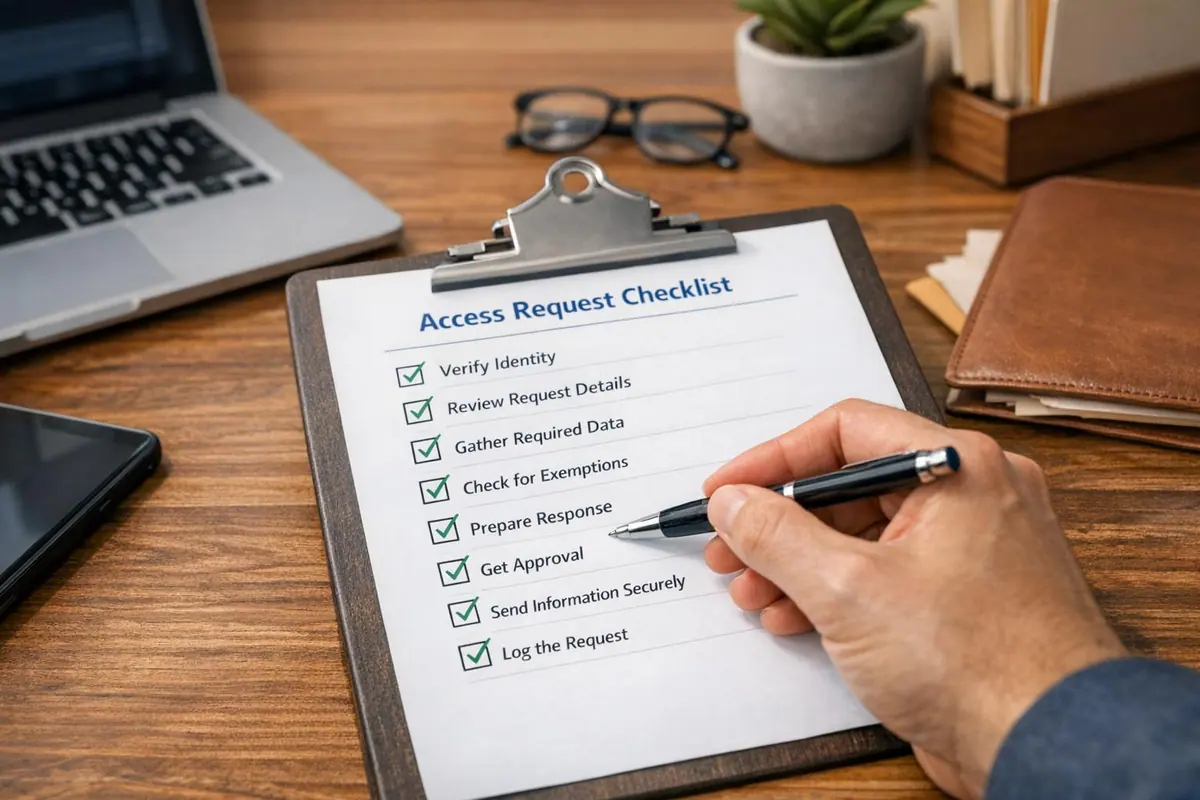
Handling access requests, or Subject Access Requests (SARs), is essential for complying with GDPR and maintaining trust. Here's what you need to know:
- Deadline: Respond within one month of receiving a request. If the deadline falls on a weekend or holiday, it extends to the next business day.
- Verification: Confirm the requester’s identity before sharing data. Keep methods reasonable - avoid asking for excessive documents like passports unless necessary.
- Clarify Requests: If unclear, pause the deadline and ask for specifics (e.g., date ranges, departments, or service details).
- Locate Data: Search all systems, including emails, backups, and paper records. Document what data was found, its purpose, and any third-party sharing.
- Redact and Format: Remove irrelevant or sensitive third-party data. Provide data in a clear, accessible format, and explain processing details like retention periods or data-sharing practices.
- Secure Delivery: Use encryption for emails or trusted couriers for physical copies. Log the entire process to demonstrate compliance.
Pro Tip: Automation tools can simplify tracking deadlines, verifying requests, and managing responses while reducing errors.
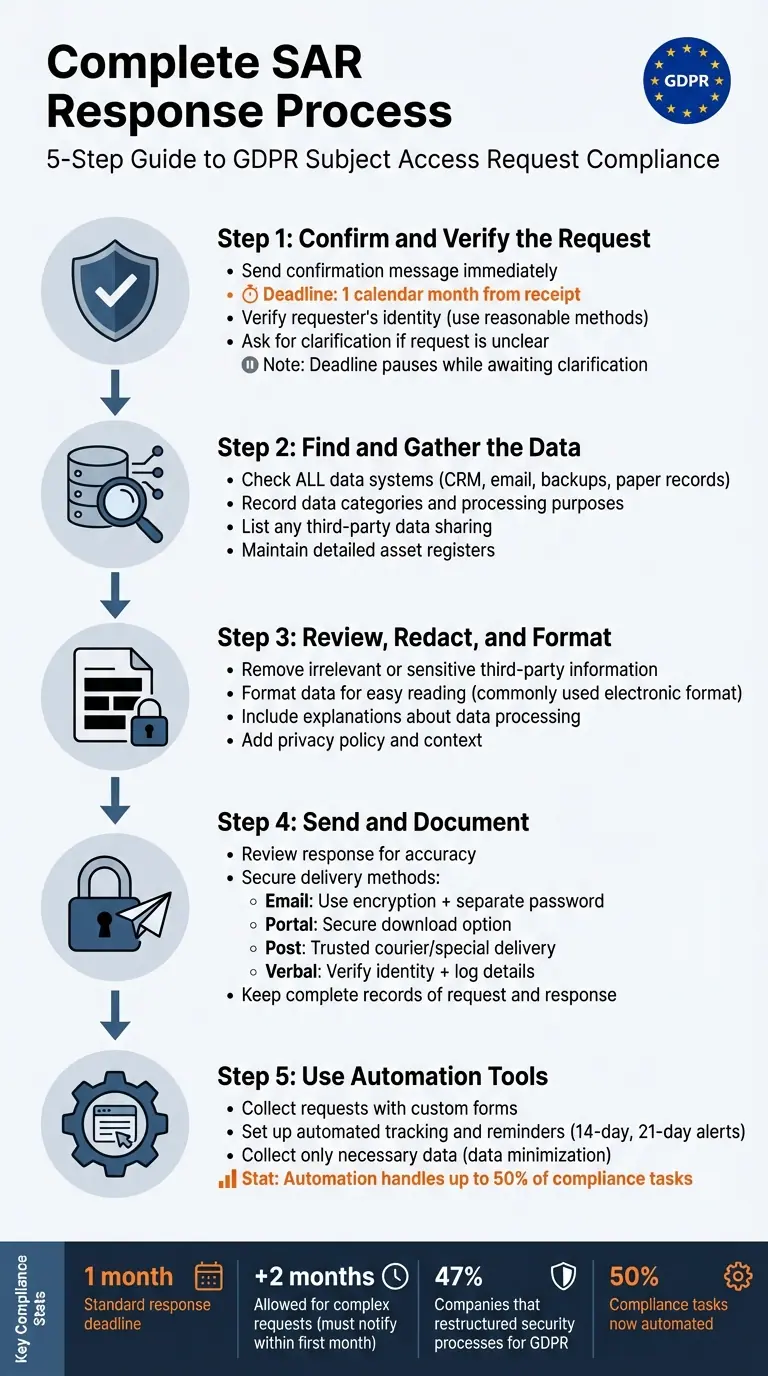
5-Step GDPR Subject Access Request Response Process
Step 1: Confirm and Verify the Request
Send a Confirmation Message
When you receive an access request - whether via email, web form, or social media - acknowledge it right away. Your confirmation should include the exact response deadline, as required by law: one calendar month from the date the request was received. For example, you might say, "We will respond by February 20, 2026." If that date falls on a weekend or public holiday, the deadline automatically extends to the next business day.
For more complex situations, such as handling multiple requests from the same individual, you’re allowed to take up to two additional months. However, you must notify the requester about this extension within the initial one-month period. To ensure consistency and compliance, consider using pre-written template messages to handle these acknowledgments. These templates can help your team include the necessary legal details every time.
Once you’ve sent the confirmation, the next step is to verify the identity of the requester.
Verify the Person's Identity
Before sharing any personal data, confirm the requester’s identity. Sending data to the wrong person is considered a data breach under GDPR.
The Information Commissioner’s Office recommends keeping your verification methods reasonable:
"You shouldn’t ask for formal ID unless it’s necessary and proportionate. Instead, you could ask questions that only they would know, about reference numbers or appointment details for example".
For instance, if the person initially signed up using their email address, a request from that same email may be enough to confirm their identity. Similarly, for online services, existing login credentials can often suffice. Avoid routinely asking for copies of passports or birth certificates, as these steps are usually excessive and can create unnecessary hurdles.
If the request is made through a solicitor or family member, ensure they provide written authorization or proof of power of attorney before releasing any information.
Once identity verification is complete, address any unclear aspects of the request.
Ask for Details if the Request is Unclear
If the request is vague or lacks specifics, ask for clarification. Under the Data (Use and Access) Act, the one-month deadline pauses while you wait for the requester to provide more details. The Information Commissioner’s Office notes:
"If you process a large amount of information about an individual, you may be able to ask them to specify the information or processing activities their request relates to, if it is not clear".
Ask for details that will help you locate the data more efficiently. This might include specifics like date ranges, department names, reference numbers, or details about particular services they used. For example, if someone requests "everything you have on me", clarify whether they mean all records or data related to a specific event, such as a recent purchase or customer service interaction. This ensures you provide the right information without unnecessary delays.
Step 2: Find and Gather the Data
Check All Data Systems
After confirming the requester's identity, start by thoroughly searching for their personal data across all your systems. This includes not just your customer database but also CRM platforms, email archives, backups, and even paper records. The key here is to make a reasonable and proportionate effort to locate and retrieve the requested information as part of responding to a Subject Access Request (SAR).
Be sure to comb through both digital and physical records, including backups and archived files. To make future searches more efficient, maintain detailed asset registers. Once you've gathered the data, document the types of data found and the reasons for processing it.
Record Data Categories and Processing Purposes
Once the data is located, clearly document the categories of data and why it’s being processed. Your response should outline details such as the purposes for processing, the types of data involved, who the data has been shared with, how long it’s retained, and where it originated. This should align with the information provided in your privacy notice.
For example, you might document that contact details and purchase history are processed to fulfill orders or provide customer support under contract obligations. Keeping an up-to-date Record of Processing Activities (ROPA) can make this task easier, as it maps out which systems handle specific data and for what purposes.
List Any Third-Party Data Sharing
Check whether the requester's data has been shared with any third parties. If so, you’ll need to provide details on the recipients. While you should aim to identify specific recipients, there may be rare cases where listing categories of recipients is acceptable if naming each one would require disproportionate effort. The Information Commissioner’s Office (ICO) advises:
"Record what information each processor processes in a detailed record of processing activities, so you can quickly identify which processors to speak to."
Review contracts with data processors and ensure that any international data transfers are documented, including the safeguards in place. Maintaining a well-organized ROPA and accurate asset registers will help you efficiently track where data has been shared outside your organization.
How to Handle GDPR Subject Access Requests
Step 3: Review, Redact, and Format the Response
With the data in hand, the next step is to refine your response to ensure it’s clear, secure, and accessible.
Remove Irrelevant or Sensitive Information
Once you've gathered the data, separate the requester's personal information from anything that belongs to third parties or is non-personal. While it’s acceptable to exclude data that doesn’t qualify as the requester's personal information, including a mix of personal and general data can sometimes provide helpful context - so long as it’s not sensitive.
Be particularly cautious with third-party data. You'll need to strike a balance between the requester's right to access their information and the privacy rights of others. When redacting electronically, avoid using reversible blackout methods. Instead, apply permanent redactions and save the edited version as a new file. For heavily redacted documents, consider extracting the relevant sections into a separate document. Keep a detailed record of what was withheld or redacted, the reasons for doing so, and who authorized the decision.
Format the Data for Easy Reading
If the request was made electronically, provide the response in a widely used electronic format unless the requester specifies otherwise. The ICO emphasizes this point:
"The UK GDPR does not require people to purchase specific software packages to access a copy of their information".
Before finalizing the response, confirm the requester’s preferred format.
Make sure the response is concise, straightforward, and easy to follow. As the ICO advises:
"You must provide the following information in a concise, transparent, intelligible and easily accessible form, using clear and plain language".
If the data includes internal codes or abbreviations - like “A” to indicate attendance - be sure to include a key or explanation so the requester can clearly understand the information. Avoid technical language and use everyday terms, especially if the requester is a child.
Once the response is clear and formatted, include details about how the data has been processed to complete the reply.
Include Explanations About Data Processing
Along with the data, include a summary of how it has been processed. The ICO highlights the importance of this:
"It is a fundamental right for people. It helps them understand how and why you are using their information and check that you are doing it lawfully".
Your response should outline the purposes of processing, the types of data involved, who the recipients are (whether specific individuals or categories of third parties), how long the data will be retained, and the individual’s rights - such as rectification, erasure, restriction, or objection. If the data was obtained from a source other than the requester, explain where it came from. For automated decision-making or profiling, provide details about the logic used, as well as the significance and potential consequences. Additionally, if the data is transferred internationally, describe the safeguards in place.
Always include your privacy policy along with the personal data, ensuring the response is easy to understand for the average person. The ICO advises:
"You should provide enough contextual information to ensure that the response is concise, intelligible and easy for the person to understand".
sbb-itb-5f36581
Step 4: Send and Document the Response
Deliver the response securely, and ensure the entire process is properly documented.
Review the Response for Accuracy
Before sending any information, perform a thorough accuracy check. Make sure the response is complete and easy to understand. If your data includes elements like codes, acronyms, or handwritten notes, include a key or explanation to avoid confusion. Also, cross-check your internal redaction log to ensure no unauthorized third-party data is included. The Information Commissioner's Office (ICO) advises taking steps to minimize human error:
"You should have measures in place to securely send information. For example, you could use a trusted courier or have a system to check email addresses and review responses before sending".
To maintain consistency, apply a standardized checklist for all requests. Double-check the recipient’s delivery details - whether it's an email address or a postal address - to avoid sending sensitive information to the wrong person.
Once you've confirmed everything is accurate, proceed to send the data securely.
Use Secure Delivery Methods
As the data controller, it's your responsibility to ensure the information remains secure during delivery. If the request was submitted electronically, respond in a commonly used electronic format unless the requester specifies otherwise. Encrypt emails and share passwords or access codes through a separate channel. Alternatively, you can set up a secure portal where individuals can download their data directly.
For physical copies, opt for special delivery services or trusted couriers instead of standard mail. If the requester prefers a verbal response, verify their identity first. Then, keep a written record of the date, the information shared, and the person who provided it.
| Delivery Method | Recommended Security Measure |
|---|---|
| Use encryption and send the password or access code separately. | |
| Secure Portal | Allow users to download data in a commonly used format. |
| Post (Hard Copy) | Use special delivery or a trusted courier for sensitive data. |
| Verbal | Confirm identity first and log the interaction details. |
Keep Records of the Request and Response
After securely delivering the response, document every detail of the process. Proper documentation not only fulfills accountability requirements but also helps protect against potential complaints. The ICO highlights the importance of this practice:
"Not keeping records of verbal and written requests, or keeping incomplete records, makes it difficult to demonstrate compliance with statutory requirements, and prevents lessons being learned and used to improve performance".
Maintain a centralized log, such as a spreadsheet or database, to track all requests. Record key details like the date the request was received, the statutory due date (typically one month from receipt), the actual response date, and the staff member responsible for handling it. Include information about identity verification checks and the delivery method used. Save copies of all supplied data, along with any additional information provided - such as details about processing purposes or third-party recipients.
If you withheld certain information due to exemptions or redacted third-party data, document the reasoning behind these decisions and note who authorized them. Finally, include your request logs in a formal retention schedule to ensure the data is retained only as long as necessary for compliance or audit purposes.
Step 5: Use Reform to Simplify the Process

After verifying, gathering, and processing data in earlier steps, Reform steps in to simplify the remaining tasks. Handling access requests manually can be both time-consuming and prone to errors. Reform's no-code form builder makes it easier to standardize intake, automate tracking, and stay compliant with GDPR regulations - all without needing to write a single line of code.
Collect Requests with Custom Forms
Although individuals cannot be forced to use a specific format for their access requests, offering a preferred online form can make life easier for both requesters and your team. Reform's conditional logic ensures you capture accurate request details and allows for layered identity verification based on the sensitivity of the data. You can include fields for date ranges, specific accounts, or products to narrow down searches and reduce unnecessary back-and-forth communication.
The platform's auto-stamp feature records the exact date and time a request is received, which marks the beginning of the statutory deadline. Consider designing your form to ask for context - like which department or service might hold the requested information. This can help avoid broad, vague requests for "all information", which are much harder to process.
For low-risk data, a simple email confirmation may be enough. However, for more sensitive information, adding secure document upload fields can help ensure proper verification. This approach stays "proportionate" to the request's sensitivity, avoiding unnecessary collection of formal identification documents unless absolutely required.
Set Up Automated Tracking and Reminders
By integrating submitted requests with your CRM, you can automate deadline tracking and set up reminders to ensure timely responses. For example, triggers can be configured to send alerts at the 14-day and 21-day marks, giving your team enough time to review and finalize responses before the 30-day legal deadline. Automation reduces the chance of human error and keeps the process running smoothly.
Accurate record-keeping is essential, and automated tracking ensures every step is logged. Keep in mind that the one-month response clock begins only after the requester’s identity is verified or any necessary clarifications are provided. As the ICO explains:
"The one-month time limit for the organisation to reply to your request only starts once they have what they need from you".
To maintain compliance, configure your system to record start and stop timestamps when the deadline clock pauses. This creates an auditable "Single Source of Truth", documenting when each request was received, verified, and fulfilled.
| Feature | GDPR Benefit |
|---|---|
| Conditional Logic | Supports layered identity verification based on request sensitivity. |
| Auto-stamping | Logs the start of the one-month statutory response period accurately. |
| Custom Fields | Captures key identifiers (e.g., user ID, past emails) for thorough searches. |
Collect Only Necessary Data
Reform's conditional logic aligns with the GDPR principle of data minimization by ensuring requesters only provide information relevant to their specific type of request. Use mandatory fields to track details like the date received, handling staff, and request status - this helps demonstrate compliance with UK GDPR Articles 5 and 30. As the ICO advises:
"Only collect the minimum information needed and have a clear retention policy for the profiles created".
These features integrate seamlessly with earlier steps in the process, helping you maintain consistent GDPR compliance.
Conclusion
Having a structured checklist for handling access requests makes compliance smoother and helps build trust with stakeholders. By sticking to a clear process - like verifying identities, collecting the necessary data, reviewing it for accuracy, and documenting each step - you can avoid common pitfalls such as missed deadlines, improper disclosures, or regulatory issues. As the Information Commissioner's Office puts it:
"It's important to be prepared and take a proactive approach to SARs, as this helps you respond to them more effectively and quickly".
A well-organized system not only ensures you meet GDPR deadlines but also fosters transparency with customers and employees. It creates a reliable audit trail, showing regulators that your organization is accountable. Incorporating automation tools into this process further reduces errors and speeds up response times.
Tools like Reform can simplify the workflow by centralizing request management, automating deadline tracking, and using conditional logic to gather only the necessary details. This aligns with the principle of data minimization and eliminates the hassle of manual tracking. In fact, over 47% of companies have restructured their internal security processes to comply with GDPR, with automation now taking care of up to 50% of compliance tasks.
Whether you're managing a handful of requests or dealing with large volumes, keeping accurate records and using the right tools can protect your organization from fines and damage to its reputation. By integrating solutions like Reform, you ensure a consistent and compliant process that demonstrates your commitment to respecting individual rights and operating with integrity.
FAQs
What should I do if I receive multiple access requests from the same person?
To handle requests effectively, start by verifying the identity of the requester to confirm the validity of their request. Maintain a detailed record of each request and aim to consolidate multiple requests into a single, comprehensive response whenever feasible. If the volume of requests becomes overwhelming, GDPR allows you to extend the standard one-month response time by up to two additional months. Should you need this extension, inform the requester promptly and provide clear reasons for the delay. Staying organized and maintaining open communication are essential for managing these requests smoothly.
What steps should I take to securely deliver data for an access request?
To safely deliver data in response to an access request under GDPR, treat the process with the same care you'd apply to any critical security task. Start by confirming the requester’s preferred email address. Make sure it’s a personal, identifiable account rather than a shared or generic one to reduce the risk of unauthorized access.
Before sending the data, encrypt it. Use password-protected files, such as PDFs or ZIP files, to secure the information. Share the password through a separate channel, like a phone call or a different email, to further protect the data. Clearly label the files as confidential and intended solely for the named recipient. If physical copies are required, opt for a tracked and signed-for postal service to ensure secure delivery.
For a more efficient and secure approach, tools like Reform can help. They allow you to create branded, encrypted forms that capture delivery preferences and ensure the data reaches the correct recipient in a controlled and audit-ready manner.
What are the advantages of using automation tools for managing Subject Access Requests (SARs)?
Automation tools bring a host of advantages to managing Subject Access Requests (SARs). By simplifying workflows, these tools make it easier for businesses to locate, verify, and deliver personal data quickly. This not only cuts down on manual labor but also helps ensure compliance with GDPR regulations. Plus, automation helps meet the one-month response deadline, giving staff more time to handle other critical tasks.
Beyond saving time, automation reduces the risk of human error, lowers operational costs, and establishes consistent, traceable processes. These tools can also support data mapping and discovery, ensuring personal information is located accurately and aligned with the request. In short, automation allows businesses to handle SARs more efficiently and reliably, building trust with individuals by demonstrating accountability and care.
Related Blog Posts
Get new content delivered straight to your inbox

The Response
Updates on the Reform platform, insights on optimizing conversion rates, and tips to craft forms that convert.



Drive real results with form optimizations
Tested across hundreds of experiments, our strategies deliver a 215% lift in qualified leads for B2B and SaaS companies.
