
.webp)
How Scalable CRM Integration Improves Lead Management



Overwhelmed by scattered customer data and inefficient lead management? Scalable CRM integration is the solution for businesses handling growing lead volumes. Here's why it works:
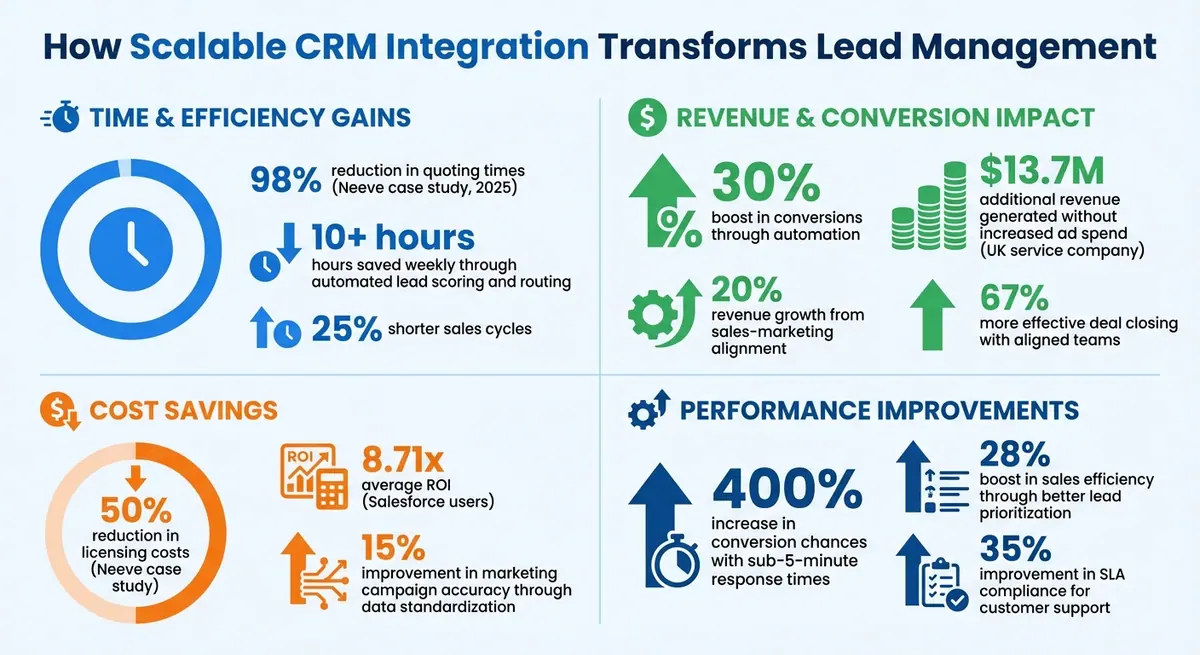
- Automates lead scoring and routing: Saves teams 10+ hours weekly and boosts conversions by 30%.
- Improves sales and marketing alignment: Unified data ensures better collaboration, increasing revenue by 20%.
- Enhances pipeline visibility: Centralized data and real-time updates reduce errors and delays.
- Streamlines tools and workflows: Integrates platforms like Salesforce, Zendesk, and Zuora for seamless operations.
For example, in 2025, Neeve reduced quoting times by 98% and cut licensing costs by 50% by integrating their CRM with other tools. This approach eliminates manual tasks, reduces errors, and ensures GDPR compliance, protecting businesses from costly fines. Whether you're managing 10 leads or 500, scalable CRM integration grows with your business, enabling efficient and accurate lead management.
Key Benefits and ROI of Scalable CRM Integration for Lead Management
How to Build An Automated Lead Management System In Make.com (Pipedrive)
sbb-itb-5f36581
What Is Scalable CRM Integration?
Scalable CRM integration is all about connecting your CRM system with external tools - like marketing platforms, booking software, and communication apps - using a flexible, modular setup. Unlike traditional integrations that can become rigid as your tech stack grows, this approach is designed to handle increasing lead volumes without creating data silos or requiring time-consuming manual work. It’s a system that grows with your business, keeping everything running smoothly even as complexity increases.
Instead of relying on fixed, one-to-one integrations that often need constant manual updates, scalable CRM integration uses dynamic APIs and connectors to automate the flow of data. This ensures your information stays centralized and up-to-date, no matter how many tools you add to your setup.
"Scalable CRM integration isn't just a tech upgrade – it's a smarter way to grow your business without chaos." - Francis Rodino, Lead Hero AI
For larger businesses, this type of integration is essential. When lead volumes grow, manual processes quickly become unmanageable. Standardizing data formats - like consistent phone number and date structures - can also improve the accuracy of marketing campaigns by up to 15%. Without scalable systems in place, businesses risk fragmented customer data, overworked sales teams, and marketing strategies that are hard to track.
How Scalable CRM Integration Works
Understanding how scalable CRM integration operates highlights why it’s a game-changer for managing leads effectively.
At its core, scalable integration connects your CRM to other tools using APIs or middleware platforms like Zapier or Make.com. For instance, when a prospect fills out a multi-step form on your website, their details are instantly added to your CRM. From there, automated follow-up sequences kick in, eliminating the need for manual data entry.
This real-time data flow ensures that updates in one tool are automatically reflected across your entire system. For example, if a lead’s phone number is updated in your marketing platform, that change is synced to your CRM, booking tools, and communication apps without any additional effort.
The modular design of scalable integration also makes it easy to add new tools or users without disrupting existing workflows. This approach prevents the kind of fragmentation that causes 40% of CRM projects to fail due to poor data preparation. Instead of rebuilding your system as your business grows, you can simply connect new tools using the same API framework.
Core Components of Effective Integration
For scalable CRM integration to work effectively, several key elements need to be in place:
- Centralized database: Combines data from spreadsheets, email lists, and booking systems into a single, unified source. This eliminates the hassle of searching through multiple platforms for customer information.
- API-based connections: These act as the backbone, enabling seamless communication between different software without creating dependencies that might break during updates.
- Real-time data syncing: Ensures updates are reflected across all platforms instantly. Standardized formats for dates, phone numbers, and other fields help maintain data accuracy and reduce errors.
- Security and compliance features: Includes tools like multi-factor authentication, ISO 27001 certification, and automated GDPR compliance for managing customer consent and data deletion requests across platforms.
These components work together to ensure your CRM stays accurate and efficient, even as your lead volume and business tools expand.
| Feature | Standard CRM Integration | Scalable CRM Integration |
|---|---|---|
| Data Flow | Often manual or batch-processed | Real-time and automated |
| Growth Capacity | Limited; frequent manual updates | High; modular design supports growth |
| Data Integrity | Prone to silos and duplicates | Centralized and standardized |
| Connectivity | Limited to native integrations | API-based; links to numerous tools |
| Compliance | Manual tracking | Automated consent and data tools |
How Scalable CRM Integration Improves Lead Management
Integrating a scalable CRM system can transform lead management almost instantly. It delivers noticeable improvements in three key areas: speeding up lead routing, improving collaboration between sales and marketing, and offering better visibility into the sales pipeline.
Automated Lead Assignment and Scoring
Manually qualifying leads can be a huge time sink. With an integrated CRM, leads are automatically scored using BANT criteria - budget, authority, need, and timing - along with behavioral cues like visits to pricing pages or case study downloads. AI takes this a step further by identifying keywords and referral sources tied to higher conversion rates. High-priority leads trigger immediate alerts for sales teams, while lower-priority leads are routed into nurturing workflows. The result? Automated lead management can boost conversions by 30%, cut sales cycles by 25%, and save teams over 10 hours each week.
This level of automation also helps bridge the often-problematic gap between sales and marketing.
Better Sales and Marketing Coordination
Misalignment between sales and marketing can hurt revenue. For instance, sales teams ignore about half of all marketing leads, and only 13% of those leads ever convert into opportunities. Even worse, 62% of sales leaders admit their definition of a "qualified lead" doesn’t match marketing’s criteria. A scalable CRM integration fixes this by creating a shared, reliable data source. Sales reps gain instant access to a lead’s engagement history - like email opens, content downloads, and website activity - and receive real-time alerts for high-intent actions, such as visiting the pricing page. No more switching between tools or guessing. Companies with strong sales and marketing alignment see 20% revenue growth and close deals 67% more effectively.
"The divide between marketing and sales kills revenue." - Instantly.ai
By unifying data and workflows, teams can also achieve better pipeline clarity.
Clearer Pipeline Visibility and Reporting
When data is scattered across spreadsheets, emails, and booking systems, it’s easy to lose track of leads. Integrated CRM solutions centralize all this information, providing a complete view of lead progression and pinpointing bottlenecks. Standardized data formats - like consistent phone number, date, and address entries - ensure accurate reporting and seamless syncing across platforms. Real-time tracking of key metrics, such as lead response times and conversion rates, allows teams to adjust strategies on the fly. AI-driven insights can even reveal trends, such as specific keywords linked to higher conversion rates. For example, a UK-based service company added over £10 million in revenue without increasing its advertising spend.
Required Features for Scalable CRM Integrations
Managing leads at the enterprise level requires CRM integrations that go beyond simple data syncing. To meet the demands of growing teams and increasing lead volumes, your CRM integration must include advanced technical capabilities designed for scalability and efficiency.
An API-first approach is a must, featuring well-documented REST or GraphQL endpoints, version control, and contract testing. Pair this with a microservices architecture to allow individual components - like lead ingestion or reporting - to scale independently. These features form the backbone of a CRM integration built for high performance in dynamic environments.
For real-time processing, consider adopting an event-driven architecture with streaming tools like Apache Kafka or Azure Event Hubs. These platforms enable low-latency performance while providing instant access to metrics like pipeline health and churn predictions. Enterprises leveraging these technologies have reported a 28% boost in sales efficiency by prioritizing leads more effectively.
Advanced Lead Routing and Automation
In large organizations, efficient lead assignment and automation are crucial for maintaining high conversion rates. Advanced routing logic ensures leads are distributed fairly and appropriately. For example, round-robin routing balances workloads evenly, while territory-based routing assigns leads based on geographic relevance.
Automation takes this further by triggering actions based on specific criteria, such as lead score thresholds or lifecycle stage changes. For multi-brand systems, fields like "Brand Assigned" and "Lead Status" can streamline workflows, eliminating bottlenecks. HubSpot users who implement these standardized fields see smoother data flows and fewer manual handoffs, leading to better conversion rates.
Customer support teams also benefit from these integrations. By combining ticketing systems with AI-driven recommendations, they’ve improved SLA compliance by 35%, ensuring faster and more accurate responses to customer inquiries.
Real-Time Analytics and Reporting
Delayed reporting can obstruct decision-making. Real-time analytics solve this issue by offering immediate insights, allowing teams to adjust strategies without delay. Platforms like Azure Event Hubs power these analytics, providing constant visibility into pipeline health and enabling rapid changes to lead management strategies. This eliminates the lag associated with traditional batch processing.
For global enterprises, multi-region deployments with geo-aware scaling reduce latency while adhering to data residency requirements. Additionally, unified reporting across multiple brands helps pinpoint bottlenecks and provides precise revenue attribution. These insights give leadership the tools needed for accurate forecasting.
Form Integration with Reform
Seamless form integration with your CRM accelerates lead capture while improving data accuracy for scoring and routing. Reform offers a no-code setup that connects forms directly to your CRM, featuring multi-step forms to guide prospects through qualified submissions. These forms start with basic information and gradually collect more detailed data, such as product interest.
With conditional routing, fields dynamically adjust based on user responses, ensuring only relevant questions are displayed. Reform also enhances data quality with lead enrichment and email validation, ensuring clean data enters your system.
Leads are synchronized in real time, feeding directly into scoring and assignment workflows. Reform’s spam prevention filters out junk submissions, while built-in analytics track conversion funnels for continuous improvement. This creates a streamlined process where every form submission sets off immediate routing and scoring, all without manual effort.
How to Implement Scalable CRM Integration
Building a scalable CRM integration requires careful planning and execution. With research indicating that 40% of CRM projects fail due to poor data preparation and planning, a structured approach is key to success.
Evaluate Your Current Systems and Requirements
Start by gathering customer data from various sources like spreadsheets, email lists, booking systems, and databases. This comprehensive review will help you uncover gaps, duplicate entries, and inconsistencies. During this process, standardize data formats across your organization to ensure consistency.
Map out the entire customer journey - from the first inquiry to the final sale - and identify manual processes that slow things down. High-volume tasks, such as lead capture, follow-ups, and appointment scheduling, are often ripe for automation. Collaborate with teams from sales, marketing, and customer service to pinpoint pain points. Use measurable metrics, such as the number of leads lost due to delayed follow-ups or hours spent on manual data entry, to quantify these challenges.
For example, in March 2023, a financial services firm in the UK conducted compliance checks and implemented multi-factor authentication during their CRM rollout. This meticulous evaluation boosted sales productivity by 30% while ensuring GDPR compliance. Insights like these will guide you as you prepare to configure your integration.
Set Up and Test Your Integration
When configuring your CRM, align it with the workflows and standards established during your evaluation. Opt for a modular CRM platform with APIs or connectors that integrate seamlessly with your existing tools. Carefully map out fields and set up workflow triggers to match your documented processes. Running the CRM in parallel with your current systems allows you to test functionality and train staff without disrupting daily operations.
Pilot tests are essential. Conduct them with different departments to uncover usability issues specific to each role. Simulate data loads to identify bottlenecks before they become major problems. For instance, a UK-based service company integrated automated lead follow-ups and saw a 10–20% increase in lead conversions while saving over 10 hours per week on manual tasks. Additionally, test your CRM with tools like Reform lead forms to ensure leads flow smoothly into scoring and assignment processes, with spam filters blocking unwanted submissions.
Monitor and Scale Your Integration
Once your CRM is up and running, regular audits and gradual scaling will keep it efficient. Perform audits annually - or semi-annually for fast-growing businesses - to check system performance, software compatibility, and data-handling capacity. Track metrics like conversion rates, response times, and error rates monthly. If conversion rates drop by more than 10%, dig into workflows to identify the issue.
Scaling should be a phased process. Begin with core teams or specific features, refine based on feedback, and expand step by step to reduce risk. Over 18 months ending in 2025, a UK-based service business fine-tuned its lead capture and conversion processes through CRM integration , following a proven lead conversions playbook, generating over $13.7 million in additional revenue without increasing ad spend. Keep an eye on multi-channel engagement to spot underperforming areas, and document changes to workflows, email subject lines, or SMS timing to avoid repeating past errors.
Measuring and Improving Integration Performance
Metrics to Track
To understand the value of your CRM integration, it's essential to monitor key metrics. Start with lead response time, which should ideally be under five minutes from capture to first contact. This quick response can increase conversion chances by as much as 400%. For example, Salesforce Sales Cloud users have reported a 29% reduction in lead response times thanks to automated routing.
Next, focus on conversion rates at every stage of your sales pipeline. This helps identify where prospects might be dropping off. Aim for a lead-to-opportunity rate of 20–30% for enterprises and an opportunity-to-close rate of 15–25%. Regularly tracking these figures allows you to catch and address issues early. Another crucial metric is ROI, which you can calculate using the formula:
ROI = [(revenue from integrated leads – total integration costs) / total costs] x 100
Salesforce users, for instance, often experience an average ROI of 8.71x.
Don’t ignore the technical side of things. Keep an eye on data integration error rates, which should stay below 1%, and sync latency, which should be under one second for real-time operations. Additionally, tracking sales pipeline velocity - the average time it takes to close a deal - and lead scoring accuracy ensures your automation focuses on the most promising prospects. Companies using scalable integrations have seen a 28% boost in sales efficiency by improving lead prioritization.
By measuring these metrics, you can uncover actionable insights to enhance lead capture and overall CRM performance.
Using Reform to Improve Lead Capture
Reform's tools are designed to optimize lead capture at its source, leveraging the metrics you’re already tracking. For instance, Reform’s A/B testing feature allows you to experiment with form elements like button text, layout, and field order. This can lead to conversion rate improvements of 20–50%. You can also compare multi-step forms against single-page forms, routing the best-performing option straight into your CRM for immediate lead scoring. Real-time syncing ensures you quickly identify which form elements attract higher-quality leads.
Another powerful feature is Reform’s abandoned submission tracking, which helps recover 15–30% of otherwise lost leads. It captures partial data - such as email addresses - before users leave the form. You can then set up automated follow-up sequences in your CRM to re-engage these prospects, turning potential losses into opportunities.
Reform’s real-time analytics provide additional insights into user behavior, such as where they abandon forms, how devices perform, and conversion trends across different traffic sources. By integrating these analytics with your CRM dashboard, you’ll have a complete picture of lead capture performance. This allows you to refine your strategy based on real user behavior, from the first form interaction to the final stages of your sales pipeline.
Conclusion
Integrating a scalable CRM system transforms how large enterprises manage leads by streamlining processes and centralizing customer data. By automating tasks like lead capture, scoring, and follow-ups, teams can dedicate more time to high-impact activities. This shift can lead to impressive results, such as a 30% boost in conversions, a 10–20% increase in lead conversion rates, and a 25% reduction in sales cycles.
One of the standout advantages of integration is enhanced collaboration between departments. When sales, marketing, and customer service teams operate within the same system, they can work in sync, respond to leads faster, and ensure no opportunities are overlooked.
A phased rollout strategy is key to achieving sustainable success. Start by standardizing data and automating core processes, then gradually expand workflows. Regular system audits help maintain optimal performance over time.
These advantages highlight the strategic importance of scalable CRM integration throughout the customer journey.
As part of this strategy, Reform plays a crucial role in optimizing lead capture at the source. With tools like A/B testing, abandoned submission tracking, and real-time analytics, Reform helps pinpoint which form elements generate the best leads. Its direct CRM syncing ensures leads are scored and routed instantly based on real-time user behavior, speeding up the conversion process.
FAQs
What should I integrate with my CRM first?
To get the most out of your forms, start by linking them with your CRM. This simple step eliminates manual data entry, minimizes mistakes, and ensures quicker follow-ups - making your lead management process much smoother. By connecting your forms to CRMs like HubSpot or Salesforce, you can enable real-time syncing, enrich lead profiles, and set up automated workflows.
Here’s how you can do it: align your form fields with the corresponding CRM fields, configure automation rules, and thoroughly test the integration. This ensures your lead data is accurate and ready for nurturing without any gaps.
How do I keep CRM data clean as lead volume grows?
To keep your CRM data clean as your lead volume increases, prioritize accuracy and consistency. Conduct regular audits to identify and fix errors, manage duplicate entries, and ensure formats are standardized across the board. Before integrating new data, clean it thoroughly to avoid mistakes and maintain dependable reports. Use automation tools for data validation, enable real-time syncing, and set up triggers for quality checks. These steps will help keep your CRM system organized and running smoothly.
Which metrics show my CRM integration is effective?
When evaluating how well your CRM integration is working, focus on these important metrics:
- Lead quality: Look for fewer invalid submissions and a noticeable boost in conversion rates. This shows you're attracting better leads.
- Data accuracy: Check for a reduction in duplicate entries and errors. Clean, reliable data is a strong indicator of successful integration.
- Response time: Measure how quickly your team reaches out to leads. Faster response times often lead to better engagement and stronger relationships.
- Lead engagement levels: Use analytics to track how actively leads are interacting with your content or campaigns.
If you see progress in these areas, it's a clear sign that your CRM integration is improving data quality, streamlining processes, and driving better results.
Related Blog Posts
Get new content delivered straight to your inbox

The Response
Updates on the Reform platform, insights on optimizing conversion rates, and tips to craft forms that convert.




Drive real results with form optimizations
Tested across hundreds of experiments, our strategies deliver a 215% lift in qualified leads for B2B and SaaS companies.
