
.webp)
ePrivacy vs GDPR for Lead Forms



Here’s the short answer: if you run multi-step lead forms for EU visitors, GDPR and ePrivacy do different jobs. GDPR covers the personal data people submit and how you use it after the form is sent. ePrivacy covers what happens on the page before that, like cookies, pixels, analytics scripts, and retargeting tags.
That means you may be allowed to reply to a demo request under GDPR, but you still can’t fire non-required tracking tools before consent. A lawful basis for follow-up is not the same as permission to read from or write to someone’s device.
If I boil the article down, these are the main points:
- Form fields: ask for only what you need, like name, work email, and maybe company.
- Enrichment and scoring: treat them as separate data use, and list them in your privacy notice.
- Follow-up emails: match the email type to the right legal basis.
- Cookies and pixels: block analytics, retargeting, session replay, and similar tools until the user says yes.
- Consent design: Accept All and Reject All should be equally easy to use.
- System setup: your CRM, tag manager, and CMP should store and honor each person’s choices.
- Timing matters: France’s CNIL has pointed to a 13-month consent refresh, while Germany’s DSK has pointed to 6 months for ad consent.
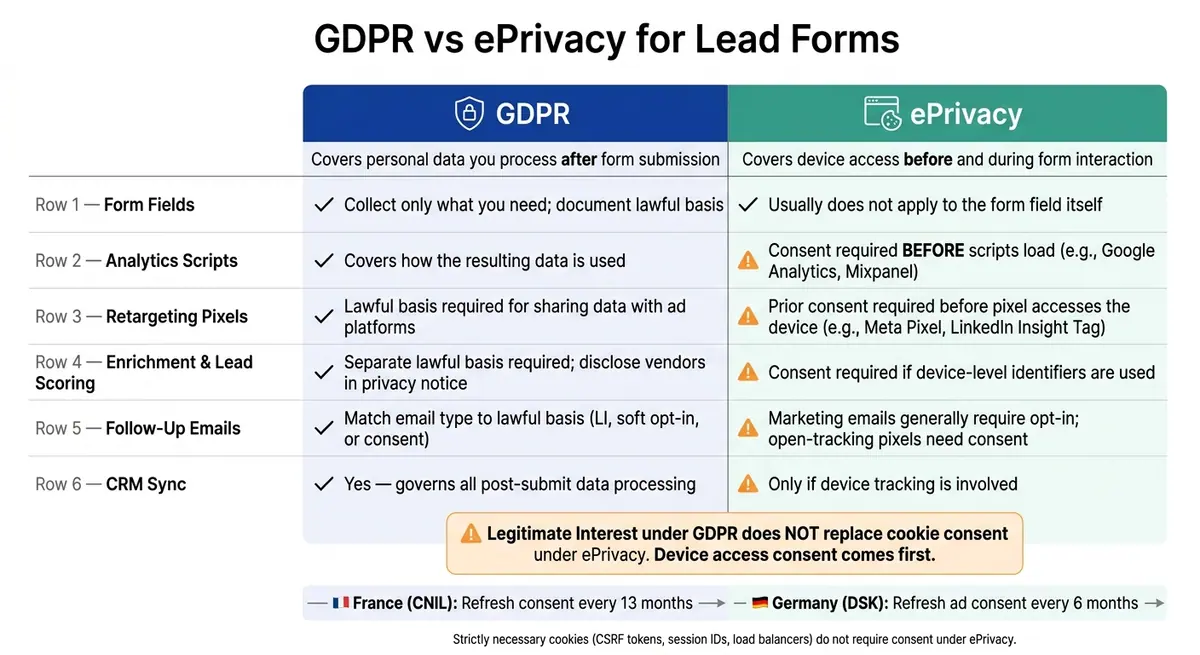
GDPR vs ePrivacy for Lead Forms: Side-by-Side Breakdown
Quick Comparison
| Area | GDPR | ePrivacy |
|---|---|---|
| Form fields | Covers submitted personal data | Usually does not apply to the field itself |
| CRM sync and follow-up | Yes | No, unless device tracking is involved |
| Enrichment and lead scoring | Yes | Yes, if device-level tracking is used |
| Analytics scripts | Covers later data use | Consent needed first |
| Retargeting pixels | Covers later data use and sharing | Consent needed first |
| Cookie banner rules | Indirectly related | Main rule set for device tracking |
My takeaway: keep form data, tracking consent, and email consent in separate lanes. If you do that, your lead flow is much easier to review, fix, and run without mixing rules.
sbb-itb-5f36581
GDPR rules for form fields, enrichment, and follow-up emails
Which lead form fields count as personal data and how much to collect
Under GDPR, personal data means any information tied to an identified or identifiable natural person. In a standard B2B lead form, that usually includes full names, business email addresses, direct phone numbers, and identifiers such as IP addresses or LinkedIn URLs.
The practical rule is simple: collect only the data you need to route the lead, send the asset, or respond to the request. If a field doesn’t serve one of those jobs, it probably shouldn’t be there. Once you've finished creating high-converting lead forms that are trimmed down, look at what happens after submission across the rest of your stack.
How enrichment tools and lead scoring fit under GDPR
If you append firmographic or contact data after someone submits a form, that counts as separate processing. That means it needs its own lawful basis, and you need to mention it in your privacy notice.
Lead scoring needs the same kind of care. If scoring changes the follow-up someone gets, disclose that automation and explain the basic logic behind it. And if that automation is what drives the decision, your privacy notice should name enrichment vendors as recipients and spell out what the scoring is used for.
You don’t need to make this harder than it has to be. Even without a formal register, it helps to keep an internal data inventory. That makes DSARs less messy and gives you a clearer view during vendor reviews.
Which lawful bases can support post-submission email flows
Each email should match its purpose, and the lawful basis should be as narrow as possible.
| Email Type | Lawful Basis | Key Requirement |
|---|---|---|
| Requested sales response | Contract / Legitimate Interest | Must be limited to the specific request |
| B2B prospecting | Legitimate Interest | Requires transparency and a clear opt-out |
| Existing customer nurture | Soft opt-in (where applicable) | Limited to similar products/services |
| Broad marketing nurture | Consent | Must be freely given, specific, and informed |
One common mistake is bundling everything together. If someone asks for an asset, don’t tie that request to behavioral tracking or unrelated nurture by default. Keep the request flow, tracking flow, and nurture flow separate, and document the lawful basis for each one.
ePrivacy rules for trackers, analytics, and retargeting around lead forms
Which cookies and pixels are strictly necessary and which are not
Once your form fields and post-submit handling are set, the next risk sits in what loads before someone clicks submit.
ePrivacy regulates what runs on a visitor's device before form submission. Without consent, only scripts that are strictly necessary for the requested service can run.
This rule applies to anything that stores data on a user's device or reads data from it. That includes HTTP cookies, LocalStorage, SessionStorage, tracking pixels, and browser fingerprinting. The main test is simple: is this tool needed for the form to work?
A small group usually passes that test. Session identifiers such as JSESSIONID, CSRF protection tokens, load balancer cookies, and security scripts can run without consent. Most other tools cannot. Google Analytics, the LinkedIn Insight Tag, the Meta Pixel, Hotjar, and A/B testing scripts all need prior consent before they load. They may help with measurement or marketing, but they are not needed for the form itself to function.
| Technology Category | ePrivacy Status | Common Examples |
|---|---|---|
| Session and security | No consent required | CSRF tokens, session IDs, load balancers |
| Analytics | Consent required | Google Analytics, Mixpanel, Adobe Analytics |
| Advertising & retargeting | Consent required | Meta Pixel, LinkedIn Insight Tag, Google Ads conversion tracking |
| Session recording | Consent required | Hotjar, FullStory, Microsoft Clarity |
What prior consent means for analytics and retargeting pixels
"Prior consent" means the script does not fire unless the user first takes a clear, affirmative action. That consent must be specific, informed, and just as easy to withdraw as it was to give.
This is where many setups go wrong. A banner that makes "Accept" easy but hides "Reject" behind extra clicks is asking for trouble. France's CNIL fined Google €150 million and Meta €60 million in 2022–2023 for exactly that issue: their cookie rejection flows were harder to use than their acceptance flows.
It's also worth clearing up a common point of confusion. Legitimate interest under GDPR does not cancel out ePrivacy's consent rule.
ePrivacy is the more specific law for device access, so it controls this part of the process. GDPR lawful bases matter for what happens after you collect the data, not for the initial act of placing or reading a tracker on the device.
How to keep the form working without non-essential tracking
Your form should still submit cleanly when a visitor rejects all non-essential cookies. That's the standard to aim for.
If your thank-you page still triggers a LinkedIn conversion event or a Meta Pixel event no matter what the user chose, that's a compliance issue.
The usual fix is pretty direct:
- Set your tag manager to block all non-essential scripts by default.
- Release those scripts only after your CMP sends a positive consent signal.
- Use server-side submission logs for conversion counts instead of client-side pixels.
That setup keeps measurement separate from consent-gated tags, which is exactly where you want it.
Email open-tracking pixels fall into the same general bucket because they access the recipient's device too, so they also need consent. That distinction matters when you're comparing form tracking with email tracking side by side.
ePrivacy vs GDPR for lead forms: side-by-side comparison
Where each law applies in the lead funnel
Once you separate the rules, the lead funnel gets a lot easier to map.
ePrivacy covers device access. GDPR covers the personal data you process after someone submits a form.
For demo requests, free trials, and gated content forms, that split matters in day-to-day work. ePrivacy can kick in the moment a non-essential script tries to read from or write to a visitor's device, even before they type a single thing. GDPR steps in once the lead’s details end up in your CRM.
The overlap starts when tracker data can be tied back to a known person. If an analytics tag or retargeting pixel collects device identifiers and those later connect to a lead record, both laws can apply at the same time.
Here’s the practical breakdown:
| Aspect | GDPR Requirements | ePrivacy Requirements |
|---|---|---|
| Form inputs (name, email, company) | Minimize fields and document your lawful basis | Usually not applicable to the form field itself |
| Enrichment tools | Lawful basis required for appending third-party data; profiling rules may apply | Consent required if the tool uses device-level identifiers to match the lead |
| Tracking and automation tags | Lawful basis required for processing the resulting personal data and for segmentation and outreach | Prior consent required before any non-essential tag reads or writes to the device |
| Retargeting pixels | Lawful basis required for sharing data with ad platforms | Prior consent required before the pixel accesses the device |
| Follow-up emails | Often relies on legitimate interest or soft opt-in; honor the right to object | Marketing emails usually require opt-in |
Use that split to check each part of the form setup against the right rule.
Why legitimate interest does not replace cookie consent
This is where many B2B and SaaS marketing or legal teams get tripped up.
They decide that legitimate interest works for their use case under GDPR, then assume that also gives them the green light for analytics scripts and retargeting tags. It doesn’t.
ePrivacy consent comes first for trackers. GDPR then covers the data those trackers produce. So even if legitimate interest may apply to post-submit processing in some B2B cases, it does not allow tracker access on its own.
Put simply: lawful basis for data use is one thing. Permission to access the device is another.
What this means for form design and marketing operations
A lead should be able to request a demo, download a whitepaper, or start a trial without being pushed into behavioral tracking. That’s why email opt-in and cookie choices need separate yes/no actions. You can’t bundle them together.
The practical result is pretty clear:
- Your cookie banner must give Reject All the same visibility as Accept All
- Your forms and follow-up workflows should show whether a lead agreed to marketing email consent, tracking consent, or both
- Your automation should honor the exact choices made on the page
Apply the same split when you review form fields, tags, and follow-up flows.
Implementation checklist and conclusion
A compliance checklist for B2B and SaaS teams
Use this checklist to turn the GDPR/ePrivacy split into form, CRM, and tracking controls.
Here’s a practical way to turn that legal split into an actual form setup:
- Audit form fields: Remove any field you don’t actively use downstream.
- Gate analytics, heatmaps, and retargeting scripts: Block all non-essential scripts until the user opts in via your consent banner.
- Fix your banner UX: Make Reject All as visible as Accept All.
- Separate transactional and marketing email flows, and assign a lawful basis to each.
- Store consent flags in your CRM for marketing email, tracking, or neither.
- Store consent records with a timestamp, pseudonymous ID, purpose, and banner version.
Consent expiry matters too. CNIL recommends refreshing consent after 13 months, while Germany's DSK recommends 6 months for advertising consent. Add that refresh cycle to your CMP setup now, not after an audit.
How Reform supports cleaner consent and data collection flows
A form builder should support these controls, not blur them.
Reform helps you collect only the fields you need. Multi-step layouts and conditional routing help limit personal data at the point of capture. Consent flags pass straight into your CRM and marketing tools, so your automations can follow the user’s choices. And the form can still submit without non-essential tracking. So if a visitor rejects analytics or retargeting scripts, they can still complete the form without extra friction.
Key takeaways
Once these controls are in place, the form can convert without mixing consent types.
The core idea is simple: separate consent types. Tracking consent, email consent, and data processing should each have their own lane. Then your systems need to respect the lane a lead picks.
FAQs
Can I use legitimate interest for demo follow-up but still need cookie consent?
Yes. These rules are separate, and legitimate interest does not override the ePrivacy Directive.
You may rely on legitimate interest under GDPR Article 6 to follow up on a demo. But if that follow-up, or any related activity on your site, uses cookies, tracking pixels, or similar device-based tools, you still need prior, informed consent under the ePrivacy Directive.
Which lead form tools are strictly necessary?
Under the ePrivacy Directive, the strictly necessary exception is narrow. For lead forms, it usually applies only to tools needed to deliver the service the user asked for, like session management and security.
That means tools used for analytics, advertising, retargeting, and cross-domain tracking are not strictly necessary. They need prior user consent.
Put simply, if the data collection goes beyond what’s needed to make the form work or keep it secure, you need an explicit, informed, and unambiguous opt-in.
How should I store and refresh consent choices?
Treat consent as an active, documented process, not a one-time setting. Keep a clear record of when and how someone gave consent. And as lead form data moves through your systems, make sure the related consent record, purpose limits, and retention safeguards move with it.
If you keep a record of a refusal so you don’t show the same prompt again and again, use a short-lived, non-unique flag or a local preference. Skip unique identifiers, and make withdrawing consent just as easy as giving it.
Related Blog Posts
Get new content delivered straight to your inbox

The Response
Updates on the Reform platform, insights on optimizing conversion rates, and tips to craft forms that convert.




Drive real results with form optimizations
Tested across hundreds of experiments, our strategies deliver a 215% lift in qualified leads for B2B and SaaS companies.
