
.webp)
Advanced Consent Analytics for Lead Forms


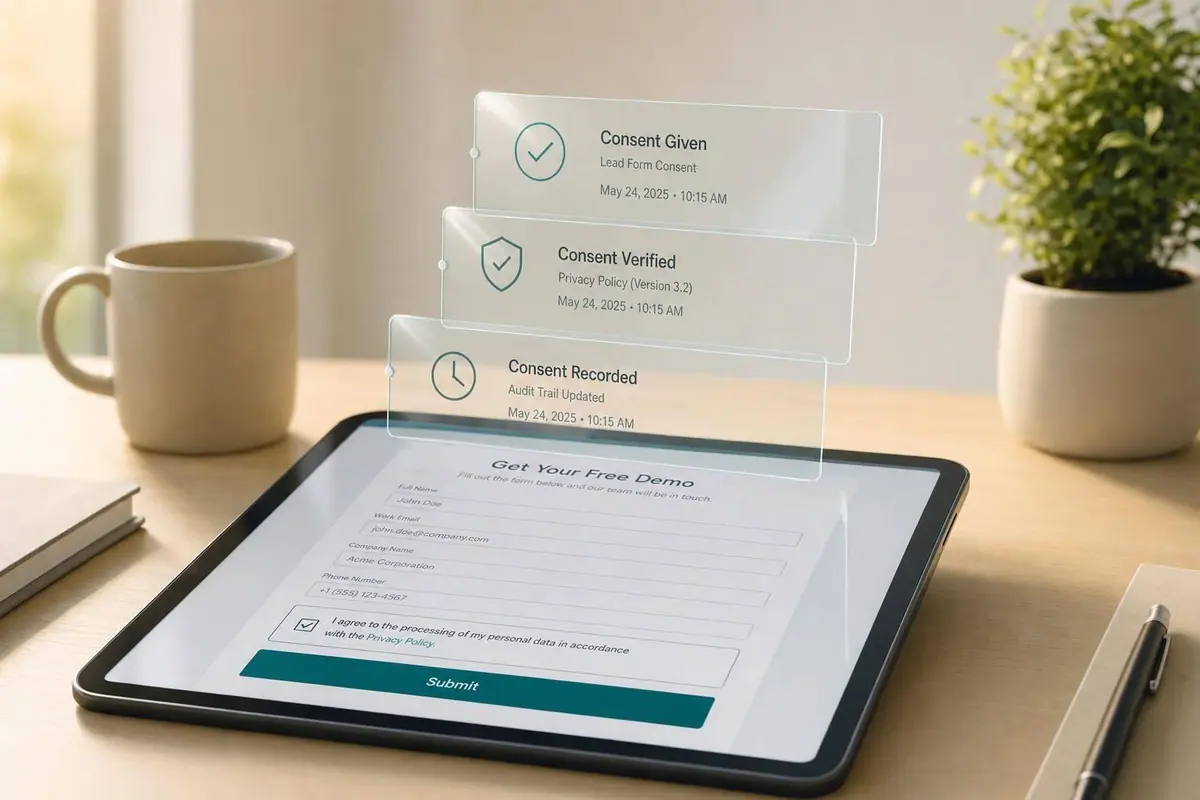
More leads do not always mean more people you can contact. If I only track form fills, I miss the part that decides whether a lead is usable: consent.
Here’s the short version: I need to track who said yes, what they agreed to, when they agreed, where they came from, and whether that consent still stands. That helps me do two things at once: improve lead quality and cut contact risk.
Right away, this article shows me how to:
- track consent events next to form starts, drop-off, and submissions
- measure contactable lead rate, valid consent rate, and no-choice rate
- break consent data down by channel, source, device, and state
- compare campaigns by usable leads, not just raw volume
- keep records, logs, and suppression data in sync for audit checks
A few points stand out:
- A campaign can bring in high submission volume and still perform poorly if only a small share of leads can be contacted.
- A jump in drop-off on the consent step often points to checkbox placement or wording, not form length.
- For U.S. teams, proof fields such as timestamp, disclosure version, seller name, phone number, and source URL matter if consent is challenged later.
- If I review consent trends before and after a form change, I can spot whether a copy update cut complaints or just hurt opt-ins.
In simple terms, the article treats consent like part of conversion data, not a legal footnote. That means I’m not just asking, “Did the person submit?” I’m also asking, “Can my team show proof and contact this person through the right channel right now?”
| Focus Area | What I’m Looking For |
|---|---|
| Form performance | starts, submissions, drop-off |
| Consent behavior | opt-in, opt-out, no interaction, preference changes |
| Lead usability | valid consent rate, contactable lead rate |
| Campaign quality | which sources send leads I can use |
| Recordkeeping | proof fields, audit trail, suppression sync |
If I want lead forms to produce leads that sales and marketing can safely use, this is the data I need to track.
How to Setup ActiveProspect TrustedForm With Your LeadForm to Certify Your Lead’s Consent
sbb-itb-5f36581
Track consent events alongside form conversion events
Track consent events as closely as you track form starts and completions. Most teams don't give consent actions their own events, and that leaves a blind spot. You can't tell if people dropped off because the form felt too long or because the consent language made them pause.
After you decide what to store, track the actions that create those records.
Consent events to capture on every lead form
A good consent event model treats each consent-related action as its own trackable moment in the form flow. At a minimum, every lead form should fire events for five core interactions: the initial form load (onFormLoaded), any checkbox or preference interaction (onInputChanged), step progression (onPageChanged), pre-submit (onPageSubmitted), and the final completed submission (onFormCompleted). If a user moves forward without checking a required consent box, an onValidationFailed event should fire too. That's a direct sign of consent friction.
Each event also needs the same core fields if you want the data to mean anything: form ID, block ID, step number, and the policy version shown at the time of the click. Log the affirmative click itself. Default states are not proof of consent.
| Event | When It Fires | Key Fields |
|---|---|---|
onFormLoaded |
First page loads | form.id, source_url, timestamp, device_type |
onInputChanged |
User checks or unchecks a consent box | block.id, answer, page.id, step_number |
onPageChanged |
User advances to the next step - confirms consent was not a blocker | page.pageNumber, previous_page_id |
onPageSubmitted |
Pre-submit, before backend save | answers, policy_version, region, user_agent |
onFormCompleted |
Record saved and success shown | submission.id, occurred_at, ip_address, region |
onValidationFailed |
Required consent is not met on submit | block.id, error_message, device_type |
Connect consent actions to drop-off and submission rates
Once consent events fire alongside conversion events, you can calculate rates that show how consent design shapes user behavior. The consent interaction rate tells you how often users engage with a consent element. The compliant consent rate shows the share of completed submissions that include auditable, policy-compliant consent. And the consent-step abandonment rate shows whether users are leaving because of what appears on that step.
For multi-step forms, compare abandonment rates on the step right before and right after consent elements appear. If drop-offs jump on the step where consent checkboxes show up, the problem is usually placement or wording, not form length. That's a big difference.
You can also study checkbox-toggle patterns. If users keep revising their email field after reading the consent text, that may mean the wording is making them second-guess how their data will be used. In that case, shorter and clearer consent copy with a stronger value message can ease that hesitation.
Use no-code tracking to cut engineering dependency
Building a consent event schema from scratch often takes developer time. Someone has to wire up tag managers, write custom JavaScript, and keep the tracking logic working every time the form changes. Reform sends structured consent events into your analytics stack without custom code, which cuts engineering dependency. Reform's incomplete response tracking also records data from users who start a form but leave before finishing, which matters if you're trying to analyze consent-related drop-off patterns.
With those events in place, you can segment consent performance and spot where compliance and conversion pull in different directions.
Build segmented reporting and opt-in trend analysis
Once you capture consent events, break them out by source, device, and jurisdiction. That helps you separate compliance risk from conversion performance. With tracking set up, the next move is to compare consent performance by segment. This shows which leads are actually contactable, not just which ones filled out the form.
Segment consent by channel, source, device, and jurisdiction
Start with these core consent segments: Email + SMS consented, Email only consented, SMS only, No marketing consent, Withdrawn consent, and Unclassified consent. Each one tends to behave differently later on. Leads with Email + SMS consented give teams more follow-up options, so they usually need their own reporting line. Track No marketing consent on its own too, because it can reveal weak consent UX by source.
Use those fields to report:
- Opt-in rate
- Valid consent rate
- Unsubscribe rate
- Complaint rate
Run those reports across paid search, paid social, organic search, referral, affiliate, and direct traffic. Then do the same by device type. Mobile traffic often shows lower opt-in rates when checkboxes or disclosure text are hard to read or tap on small screens. That usually points to a UX problem, not a traffic-quality problem. For U.S. compliance, group leads by state or by compliance cluster so legal teams can spot where stricter consent language or different review rules may be needed.
Use the same segment cuts over time. That way, you can tell whether a change improved consent quality or just cut volume.
Analyze opt-in trends before and after form changes
Any time you update consent copy, move a checkbox, or add a disclosure, use trend reporting to measure what happened. Track opt-in rate, valid consent rate, opt-out rate, and complaint rate daily or weekly. Then set a clear change window around each form or disclosure update and compare the four weeks before with the four weeks after. That helps limit seasonality noise.
A clear, explicit consent disclosure may lower opt-in rate a bit while lifting valid consent rate and cutting complaint volume. In most cases, that’s a fair trade. On the other hand, if opt-in rate drops hard and there’s no gain in valid consent or complaints, the new copy may be pushing people away without doing much for compliance. Complaints per delivered message are especially useful to watch here.
Compare segments and time periods with tables
Two tables help turn consent analytics into something teams can act on. The first compares consent segments against the metrics tied to lead quality and risk. The second shows what changed after a form update.
| Consent Segment | Opt-in Rate | Submission Rate | Unsubscribe Rate | Complaint Rate |
|---|---|---|---|---|
| Email + SMS Consented | Above benchmark | Above benchmark | Below benchmark | Below benchmark |
| Email Only Consented | Near benchmark | Above benchmark | Near benchmark | Near benchmark |
| No Marketing Consent | Not applicable | Near benchmark | Not applicable | Not applicable |
Keep SMS only, Withdrawn consent, and Unclassified consent as separate drill-down states in the dashboard, even if they don’t appear in the summary table.
| Metric | Baseline | After Change | Variance |
|---|---|---|---|
| Total Leads | Baseline | After change | - |
| Valid Consent Rate | Baseline | After change | - |
| Form Abandonment Rate | Baseline | After change | - |
| Complaint Rate | Baseline | After change | - |
This kind of pre/post view makes the trade-off easy to see: Did total lead volume shift, and did valid consent rate and complaint rate move in the right direction after the disclosure update? Reform's real-time analytics and form variant tagging make these comparisons easier.
Carry these segment views into campaign dashboards so source-level patterns stay visible at the campaign level.
Build campaign-level consent dashboards and compliance views
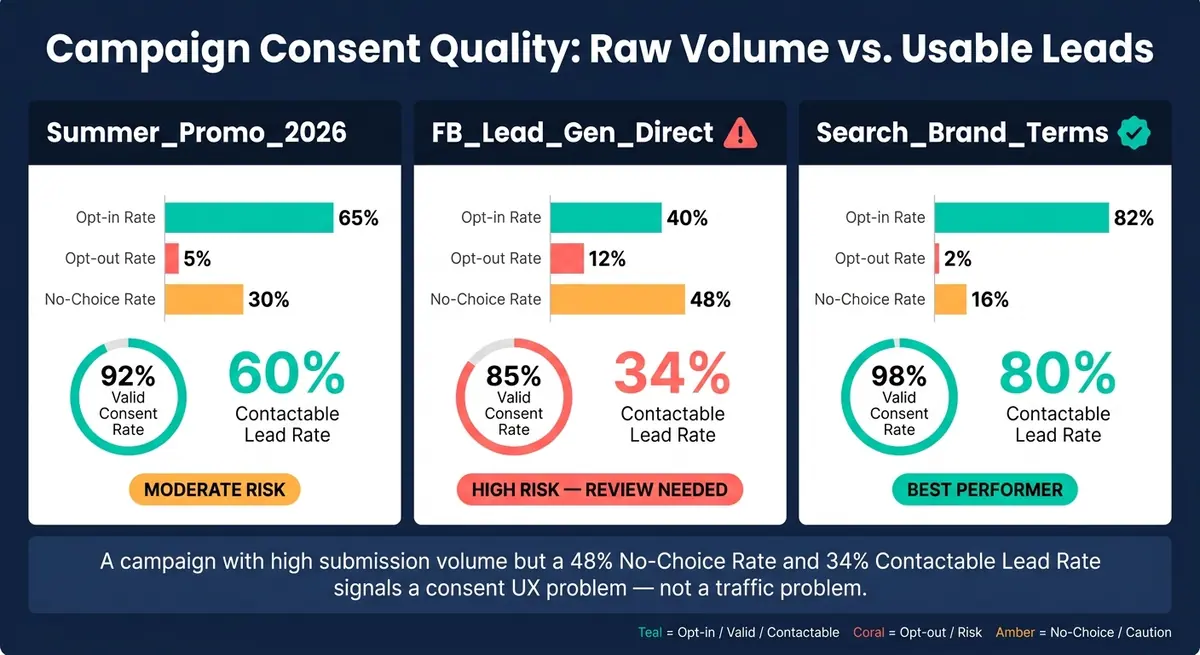
Campaign Consent Quality Comparison: Raw Volume vs. Usable Leads
Bring segment-level consent data into campaign dashboards so you can see which sources bring in leads you can actually use. Raw submission volume only tells part of the story. A campaign can look strong on paper and still hand you a pile of leads that sales can't safely contact.
That’s why it helps to compare campaigns by valid consent rate and contactable lead rate, not just total form fills. With form-level event tracking, it’s much easier to connect consent behavior with acquisition data and spot where things start to break.
Measure consent quality by campaign and landing page
Track these metrics by campaign, landing page, and traffic source:
- impressions
- clicks
- visits
- submissions
- opt-in rate
- opt-out rate
- no-choice rate
- valid consent rate
- contactable lead rate
The no-choice rate shows how many users loaded the form and never interacted with the consent field. When that rate is high, the issue usually isn’t traffic quality. It usually means the disclosure is hidden, skipped, or not rendering the way it should. And once consent proof gets weak, those submissions stop being leads and start becoming outreach risk.
Monitor U.S. compliance requirements in campaign reporting
Under the FCC's updated TCPA framework, each consent record must name one seller, match the offer that prompted consent, and identify the covered phone number. Store the disclosure text, seller name, phone number, and timestamp for every record.
If a campaign sends leads to multiple sellers, report each seller on its own. Don’t lump them together. You should also add opt-out processing status and suppression-list sync status to the dashboard so teams can catch problems before leads move downstream.
Add tables for campaign comparison and regulatory mapping
Two tables make campaign-level consent analysis much easier to act on.
The first compares campaigns on the metrics that show the gap between raw volume and usable leads:
| Campaign/Landing Page | Opt-in Rate | Opt-out Rate | No-Choice Rate | Valid Consent Rate | Contactable Lead Rate |
|---|---|---|---|---|---|
Summer_Promo_2026 |
65% | 5% | 30% | 92% | 60% |
FB_Lead_Gen_Direct |
40% | 12% | 48% | 85% | 34% |
Search_Brand_Terms |
82% | 2% | 16% | 98% | 80% |
A campaign like FB_Lead_Gen_Direct above should trigger a review even if its raw submission count looks acceptable. The mix of a low opt-in rate, high opt-out rate, and low contactable lead rate points to a consent UX problem, not a traffic problem.
The second table maps regulations to the proof elements and reporting fields your dashboard needs to cover:
| Regulation | Jurisdiction | Required Proof Elements | Key Reporting Metrics |
|---|---|---|---|
| TCPA / FCC consent rules | U.S. (Federal) | Seller name, covered phone number, disclosure text, electronic signature, timestamp | One-to-one consent rate, valid consent rate, timestamp completeness |
| CCPA / CPRA | U.S. (California) | Notice at collection, opt-out status, suppression-list status | Opt-out rate, suppression processing time, disclosure version ID |
| GDPR | EU / UK | Affirmative action, specific purpose, withdrawal method | Opt-in rate, interaction timestamp, withdrawal rate |
| E-SIGN Act | U.S. (Federal) | Intent to sign electronically, access demonstration, record retention | Electronic signature confirmation, record completeness flag |
Use exception reporting to flag any lead record that’s missing a required field before it reaches sales teams and dialers. Those same fields should also feed audit logs and retention rules.
Keep audit-ready consent records and governance processes
Once reporting tells you which leads are safe to contact, the next job is keeping the proof behind each one in good shape.
Store the fields needed to prove valid consent
A defensible consent record is more than a checked box.
You need to store the disclosure text, version ID, seller/controller, consent scope, timestamp, source URL, campaign ID, IP address, and user agent.
For higher-risk use cases, it also helps to keep the affirmative action itself. That could be a checkbox click, a typed name, or a signature event. If the person later opts out, changes channel preferences, or withdraws consent, link those updates to the same person ID. That way, the full lifecycle stays visible in one place.
Compliance teams should be able to search these records by person, purpose, and date without digging through multiple systems.
Use audit logs, retention rules, and system reconciliation
After capture comes control.
Every change to a consent record - an opt-out, a preference update, or a disclosure version change - should be written as a new event, not replaced. This append-only setup gives auditors a clear timeline of what happened and when. Manual admin changes to consent states should be limited to approved users, and each change should log the actor, system origin, and method.
For retention, use a time window set by legal and policy rules. Keep records long enough to prove consent, but not past the limit your policy sets. Put those rules into a formal data governance policy, then apply archiving the same way across every system that stores consent data:
- form platform
- CRM
- email provider
- data warehouse
Reconciliation is what keeps all of that from drifting apart.
A daily or weekly job that compares consent status in your source of truth against your email platform and CRM suppression lists can catch gaps before they turn into outreach violations. That stops sales and marketing from acting on stale consent status. Governance dashboards should track mismatch rates, time-to-resolution, and opt-out enforcement time targets. If there’s drift between your consent master and activation tools, marketing ops needs to see it before a campaign goes live.
Conclusion: Use consent analytics to improve lead quality and lower compliance risk
When the record, the logs, and the reconciliations are all in place, consent analytics does two jobs at once: it helps show conversion quality, and it gives you an audit trail.
The day-to-day payoff is simple: fewer uncontactable leads, lower outreach risk, and a faster response when an audit comes in.
FAQs
How do I measure contactable lead rate?
Measure your contactable lead rate by looking at the share of total form submissions that include valid, documented consent for marketing communications.
With Reform’s Google Tag Manager integration, you can track successful submissions and compare:
- total form completions
- submissions where the consent field was clearly accepted
That gives you a clean view of how many leads you can actually contact.
Just as important, keep solid audit records. If someone asks how consent was collected, you need a paper trail. Good records help confirm your contactable database and back up your compliance work.
Which consent fields should I store?
Store the key details you need to prove consent at the moment of submission: a unique user ID, the exact timestamp, and the specific version of the privacy notice or terms the person saw.
You should also keep a version history of your consent statements. That way, if you ever need to verify consent, you can show exactly what the user agreed to at that time.
Hold on to these records for as long as you process the data, plus a reasonable period after that.
How can I spot consent-related drop-off?
Look at which form fields people abandon most often, with extra attention on consent checkboxes and privacy disclosures. If users leave at that point, there’s a good chance your opt-in wording or form layout is adding friction.
Keep consent clear and short. In Reform, a simpler consent flow and less legal jargon can help preserve trust and reduce abandonment.
Related Blog Posts
Get new content delivered straight to your inbox

The Response
Updates on the Reform platform, insights on optimizing conversion rates, and tips to craft forms that convert.




Drive real results with form optimizations
Tested across hundreds of experiments, our strategies deliver a 215% lift in qualified leads for B2B and SaaS companies.
