
.webp)
How Real-Time Consent APIs Help with ePrivacy Compliance



Real-time consent APIs are transforming how businesses comply with the EU's ePrivacy Directive. If your website uses cookies or tracks users in the European Union, you’re required to get clear, upfront consent before collecting non-essential data. These APIs make managing consent simpler and faster by instantly updating and syncing user preferences across your entire tech stack.
Key Takeaways:
- What the ePrivacy Directive Covers: It regulates cookies, trackers, and any data stored on user devices, requiring prior consent for non-essential tools like analytics or advertising pixels.
- How Real-Time Consent APIs Work: They provide live consent updates to ensure tools like Google Analytics or CRM platforms respect user choices immediately.
- Why They Matter: Outdated or disconnected consent systems can lead to compliance risks. Real-time APIs prevent this by syncing consent changes instantly across all systems.
- Challenges They Solve: Avoids unauthorized tracking, ensures CRM and analytics tools stay aligned, and simplifies consent management for lead generation forms.
How to Use WP Consent API with ConsentMagic - WordPress Guide
Mapping Consent Across Your Lead Generation Stack
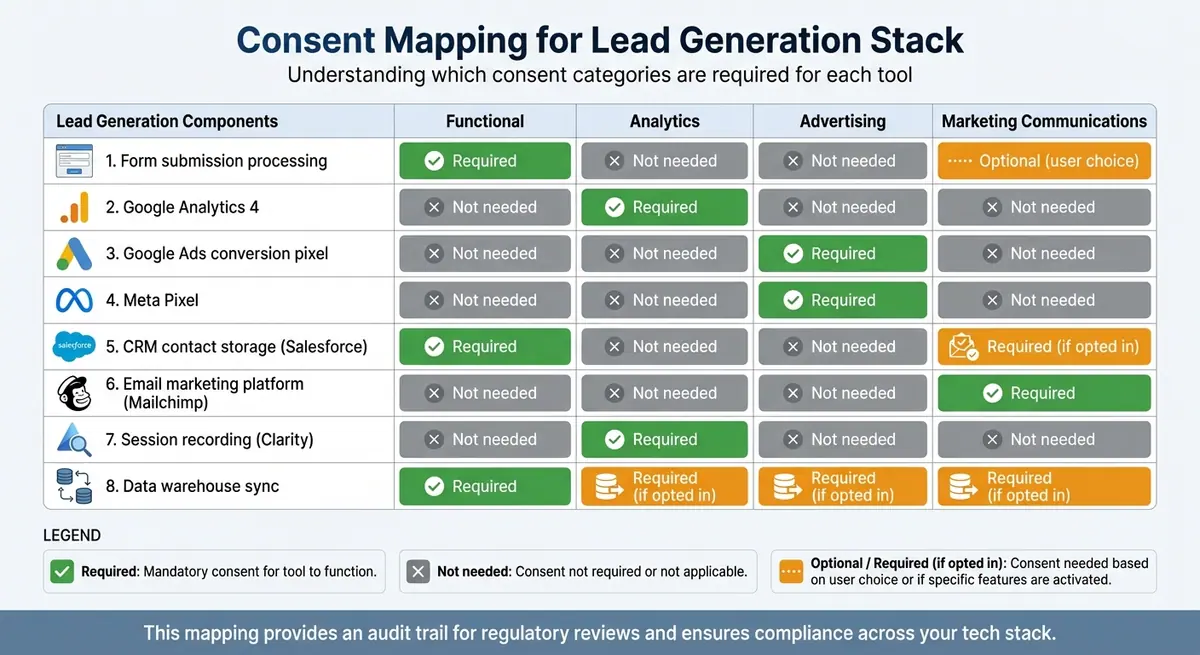
Consent Mapping Table: Lead Generation Tools and Required Consent Categories
To keep your lead generation tools in sync with real-time user preferences, it's crucial to map out every consent point in your system. Start by auditing your tools - from JavaScript trackers to CRM platforms - to understand how user consent flows through your stack. This mapping ensures that every update reflects the choices users make. After identifying these points, categorize consent types to align each tool with the necessary level of control.
Understanding Consent Categories
The ePrivacy Directive outlines specific consent categories based on how data is collected and used:
- Functional consent: Covers essential technologies like shopping carts or login sessions. Since these are critical for your site’s functionality, they don’t require explicit user permission.
- Analytics consent: Applies to tools like Google Analytics 4 and session recording platforms, which track user behavior for statistical purposes.
- Advertising consent: Governs technologies such as marketing pixels and retargeting tags used for ad targeting and user profiling.
- Marketing communications consent: Covers promotional outreach, including email campaigns and third-party data sharing.
Each category has a direct impact on your lead generation stack. For example, forms may require checkboxes for marketing communications opt-ins. Analytics platforms like Google Analytics 4 need to respect analytics_storage consent settings. Similarly, ad pixels from platforms like Google Ads or Meta must wait for ad_storage consent before activating. Your CRM, email tools, and data storage systems also need to adhere to these preferences immediately upon capture.
Connecting APIs for Real-Time Consent Updates
Modern consent management platforms (CMPs) automate the process of keeping consent data consistent across your tools. For instance, Usercentrics CMP integrates seamlessly with Google Consent Mode, ensuring that user preferences are communicated to Google services. This integration adjusts tag behavior for analytics and advertising in real time. Tag managers like Google Tag Manager play a key role here by reading consent states and conditionally activating tags.
It’s a good idea to define default consent states for each category before any tracking scripts load. When a user interacts with your consent banner, the CMP updates these states immediately and broadcasts the changes across all connected tools. This ensures uniform enforcement of consent preferences, whether the user is on a desktop or mobile device.
For platforms like Salesforce, Marketo, or Mailchimp, webhooks can push consent updates in real time. This prevents outdated data from causing issues - like sending marketing emails to users who have opted out. These real-time connections simplify consent mapping and ensure compliance across your tools.
Consent Mapping Table
Using a consent mapping table can help you visualize how consent categories influence the behavior of each tool in your lead generation stack. It provides an audit trail that’s invaluable for regulatory reviews.
| Lead Generation Component | Functional | Analytics | Advertising | Marketing Communications |
|---|---|---|---|---|
| Form submission processing | Required | Not needed | Not needed | Optional (user choice) |
| Google Analytics 4 | Not needed | Required | Not needed | Not needed |
| Google Ads conversion pixel | Not needed | Not needed | Required | Not needed |
| Meta Pixel | Not needed | Not needed | Required | Not needed |
| CRM contact storage (Salesforce) | Required | Not needed | Not needed | Required (if opted in) |
| Email marketing platform (Mailchimp) | Not needed | Not needed | Not needed | Required |
| Session recording (Clarity) | Not needed | Required | Not needed | Not needed |
| Data warehouse sync | Required | Required (if opted in) | Required (if opted in) | Required (if opted in) |
Google Tag Manager’s "Consent Overview" page offers a similar high-level view, enabling you to manage consent settings across all tags. When a user updates their preferences, every tool linked to the relevant consent category adjusts automatically - eliminating the need for manual intervention.
Setting Up Real-Time Consent APIs for Client-Side Tracking
After mapping consent preferences across your tools, the next step is ensuring your browser-based tracking systems respond instantly to user consent updates. Whether you're dealing with analytics scripts or advertising pixels, client-side tracking must respect user preferences as soon as they're set or adjusted. To achieve this, you'll need to integrate your Consent Management Platform (CMP), tag manager, and tracking tools. These updates ensure your tracking setup aligns immediately with user consent, laying the groundwork for compliance and seamless functionality.
Selecting a Consent Management Platform (CMP)
For real-time client-side tracking, it's essential to choose a CMP that supports immediate updates. Look for platforms with JavaScript APIs for live consent changes, webhooks to send consent data to external systems, and audit logs to document every user interaction. These features not only streamline your operations but also provide evidence of compliance during any regulatory audits.
Additionally, prioritize CMPs that work effortlessly with Google Consent Mode. This integration ensures your tracking stack can leverage real-time API functionality while maintaining compliance.
Configuring Tag Managers for Consent
Google Tag Manager (GTM) has built-in tools to handle consent management effectively. Start by setting default consent states using the gtag('consent', 'default', …) command before any tracking scripts load. Tailor these defaults to specific regions, like ['US-CA', 'GB'], to meet local requirements.
The Consent Initialization Trigger in GTM is key - it fires before all other triggers, including standard initialization events. Assign your CMP tag to this trigger to ensure consent settings are established as early as possible in the page load process. For tags with built-in consent checks, GTM automatically adjusts their behavior based on the user's preferences. For other tags, use the "Additional Consent Checks" feature under Advanced Settings to specify which consent types must be granted before the tag activates. These steps integrate the consent API into your tracking system, ensuring compliance with privacy regulations.
"Google Consent Mode allows websites to adjust the Google tag behavior based on user consent for ads and analytics, ensuring compliance with laws like the DMA."
- Tilman Harmeling, Senior Expert, Privacy at Usercentrics
If your consent banner loads asynchronously, use the wait_for_update parameter (set in milliseconds) in your default consent command. This delay gives the CMP enough time to update the consent status before any tags fire, preventing accidental data collection. These configurations create a solid foundation for secure and dynamic consent handling, which is crucial for managing real-time updates.
Managing Consent Changes in Real Time
When users modify their consent preferences, use the gtag('consent', 'update', …) command or GTM's updateConsentState API to adjust all tags immediately.
If consent is granted, full measurement data becomes available, improving conversion modeling and tracking accuracy. For scenarios where ad_storage is denied, enable URL passthrough (url_passthrough: true) to transfer ad click and session data via URLs without relying on cookies.
Trigger updates as early as possible to minimize data loss. Additionally, the Consent Overview page in GTM provides a centralized dashboard for monitoring and editing consent settings across all tags. This tool simplifies compliance management as your tracking setup evolves, ensuring your system stays efficient and up-to-date.
sbb-itb-5f36581
Setting Up Real-Time Consent APIs for Server-Side Workflows
Backend systems need their own consent management layer to ensure user preferences are respected. Server-side workflows - such as data pipelines, conversion APIs, and third-party integrations - handle user data outside the browser, making them invisible to client-side consent tools. If server-side handling isn’t properly configured, you could end up processing data for users who have opted out, leading to compliance issues that client-side solutions alone cannot resolve.
Building a Consent State Service
To manage consent effectively on the backend, you’ll need a service to store and retrieve user preferences. Start by designing a data model that captures essential consent details, such as a boolean status, category mappings (true, false, or "Auto"), and a timestamp. Optionally, you can include signals like Global Privacy Control (GPC) and Do Not Track (DNT).
Develop GET and POST endpoints to retrieve and update consent data. When a user confirms their choices on the client side, use your consent management platform's JavaScript API to fetch that data and send it to your backend. For users logging in from new devices, retrieve their stored preferences to maintain a consistent experience across sessions. To handle discrepancies between client-side and server-side data, create a reconciliation strategy - this might involve opting users out by default when conflicts arise, using the most recent timestamp as the authoritative source, or prioritizing backend data. Use session authentication methods, like JWT tokens, to securely link consent data to user accounts.
These components form the backbone for applying consent rules across all backend workflows.
Adding Consent Checks to Data Pipelines
Once your consent state service is operational, integrate consent checks into all server-side processes, including advertising, analytics, CRM, and email tools. For example, before sending conversion data to platforms like Google Ads or Facebook Ads, query your consent service to confirm the user has granted permission for advertising. Apply the same checks to analytics pipelines, CRM updates (e.g., Salesforce or Marketo), and email tools like Mailchimp.
For third-party systems, use their Data Subject Request (DSR) APIs to communicate user opt-out preferences, ensuring that even previously shared data aligns with current consent choices. On the client side, set up event listeners to detect consent changes and trigger immediate updates to your server-side state, keeping everything in sync. Platforms such as OneTrust offer server-side APIs that handle consent processing directly on the server, which can be especially useful for devices with limited storage or processing power.
By understanding these backend processes, it becomes clear how combining client-side and server-side consent strategies can provide stronger compliance and user preference enforcement.
Client-Side vs. Server-Side Consent Handling
The differences between a client-only approach and a combined client-server setup can help determine the best architecture for your needs. Here’s a comparison:
| Aspect | Client-Side Only | Combined Client-Plus-Server |
|---|---|---|
| Consent Storage | Browser storage | Browser and backend database |
| Cross-Device Sync | No - consent resets on new devices | Yes - preferences follow authenticated users |
| Anonymous Users | Fully supported | Supported until login |
| Backend Enforcement | Not available | Full server-side consent checks |
| Compliance Coverage | Limited to browser tracking | Covers the entire data stack |
| Data Quality | Potential gaps for known users | Consistent enforcement across all touchpoints |
For anonymous visitors, client-side consent management might be enough. However, for authenticated users - especially in jurisdictions with regulations like CPRA - a combined approach ensures that preferences apply across devices and cover all forms of data processing, not just browser-based activity.
In setups using Google Consent Mode, client-side banners send consent choices via HTTP to server containers. This allows consent-aware tags, like GA4 and Google Ads, to adjust their behavior. For instance, if analytics_storage is denied, cookieless pings can replace full tracking.
Using Real-Time Consent in Form-Based Lead Generation
Forms are a cornerstone of most lead generation workflows, making them a key player in consent management. These forms not only collect essential information like names and emails but also capture users' consent preferences. By incorporating real-time consent APIs, you can manage and adapt consent dynamically as users interact with your forms. This ensures compliance with regulations while maintaining a seamless user experience.
Adding Consent Options to Forms
To comply with ePrivacy and GDPR standards, forms must collect explicit and specific consent from users. Forget about pre-checked boxes - those are a no-go. Instead, provide clear, easy-to-understand consent options, allowing users to decide what they’re agreeing to. Whether it’s signing up for a newsletter, enabling analytics tracking, or opting into personalized ads, users should have full control over their choices.
Each form submission should include consent metadata, such as category statuses, timestamps, and the consent text displayed to users. When a user submits a form, the consent management platform's JavaScript API can fetch the current consent state and attach it to the lead data. This bundled information is then sent to your CRM or marketing automation platform.
For instance, you can tag submissions based on individual consent selections, ensuring that only the relevant tracking tools are activated. The goal is to make sure consent preferences are respected throughout your entire lead generation process - from the initial form submission to CRM updates and email marketing workflows.
How Reform Supports Consent-Aware Forms
Once consent options are integrated into your forms, tools like Reform can simplify compliance and optimize performance. Reform's no-code form builder makes it easy to create forms that align with real-time consent requirements. It extends the real-time updates discussed earlier into your lead generation pipeline.
One standout feature is conditional routing, which adjusts form behavior based on user choices. For example, you can display a custom thank-you page or trigger specific integrations depending on whether a user opts into marketing communications.
Reform also offers seamless integrations with CRM and marketing tools like HubSpot, Salesforce, and ConvertKit. By connecting Reform to your consent management platform, you can automatically attach consent data to each submission. This ensures your sales team knows exactly what permissions each lead has granted, and your marketing workflows stay within those boundaries.
Additionally, Reform's real-time analytics let you track how consent choices impact conversions. If you notice certain consent language is causing drop-offs, you can tweak your form copy and test alternatives using Reform's A/B testing functionality. With custom CSS and JavaScript support, you can directly integrate your consent management platform’s banner and API into your forms, ensuring real-time updates as users interact.
Testing Form Compliance
Before launching your form, it’s crucial to verify that non-essential tracking remains disabled until users provide explicit consent. Start by opening your form in a private browsing window and using your browser's developer tools to see which scripts are firing before any consent is given. If advertising or analytics tags are loading prematurely, you’ll need to adjust your tag manager or consent mode settings.
Next, test the complete submission process. Try different consent combinations - accept all, reject all, or select specific categories - and confirm that the correct consent metadata is being sent to your CRM or marketing platform. Use API logs or webhook inspection tools to ensure consent signals are accurately captured.
Finally, maintain detailed audit logs and consent records that include timestamps and the exact consent text shown to users. These logs are crucial for demonstrating compliance during audits or responding to data subject access requests. While most consent management platforms generate these logs automatically, it’s a good idea to periodically export and review them to ensure everything is in order. As a final step, double-check that real-time preference updates are properly syncing across all connected systems.
Conclusion
Real-time consent APIs play a key role in meeting ePrivacy requirements while fostering user trust. By integrating these APIs into both client-side and server-side systems, you can create a responsive consent framework that aligns with user preferences instantly. This ensures tracking scripts only activate when permitted, data flows respect user choices, and your lead generation processes remain compliant with legal standards.
Think of consent as an ongoing dialogue with your users. Allow them to review and adjust their preferences in real time, with updates syncing seamlessly across all systems. This kind of transparency not only satisfies regulatory demands but also deepens trust between your brand and your audience.
Forms raise the stakes even further. Every form submission represents a potential customer, and mishandling consent can harm both your reputation and revenue. By connecting your consent management platform with your form builder and CRM, you can create a compliant and efficient lead generation system that bridges technical and marketing needs.
Before deploying any forms or tracking tools, double-check that non-essential scripts stay blocked until users give explicit consent. Keep detailed audit logs with timestamps to document every consent decision - these records can be critical during audits or when responding to data subject access requests.
Real-time consent APIs strike a balance between regulatory compliance and business objectives, enabling privacy-respecting data collection while turning compliance into an advantage.
FAQs
What are real-time consent APIs, and how do they help businesses comply with ePrivacy regulations?
Real-time consent APIs give businesses the ability to instantly check and confirm a user’s consent status. This ensures that data collection or processing only happens when proper consent is in place. By automating consent verification and maintaining up-to-date audit trails, these APIs help companies align with the requirements of the ePrivacy Directive.
Using real-time consent APIs can improve transparency, strengthen user trust, and reduce the risk of non-compliance. They also enable features like dynamic content blocking, ensuring no data is collected without clear and explicit user approval.
What’s the difference between client-side and server-side consent management?
Client-side consent management takes place directly in the user’s browser. A Consent Management Platform (CMP) gathers the user's preferences and stores them locally, typically in a cookie or local storage. This setup allows for instant enforcement of opt-in or opt-out rules for browser-based activities. However, it can face challenges from privacy-focused browsers, ad-blockers, or other client-side restrictions. Additionally, it only applies to requests that originate directly from the webpage.
On the other hand, server-side consent management handles the process on the backend. Here, user consent is sent to a centralized server where it’s stored and verified via an API before any personal data is processed. This approach is less vulnerable to client-side blockers, supports synchronization across multiple devices, and is compatible with full-stack workflows. That said, it can add latency, depends on API calls, and requires a more complex setup.
Each method offers distinct advantages, and they are often combined to achieve a balance between instant browser-level enforcement and reliable backend functionality.
How can I make sure my lead generation forms comply with ePrivacy regulations?
To make sure your lead generation forms align with ePrivacy regulations, use a real-time consent API. This tool should capture clear, specific consent from users. Steer clear of pre-checked boxes and allow users to opt in for particular purposes without confusion. The system must also log key details like who gave consent, the time it was given, and the intended purpose.
On top of that, make it easy for users to withdraw or update their consent whenever they choose. By following established consent management guidelines from regulatory authorities, you'll not only stay compliant but also build stronger trust with your audience.
Related Blog Posts
Get new content delivered straight to your inbox

The Response
Updates on the Reform platform, insights on optimizing conversion rates, and tips to craft forms that convert.




Drive real results with form optimizations
Tested across hundreds of experiments, our strategies deliver a 215% lift in qualified leads for B2B and SaaS companies.
