
.webp)
Ultimate Guide to Consent Preferences Management



Managing consent preferences is essential for businesses to comply with data privacy laws like GDPR and CCPA, avoid hefty fines, and build trust with users.
- GDPR (EU): Requires explicit opt-in consent before data collection. Using multi-step forms can help break down these requests to avoid overwhelming users. Users must actively agree, and withdrawing consent must be simple.
- CCPA (California): Uses an opt-out model. Data collection is allowed by default, but users must have a clear way to opt out of data sales or sharing.
- Fines and Risks: GDPR violations can cost up to €20 million or 4% of global revenue, while CCPA fines can reach $7,500 per violation.
- User Trust: 89% of consumers are loyal to brands that prioritize data transparency. Poor consent management can lead to legal issues and loss of customer confidence.
Key Takeaways:
- Use clear, user-friendly consent interfaces with equal visibility for "Accept" and "Reject" options.
- Create centralized preference centers where users can manage communication preferences and data-sharing choices.
- Implement Consent Management Platforms (CMPs) to automate compliance and synchronize user preferences across tools.
Quick Comparison:
| Feature | GDPR (EU) | CCPA/CPRA (California) |
|---|---|---|
| Consent Model Approach | Opt-in (Prior consent required) | Opt-out (Right to opt out of sale) |
| Default State | No processing until user agrees | Processing allowed until opt-out |
| Penalties | €20M or 4% global revenue | $2,500–$7,500 per violation |
Actionable Steps:
- Design clear consent banners and preference centers that prioritize user experience.
- Use tools like CMPs to automate compliance.
- Regularly audit data collection practices for transparency and legal adherence.
Consent management isn't just about compliance - it's about creating a trusted relationship with users while leveraging high-quality first-party data for better marketing outcomes.
What is a Consent Management Platform (CMP)?
sbb-itb-5f36581
GDPR vs. CCPA Consent Requirements
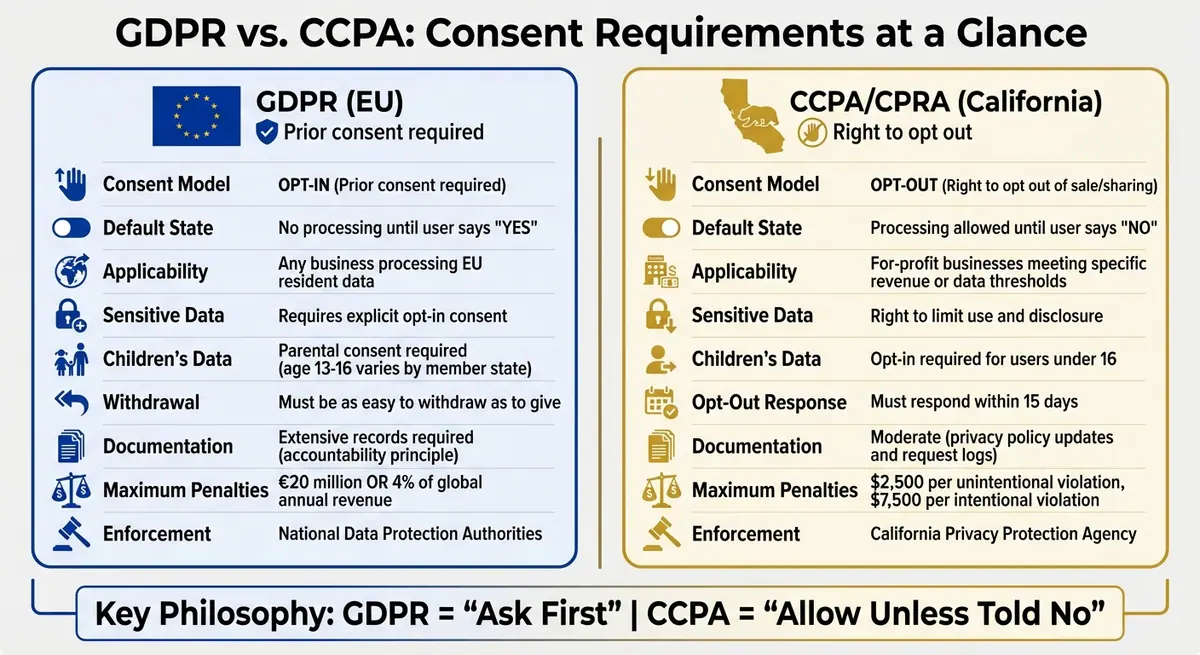
GDPR vs CCPA Consent Requirements Comparison Chart
GDPR Opt-In Consent Rules
Under GDPR, businesses are required to obtain explicit, affirmative consent before processing any personal data. This means users must actively agree, such as by clicking an "Accept" button or ticking an empty checkbox. The consent must be freely given, specific, informed, and unambiguous.
"Consent should not be regarded as freely given if the data subject has no genuine or free choice or is unable to refuse or withdraw consent without detriment." – GDPR Recital 42
Pre-checked boxes, silence, or inactivity? Those don’t cut it. The British Information Commissioner's Office clarifies: "If the request for consent is vague, sweeping or difficult to understand, then it will be invalid".
This principle was highlighted in January 2019 when France's CNIL fined Google €50 million. Why? Consent details were scattered across multiple documents, making it impossible for users to provide informed and specific consent.
The GDPR also ensures that withdrawing consent is just as simple as giving it. For sensitive information - such as health data, religious beliefs, or racial origin - businesses must use clear language and obtain explicit opt-in consent. Additionally, GDPR applies to any business handling the data of EU residents, regardless of the company's location or size. It also mandates detailed record-keeping of when and how consent was collected. These strict rules force businesses to design consent interfaces that allow users to make informed and granular choices.
In comparison, the CCPA operates on a different philosophy, allowing data collection by default unless users opt out.
CCPA Opt-Out Consent Rules
Unlike GDPR’s opt-in model, the CCPA assumes data collection is acceptable by default - until the user decides to opt out. Businesses can collect and use personal data without prior consent but must provide a clear way for users to stop the sale or sharing of their information. Additionally, businesses are required to inform users at or before data collection about the types of data being gathered and how it will be used.
"The GDPR generally requires opt-in consent... However, the CCPA allows collection by default in most cases... as long as people have a clear way to opt out of sales or sharing." – Celestine Bahr, Director Legal, Compliance & Data Privacy, Usercentrics
To comply, businesses must include a "Do Not Sell or Share My Personal Information" link, often placed in website footers or homepages. Once users click this link, companies must honor their opt-out request within 15 days. The California Privacy Rights Act (CPRA) also requires businesses to support a Global Privacy Control (GPC) browser signal, which acts as an automatic opt-out request when enabled.
The CCPA applies only to for-profit companies that meet certain criteria, such as having annual revenues over $25 million, processing data for 100,000 or more California residents, or earning at least 50% of their revenue from selling personal data. For sensitive data like Social Security numbers or health information, users have the right to limit its use and disclosure. These opt-out rules compel businesses to create transparent and accessible preference centers for users.
GDPR vs. CCPA Comparison Table
| Feature | GDPR (EU) | CCPA/CPRA (California) |
|---|---|---|
| Consent Model Approach | Opt-in (Prior consent required) | Opt-out (Right to opt out of sale or sharing) |
| Default State | No processing until user says "Yes" | Processing allowed until user says "No" |
| Applicability | Any business processing EU resident data | For-profit businesses meeting specific revenue or data thresholds |
| Sensitive Data | Requires explicit opt-in consent | Right to limit use and disclosure |
| Children's Data | Parental consent required (age varies 13–16 by member state) | Opt-in required for users under 16 |
| Withdrawal/Opt-Out | Must be as easy to withdraw as it is to give | Must respond within 15 days |
| Documentation | Extensive records required (accountability principle) | Moderate (privacy policy updates and request logs) |
| Maximum Penalties | €20 million or 4% of global annual revenue | $2,500 per unintentional violation, $7,500 per intentional violation |
| Enforcement | National Data Protection Authorities | California Privacy Protection Agency |
The key difference is timing and philosophy. GDPR requires businesses to secure consent before processing data - essentially, an “ask first” approach. CCPA, on the other hand, assumes consent by default, allowing users to opt out later. Because of these differences, many companies operating in both regions choose to follow GDPR’s stricter standard globally to simplify compliance systems.
Knowing these frameworks is essential when designing user-friendly multi-step preference centers that respect both approaches.
Building User-Friendly Preference Centers
Creating effective preference centers is essential for meeting global compliance requirements like GDPR and CCPA while also building trust with your audience. A preference center is essentially a hub where users can manage their communication preferences and data-sharing choices. When done right, it not only boosts user satisfaction but can also reduce opt-out rates. The trick lies in striking the right balance - offering enough options to give users control without overwhelming them. Let’s dive into the core features and design practices that make preference centers both functional and user-friendly.
Core Features of a Preference Center
A well-crafted preference center gives users detailed control over what communications they receive. Instead of a simple "all-or-nothing" approach, users should be able to choose specific content types, like newsletters, product updates, or promotional offers. Additionally, they should have the flexibility to select their preferred communication channels - whether that’s email, SMS, or push notifications - and set how often they want to hear from you.
Another critical function is allowing users to manage their consent for data processing, targeted ads, and cookie tracking. Transparency is key here - especially since 86% of consumers express concerns about online privacy, and nearly half say they might switch brands over it.
"A preference center is no longer a luxury - it is a necessity in today's privacy-conscious world." – Captain Compliance
Also, make sure the interface is mobile-friendly and provides immediate confirmation when users update their preferences.
Design Best Practices for Preference Centers
The design of your preference center can make or break the user experience. Keep it simple and easy to navigate. Overloading users with too many choices at once can lead to decision fatigue and, ultimately, higher opt-out rates. Instead, use clear toggles or one-click options for quick updates. Avoid using dark patterns - ensure "Accept" and "Reject" options are equally visible, and don’t rely on pre-checked boxes for consent.
Use plain, straightforward language to describe each option. For example, instead of vague labels, try something like: "Product updates: Be the first to hear about new features." This approach helps users understand the value of staying subscribed. Accessibility is another must - design your center to meet WCAG standards so that everyone can manage their preferences. Offering an "opt-down" option, where users can reduce communication frequency or adjust content types instead of fully opting out, is also a smart move.
Using Reform to Build Preference Centers

If you’re looking for a tool to simplify the process, Reform is a great option. This no-code platform allows marketing teams to create branded, user-friendly preference centers without needing developer assistance. With Reform, you can break down complex choices into easy-to-follow steps using multi-step forms, reducing the chances of user abandonment. Conditional routing adds a personal touch - if someone opts out of marketing emails, you can suggest alternatives like a monthly digest.
Reform also integrates seamlessly with CRMs, ensuring that user preferences are updated across all channels in real time, eliminating conflicting communications. Its built-in email validation and spam prevention features help maintain a clean contact list while collecting zero-party data - information users willingly share about their preferences and interests.
The platform includes real-time analytics so you can track which options users engage with most, helping you fine-tune your communication strategy. With support for custom CSS and JavaScript, you can align the design with your brand’s look and feel. Plus, its accessibility features ensure compliance with WCAG standards. Reform offers flexible pricing, starting at $15/month, which includes unlimited responses and conditional logic. It’s a seamless way to combine compliance with a better user experience.
Managing Consent Across Multiple Regions
Operating across multiple countries means navigating a maze of privacy laws. For instance, GDPR penalties can hit €20 million or 4% of annual global revenue, whichever is higher. The key challenge lies in creating a system that complies with these laws while remaining user-friendly and engaging and easy to manage for your teams.
Creating a Unified Consent System
A unified consent management system serves as a centralized hub for all consent-related data. Instead of juggling separate systems for your website, mobile app, and offline channels, everything is consolidated into one platform. Many modern systems even use geolocation to display the right consent banner - like GDPR opt-in for users in Europe and CCPA opt-out for Californians.
These systems also synchronize updates across your entire marketing stack in real time. That means tools like your CRM (e.g., Salesforce or HubSpot), analytics platforms (e.g., GA4), and ad pixels (e.g., Meta or TikTok) are always up to date. Without such synchronization, you risk sending marketing emails to users who opted out or targeting ads to those who withdrew their consent.
To stay audit-ready, log every consent action with details like timestamps, banner versions, and the legal basis for data collection. As Cookie-Script emphasizes:
"A screenshot of a banner is not enough. [Regulators] expect an audit trail that shows what users clicked and when"
Not only does a unified system help you meet legal requirements, but it also builds trust with your users.
How Consent Management Platforms Work
Consent Management Platforms (CMPs) simplify the process by automating much of the work. They gather consent signals from all your touchpoints and store them in a centralized database. CMPs then integrate with tools like Google Tag Manager, ensuring tracking scripts only activate after the appropriate consent is received.
Since January 2024, Google requires websites serving personalized ads in the EEA, UK, and Switzerland to use Google Consent Mode v2 with a certified CMP. This system uses parameters like ad_storage and analytics_storage to control how Google tags function based on user consent. Additionally, adopting standards such as the IAB Global Privacy Platform can streamline compliance across regions.
CMPs also support automated signals like Global Privacy Control (GPC), which some states now mandate. Ignoring these signals can be costly - Sephora faced a $1.2 million fine under CCPA for failing to honor GPC requirements.
Once your CMP is in place, regular audits of your data flows are essential to ensure ongoing compliance.
Conducting Audits and Data Mapping
Before setting up a unified system, it’s critical to map out your current data collection practices. Identify all data collection points - websites, mobile apps, CRMs, and even offline channels - to understand where personal data is being gathered and processed. This process often uncovers hidden trackers introduced by third-party plugins or marketing tools that weren’t properly vetted.
Marketing teams frequently add new tools or plugins without fully considering their compliance impact. Regular scans of your systems help you catch these unnoticed changes.
Document everything thoroughly. Maintain detailed records of what data you collect, why it’s being collected, where it’s stored, and who has access to it. This documentation not only highlights compliance gaps but also serves as evidence if regulators come knocking. Over 60% of users reject cookies when there’s a clear "Reject All" button. To avoid penalties, ensure your consent interface provides equal ease for accepting or rejecting cookies. For example, France’s CNIL fined Google €150 million and Facebook €60 million for making it harder to reject cookies than to accept them.
Clear documentation and transparent practices aren’t just about compliance - they’re essential for earning and maintaining user trust.
Consent Management Best Practices
Set up a consent system that not only satisfies legal standards but also fosters trust with your users.
Clear Communication and Detailed Options
Clarity is key. Use straightforward language to explain what data you collect and why. For instance, instead of saying, "We process your information for legitimate interests", you could say, "We use your email to send you updates about our products."
Offer users separate toggles for different purposes, like marketing, analytics, or third-party sharing. This approach aligns with GDPR's requirement for specific consent and gives users genuine control over their data.
Keep consent requests distinct from general terms and conditions to make them stand out. A layered, multi-step design can make the information easier to digest. The ICO also suggests refreshing consent every two years to maintain transparency and user engagement.
Most importantly, make it simple for users to reverse their consent choices at any time.
Easy Opt-Out and Withdrawal Options
Once you've communicated clearly, ensure withdrawing consent is just as simple as opting in. This isn't just a good practice - it’s a legal obligation. According to UK GDPR Article 7:
"The withdrawal of consent shall not affect the lawfulness of processing based on consent before its withdrawal. It shall be as easy to withdraw as to give consent."
A "Reject All" button should be as visible and accessible as the "Accept All" button.
Consider adding a persistent widget or icon - commonly in your website footer - to let users adjust or withdraw consent with one click. Include an "unsubscribe" link in all marketing emails for easy opt-outs. If a user withdraws consent, stop all related data processing immediately and notify any third parties to delete the data as well.
Connecting with Third-Party Tools
Integrating your consent system with third-party tools is essential for consistency. Start by auditing all third-party cookies, pixels, tags, and SDKs on your site. Many organizations find they have 30–50% more tracking mechanisms than they initially thought.
Be specific - name each third party that will use the data rather than grouping them into vague categories. Third-party tags should remain inactive until you’ve secured explicit consent. Your consent management platform (CMP) should sync in real time with tools like your CRM, marketing software, and analytics platforms to immediately reflect user preferences.
For CCPA compliance, your website must automatically honor GPC (Global Privacy Control) browser signals as valid opt-out requests. Ignoring these signals could lead to hefty fines. Additionally, audit backend API data sharing to ensure CMP consent flags are consistently enforced.
Conclusion: Balancing Compliance and User Trust
Consent management isn’t just about avoiding penalties - it’s about fostering trust. When businesses view privacy as an opportunity rather than a burden, they set the stage for lasting customer loyalty. The numbers don’t lie: 48% of consumers have switched providers due to privacy concerns.
Key Takeaways
Here’s a quick recap of what effective consent management entails. It boils down to three essential elements working together:
- Legal compliance: Understand the nuances between GDPR’s opt-in requirements and CCPA’s opt-out model. Don’t forget to honor automated signals like Global Privacy Control.
- User-friendly design: Make sure “Reject All” and “Accept All” options are equally visible. Use simple language, provide granular toggles for specific data uses, and avoid overwhelming users with legal jargon.
- Centralized management: Connect your consent system with backend tools (like CRM, marketing platforms, and analytics) so user preferences are applied instantly across all touchpoints.
These elements not only ensure compliance but also build trust - a theme we’ve emphasized throughout.
As TrustArc aptly states:
"If privacy is the castle, consent is the drawbridge - without it, companies can't protect themselves from legal risks or earn customer trust".
And the risks are very real. GDPR fines can climb to €20 million or 4% of annual global revenue, while California has already seen over 1,641 privacy lawsuits since 2022.
Planning for the Future
Staying ahead means staying flexible. As privacy regulations evolve, your consent system should evolve too. Update permissions every six months or whenever data processing practices change to keep everything valid.
It’s also a good idea to audit third-party trackers regularly and use automated compliance tools to catch issues early. With more states enacting privacy laws and browsers adopting universal opt-out signals, investing in adaptable and transparent consent systems now can save you headaches - and build trust - down the line.
FAQs
Do I need one consent flow for both GDPR and CCPA?
It's better to keep GDPR and CCPA consent flows separate. Why? Because the two laws operate on different principles.
- GDPR: Requires explicit opt-in consent. Users must actively agree before their data can be processed.
- CCPA: Follows an opt-out model, where users have the right to request their data not be sold but are automatically included unless they act.
Each regulation also has distinct rules for transparency and user control. Combining these into a single flow could risk non-compliance with one or both laws. Keeping them separate ensures you meet the specific requirements of each.
How can I prove when and what a user consented to?
To demonstrate user consent, it's crucial to keep detailed, time-stamped records of every interaction. Make sure to log essential details such as:
- The exact date and time consent was given
- The method used to obtain consent (e.g., checkbox, digital signature)
- The specific purposes or terms the user agreed to
These records should be securely stored and periodically reviewed to ensure you're meeting compliance requirements for regulations like GDPR and CCPA. Using automated tools can make this process easier by helping to organize, protect, and retrieve consent data when needed for audits or legal reviews.
How can I prevent third-party tags from firing without consent?
To prevent third-party tags from firing without user consent, activate consent mode in your tag management system, such as Google Tag Manager. This feature allows you to either block tags entirely until users provide consent or modify their behavior based on the consent status. It's essential to configure this properly to honor user preferences and adhere to privacy laws like GDPR and CCPA.
Related Blog Posts
Get new content delivered straight to your inbox

The Response
Updates on the Reform platform, insights on optimizing conversion rates, and tips to craft forms that convert.




Drive real results with form optimizations
Tested across hundreds of experiments, our strategies deliver a 215% lift in qualified leads for B2B and SaaS companies.
