
.webp)
Using Form Data for Personalized Lead Nurturing


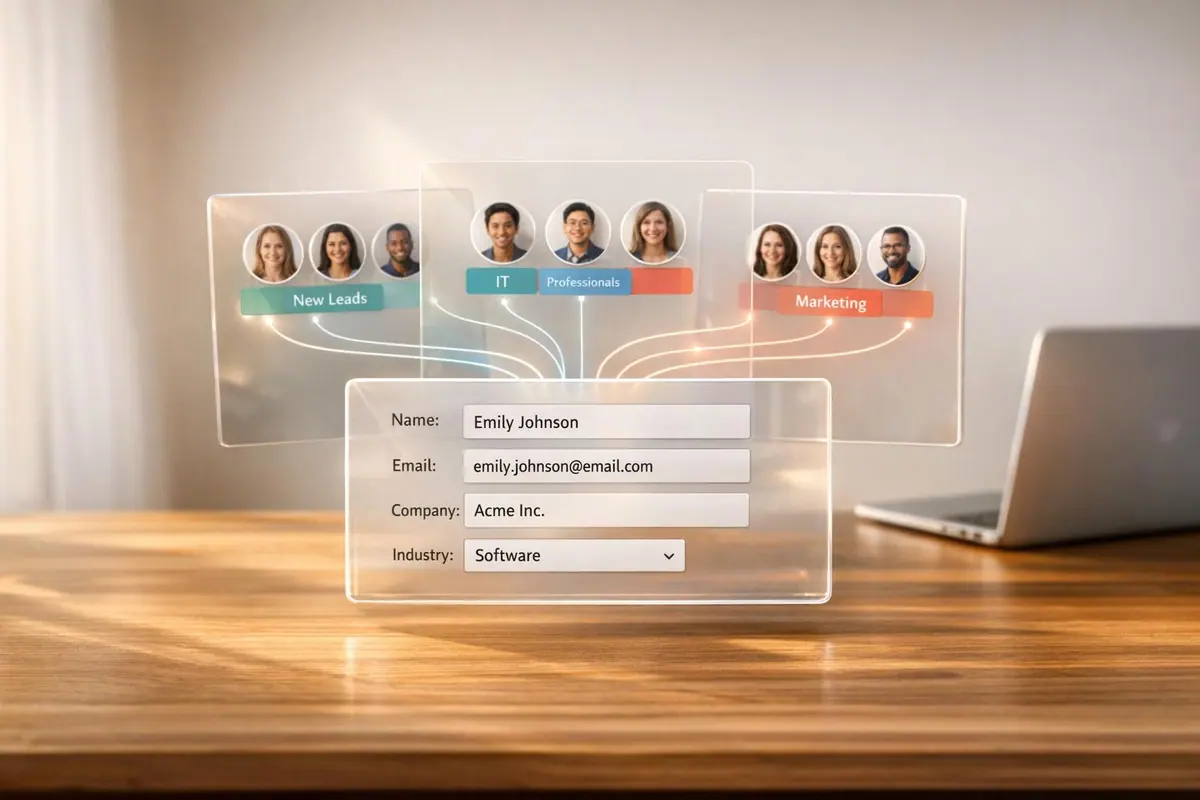
Want to turn more prospects into customers? Personalized lead nurturing is the key. By using form data effectively, you can deliver tailored content that resonates with your audience, driving 50% more sales-ready leads at 33% lower costs.
Here’s how to make the most of form data:
- Collect actionable data: Use forms that capture essential details like job title, company size, and behaviors (e.g., downloads, page visits) without overwhelming users.
- Segment leads: Group prospects by demographics and behaviors to send messages that align with their needs.
- Automate workflows: Integrate with tools like HubSpot to trigger timely follow-ups and personalized email sequences.
- Personalize content: Match offers and messaging to specific pain points revealed through form responses.
- Track and optimize: Use analytics to refine forms and workflows, reducing drop-offs and improving conversions.
Smart forms + clean data = better results. Tools like Reform help you design forms with features like multi-step forms, conditional logic, and real-time validation, ensuring you gather high-quality data for effective lead nurturing. Start turning form submissions into conversions today.
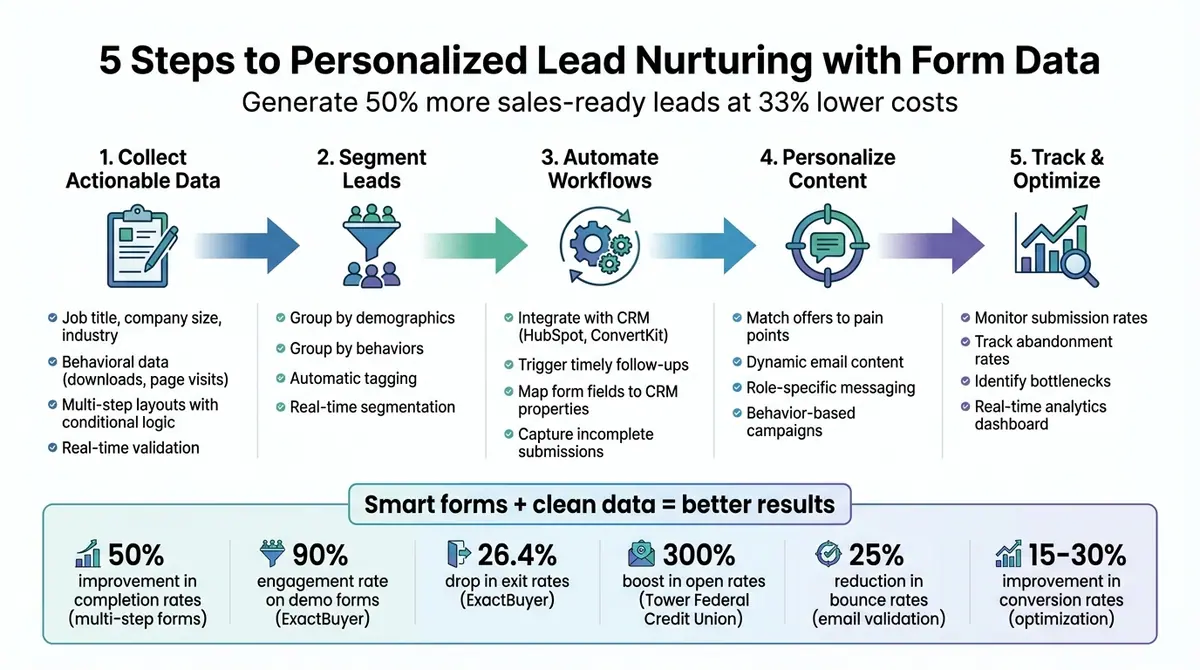
5-Step Process for Using Form Data in Personalized Lead Nurturing
How Lead Nurturing Works (Automate!)
sbb-itb-5f36581
Collecting Useful Form Data
The success of your lead nurturing efforts hinges on the quality of the data you gather right from the start. Details like job title, company size, and industry help you group leads into meaningful categories, while behavioral cues - such as downloads or visits to pricing pages - offer insights into where a lead stands in their buying journey. Without this foundational data, you're left guessing which messages will resonate.
The key is to use smartly designed forms that capture the right information without overwhelming users. Features like multi-step layouts, conditional logic, and automatic data enrichment allow you to collect detailed profiles while keeping the process smooth and user-friendly. Reform’s form design tools make this process seamless, helping you gather actionable data efficiently.
Another critical aspect is ensuring data quality. Forms that allow inaccurate emails, duplicate entries, or spam submissions can derail your workflow, leading to bounced emails and wasted time on ineffective automation. Features like email validation and spam filters help ensure the data entering your CRM is clean and ready to use.
Design High-Converting Forms with Reform

A well-designed form can make all the difference when it comes to collecting data. Reform’s interactive multi-step forms and conditional logic adapt dynamically based on user responses, improving completion rates by up to 50%. For example, start with simple fields like name and email, then move on to more specific questions. If a user selects "Manufacturing" as their industry, the form can display targeted questions about challenges like "Supply chain visibility" or "Compliance tracking", while skipping irrelevant ones. This tailored approach keeps users engaged and ensures you collect relevant, complete data for better segmentation.
Reform also offers lead enrichment tools that automatically add external data to form submissions. If a prospect provides just their email address, Reform can enrich their profile with details like company size, revenue, or job title using sources like LinkedIn. This means you can keep forms short - improving completion rates - while still building detailed lead profiles for personalized nurturing.
Ensure Data Quality with Validation Features
Collecting data is only half the battle; ensuring its accuracy is just as important. Reform’s real-time email validation checks deliverability as users type, catching typos and fake addresses before they’re submitted. This can reduce bounce rates, which might otherwise increase by 25% due to invalid emails entering your system.
Clean data keeps your workflows running smoothly. When your email campaigns aren’t bogged down by undeliverable addresses and your segmentation isn’t distorted by fake entries, your automation tools work as intended, and your analytics reflect actual user behavior. Reform also helps maintain consistency by standardizing inputs like phone numbers and dates, ensuring your CRM and marketing tools operate with uniform, reliable data. This attention to detail keeps your processes efficient and your insights accurate.
Segmenting Leads for Targeted Nurturing
Once you've gathered clean and accurate form data, the next step is effective segmentation. This process organizes your leads into groups based on shared traits - like industry, company size, or key challenges - so you can deliver messages that feel personal and relevant. Think about it: a small business owner struggling with lead conversion has entirely different needs than a decision-maker at a large company looking for scalability solutions.
Segmentation often happens automatically as leads fill out forms. For example, if someone selects "Manufacturing" as their industry and notes they have over 500 employees, they’re instantly tagged as an enterprise-level prospect. This allows you to send them materials like ROI calculators and case studies. On the other hand, a startup founder might be routed into workflows offering quick-start guides or webinar invites. This tailored approach ensures that every lead gets the right content at the right time, helping to move them through the funnel efficiently.
Segment by Demographics and Behaviors
Start with demographic data collected from your forms - things like job title, company size, industry, and location. These details help you create foundational segments. For instance, a marketing manager at a small SaaS company will need different content than a VP of Operations at a large manufacturing firm. By grouping leads naturally, you can deliver tailored messaging without the need for manual adjustments.
Here’s an example:
- "SMB Marketers" (small businesses with fewer than 50 employees in marketing roles) might receive content focused on quick wins and practical tips.
- "Enterprise Decision-Makers" (C-suite executives at companies with 500+ employees) could get white papers on ROI and scalability.
Then, layer in behavioral data for even more precision. Monitor actions like which forms they complete, how far they get through multi-step form design, and the pain points they highlight. For example, if a lead downloads a pricing guide and visits your features page multiple times, they’re showing strong purchase intent - send them a demo offer right away. On the flip side, a lead who only downloaded a beginner’s ebook might need more nurturing through educational content first. You can refine these segments further by using follow-up surveys to ask leads directly about their biggest challenges or interests.
Use Conditional Logic for Real-Time Segmentation
Conditional logic lets you take segmentation to the next level by dynamically adjusting the form experience based on how leads respond. For instance, if someone selects "Enterprise" as their company size, the form can skip basic setup questions and jump straight to advanced topics like compliance or integration needs. This ensures leads are segmented as they fill out the form, saving time and making the process seamless.
The real magic happens when you pair this logic with immediate actions. For example:
- Use the "Redirect to" feature to send high-intent leads directly to a calendar booking page for a demo.
- Apply "And/Or" logic to handle complex conditions. If a lead is in healthcare AND has 100+ employees, tag them as "Healthcare Enterprise" and start a specialized nurture sequence.
Building Personalized Workflows with Integrations
Once you've segmented your leads, the next step is connecting them to automation tools to keep things running smoothly. Integrations between Reform and platforms like HubSpot or ConvertKit eliminate tedious manual data entry and kick off automated workflows as soon as someone submits a form. This real-time data sync ensures every lead gets timely, personalized follow-ups, turning form submissions into immediate action.
The magic lies in mapping form fields directly to CRM properties. For instance, when you link Reform with HubSpot, demographic and behavioral data flows directly into your system, automatically creating or updating contact records. Even incomplete submissions from multi-step forms can be captured, so leads who start but don’t finish still enter your nurturing workflows. Plus, adding hidden fields for UTM parameters (like source, medium, and campaign) makes tracking each lead’s origin easy, allowing you to tailor follow-ups based on how they found you. This seamless data transfer sets the stage for targeted email campaigns and detailed tracking.
Automate Email Sequences and Follow-Ups
With these integrations in place, you can trigger behavior-based campaigns instantly. For example, if a lead downloads a pricing guide via your form, the system can send a welcome email within hours and then follow up with a series of messages spread throughout your sales cycle. Start with educational content addressing their challenges, move on to product-specific details, and wrap up with conversion-focused offers like invitations to a demo.
Dynamic content takes personalization to the next level. By pulling data from CRM fields - like industry, job role, or company size - you can craft emails that speak directly to each lead's needs. For instance, a healthcare lead might receive compliance-focused resources, while a manufacturing lead gets content about improving operational efficiency. Once your field mappings and workflow triggers are in place, this customization happens automatically, saving you time while delivering relevant messages.
Streamline Lead Tracking and Nurturing
Integrations also make it easier to track and nurture leads by providing real-time visibility for your entire team. When Reform syncs with your CRM, every form submission instantly updates lead profiles, keeping both sales and marketing in the loop. Analytics can capture conversion data and connect form submissions to overall web activity, revealing which pages leads visit before and after submitting a form. This gives you a clearer picture of their intent.
To keep your data accurate as your system scales, Reform offers email validation and spam prevention features to ensure only genuine leads make it into your CRM. Adding "reform.app" to your analytics tracking domain list can prevent submissions from being flagged as bots. Regularly auditing your field mappings and CRM records will also help ensure workflows stay intact and data flows correctly. With clean, reliable data feeding your integrations, you can trust your automated workflows to deliver the right message to the right person every time.
Using Form Data to Tailor Content and Offers
When workflows kick into action, form data becomes the backbone for creating a personalized experience for every lead. It allows you to align messages, resources, and offers with the specific needs of each individual. For example, a CFO might receive detailed ROI projections and insights on long-term value, while a product manager would be shown feature breakdowns and usability tips. This ensures that every email, landing page, and offer feels custom-made for the recipient.
Personalize Drip Campaigns and Messaging
Form data helps identify where a lead is in their journey and what matters most to them. Someone who just downloaded a case study is likely still researching and would appreciate educational content that builds trust. On the other hand, a lead frequently visiting your pricing page is probably ready for a demo invite or a time-sensitive offer. Behavioral data from form submissions - like attending a webinar or downloading resources - can shape the flow of your drip campaigns. Dynamic content blocks can then automatically adjust to include industry-specific stories, role-relevant features, or targeted calls-to-action. For instance, if a lead attended a session about security, it's more effective to follow up with cybersecurity-focused content rather than general product updates.
A great example comes from ExactBuyer, which used multi-step forms with dynamic routing to achieve impressive results: a 90% engagement rate on demo forms and a 26.4% drop in exit rates. Edan Krolewicz, Founder and CEO of ExactBuyer, summed it up perfectly:
"Multi-step form → Higher engagement. Dynamic routing → Better qualified leads. Real-time enrichment → Improved experience."
This kind of tailored communication elevates lead nurturing from generic outreach to highly targeted, impactful messaging. And when offers align with specific challenges, conversion rates naturally climb.
Deliver Relevant Offers Based on Pain Points
Using form responses, you can match offers directly to the challenges leads are facing. For instance, a lead concerned about compliance could receive resources explaining how your solution ensures regulatory adherence. Meanwhile, someone focused on operational efficiency might get case studies showcasing cost savings and streamlined workflows. This type of role-specific personalization makes every interaction feel thoughtful and intentional, rather than like a mass email blast.
GrowthMatch successfully applied this strategy using Reform's personalized logic features. Shelby Stephens, Founder and CEO of GrowthMatch, shared:
"Personalized logic → Only qualified leads book. Interactive UX → Higher conversion from visitors. CRM-ready submissions → Less time triaging inbound."
Their system ensured that only high-value, qualified leads could book meetings, delivering strong matches directly into their CRM in under 30 days. By tailoring offers to pain points revealed in form responses, they eliminated wasted time on unqualified prospects and significantly boosted conversions among leads ready to take action.
Tracking and Optimizing Lead Nurturing Performance
Keeping an eye on performance data helps you spot what’s working and fix what’s not. The right metrics can show where leads are engaging, where they’re dropping off, and which steps are driving conversions. Key metrics to watch include submission rates (how many people start and finish your form), abandonment rates (where users bail out during the process), conversion rates (how many leads advance to the next stage), and behavioral cues like email opens or visits to pricing pages. These insights give you a clear picture of how leads are interacting with your campaigns and where tweaks will make the biggest difference. With this data, you can fine-tune your lead nurturing strategy to ensure every touchpoint is as effective as possible. For real-time tracking, tools like Reform’s analytics can be a game-changer.
Monitor Real-Time Analytics in Reform
Reform’s analytics dashboard offers real-time insights, showing exactly where leads drop off and letting you make quick adjustments. For instance, if 25% of users abandon at a specific step, you can test changes like simplifying form fields or improving your calls-to-action. The dashboard also highlights patterns you might otherwise miss - like higher conversion rates from mobile users or better performance from certain traffic sources. This means you don’t have to wait weeks for data to pile up before making changes. You can also track lead quality scores and completion times, giving you a deeper understanding of not just how many leads are converting, but whether they’re the right fit for your business.
Identify and Address Bottlenecks
Using these insights, you can zero in on problem areas in your forms or workflows. For example, if a 30% drop-off happens at the phone number field, try moving it to a later step or making it optional. If social media leads are abandoning early while email leads are converting better, adjust your follow-ups - for example, using shorter, more casual messaging for social media audiences. This approach worked for Tower Federal Credit Union, which swapped manual, non-segmented emails for automated campaigns informed by performance data. The result? A 300% boost in open rates for their follow-up emails. Regularly testing and refining your process can improve conversion rates by 15-30%.
Conclusion
Using form data effectively for personalized lead nurturing turns basic information into tailored campaigns that guide leads through your sales funnel. By designing forms that collect accurate, validated data, segmenting leads based on demographics and behaviors with conditional logic, and automating workflows, you can deliver timely, relevant content to your audience. This strategy ensures every interaction is geared toward boosting conversions, while real-time analytics provide the insights needed for constant improvement.
Reform takes this process a step further by offering a no-code form builder packed with features like multi-step forms, lead enrichment, and conditional routing. These tools help you gather actionable insights instead of incomplete or irrelevant data. With seamless CRM and marketing integrations, you can automate personalized email sequences and follow-ups, making it easier to scale your campaigns.
Personalization is the key to successful lead nurturing. By addressing specific pain points, you can provide solutions that resonate - like ROI calculators for enterprise clients or starter guides for smaller businesses - rather than relying on one-size-fits-all messaging that often gets ignored. Reform’s real-time analytics dashboard helps you identify and fix drop-off points quickly, allowing you to test and refine your approach without delays. This focus on targeted personalization keeps your audience engaged and drives faster conversions.
FAQs
What form fields matter most for personalization?
Key areas for personalization include basic contact information like name and email, along with extra details such as company name, job title, and even behavioral data - like how users engage with your content or respond to forms. This kind of information is crucial for building customized lead nurturing workflows that feel relevant and engaging.
How do I reduce form drop-offs without losing lead quality?
To reduce form drop-offs while still gathering high-quality leads, try using multi-step forms. Start with easy, engaging questions to draw users in. Add real-time validation to catch errors as users type, and use conditional logic to show only relevant fields, keeping things simple. You can also implement form enrichment to auto-fill details, helping users complete forms faster. These techniques make the process smoother for users while ensuring you collect accurate, valuable information.
How can I turn form answers into automated nurture emails?
To set up automated nurture emails using form responses, start by designing a form that's simple yet effective. Include features like conditional questions to tailor the experience and email validation to ensure accurate data collection. Once your form is ready, link it to an email automation platform and set up triggers to send personalized emails based on the answers provided.
In your emails, use branded templates that maintain a professional look and include clear calls-to-action to guide recipients. Additionally, integrate the form with your CRM or other marketing tools to ensure follow-ups happen promptly. This approach not only keeps leads engaged but also helps streamline your overall communication strategy.
Related Blog Posts
Get new content delivered straight to your inbox

The Response
Updates on the Reform platform, insights on optimizing conversion rates, and tips to craft forms that convert.




Drive real results with form optimizations
Tested across hundreds of experiments, our strategies deliver a 215% lift in qualified leads for B2B and SaaS companies.
