
.webp)
How Conditional Logic Improves Consent Forms



Long, irrelevant consent forms frustrate users and lead to high abandonment rates. Conditional logic solves this by tailoring forms to each user's input, showing only relevant fields and skipping unnecessary ones. This approach makes forms shorter, easier to complete, and more personalized.
Key benefits include:
- Higher completion rates: Dynamic forms can boost submissions by up to 30% and reduce completion time by 20–40%.
- Simplified compliance: Automatically display GDPR, CCPA, or other region-specific notices based on user location.
- Accurate data collection: Users are more likely to provide correct information when forms feel relevant and clear.
For example, if a user selects "under 18", a parental consent section appears. Similarly, California residents automatically see CCPA notices. Tools like Reform make implementing such features simple, even without coding skills. Conditional logic isn't just about improving user experience - it's about creating smarter, more efficient forms that work for everyone.
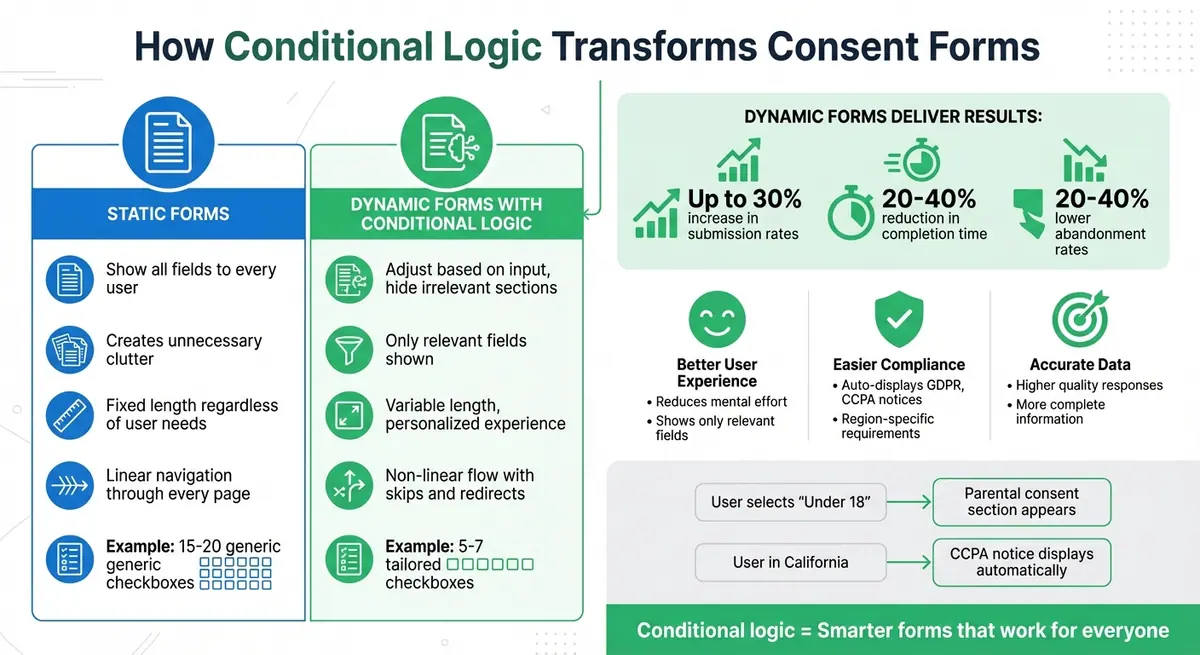
Static vs Dynamic Consent Forms: Key Differences and Performance Benefits
What is Conditional Logic in Consent Forms?
Defining Conditional Logic
Conditional logic refers to a system of "if-then" rules that dictate how form fields respond to user inputs. Essentially, when a user makes a specific choice (the "if"), the form reacts by showing, hiding, or requiring certain fields (the "then").
In consent forms, this ensures users only see questions that are relevant to them. For example, if someone indicates they’re over 18 and selects a specific service type, the form automatically displays tailored consent language. This process relies on "AND" logic (all conditions must be met) or "OR" logic (any condition triggers the action).
Let’s take a closer look at how this works in real time.
How Conditional Logic Works
Conditional logic operates through two key components: trigger elements (like an initial consent question) and dependent elements (fields that appear, disappear, or change based on the trigger). When a user makes a selection, the system evaluates the "When/Then" rule in real time.
Here’s an example: A user selects "I agree to data processing" → the system processes the rule → relevant privacy fields appear, while unrelated sections stay hidden. This approach can dynamically adjust the form by:
- Displaying specific sections or fields
- Hiding irrelevant parts
- Redirecting users to different confirmation pages based on their responses
| Static Forms | Dynamic Forms with Conditional Logic |
|---|---|
| Show all fields to every user, creating unnecessary clutter | Adjust based on input, hiding irrelevant sections (e.g., skipping car insurance consent for non-car owners) |
| Fixed length, regardless of user needs | Variable length, making the form feel shorter and more personalized |
| Linear navigation through every page | Non-linear flow, allowing skips, jumps, or redirects based on responses |
This dynamic approach transforms consent forms from rigid, one-size-fits-all documents into personalized, interactive experiences. By tailoring the form to each user, it simplifies the process, encourages engagement, and helps maintain compliance.
Benefits of Conditional Logic for Consent Forms
Better User Experience
Conditional logic simplifies the experience by displaying only the consent fields that matter to each user. Instead of overwhelming users with 15–20 generic checkboxes, it narrows the options to just 5–7 tailored ones. This reduces mental effort and the frustration of navigating irrelevant questions. For instance, if someone selects "No" for receiving emails, they won’t be asked about email frequency preferences. This streamlined approach not only encourages users to complete the form but also lowers the chances of them abandoning it midway. A smoother process like this improves engagement and aligns with compliance requirements.
Easier Compliance with Privacy Regulations
Privacy laws like GDPR and CCPA require explicit consent for specific data uses. Conditional logic makes meeting these standards easier by dynamically guiding users through the correct consent pathways. For example, California residents might see CCPA notices, while EU users encounter GDPR-compliant language. This ensures that only necessary data is collected, reducing the risk of non-compliance.
More Complete and Accurate Data
Accurate data collection is critical, and conditional logic plays a big role in achieving it. By directing users to relevant follow-up questions, it ensures the information collected truly reflects their preferences. In healthcare, for example, gender-specific consent fields only appear when relevant, leading to more thorough medical records. This targeted approach minimizes errors and boosts completion rates, as users are more likely to provide accurate consent when the process feels clear and personalized.
How to Design Conditional Logic for Consent Forms
Aligning Business Needs with Form Logic
To create effective conditional logic, start by segmenting users based on attributes like membership status or qualifications. Then, align the required data fields with user inputs so only relevant questions appear when triggered. For instance, if extra qualification details are needed only for users without a specific degree, set up your form so those fields show up only when earlier responses indicate it's necessary. This keeps the form targeted, avoids clutter, and ensures you're not asking for irrelevant information.
Conditional Logic Examples
Here are some practical ways to implement conditional logic that streamlines user experience:
- Skip unnecessary steps: If a user selects "Yes" to VIP status, skip payment or promotional pages entirely.
- Prioritize high-value leads: Users reporting over $10,000,000 in annual revenue can be directed to a scheduling page, while others are shown self-service resources.
- Address missing critical data: Use "Finish and show" logic. For example, if a required field like an email address is left blank, redirect users to a custom thank-you page that prompts them to complete the missing information before submission.
- Redirect based on status: Send existing members straight to a dashboard login, while guiding new users to a sign-up page.
For more advanced scenarios, combine multiple conditions using "And/Or" logic. For example, you could skip a promotional page only if the user is both not a member and lacks a promo code. This type of layered logic ensures a more tailored experience for each user.
Testing and Refining Your Logic
Once your logic is set, thorough testing is key. Check how conditional flows behave across different devices, especially mobile, to ensure hidden fields collapse correctly. Use logic previews to simulate all possible user paths and confirm that hidden required fields don’t accidentally block submissions.
To make troubleshooting easier, document your nested conditions with clear, descriptive names. Analytics can also help you refine your logic - track where users drop off and adjust triggers or simplify overly complex branches to reduce friction. Studies show that well-designed conditional logic can lower abandonment rates by 20%–40% and boost submissions by up to 30%. Use these insights to continuously fine-tune your form for better results.
Reducing Form Abandonment with Conditional Logic
Shortening Perceived Form Length
Long forms can feel intimidating, often causing users to quit halfway through. Conditional logic helps by hiding fields that don't apply to the user, showing only what’s relevant. For instance, if someone answers "No" to a question about sharing marketing data, the form skips any follow-up questions about newsletter preferences. Similarly, users selecting a European country from a dropdown might see GDPR consent language, while those in the U.S. are shown CCPA notices instead. This approach makes the form feel shorter and less overwhelming, keeping users engaged and increasing the chances they’ll complete it.
Higher Completion Rates
Dynamic forms, powered by conditional logic, not only feel shorter but also lead to more submissions. Research shows that these forms can raise submission rates by up to 30% and cut the time it takes to complete them by 20–40%. For example, asking "Do you consent to cookie usage?" can trigger additional options for marketing cookies, but only for users who answer "Yes". This streamlined process reduces unnecessary steps, making it easier for users to complete the form and improving overall conversion rates.
sbb-itb-5f36581
Personalizing Consent Forms to Build Trust
Customizing Consent Language by User Type
Not all users need the same level of detail in a consent form. For instance, a business signing up for your service might require specifics about data sharing for team accounts or how employee data is processed under GDPR. On the other hand, an individual consumer may only need a straightforward notice focusing on personal privacy rights, like an option to opt out under CCPA. By using conditional logic, you can tailor consent language based on the type of user, cutting out unnecessary legal jargon and making the process more transparent and approachable.
When users see consent language that feels relevant to them, it not only simplifies their experience but also shows that their needs are being considered. This approach goes beyond just simplifying language - it builds a sense of trust by demonstrating understanding. Additionally, adjusting privacy notices based on a user’s location can further strengthen that trust.
Region-Specific Privacy Notices
Privacy regulations vary widely across regions. California residents, for example, are protected by CCPA, Europeans by GDPR, and Brazilians by LGPD. A one-size-fits-all privacy notice can leave users confused and disconnected, making it feel like their unique rights aren’t being acknowledged.
With tools like conditional logic, you can identify a user’s location - through IP geolocation or a country selection dropdown - and display only the relevant privacy notice. For example, a user from California might see a checkbox that says, “Under CCPA, you have the right to opt out of data sales.” Meanwhile, someone in Europe might encounter a message like, “GDPR requires your explicit consent for cookies and profiling.” For users in other regions, a general privacy notice tailored to local guidelines ensures compliance without overwhelming them with unnecessary details. This targeted approach not only helps meet legal requirements but also makes users feel cared for and respected.
| User Location | Privacy Notice Displayed | Key Elements |
|---|---|---|
| California, USA | CCPA disclosure | Right to opt-out of data sales, access requests |
| European Union | GDPR consent | Explicit consent for cookies, data transfer info |
| Other regions | Basic privacy notice | Standard data collection and usage terms |
Platforms like Reform make it easier to integrate these location-specific, personalized consent forms, improving trust while also encouraging more users to complete the process.
Elements to Include in Electronic Informed Consent Forms
Conclusion
Conditional logic transforms ordinary forms into responsive, user-focused tools that adjust to individual needs. Research indicates that dynamic forms can increase submission rates by up to 30% while reducing abandonment by 20–40%.
This approach doesn’t just enhance user experience - it also improves data quality. By asking only relevant questions, users are more likely to provide accurate and complete information. This leads to cleaner data, fewer inconsistencies, and better integration with your CRM and marketing systems, ensuring smooth and compliant follow-up processes.
Reform simplifies this process with its no-code conditional logic features. The platform’s Pro Plan offers tools like "Skip this page", "Jump to", and "Finish and show" options, along with real-time analytics to monitor completion rates and user behavior. It also integrates effortlessly with CRM systems for a seamless workflow.
FAQs
How does conditional logic make consent forms easier to use?
Conditional logic enhances consent forms by tailoring questions to a user's previous responses. In practice, this means users are only presented with questions that matter to them, cutting down on irrelevant fields and making the process quicker and easier.
By simplifying the form and removing unnecessary steps, conditional logic offers a more seamless and personalized experience. This approach helps maintain user interest, boosts completion rates, and improves overall satisfaction.
How does conditional logic help improve compliance with privacy regulations?
Conditional logic plays a key role in meeting privacy regulations by customizing questions based on user responses. For instance, it can automatically display or hide specific fields to ensure users are only asked questions relevant to their circumstances. This approach is especially useful for adhering to laws like GDPR, where consent and data collection need to align with strict legal standards.
This dynamic functionality not only makes forms easier to navigate but also ensures that consent is gathered correctly and complies with regulations. By automating critical tasks like consent management, conditional logic helps businesses maintain compliance while minimizing errors and streamlining their forms.
How can businesses use conditional logic in consent forms without needing coding skills?
Businesses can now add conditional logic to consent forms effortlessly using no-code tools like Reform. These platforms make it simple to design forms that adjust dynamically based on user input, all through intuitive settings - no coding required.
Here’s how it works: within the form builder, you can set up rules to control how the form behaves. For example, you can show or hide specific questions, skip entire sections, or display custom messages depending on the user's responses. This not only makes the form more interactive but also creates a smoother, more tailored experience for users. The result? Better engagement and higher conversion rates.
With tools like Reform, the process is straightforward. All you need is a clear vision of how you want the form to react to different user actions - no technical skills necessary.
Related Blog Posts
Get new content delivered straight to your inbox

The Response
Updates on the Reform platform, insights on optimizing conversion rates, and tips to craft forms that convert.



Drive real results with form optimizations
Tested across hundreds of experiments, our strategies deliver a 215% lift in qualified leads for B2B and SaaS companies.
