
.webp)
How to Choose the Right Lead Routing Tool



Choosing the right lead routing tool can transform how your team manages leads, improving response times, workload distribution, and overall efficiency. Companies responding to leads within one minute see a 391% increase in conversions, yet many sales teams struggle with outdated manual processes that delay follow-ups and lead assignments. A good routing tool automates assignments based on criteria like territory, expertise, or account ownership, ensuring no leads are missed and workloads are balanced.
Key Takeaways:
- Speed matters: Responding within 5 minutes makes you 400% more likely to qualify leads.
- Automation prevents errors: Manual routing often leads to missed opportunities and uneven workloads.
- Scalability is crucial: As your team grows, a routing tool should adapt to handle increasing lead volume.
- Integration is key: Choose a tool that syncs seamlessly with your CRM and supports real-time data updates.
Steps to Choose the Right Tool:
- Identify challenges: Pinpoint issues like slow response times, mismatched assignments, or lead leakage.
- Set clear goals: Focus on speed, expertise matching, workload balance, and flexibility.
- Evaluate features: Look for real-time routing, conditional logic, lead-to-account matching, and CRM integration.
- Compare costs: Understand pricing structures, including user fees, platform fees, and setup costs.
- Test workflows: Simulate scenarios to ensure the tool handles routing quickly and accurately.
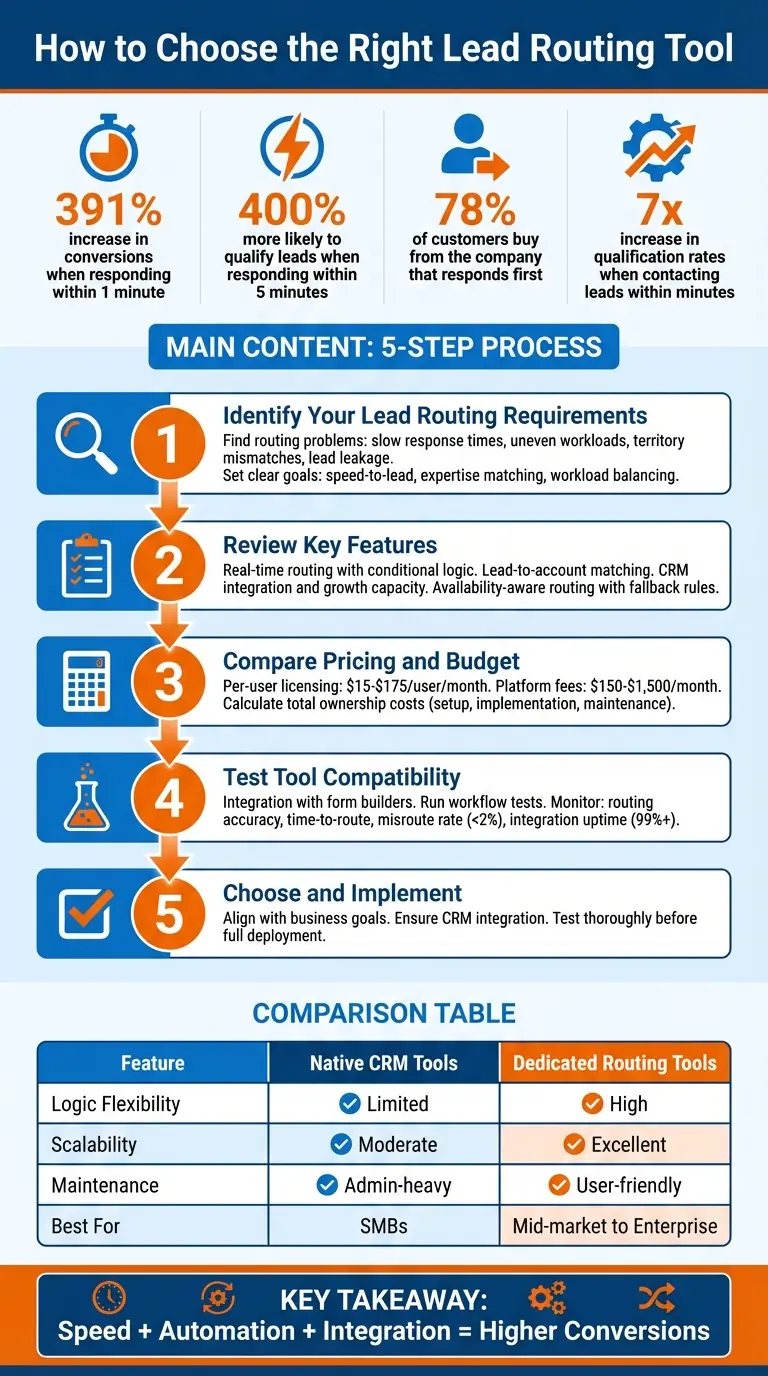
5-Step Process for Choosing the Right Lead Routing Tool
Step 1: Identify Your Lead Routing Requirements
Find Your Routing Problems
Start by pinpointing the weaknesses in your current routing process. A common issue is slow response times. Manual routing often delays follow-ups, leaving leads untouched for hours - or even days - giving your competitors a head start. Research shows that contacting leads within minutes can increase qualification rates by 7x.
Another frequent challenge is uneven workload distribution. Without automation, some team members are overwhelmed with leads while others have too little to do. This imbalance can lead to burnout for some and wasted potential for others. Then there’s the problem of territory and skill mismatches - when leads are assigned to reps who lack the necessary expertise or regional knowledge. Caspar Matthews, Director at Electcomm Group Electrical & Data, highlights this issue:
"A lead that requires understanding of high-voltage systems, for example, cannot be handled by someone whose training primarily covers data cabling. When those mismatches occur, clients get held up and the business loses credibility".
Lead leakage is another major problem. High-quality prospects can slip through the cracks when ownership isn’t clear. Espresso Translations faced this exact issue during one quarter of 2024. Director Nicola Leiper shared:
"Nobody knows what belongs to who, commissions are fought over, and clients are left out of the conversation".
After automating their lead routing, Espresso Translations reduced their average response time from 4.2 hours to 37 minutes and saw a 23% increase in conversion rates.
Data quality is also a critical factor. Incomplete or inaccurate lead information can cause routing rules to fail. Navin Persaud, VP of RevOps at 1Password, emphasizes this point:
"RevOps' job is to reduce manual workarounds and keep data accurate so routing decisions are trusted".
Finally, don’t overlook fallback mechanisms. If a rep is unavailable - whether on vacation or otherwise - leads can stall without automated reassignment rules in place.
Addressing these challenges starts with setting measurable goals to guide your improvements.
Set Clear Routing Goals
Turn your identified pain points into clear, measurable objectives. One key goal is improving speed-to-lead. For example, setting a Service Level Agreement (SLA) for a five-minute follow-up can significantly enhance lead qualification rates.
Another important goal is expertise matching. Assign leads to reps who have the right industry knowledge, product expertise, or language skills to ensure better-quality interactions. For companies using Account-Based Marketing (ABM), lead-to-account matching ensures that new leads from existing accounts are directed to the correct owner. This prevents duplicate outreach and maintains valuable context.
Balancing workloads is equally important. Workload balancing ensures that leads are distributed fairly, avoiding burnout for high performers while maximizing efficiency. Over three years leading up to 2023, Miro scaled its workforce from 200 to 1,800 employees. Their RevOps team used automated routing integrated with Salesforce to track lead velocity and SLA compliance in real-time. This allowed their SDRs to monitor daily metrics and refine their outreach strategies.
Lastly, focus on operational agility. Your routing system should be flexible enough to adapt quickly to changes in your go-to-market strategy. For example, in March 2020, just before the COVID-19 pandemic was declared, Zoom implemented a new routing system. This allowed them to handle a sudden surge of diverse leads by making routing updates in just one week - something that would have previously taken months.
sbb-itb-5f36581
Step 2: Review Key Features in Lead Routing Tools
Real-Time Routing and Conditional Logic
Speed is everything when it comes to lead routing. Your tool should assign leads instantly after a form is submitted - every second of delay can mean a lost opportunity.
Look for tools that include advanced conditional logic. This means features like "If/Then" branching, "And/Or" operators, and routing based on specific criteria like territory, company size, industry, lead score, or product interest. For example, weighted distribution can allocate 60% of leads to senior reps and 40% to junior reps, striking a balance between experience and workload.
Availability-aware routing is another must-have. This feature ensures leads are assigned only to reps who are available, using calendar integrations to make it happen. If a rep doesn’t respond within your SLA window, fallback rules can automatically reassign the lead to avoid delays.
Consider using "hold-until-enriched" gates as well. These tools pause the routing process until data enrichment platforms like Clearbit or ZoomInfo fill in missing details - like company size or industry - so your routing logic can make more precise decisions.
Once you’ve ensured your tool supports real-time, flexible routing, make sure it also includes strong account-matching capabilities.
Lead-to-Account Matching
This feature is all about maintaining continuity. Before assigning a new lead, the tool checks your CRM for existing accounts. If the lead’s company is already in your system, it routes them directly to the account owner. This avoids duplicate records and keeps relationships consistent.
A great example of this in action is RCReports. In October 2023, they integrated Calendly Routing with Salesforce to solve a major inefficiency. Their Account Executives had been losing five hours every month manually reassigning leads booked on the wrong calendars. By implementing real-time Salesforce account matching, they eliminated this issue. Abbie Deaver, Director of Marketing at RCReports, explained:
"Now that we've implemented Calendly's routing feature with Salesforce integration, demos are always booked with the correct AE, reducing friction for both our team and the customer".
For even better results, look for tools with fuzzy matching. This allows the system to connect variations like "IBM" and "International Business Machines" instead of relying solely on email domains. If you’re in enterprise sales, graph-based matching is a valuable feature - it can navigate parent/child account structures to find the right owner.
CRM Integration and Growth Capacity
Your routing tool needs to do more than just connect to your CRM; it should integrate deeply. Real-time data synchronization ensures routing decisions are always based on the latest information. Tools that perform live lookups of Salesforce or HubSpot objects can check current ownership and prevent misrouting.
As your team scales, the tool’s growth capacity becomes critical. Look for features like sandbox environments, which allow you to test new routing rules safely before implementing them. This helps avoid misrouting and keeps your system organized. To keep up with changes in your business, review your routing logic every 90 days to ensure it aligns with your current strategy.
| Feature | Native CRM Tools | Spreadsheet-Based | Dedicated Routing Tools |
|---|---|---|---|
| Logic Flexibility | Limited (workflow-based) | Very High (custom formulas) | High (UI-based builders) |
| Scalability | Moderate | High (flexible but manual) | Excellent (built for enterprise) |
| Maintenance | Admin-heavy | Self-service | User-friendly for RevOps |
| Best For | SMBs with simple rules | Teams needing high flexibility | Mid-market to Enterprise |
Step 3: Compare Pricing and Budget
Review Pricing Structures
Understanding how pricing works is crucial to avoid unexpected costs. The per-user licensing model is the most common, with prices ranging from $15 to $175 per user per month. Some vendors only charge for users involved in routing or administration. Opting for annual billing often reduces costs. For instance, PowerRouter’s Enterprise tier drops from $55 to $35 per user per month when billed annually.
Another common approach combines platform fees with user fees. These include a base platform fee between $150 and $1,500 per month, plus an additional $15 to $30 per user. For businesses handling large lead volumes, be mindful of tiered platform fees, which increase as your monthly leads exceed thresholds like 100 or 1,000 submissions.
Some tools offer alternative pricing models like flat-fee group pricing or record-based pricing. For example, Bitrix24 charges fixed monthly rates based on user caps, while LeadAngel uses record-based pricing, starting at $500 per month for up to 100,000 records.
Sam Rosenbaum, Head of Enterprise Sales at UXPin, shared his experience:
"We were previously paying 4x the cost for the same or potentially less functionality. PowerRouter is a simple yet powerful and effective way to route sales leads".
When evaluating these models, make sure they align with your lead routing needs and the return you expect on your investment.
Calculate Total Ownership Costs
Subscription fees are just one part of the equation. Be sure to factor in other expenses, like setup and implementation costs. If your system requires complex routing logic, you might need to hire consultants, which can significantly increase the total cost. Some vendors include setup assistance, while others leave you to handle the configuration yourself.
Check for compatibility with your CRM. Avoid tools that require costly third-party connectors, such as Tray.ai or Workato, and consider whether you'll need additional subscriptions for data enrichment services like Clearbit or ZoomInfo.
Keep an eye out for essential features - like lead-to-account matching, duplicate merging, or advanced analytics - that might be locked behind higher-tier plans.
Administrative time is another expense to consider. Complex tools often demand significant manual effort from Sales Ops teams for tasks like audits, field normalization, and troubleshooting. Navin Persaud, VP of Revenue Operations at 1Password, highlighted this issue:
"RevOps' job is to reduce manual workarounds and keep data accurate so routing decisions are trusted".
Lastly, ensure that lead routing actions won't affect your automation task limits or API quotas. For example, Zapier excludes successfully completed Lead Router actions from monthly task counts. These details can help you avoid unexpected limitations and costs.
Top 3 Best Lead Distribution Software CRMs In 2024
Step 4: Test Tool Compatibility with Your Forms and Workflows
Once you've set up your routing tool, the next step is to ensure it works seamlessly with your systems. Testing is essential to maintain the speed and accuracy needed for converting leads effectively. This step helps avoid workflow disruptions and minimizes errors that could impact conversions.
Integration with No-Code Form Builders like Reform

Your form builder is where leads first enter your system, so ensuring compatibility here is key. Reform, for example, offers no-code forms with features like conditional routing and lead enrichment, which help deliver complete data before it reaches your CRM.
To test Reform's integration, submit leads with varying attributes - such as different locations, company sizes, or lead scores - and confirm that CRM sync and notifications happen instantly. A great case study comes from heyMarvin, which implemented multi-step forms with logic-based routing using Reform. Led by Director of Growth and Operations Tim McMinn, the project went live in just two weeks. The result? Leads were automatically routed to two separate Account Executive Calendly flows, with unqualified leads filtered out through routing logic.
Another success story is ExactBuyer, which saw a 90% demo engagement rate and reduced exit rates by 26.4% in just 23 days. This was achieved by combining end-to-end qualification with real-time enrichment and dynamic routing, under the guidance of Founder and CEO Edan Krolewicz.
After testing the integration with your forms, move on to checking the tool's performance across your entire workflow.
Run Workflow Tests
Once you've confirmed form integration, it's time to test the entire routing workflow. Simulate real-world scenarios to evaluate the tool's routing speed, accuracy, and logic. For example, create test leads that represent different segments, such as enterprise-level inquiries, mid-market prospects, or leads from specific regions. Ideally, your routing tool should process these leads in under a minute, as faster routing improves engagement by prioritizing high-value opportunities.
During testing, monitor these key metrics:
- Routing accuracy: The percentage of leads correctly assigned to the right reps.
- Time-to-route: How long it takes to assign a lead, measured in seconds.
- Misroute rate: This should stay under 2%.
- Integration uptime: Aim for at least 99%.
Use your CRM to log timestamps from lead submission to assignment, ensuring high-volume submissions don’t slow down the process. Test every step of the workflow - from form submission to CRM sync - making sure that conditional logic, account matching, rep notifications, and calendar bookings happen within seconds.
Additionally, verify that Reform’s spam prevention and email validation features are working as intended. These ensure that only clean, qualified leads enter your system. Finally, confirm that enriched data syncs correctly with your CRM, enabling skill-based lead assignment and reducing time wasted on unqualified prospects.
Conclusion
Choose the right tool by aligning it with your business goals. Start by pinpointing the specific routing issues you’re facing. Speed is crucial - 78% of customers tend to buy from the company that responds first, making quick response times a competitive advantage.
After conducting system tests, ensure the tool integrates well with your CRM and form builder. It’s essential that the routing tool works smoothly with your existing systems. For instance, if you’re using Reform for lead capture, confirm that the tool supports features like conditional logic and account matching. Navin Persaud from 1Password highlights that automating tasks and maintaining data accuracy are key to building trust in routing decisions.
Consider the full cost of ownership, not just the monthly subscription fee. Hidden expenses, such as setup, maintenance, and API limitations, can add up quickly. Even tools with a low advertised price can strain your budget if implementation and administrative tasks are time-consuming.
Finally, test your workflows thoroughly. Simulate real-world scenarios to check for routing accuracy and speed. Make sure your form data syncs properly with your CRM. For example, Smith.ai saw a 34% boost in conversions after automating its routing process, proving how impactful the right tool can be.
FAQs
What should I look for in a lead routing tool?
When picking a lead routing tool, focus on features that match your business goals and day-to-day needs. Start with customizable routing rules - these allow you to assign leads based on factors like location, company size, or specific behaviors. Automation features are a must too, as they enable real-time lead assignment, making your process faster and more efficient. Plus, tools with CRM integration help ensure smooth data syncing, cutting down on manual tasks.
Other helpful features to look for include lead enrichment to add valuable details to your lead profiles, lead scoring to identify and prioritize your best prospects, and performance tracking to fine-tune your approach over time. It's also important to choose a tool that's easy to use and scalable, so it can grow alongside your business and support your team effectively. The right tool will not only simplify lead distribution but also improve response times and increase your chances of converting leads into customers.
How does a lead routing tool help my team respond faster to leads?
A lead routing tool simplifies assigning leads by automatically directing them to the right sales rep based on specific criteria like territory, expertise, or availability. This approach ensures leads are addressed quickly, cutting down delays and boosting response times.
With automated lead distribution, your team can spend less time figuring out who handles what and more time connecting with prospects. Quick responses not only improve the customer experience but also position your business to stay ahead of competitors.
What factors should I consider when assessing the cost of a lead routing tool?
When considering the cost of a lead routing tool, it’s essential to look beyond just the price tag. Pay close attention to the features it offers, like automation, lead scoring, or advanced routing options. Also, be aware of any hidden fees - these could include charges for additional integrations, premium support, or running extra campaigns.
Another key factor is the return on investment (ROI). The right tool should help you respond to leads faster, improve conversion rates, and grow alongside your business. Make sure it integrates smoothly with your current CRM and marketing platforms to avoid extra expenses and keep your workflows efficient.
By balancing the upfront price with the long-term benefits, you’ll be in a better position to pick a solution that aligns with your business needs.
Related Blog Posts
Get new content delivered straight to your inbox

The Response
Updates on the Reform platform, insights on optimizing conversion rates, and tips to craft forms that convert.




Drive real results with form optimizations
Tested across hundreds of experiments, our strategies deliver a 215% lift in qualified leads for B2B and SaaS companies.
