
.webp)
Best Practices for Encrypting Multi-Step Forms


Multi-step forms often handle sensitive data like personal details, payment information, or login credentials. Without encryption, this data is exposed to risks such as interception, manipulation, and regulatory non-compliance. To protect user information and maintain trust, businesses should implement strong encryption practices. Here's what you need to know:
- Encrypt Data in Transit: Use HTTPS with TLS 1.3 to secure data during transmission. Redirect HTTP traffic to HTTPS and enable HTTP Strict Transport Security (HSTS).
- End-to-End Encryption (E2EE): Ensure only the intended recipient can decrypt data, even keeping servers blind to sensitive information.
- Encrypt Data at Rest: Use AES-256 encryption with authenticated modes like GCM or CCM for stored data. Employ envelope encryption for added security.
- Input Validation: Validate user inputs on both client and server sides to prevent attacks like SQL injection or XSS.
- Re-Encrypt Before Processing: Decrypt data temporarily for validation, then re-encrypt it immediately to limit plaintext exposure.
- Key Management: Rotate encryption keys regularly and store them securely using tools like AWS KMS or Azure Key Vault.
- Monitor and Audit: Use real-time analytics and maintain detailed logs to detect anomalies and ensure compliance with data protection regulations.
Database Encryption: A Beginner's Guide to Protecting Sensitive Data
Risks of Unencrypted Multi-Step Forms
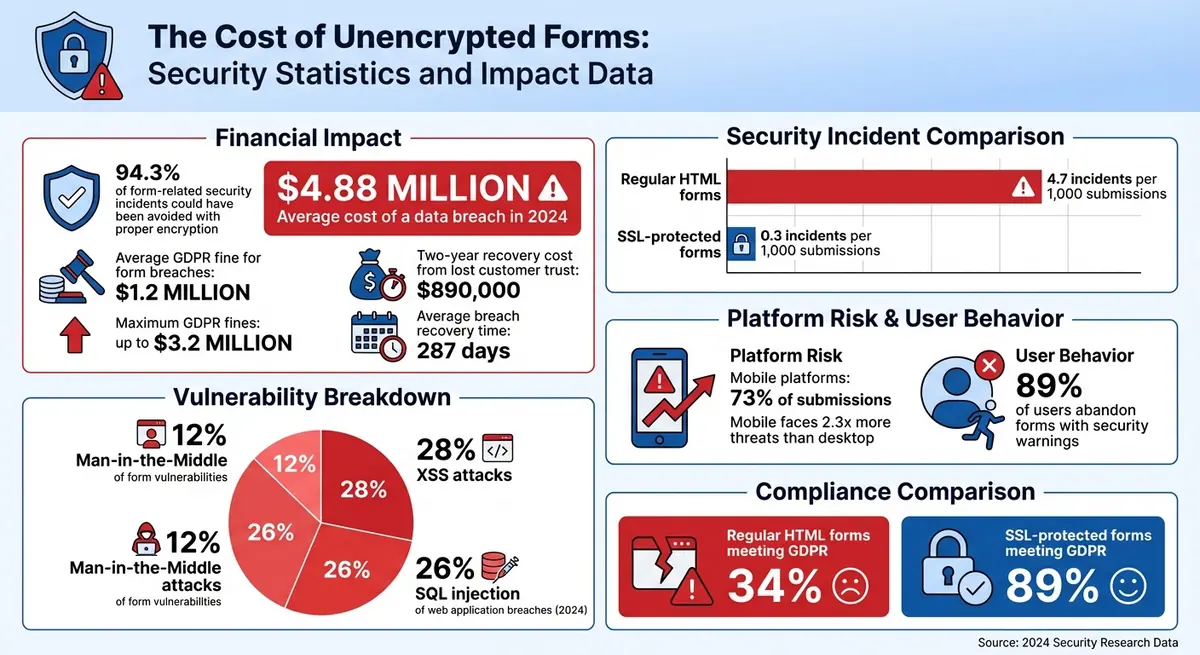
The Cost of Unencrypted Forms: Security Statistics and Impact Data
Unencrypted multi-step forms leave sensitive data vulnerable at every stage of transmission. While encryption is essential for securing data, it also plays a key role in building customer trust. Consider this: the average cost of a data breach reached $4.88 million in 2024, and a staggering 94.3% of form-related security incidents could have been avoided with proper encryption and validation measures.
Data Capture During Transmission
When data is transmitted via HTTP, it travels in plaintext, making it an easy target for Man-in-the-Middle (MITM) attacks. These attacks, responsible for about 12% of form vulnerabilities, occur when cybercriminals intercept or alter data as it moves between the user's browser and the server.
Multi-step forms are particularly at risk because they often transfer data between steps using hidden fields. Without encryption, attackers can not only view this data but also manipulate it. Here's a telling statistic: regular HTML forms experience 4.7 security incidents per 1,000 submissions, while SSL-protected forms reduce that number to just 0.3 incidents. Mobile platforms, which account for 73% of submissions, are especially vulnerable - facing 2.3 times more threats compared to desktops. And when browsers flag unencrypted forms with security warnings, 89% of users abandon the form entirely, leading to lost conversions and revenue.
Non-Compliance with Data Protection Regulations
Organizations that fail to encrypt sensitive user data risk falling afoul of regulations like GDPR and CCPA, which require data protection measures to be integrated from the outset. These regulations explicitly prohibit the use of outdated protocols and insecure cipher suites.
The penalties for non-compliance can be steep. The average fine for GDPR violations related to form breaches is $1.2 million, with some reaching as high as $3.2 million. Beyond financial penalties, recovering from a breach takes, on average, 287 days. During this time, businesses often face operational disruptions and a prolonged loss of customer trust - estimated to cost around $890,000 over a two-year recovery period. Alarmingly, only 34% of regular HTML forms meet GDPR standards, while 89% of SSL-protected forms comply. This stark contrast underscores how critical encryption is for both data security and regulatory compliance.
These risks emphasize the importance of adopting strong encryption practices, which we’ll explore in detail in the following sections.
Best Practices for Encrypting Multi-Step Forms
Protecting multi-step forms requires a layered approach to security, addressing vulnerabilities from data transmission to storage. Here’s how you can safeguard your forms effectively.
Implement HTTPS and TLS for Data in Transit
Start by encrypting all data in transit using TLS 1.3, which eliminates outdated vulnerabilities and shortens handshake times. Redirect all HTTP traffic to HTTPS with a 301 permanent redirect to ensure secure connections from the outset. Your SSL certificate should use at least a 2,048-bit RSA key or an equivalent ECC key, signed with SHA-256. Tools like the Mozilla SSL Configuration Generator can help you optimize server configurations for platforms like Nginx, Apache, or AWS Elastic Load Balancers.
Enable HTTP Strict Transport Security (HSTS) by adding the Strict-Transport-Security header to your server setup. Set the max-age to 63,072,000 seconds and include includeSubDomains and preload directives. To further secure your domain, submit it to hstspreload.org.
Mark session cookies as "Secure" to prevent them from being transmitted over unencrypted connections. Regularly audit your TLS setup using tools like SSL Labs Server Test or Mozilla Observatory to identify and fix vulnerabilities.
Use End-to-End Encryption for Multi-Step Forms
While HTTPS encrypts data during transmission, end-to-end encryption (E2EE) ensures that only the intended recipient can decrypt the information - even your servers remain blind to the data. This is especially important for forms handling sensitive details like financial or medical records.
The Web Crypto API (window.crypto) enables client-side encryption directly in JavaScript. For example, you can store the encryption key in the URL fragment, ensuring it never reaches your server. With this setup, the server processes only encrypted data, while the decryption key stays client-side.
If you’re using a CRM, platforms like Reform offer secure integrations that maintain encryption from submission to storage. This allows you to handle sensitive data securely without getting bogged down in cryptographic complexities.
Encrypt Data at Rest with AES-256
Once data reaches your server, it needs robust protection during storage. AES-256 encryption is widely regarded as the standard for securing data at rest. It provides high entropy and is endorsed by organizations like NIST. Use authenticated encryption modes such as GCM (Galois/Counter Mode) or CCM to protect both the confidentiality and integrity of your data.
Employ envelope encryption by encrypting form data with a Data Encryption Key (DEK), which is then secured with a Key Encryption Key (KEK). Always store these keys separately in secret management tools like Azure Key Vault, AWS KMS, or HashiCorp Vault - never alongside the encrypted data.
For example, in 2025, Optimizely implemented AES-256 encryption for its MVC-based forms by integrating Azure Key Vault to manage a 32-character secret key. To optimize performance during multi-step submissions, data was encrypted only at the final submission stage rather than at each step.
Hash indexed fields, such as email addresses, with secure algorithms like bcrypt. Additionally, establish a key rotation process based on a defined cryptoperiod - for instance, after encrypting 2^68 bytes for 128-bit blocks or whenever a compromise is suspected.
"For symmetric encryption AES with a key that's at least 128 bits (ideally 256 bits) and a secure mode should be used as the preferred algorithm."
– OWASP
sbb-itb-5f36581
Improve Security with Input Validation and Server-Side Encryption
Client-Side vs. Server-Side Input Validation
Input validation acts as a crucial barrier against attacks like SQL injection and cross-site scripting (XSS). To put it in perspective, SQL injection accounted for 26% of all web application breaches in 2024, while XSS was involved in 28% of attacks.
On the client side, validation enhances the user experience by catching errors immediately - like highlighting a wrongly formatted email address or missing required fields. However, it doesn’t actually secure your system. Attackers can easily bypass these checks by disabling JavaScript or using developer tools. While it’s great for usability, it doesn’t protect against malicious intent.
| Aspect | Client-Side Validation | Server-Side Validation |
|---|---|---|
| Execution Location | Browser (JavaScript/HTML5) | Web Server (PHP, Node.js, Python) |
| Primary Purpose | Instant feedback for UX | Security and data integrity |
| Security Level | Low (easily bypassed) | High (mandatory for all requests) |
| Response Time | Immediate (no network delay) | Delayed (requires server round-trip) |
| Bypass Risk | High (vulnerable to bots/APIs) | None (enforced for all inputs) |
Server-side validation, on the other hand, is non-negotiable for security. It rigorously checks every input against strict allowlists - permitting only predefined formats, such as regex patterns for ZIP codes or phone numbers. To enhance effectiveness, always canonicalize inputs by reducing them to their simplest form. This prevents attackers from bypassing validation using tricks like double URL encoding or Unicode manipulation. Additionally, for multi-step forms, validate data at every step to block incomplete or malicious submissions.
Once input validation ensures data integrity, the next step is safeguarding that data during processing.
Re-Encrypt Data Before Processing
After input passes validation, re-encryption adds another layer of protection for sensitive information. Without this step, any unencrypted data in server memory or internal systems becomes an easy target for attackers.
Field-level re-encryption is the answer. This involves decrypting incoming data only temporarily for validation, then immediately re-encrypting it with a different key set before storage. This approach significantly reduces the time plaintext data is exposed.
For systems handling multi-step forms or sensitive data entries, tools like Reform can streamline this process. These platforms integrate securely with CRMs and databases, automatically managing re-encryption to keep data safe from submission through storage.
Monitor and Audit Encryption Practices
Even the strongest encryption systems require constant vigilance. Audit logs are essential - they record every instance of encryption key usage, access times, and interactions with protected data. These logs provide a clear trail for compliance with regulations like GDPR and CCPA. Combined with robust encryption methods, proper oversight ensures data remains secure during form processing.
One critical step is implementing Role-Based Access Control (RBAC). This restricts access to encrypted data, ensuring that only authorized personnel can view sensitive information. For multi-step forms, tools like Reform's real-time analytics can be invaluable. They allow you to monitor encryption events as they occur, helping you detect unusual activities - like unexpected decryption attempts or failed validation checks - before they lead to security breaches.
It’s also important to continuously track encryption health metrics. Keep an eye on encryption and decryption success rates, latency times, and error rates. For example, a sudden rise in decryption failures or slower processing times could indicate configuration issues or even active attacks. Automated alerts for these anomalies ensure your team can respond quickly and effectively.
By combining meticulous logging with real-time analytics and proactive key management, you create a robust system for ongoing data protection.
Use Real-Time Analytics for Security Tracking
Real-time monitoring is a game changer for identifying security issues as they happen. JavaScript event tracking, for instance, can flag anomalies during multi-step form submissions. When paired with dedicated audit systems, this approach provides immediate insight into potential threats.
Reform simplifies this process with built-in security tools available in its Form Settings panel. These features let you manage encryption protocols and monitor form activity without needing custom development. They automatically log key events - like submission attempts, validation errors, and data processing - offering both the documentation required for audits and the ability to spot suspicious patterns in real time.
Continuous tracking doesn’t just detect anomalies; it helps you stay ahead of threats by enabling timely key rotations and system updates.
Regular Key Rotation and Future-Proofing
Key rotation is a vital part of any encryption strategy. It limits the damage a compromised key can cause. As Bob Ertl from Kiteworks points out:
"When organizations use the same encryption key for years, that single key protects all historical data. A compromised key exposes everything ever encrypted with it".
For example, PCI DSS mandates annual rotation for cardholder data, but quarterly rotation is a better practice in high-volume environments. For highly sensitive data, such as personal health information or intellectual property, monthly rotation is ideal. Automating this process is essential, as manual rotations can easily fall through the cracks when priorities shift.
| Data Sensitivity | Minimum Frequency | Recommended Frequency |
|---|---|---|
| Highly sensitive (IP, PHI, PII) | Quarterly | Monthly |
| Regulated data (PCI, HIPAA) | Annually | Quarterly |
| Standard business data | Annually | Semi-annually |
For multi-step forms, key versioning is particularly useful. Assign unique identifiers (like integers or UUIDs) to encryption keys. This enables your system to decrypt earlier form data with older keys while encrypting new submissions using the latest key version. On-demand re-encryption ensures that records are only updated when accessed, avoiding disruptions during key updates.
To prepare for future challenges, including post-quantum threats, consult resources like the NSA's Commercial National Security Algorithm Suite 2.0. This guide identifies encryption algorithms expected to withstand quantum computing advancements. Additionally, establish emergency protocols - such as immediate key rotation in response to employee departures or suspected breaches - to ensure your encryption practices remain resilient.
Conclusion
The strategies covered above provide a solid foundation for securing multi-step forms. Encrypting these forms is critical to protecting sensitive personal information (SPI) and personally identifiable information (PII) collected through form fields. Without proper encryption, organizations risk data breaches, regulatory fines, and a loss of user trust. To build strong defenses, implement HTTPS/TLS for data in transit and AES-256 for data at rest.
Field-level encryption plays a key role in safeguarding data from the moment it's captured to when it's stored. This is especially important for multi-step forms that collect data in segments. Such encryption measures also emphasize the need for effective key management.
Key management is at the heart of encryption security. As noted in SurveyCTO Product Documentation:
"The private key is your only way to decrypt data. If you lose it, you will also lose the ability to decrypt data".
To maintain stability, ensure routine re-encryption during key rotations and conduct regular decryption tests to verify functionality.
FAQs
Why should you use TLS 1.3 to encrypt data during transmission?
TLS 1.3 plays a key role in securing data during transmission by improving both security and speed. It removes older protocols and weak algorithms, cutting down vulnerabilities and delivering stronger encryption. On top of that, it accelerates connection times by simplifying the handshake process, reducing delays and enhancing the overall user experience. Using TLS 1.3 safeguards sensitive information and aligns with current security requirements.
Why is end-to-end encryption important for securing multi-step forms?
End-to-end encryption plays a key role in keeping sensitive data safe when collected through multi-step forms. It ensures that the information is encrypted from the moment users input it until it reaches secure storage, effectively blocking any unauthorized access or potential breaches.
This encryption method is crucial for protecting personal and confidential details, building user trust, and meeting data protection regulations. It's especially critical for forms that deal with highly sensitive information, such as financial or medical data.
What is key rotation, and how does it improve encrypted data security?
Key rotation involves periodically updating encryption keys to bolster data security. By replacing keys on a regular schedule, the risk of a key being compromised is reduced, and the potential exposure of sensitive data is minimized.
This approach ensures that even if an unauthorized party gains access to a key, they can only decrypt a limited amount of data. Regular key rotation plays a crucial role in upholding strong encryption practices and safeguarding sensitive information over time.
Related Blog Posts
Get new content delivered straight to your inbox

The Response
Updates on the Reform platform, insights on optimizing conversion rates, and tips to craft forms that convert.



Drive real results with form optimizations
Tested across hundreds of experiments, our strategies deliver a 215% lift in qualified leads for B2B and SaaS companies.
