
.webp)
Conditional Routing for Financial Services Leads



Conditional routing uses "if-then" logic to assign financial service leads to the right team members based on factors like budget, location, and urgency. This approach eliminates delays, improves response times by up to 80%, and increases conversion rates by 10–20%. For example, a $500,000+ loan inquiry can be routed directly to a senior underwriter, ensuring high-value prospects receive expert attention quickly. It also supports compliance by automating regulatory checks and creating clear audit trails. Tools like Reform simplify this process with no-code forms, advanced logic rules, and CRM integrations, making lead management faster and more precise.
How to Automate Lead Assignment in Salesforce (Step by Step Tutorial)
What is Conditional Routing?
Conditional routing is an automated system that uses "if-then" logic to direct leads to the right team members based on specific criteria. It evaluates details like loan amount, service type, or credit profile to make instant decisions. For instance, if someone applies for a mortgage over $500,000, they’re sent to a senior loan officer. For smaller amounts, the system routes them to a junior team member.
This process relies on predefined rules that analyze data collected during form submissions. These rules use Boolean logic to set clear conditions. A typical rule might look like this: "IF loan amount exceeds $500,000 AND credit score is above 750, THEN route to Senior Wealth Manager." If a lead doesn’t meet any specific criteria, the system sends it to a fallback option, ensuring no lead gets overlooked. This logic forms the backbone of how routing works, which is explained further below.
How Conditional Routing Works
To set up conditional routing, start by defining entry triggers like service type, budget, timeline, or location. Use custom fields to capture this data, then create distinct routing paths with fallback options for unmatched leads.
Organize routing rules in a logical order, starting with broad filters - such as service type or geographic location - before narrowing down to specific conditions like loan size or credit score. For example, you might first separate mortgage leads from investment service inquiries, then route mortgage leads based on loan amount, and finally prioritize by urgency.
Advanced setups allow for more complex logic using AND/OR conditions. An "AND" condition ensures all specified criteria must be met before routing, while an "OR" condition triggers routing if any one criterion is satisfied. This flexibility lets financial firms handle multiple factors at once. For example, a system could route leads based on both income level and location to ensure they’re matched with agents licensed in their region.
Why Financial Services Need Conditional Routing
Conditional routing is especially valuable in financial services, where quick and precise lead management is critical. Automated routing ensures leads connect with the right specialists in minutes, not hours - an essential advantage in a high-stakes industry.
It also supports regulatory compliance by integrating specific conditions into routing rules, such as certification requirements, age or identity verification, and documentation checks. For instance, applications above certain thresholds can automatically go to compliance-trained officers, creating a clear audit trail for regulatory reviews.
Criteria for Routing Financial Services Leads
Conditional routing becomes even more effective when paired with specific criteria that refine how financial services leads are assigned.
Standard Routing Criteria
Smart lead routing relies on multiple factors to connect prospects with the right team. One key factor is financial capacity: leads with annual revenues exceeding $10 million are directed to senior advisors, while those under $1 million might be steered toward self-service options. This approach ensures high-value opportunities get the attention they deserve, while simpler cases don't overwhelm senior staff.
Geographic licensing is another critical consideration. For instance, a mortgage applicant in California must be paired with an agent licensed in that state. Timing and lead intent also play a role - someone requesting immediate consultation is prioritized over a lead downloading a resource.
Complete and accurate data (like phone numbers, LinkedIn profiles, or financial goals) makes it easier to assess a lead's engagement level and prioritize follow-ups. Predictive lead scoring, which analyzes historical data and engagement patterns, further refines this process. As Reform explains:
High-value leads can go straight to sales, mid-tier leads can enter nurturing programs, and low-fit leads might get automated follow-ups or on-demand resources.
Budget information is another useful criterion. For example, leads that fail to provide budget details might be directed to educational resources, while those sharing specific budget figures could receive tailored outreach, such as demo invitations or consultations. These strategies ensure resources are allocated efficiently.
Sample Routing Rules
Conditional routing rules can be tailored to meet specific business needs. Here are a few examples:
- Commercial Lending: "IF loan amount > $2 million AND applicant is in Texas, THEN route to Senior Commercial Lender (Texas license holder)." This combines financial thresholds with geographic requirements to ensure the right match.
- Wealth Management: "IF annual income > $500,000 OR investable assets > $1 million, THEN skip standard qualification and redirect to the private wealth team scheduling page." This fast-tracks high-value prospects to the appropriate team.
- VIP Clients: Membership status can trigger special handling. For example: "IF membership status equals 'Platinum,' THEN jump to a dedicated account manager." This ensures loyal or high-priority clients receive personalized service.
For cases involving compliance, routing rules must align with regulatory standards. This includes avoiding criteria that could unintentionally lead to discriminatory practices. Regular audits of these rules are essential to stay compliant with regulations like the Equal Credit Opportunity Act.
sbb-itb-5f36581
How to Set Up Conditional Routing in Reform

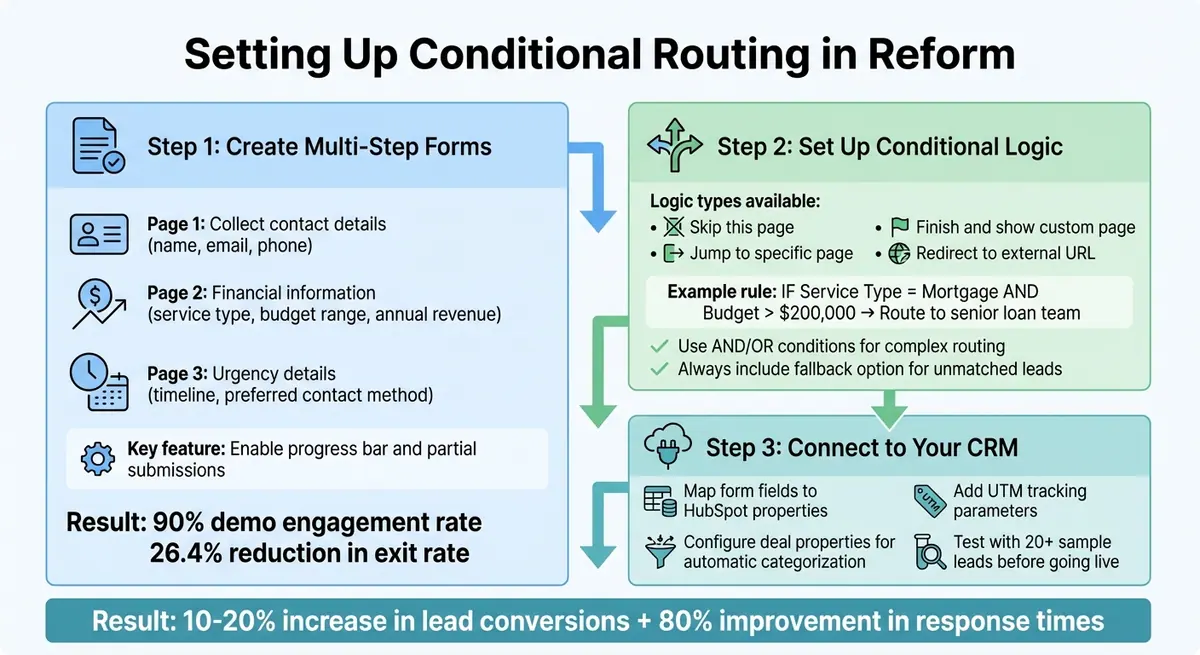
How to Set Up Conditional Routing for Financial Leads in 3 Steps
Reform's no-code form builder makes it easy to set up conditional routing, especially for managing financial services leads. By following these steps, you can streamline your lead management process with automated workflows. The setup involves creating multi-step forms to gather the right details, applying logic rules to direct leads appropriately, and syncing everything with your CRM for automatic assignment.
Creating Multi-Step Forms in Reform
Start by logging into your Reform dashboard and selecting "New Form". Choose a multi-step template to break down complex forms into smaller, more manageable sections. This approach reduces the chances of users abandoning the form. Use the "Add Page" option to create additional steps.
For financial services, organize your form logically:
- Step 1: Collect basic contact details like name, email, and phone number (e.g., (123) 456-7890).
- Step 2: Request financial information such as service type (e.g., mortgage, investment), budget range (e.g., $50,000–$100,000), and annual revenue.
- Step 3: Gather urgency-related details like timeline and preferred contact method.
To guide users through the form, enable the progress bar in Form Settings. Customize step labels to reflect the content, such as "Financial Details" or "Asset Information".
In 2023, ExactBuyer saw impressive results after implementing Reform's multi-step forms and dynamic routing. They achieved a 90% demo engagement rate and reduced their exit rate by 26.4% in just 23 days. Founder and CEO Edan Krolewicz shared:
Multi-step form → Higher engagement. Dynamic routing → Better qualified leads. Real-time enrichment → Improved experience.
To capture data even from incomplete submissions, enable the "Send partial form submissions" feature. This is especially helpful for long financial applications where users might not finish the form.
Setting Up Conditional Logic
Once your form structure is ready, it's time to set up logic rules. Open the form editor, go to "Page settings", and select the "Logic" option. Reform provides four types of logic:
- Skip this page: Bypass irrelevant questions.
- Jump to: Direct users to a specific page.
- Finish and show: Display a custom thank-you page.
- Redirect to: Send users to an external URL, like a Calendly booking link.
Set up conditions by choosing a triggering question, such as "Annual Revenue." Then, define the logic - for example, "is greater than" $500,000. Use the "Add condition" feature to combine multiple criteria with "And" (all conditions must be met) or "Or" (any one condition triggers the action). For instance:
- If "Service Type = Mortgage" AND "Budget > $200,000", redirect the lead to a senior loan team scheduling page.
- If "Location = CA", route the lead to a regional compliance team qualification page.
In 2025, heyMarvin used Reform's routing logic to automatically direct qualified leads to specific Account Executive Calendly flows. They completed the setup in just two weeks. Tim McMinn, Director of Growth and Operations, remarked:
Multi-step design → Easier intake flow. Routing logic → No more calendar spam. Flexible inputs → More complete answers.
To ensure smooth lead management, start with broad filters and work down to more specific criteria. Always include a fallback option for unmatched leads. This method ensures high-value leads get matched with the right specialists, while routine inquiries are handled efficiently.
Connecting Reform to Your CRM
Reform integrates seamlessly with CRMs like HubSpot. The HubSpot integration (available on the Pro Plan for $35/month or $350/year) lets you map form fields directly to contact, company, or deal properties.
Here’s how to set it up:
- Map routing criteria fields to their corresponding HubSpot properties.
- Use the "Configure Deal" feature to connect financial fields for automatic lead categorization.
- Add hidden fields for UTM parameters (e.g.,
utm_source,utm_campaign) and map them to HubSpot properties to track marketing channels. - Enable tracking by checking the "Enable tracking" box and adding
reform.appto your HubSpot analytics tracking site domain list.
Before going live, test the integration thoroughly. Submit at least 20 test leads with different combinations of criteria (e.g., varying budgets, locations) to ensure everything works as expected. Verify that leads are properly assigned, notifications are sent, and no duplicate entries appear in your CRM.
Testing and Improving Your Routing Rules
Once your routing rules are live, the work doesn't stop there. Testing and fine-tuning these rules is key to ensuring they perform effectively, improving both accuracy and lead conversions. After setting up your rules in Reform, take time to test them thoroughly. Use Reform's preview mode to submit sample leads from every form entry point. This helps confirm that leads are routed correctly based on specific criteria - like distinguishing between a $75,000 mortgage inquiry and a $500,000 investment lead. This step is vital to ensure your system works seamlessly.
Testing Your Routing Setup
Pay special attention to edge cases that might disrupt your workflow. Test scenarios such as incomplete budget details, ambiguous choices (like selecting both loan and investment options), or international leads that fall outside a U.S.-focused strategy. Document your findings with screenshots to help troubleshoot any issues. Track key metrics to verify that leads are being assigned correctly, and leverage Reform's real-time analytics to monitor how forms are processed.
Auditing Rules for Compliance
For financial services, keeping routing rules compliant with regulations - like the Gramm-Leach-Bliley Act (GLBA) - is non-negotiable. Conduct quarterly audits to ensure your rules align with current regulations and business priorities. Use these audits to document existing rules, evaluate them against compliance standards, and analyze metrics such as team workload or low-performing lead paths. Involve your compliance team in the review process to catch potential risks. Once updates are made in Reform's logic builder, retest the system to ensure everything is functioning as intended. This regular review process helps reduce risks while keeping workflows efficient.
Using A/B Testing to Improve Performance
Beyond compliance, A/B testing can help you refine your routing strategy for better results. Once your system is running smoothly, start experimenting with targeted adjustments to improve performance. Reform's analytics dashboard makes it easy to test different routing approaches. For example, you could compare routing leads by budget thresholds versus service urgency. Another option is to segment tests by lead source, such as web forms versus email campaigns. To ensure accurate results, run each test with at least 100 submissions per variant.
Here’s a real-world example: A financial firm tested routing investment leads based on location (variant A) versus a combination of budget and timeline (variant B). Variant B outperformed, increasing conversions by 15%. It assigned high-value, time-sensitive leads to specialists more quickly, cutting response times from 24 hours to just 4 hours. Businesses using conditional logic for lead routing often see 10–20% increases in lead conversions, making these experiments worthwhile. Use Reform's dashboard to monitor results and implement the most effective strategies permanently.
Conclusion
Conditional routing is changing the way financial services firms handle leads by streamlining the assignment process. Instead of manually sorting through inquiries, teams can use "if this, then that" rules to automatically direct leads to the right specialist. Criteria like budget, location, or service type ensure that high-value mortgage requests or urgent investment inquiries are sent to senior closers in minutes rather than days, eliminating unnecessary delays.
And the impact? It’s clear. Companies leveraging conditional logic report a 10–20% boost in lead conversions by pairing prospects with the most qualified agents. These systems also show measurable gains in engagement and reductions in inefficiencies.
Reform simplifies this entire process with its no-code platform. You can create multi-step forms, set up complex routing rules with "And/Or" conditions, and integrate directly with your CRM - all without needing technical expertise. Features like page skipping, redirects, and custom thank-you pages are included in the Pro Plan, making it easier to tailor the experience to your needs.
To get started, focus on capturing accurate data, defining clear qualification criteria, and organizing your routing rules from general to specific. Regular testing and quarterly audits can help maintain compliance and ensure everything runs smoothly. Keep an eye on key metrics like response times and conversion rates to measure success and spot areas for improvement.
With Reform's conditional routing, you’ll see faster lead qualification, a more balanced workload for your team, and higher conversions - all while staying efficient and compliant. Start implementing these strategies today to transform your lead management process.
FAQs
How can conditional routing help financial services increase lead conversions?
Conditional routing is a method that directs financial services leads to the right team or agent based on specific criteria, such as their product interest, credit profile, or geographic location. By organizing this process efficiently, it helps shorten response times and ensures communication is tailored to each lead, offering a more personalized experience.
This focused strategy doesn’t just make operations smoother - it also elevates the quality of leads. When potential clients receive timely and relevant responses, they’re much more likely to engage and move forward in the process, ultimately improving conversion rates.
What factors should you focus on when setting up conditional routing for financial leads?
To establish effective conditional routing for financial leads, focus on criteria that enhance compliance, streamline processes, and ensure precise lead matching. Here are some key considerations:
- Location: Route leads to teams licensed in the prospect's specific state or region to meet regulatory requirements.
- Income or Business Size: Match leads to appropriate financial products or services by considering income brackets or annual revenue.
- Product Interest: Direct leads based on their interest in specific offerings, such as mortgages, loans, credit cards, or investment accounts.
- Lead Quality: Prioritize valuable prospects by evaluating lead scores, credit scores, or recent engagement activity.
- Behavioral Responses: Simplify the process by using inputs like desired loan amounts or funding timeframes to bypass irrelevant questions.
By applying these criteria, you can accurately and efficiently route leads, enhancing both customer satisfaction and team productivity. Tools like Reform’s no-code platform make it easy to implement this logic, ensuring the right leads reach the right teams without the need for complex technical setups.
How can financial services stay compliant when using conditional routing?
To stay compliant, financial services should integrate conditional routing into their data privacy strategy. Start by setting up clear routing rules that use only essential information like location, product preferences, or account type. Avoid relying on sensitive data unless absolutely required by law. With Reform's no-code logic, you can design efficient workflows that limit unnecessary data exposure to downstream teams.
Add consent management directly into your forms by using tools like Reform’s consent blocks. These allow you to gather explicit permissions for data collection and routing seamlessly. Consent details should be stored with each lead record, and Reform’s automatic logging can help maintain comprehensive audit trails to meet privacy laws such as the Gramm-Leach-Bliley Act. It's also important to regularly review your routing criteria and implement automated checks, ensuring that only authorized users can access lead data. This approach not only keeps you compliant but also ensures leads are directed to the right teams efficiently.
Related Blog Posts
Get new content delivered straight to your inbox

The Response
Updates on the Reform platform, insights on optimizing conversion rates, and tips to craft forms that convert.




Drive real results with form optimizations
Tested across hundreds of experiments, our strategies deliver a 215% lift in qualified leads for B2B and SaaS companies.
