
.webp)
Real-Time Lead Routing: Best Practices


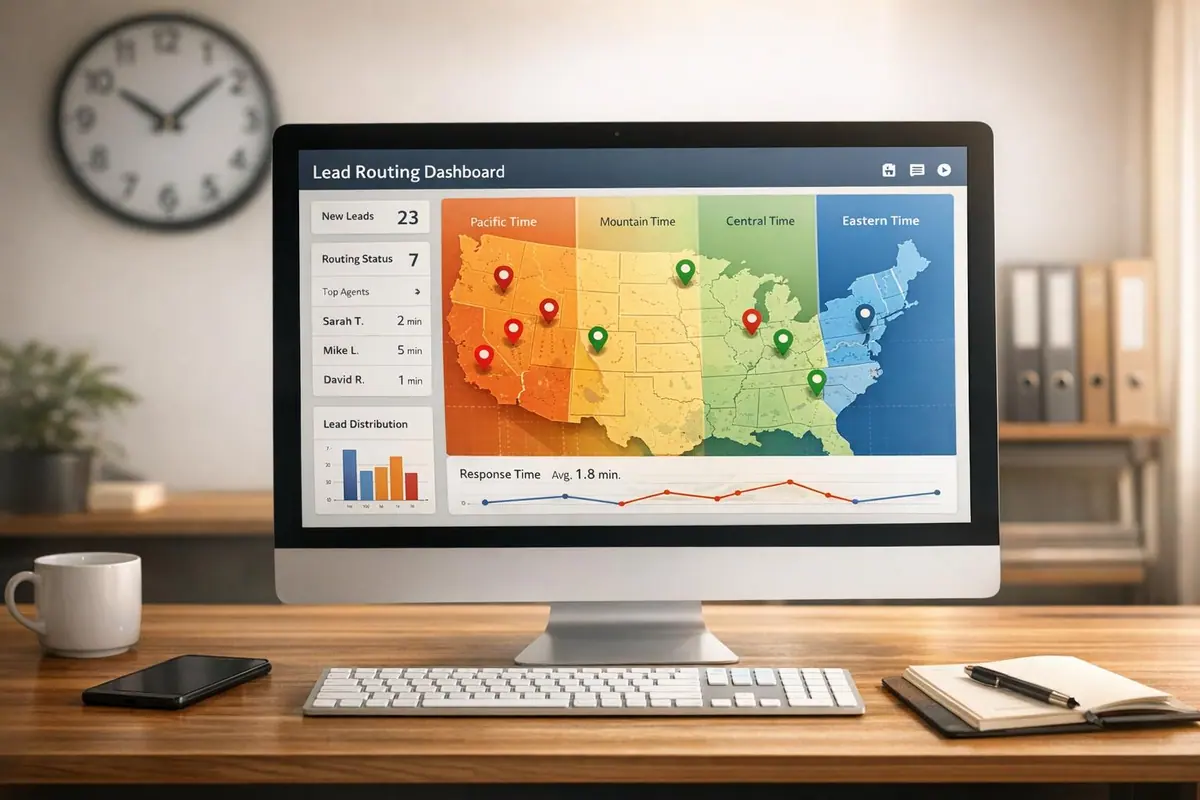
Real-time lead routing assigns leads to the right sales reps instantly, improving response times and conversions. Companies responding within 5 minutes are 8x more likely to see higher conversions, and 78% of buyers choose the first responder. Implementing a lead conversions playbook can help capture this demand. Here's how to optimize lead routing:
- Collect Accurate Data: Use tools like IP detection and location fields to enrich leads for precision.
- Set Routing Rules: Assign leads by geography, time zone, and team availability.
- Automate Notifications: Ensure alerts align with business hours to boost efficiency.
- Fallback Plans: Handle incomplete data or delays with backup rules.
- Test & Review: Regularly check workflows and adjust based on performance metrics.
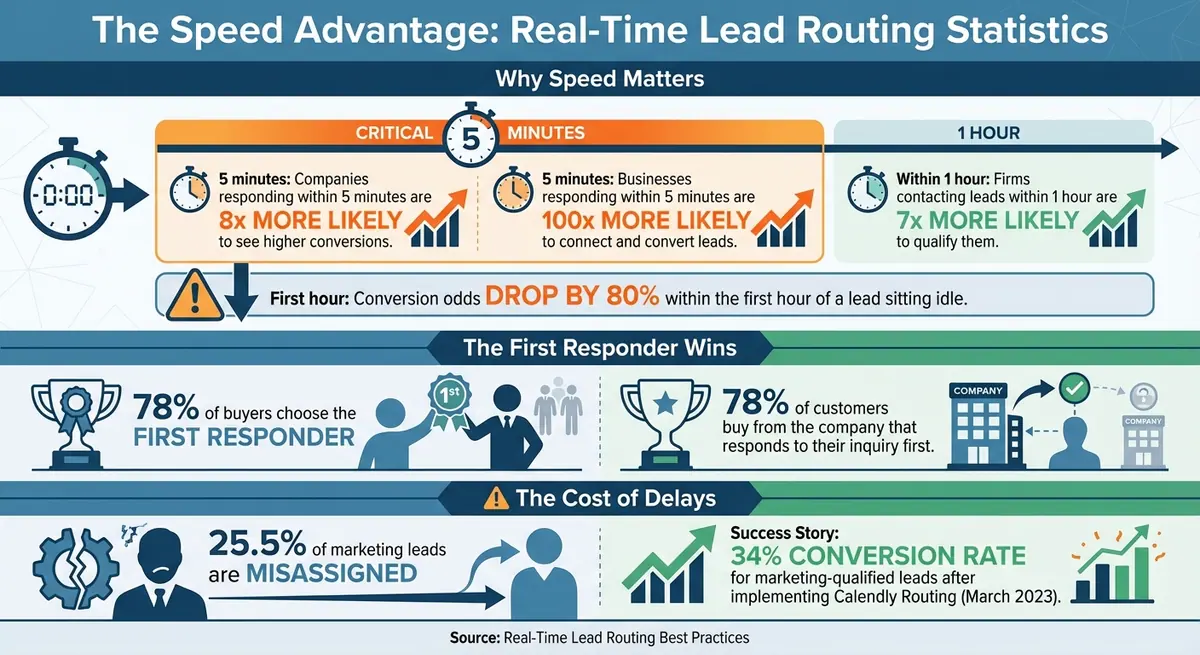
Real-Time Lead Routing Statistics: Response Time Impact on Conversions
Office Hours: Lead Routing and Advanced Lead Flows
sbb-itb-5f36581
1. Collect Accurate Location and Time-Zone Data
Getting precise location and time-zone information is crucial for assigning leads to the right reps. Imagine a lead from Boston being routed to a rep in San Francisco at 8:00 PM EST - there’s no one available to respond, and that’s a missed opportunity.
Having accurate geographic data keeps things running smoothly and helps avoid delays caused by manual processes or outdated spreadsheets. As Fullcast puts it:
The next quarter's pipeline depends on what you route in the next five minutes.
Tools like Reform’s lead enrichment feature make this easier by automatically filling in country and address fields using email or IP detection. This automation reduces manual input, shortens forms, and ensures better data accuracy. To start, include form fields that capture essential location data. This is a foundational step in creating high-converting lead forms that streamline your sales pipeline.
Add Location Fields to Your Forms
Integrating ZIP code, state, or country fields into your Reform forms is a simple way to gather baseline data for assigning leads to specific sales territories. For instance, a ZIP code can instantly determine whether a lead belongs to the Northeast or Southwest sales team.
Keep your forms as short as possible. Reform’s "Shorten Forms" toggle helps by dynamically hiding fields that can be auto-filled through enrichment. If the system detects a lead’s country automatically, that field stays hidden. If it doesn’t, the field appears, allowing the lead to fill it in manually. This way, you collect critical data without overwhelming users.
Use IP Detection and Lead Enrichment
Reform’s enrichment feature takes things a step further by using IP detection to automatically capture a prospect’s location and time zone. When a lead submits their email, the system pulls geographic details behind the scenes and maps them to your CRM’s region-specific fields.
This feature is particularly useful for spotting errors. For example, if a lead enters "New York" but their IP shows they’re in New Jersey, the system flags the inconsistency before routing them incorrectly. Enrichment also supports hidden fields, which can collect backend data like detected time zone or industry.
To activate this feature, head to Team Settings in Reform (available to Team Owners only) and enable enrichment. Then, map the enrichment fields to specific form blocks in your dashboard. Keep in mind that this feature is available with Reform’s Pro Plan. Once you’ve set up accurate auto-filled data, you can refine your forms further with progressive profiling.
Set Up Progressive Profiling
Progressive profiling is a smart way to gather data over time. Start with a short form - just an email and company name, for example - and then request additional details, like a ZIP code, during later interactions.
This approach keeps your data fresh and ensures accurate routing, even if a lead’s location or role changes. For instance, if a lead moves from Chicago to Dallas, submitting an updated ZIP code on a follow-up form will automatically reassign them to the correct territory.
If you’re using multi-step forms in Reform, enable the progress bar to show leads how close they are to finishing. This visual cue helps keep users engaged and reduces drop-off rates, especially when collecting location data in later steps.
2. Create Routing Rules Based on Geography and Time Zones
Routing leads effectively is all about precision and timing. Start by using geography as your foundation - whether it’s by country, state, or postal code. This ensures leads are assigned to the right team, setting the stage for faster and more relevant responses.
Why does speed matter? Research shows that 78% of customers buy from the company that responds to their inquiry first. This makes it clear: your routing rules aren’t just about organization - they’re about winning opportunities. By prioritizing speed and alignment, you create the backbone for efficient lead management.
Divide Leads by Sales Territories
The first step is to break leads into regional groups based on geography. Use criteria like country, state, or ZIP code to tag sales reps by their assigned territory. For example, you can divide the U.S. into East, Central, and West territories. From there, refine the distribution with a logical hierarchy - starting broad (like country) before narrowing down to specifics, such as industry or company size.
Within each territory, round-robin automation can be a game-changer. It ensures leads are distributed fairly, preventing one rep from being overwhelmed or cherry-picking leads. This balanced approach helps maintain momentum and keeps your team motivated.
Match Leads to Representatives in the Same Time Zone
Once you’ve set up territories, take it a step further by aligning leads with reps in the same or nearby time zones. This strategy ensures that reps are active and ready to follow up as soon as a lead comes in. For example, a lead from Boston submitting a form at 2:00 PM EST should ideally go to an East Coast rep who’s available to engage right away, rather than someone in a different time zone who might not be online.
Use CRM workflows and round-robin tools to manage these assignments efficiently. You can also implement business hour triggers to pause lead routing during off-hours and resume it when the local team is back online. This eliminates unnecessary delays and keeps your pipeline moving.
Create Backup Rules for Unmatched Leads
Not all leads will fit neatly into your predefined territories or time zones. Some may have incomplete data, or the assigned rep might be unavailable. To handle these cases, set up fallback rules. For example, if a lead’s country field is blank, route it to a general inbound queue where a manager can step in and assign it manually.
Another option is time-based reassignment. If a rep doesn’t act on a lead within a set timeframe - say, 24 hours - the system can automatically reroute it to another rep or team. This ensures no lead sits idle for too long, reducing the risk of missed opportunities.
Fallback strategies like default round-robin, manager review, priority queues, and backup territories keep your pipeline flowing smoothly.
“Without fallback logic, leads get stuck. Stuck leads die.” - Rework
3. Set Up Conditional Routing in Reform

Reform takes lead assignment to the next level with its conditional logic, automating the process with pinpoint accuracy. By leveraging geographic and time-zone routing, you can turn your forms into powerful tools that automatically direct leads to the right person or team. Instead of wasting time manually sorting through submissions, Reform’s page logic ensures every lead is routed correctly - based on criteria like location or time zone - before it even reaches your CRM.
Quick responses matter. Research shows that companies responding to leads within five minutes are 21 times more likely to qualify that lead compared to those waiting 30 minutes. With Reform, automation eliminates delays, ensuring every lead is routed instantly.
Configure If-Then Logic for Lead Assignment
Reform's conditional routing builds on geographic segmentation by introducing precise if-then logic for lead assignment. Start by outlining your routing hierarchy, moving from broader categories to more specific ones. For instance, you might begin with country-level assignments and then refine them by state or ZIP code. Reform’s page logic uses straightforward "if this, then that" rules: for example, if a lead selects "California", they’re immediately routed to your West Coast team.
To ensure accuracy, create mutually exclusive categories so every lead has a clear path. Use dropdown menus or radio buttons instead of free-text fields to keep data consistent. For example, if someone selects "New York" from a dropdown, the routing rule activates seamlessly. Free-text entries like "NY" or "New York City", on the other hand, can disrupt the logic and misroute leads. Always include fallback rules to handle cases where no predefined category applies, sending those leads to a general queue for manual review.
Once your logic is in place, Reform ensures these leads are seamlessly transferred to your CRM using its integration features.
Connect Reform to Your CRM for Automatic Lead Transfer
Reform integrates directly with leading CRMs like HubSpot, Salesforce, Marketo, and Close. Once connected, it automatically updates your CRM and triggers follow-up workflows.
For real-time notifications, Reform also connects with tools like Zapier, Slack, and Webhooks. For example, a lead from Boston could instantly trigger a Slack alert for your East Coast team, ensuring they follow up immediately. Why is this important? Studies show that firms contacting leads within an hour are nearly seven times more likely to qualify them than those who delay even slightly longer.
Add Custom Fields for Region-Specific Information
To make your routing rules effective, you’ll need the right data. Start by adding fields like Country and Address to your Reform forms. Reform’s lead enrichment feature can automatically fill in details such as company location or size, saving users from entering this information manually.
For backend processes, use hidden fields to capture data like IP addresses. This allows you to determine a lead’s time zone for routing without cluttering the form with extra questions.
If your assignments depend on specific criteria, include custom fields like Company Size, Industry, or Product Interest. Use dropdowns or checkboxes to standardize responses. For example, if routing is based on budget, you could create predefined ranges like "$10,000-$25,000" or "$25,000-$50,000" instead of allowing free-text entries.
Reform’s enrichment feature also helps streamline your forms by auto-filling fields when possible. These fields only appear if the data provider fails to populate them, keeping your forms simple while ensuring you gather the necessary geographic details for accurate routing.
4. Automate Notifications and Follow-Ups by Time Zone
Let’s face it: a notification at 2:00 AM isn’t doing anyone any good. Your sales reps need alerts when they’re actually working, and leads expect responses during normal hours. Responding within five minutes can make conversion rates 8 times higher, but that only works if your team is awake and ready to act. By aligning notification timing with your team’s availability, you can ensure that your real-time routing efforts pay off. Here's how automated notifications and follow-up rules can help your team respond at the right time.
Send Alerts During Business Hours Only
Notifications outside business hours? Skip them. Reform integrates with tools like Slack and email, allowing you to set up rules that send alerts only when your reps are online. For instance, if a lead submits a form at 11:00 PM EST, the system can hold that notification until 9:00 AM the next morning, sparing your East Coast team from late-night pings.
Calendar integrations can take this a step further. If a rep marks themselves as "in a meeting" or "out of office", the system can automatically skip them and route the lead to someone who’s available. This ensures no lead gets stuck in a queue while a rep is unavailable. For urgent cases, SMS notifications can be a dependable alternative to email.
Reassign Leads That Go Unanswered
Set up failover logic to handle leads that don’t get a timely response. For example, if a rep doesn’t respond to a lead within two hours, the system can send a reminder. If there’s still no action after six hours, it can automatically reassign the lead to a backup rep or manager. Conversion odds drop by 80% within the first hour of a lead sitting idle, so these safeguards ensure no opportunity is wasted.
"The issue isn't visibility into what should happen - it's visibility into what is happening." - Toms Krauklis, RevOps & Customer Success, NC Squared
Establish clear Service Level Agreements (SLAs) to define expectations. For instance, you might set a 90-minute window for the first contact and require full qualification within 24 hours. Use these SLAs to trigger automated escalations, ensuring every lead gets the attention it deserves.
Monitor Response Times by Region
After automating reassignments, keep an eye on response times to refine your process further. Track how quickly your team connects with leads across different regions. Reform's analytics can help you spot trends, like whether your West Coast reps are outperforming your Midwest team or if certain territories are consistently missing SLA targets. Use custom timestamp fields in your CRM to measure the exact time between lead creation and first contact.
If you notice slower response times in a specific area, dig deeper. Is the workload for that territory too heavy? Do your routing rules need tweaking? You might need to assign backup reps, rebalance workloads, or adjust fallback logic. Regularly monitoring these metrics helps you identify bottlenecks early and make updates to keep your workflow running smoothly.
5. Test and Improve Your Routing Workflows
Automated routing is only as effective as its upkeep. Regular testing is the key to ensuring your system continues to perform at its best. Did you know that 25.5% of marketing leads are misassigned? To avoid becoming part of that statistic, run tests frequently. For example, submit sample leads from different states and time zones to confirm your routing rules are functioning as expected.
Beyond the basics, it's important to test geographic workflows, monitor performance metrics, and adjust rules regularly to keep your routing process sharp.
Test Workflows With Leads From Different Locations
To ensure your routing logic is working, submit test leads with specific geographic attributes. For instance, if leads from Texas are supposed to go to the Southwest team, simulate an address from Houston to verify they’re routed correctly. Don’t forget to test time-zone matching as well. For example, simulate a scenario where a lead doesn’t respond within two hours to confirm whether your backup reassignment rules kick in.
When these tests confirm your setup is solid, you can move on to tracking performance metrics.
Track Performance Metrics
Once your workflows are live, it’s time to monitor the numbers. Key metrics will reveal how well your routing system is performing and where adjustments, such as lead qualification improvements, might be needed. Pay attention to the following:
Key Metrics Overview:
| Metric | What It Measures | Why It Matters |
|---|---|---|
| Time-to-Assignment | How long it takes to assign a lead after capture | Reduces the time leads remain unmanaged, improving efficiency. |
| Lead Response Time | Time from assignment to first contact | 78% of deals go to the first responder, making this a critical metric. |
| Assignment Success Rate | Percentage of leads routed correctly on the first try | Minimizes manual reassignments and avoids frustrating your reps. |
| Lead Leakage Rate | Percentage of leads that receive no follow-up | Directly impacts your ROI on marketing efforts. |
| Conversion Rate by Territory | How well leads convert in different regions | Helps identify regions where routing rules may need tweaking. |
Review and Update Rules Monthly
Routing rules aren’t “set it and forget it.” Review and update them monthly to account for changes like territory realignments, team structure updates, or Daylight Saving Time adjustments. For instance, in March 2023, implementing Calendly Routing led to a 34% conversion rate for marketing-qualified leads. Use these reviews to rebalance workloads and document changes in a central wiki. This ensures your team can troubleshoot quickly and stay on top of routing challenges.
6. Conclusion
Real-time lead routing bridges the gap between incoming leads and active sales reps instantly. By implementing the steps outlined in our checklist - ranging from accurate data collection to dynamic routing - you can build a system that leverages precise location data, time-zone alignment, and conditional logic to respond immediately. Businesses that respond to inbound leads within 5 minutes are 100 times more likely to connect and convert those leads.
To make this process even smoother, tools like Reform streamline the entire workflow. With Reform, you can create conversion-focused forms featuring built-in conditional routing, lead enrichment, and seamless CRM integrations - all without needing to write a single line of code. It allows you to capture geographic data, assign territories using if-then logic, and automatically route leads to your sales team while they're still engaged.
But automation doesn’t mean set-it-and-forget-it. Continuous improvement is key to staying ahead. As Tara Minh from Operation Enthusiast explains:
Manual routing makes [responding in 5 minutes] impossible at scale.
To ensure your system stays effective, regularly test your workflows, monitor metrics like time-to-assignment and conversion rates by territory, and update your rules monthly to adapt to team changes or territory adjustments.
Speed matters. The first company to respond secures the deal 78% of the time, and reaching out within 5 minutes boosts conversion rates by 8 times. With a strong routing strategy and tools like Reform, you can ensure every lead gets the attention it demands - right when it counts the most.
Keep testing, keep refining, and watch your results soar.
FAQs
How can I set up lead routing to account for different time zones effectively?
To make sure your lead routing operates smoothly across different time zones, leverage geographic and time-zone data to set up flexible, dynamic rules. This approach helps assign leads to team members whose work hours match the prospect's local time, ensuring timely follow-ups. Keep an eye on these rules regularly, adjusting as needed to maintain quick response times and boost engagement.
For an extra edge, use tools that support conditional routing and real-time updates. These features help fine-tune lead distribution, so no potential opportunity slips through the cracks.
How can I effectively handle leads with incomplete information during routing?
When a lead form comes in missing key details - like industry, company size, or contact information - it can throw a wrench into your routing process and slow down follow-ups. To handle leads effectively, even when some data is missing, try these strategies:
- Fill in the gaps automatically: Leverage tools that enrich incomplete fields in real time by pulling relevant data from external sources. This ensures your leads are more complete before they’re routed.
- Establish fallback plans: Have a system in place for incomplete leads. For example, send them to a general queue, assign them to a nurturing campaign, or pass them to a specialist who can handle data enrichment.
- Validate information at the start: Use features like email validation or required fields to reduce errors and missing details when leads are first submitted.
By combining automated enrichment, fallback processes, and upfront validation, you can keep your lead-routing process running smoothly and boost your chances of turning those leads into conversions.
How often should I review and update my lead routing processes to ensure they stay effective?
Regularly revisiting and tweaking your lead routing workflows is essential to keep things running smoothly. By closely monitoring performance metrics, you can fine-tune rules to align with shifts in your business, customer habits, or even geographical and time-zone factors.
As a general rule, try to review these workflows at least once every quarter. But if you spot a dip in lead conversion rates or slower follow-ups, don’t wait - take a closer look right away to tackle any problems before they grow.
Related Blog Posts
Get new content delivered straight to your inbox

The Response
Updates on the Reform platform, insights on optimizing conversion rates, and tips to craft forms that convert.




Drive real results with form optimizations
Tested across hundreds of experiments, our strategies deliver a 215% lift in qualified leads for B2B and SaaS companies.
