
.webp)
How CRM Data Improves Email Campaigns


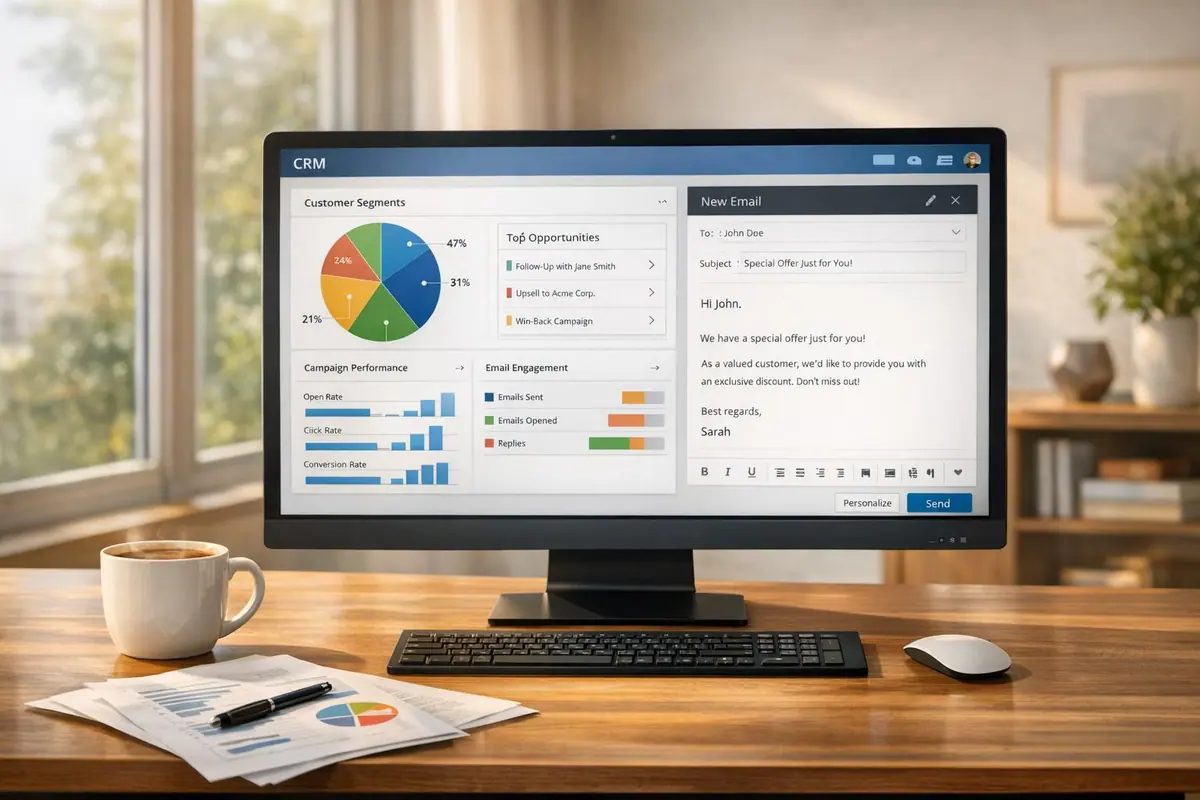
CRM data transforms email marketing from generic blasts into highly targeted campaigns that drive results. By using customer insights like demographics, behavior, and interests, you can create personalized, segmented emails that deliver:
- 6x higher transaction rates than generic emails.
- 760% revenue growth through segmented campaigns.
- 7x higher conversion rates with personalized content.
Key takeaways:
- Segmentation: Group contacts by demographics, behavior, or lifecycle stage to send relevant messages.
- Personalization: Use CRM data to tailor content, like including names, interests, or past purchases.
- Automation: Trigger emails based on customer actions (e.g., abandoned carts, downloads) for timely follow-ups.
- Integration: Sync tools like Reform for real-time CRM updates, ensuring accurate, actionable data.
- Performance Tracking: Measure success with CRM analytics, linking email metrics to revenue.
Start leveraging CRM data to boost engagement, conversions, and ROI in your email campaigns.
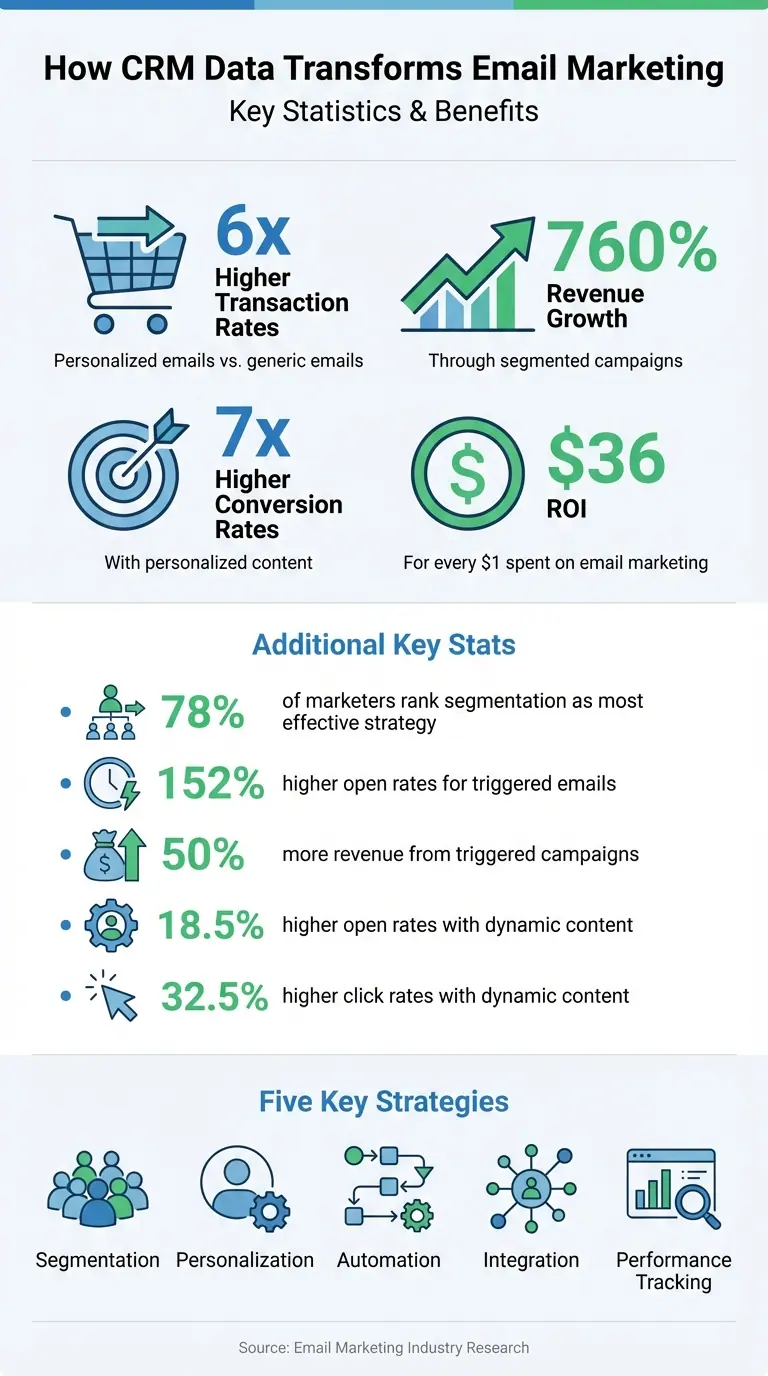
CRM Email Marketing Impact: Key Statistics and ROI Benefits
The Email Marketing Chronicles: CRM and email marketing with Phil Ireland
Connecting Reform Forms to Your CRM

Real-time syncing between forms and your CRM is crucial for effective email marketing. When someone fills out a form on your website, their information should immediately update in your CRM. This instant connection sets the stage for highly targeted and timely email campaigns. With real-time syncing, you can automate follow-ups, assign accurate lead scores, and deliver personalized messages, ensuring no opportunity is missed.
Reform offers direct integrations that connect your forms to your CRM without needing middleware. As soon as a visitor submits a form, their data flows straight into your CRM, triggering any email sequences or workflows you've set up. This eliminates delays that could result in lost opportunities and ensures your sales team can act quickly on high-priority leads. Up next, you'll learn how to set up these integrations seamlessly in Reform.
This real-time connection also powers personalized email content using CRM data. For example, you can dynamically include recipients' first names or reference their specific interests. Emails that incorporate this level of personalization see 7x higher conversion rates compared to generic bulk emails.
How to Set Up CRM Integrations with Reform
To start, open Reform's editor, go to the Integrations menu, select your CRM (like HubSpot for Pro users; Salesforce is coming soon), click "Add integration", and log in to authorize the connection.
The most important step is field mapping, where you link specific fields in your Reform form to corresponding CRM properties. For instance, map the "Email" field in your form to the "Email Address" property in your CRM. Repeat this process for other fields to ensure complete and accurate records for contacts, companies, and deals.
For multi-step forms, Reform syncs partial submissions to your CRM even if users abandon the form midway. This ensures you capture valuable data from drop-offs, allowing you to nurture those leads later. You can also choose which form pages trigger these data syncs, giving you control over when information flows into your CRM.
To track lead sources effectively, use hidden fields in your forms to capture UTM parameters (like source, medium, and campaign). Map these fields to your CRM’s tracking properties, ensuring the field names match UTM parameters exactly. Don’t forget to enable analytics tracking in your integration settings and add reform.app to your CRM's list of tracking domains. This prevents legitimate submissions from being flagged as bots.
"Integrating your forms with HubSpot allows you to seamlessly add or update contacts, companies, or deals in HubSpot whenever someone submits your form." - Reform Support
Improving Data Quality and Accuracy
Once your integration is up and running, maintaining clean and accurate data becomes essential. High-quality data is the backbone of successful email campaigns. Reform’s built-in validation tools ensure that only accurate information enters your CRM, helping protect your sender reputation and boosting email deliverability. For example, Reform validates email addresses during form submission, catching typos or fake entries before they reach your database. This reduces the risk of invalid contacts, which can hurt your email performance metrics.
Reform also includes spam filters to block bot submissions and junk data automatically. This keeps your CRM clean without requiring manual cleanup. Additionally, with lead enrichment features, you can ask for fewer fields on your forms - making it easier for users to complete them - while still gathering detailed information like company size and industry. This balance helps you collect the insights needed for precise email segmentation without overwhelming prospects with lengthy forms.
To maintain data accuracy over time, conduct quarterly audits to remove duplicates and verify contact details. Invalid email addresses not only hurt your sender reputation but also lower the effectiveness of future campaigns. By starting with validated and enriched data from Reform, you reduce the need for extensive cleanup later and ensure your email campaigns are built on a solid foundation.
Building Email Segments from CRM Data
Segmentation turns your CRM into more than just a contact list - it becomes a powerful tool for precision targeting. Instead of sending generic emails to your entire audience, segmentation allows you to group contacts based on what you know about them. Information like demographics, behavior, and engagement history from tools like Reform can help you create these groups, ultimately driving better results. In fact, 78% of marketers agree that email segmentation is one of the most effective ways to optimize campaigns.
The magic lies in combining different types of data to build detailed, multi-layered segments. Start with basic identity info like names and job titles, add descriptive elements such as company size or industry, and then include behavioral cues - like which web pages they viewed or which content they downloaded. For instance, you could target Marketing Directors at mid-sized companies (50-200 employees) who downloaded your pricing guide in the last two weeks. This level of detail ensures your message hits the right people at the right time.
Dynamic segments take this a step further by updating automatically as your CRM data evolves. For example, when a lead makes their first purchase, they’re instantly moved from the "prospect" group to the "new customer" group without you lifting a finger. This real-time updating ensures your emails reflect where your customers are in their journey, avoiding missteps like sending promotions to someone who’s already bought.
Creating Dynamic Segments for Targeted Campaigns
To create effective dynamic segments, focus on the CRM fields that matter most - behavioral data is often the clearest indicator of intent. Look for patterns like visits to high-priority pages (pricing or product demos), downloads of key content, or frequent email interactions. For instance, someone who visits your pricing page three times in a week is likely more interested than someone who’s only opened one email.
Lead scoring can simplify this process by assigning numerical values to different actions. For example, you might assign points for activities like downloading a whitepaper or signing up for a webinar. Once a contact’s score hits a certain number - say 50 points - they automatically join your "high-priority" segment, triggering immediate action from your sales team. This approach eliminates guesswork and ensures your team focuses on the leads most likely to convert.
For B2B campaigns, technographic segmentation can be especially effective. This involves targeting prospects based on the software they use. If your CRM shows a lead uses Salesforce, you can send emails that highlight your Salesforce integration, making it easier for them to see how your product fits into their workflow. Geographic and demographic data also play key roles - sending webinar invites based on local time zones can boost attendance, while tailoring promotions by age can make them more relevant.
| Segmentation Category | CRM Data Points Used | Example Use Case |
|---|---|---|
| Demographic | Age, gender, income, job title | Sending age-based product promotions |
| Geographic | Country, city, timezone | Scheduling webinar invites to match local time zones |
| Behavioral | Website visits, downloads, email clicks | Following up after a whitepaper download |
| Technographic | Current software stack, hardware | Promoting integrations with tools they already use |
| Lifecycle Stage | Lead score, funnel position, purchase history | Moving a "Lead" to "Customer" after a purchase |
Segmenting by Lifecycle Stage
Lifecycle segmentation ensures your emails align with where each contact is in their buyer journey. Someone learning about your brand for the first time needs different content than someone who’s ready to make a purchase. By tracking lead scores and interaction history, your CRM can automatically place contacts into the right stage, helping you deliver more relevant messages.
Break your funnel into clear stages: Awareness (new leads), Consideration (active prospects), Decision (ready-to-buy), Customer (post-purchase), and Dormant (inactive contacts). Each stage requires tailored content. For example, new leads in the Awareness stage might receive welcome emails and educational resources, while Consideration-stage prospects need product demos and case studies. Customers benefit from onboarding tips, and dormant contacts might respond to re-engagement campaigns with special offers.
For even sharper targeting, try breaking these stages into smaller sub-stages. Instead of just "Prospect", you could create segments like "Proposal Sent", "Negotiation Pending", or "Awaiting Signature". This level of detail allows you to craft highly specific follow-ups that address exactly where someone is in their decision-making process. The payoff? Higher engagement and faster conversions. In fact, predictive models for lifecycle segmentation have been shown to deliver a 32% increase in qualified lead conversion rates and a 125% improvement in average conversion time.
"CRM is the powerhouse of conversions, if used correctly." - Disha Bhatt (Dave), Content Strategist, Email Uplers
With these precise segments in place, you’ll be ready to tailor your email content to meet the unique needs of each group.
Personalizing Email Content with CRM Data
Make your emails feel like they’re speaking directly to each recipient. This is where CRM data becomes your secret weapon, transforming a simple contact list into a powerful personalization tool. Instead of sending generic messages like "Dear Customer", you can use CRM insights to include specific details - like the recipient's name, recent activity, purchase history, or even a product they’ve browsed. These details can be seamlessly woven into your email content, creating a much more engaging experience.
And the results? They’re hard to ignore. Emails with personalized content generate six times higher transaction rates compared to non-personalized ones. But personalization doesn't stop at adding a first name to the subject line. With modern CRM systems, you can go further by including contextual information - like the status of a support ticket or items recently viewed - making your emails feel like a one-on-one conversation rather than a mass marketing blast.
Using Dynamic Content for Personalized Messages
Dynamic content blocks allow you to customize sections of an email based on recipient data - all within a single campaign. The benefits are clear: dynamic content leads to 18.5% higher open rates and 32.5% higher click rates. This approach lets you tailor messages to different audience segments. For example, a CFO might receive messaging focused on ROI, while an operations manager gets content highlighting improved efficiency. Even small adjustments, like using a real person’s name in the "From" field instead of a generic company name, can make your emails feel more personal and increase engagement.
CRM data also enables smart product recommendations. Imagine this: a customer who bought a consumable product three months ago gets a timely reminder to restock, while someone who purchased an entry-level product receives an upsell email highlighting premium features. These targeted suggestions align perfectly with each recipient’s preferences and behavior.
Dynamic content is just the start. When paired with behavioral triggers, your emails can become even more impactful.
Improving Engagement with Behavioral Data
Behavioral data is incredibly powerful because it’s based on real actions, not assumptions. For instance, if someone visits your pricing page multiple times in a week, downloads a specific whitepaper, or abandons their shopping cart, these actions reveal what they’re interested in - and when they’re interested. By capturing these behaviors in real time, your CRM can trigger perfectly timed, relevant emails.
The performance of triggered emails speaks for itself. They achieve 152% higher open rates and drive 50% more revenue compared to standard campaigns. Setting up automated workflows ensures that specific actions lead to targeted follow-ups. For example, if a recipient clicks on a link about a particular product feature, they could instantly receive a follow-up email featuring a case study that demonstrates how that feature works.
Lead scoring takes this one step further. By assigning scores based on behaviors - like repeated visits or downloads - you can identify high-intent leads and prioritize them. Meanwhile, lower-scoring contacts can continue receiving educational content until they show stronger buying signals. This way, your messaging always aligns with the recipient’s stage in the decision-making process.
"Personalization isn't a 'nice to have' anymore. It's a must." - Ruth Bolster, Product Marketing Senior Lead, Salesforce
sbb-itb-5f36581
Automating Email Campaigns with CRM Triggers
Using CRM triggers, you can automate email campaigns by setting up actions that activate specific emails when certain changes occur - like a lead status update, a field adjustment, or even logging an activity such as a phone call. These triggers follow predefined rules, adding the contact to a marketing list and instantly kicking off the relevant email campaign.
Triggers generally fall into three types: transactional (e.g., purchases), behavioral (e.g., website activity), and milestone-based (e.g., birthdays). This approach allows you to send emails tailored to the customer journey, like "pre-transactional" emails to spark interest before a purchase or "post-transactional" emails that focus on retention and collecting feedback. With this structure in place, you can create targeted drip campaigns and respond to real-time behaviors seamlessly.
"A properly managed automated email marketing campaign can not only bring you more customers, but also cost your business less in the process." - Salesforce
Setting Up Drip Campaigns for Lead Nurturing
Drip campaigns, built on personalized segmentation, ensure steady engagement through automated, well-timed follow-ups. For example, when a lead becomes qualified, you can trigger a drip sequence of 5–7 emails, complete with wait times and branching logic. If someone opens an email but doesn’t respond, follow up with a case study or even reach out through LinkedIn.
This kind of automation is especially helpful for staying connected with hard-to-reach leads over time. Emails can be designed to feel like personal check-ins from a salesperson’s inbox, adding a human touch. For clients who’ve already closed a deal, you can launch an onboarding series with training resources, survey links, and eventually a referral request. For lost opportunities, use the "lost" date to time a win-back campaign, ideally just before a competitor’s contract is up.
To avoid sending irrelevant emails, create scrub or exclusion lists. These lists automatically remove existing clients from top-of-funnel campaigns, ensuring your messages stay relevant.
Sending Real-Time Emails with Behavioral Triggers
Real-time behavioral triggers take your email automation to another level, sending messages precisely when interest is at its peak. These triggers activate immediately after key actions are logged in your CRM - like abandoned carts, visits to your pricing page, or product views. For instance, if someone abandons their cart, you can instantly send an email with an incentive to complete the purchase. Or, if a prospect visits your pricing page several times in a week, a demo offer can land in their inbox while your brand is still fresh in their mind.
CRM-driven personalized emails can deliver up to 7x higher conversion rates compared to generic bulk emails. You can also set up alerts for high-intent behaviors, empowering your sales team to step in when automation alone isn’t enough.
Some advanced CRMs even use predictive analytics to anticipate customer needs. For example, they can send a stock replenishment reminder before a customer runs out of a consumable product. Once the behavioral event is logged, the CRM automatically adds the contact to a targeted marketing list and launches the campaign.
To keep your automation running smoothly, schedule quarterly data audits. Triggers sent to invalid email addresses not only waste resources but can also harm your sender reputation. By maintaining clean data, you ensure your campaigns hit the right inboxes every time.
Tracking and Improving Campaign Performance with CRM Analytics
A CRM does more than just track email open rates - it transforms them into actionable insights by connecting email engagement to deal progression and revenue generation. While email marketing boasts an average ROI of $36 for every $1 spent, you’ll only see those returns if you’re measuring the right outcomes.
With modern CRM dashboards, email engagement data syncs directly with your sales pipeline in real time. This allows you to identify campaigns that generate high-quality leads, not just high click rates. Take Aaron’s, an Atlanta-based retailer, as an example: since 2020, they’ve nearly tripled their subscriber base and boosted their conversion rate by 53% by leveraging Salesforce’s email tracking tools. By going beyond surface-level metrics, they uncovered how email interactions translated into store visits and purchases. Your CRM can do the same by making critical email metrics and their financial impact instantly visible.
"You can't fix what you don't know is broken, right? Enter email tracking, one of the most essential marketing tools." – Salesforce
Monitoring Email Metrics in Your CRM
A good CRM dashboard doesn’t just track engagement - it links metrics to outcomes. For example:
- Open rates help you gauge the effectiveness of subject lines.
- Click-through rates (CTR) measure the impact of your content.
- Click-to-Open Rate (CTOR) assesses content quality among recipients who actually opened your email.
For a clearer financial picture, track Revenue Per Email (RPE) by connecting email interactions directly to closed deals in your sales database. This allows you to measure each campaign's true financial return. Also, keep an eye on bounce rates (aim for less than 2%) and spam complaints (keep these below 0.1%) to maintain a strong sender reputation. Advanced analytics can even provide insights into device usage, read time, and engagement depth.
Consider DoorDash’s success: by integrating HubSpot’s CRM, they shifted from relying solely on one-off campaigns to automating 80% of their emails. This not only saved production time but also improved audience segmentation. Having all metrics centralized allowed the team to make real-time adjustments instead of waiting for weekly reports. Once you’ve nailed down tracking, the next step is refining your campaigns through A/B testing.
Using A/B Testing to Improve Campaigns
CRMs make A/B testing more effective by tracking results beyond basic metrics like opens and clicks. Start with a clear hypothesis, such as, “If we move the CTA above the fold, then click-through rates will increase because the action is immediately visible”. Test one variable at a time - whether it’s the subject line, CTA color, or send time - to ensure accurate results.
For reliable data, use a sample size of at least 1,000 recipients per variation and run tests for 3–7 days to account for different engagement patterns. Only declare a winner when your results reach a 95% confidence level. For example, the YMCA of Alexandria achieved a 12.8% click-through rate and saved 10 hours of manual work per campaign by using ActiveCampaign’s AI-driven predictive tools for sending and testing.
Your CRM can automatically send the winning variation to the rest of your list and document the results for future campaigns. Start by testing high-impact elements like subject lines and CTAs, as these often yield the quickest improvements. Then, track how each variation influences broader metrics like deal velocity and customer lifetime value within your CRM.
Conclusion
Your CRM is more than just a place to store contacts - it's the driving force behind smarter, more effective email campaigns. By combining segmentation, personalization, automation, and performance tracking, you can move beyond generic emails to deliver messages that truly connect with your audience. For instance, 78% of marketers rank segmentation as one of the most effective email marketing strategies, and personalized emails generate six times higher transaction rates.
But here's the catch: the success of this system hinges on accurate, up-to-date data. If your CRM data is outdated or incomplete, even the most well-planned segmentation strategy can fall apart. That's where tools like Reform come in. By syncing form submissions instantly with your CRM, Reform eliminates the need for manual data entry, ensuring every lead is enriched with accurate, actionable information. Whether it's new data from surveys or lead magnets, having your CRM updated in real-time gives your team immediate access to organized insights.
This real-time integration doesn't just streamline your processes - it also supercharges your automation efforts. Dynamic segmentation becomes possible, with email lists that automatically adjust based on customer behavior and characteristics. No more manually sorting contacts; your CRM takes care of it, automating lifecycle stages and personalizing messages. The payoff? Higher open rates, better click-through rates, and stronger conversions - all driven by relevance.
"CRM is the powerhouse of conversions, if used correctly." – Disha Bhatt (Dave), Content Strategist, Email Uplers
With email marketing delivering an average ROI of $36 for every $1 spent, leveraging your CRM effectively can make all the difference. Clean data, automated workflows, and ongoing testing create a system where insights turn into revenue.
FAQs
How can CRM data make email campaigns more personalized?
CRM data gives you the tools to craft email campaigns that feel personal and resonate with your audience. By tapping into details like contact history, purchase habits, and individual preferences, you can divide your audience into specific groups and customize your messages to suit each one.
It also opens the door to dynamic personalization. Think about adding the recipient's name, suggesting products they might love, or timing your emails perfectly based on their past activity. These small touches make your emails more relevant and engaging, strengthening the bond between you and your audience.
How does segmentation enhance the success of email campaigns?
Segmentation means breaking your email list into smaller, focused groups based on factors like demographics, past purchases, or how engaged they are with your brand. By customizing your messages for each group, you can send more targeted and meaningful content, which often results in higher open rates, better click-through rates, and improved campaign results.
This strategy helps your emails connect with your audience on a deeper level, making recipients feel seen and appreciated. In the long run, segmentation strengthens customer relationships and boosts the return on investment (ROI) for your email marketing campaigns.
How does integrating CRM data in real time enhance email marketing?
Integrating CRM data in real time gives marketers access to the latest customer information, opening the door to accurate audience segmentation, tailored messaging based on behavior, and instant automated actions like follow-up emails or exclusive offers.
Real-time insights also let you track email performance - think open rates, clicks, and conversions - almost as they happen. This means you can tweak campaigns immediately, boosting engagement. In fact, automated emails often outperform standard campaigns with noticeably higher open rates.
Related Blog Posts
Get new content delivered straight to your inbox

The Response
Updates on the Reform platform, insights on optimizing conversion rates, and tips to craft forms that convert.



Drive real results with form optimizations
Tested across hundreds of experiments, our strategies deliver a 215% lift in qualified leads for B2B and SaaS companies.
