
.webp)
CRM Integration: Steps for Lead Nurturing Success



When you integrate your CRM with lead nurturing tools, you create a system that ensures every lead gets timely, personalized attention. Here's the bottom line: clean data, efficient forms, and automated workflows are the keys to turning leads into customers.
- Why it matters: Poor CRM data affects 44% of businesses, costing them 25% of revenue.
- What to do: Start by auditing your CRM for duplicates, missing info, and outdated records. Use tools like Reform to capture accurate data and sync it instantly.
- How to nurture leads: Set up workflows to send tailored messages based on lead actions, like visiting a pricing page or filling out a form. Use lead scoring to prioritize follow-ups.
- Results: Businesses using CRM automation can see up to 50% more sales-ready leads and deals closing 23% faster.
Clean data and automation aren’t just nice-to-haves - they’re essential for keeping leads engaged and moving through your pipeline. Read on for actionable steps to integrate your CRM and streamline your lead nurturing process.
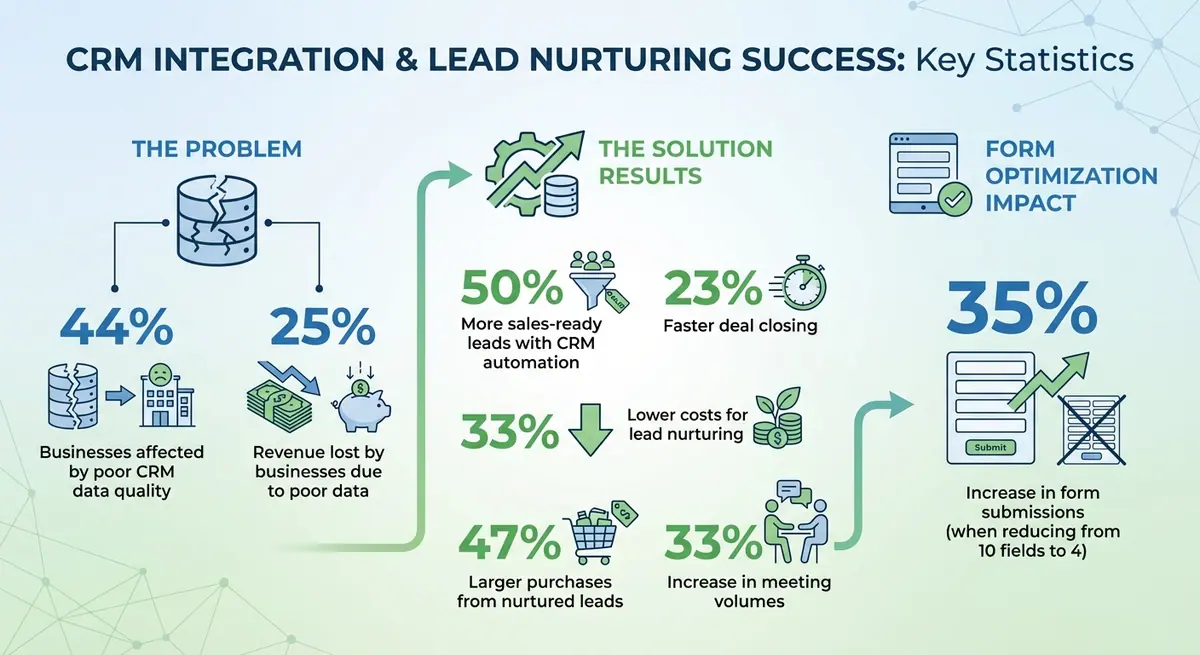
CRM Integration Impact: Key Statistics for Lead Nurturing Success
How Do You Integrate CRM With Inbound Lead Nurturing? - Sales Pro Blueprint
Preparing for CRM Integration
Before diving into integration, it's crucial to tidy up your CRM data. Poor data quality is a widespread issue, impacting 44% of businesses and costing them 25% of their revenue in 2023. This kind of inefficiency can derail growth and harm the customer experience. Your CRM should be a powerful tool, not a cluttered repository of outdated or incorrect information. Start with a thorough audit to establish a solid foundation.
Audit and Clean Your CRM Data
Define what an ideal lead looks like for your business. Then, review a sample of your records for missing or inconsistent information - like incomplete phone numbers or incorrect job titles - and identify duplicates. Remove contacts that haven’t engaged in over a year.
"A disorganized CRM slows everything down. It leads to missed follow-ups, misaligned campaigns, and vague pipeline forecasts." - Contentbacon
Use built-in tools to find and merge duplicate entries, and enforce consistent formatting. For instance, names could follow Title Case, and phone numbers might use a standard format like (555) 123-4567. Stick to approved picklists for fields like industry or country to maintain uniformity. Adopt a "one person = one record" rule to avoid redundancy. Also, clean out contacts that no longer add value to your strategy. To prevent junk data from entering your system, implement validation rules that require proper email formats and block generic domains.
Identify Key Data Fields
Once your CRM data is clean, focus on the fields that are most important for decision-making. Not all data is equally valuable, so prioritize fields that drive results. These might include:
- Identity: Name, email, phone, Lead ID
- Qualification: Job title, industry, account size
- Engagement: Email clicks, web visits, pricing page views
- Lifecycle: Lead stage, lead score, opportunity status
- Compliance: Consent flags, opt-in status
"Start with contacts, companies, opportunities, campaign membership, key custom fields (persona, lifecycle stage), and consent flags." - Vendasta
Create a data dictionary to map fields from your forms and marketing tools to their corresponding CRM fields. This prevents mismatches and formatting errors during data syncing. For example, standardize entries like "United States" instead of allowing variations like "USA." High-priority actions, such as demo requests, should sync immediately, while aggregated data like engagement scores can update daily. Proper mapping ensures your automated workflows are accurate and effective.
Optimize Your Forms for Lead Capture
Forms act as the gateway to your CRM, so a poor design can discourage potential leads. Complicated or lengthy forms often lead to abandonment. For example, one SaaS company reduced its demo request form from 10 fields to just 4 and saw a 35% increase in submissions.
Using multi-step forms and conditional logic can simplify the process. Start by asking for only essential details, such as an email address, and collect additional information later if needed. Tools like Reform can enrich missing data - filling in details like company size or industry - so you don’t have to ask for everything upfront. Features like email validation and spam prevention filters also ensure your CRM remains free of fake entries. Every submission is structured and accurate, flowing directly into your CRM. Additionally, Reform captures UTM parameters automatically, helping you track which campaigns generate the best leads. Streamlined, accurate form submissions not only enhance your CRM but also improve your lead nurturing efforts.
Setting Up CRM and Form Integrations
To fully activate automated lead nurturing, it's essential to integrate clean CRM data with mapped fields. This ensures that form submissions instantly create or update CRM records, triggering appropriate follow-up actions without requiring manual effort.
Connect Your CRM with Marketing Tools
Start by authenticating your CRM account through its integration settings. Most platforms will direct you to a sign-in page where you can grant the necessary permissions. Once connected, enable two-way synchronization to ensure data flows seamlessly between your CRM and marketing tools. This synchronization allows for a unified and accurate data source across your systems.
Begin by mapping standard fields like email, name, and phone. Then, include custom fields such as lead source, industry, or product interest. Avoiding data silos is critical, as they can hinder your digital processes. If your tools lack built-in connectors, consider using a three-tier API setup to extract, unify, and deliver data effectively. Afterward, integrate your lead capture forms to maintain a smooth data flow within your systems.
Connect Reform Forms to Your CRM

Reform simplifies the CRM integration process. In the Reform form editor, navigate to the Integrations menu and select your CRM - whether it’s HubSpot, Salesforce, or Close. Authenticate the connection by signing into your CRM account to establish a secure link. Once connected, map specific form fields - like Email, Name, and Phone - to their corresponding CRM properties. Reform supports mapping for Contacts, Companies, and Deals.
"Integrating your forms with HubSpot allows you to seamlessly add or update contacts, companies, or deals in HubSpot whenever someone submits your form." - Reform
Reform uses the email address from form submissions to identify existing records. If a match is found, it updates the record instead of creating a duplicate. Updates happen instantly, ensuring timely follow-ups. Starting January 2025, Reform will also capture data from multi-step forms, even if users don’t complete the entire form. You can configure this by selecting the page where partial data should be sent to your CRM. To track lead sources effectively, create hidden fields for UTM parameters (like utm_source and utm_medium) and map them to your CRM properties. Additionally, add reform.app to your CRM’s analytics tracking site domain list to prevent submissions from being flagged as spam.
Test and Validate Your Integrations
Once your CRM and forms are connected, it’s essential to test the setup to ensure everything syncs correctly. Submit a test form with all fields filled out, then check your CRM to confirm that the data appears in the appropriate fields, such as First Name, Email, or Industry. For multi-step forms, fill out only the first page and exit to verify that partial data creates a lead record in your CRM. If you’re using UTM parameters, submit a form via a URL with tracking parameters and confirm they populate the correct lead source fields in your CRM.
"Monitor Data Flow: Regularly check your HubSpot account to ensure that the data from your forms is being correctly captured." - Reform
Check your CRM’s analytics or spam folder to ensure that submissions from your form domain aren’t being flagged as bots. Differentiate between real-time syncs, which support immediate follow-ups, and scheduled syncs for aggregate data like engagement scores. Use your CRM’s native tools - such as Salesforce’s "Duplicate Management" - to identify and merge duplicate records as they are created. Finally, schedule monthly or quarterly reviews to address inaccuracies, outdated information, or anomalies before they affect your campaigns.
sbb-itb-5f36581
Building Lead Nurturing Workflows
With your CRM and forms working seamlessly together, it’s time to transform that data into effective lead nurturing workflows. These workflows take the hassle out of manual follow-ups, ensuring every lead gets the right message at the perfect time based on their activity and potential fit.
Set Up Lead Stages and Scoring
Lead scoring is all about assigning numerical values to each lead to gauge how likely they are to become a customer. This involves tracking two types of data:
- Explicit data: Information directly provided, like job title, industry, or company size.
- Implicit data: Observed behaviors, such as email opens, visits to your pricing page, or content downloads.
These scores help you prioritize which leads need immediate attention. For example, configure your CRM to automatically move a lead to "Qualified" or "MQL" status once they hit a certain score - say, 50 points. Identify key actions that drive revenue, such as signing up for a webinar or clicking specific links, and assign higher scores to these activities. To keep your sales team focused on active prospects, use score decay to lower a lead’s score if they stop engaging over time [18, 21]. You can even use color-coded categories or letter grades (like A1 for high-fit, high-engagement leads) to signal when it’s time for a sales handoff.
| Nurture Stage | Content Type | Goal/Trigger |
|---|---|---|
| Awareness | Short emails, helpful resources | Introduce your brand, soft CTAs |
| Consideration | Case studies, comparison guides | Build trust, light qualification |
| Decision | Social proof, meeting links | Handle objections, book demos |
Once your leads are scored, you can automate responses using trigger-based workflows.
Create Trigger-Based Workflows
Trigger-based workflows are designed to respond instantly to specific actions, like form submissions, changes in lead stages, or stagnant deals. Acting quickly matters - a fast response can double your chances of booking a meeting. For example, set up idle deal reminders that automatically send a check-in message if a deal has been inactive for five to seven days [3, 1].
Use conditional branching to guide leads into high-intent paths. For instance, if someone clicks on your pricing page, you can immediately trigger a calendar booking prompt [3, 1].
"Manual follow-ups are like doing cardio with bricks in your shoes. Leads go cold, reps get tired, and deals slip away." - Nitish Chauhan, Author
Keep your emails short, conversational, and easy to skim - dense text can overwhelm readers [3, 1]. Coordinate triggers across multiple channels like email, SMS, and retargeting ads to meet leads wherever they are. You can also configure your CRM to assign an account owner, generate a pre-call checklist when a meeting is booked, and create alerts for unassigned high-intent leads that sit idle for more than an hour during business hours [3, 1].
Use Reform Data in Your Workflows
Take your workflows to the next level by integrating data from Reform. This tool captures intent signals, like how far a lead progresses through a multi-step form or whether they abandon it midway. Use this data to personalize workflows and speed up the nurturing process.
For example, if a lead completes a high-intent field in a Reform form, you can trigger a fast-track workflow with shorter paths and direct calendar booking options [3, 8]. On the other hand, if someone abandons a form, set up follow-up messages or share targeted resources to re-engage them.
Ensure Reform and your CRM sync in both directions so you can refine future campaigns with accurate data. To avoid automation errors, validate email addresses and standardize company names during data capture [3, 22]. Clean data is the foundation of smooth workflows.
Measuring and Optimizing CRM Integration
Once you've set up your CRM and form integration, the work doesn’t stop there. To keep your lead nurturing engine running smoothly, you need to regularly evaluate performance and fine-tune your processes. By tracking key metrics, acting on insights, and keeping your systems clean, you can ensure your integration stays effective.
Track Performance Metrics
To understand how well your campaigns are working, start by analyzing engagement metrics across your nurture sequence. Keep an eye on email open rates, click-through rates (CTR), and reply rates for each touchpoint. For instance, if your third email consistently gets the most replies, you might want to test similar messaging earlier in the sequence. Also, monitor the number of Marketing Qualified Leads (MQLs) and Sales Qualified Leads (SQLs), along with your MQL-to-SQL conversion rate. These figures can reveal whether your lead scoring and qualification methods are aligned with what drives actual sales conversations.
Next, track efficiency metrics like speed to lead and the time leads spend in each stage of your pipeline. Reducing response times can significantly increase your chances of securing meetings.
Finally, assess the revenue impact by measuring win rates, average deal size, pipeline created, and Customer Acquisition Cost (CAC) payback. Companies leveraging CRM automation for lead nurturing often see meeting volumes increase by up to 33%, all without additional spending at the top of the funnel.
Here’s a quick summary of key metrics to monitor:
| Metric Category | Key Performance Indicators (KPIs) | Purpose |
|---|---|---|
| Engagement | Open Rate, CTR, Reply Rate per Touch | Gauge content relevance and audience interest |
| Conversion | MQL to SQL Rate, Win Rate, Close Rate by Segment | Evaluate lead quality and sales alignment |
| Velocity | Speed to Lead, Time to First Touch, Days in Stage | Identify bottlenecks and improve workflow momentum |
| Financial | Pipeline Created, Influenced Revenue, CAC Payback | Measure ROI and bottom-line impact |
Use these insights to refine your campaigns and make adjustments in real time.
Optimize Campaigns Using Data
With performance metrics in hand, dive deeper into reports to identify trends by funnel stage, form type, and traffic source. If certain forms generate higher-quality leads, focus on those designs and placements. On the other hand, if leads from a specific traffic source tend to stall in the consideration stage, tweak your messaging or adjust qualification criteria for that channel.
Implement bi-directional sync between your CRM and marketing tools to create a feedback loop. For example, when a deal is closed - whether won or lost - that information should flow back to marketing to refine future campaigns. Ideally, your target conversion stage should occur within 28 days of generating a lead. If leads take longer, consider adding more aggressive triggers or shortening your nurture sequence.
Regular updates are also key. Review your sequences every month to refresh subject lines or include new case studies that reflect current market conditions. If high-intent leads are sitting unassigned for more than an hour during business hours, update your routing rules and set up automated alerts to ensure no opportunity slips through the cracks.
Maintain Integration Efficiency
After optimizing campaigns, focus on keeping your integration efficient through consistent data hygiene and streamlined syncing. Start by validating email addresses, deduplicating contacts, and standardizing company names. As Nitish Chauhan from Smartlead advises:
"Data hygiene first: bad data breaks good automation. Validate emails, standardize company names, and tag sources correctly".
Sync only the most important fields - like contacts, companies, opportunities, and consent flags - before adding high-volume events. This approach reduces unnecessary clutter and keeps your CRM manageable. Establish clear service-level agreements (SLAs) for lead handoffs, such as ensuring MQLs are assigned to an SDR within four business hours.
For forms, monitor completion rates and abandonment data to identify weak points. If leads frequently drop off at a specific step in a multi-step form, simplify that field or provide context to explain why the information is needed. Experiment with layouts, field orders, and conditional logic to boost both completion rates and lead quality. Schedule monthly audits to review automation workflows and performance metrics, ensuring your system evolves alongside your business needs.
Conclusion
Setting up your CRM and integrating it with forms is just the beginning - keeping the process seamless is what truly drives success in lead nurturing. The key lies in maintaining clean data, using optimized forms, and leveraging smart automation. Without proper data hygiene, even the most advanced workflows can fall apart. As Amanda Pell from WhatConverts explains:
"Your CRM is only as valuable as the data it contains. When marketing teams make decisions based on flawed data, it leads to misallocated budgets and missed opportunities".
In fact, 44% of businesses report that poor CRM data quality hinders their ability to grow and deliver a strong customer experience. To avoid this, establish clear data standards, enable bi-directional syncing, and conduct regular audits to keep your data accurate and actionable.
Real-time data capture through well-designed forms ensures your CRM is always up-to-date, allowing for timely and personalized workflows. When high-quality data is paired with automation, you can deliver the right messages at the right moments - no manual effort required.
The benefits speak for themselves: nurturing leads can generate 50% more sales-ready prospects at 33% lower costs. Plus, nurtured leads tend to make 47% larger purchases and close deals 23% faster. These results don’t happen by chance - they’re the outcome of treating CRM integration as an ongoing effort rather than a one-and-done task.
Think of your CRM integration as a continuous strategy to boost revenue. By maintaining clean data, testing workflows regularly, and ensuring smooth integration, you’ll not only convert more leads but also shorten the time it takes to close deals.
FAQs
How does inaccurate CRM data affect business revenue?
Inaccurate CRM data can seriously hurt your business. It can lead to poorly targeted outreach, missed follow-ups, and fewer conversions. These missteps don’t just waste time - they can slash your revenue by up to 50%, stalling your growth and leaving opportunities on the table.
Having clean, accurate CRM data isn’t just helpful - it’s critical. It ensures your sales and marketing teams can nurture leads effectively and get the best possible results from their efforts.
What are the essential steps to clean and audit CRM data effectively?
To keep your CRM data neat and functional, here are some practical steps to follow:
- Audit and segment your data: Go through your records to spot missing fields, outdated entries, or contacts that haven’t been updated in ages. Group your data by categories like source, lifecycle stage, or owner. This makes it easier to apply specific rules where needed.
- Eliminate duplicates: Duplicate entries can clutter your system and create confusion. Merge them so each contact or lead has one accurate profile.
- Standardize formatting: Consistency is key. Use uniform formats for dates, phone numbers, and other fields to minimize errors and make reporting more reliable.
- Validate and update information: Double-check email addresses, phone numbers, and other critical details. Whenever possible, enrich your records with current data, such as a company’s size or industry.
- Schedule regular maintenance: Create clear data-entry guidelines and automate routine cleanup tasks. Plan regular audits - whether monthly or quarterly - to ensure your CRM data stays accurate and trustworthy.
By sticking to these steps, you’ll build a CRM system that drives better lead management, smoother integrations, and more impactful campaigns.
What are trigger-based workflows, and how do they improve lead nurturing?
Trigger-based workflows are designed to send personalized messages automatically whenever a lead takes a specific action, such as completing a form or clicking a link in an email. This type of real-time interaction ensures your communication is both timely and relevant, keeping leads engaged and progressing through the sales funnel.
By reacting immediately to a lead's behavior, these workflows create a more customized experience, boosting the likelihood of conversion and fostering stronger connections with potential customers.
Related Blog Posts
Get new content delivered straight to your inbox

The Response
Updates on the Reform platform, insights on optimizing conversion rates, and tips to craft forms that convert.




Drive real results with form optimizations
Tested across hundreds of experiments, our strategies deliver a 215% lift in qualified leads for B2B and SaaS companies.
