
.webp)
5 Steps to Build a Custom Attribution Model



A custom attribution model helps you assign credit for conversions across your marketing channels based on your specific business needs. Unlike standard models, this approach gives you control over how credit is distributed, offering clearer insights into which channels drive revenue.
Key Steps to Build a Custom Attribution Model:
- Set Goals and Map Touchpoints: Define what you're measuring (e.g., demo requests, sales) and identify all customer interactions.
- Collect and Organize Data: Use consistent UTM parameters, track conversions, and centralize data in a tool like BigQuery or Snowflake.
- Choose an Attribution Model: Options include linear, time-decay, or data-driven models, depending on your conversion volume and sales cycle.
- Set Attribution Windows and Segments: Define timeframes (e.g., 90 days) and group data by customer type or region for deeper insights.
- Test and Improve: Validate results, integrate with your CRM, and refine the model regularly based on performance.
Why It Matters:
Standard models often misattribute credit, leading to poor budget decisions. By customizing your model, you can reallocate resources more effectively, sometimes revealing a 10–40% shift in channel performance.
This process takes time but can significantly improve your marketing ROI by linking ad spend to revenue more accurately.
Leverage a Custom Built Attribution Model Through Google Cloud Platform
sbb-itb-5f36581
Step 1: Define Your Goals, Conversions, and Touchpoints
Before diving into attribution modeling, it’s essential to clarify what you’re measuring and why. Without clear objectives, any custom attribution model risks becoming just a jumble of data with no actionable insights. By setting clear goals, mapping out customer journeys, and configuring your forms correctly, you’ll create a solid foundation for accurate attribution.
Set Your Goals and Conversion Events
If you’re only tracking the final sale, you’re missing out on critical data from earlier stages of the funnel. Every conversion event - whether it’s downloading a whitepaper, visiting a pricing page, or requesting a demo - provides valuable insights into customer intent. For example:
- Whitepaper downloads: Indicate early-stage interest.
- Pricing page visits: Show a higher level of intent.
- Demo requests: Signal readiness to engage with sales.
Peter Geisheker, SaaS Fractional CMO, highlights the importance of tracking the entire funnel:
"If you're only measuring Stage 6 [Closed-Won Revenue], you miss critical insights from earlier stages." – Peter Geisheker
To ensure your model works effectively, map out all conversion events from the first interaction to the final sale. This comprehensive approach ensures no stage of the customer journey goes unnoticed.
Map the Customer Journey and Touchpoints
Once you’ve defined your conversion events, the next step is to analyze every touchpoint a prospect interacts with before converting. Start by pulling the last 90 days of conversion data from your analytics tools and CRM. Use this data to trace the sequence of touchpoints that led to each deal. Don’t forget to collaborate with your sales team - they can often uncover additional touchpoints, like case studies or webinars, that might not show up in your data.
This process not only helps refine your list of conversion events but also informs how you should configure your forms. Keep in mind, though, that a significant portion of the buyer journey - about 70–80% - happens in untracked spaces like Slack DMs or podcasts. To capture some of this “dark funnel,” consider adding an open-ended question like “How did you hear about us?” to your forms.
How Forms Fit Into Attribution
Forms do more than just collect leads - they play a key role in attribution by marking the point where an anonymous visitor becomes a known contact. This transition allows your system to connect the dots between a user’s previous sessions and touchpoints, creating a complete picture of their journey.
For example, using a tool like Reform, you can set up forms to capture UTM parameters through hidden fields and pass that data directly into your CRM. This means the original marketing source - whether it’s a LinkedIn ad, organic search, or a referral link - remains tied to the contact, even if they later engage with retargeting ads. Reform’s real-time analytics and CRM integrations also help maintain clean and consistent data, which is essential for piecing together multi-touch journeys accurately.
Step 2: Collect and Unify Multi-Touch Data
Once you’ve mapped out your touchpoints, the next step is gathering reliable data from all of them and pulling it together into a single, cohesive system. This is where the story of your customer interactions starts to take shape.
What Data to Track and How
At the heart of any attribution model are UTM parameters. Every paid ad, email, or social media post you run should include all five: utm_source, utm_medium, utm_campaign, utm_content, and utm_term. Consistency is critical. For example, writing "LinkedIn" in one campaign and "linkedin" in another will split your data and distort your results. Stick to a shared naming convention - use lowercase letters and replace spaces with hyphens.
In addition to UTMs, you’ll need identity resolution data. This includes email addresses, CRM contact IDs, and cookie IDs, paired with interaction details like timestamps, device types, and referring URLs. Together, this data allows you to piece together cross-device journeys and link your ad spend directly to qualified leads and revenue. Keep in mind that browser-based pixels often miss a portion of traffic, but server-side tracking can help fill in those gaps.
Once you’ve standardized your data points, the next step is to consolidate everything into one central system.
Bring All Your Data Into One Place
Centralizing your data is essential, and a data warehouse is the perfect tool for the job. Platforms like BigQuery, Snowflake, or Redshift allow you to merge data from ad platforms, analytics tools, and your CRM into a single, unified layer. To make the process easier, ETL (Extract, Transform, Load) tools like Fivetran or Airbyte can automate daily replication, saving you from manual updates.
By centralizing your data, you can enable a two-way sync between your marketing touchpoints and CRM. This is the difference between a model that tracks leads and one that tracks actual revenue. For instance, in 2026, TestGorilla implemented this approach, connecting multi-touch attribution directly to customer revenue in their CRM. The result? They achieved an 80-day payback period on their measurement investment.
To ensure accuracy, regularly check the percentage of leads attributed to "Direct" or "Web."
"If 'Web' or 'Direct' accounts for more than 20% of your leads, something is broken in your attribution setup." - Camellia, Principal Product Marketing Strategist
If you find your numbers exceeding this threshold, start by auditing broken UTMs and checking for missing tracking scripts on subdomains.
Keep Form Data Clean and Accurate
UTM parameters can sometimes disappear when users navigate between pages. To prevent this, use JavaScript to store UTMs in sessionStorage and pass them through hidden form fields that map directly to your CRM properties. This ensures the original source remains intact across multiple pages.
Tools like Reform can simplify this process. Reform’s hidden field support captures all five UTM parameters automatically, while its email validation and spam prevention features filter out junk leads before they enter your system. Additionally, Reform’s lead enrichment tools can fill in missing contact details, ensuring your CRM records are complete from the start. This gives your attribution model the accurate data it needs to perform effectively.
Step 3: Choose an Attribution Model and Framework
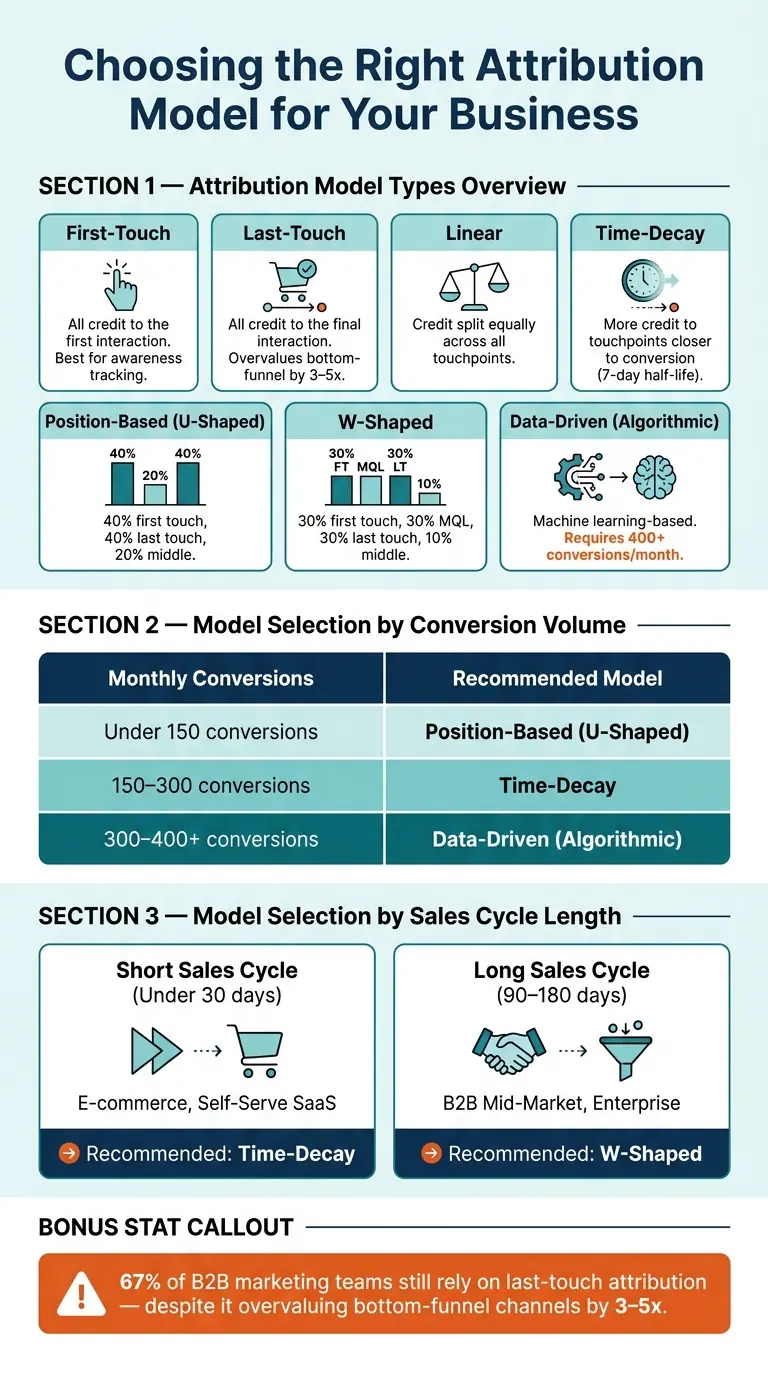
Attribution Model Comparison: Which Model Fits Your Business?
Now that your data is clean and centralized, it’s time to decide how to assign credit across touchpoints. This step is all about selecting and tailoring an attribution framework that fits your business.
Common Attribution Models at a Glance
Attribution models generally fall into three categories: single-touch, rule-based multi-touch, and algorithmic.
Single-touch models are straightforward. For example, a first-touch model gives all the credit to the initial interaction, which is handy for tracking awareness campaigns. On the flip side, a last-touch model assigns all the credit to the final interaction. While popular, last-touch often skews results, overvaluing bottom-funnel channels like retargeting by 3–5x and undervaluing top-funnel efforts like SEO by 2–3x. Despite these flaws, 67% of B2B marketing teams still rely on it.
Rule-based multi-touch models distribute credit across multiple interactions using set formulas:
- Linear: Spreads credit equally across all touchpoints.
- Time-decay: Gives more weight to interactions closer to the conversion, often using a 7-day half-life.
- Position-based (U-shaped): Assigns 40% credit each to the first and last touches, with the remaining 20% divided among middle interactions.
- W-shaped: Adds a third anchor point, typically the MQL stage, distributing 30% credit each to the first touch, MQL, and last touch, with 10% for everything in between.
Data-driven attribution (DDA) uses machine learning to analyze historical conversion paths and calculate each touchpoint’s contribution. While highly accurate, it requires a large data set - at least 400 conversions and 300 unconverted paths per month per conversion event - to produce reliable results.
"Data-driven attribution is the best model in theory. But the algorithm is opaque, it's run by an ad platform that profits when paid wins, and it slides back to last-click without a word." - Clickport
How to Pick the Right Model for Your Business
The best model for your business depends on two key factors: conversion volume and sales cycle length.
| Monthly Conversions | Recommended Model |
|---|---|
| Under 150 | Position-based (U-shaped) |
| 150–300 | Time-decay |
| 300–400+ | Data-driven (algorithmic) |
For shorter sales cycles (under 30 days) - like e-commerce or self-serve SaaS - time-decay is a solid choice because recent actions tend to have the most impact. For longer cycles (90–180 days), such as B2B mid-market deals, W-shaped attribution works better since it highlights key pipeline transitions that drive deals forward.
Take this example: In April 2026, a dental practice in London, Ontario, led by Dave De Vries of ONmetrics, switched from last-click to a position-based model. They discovered Facebook was driving 65% of first touches, while Google Ads was taking all the last-click credit. By reallocating budget to Facebook and creating a cross-channel funnel, they increased new patient volume by 47% and reduced cost per patient by 22% within six months.
"Most businesses optimize for what they can measure, not what actually works." - Dave De Vries, Owner, ONmetrics
Customize Touchpoint Weights
After selecting a base model, adjust the weights to reflect your business goals. Give more weight to touchpoints that frequently appear in closed-won deals. For instance, if a channel or content type shows up in 70% of converting paths, it should carry more weight than one appearing in just 20%. Similarly, high-intent actions - like demo requests or visits to the pricing page - should outweigh lower-impact interactions like newsletter opens or display ad impressions.
For B2B teams with defined pipeline stages, a W-shaped split (30% for first touch, MQL, and opportunity creation, with 10% for middle interactions) is a practical starting point. For simpler setups focused on lead generation, a U-shaped split (40% for first and last touches, 20% for the middle) offers a balanced view without overcomplicating things.
"The right attribution model is the one your marketing lead, sales lead, and CFO can look at without arguing. That is almost never the most sophisticated one." - Siddharth Gangal, Founder, Fairview
Before fully adopting your new model, test it alongside your current one for 90 days. This allows you to identify discrepancies, validate its logic, and build trust internally before making major budget decisions.
Once you’ve done this, move on to setting attribution windows and refining segments to further enhance your model.
Step 4: Set Attribution Windows, Scopes, and Segments
After selecting your attribution model, it’s time to focus on defining when touchpoints are counted, what level they’re measured at, and which groups are analyzed. These choices directly influence how actionable your attribution data will be.
Choose the Right Lookback Window
An attribution window determines the timeframe during which a touchpoint can receive credit for a conversion. A good rule of thumb is to set the window to 1.5x your average sales cycle. For instance, if your typical deal closes in 60 days, a 90-day window makes sense. In contrast, quick e-commerce purchases might only need a 1–7 day window, while enterprise B2B deals could require up to a year.
"Window length directly affects how conversions are counted, how channels perform, and how budget decisions are made." - Stephanie Trovato, Author, HubSpot
For high-intent actions, like demo requests, stick with a 30–90 day window. For passive impressions, such as display ads, a shorter 1–7 day window is usually sufficient. To confirm your choice, run reports with different window lengths and observe how credit shifts between awareness-focused and closing-focused channels.
Decide on the Scope of Attribution
Scope refers to the level at which you measure attribution, and this should align with your business model and reporting needs.
For B2B teams, contact-level attribution can be misleading because buying decisions often involve committees of 8–13 stakeholders. Instead, aggregate interactions at the account level to get a clearer view of your pipeline, especially for ABM strategies.
For lead generation and e-commerce, lead-level attribution works well for tracking top-of-funnel activity. However, if your goal is to identify what’s driving revenue - not just form submissions - tie attribution to closed-won deals in your CRM. As one expert explains:
"A channel can show strong ROAS inside its own dashboard while contributing almost nothing to actual revenue when measured through a unified attribution model." - Cometly
To make this work, track an Original Lead Source for awareness efforts and use a distinct Opportunity Source field to monitor sales conversations.
Once you’ve set the scope, you can dig deeper by segmenting your results to qualify leads effectively.
Break Down Results by Segment
Aggregated data often hides critical details. Segmenting by customer type, product line, channel group, or region can reveal the true drivers behind your conversions. For example, if you cater to both SMBs and enterprise customers, combining their data may distort your insights. Enterprise deals typically involve longer cycles and more touchpoints, which may require different attribution windows and weightings.
A helpful tip is to audit your "Direct" or "Web" traffic categories. Breaking down leads by the specific form or landing page can often uncover the real source of previously unattributable leads. Additionally, including a simple "How did you hear about us?" field on forms can capture insights from less trackable sources - like podcast mentions or peer referrals - that standard tracking might miss.
Step 5: Test, Launch, and Improve Your Model
Once you've fine-tuned your data and segmentation, it's time to test your model, launch it, and make ongoing improvements. This step ensures your model performs effectively and evolves alongside your marketing strategies.
Check That Your Model Outputs Make Sense
Before rolling out your custom model, compare its performance against a standard attribution model like last-click or linear. Expect to see a 10–40% shift in how credit is distributed across channels. However, if a major channel suddenly shows almost no contribution, it's a sign that something might be off and needs attention.
Another key step is CRM reconciliation. If discrepancies between your CRM and attribution model exceed 10–20%, it could indicate tracking issues. A well-functioning setup should maintain a CRM match rate of at least 95%. Also, audit conversions with NULL sources - paid campaigns should have near-zero rates for this metric.
"Validate your data completeness before you choose or change your attribution model. A sophisticated model built on incomplete data will give you confident wrong answers." - Trackingplan
To measure the impact of your attribution model, document baseline metrics like spend, CPA (cost per acquisition), and ROAS (return on ad spend) for each channel. This provides a clear benchmark for evaluating changes.
Connect Attribution to Your Marketing Automation Tools
Attribution data becomes actionable when it's integrated into your marketing tools. The goal is to set up a two-way sync: your CRM should feed lead and revenue data into the attribution model, while the model writes back touchpoint and campaign influence data to your CRM. This way, your sales team can see the complete customer journey.
Here are some practical steps to make this happen:
- Use
sessionStorageto carry UTM parameters across multiple page visits before a form submission. - Pass a unique session ID from your analytics tool into every form submission, linking anonymous web activity with identified CRM contacts.
- In Salesforce, store attribution data in Campaign Member records; in HubSpot, use custom Contact or Deal properties.
- Lock the "Original Lead Source" field after the first touchpoint and use a separate "Most Recent Source" field for ongoing tracking. This prevents later interactions from overwriting the initial source.
Once the integration is in place, regularly monitor and refine your model to keep it aligned with your marketing goals.
Keep Your Model Up to Date
Attribution modeling isn't something you set up once and forget. Plan to review your model at least every quarter - or monthly if you're running high-volume campaigns with frequent updates . During the first month after launching your model, check reports daily for the first week, then weekly, to catch and fix any configuration issues early.
Revisit your model whenever you add a new marketing channel, adjust your funnel structure, or shift your overall strategy. When making updates, take small steps - adjust touchpoint weights by about 10% at a time - and monitor the results over several weeks before making further changes. Making sweeping changes all at once can make it hard to identify what's driving performance shifts.
"Attribution modeling is not a one-time configuration. Run quarterly model comparisons, update your conversion event taxonomy as your funnel evolves, and treat the outputs as a living signal rather than a static report." - The Data Driven Marketer
To ensure your model reflects real-world behavior - not just the tracked data - consider using incrementality testing. For example, pause a specific channel for a subset of your audience for two to four weeks and compare the resulting conversion drop to your model's predictions.
Take Playvox's experience as an example. In 2026, they paused their highest-attributed keywords for a controlled group and found these keywords were simply capturing demand from prospects already in their pipeline. By distinguishing between demand-capture and demand-generation, they reduced their cost per customer acquired by tenfold. This highlights the importance of regular assessments and making incremental updates to your model.
Conclusion: Use Attribution to Make Better Marketing Decisions
Creating a custom attribution model involves five key steps: defining your goals and touchpoints, gathering and unifying your data, selecting the right model framework, setting proper attribution windows and segments, and continually testing and improving your approach. Each step works together to build a well-rounded attribution strategy. This process helps turn raw data into actionable marketing insights.
Clean, reliable data is essential. Issues like inconsistent UTM parameters, incomplete form data, or having more than 20% of leads labeled as "Direct" or "Web" can seriously impact your model's accuracy. Tools such as Reform can simplify UTM tracking and close data gaps, reducing the "mystery bucket" that often disrupts attribution models.
Teams with strong attribution systems are 1.6× more likely to secure budget increases. This can make a big difference when it comes to gaining support from your CFO and leadership team. By following these practices, you can ensure your marketing budget is used effectively.
"Accurate attribution isn't just about marketing solace; it's the bedrock of capital-efficient growth." - Polayads
FAQs
What’s the minimum data I need to build a custom attribution model?
To build a custom attribution model, you’ll need well-organized, detailed data that captures the entire customer journey. This data should include:
- Unique user IDs to track individual behavior
- Timestamps for every interaction
- Marketing channels involved in the journey
- A conversion flag to identify successful actions
- Transaction revenue for financial insights
For reliable results, your dataset should meet these benchmarks:
- At least 300–500 conversions per month
- 30–50 unique customer paths
- 80% of conversions with complete sequences of touchpoints
Additionally, ensure all paid traffic is consistently tagged with UTM parameters to maintain accuracy in tracking.
How do I choose the right attribution window for my sales cycle?
To determine the best attribution window, start by calculating your average days to conversion using data from your CRM or analytics tools.
- If your conversion cycle is less than 30 days, a last-non-direct model is a good fit.
- For cycles between 30 and 90 days, consider using W-shaped or position-based models.
- For cycles lasting 180 days or more, data-driven models are ideal - provided you have sufficient volume to support them.
When using time-decay models, adjust the half-life to match your cycle length. For example, if your cycle is 60 days, set the half-life to around 30–45 days.
How can I reduce “Direct” or “Web” leads with better form tracking (e.g., Reform UTMs)?
To reduce the number of "Direct" or "Web" leads and improve lead attribution, it's important to capture marketing source data at the point of form submission. Here's how you can do it:
-
Map UTM Parameters to Hidden Form Fields: Add hidden fields to your forms to store UTM parameters like
utm_sourceandutm_medium. This ensures the data is captured when a user submits the form. -
Use a Script for URL Parsing: Implement a script that extracts UTM parameters from the URL and populates the hidden form fields automatically. To maintain consistency across multiple pages, store the UTM data in
sessionStorage. - Sync with CRM: Map the captured UTM data to custom properties in your CRM. This step ensures you have clear visibility into which campaigns are driving leads, helping you measure performance accurately.
By following this process, you'll gain better insights into your marketing efforts and reduce ambiguity in lead sources.
Related Blog Posts
Get new content delivered straight to your inbox

The Response
Updates on the Reform platform, insights on optimizing conversion rates, and tips to craft forms that convert.




Drive real results with form optimizations
Tested across hundreds of experiments, our strategies deliver a 215% lift in qualified leads for B2B and SaaS companies.
