
.webp)
B2B SaaS Attribution Guide: Forms, CRM, Email



If your form data is wrong, your CRM and email reports will be wrong too. In most B2B SaaS setups, attribution breaks for three simple reasons: UTMs are inconsistent, first-touch data gets overwritten, and email activity never links back to pipeline.
Here’s the short version of what I’d do:
-
Set up forms first
- Use one UTM naming rule
- Store first-touch once and last-touch on each new submission
- Save hidden fields like page URL, referrer, form name, and timestamp
- Test paid, organic, and email form fills before launch
-
Then fix the CRM
- Mirror the same attribution fields in leads, contacts, accounts, and deals
- Lock first-touch values so later actions do not replace them
- Add lifecycle stage rules and timestamps
- Stop duplicate records before they split source credit
-
Then connect email
- Sync clicks, campaign IDs, and form conversions into CRM
- Keep marketing emails and sales emails separate
- Match email reporting to lifecycle stages, not just opens and clicks
-
Then build reporting
- Track source, funnel conversion, influenced pipeline, and closed-won revenue
- Review missing UTMs, duplicate records, and sync errors every week
- Use one agreed attribution model for leadership reporting
A few details matter more than most teams think. Cross-domain tracking can turn paid traffic into Direct if a user moves to another domain before submitting a form. And even small naming changes like Email_Newsletter vs. email-newsletter can split one channel into multiple rows in your reports.
If I had to boil the whole article down to one point, it’s this: <u>attribution is not a reporting problem first; it is a data setup problem first</u>. Clean form input, fixed CRM rules, and clean email-to-pipeline links are what make revenue reporting line up.
| Step | What matters most | Common failure |
|---|---|---|
| Forms | UTM rules, hidden fields, testing | Missing source data |
| CRM | Field rules, stage timestamps, deduping | Overwritten first-touch |
| Campaign ID sync, stage mapping | Nurture gets no credit | |
| Reporting | One model, weekly data checks | Teams trust different numbers |
That’s the setup order I’d use if I wanted attribution data I could trust in a pipeline review.
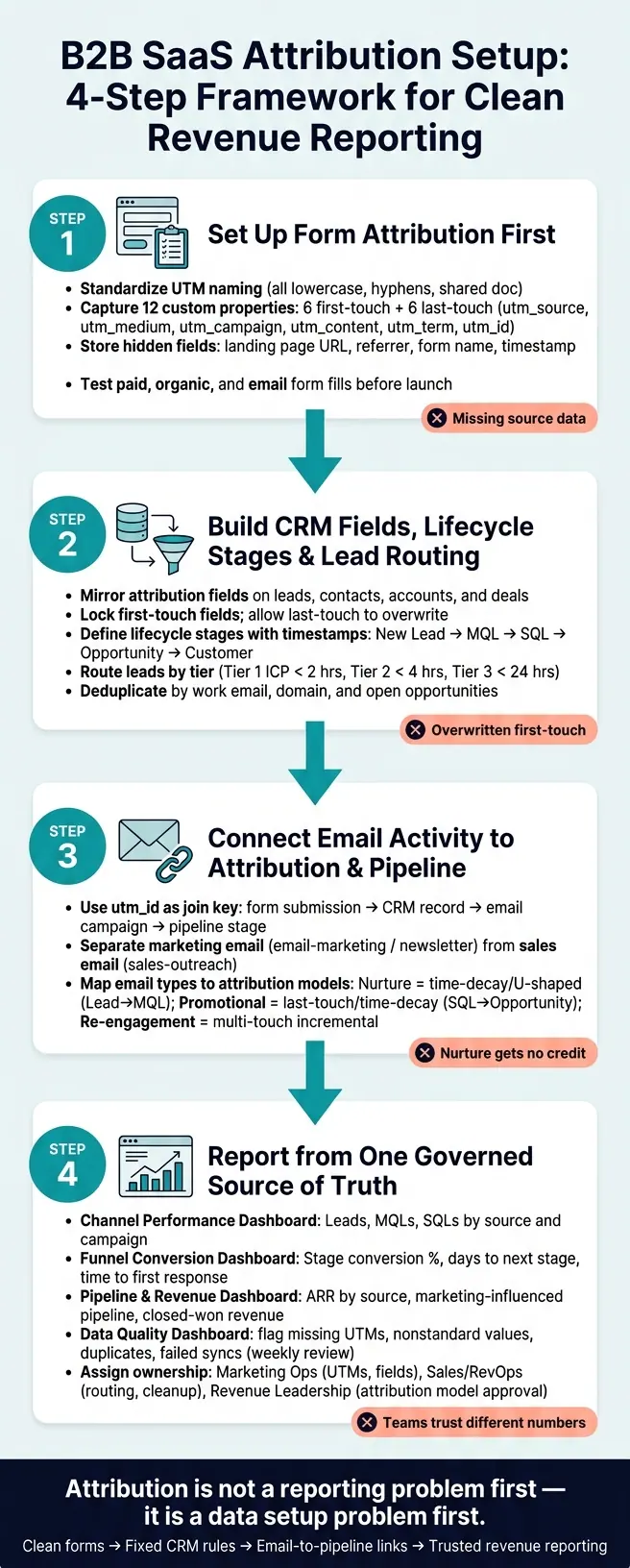
B2B SaaS Attribution Setup: 4-Step Framework for Clean Revenue Reporting
Sourced vs Influenced Pipeline 2026: The Honest B2B SaaS Attribution Framework
sbb-itb-5f36581
1. Set up form attribution first
Start with form capture. Everything that happens after that depends on it.
Forms create the source record that CRM fields, lifecycle stages, and email sync inherit. If a form misses key data or records it at the wrong time, the rest of your setup becomes shaky. At that point, reports look fine on the surface, but the data underneath can’t be trusted.
Standardize UTM rules, campaign names, and source values
Before you edit a single form field, lock down naming rules.
Analytics tools are case-sensitive, so utm_source=Facebook and utm_source=facebook show up as two different channels in reports. That split adds up fast across paid, organic, partner, and email campaigns. It’s one of those small mistakes that snowballs.
Use an approved value list with:
- all lowercase text
- hyphens instead of spaces
- one shared document the whole team uses when building campaign links
Keep utm_medium on a fixed list like cpc, paid-social, email, organic, referral, and webinar so those values map cleanly into CRM lead source fields without manual cleanup.
You’ll also want to store first-touch values once and update last-touch values on every submission. In practice, that means 12 custom properties total: six for first-touch and six for last-touch, covering utm_source, utm_medium, utm_campaign, utm_content, utm_term, and utm_id.
| Property Type | Update Behavior | Parameters to Capture |
|---|---|---|
| First-Touch | Set once; never overwritten | utm_source, utm_medium, utm_campaign, utm_content, utm_term, utm_id |
| Last-Touch | Overwrites on every submission | utm_source, utm_medium, utm_campaign, utm_content, utm_term, utm_id |
These rules need to be in place before you rely on hidden fields or CRM routing. Otherwise, you’re building on messy inputs.
Capture visible and hidden fields on every high-intent form
This is the information your CRM uses for routing, lifecycle stages, and reporting.
On high-intent forms like demo requests, free trial signups, and contact sales pages, collect work email, full name, phone number, company name, industry, and specific product interest. That gives the CRM enough context to qualify and route the lead without making a sales rep hunt down basic company details.
Hidden fields do most of the attribution work. Every high-intent form should record the landing page URL, referrer, form name, submission timestamp, and the full UTM set for both first-touch and last-touch values. The landing page URL matters more than many teams think. It helps you tell apart two pages running under the same campaign, which is a big deal when you’re comparing page performance.
"Problems can arise when UTMs are captured without a clear plan for how they'll be used. If there's no agreed-upon approach to reporting or overwrite rules, UTM values can quickly become unruly or misleading over time." - Tom Ryan, Founder & CEO, MarCloud
Use validation, enrichment, and routing logic in your form setup
Attribution data only helps if it’s clean.
A form that accepts spam or sends every lead to the same owner adds noise before the record even reaches the CRM. That kind of bad input spreads fast.
Business email validation should be standard on any high-intent form. Add spam prevention too, so bot submissions don’t contaminate your data. Once a valid submission comes in, firmographic enrichment can pull in company size, industry, and revenue data through an API or third-party tool. That lets you route leads right away instead of waiting for a rep to do manual research.
Reform supports multi-step forms, conditional routing, email validation, spam prevention, lead enrichment, real-time analytics, and CRM integrations, so attribution data is cleaned before sync.
Test form submissions before data flows into CRM
This is the step most teams skip, and it’s often where attribution problems begin.
Test every tracked source before launch, including paid, organic, and email. Click a properly tagged link, submit the form, and inspect the CRM record that gets created. Check that utm_source, utm_medium, utm_campaign, and the hidden context fields all populated as expected.
Then run a second submission for the same contact. Make sure first-touch fields stayed fixed and last-touch fields updated. If that overwrite logic breaks, your reporting will drift fast.
Test routing rules too. A demo request and a newsletter signup should trigger different lifecycle stages and different owner assignments. If both end up in the same queue, pipeline reporting is off from day one.
Also confirm that conversion events, like a thank-you page load, fire only after the form is submitted, not when the landing page loads. If the event fires too early, conversion counts get inflated.
If this step breaks, CRM attribution and email reporting inherit the same error. Clean form data is the input for CRM attribution and email sync.
2. Build CRM fields, lifecycle stages, and lead routing
Once form data comes in cleanly, the CRM needs to hold onto source, owner, and lifecycle history. If the form creates the source record, the CRM is what keeps that record intact. This is the point where attribution either stays solid or starts to drift.
Create core attribution fields on leads, contacts, accounts, and opportunities
Start by mirroring the six first-touch and six last-touch UTM fields already captured on forms. Then add lifecycle stage, lead status, and timestamp fields for each stage entry.
On the account and opportunity side, add Deal Source, Deal Amount, and Expected Close Date using U.S. reporting formats. Deal Source should be fixed when the deal is created.
Define which source fields can update and which must stay fixed
Not every attribution field should act the same way. First-touch properties - original source and the six first-touch UTMs - should be written once and left alone. Last-touch properties should update with each new form submission or session.
Most CRMs don't let you lock a field after its first write. So the usual fix is a workflow that checks whether the first-touch field is still unknown before writing to it. Without that step, a later touch can replace the original acquisition source.
One extra safeguard helps here too: copy the native "Original Source" value into a custom "Original Source Stable" property through a workflow. CSV imports and API syncs can overwrite the native field by accident, so this gives you a backup of the first source value.
Define lifecycle stages with entry criteria and timestamps
Each stage needs a plain definition, a clear owner, and a timestamp field that records the exact moment the contact entered it. Those timestamps are what make source-to-stage and stage-to-revenue reporting possible.
| Lifecycle Stage | Definition | Owner | Entry Criteria |
|---|---|---|---|
| New Lead | Initial contact capture with minimal data. | Marketing | Newsletter signup or manual import |
| MQL | Marketing Qualified Lead; shows high intent. | Marketing | Demo request or high-value form fill |
| SQL / SAL | Sales Qualified/Accepted; vetted by sales. | Sales / SDR | Meeting booked or BANT criteria met |
| Opportunity | Active deal in pipeline. | Sales | Discovery call completed; deal created in CRM |
| Customer | Closed-won deal. | CS / Account Mgmt | Contract signed; deal moved to Closed-Won |
Route leads after enrichment and account matching
Before assigning anything, match the domain to an existing account and any open opportunity. If there's a match, attach the lead to that account and alert the current owner instead of making a new record. That keeps new conversions tied to the original account rather than splitting credit across records.
After that, route leads based on ICP fit and intent signal.
| Routing Tier | Required Fields | Destination | SLA Target |
|---|---|---|---|
| Tier 1 (ICP) | Industry, Revenue, Country | Senior AE | < 2 business hours |
| Tier 2 (Mid-Market) | Employee Count, UTM Source | Mid-Market Team | < 4 business hours |
| Tier 3 (SMB / Other) | Email Domain | SMB Pool / Round Robin | < 24 business hours |
You can also use utm_id to push high-intent campaigns into a dedicated SDR queue. That same record becomes the link point for email engagement later.
Prevent duplicate leads, contacts, and accounts
Duplicates can wreck attribution fast. When the same lead shows up twice, source reporting splits credit across both records.
At a minimum, check:
- Work email
- Email domain
- Existing account matches
- Open opportunities
If any of those match, merge the record or link it instead of creating a new one.
Some CRMs use tracking cookies to deduplicate known visitors at submission. That helps, but it doesn't catch everything. Work email and domain matching still matter because they pick up cases a cookie-based match can miss.
Clean deduplication keeps email activity tied to one record in the next step.
3. Connect email activity to attribution and pipeline stages
Once your CRM is clean and duplicates are under control, the next step is tying email activity to attribution. This matters more than it may seem at first glance. Email often sits in the middle of the journey, between the moment someone becomes a lead and the moment an opportunity is created. If that link is missing, nurture touches can disappear from reporting, especially in long B2B sales cycles.
Sync email events and campaign IDs into CRM records
Opens and clicks can tell you that someone paid attention. But they are engagement signals, not conversion events. Attribution should center on macro-conversions like demo requests or trial signups.
Use utm_id as the join key across the email campaign, CRM record, and pipeline reporting. That gives you a clean thread to follow. When a contact clicks an email link and then submits a form, the campaign ID connects that conversion to the right campaign object. The path looks like this: form submission → CRM record → email campaign → pipeline stage.
Use the same naming pattern for email campaign IDs that you use for form UTMs. If you don't, reporting gets messy fast, and someone usually ends up fixing it by hand.
Map email journeys to lifecycle stages and attribution rules
Different emails do different jobs. So the attribution model should match the stage the email is meant to support.
Early-stage nurture emails, like educational content, blog roundups, and trust-building sequences, help move a contact from Lead to MQL. These touches usually work over time, not all at once. A time-decay or U-shaped model fits better because it gives credit across a longer warm-up period.
Mid-funnel acceleration emails, such as case studies, product launches, and limited-time offers, line up more closely with the SQL and Opportunity stages. In that case, last-touch or time-decay attribution gives fair credit to the emails that helped move the deal ahead. Re-engagement should be tracked on its own so reactivation credit does not get mixed in with original acquisition.
| Email Campaign Type | Attribution Model | Lifecycle Stage Mapping |
|---|---|---|
| Nurture Sequence | Time-decay / U-shaped | Lead → MQL |
| Promotional | Last-touch / Time-decay | SQL → Opportunity |
| Re-engagement | Multi-touch (Incremental) | Dormant → Reactivated |
Track marketing automation email and sales email separately
Marketing email and sales email play different parts in attribution. If you treat them the same way, your reporting can get distorted. For example, a sales follow-up should not show up as a new acquisition source.
Standardize utm_medium values so the two are easy to separate. Use values like email-marketing or newsletter for automated marketing sends, and sales-outreach for rep-sent emails. That one field makes it much easier for your CRM and dashboards to split marketing-influenced pipeline from sales-driven pipeline without hand-editing records later.
Inside the CRM, log them as different activity types or interaction records. Marketing email events should connect to campaign objects. Sales email activity should be logged against the contact and opportunity timeline. Keep sales emails separate so they don't overwrite marketing source fields. That way, the dashboard in the next section is much easier to read.
4. Report on attribution with dashboards and clear ownership
Once your forms, CRM fields, and email activity are connected, the next job is simple in theory and messy in practice: turn that data into dashboards your team actually trusts.
That’s the point where attribution stops being a setup project and starts becoming part of how the business runs. If the system is working, your dashboards should show whether form capture, CRM routing, and email sync are all lining up from start to finish.
Build dashboards for channel performance, funnel conversion, and revenue influence
For most B2B SaaS teams, three dashboards cover the basics.
A channel performance dashboard shows leads, MQLs, and SQLs by source and campaign. This helps you see which channels are bringing in volume and which campaigns are moving people into the pipeline.
A funnel conversion dashboard tracks stage-to-stage conversion rates, days to next stage, and time to first response after submission. That gives you a clearer view of where leads slow down, where handoffs break, and how fast your team reacts.
A pipeline and revenue influence dashboard connects pipeline, marketing-influenced pipeline, and closed-won revenue back to source and campaign. That’s the dashboard revenue leaders usually care about most, because it links marketing activity to dollars.
| Dashboard | Key Metrics |
|---|---|
| Channel Performance | Leads, MQLs, SQLs by source and campaign |
| Funnel Conversion | Stage conversion %, days to next stage, time to first response after submission |
| Pipeline and Revenue Influence | ARR by source, marketing-influenced pipeline, closed-won revenue by source and campaign |
Use the attribution model you already picked for executive reporting. If leadership is looking at one model while Marketing Ops is using another, things go sideways fast.
These reports only help if someone owns the inputs behind them.
Monitor data quality and attribution coverage
A dashboard is only as good as the data feeding it. If your UTMs are broken, records are duplicated, or syncs fail, the numbers may look clean while the story is off.
That’s why it helps to keep a separate data quality dashboard. Build it to flag:
- Missing UTM values
- Nonstandard source values
- Duplicate records
- Failed CRM syncs
Check this dashboard every week. That cadence is usually enough to catch issues early, before bad data starts showing up in board slides or pipeline reviews.
Assign ownership across Marketing Ops, Sales Ops, and revenue leaders
Dashboards don’t stay useful by accident. Someone has to own the fields, rules, and cleanup work behind them.
Marketing Ops should own UTM taxonomy, hidden fields, and lifecycle stage rules. Sales Ops or RevOps should own routing, opportunity mapping, and cleanup. Revenue leadership should approve the attribution model used in executive reporting.
Put the source rules, field-locking logic, and attribution model into one shared reference that all three teams can access. Then set a rhythm:
- Run a monthly review to catch taxonomy drift before it stacks up
- Do a quarterly cleanup to fix source fields overwritten by CSV imports or integration syncs
Conclusion: the minimum attribution setup to launch first
Capture clean form data, sync it into CRM, connect email activity, then report from one governed source of truth.
Reliable attribution doesn’t come from adding more tools. It comes from a steady setup, a governed naming vocabulary, and a small team that checks the data on a regular schedule. Get those pieces in place, and the dashboards become much easier to trust.
FAQs
How do I choose the right attribution model?
Choose an attribution model based on your business goals, sales cycle length, and how involved the customer journey is.
If your sales cycle is short and your main goal is direct response, last-touch attribution may do the job. It’s simple, easy to track, and often good enough when conversions happen fast.
For more complex B2B journeys, multi-touch attribution models like linear, time-decay, or position-based usually give a better picture. Why? Because they account for nurture efforts and other touchpoints that help move a buyer along the path.
The best model isn’t always the most detailed one. It’s the one that marketing, sales, and finance all agree on and can use the same way over time.
Before you lock anything in, check your data. If it’s incomplete, even a solid model can point you in the wrong direction.
What should I do if first-touch data is already overwritten?
If first-touch data has already been overwritten, you usually can’t get it back on its own. Hidden form fields only record the values that exist at the moment someone submits the form.
To stop this from happening again, pick a clear source of truth first. Then review your form fields, property mapping, and sync logs to spot where the overwrites are happening. Your form tool and CRM need to pass and store UTM data the same way at the first lead conversion.
How can I audit attribution data each week?
Audit attribution data every week to check for consistency and drift. Compare the conversion counts in your dashboard with actual business activity so you can confirm the numbers line up.
You should also review UTM naming, CRM lifecycle stages, form mappings, and whether lead source data is passing from forms into the CRM without being overwritten.
Related Blog Posts
Get new content delivered straight to your inbox

The Response
Updates on the Reform platform, insights on optimizing conversion rates, and tips to craft forms that convert.




Drive real results with form optimizations
Tested across hundreds of experiments, our strategies deliver a 215% lift in qualified leads for B2B and SaaS companies.
