
.webp)
Form Attribution with AI: Setup Guide


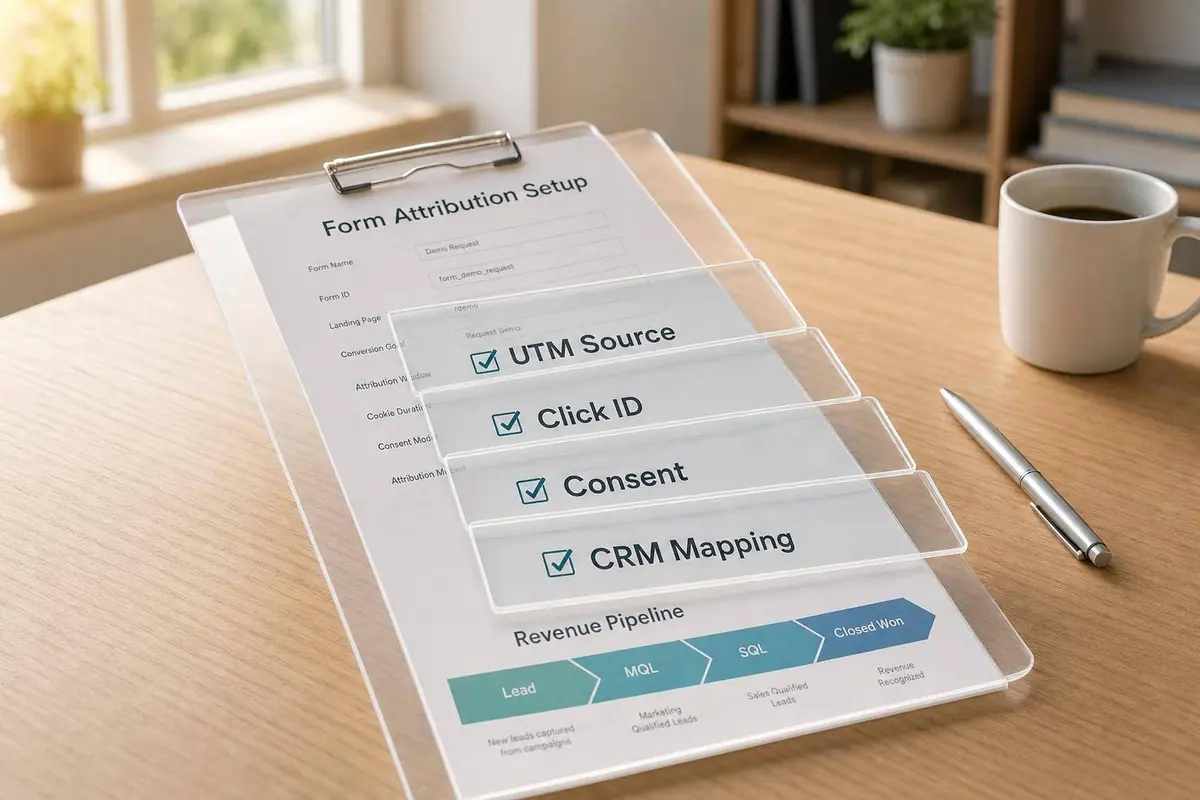
Most teams can track form fills. Fewer can tie them to closed-won revenue. That gap usually comes down to setup.
I’d boil this guide down to five jobs:
- Pick one conversion goal first - like opportunity created, MQL, or closed-won revenue
- Set fixed UTM rules - keep values lowercase and consistent
- Store UTMs, click IDs, and consent data in hidden form fields
- Keep first-touch and current-touch data separate in your CRM and reporting layer
- Review attribution by channel, form, pipeline, and revenue on a weekly or monthly schedule
The article also makes one point clear: if your data path breaks at any step - click ID, form fill, CRM record, or revenue outcome - your AI model starts filling in blanks. And that often leads you back to simple last-touch reporting.
A few details stand out:
- B2B buyers now use 10 channels on average during a purchase path
- A common starting conversion for model training is opportunity created
- Most forms should include 8–12 hidden fields
- Revenue should be stored in numeric USD fields like $12,500.00
- Consent records should log a timestamp such as 2026-07-22T2:35:00 PM UTC in stored form, then display it in a U.S. format in the CRM
If I were setting this up, I’d treat the article like a launch checklist, not a theory piece. The main idea is simple: clean inputs lead to cleaner attribution. That means standard UTMs, separate first- and last-touch fields, clean CRM handoffs, consent checks, and dashboards that show which forms and channels turn into pipeline and revenue.
Below is a short recap of the core setup points so you can scan them fast before diving into the full guide.
| Area | What matters most |
|---|---|
| Conversion goal | Use one main revenue-linked event for model training |
| Form setup | Store UTMs, click IDs, referrer, landing page, session data, and consent fields |
| Attribution logic | Write first-touch once; update current-touch later |
| CRM mapping | Keep the same field structure across Lead, Contact, and Opportunity |
| Reporting | Compare first-touch, last-touch, and multi-touch side by side |
| Compliance | Use unchecked consent boxes and filter reports to consent_status = granted |
So if you want AI form attribution to mean more than “which ad got the submit,” this setup is the work that makes that possible.
Set Up UTM Rules and Hidden Fields on Your Form
Build a Consistent UTM Naming System
Once your source systems are mapped, lock down collection at the form level. Do this before any form goes live.
Why? Because messy UTM values can wreck your reporting fast. LinkedIn, linkedin, and LINKEDIN may look the same to a person, but your reports - and any AI model built on top of them - can treat them as three separate channels.
The five standard parameters are utm_source, utm_medium, utm_campaign, utm_content, and utm_term. Use each one the same way every time:
- utm_source: platform or publisher (
google,linkedin,newsletter) - utm_medium: channel type (
paid_search,paid_social,email,referral) - utm_campaign: the specific initiative, ideally tied to a time period and goal
- utm_content: the ad, asset, or placement variation
- utm_term: keyword or audience segment, most often for paid search
Keep everything lowercase. Skip spaces. Use a fixed list of approved source and medium values.
For example, a U.S.-based SaaS team might use a URL like this:
https://example.com/demo?utm_source=google&utm_medium=paid_search&utm_campaign=q3_2026_demo_push&utm_content=rsa_1&utm_term=crm+demo
That kind of consistency makes reporting much cleaner. It also cuts down on the annoying cleanup work later.
Add Hidden Fields for UTMs, Click IDs, and Visit Context
After your naming rules are set, add hidden fields to every lead form. In most cases, 8–12 hidden fields per form is a good target for UTMs, click IDs, and session context.
At a minimum, capture the five UTM fields plus gclid, fbclid, and msclkid. Then add landing_page_url, referrer_url, and session_id from your analytics platform. It also helps to store both the original and latest touchpoint values. That gives the next attribution layer cleaner source data to work with.
For single-page forms, map each hidden field to its matching URL parameter. Pretty straightforward.
Multi-step forms need a bit more care. The safer setup is a two-stage capture:
- Write UTMs and click IDs into a first-party cookie on the first landing page
- Read from that cookie and use it to fill hidden fields at the final submission step
Place the hidden fields in the final step so the submission payload includes them.
If you're using Reform, hidden fields, multi-step forms, and incomplete response tracking can help keep attribution data intact when someone starts a form but doesn't finish it.
Compare Hidden Field Capture Methods
The right capture method depends on two things: your technical setup and how complete the data needs to be for AI modeling.
| Method | Setup Complexity | Reliability Across Journeys | Best for |
|---|---|---|---|
| URL-only capture | Low - simple scripts or tag manager rules | Low - breaks when users navigate away, hit redirects, or move through multi-step forms | Last-click reporting; limited for first-touch and multi-touch modeling |
| Cookie-based persistence | Medium - requires JavaScript and consent-aware cookie management | Reliable across pages and steps | First-touch and session-level models with fewer data gaps |
| Server-side enrichment | High - needs event logging, server or CDP logic, and ad platform integration | Very high - can reconstruct journeys and fix gaps even when client-side tracking fails | Advanced multi-touch modeling at scale |
Use the method that fits your first-touch and multi-touch reporting needs.
One smart move is to split first-touch and current-touch fields in your hidden field setup. Use separate ft_ and lt_ fields so CRM and AI reporting can tell the difference between where the lead came from and what pushed the conversion. Keep first-touch and current-touch values separate so the attribution model can score each one the right way.
sbb-itb-5f36581
[Tutorial] How to create marketing attribution data with UTMs
Configure First-Touch, Last-Touch, and Multi-Touch Attribution
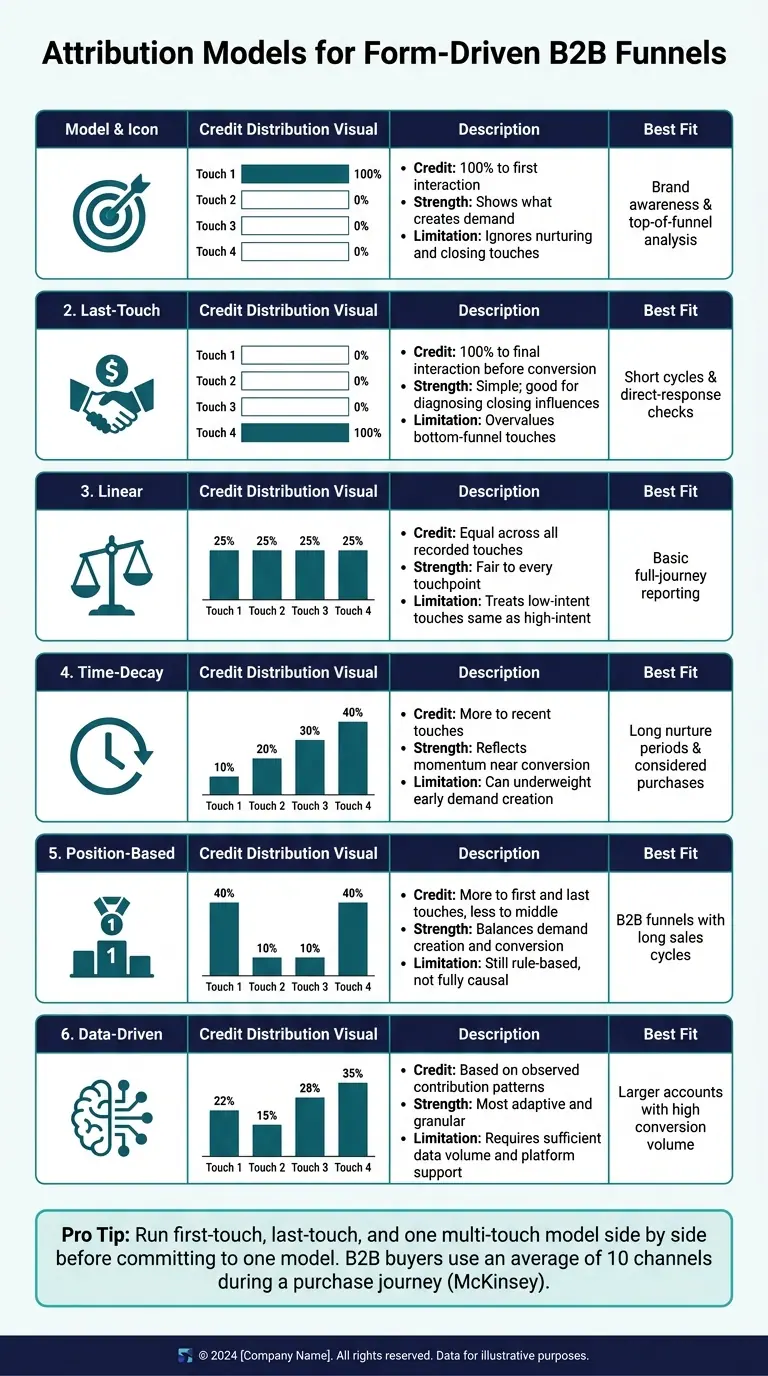
Attribution Models for Form-Driven Funnels: A Side-by-Side Comparison
Once you’ve captured hidden fields, the next step is deciding how to store them and how much credit each touch should get.
Store First-Touch and Current Attribution Values Separately
Write FT_* fields one time. Update only CT_* fields after that.
On the first qualifying submission, copy the captured values into both field sets. Then lock the FT_* fields. On each later qualifying submission, update only the CT_* fields.
Use matching FT_ and CT_ fields for:
- Source
- Medium
- Campaign
- Channel_Group
- Form_ID
- Submission_Timestamp
In your warehouse or AI layer, add Journey_Touch_Index, Touch_Type, Touch_Timestamp, and Revenue_Stage. That gives you a clean way to order each touch and review it on its own. Store submission timestamps server-side in ISO 8601 format, and localize them only for CRM display.
This is a big deal for U.S. B2B teams. McKinsey reports that B2B buyers now use an average of 10 channels during a purchase journey. Gartner also says most buyers revisit at least one buying job before making a decision. If first-touch fields aren’t fixed, the original source gets replaced. Then your AI model loses the signal that shows what kicked off demand in the first place.
Tag Form Events for AI Attribution Modeling
Not every form submission means the same thing. Creating high-converting lead forms requires understanding that a demo request is not an ebook download, and your attribution setup should reflect that.
High-intent events - demo requests, pricing inquiries, and contact sales forms - should map to SQL or Opportunity in your CRM. Mid-funnel events - ebook downloads, webinar registrations, and checklist downloads - should map to MQL or Engaged Lead.
Tag every submission with a conversion_type value like demo_request or ebook_download. Pass that field through to your CRM and analytics pipeline along with the standard UTM fields.
Use a single event name across your stack, such as form_submit, and attach the same properties every time:
form_idform_nameconversion_typechannelsourcemediumcampaignsubmission_timestampcrm_stage_at_submissionis_high_intent
If you’re using Reform, set up webhooks or native integrations to send this standard payload on every submission. This is especially effective when using multi-step form designs to capture complex attribution data without overwhelming the user. That way, every touch follows the same schema no matter which form fired it. And that keeps your channel and intent labels clean instead of turning into a mess later.
Those labels shape how each attribution model scores the submission.
Compare Attribution Models for Form-Driven Funnels
Running first-touch, last-touch, and one multi-touch model side by side for a set period gives you a much better view of a form-driven funnel than picking one model too early.
| Model | Credit Allocation | Strengths | Limitations | Best Fit |
|---|---|---|---|---|
| First-touch | 100% to the first interaction | Shows what creates demand | Ignores nurturing and closing touches | Brand awareness and top-of-funnel analysis |
| Last-touch | 100% to the final interaction before conversion | Simple; good for diagnosing closing influences | Overvalues bottom-funnel touches and hides earlier influence | Short cycles and direct-response checks |
| Linear | Equal credit across all recorded touches | Simple multi-touch view; fair to every touchpoint | Treats low-intent touches the same as high-intent ones | Basic full-journey reporting |
| Time-decay | More credit to recent touches | Reflects momentum near conversion | Can underweight early demand creation | Long nurture periods and considered purchases |
| Position-based | More credit to first and last touches, less to the middle | Balances demand creation and conversion | Still rule-based, not fully causal | B2B funnels with long sales cycles |
| Data-driven | Credit based on observed contribution patterns | Most adaptive and granular | Requires enough data and platform support | Larger accounts with sufficient conversion volume |
Native platform models in Google Ads and GA4 are limited. So the CRM and AI layer should hold the fuller attribution view.
These fields and models feed the CRM and AI reporting layer next.
Map Attribution Data into Your CRM and AI Reporting Layer
Models only work when your CRM stays complete from the first form fill to closed revenue. Once your forms collect clean touchpoint data, the next job is simple: move that data into CRM fields your AI layer can read and trust. Otherwise, the model ends up scoring form submissions instead of revenue.
Create CRM Fields for Source, Campaign, and Conversion Data
Set up the same field structure across Lead, Contact, and Opportunity objects so data can pass from one object to the next without breaking. Create matching FT_ and LT_ fields for source, medium, campaign, term, content, click IDs, landing page URLs, form metadata, and revenue fields. Add click ID fields like gclid, fbclid, and msclkid as text fields so they remain usable even if ad platforms shift over time. Store timestamps in ISO 8601, but show them in the CRM UI as MM/DD/YYYY h:mm AM/PM. On Opportunity records, add Pipeline Created Date, Amount (USD), Closed Won Date, and Closed Lost Reason. Keep revenue fields numeric and marked as USD ($) so the AI layer can total them the right way.
If you use Reform, map each hidden form field straight to the matching CRM property name in the integration settings. In the HubSpot integration, turn on tracking so UTM values and landing page URLs are saved with each record.
Preserve Attribution Through the Lead-to-Opportunity Handoff
Once field mapping is in place, keep those values intact during lead conversion and opportunity creation. Copy Lead FT_* values into Contact and Opportunity records, then save last-touch data at the moment the opportunity is created. In practice, that means setting your CRM’s lead conversion mapping so each FT_ field on the Lead copies to the same field on the Contact, with no gaps and no accidental overwrites. Then, when an Opportunity is created, trigger a workflow that copies Contact.FT_* values into Opportunity.FT_* fields and stores an Opportunity Creation Campaign snapshot based on the active last-touch campaign at that point in time.
Those snapshots matter at three points:
- Opportunity creation
- Stage changes
- Closed-won
At closed-won, store Closed Won Date, Final Amount (USD), and a Revenue Attribution Snapshot that records the top contributing campaigns or channels. For stage changes, log Stage Change Timestamp, Previous Stage, and New Stage so your AI can tie certain channels to faster pipeline movement. If several contacts are tied to one opportunity, set one rule and stick with it - for example, always use the primary contact’s first-touch attribution. That keeps the AI layer from getting mixed source data for the same deal.
Send Clean, Enriched Records into the AI Layer
Before CRM data reaches your warehouse or model, clean it up. Standardize channel names so you use Paid Search instead of mixing PPC and Google Ads. Use one lowercase UTM format across the board. Replace null UTM fields with Not Set so the model treats missing data as a category, not a failure. Keep U.S. number formatting throughout - 1,250.75 for amounts and MM/DD/YYYY for display dates - and store all revenue fields as DECIMAL(18,2) in USD.
Enriched data gives the model more to work with. Use Reform lead enrichment to add firmographic data at submission before the record goes into the warehouse. Pair that with email validation, store Email Validity Status and Email Validation Timestamp, and remove invalid or disposable addresses before training. Bad input goes in, bad output comes out.
Add Consent Checks and Review Your Attribution Dashboards
Collect Consent and Document Data Use on Every Form
Once attribution fields start flowing into your CRM, the next step is simple: protect that data with consent controls.
Without clear consent, attribution data can't be used. Every form should include an unchecked consent checkbox, short legal copy that explains what data is being collected and why, and direct links to your Privacy Policy and Terms of Service placed right next to the checkbox. Say plainly that the company may use the data to respond to the inquiry and to improve analytics and AI reporting.
If you're sending marketing emails or SMS, the form should also reflect CAN-SPAM and TCPA expectations. Make it clear that users can opt out at any time. It also helps to use two separate checkboxes:
- one for necessary processing
- one for marketing and AI analytics
That split makes the consent record much easier to audit later.
Along with the visible checkboxes, pass hidden compliance fields with every submission: consent_status, consent_timestamp (stored as ISO 8601, for example 2026-07-22T14:35:00Z), policy_version (for example PrivacyPolicy_v3_2026-05-01), tracking_opt_in, and marketing_opt_in.
Storing the policy version with each record shows exactly which disclosure text the user saw at the time of submission. If you use Reform, set up a reusable consent block with standardized wording and hidden fields, then embed it across all forms so no form goes live without it.
You should also gate pixels, tags, and analytics scripts by consent category, then test accept, reject, and partial-consent flows. This part matters more than many teams think. Consent controls decide which records are allowed into reporting, so opted-out records need to be excluded from attribution metrics before analysis begins.
With compliant collection in place, the next job is to check how those records perform in pipeline.
Review Dashboards by Channel, Form, and Pipeline Impact
Use the same fields captured on the form to check channel, form, and revenue impact. Set a recurring review schedule: weekly during active campaigns and monthly otherwise. Each review should cover the same core views.
| Dashboard View | Business Question It Answers | Fields Needed |
|---|---|---|
| Pipeline & revenue by source/channel | Which channels drive the most qualified pipeline and closed-won revenue? | Source, channel, campaign ID, opportunity amount (USD), stage, close date, first-touch and last-touch markers |
| Pipeline & revenue by campaign | Which campaigns deliver the best ROI and deserve more budget? | Campaign name/ID, spend, opportunities, revenue, multi-touch attribution weights |
| Performance by form type | Which form experiences convert best and produce the highest-quality leads? | Form ID/type, page URL, submissions, conversion rate, lead score, opportunity rate, device, traffic source |
| First-touch vs. multi-touch comparison | How does channel credit shift when moving from simple to algorithmic attribution? | First-touch source/campaign, last-touch source/campaign, multi-touch contribution scores, pipeline per model |
| Consent & tracking coverage | Are we collecting consent and attribution data consistently across all forms and states? | Consent status, policy version, tracking opt-in flags, UTM completeness, click IDs, form ID, state/region |
| Lead-to-opportunity attribution continuity | Where in the funnel do we lose attribution data? | Lead ID, opportunity ID, source/campaign at lead stage, source/campaign at opportunity stage, timestamps, owner |
These dashboards help confirm that UTMs, click IDs, consent, and CRM handoff stayed intact across the full funnel.
Before reviewing performance, filter out null or unknown UTM values. Then compare source and campaign values recorded at lead creation with the values on the related opportunity. If they don't match, a CRM workflow is often rewriting attribution fields.
For AI model outputs, keep an eye on small-volume channels. If a low-traffic channel is getting too much revenue credit, pause before moving budget. Review the training data, lookback windows, and weighting logic first.
And one rule should apply across every report: use a consent_status = granted filter on all performance metrics so opted-out records don't distort your cost-per-opportunity numbers.
If you use Reform, its integrations can send clean form-level metrics - form type, conversion rate, and enrichment status - into these dashboard views. That keeps the performance-by-form report accurate without manual data pulls.
Conclusion: A Checklist for Reliable AI Form Attribution
Use this checklist as the final launch audit for your attribution stack.
- Define attribution goals - Set pipeline and revenue targets in USD and identify key conversion events.
- Standardize UTMs and click IDs - Lock naming conventions for
utm_source,utm_medium,utm_campaign, and ad IDs. - Capture hidden fields on every form - UTMs, click IDs, visit context, and consent metadata.
- Separate first-touch and current-touch values - Store them separately in your CRM and data warehouse so historical context isn't overwritten.
- Map attribution and consent fields into CRM - Document schemas and run integration tests.
Review active campaigns weekly and the full portfolio monthly. AI attribution works best when data stays clean and the same rules are applied across every form, every campaign, and every CRM handoff.
FAQs
Which conversion goal should I start with?
Start with the conversion goal tied to your funnel’s core events. Pick the interactions that show a lead is actually moving forward, and make sure you track those the same way every time.
At the start, keep things simple. Use a goal that marketing, sales, and finance can all understand and agree on without a long debate. As your funnel changes, update your conversion event taxonomy so it still matches how leads move through the business.
How do I keep first-touch data from being overwritten?
Capture UTM parameters as soon as someone lands on the page, because they only live in the URL at that point. A small JavaScript snippet can pass them into hidden fields in your Reform form.
From there, map those hidden fields straight into your CRM so the first interaction becomes a lasting record. Reform’s custom mapping and duplicate handling help keep that first-touch data in place.
What should I do if UTM or click ID data is missing?
First, make sure attribution tracking isn’t breaking at the source.
Use JavaScript to capture UTM parameters from the URL and pass them into hidden form fields. That matters because those parameters can disappear once a visitor leaves the landing page.
Also, check that your hidden field names exactly match the UTM parameter names. Then confirm your CRM mapping sends those fields to the right properties.
Related Blog Posts
Get new content delivered straight to your inbox

The Response
Updates on the Reform platform, insights on optimizing conversion rates, and tips to craft forms that convert.




Drive real results with form optimizations
Tested across hundreds of experiments, our strategies deliver a 215% lift in qualified leads for B2B and SaaS companies.
