
.webp)
How AI Enhances Real-Time Email Form Personalization



AI transforms email forms by making them responsive to individual users, improving conversions and lead quality. Traditional forms treat everyone the same, but AI-powered forms adjust dynamically based on user behavior, demographics, and intent signals. Here's how it works:
- Dynamic Forms: Forms change in real time, skipping irrelevant questions and pre-filling known details.
- AI Predictions: AI analyzes user interactions to suggest the best questions and predict conversion likelihood.
- Improved Metrics: Companies using AI forms report a 215% increase in qualified leads and 41% higher revenue.
Tools like Reform simplify this process with features such as multi-step forms, conditional routing, lead enrichment, and real-time email validation. By focusing on specific goals, reliable data, and user-friendly design, businesses can create forms that feel personalized and reduce friction for users.
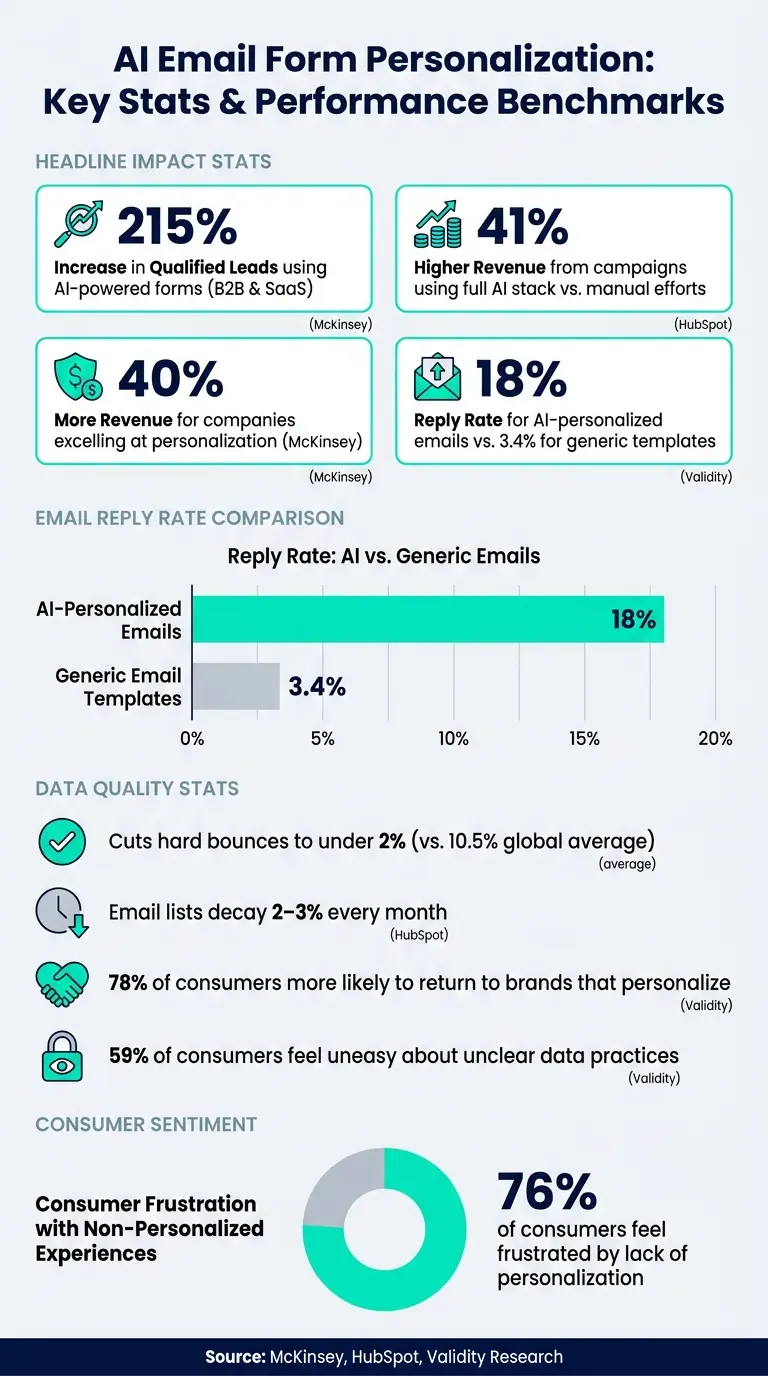
AI Email Form Personalization: Key Stats & Performance Benchmarks
The Future of AI-Driven Lead Nurture: Hyper-personalized Emails
Key Components for AI-Driven Email Form Personalization
Creating AI-powered forms starts with a solid foundation: clear objectives, high-quality data, and seamless integration of tools. Let’s dive into the essential elements that make AI personalization effective.
Setting Personalization Goals and Metrics
The first step is to define what success looks like - and to be precise about it. Broad goals like "boost engagement" aren’t actionable. Instead, tie each goal to a measurable metric you can monitor and evaluate.
Here’s how to align goals with metrics:
- Form conversions: Track completion rates or meeting-booked rates.
- Lead quality: Measure qualified conversion rates or pipeline generation per 1,000 emails sent.
- Revenue impact: Focus on metrics like revenue per recipient (RPR) or customer lifetime value (CLV).
- Drop-off reduction: Monitor partial submission rates or abandonment at specific steps.
It’s also important to prioritize metrics that reflect meaningful business outcomes. Traditional open rates, for example, have become less reliable due to email privacy updates affecting recipient data.
For perspective, AI-personalized emails achieve an 18% reply rate, far outperforming the 3.4% seen with generic templates. Even better, campaigns leveraging a full AI stack - like predictive segmentation, send-time optimization, and dynamic content - report 41% higher revenue compared to manual efforts. These benchmarks can guide you when setting your own KPIs.
Once your goals are in place, the next step is ensuring you have the right data to fuel AI personalization.
Data Requirements for AI Personalization
AI systems are only as effective as the data they process. For personalized email forms, three types of data work together to create meaningful experiences:
- Demographic and firmographic data: Includes basic details like name, role, company size, and industry, which help the AI understand the user’s context.
- Behavioral data: Tracks user activities such as website visits, product page views, or previous form submissions, offering insights into past behavior.
- Intent signals: Captures time-sensitive indicators like recent funding rounds, hiring trends, or technology updates to identify immediate needs.
The quality of your data matters just as much as its quantity. Tools like real-time email validation, input constraints for numerical fields, and automatic URL formatting help prevent errors at the source. Additionally, hidden fields that auto-capture UTM parameters can enrich lead profiles without requiring users to answer extra questions.
Tools and Integrations You Need
With clear metrics and reliable data in place, the right tools complete the AI-driven personalization process. These systems work together to deliver tailored experiences.
- Reform acts as the main data collection tool, capturing structured responses and feeding them into your stack. Its integration with ExactBuyer automatically fills in details like company size and industry by crawling the web. Plus, Reform’s Smart Hiding feature removes redundant fields from forms once data is pre-filled, reducing user effort without compromising on data quality.
- Reform’s integration with HubSpot ensures that form responses are instantly mapped to contact, company, and deal properties. Even if a user abandons a multi-step form, Reform’s partial submission feature (introduced in January 2025) saves any entered data, so no lead is lost.
-
For teams needing advanced customization, JavaScript event handlers like
onInputandonPageSubmittedenable real-time validation and data transformation during form interactions. For example, they can verify company-specific email domains before data is sent to your CRM.
How to Build Personalized Email Form Experiences
Once your goals are clear and your data pipeline is ready, the next step is creating forms that adapt to each user in real time.
Mapping User Journeys and Form Triggers
Using AI insights, map out the user journey to design tailored form experiences. Different users - like first-time visitors versus returning customers - need distinct approaches. AI-powered personalization helps sort users into lifecycle stages such as prospect, first-time buyer, active, at-risk, or dormant, triggering the right form at just the right time.
Each user action signals intent, which can inform your form triggers. For instance, a user revisiting your pricing page multiple times in a week likely signals high purchase intent, while an abandoned cart offers a chance for re-engagement. Reform's "Jump to" logic allows you to guide users to specific form sections based on their initial responses. From there, forms can be dynamically customized to align with these triggers.
Dynamic Form Customization with AI
Dynamic customization ensures that users only see questions relevant to them. Reform's Form Enrichment feature automates much of this by pulling external data, such as company size or industry, and removing unnecessary fields from the form - a process known as Form Shortening. This approach keeps forms concise for users while still gathering the data you need.
Conditional logic in Reform allows you to apply AI-driven rules using "And/Or" conditions for multiple criteria. For example, in a B2B scenario, a detailed budget question might only appear if the user identifies as a decision-maker and their company has more than 50 employees. This targeted approach minimizes friction while maintaining high-quality leads. Once these dynamic fields are configured, you can build multi-step forms that adapt based on user input.
Building Multi-Step Forms with Conditional Logic
Multi-step forms - created using Pages in Reform - are a proven way to reduce form abandonment. Splitting a long form into smaller, digestible steps makes the process feel less daunting. The real advantage comes when these steps are made conditional.
Take a B2B form, for example: if a respondent selects "More than $10 million" in annual revenue, the form can immediately direct them to a sales scheduling link. On the other hand, selecting "Less than $1 million" might route them to a self-service resource page or a webinar invitation.
To set this up in Reform, navigate to Page settings for any step after the first. There, under Logic settings, you can choose actions like Skip this page, Jump to, Finish and show, or Redirect to. Define your trigger condition - such as the question, operator (e.g., is, is not, is empty), and value - and you're set. Additionally, Reform's Liquid template syntax (e.g., {{ answers.BLOCK_ID }}) lets you pull specific form answers into automated email subject lines and messages. This makes follow-up emails feel more personal and less like generic templates.
Note: Advanced logic features like Jump to, Skip, and Redirect are only available with Reform's Pro Plan.
sbb-itb-5f36581
How to Deploy and Optimize AI-Powered Forms
Now that your multi-step forms and conditional logic are set up, it's time to focus on deploying them effectively and fine-tuning their performance over time.
Setting Up Real-Time Data Flows and Identity Resolution
A strong data pipeline is crucial for real-time personalization. In Reform, you can configure a global enrichment source (powered by ExactBuyer) in the Team Settings. This setup ensures enriched data - like company size, industry, or geographic location - flows seamlessly across all your forms. Use the "Add Mapping" feature to link these enriched fields to individual form blocks.
Real-time email validation plays a critical role here. It ensures accuracy from the start, aligning submissions with existing CRM contacts through identity resolution. Additionally, hidden fields can pass backend data, such as UTM parameters or lead scores, which can then trigger routing rules in integrated platforms via webhooks.
Tip: Test your form thoroughly before going live. Use both known and unknown leads to see how the form behaves when the enrichment provider doesn't find a match. This step helps prevent blank fields or errors for new contacts.
When setting up identity resolution and data enrichment, make sure to comply with privacy laws. For instance, the CCPA mandates an opt-out model for data sharing, while the GDPR requires opt-in consent. Aligning with these frameworks ensures your data practices meet legal standards.
Once your data flow is solid, you can move on to configuring AI-driven decision logic.
Configuring AI Rules and Decision Models
Reform provides four key logic actions - Skip this page, Jump to, Finish and show, and Redirect to - that form the foundation of AI-assisted routing. These rules respond to user answers or data availability and can be combined with And/Or operators for more complex scenarios. For advanced routing examples, refer back to the previous section.
The "Form Shortening" feature works hand-in-hand with these rules by automatically hiding fields when enriched data is already available. This keeps high-intent leads from being bogged down by unnecessary questions. Strategies like this have been shown to boost qualified leads by 215% for B2B and SaaS companies.
Once your AI rules are live, it's essential to monitor their performance and make adjustments as needed.
Tracking and Improving Form Performance
Reform's analytics tools let you track segmented conversion rates across various groups, such as enterprise versus SMB, mobile versus desktop, and first-time versus returning visitors. This data helps you identify exactly where users drop off in the process.
Pay close attention to form completion times. Ideally, personalization should make forms quicker to complete. If times increase, it might indicate overly complex conditional logic or a confusing step. Reform also tracks abandoned submissions, allowing you to pinpoint where users exit and make targeted improvements.
A/B testing is another powerful tool. Compare enriched forms against traditional formats to measure how much cognitive load is being reduced. This testing can reveal whether your optimizations lead to better outcomes, such as shorter sales cycles, higher conversion rates, or increased contract values.
Governance and Privacy Best Practices
Personalization thrives on trust, which comes from clear communication and consistent data practices.
Getting Consent and Being Transparent
Burying consent language in lengthy terms and conditions erodes trust. Under GDPR, consent must be specific and explicit - lumping it into a generic "I agree to the terms" checkbox doesn’t cut it. In the U.S., while the CCPA operates on an opt-out basis, states like Colorado, Virginia, and Connecticut are adopting GDPR-like opt-in models.
A great way to build trust is by adding a short, clear notice near your form’s submit button. For example: "We use your answers to personalize the emails we send you, including through automated tools. You can update your preferences anytime." Link this to a privacy policy that spells out exactly what data you collect, how AI uses it, and how long you keep it. Avoid vague language like "may use your data for various purposes." If AI-driven personalization is part of your process, let users know when profiling occurs. A simple inline note, such as "We're showing these questions based on your previous choices to keep this form shorter," can make a big difference in transparency.
Here’s why this matters: HubSpot reports that 78% of consumers are more likely to return to brands that personalize their experiences, but 59% feel uneasy about unclear data practices. Being upfront about how you use data builds confidence and sets the stage for accurate personalization.
Keeping Input Data Clean and Reliable
Accurate data is the backbone of effective personalization. Messy inputs - like fake emails, bot submissions, or duplicate records - can throw off personalization strategies and hurt email deliverability.
Tools like Reform’s built-in email validation can help. They catch invalid addresses, typos, and disposable domains right at the point of submission, ensuring bad data doesn’t even reach your CRM or AI systems. This is crucial: Validity studies show that using proper validation can cut hard bounces to under 2%, compared to the global average of 10.5%. Without ongoing checks, your data can quietly degrade, as email lists naturally decay by 2–3% every month due to job changes, abandoned accounts, or domain updates.
When enriching leads, stick to collecting only the data that directly supports your personalization goals - like company size or industry. Make sure these practices are disclosed in your privacy policy. Also, separate suspicious or incomplete submissions to keep them from contaminating your AI training data.
Aligning Marketing, Sales, and Data Teams
Once trust and data quality are in place, collaboration among teams becomes essential. Misalignment can derail personalization efforts. For example, if marketing labels a lead as "enterprise" based on form responses, but sales uses a different definition in the CRM, your AI models might pick up incorrect patterns, leading to inconsistent results.
To avoid this, create a shared data and personalization playbook. This document should outline what data is collected, how fields are defined, approved personalization use cases, and prohibited practices (like inferring sensitive traits from user behavior). Standardizing form templates with Reform ensures new forms align with consent and data-naming standards. Regularly reviewing metrics like conversion rates, opt-out rates, and spam complaints helps identify issues early and keeps your models on track.
Clear ownership is also critical. Assign specific roles: a marketing lead to focus on user experience and business goals, a data lead to oversee model quality and integrations, and a privacy lead to evaluate new use cases. This structure prevents unauthorized AI projects and ensures sales teams rely on validated, trustworthy data.
Conclusion
AI-powered email form personalization is no longer out of reach for most marketing teams. By combining clear goals, reliable data, and tools like Reform, teams can create tailored experiences that not only engage users but also boost revenue.
The numbers back this up. According to McKinsey, companies that excel at personalization see 40% more revenue from these efforts compared to their competitors. Plus, with 76% of consumers expressing frustration when they encounter a lack of personalization, sticking with generic email flows isn't just inefficient - it could cost you customers.
The key to making AI personalization work lies in the feedback loop: launch a form, track its performance, use the results to refine your AI rules, and improve continuously. Reform simplifies this process with features like real-time analytics, email validation, conditional logic, and CRM integrations. Whether you're testing the performance of a multi-step form versus a single-page version or using lead enrichment to pre-fill fields for returning visitors, each iteration helps you optimize further.
Here’s a practical way to get started: Focus on your highest-traffic email campaign. Analyze the form for any points of friction and set a measurable goal - like increasing completion rates by 15% or boosting sales-qualified leads by 20%. Use Reform to build a new version of the form with conditional logic and enrichment, link it to your CRM, and run the test for at least 30 days to gather meaningful insights. And remember, responsible data practices - like securing explicit consent, being transparent about how data is used, and maintaining data hygiene - are crucial. These steps not only protect your users' trust but also ensure your personalization efforts remain effective over time.
FAQs
What data do I need to personalize email forms with AI?
To make email forms more personal with AI, you'll need to gather and use a mix of data. This includes basic user details, form responses, and contextual insights like geographic location or behavior patterns (such as referral sources). You can also enhance this with enriched data, such as the user's company size or industry.
AI can take this a step further by analyzing responses for sentiment or identifying common themes. This allows you to craft follow-up emails that feel more relevant and tailored to each individual, improving the overall user experience.
How do I add consent and stay compliant with GDPR/CCPA?
When dealing with user data, compliance with GDPR and CCPA is non-negotiable. Both regulations aim to protect user privacy but have slightly different requirements.
Under GDPR, users must explicitly opt in to data collection. This means your email forms should include clear consent fields where users actively agree to share their data.
Meanwhile, CCPA focuses on giving users control over their data. It requires that individuals have the ability to opt out of data collection or request their data be deleted.
To stay compliant, your forms should:
- Include a checkbox or field for users to provide explicit consent.
- Offer options for users to withdraw their consent at any time.
- Provide a clear way for users to request data deletion.
Make sure these options are easy to access and manage through your settings. Not only does this keep you compliant, but it also helps build trust with your audience.
How can I measure if AI form personalization is working?
To gauge how well AI form personalization is working, focus on tracking a few key metrics: conversion rate, field-level analytics, time to complete, lead quality, and downstream outcomes. Begin by analyzing basic data, such as how many people complete the forms and where drop-offs occur. Use these insights to fine-tune your strategy and make sure your forms are effectively engaging users and delivering worthwhile results.
Related Blog Posts
Get new content delivered straight to your inbox

The Response
Updates on the Reform platform, insights on optimizing conversion rates, and tips to craft forms that convert.




Drive real results with form optimizations
Tested across hundreds of experiments, our strategies deliver a 215% lift in qualified leads for B2B and SaaS companies.
