
.webp)
Best Practices for CRM Email Form Automation



Automating CRM email forms can save time, reduce errors, and improve lead quality. Here's what you need to know:
- Sync submissions directly to your CRM to cut manual data entry errors by 70%.
- Use multi-step forms to reduce drop-offs by 20–30%.
- Add conditional logic to show relevant fields and increase conversions by 20–30%.
- Enable real-time validation to block invalid emails and spam, improving data quality.
- Choose no-code tools like Reform to create forms quickly and integrate with CRMs like HubSpot and Salesforce.
- Map form fields carefully to CRM properties to avoid errors and boost lead conversions by 20–30%.
- Test workflows thoroughly to ensure smooth data transfer and fast response times.
Focus on clean design, proper integration, and compliance (GDPR/CAN-SPAM) to build an efficient, reliable system that supports your sales and marketing goals.
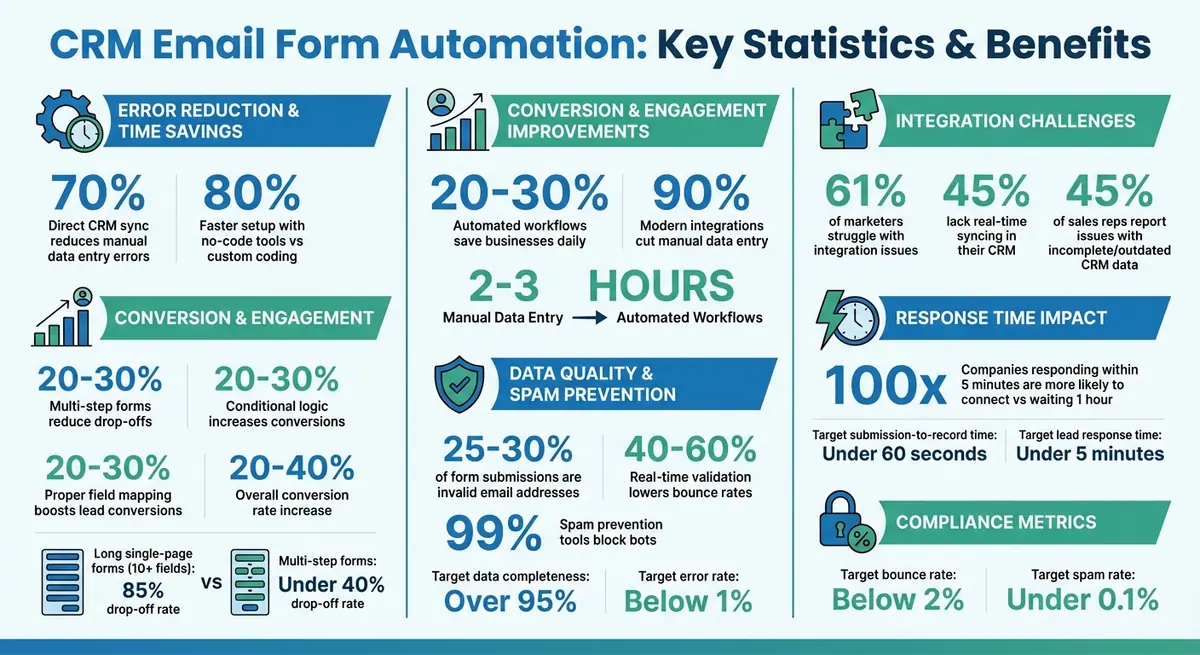
CRM Email Form Automation Statistics and Benefits
Preparation Steps for CRM Email Form Automation
Assess CRM Capabilities and Integration Requirements
Start by confirming that your CRM supports real-time lead syncing and automation triggers. Check the API documentation to ensure webhook support for instant lead capture. For example, platforms like HubSpot come with built-in form support that automatically creates leads, while Salesforce often requires either AppExchange apps or third-party connectors for more advanced automation workflows.
Integration challenges are a common hurdle. According to Forrester Research, 61% of marketers struggle with integration issues, and 45% lack real-time syncing in their current CRM setup. To avoid these obstacles, document key details such as authentication methods (like OAuth or API keys), data synchronization intervals, and error-handling protocols. A one-page summary highlighting essential features - such as deduplication, lead scoring, and data validation - can help you identify potential gaps early on.
Once you've outlined your CRM's capabilities, choose a no-code form builder that aligns with these integration requirements.
Choose a No-Code Form Builder
Using a no-code platform can save significant time - up to 80% faster setup compared to custom coding - allowing non-technical teams to deploy CRM-integrated forms in under an hour. When evaluating form builders, focus on tools that provide pre-built CRM connectors, are mobile-responsive, and include compliance features like GDPR support.
A tool like Reform offers seamless integrations with over 20 CRMs, including HubSpot and Salesforce. Features like multi-step flows, conditional routing, and lead enrichment reduce form abandonment and ensure high-quality data flows directly into your CRM without requiring a developer. Before committing to a platform, test it in a sandbox environment to confirm it meets your needs.
After selecting your form builder, the next step is to map your form fields to CRM lead records for smooth data transfer.
Map Form Fields to CRM Lead Records
Create a spreadsheet to map each form field to its corresponding CRM property. For example, match "Email" from the form to Lead.Email in the CRM, or "Company" to Lead.CompanyName. For US-based implementations, use standardized formats: MM/DD/YYYY for dates, $1,000 for currency, and (123) 456-7890 for phone numbers.
Validating data inputs is crucial to avoid workflow errors. Set default values for optional fields to reduce mistakes, and test your mappings in a sandbox environment before going live. Proper alignment of fields can make a big difference - 74% of businesses that implement accurate field mapping report a 20–30% improvement in lead conversion rates.
sbb-itb-5f36581
How to Design CRM-Integrated Email Forms
Use Multi-Step Forms for Better User Experience
Breaking down your forms into small, manageable steps can make a big difference in how users interact with them. Long, single-page forms with more than 10 fields often overwhelm users, leading to an 85% drop-off rate. In contrast, multi-step forms can cut this drop-off to under 40% by starting with just the essentials, like a name and email address. By splitting forms into sections - such as "Contact Info" and "Details" - you reduce fatigue and keep users engaged. Adding progress indicators like "Step 2 of 4" can further motivate users by showing them how far along they are. Tools like Reform’s drag-and-drop multi-step builder make it simple to create these forms, letting you add 3-5 fields per step and customize labels like "Confirmation" to keep the process clear and efficient. This setup not only improves user experience but also ensures seamless CRM synchronization. For an even more tailored experience, consider using dynamic features.
Add Conditional Logic and Lead Enrichment
Conditional logic makes forms smarter by displaying only the fields relevant to each user. For instance, if someone selects "B2B" as their business type, additional fields like "Company Size" or "Annual Revenue" can appear, while these remain hidden for "B2C" users. This approach avoids irrelevant questions, which can boost conversion rates by 20-30%. Lead enrichment takes things further by automatically adding extra details - like job title, company name, and industry - using third-party data sources when an email address is provided. This reduces manual data entry and ensures higher-quality leads. Enriched leads often show better engagement in email campaigns. Reform combines conditional routing with lead enrichment to prioritize high-value leads for sales teams while directing lower-priority ones to self-service options. This approach simplifies lead capture and optimizes CRM workflows.
Enable Spam Prevention and Email Validation
Spam and invalid emails can wreak havoc on your CRM. Studies show that 25-30% of form submissions can consist of invalid addresses, while spam bots can flood your system with useless data. Real-time email validation helps by checking for syntax errors, verifying MX records, and filtering out disposable email addresses. This can lower bounce rates in your email campaigns by 40-60%. To combat bots, you can layer in tools like invisible reCAPTCHA v3, honeypot fields, and rate limits (e.g., capping submissions to 5 per IP per hour). These measures can block up to 99% of bots before they even reach your CRM. Reform includes built-in spam prevention and email validation tools, ensuring that only verified, high-quality leads make it into your system, complementing the personalized logic and enrichment strategies mentioned earlier. This ensures clean and reliable data for your CRM workflows.
HubSpot + Zapier: How to Build An Automated Email w/ Form Submission FREE [No PRO versions required]

Integration and Workflow Setup Checklist
Once your form design and field mapping are ready, use this checklist to fine-tune your CRM integration and ensure workflows run smoothly.
Set Up Field Mapping and Data Validation
Start by documenting every form field, its data type, and validation rules in a spreadsheet. Match each field to its corresponding CRM property, ensuring the data types align. For example, don’t map a text field to a date field or a multi-select field to a single-value CRM property - these mismatches can break the integration. If you need to transform fields (e.g., combining first and last names into one CRM property), plan this step in advance.
Before diving into complex workflows, create a simple test form with just two fields - email and company. Use this to validate your CRM connection and authentication. To avoid duplicate records, enable duplicate detection using email as the unique identifier. Modern integrations can cut down manual data entry by up to 90%, saving businesses an average of 2–3 hours daily. Platforms like Reform simplify field mapping with visual tools that automatically match common fields, while still letting you customize mappings for more specific needs.
Configure Automation Triggers and Email Sequences
Set up auto-response emails to acknowledge form submissions immediately. Research shows that companies responding to leads within 5 minutes are 100 times more likely to connect than those waiting an hour. Use lead assignment rules to route submissions effectively - enterprise leads can go to senior sales reps, while small business inquiries can be directed to a different team. Make sure fallback rules are in place for submissions that don’t match predefined criteria.
Next, enroll leads into email sequences based on their responses and enrichment data. For instance, high-value B2B leads might receive tailored sequences showcasing enterprise-level features. Set up Slack or email notifications to alert your team when integration errors occur, and include submission data and error details for faster troubleshooting. Track metrics like submission-to-record time (aim for under 60 seconds) and lead response time (target under 5 minutes) to ensure your automation is running efficiently.
Once automation is configured, test the entire system as outlined below.
Test End-to-End Form Submissions
Submit test entries for every field to confirm that data flows into the CRM accurately, without truncation or formatting issues. For multi-step forms, check how the system handles incomplete submissions - if incremental submissions are enabled, partial data should still be captured.
Test for invalid inputs, such as fake email addresses, to ensure real-time validation blocks bad data. After successful test submissions, verify that CRM-side automation works as expected. Check if auto-response emails are sent, leads are assigned correctly, and any triggered workflows function as intended. Additionally, confirm that tracking tools like Facebook Pixel or Conversions API fire events properly on thank-you pages, ensuring your marketing data syncs with CRM records.
A well-functioning integration should maintain over 95% data completeness and keep error rates below 1%. Thorough testing before launch ensures your workflows operate smoothly when actual leads start coming in.
Optimization and Compliance Practices
Once your CRM email form automation is up and running, keeping it effective means focusing on continuous improvement and following strict compliance rules. Together, these practices ensure your workflows are both efficient and legally sound, helping you achieve better conversions while avoiding potential risks.
A/B Test Forms and Email Campaigns
Testing is a powerful way to figure out what works best in your forms and emails. Start by experimenting with different elements like subject lines (e.g., questions versus urgency), call-to-action (CTA) phrasing and placement, email length (short bullet points versus detailed storytelling), and even the timing of your emails. For example, compare subject lines that use personalization ("Hi [Name], Here's Something Just for You") with urgency-driven ones ("Limited Time Offer: Act Now!"). Similarly, try CTAs like "Schedule Your Free Demo Today" versus "Claim Your Exclusive Discount Now."
To make testing effective, define clear success metrics - such as open rates, click-through rates, and conversions - and focus on one variable at a time. This approach helps you pinpoint exactly what's driving changes in performance.
Monitor Real-Time Analytics and Adjust Workflows
Keeping an eye on real-time analytics is key to spotting trends and making quick adjustments. Track metrics like open rates, click-through rates, conversions, bounce rates (aim for below 2%), and spam rates (keep under 0.1%). For instance, if your click-to-open rate is high but conversions are low, there may be a mismatch between your email content and the landing page it links to.
Dashboards that integrate your email platform with your CRM can provide a clear view of list growth and conversions in real time. These insights help you fine-tune automation workflows, such as adjusting wait times or eliminating steps that aren’t performing well. Tools like heatmaps can also highlight design issues or areas of high engagement. For example, Reform’s analytics dashboard tracks form submissions, completion rates, and drop-off points, offering actionable insights without the hassle of switching between tools.
Ensure GDPR and CAN-SPAM Compliance
Compliance isn’t just a legal requirement; it’s a way to build trust with your audience. Every automated email should include a clear, working unsubscribe link that processes opt-outs immediately. Use explicit opt-in checkboxes (not pre-checked ones) to ensure subscribers actively agree to receive your emails. Keeping records of when and how subscribers opted in is essential for meeting GDPR standards. A double opt-in process can also help verify subscribers, improving lead quality.
To maintain email deliverability and avoid spam filters, use professional sending domains with proper SPF, DKIM, and DMARC authentication. Include your physical business address in email footers, as required by CAN-SPAM regulations. Additionally, verify email addresses at the point of collection to avoid spam traps and improve data quality. Poor data can be costly - 45% of sales reps report issues with incomplete or outdated CRM data, which can impact overall performance. Clean, compliant data not only keeps you within legal boundaries but also ensures your automation system runs efficiently while respecting your audience.
Conclusion
Setting up effective CRM email form automation creates a system that not only generates high-quality leads but also simplifies workflows. By following the practices outlined in this checklist - like evaluating your CRM’s capabilities, designing multi-step forms, using A/B testing, and ensuring compliance - you can build a reliable lead generation system that grows with your business.
These strategies do more than just simplify processes - they deliver real results. For example, conversion rates can increase by 20–40%, while automated workflows reduce manual errors and speed up response times. Plus, when clean, validated data enters your CRM, your sales team can focus on engaging with qualified leads rather than sifting through spam or incomplete submissions.
Reform makes this process even easier by providing tools to create branded, conversion-focused forms with features like lead enrichment, spam prevention, and real-time analytics. With seamless CRM integration, data flows smoothly from form submissions, while tools like conditional routing and email validation ensure your automation runs on accurate, high-quality inputs.
FAQs
What’s the best way to prevent duplicate leads in my CRM?
To keep duplicate leads out of your CRM, focus on data validation and effective mapping strategies. Tools like Reform can help streamline lead validation, handle duplicates, and maintain accurate data. Take time to standardize your data, review mapping rules regularly, and rely on unique identifiers like email addresses or phone numbers to differentiate records. Additionally, setting up real-time validation - such as email verification and spam filters - can further minimize duplicate or invalid entries.
How do I handle partial submissions from multi-step forms?
To help users manage partial submissions, provide an option to save progress. This way, they can pause and return later without losing their work. This approach not only reduces the likelihood of abandonment but also increases completion rates.
Additionally, implement real-time validation and offer clear error messages at every step. These features help users spot and fix mistakes immediately, making the overall experience much smoother and less frustrating.
What should I test before going live with CRM form automation?
Before rolling out CRM form automation, it's crucial to test a few critical elements to keep everything running smoothly. Start by ensuring form fields are designed correctly and validate inputs in real-time. Features like email verification and spam prevention should also be thoroughly checked.
Next, test the form's responsiveness across all devices - desktop, tablet, and mobile - to prevent any usability hiccups. Finally, double-check CRM data synchronization. Validate field mappings, integrations, and webhooks to confirm they work as expected. Keep an eye out for any errors or delays in data transfer during this process.
Related Blog Posts
Get new content delivered straight to your inbox

The Response
Updates on the Reform platform, insights on optimizing conversion rates, and tips to craft forms that convert.




Drive real results with form optimizations
Tested across hundreds of experiments, our strategies deliver a 215% lift in qualified leads for B2B and SaaS companies.
