
.webp)
Best Bot Detection Methods for Lead Forms


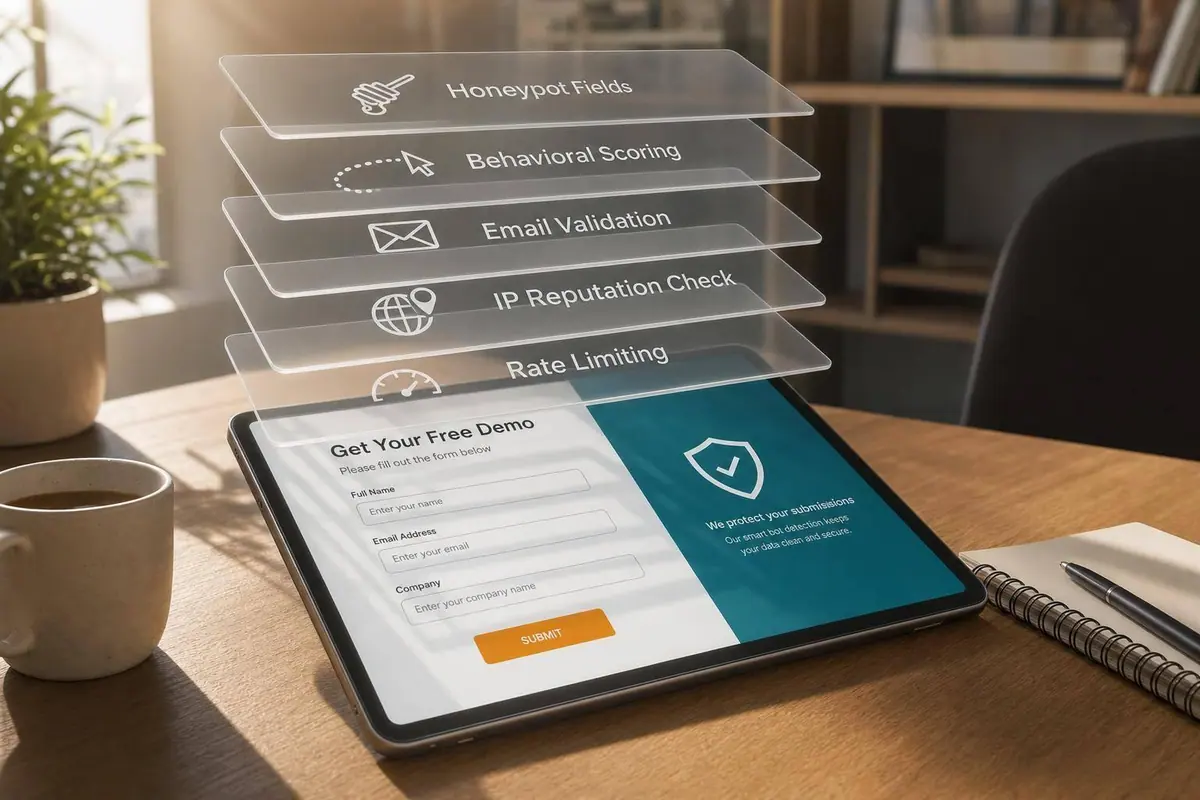
If you want cleaner lead data, one bot check is not enough. I’d use a small stack: device checks, honeypots, behavior signals, rate limits, email screening, and IP review.
Here’s the short version:
- Device checks help spot automated browsers
- Honeypots catch simple bots with hidden fields
- Behavioral scoring looks at typing, scrolling, and form-fill timing
- Velocity limits flag too many submissions from one source
- Email screening blocks fake, disposable, and risky addresses
- IP review checks whether traffic comes from known bad networks
Why this matters: fake leads can waste paid ad budget, pollute your CRM, and hurt email deliverability. Even a small stream of junk submissions can distort conversion data and send bad contacts into sales workflows.
How to Detect and Block Click Fraud Inside Your Lead Forms, Funnels, and Landing Pages
sbb-itb-5f36581
Quick Comparison
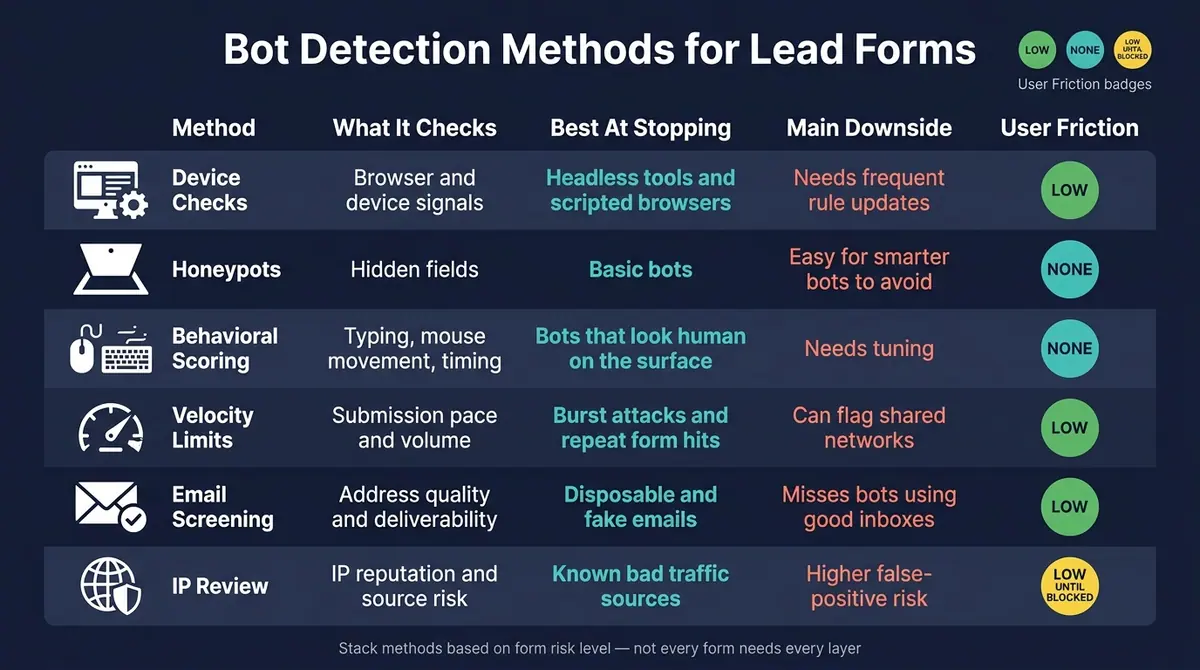
Bot Detection Methods for Lead Forms: Side-by-Side Comparison
| Method | What it checks | Best at stopping | Main downside | User friction |
|---|---|---|---|---|
| Device checks | Browser and device signals | Headless tools and scripted browsers | Needs frequent rule updates | Low |
| Honeypots | Hidden fields | Basic bots | Easy for smarter bots to avoid | None |
| Behavioral scoring | Typing, mouse movement, timing | Bots that look human on the surface | Needs tuning | None |
| Velocity limits | Submission pace and volume | Burst attacks and repeat form hits | Can flag shared networks | Low |
| Email screening | Address quality and deliverability | Disposable and fake emails | Misses bots using good inboxes | Low |
| IP review | IP reputation and source risk | Known bad traffic sources | Higher false-positive risk | Low until blocked |
My takeaway is simple: use the lightest stack that fits the form. For a low-risk signup, I’d start with honeypots, time checks, and email validation. For demo requests or paid traffic forms, I’d add behavior scoring. If you’re under attack, I’d layer in velocity rules, IP review, and device checks.
That setup helps you block more junk without making normal users jump through extra steps.
1. Device Checks and Browser Fingerprinting
Device checks and browser fingerprinting look at the browser and device behind each submission. They check signals like the operating system, screen size, browser settings, and how the browser executes code.
This method works well against headless browsers and automation tools like Playwright and Puppeteer. Even when those tools try to look normal, they often leave behind small timing and environment clues that don’t match human browsing. That’s where fingerprinting earns its keep. Its power comes from depth, not visibility.
Detection Strength
High. It’s stronger than a basic user-agent check because it looks at many signals instead of one easy-to-fake field.
False-Positive Risk
Moderate. Privacy-focused or heavily customized browsers can still get flagged. One way to cut down on that is to pair fingerprinting with behavior signals, such as mouse movement and typing cadence.
User Friction
Low. It runs in the background, so users don’t have to deal with extra challenges.
Maintenance Load
High. Bot tools change fast, so teams need to update detection rules often.
2. Honeypots and Hidden Field Traps
A honeypot is a hidden form field that real users never see. If a bot fills out every field on the page, including that hidden one, it gives itself away.
This is different from fingerprinting. Honeypots work at the form level, and they add a layer of protection without adding friction for the user. That said, they mostly catch simple automation. More advanced bots can often spot hidden fields and skip them.
So honeypots make sense as a low-cost layer, not a standalone defense. They work best on forms where you want to cut spam without adding extra steps for people.
Detection Strength
Moderate to high against basic bots. Honeypots do a good job against simple bots that fill every field, but they’re less effective against bots that can detect and ignore hidden inputs.
False-Positive Risk
Very low. Legitimate users can’t see or interact with the hidden field, so accidental false positives are rare.
User Friction
None. Honeypots run in the background, so users never face a challenge or extra step.
Maintenance Load
Low. Setup is simple and usually needs little upkeep. It helps to change field names from time to time so bots don’t learn the pattern.
3. Behavioral Scoring
Fingerprinting looks at the browser. Behavioral scoring looks at the interaction itself.
Instead of focusing only on what a lead submits, behavioral scoring looks at how the form gets filled out. That includes typing cadence, mouse movement, scroll depth, and total completion time. Human users tend to pause, hesitate, backtrack, and move in uneven ways. Bots, on the other hand, often submit forms right away or follow patterns that look too even to be natural.
The main point here is simple: behavioral scoring gives you evidence of live interaction, not just a finished form submission.
A common setup is to define a minimum completion time and flag submissions that come in faster than a person could reasonably finish. That gives behavioral scoring a solid role in the stack, sitting between static checks and later-stage screening.
Detection Strength
High against modern bots. This method can catch automation that uses real browsers or residential proxies because it judges interaction patterns rather than source-based signals.
False-Positive Risk
Low to moderate. The safest way to cut false positives is to compare scores against human benchmarks. Even then, some real users move fast and may still get flagged, which is why behavioral scoring works best when paired with other signals.
User Friction
None. It runs quietly in the background and doesn't ask the user to solve a puzzle or click a checkbox.
Maintenance Load
Moderate. You need to connect the system to lead routing and CRM workflows so it can support real-time routing decisions. Thresholds also need tuning over time as bot behavior shifts.
4. Velocity Limits and Rate Controls
Behavioral scoring looks at how someone fills out a form. Velocity limits look at how often that source submits.
In plain English, velocity limits track submission volume and speed from the same source. They look for patterns like submissions coming in at impossible volume or pace, rapid-fire form fills, and repeated submissions from the same source.
This method is very strong against automated scripts and automated spam traffic that test forms at scale. If a bot starts hammering your form, velocity rules can spot that fast.
The catch? It won't do much against slow, spread-out attacks. If bad traffic drips submissions over time to avoid a spike, simple rate rules may not catch it. That's where behavioral signals need to work alongside velocity checks.
False-Positive Risk
Shared IP environments are the biggest issue. An office, school, or other shared network can send many real users through the same IP address. If your limits are too tight, you can end up blocking legit leads by mistake.
A safer move is to use step-up checks, like email confirmation, instead of blocking right away when velocity looks suspicious. That gives you a second layer without shutting the door on real people.
User Friction
Minimal in normal use. Rate controls usually run in the background, so most users never notice them. Friction only shows up when the system sees risk.
The better tools stay out of the way until they need to act. That matters, because no one wants extra hoops for every single form fill.
Maintenance Load
Moderate and ongoing. To work well, velocity controls need tuned rules and real-time routing. Set them once and forget them? That usually doesn't end well.
You also want velocity rules tied to lead routing, so flagged submissions never make it into the CRM or skew conversion data. Email screening then acts as the next layer, picking up cases that timing-based rules miss.
5. Email Screening
When velocity checks don’t catch slow or spread-out abuse, email screening looks at the address itself.
It checks whether the submitted email can actually be used. That includes syntax validation, spotting gibberish or malformed entries, flagging disposable inboxes like Mailinator or TempMail, confirming that the domain has active MX records, and checking whether the mailbox appears deliverable.
Detection Strength
High for low-quality and automated submissions. Email screening does a good job of blocking disposable inboxes, spam trap networks, and scripted form fills that rely on obviously fake addresses. It’s less effective against advanced bots that use valid, aged email accounts.
False-Positive Risk
Real, but manageable. Some legitimate users prefer disposable or privacy-first email addresses when they want a lead magnet without giving up their main inbox. If your rules are too strict, you can end up blocking people who might have converted later. A better move is to block known high-risk disposable domains while still allowing common providers like Gmail and Outlook.
User Friction
Minimal in most cases. Validation happens in the background, so most users won’t notice a thing. Usually, the only time it surfaces is when someone makes a typo or submits a flagged address. In that case, an inline prompt to fix the email keeps the process smooth.
Maintenance Load
Low when it runs through an API or built-in integration, because the provider handles disposable-domain and spam-trap lists for you. Still, new throwaway email services pop up all the time, so the data behind those checks needs regular updates.
That makes email screening a solid backstop for CRM hygiene. Reform’s built-in email validation catches bad addresses before they reach your CRM.
6. IP Review and Reputation Checks
When a submission clears email checks but still feels off, IP data gives you another way to judge risk at the source. After device, behavior, and email checks, IP review helps catch abuse tied to where the submission came from. It compares the submission IP against reputation databases and can flag repeat abuse from the same IP.
It can also help teams block submissions from regions outside their target market when fraud is heavily concentrated there. That matters because email validation only tells part of the story. IP review can spot patterns that an email check might miss.
Detection Strength
High for automated scripts and bot networks. IP reputation checks work well for stopping junk submissions that keep coming from the same source. In plain terms, if one IP keeps sending garbage, this layer can catch it fast.
That makes IP review useful for spotting source-level abuse before other checks even get involved. But there’s a catch. It’s less effective against more advanced bots that rotate IPs or use residential proxies to blend in with normal traffic.
False-Positive Risk
High. Shared networks and privacy tools can make normal traffic look suspicious, so aggressive blocking can lock out real leads.
Think about a coffee shop Wi-Fi network, a big office, or someone using a VPN. On paper, that traffic might look risky. In practice, it could be a legitimate prospect trying to fill out your form.
User Friction
No friction unless a block triggers; then the form is blocked entirely.
For the user, it’s invisible right up until it isn’t. If the system flags the IP, the submission stops cold.
Maintenance Load
High. Blocklists and reputation data need constant updates.
That’s the tradeoff. IP review can catch obvious abuse, but it only works well if the underlying data stays current.
Pros and Cons of Each Detection Method
Each method catches a different kind of abuse. And each one has blind spots too. The table below lays out those tradeoffs before you match them to your risk level.
| Method | Main Advantages | Main Limitations | Pairs Best With |
|---|---|---|---|
| Device Checks | Reads device and browser signals with high precision. | Can flag privacy-focused browsers; can be bypassed by sophisticated spoofing. | IP Review |
| Honeypots | Zero friction for real users; easy to implement. | Easily evaded by bots that scan for hidden fields. | Behavioral Scoring |
| Behavioral Scoring | Detects non-human patterns like unnatural typing patterns and instant submissions. | Complex to set up; needs benchmark data and ongoing tuning. | Device Fingerprinting & CRM integration |
| Velocity Limits | Stops mass automated attacks and impossible submission speeds. | Can block legitimate users on shared networks like corporate offices. | IP Review |
| Email Screening | Blocks disposable and risky domains; protects sender reputation. | Won't stop bots using legitimate but stolen email addresses. | double opt-in |
| IP Review | Fast; identifies known malicious actors and spam networks. | High risk of overblocking users on public Wi-Fi or VPNs. | Velocity Limits |
A simple way to think about it: honeypots are the easy win. They add no friction for normal users and don't take much work to launch. The catch? More advanced bots can spot hidden fields and skip right past them.
Behavioral scoring goes deeper, but it asks more from your team. It looks for non-human activity like odd typing behavior or forms submitted in a split second. That can be powerful, but it also needs baseline data and steady tuning to stay useful.
Email screening works well as a backstop for lead quality and deliverability. It can block disposable or risky domains before bad records pile up. Reform's built-in email validation catches bad addresses before they reach your CRM.
Put all that together, and the tradeoffs shape how much layering each lead form needs.
Recommended Layered Setups by Lead Form Risk Level
Not every form needs the same level of protection. A simple newsletter signup is a very different case from a demo request tied to paid traffic. The six methods above work best when you stack them based on risk instead of dropping every safeguard onto every form. In plain English: use the lightest setup that stops the kind of abuse you're most likely to see.
| Risk Level | Recommended Method Combination | User Friction | Maintenance Effort |
|---|---|---|---|
| Low-Risk Public Forms | Honeypots + completion-time checks + basic email validation | Zero | Low |
| High-Value Forms | Honeypots + behavioral scoring + email validation | Low | Moderate |
| Active Abuse | Baseline stack + IP reputation checks + velocity limits + device fingerprinting | Low to moderate | High |
Baseline protection is enough for most public-facing forms. It blocks low-effort bots without making things harder for actual users.
High-value forms like B2B demo requests or SaaS trial signups usually need a stronger setup. Behavioral scoring helps spot submission patterns that don’t look human. Email validation can also stop disposable domains, spam traps, and typo-driven mistakes before they hurt list quality.
When abuse starts to spike, add IP reputation checks and velocity limits to slow down high-volume scripts. Device fingerprinting gives you one more behind-the-scenes signal to spot traffic that looks off.
Reform combines spam prevention, email validation, and CRM integrations in one form flow.
FAQs
Which bot checks should I start with?
Start with a few low-friction checks that can catch bots without making life harder for real leads:
- Honeypot fields that trap automated submissions
- Real-time email validation to flag disposable addresses, typos, and risky domains
- Behavioral monitoring to spot bot-like patterns in typing and mouse activity
Used together, these checks give you strong early protection while keeping the form experience smooth.
How can I reduce false positives?
Use a balanced, layered approach instead of relying on one aggressive filter. A single hard gate can block junk, sure, but it can also shut out real people who just move fast.
Set time-based thresholds with care. If the cutoff is too tight, you'll catch bots and legitimate users who fill out forms quickly.
Start with low-friction methods like behavioral analytics. They help you spot patterns that look human without putting extra steps in front of good leads.
Honeypots still have a place, but they work best as one part of a broader setup, not the whole plan. The goal is simple: learn what normal human behavior looks like, then use that baseline to separate real leads from spam with more confidence.
When should I add device and IP checks?
Add device and IP checks as a base layer in a multi-layered security setup. They do their best work when they track user actions and network behavior in real time.
These signals let you compare traffic against known bot networks, proxy lists, and data center IPs, so you can filter suspicious connections before they ever get near your database.
Related Blog Posts
Get new content delivered straight to your inbox

The Response
Updates on the Reform platform, insights on optimizing conversion rates, and tips to craft forms that convert.




Drive real results with form optimizations
Tested across hundreds of experiments, our strategies deliver a 215% lift in qualified leads for B2B and SaaS companies.
