
.webp)
API Retry Logic for Failed Lead Writes


A failed API response does not always mean the lead was lost. In many lead flows, the safest setup is simple: retry only temporary failures, use capped backoff with jitter, stop after a set window, and dedupe every retry with an event ID or upsert key.
If I boil the article down, the main points are:
- Do not retry every error. Retry timeouts, connection drops,
429, and5xxerrors. Do not retry400,401,403,404, or422. - Keep retry windows tight. For sync form flows, stay under 5 seconds total. For async jobs, a window of 30 minutes to 4 hours can fit, based on follow-up SLAs.
- Use exponential backoff + jitter. This cuts retry spikes and lowers the chance of making an outage worse.
- Prevent duplicates on every retry. Use an idempotency key, webhook event ID, or external ID + upsert.
- Add safety controls. Circuit breakers, retry budgets, and a DLQ stop bad failures from turning into backlog and lost leads.
- Track the right numbers. Watch retry rate, post-retry success rate, duplicate rate, DLQ age, and time-to-write.
Here’s the short version: save the lead first, confirm the submission, then send downstream writes through a background worker with limits and dedupe rules. That setup cuts lead loss and lowers duplicate risk at the same time.
| Area | What I’d do |
|---|---|
| Retryable errors | Network timeouts, resets, 429, 500, 502, 503, 504 |
| Non-retryable errors | 400, 401, 403, 404, 422 |
| Sync flow | 2–3 attempts, under 5 seconds total |
| Async flow | 5–10 attempts, capped retry window |
| Delay pattern | 2x backoff with full jitter |
| Duplicate control | Event ID, idempotency key, or upsert |
| Last-stop handling | Queue or DLQ with replay data |
That’s the core of it: retry with rules, not guesswork.
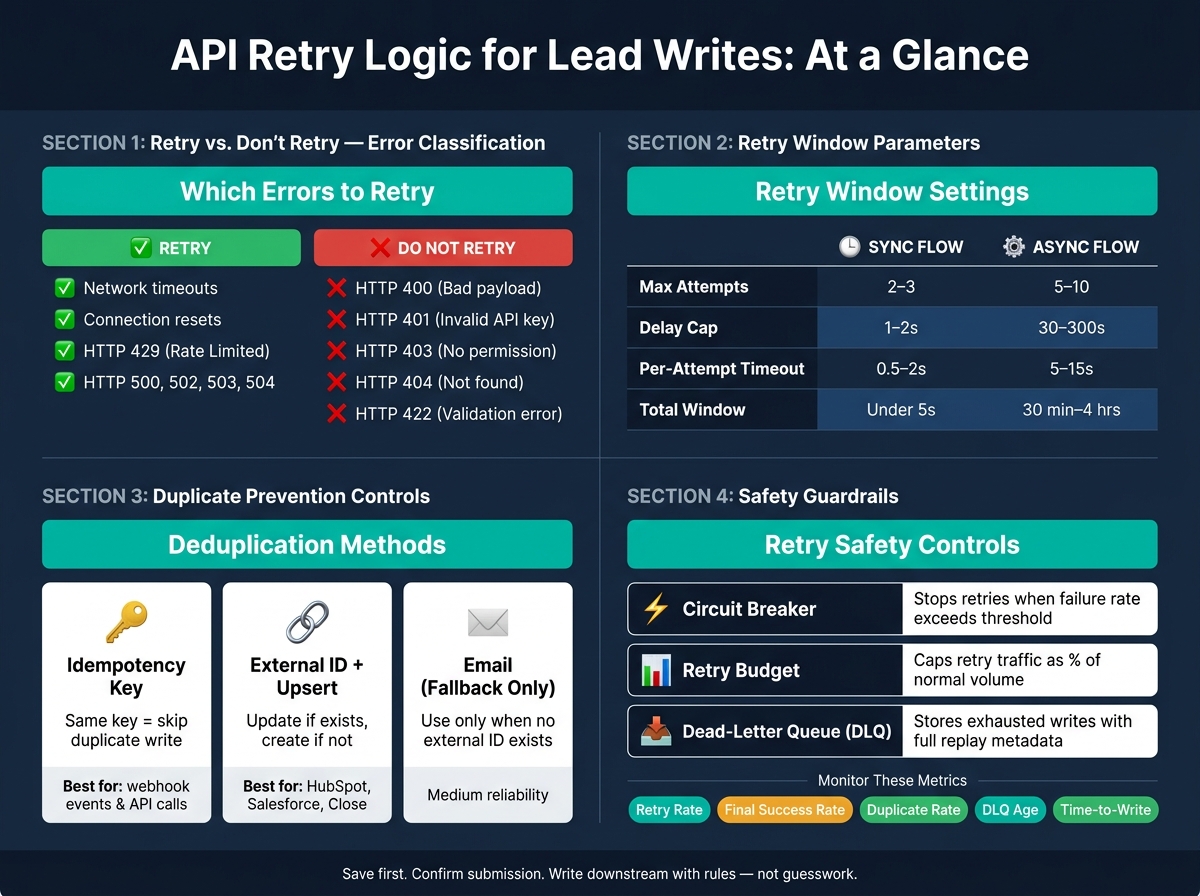
API Retry Logic for Lead Writes: Decision Framework & Key Parameters
Adding retry logic to your API calls is one of the easiest ways to improve reliability.
sbb-itb-5f36581
The problem with naive retries in lead pipelines
Retries can save leads when failures are temporary. But if you handle retries the wrong way, you can create duplicate records or put extra strain on the systems you're trying to reach.
| Retry approach | Effect on lead recovery | Duplicate risk | Outage risk |
|---|---|---|---|
| No retries | Low; any transient error means a permanently lost lead | Very low | Low |
| Immediate fixed-delay retries | Moderate; recovers from brief interruptions only | High | High (thundering herd) |
| Unbounded retries | Appears high, but wastes retries on permanent failures | Extreme | Extreme |
| Capped exponential backoff, jitter, and idempotency | Optimal; maximizes recovery while respecting API limits | Low | Low |
The trouble starts when the retry pattern ignores how the API reacts under stress. Immediate fixed-delay retries and unbounded retries do the most damage.
Fixed-delay retries can pound a struggling CRM instead of giving it time to recover. If dozens of clients all retry on the same schedule, traffic spikes at the exact same moment. That synchronized burst can take a small issue and turn it into an outage.
Unbounded retries are even harsher. A pipeline set to retry until success will keep sending requests forever, chewing through rate limits and making pointless calls when the root cause is something like a bad payload or an invalid API key.
Which failures should be retried and which should not
Not every failed API call should get another shot. The main split is simple: some failures are temporary, and some are permanent.
Retryable failures include:
- Network timeouts
- Connection resets
- HTTP 429 (rate limit exceeded)
- Temporary 5xx responses like 500, 502, 503, and 504
These are the kinds of problems that may clear on their own.
Non-retryable failures include 400 (malformed payload), 401 (invalid API key), 403 (insufficient permissions), 404 (not found), and 422 (validation error). If you retry a 422 because a required field like email is missing, nothing changes. The request will fail again, capacity gets wasted, and the alert that should flag broken lead data shows up later than it should.
A practical pipeline checks the HTTP status code first, then sends transient failures to retry and permanent failures to alert or correction. That split decides whether the next step is retry, alert, or correction.
How duplicate leads happen after partial failures
The biggest duplicate risk shows up when the write succeeds on the server, but the client never gets the response back. In form-to-CRM workflows, that matters a lot because a timeout does not prove the write failed.
A POST can finish on the server even if the client times out before the response arrives. If the client retries, it may create the same lead again unless the API supports idempotency or upsert behavior.
That’s how sales teams end up with duplicate lead records. Follow-up gets duplicated. Attribution gets skewed. Conversion metrics look higher than they should. Without idempotency keys or upsert semantics, this keeps happening whenever a short network issue hits during a create operation, especially in high-traffic periods.
How to design retry windows and backoff rules for failed lead writes
Once you know which failures are worth retrying, the next step is deciding how long to keep trying and how often to try again. That’s where retry windows come in.
A retry window helps you balance recovery against stale lead delivery. Wait too little, and you may drop writes that would have gone through after a short outage. Wait too long, and the lead may arrive too late to matter. A retry window has two limits: total attempts and total elapsed time. Getting both right keeps lead routing on time without giving up on writes that a brief outage would have recovered.
| Parameter | Typical range |
|---|---|
| Max attempts | 2–3 total (sync); 5–10 (async) |
| Delay cap | 1–2 s (sync); 30–300 s (async) |
| Per-attempt timeout | 0.5–2 s (sync); 5–15 s (async) |
| Total retry window | 2–5 s (sync); 30 min–4 h (async) |
Set practical limits for synchronous and asynchronous lead flows
The retry window should match the kind of flow you’re dealing with. If a user is sitting there waiting on a form, the rules need to be tight. If a background worker is handling the job, you have more room.
For synchronous forms, keep the full retry sequence under 5 seconds. Also, write the lead to durable storage before calling downstream APIs. In plain terms: save the lead first, confirm the form submission right away, and let a background worker handle the CRM write after that. That timing keeps the user-facing request fast and makes sure the lead isn’t lost if the downstream system has a bad moment.
Background workers can wait longer, but not forever. Async retries should finish well before the SLA for sales follow-up. That way, if the write still fails, your team still has time to escalate and act while the lead is fresh.
Use exponential backoff with jitter instead of fixed delays
Fixed delays sound simple, but they can backfire. If every worker retries at the same interval, they tend to pile back in together. That’s how a short CRM wobble turns into a traffic jam.
Exponential backoff works better. Double the delay after each failed attempt - use a 2x backoff until you hit the cap. This gives a recovering API a little breathing room instead of hitting it with a steady drumbeat of retries.
Then add jitter. Jitter spreads retries out so one CRM hiccup doesn’t turn into a spike you caused yourself. A common option is full jitter: pick a random value between zero and the computed backoff. Instead of all workers coming back at once, they scatter across a time window.
If the API sends a Retry-After header and that value is longer than your computed delay, honor it. Then add a small amount of jitter so clients still don’t resume in lockstep.
Even with solid backoff settings, you still need duplicate protection, which comes next.
How idempotency keys and upserts prevent duplicate records
Backoff and jitter help a recovering API avoid a flood of traffic. But they don't stop a retry from writing the same lead twice.
That's a different problem.
If a request fails and your system retries it, the retry needs a dedupe rule. Without one, you can end up with a second lead record for the same submission.
The fix is idempotency. In plain English, that means the same lead write can be retried without creating another record.
A common way to do that is with an idempotency key: one unique value per submission, sent with every retry. When the receiving system sees that same key again, it knows this is the same request coming back and skips the duplicate write. Reform webhooks include a unique event id in the payload, and consumers should use that value for deduplication.
If the CRM doesn't support idempotency headers, use an external ID + upsert pattern instead. Rather than sending a plain create request, you send an update-or-insert request tied to an external ID, often the submission ID from your form. If the record is already there, the CRM updates it. If not, it creates it.
| Control | How it works | Duplicate prevention value | Best use case |
|---|---|---|---|
| Idempotency Keys | Server ignores repeated requests with the same key | High | Preventing duplicate processing of the same webhook event or API call |
| External ID + Upsert | Updates existing record or creates one | High | CRM integrations like HubSpot, Salesforce, or Close |
| Unique Business-Key (Email) | Fallback dedupe when no external ID exists | Medium | Standard lead/contact creation where no external ID is available |
| Webhook Event Deduplication | Skips already processed event IDs | High | Asynchronous workflows and third-party automation |
Use email as a fallback only. It can fail when one person submits more than one form, or when a shared inbox is a valid contact point.
Store deduplication state for the full retry period
Keep dedupe state longer than the full retry window. Store the request ID, status, and final CRM object ID so ops can trace what happened to the write later.
Where Reform fits in a lead capture workflow
Reform sits at the capture layer of the lead pipeline and sends submissions downstream to CRMs and marketing tools. Reform webhooks include a unique event id; use that as the dedupe key.
Guardrails for when retries cause more errors
After backoff and deduplication, you still need controls that keep retries from pouring gas on the fire. Retries use quota, bandwidth, and processing time. If you leave them unchecked, a shaky CRM or marketing API can turn a small issue into a backlog, duplicate writes, and burned quota.
Use circuit breakers, retry budgets, and dead-letter queues
Circuit breakers stop retries during long failure streaks. Retry budgets put a hard cap on how much extra traffic retries can add.
A circuit breaker sits around your lead-write calls to the CRM or marketing tool. If failure rates stay above the set threshold, the breaker opens and stops sending requests downstream. Instead of piling on more failed calls, your system fails fast and queues the lead internally. After a cooldown period, the breaker tests the connection with a small batch of probe requests before letting normal traffic flow again.
A retry budget limits how much extra traffic retries can create during an incident. Keep retries capped at a small share of normal traffic. When the cap is hit, the system should stop retrying and send the lead to a DLQ or internal queue for review.
A dead-letter queue (DLQ) stores leads that ran out of retries, along with enough metadata to replay them safely. Each record should include:
- The original lead payload
- The target integration
- A full attempt history with timestamps and error codes
- The campaign or form source
| Control | What it solves | Risk without it |
|---|---|---|
| Circuit breaker | Downstream outage | Cascading failures, provider overload |
| Retry budget | Retry amplification at scale | Retry storms, self-inflicted rate limiting |
| Dead-letter queue | Exhausted writes | Silent lead loss or repeated poison-message loops |
Track the metrics that show lead-write reliability
These controls only help if the team can see when they stop working.
Track retry rate, final success rate after retries, duplicate creation rate, DLQ volume and age, and time-to-write. Retry rate gives you an early signal that the integration is struggling. Final success rate tells you whether retries are fixing the problem or just adding noise. Duplicate rate points to idempotency gaps. DLQ volume and age show how many leads are stuck and how long they’ve been sitting there. Time-to-write matters because it affects how fast sales can follow up.
Send technical alerts to engineering, and send business-impact summaries to sales and marketing ops. Watch retry rate, duplicate rate, DLQ age, and time-to-write closely so the team can spot trouble early.
FAQs
What if a timeout still created the lead?
A timeout doesn't always mean the request failed. In many cases, the CRM received and processed the request before the connection closed, which means the lead may already be in the system.
That matters when you retry. If you send the same request again without a safeguard, you could create a duplicate lead.
The safest move is to use idempotency keys so the CRM can treat repeat requests as the same action. If your CRM doesn't support idempotency, check whether the lead already exists before retrying.
How long should retries continue before stopping?
Keep automated retries on a short leash - usually 3 to 5 attempts is enough. Pair that with exponential backoff and jitter so your system doesn’t hammer the API while still giving short-lived issues, like timeouts, rate limits, or temporary server errors, a chance to pass.
If you hit the max number of attempts and the request still fails, stop right there. Send the record to a dead-letter queue or other durable storage for manual review so lead data doesn’t disappear.
What belongs in a lead-write DLQ?
A lead-write DLQ entry should include the original payload, a stable business key or other identifiers, the failure category (retryable or permanent), the timestamp, and replay/debugging metadata.
That means storing the form ID, submission ID, correlation ID, idempotency key, endpoint, HTTP status or error code, retry count, and the failure reason.
Common failure reasons include:
- Missing required fields
- A duplicate conflict
- A protected field overwrite attempt
- A routing failure
This gives your team the context needed to replay the event, trace what happened, and debug the issue without guessing.
Related Blog Posts
Get new content delivered straight to your inbox

The Response
Updates on the Reform platform, insights on optimizing conversion rates, and tips to craft forms that convert.



Drive real results with form optimizations
Tested across hundreds of experiments, our strategies deliver a 215% lift in qualified leads for B2B and SaaS companies.
