
.webp)
CRM Batch Sync Checklist: Jobs, Limits, Logs



A CRM batch sync should not go live until jobs, limits, mapping, retries, logs, and alerts are all checked. One bad run can create duplicate records, miss opt-outs, burn API quota, or leave leads unassigned for more than 15 minutes.
If I were getting a sync ready today, I’d check these points first:
- Job setup: fixed schedule, no overlap, off-peak run window
- API safety: batch sizes with headroom, quota checks, error alerts at 50+ failed records
- Data rules: field mapping, null handling, protected fields, picklist cleanup
- Match logic: lookup order, dedupe keys, idempotency for replays
- Failure handling: up to 3 retry attempts, then move bad records to a dead-letter queue
- Logs and alerts: structured logs, named owners, and recovery steps
- Go-live proof: sandbox tests, count checks, and attached evidence for each control
In short: I’d block launch if primary keys are missing, duplicate risk is not handled, or alerts and replay controls are not in place. The goal is simple - sync the right records, at the right time, with a clear way to spot and fix failures.
That’s what this checklist helps you do.
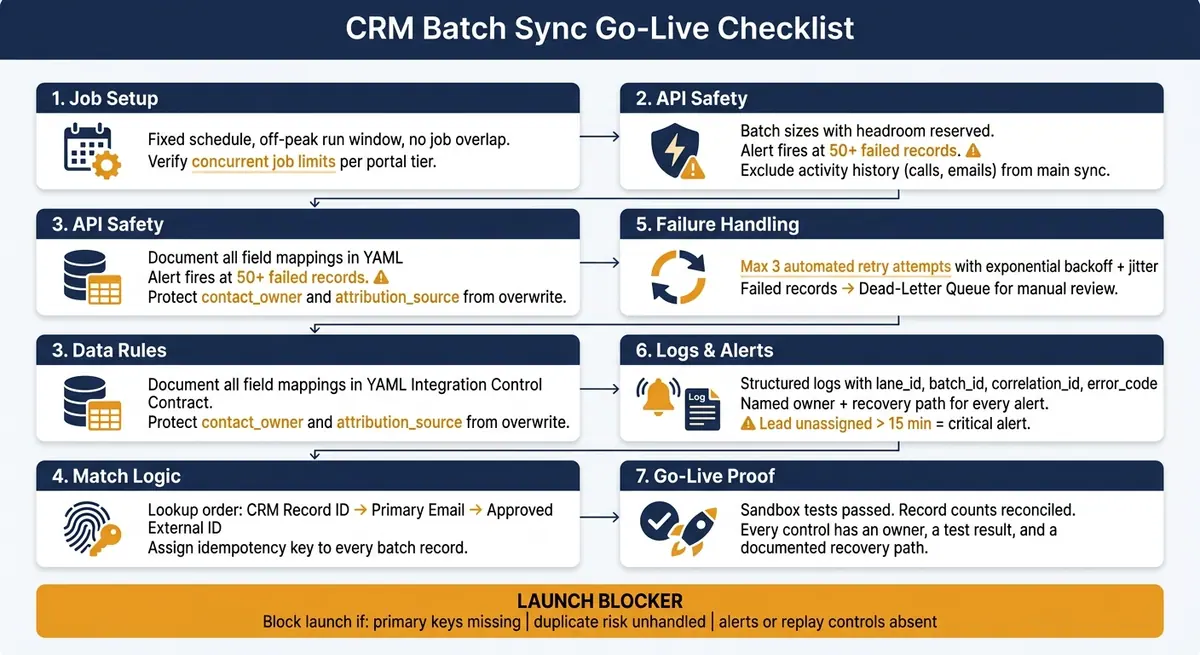
CRM Batch Sync Go-Live Checklist: 7 Critical Control Areas
Master Batch Data Sync: The Ultimate Integration Pattern for Data Warehouse, CRM & Beyond!
sbb-itb-5f36581
1. Set job scheduling, throughput, and API guardrails
Once scope is approved, set the operating limits that stop the sync from overrunning the CRM.
Confirm job cadence, run windows, and concurrency
First, lock in when the sync runs and whether jobs can overlap. If the run window isn't fixed, overlapping jobs end up fighting for the same capacity.
Large batch jobs can sit in queue for hours, so move them outside peak campaign windows. Then log the approved run window in the job log.
You should also check your CRM's concurrent job limits. HubSpot, for example, enforces enrollment, action, and execution limits by workflow and portal tier. When those limits are hit, automations can silently queue or skip. Verify portal-tier limits, the max number of active sync jobs allowed, and what happens when a job runs past its window.
Once the run window is set, size batches around the API room you have left.
Set batch sizes and safe API thresholds
Batch size should balance throughput, retry cost, and API headroom. Start with your API quota and rate limits, then work backward. Don't size batches right up to the limit. Leave room for retries and manual replays.
It also helps to leave high-volume, low-value activity timelines out of standard batch syncs. Calls and emails are common examples. That kind of volume can jam the sync queue without adding much business value.
| Guardrail | What to Verify | Why It Matters |
|---|---|---|
| Run window | Confirmed off-peak slot, no campaign conflicts | Prevents queue choking during peak send times |
| Concurrency limit | Max active sync jobs per portal tier | Avoids silent queuing or skipped automations |
| Batch size | Sized against API quota with headroom reserved | Leaves room for retries and manual replays |
| Activity history | Excluded from main sync job | Reduces volume that clogs the queue |
| Error threshold alert | Fires at a defined error threshold | Surfaces silent failures before they compound |
Set up a Slack or webhook alert when errors pass a defined threshold, such as 50 records. Without that alert, failed records can sit in the error queue and stop retrying on their own.
2. Validate field mapping, identity matching, and data rules
With job timing locked, the next step is making sure each record lands on the correct CRM record.
Document field mappings and transformation rules
Before launch, document every source-to-target field mapping. That includes field names, required status, null handling, date conversion, and picklist normalization.
Keep those mappings in a version-controlled Integration Control Contract in YAML. For each sync lane, include the owner, identity rule, and writeback rule.
Some fields need protection from automated overwrite. That usually includes contact_owner and attribution_source.
| Mapping Category | Example Fields | Notes |
|---|---|---|
| Identity Keys | Primary Email, Company Domain, External ID | Used for record lookups and match before create |
| Routing Fields | Lead Source, Country, Lifecycle Stage | Used for assignment rules and lifecycle progression |
| Protected Fields | Contact Owner, Attribution Source | Do not overwrite protected fields on conflict |
| Enrichment Inputs | Business Email, LinkedIn URL | Required for external enrichment tools to return valid data |
Define dedupe keys and conflict handling
Match first, create second. Write down the lookup order and stick to it: check the CRM Record ID first, then Primary Email, then an Approved External ID. For company records, use Company Domain in place of Primary Email. If nothing matches in that order, then the sync can create a new record.
Give each batch record an idempotency key. That can be a single event ID or a composite business key. The point is simple: if a failed batch gets replayed, it should produce the same result as the first run.
Check upstream lead quality controls
If Reform collects leads upstream, leave email validation and spam prevention turned on before go-live.
Once mapping and dedupe rules are in place, move on to retries, dead-letter handling, and logs.
3. Set retry rules, dead-letter handling, and traceable logs
Once your match rules are fixed, the next job is deciding what happens when the sync fails. That means retrying short-term errors, isolating records that can't be fixed by automation, and logging each outcome so you don't end up with duplicate writes or lost leads during batch replay.
Classify retryable vs. permanent failures
Not every error should be retried.
Short-term issues like network timeouts, temporary API 500s, and rate limit hits are usually safe to retry on their own. But structural issues need a different path. If the data is broken or the write should not happen, send it to the dead-letter queue for manual review—often the result of multi-step form design issues that allow invalid data through.
Set a maximum of 3 automated retry attempts with exponential backoff and jitter. Jitter matters because it stops failed records from slamming the API at the exact same moment after a timeout. If the third attempt fails, move the record to the dead-letter queue.
| Failure Class | Example Error | Action | Owner |
|---|---|---|---|
| Retryable | API 500, network timeout, temporary rate limit | Automated retry with backoff + jitter | Automation Operator |
| Permanent (DLQ) | Missing required fields (email, domain); identity conflict (409 error, duplicate email); protected field overwrite attempt; routing failure (no valid owner found) | Block the write; route to DLQ for human review | Data Steward / CRM Admin / RevOps |
Create a dead-letter process with replay controls
Each DLQ entry should store the full payload, business key, failure type, and timestamp.
Before replaying anything, fix the root cause first. Then check the current CRM state before you resend the record. Reuse the existing idempotency key during replay.
Also require operators to log their name, the reason for the replay, and a short note about expected side effects. That audit trail makes post-incident review possible.
Capture structured logs for every sync run
Log every sync run in structured, searchable records. For each entry, include the lane_id, batch_id, record_id, status, error_code, correlation_id, and start and end timestamps. The correlation_id is what lets you follow one lead across multiple systems when something breaks.
It's also worth separating log outcomes by type. Log skipped records, partial successes, and validation failures on their own. If you lump them together, the failure rate gets muddy fast.
Set a weekly review for records still sitting in the error queue after 3 retries. Pick the owner and escalation path before go-live.
The table below shows the minimum fields each sync log entry should include:
| Log Field | Purpose | Example Value |
|---|---|---|
lane_id |
Identifies the specific integration path | inbound_lead_intake_us |
idempotency_key |
Prevents duplicate writes on retry | evt_01J3Z... or email+timestamp |
correlation_id |
Traces a single lead across multiple systems | uuid-1234-5678 |
status |
Indicates outcome for that record | success, filtered, failed |
error_code |
Categorizes the failure for alerting | 409_CONFLICT, 429_LIMIT |
system_of_record |
Defines which system holds the master data | Salesforce or HubSpot |
Use these log fields and failure counts to power alerts and pre-go-live checks in the next step.
4. Launch monitoring, validation tests, and final go-live checklist
With retries and logs in place, the next step is simple: make sure the sync is ready for production. That means it needs monitoring, testing, and clear support ownership.
Set alerts for failures, quota risk, and throughput lag
Tie each failure type to an alert, a named owner, and a clear recovery path. For example, set a daily check that alerts #data-ops when sync_error_count goes above 50 records. If you're handling lead routing, add a separate critical alert when any record stays unassigned for more than 15 minutes.
| Alert Category | Threshold | Notification Owner |
|---|---|---|
| Dead-Letter Growth | sync_error_count > 50 |
#data-ops Slack channel |
| Quota Risk | Bulk load > 100,000 records | RevOps lead |
| Throughput Lag | Records syncing in chunks over hours | Ops owner |
| Ownership Gap | Lead unassigned > 15 minutes | Routing owner |
| Data Integrity | Duplicate identity conflict or protected field overwrite | RevOps incidents channel |
Before go-live, each alert should have two things attached to it:
- A named owner
- A recovery path
Those same thresholds should also guide the sandbox tests in the next step.
Run sandbox tests and reconcile counts before go-live
Run sandbox tests before moving anything into production. Focus on the main path, field transforms, duplicate handling, and retry behavior.
A few checks matter most:
- For duplicate handling, send the same business event twice and confirm the second event updates the existing record instead of making a duplicate.
- For retry behavior, confirm records stop after three failures and move to the error queue.
- For field transforms, review picklist normalization before sync so you don't end up with duplicate values.
Once sandbox tests pass, reconcile record counts between the source system and the CRM. Also test initial backfills on their own. Historical filters often differ from net-new filters, and that can spike throughput alerts.
When the counts match and failures route to the right place, you're ready for go-live review.
Conclusion: The minimum controls to verify before production
A batch CRM sync is ready for production when each control has an owner, a test result, and a documented recovery path.
That includes alerts for:
- Sync failures
- Quota risk
- Throughput lag
- Ownership gaps
- Data integrity issues
It also includes checked field mappings and dedupe rules, structured logs for each sync run, and a retry policy that moves failed records into a dead-letter process.
Ship only after every control has an owner, a test result, and a recovery path.
FAQs
What should block a CRM batch sync launch?
Block launch if you don’t have monitoring for both errors and unexpected silence, a clear rate-limit plan for jitter, backoff, and 429s, secure structured logs that mask sensitive data, or a reconciliation process to check data integrity.
Also block launch if credential health isn’t managed or bidirectional mapping hasn’t been validated. If you skip that step, you can end up with automation loops. Reform can support these workflows with lead routing, duplicate prevention, and custom mapping.
How do I choose safe batch sizes and retry limits?
Calculate how many API calls each record actually uses. That matters because even a single contact sync can trigger multiple requests, and those requests can chew through burst limits faster than you'd expect.
You should also monitor the X-RateLimit-Remaining header on every request. It gives you an early warning when you're getting close to the edge, so you can slow down before requests start failing.
For retries, use exponential backoff when you hit temporary 429 errors. Add jitter to each delay too. Without jitter, lots of retries can fire again at the same moment, which just piles more pressure onto the API. A small amount of randomness spreads those retry attempts out and helps keep your sync steady.
What belongs in a dead-letter queue process?
A dead-letter queue process needs clear rules from the start. It should spell out what counts as a failed sync, where that failure gets logged, and who owns the first response when something breaks.
That same process also needs a safe replay plan. If a failed job is retried, the retry shouldn't create duplicates or damage data. And just as important, the team needs to watch for silent failures with the same care they give logged errors. A sync that fails without throwing an alert can be just as damaging - sometimes worse - because it slips by unnoticed.
Related Blog Posts
Get new content delivered straight to your inbox

The Response
Updates on the Reform platform, insights on optimizing conversion rates, and tips to craft forms that convert.



Drive real results with form optimizations
Tested across hundreds of experiments, our strategies deliver a 215% lift in qualified leads for B2B and SaaS companies.
