
.webp)
Ultimate Guide to Real-Time Data Mapping



Real-time data mapping connects data sources to target systems instantly, ensuring up-to-date, synchronized information across platforms like Salesforce Marketing Cloud. Unlike traditional batch processing, this method uses event-driven systems to handle continuous data flows.
Key Benefits:
- Instant Updates: Keeps customer data current for timely actions, like sending welcome emails or resolving support tickets.
- Improved Accuracy: Reduces duplicate entries and manual errors.
- Enhanced Automation: Eliminates reliance on manual exports or developer support.
Key Techniques:
- Manual Mapping: Best for small projects; offers precise control over data fields.
- Semi-Automated Mapping: Ideal for medium datasets; uses drag-and-drop tools for quick field connections.
- AI-Powered Mapping: Perfect for large-scale operations; identifies field matches and anomalies using machine learning.
Real-time mapping is essential for maintaining accurate, synchronized data, optimizing marketing efforts, and improving operational efficiency.
How Real-Time Data Mapping Works
The Data Mapping Process
Real-time data mapping transforms raw data into meaningful insights by following a structured process. It starts with connecting to data sources and creating streams from bundles or kits, ensuring a steady flow of input data.
The first step involves profiling raw data using tools like text manipulation, type conversion, and logical expressions. This step ensures the data is accurate and ready for mapping. Once cleansed, the data moves to the source-to-target mapping phase. Here, Data Lake Objects (DLOs) are aligned with Customer 360 Data Model Objects (DMOs), organizing the data across key areas like party, product, and email engagement. During this phase, relationships between objects are defined, including cardinality rules like one-to-one or many-to-one.
Next, users set refresh intervals - whether incremental, hourly, or manual - and map the "Event Time Field" to ensure data is processed chronologically.
The process wraps up with validation and testing. This involves running small batch test syncs to confirm that data types and values are correctly mapped, while also identifying edge cases like null values. As Victor Hoang, Co-Founder & CMO at Rework, emphasizes:
"An import run that completes with no errors is not the same as an import run that's correct".
This entire workflow is essential for delivering timely and tailored data to Salesforce Marketing Cloud. Once the mapping is complete, stream-based architecture takes over, enabling real-time data transformations.
Stream-Based Architecture Requirements
The stream-based architecture ensures continuous and immediate data transformations. It applies real-time cleaning, reformatting, and routing as data flows through the pipeline.
One critical requirement is multi-destination flexibility. This allows a single source stream to be adapted for various destinations simultaneously. For example, data might be formatted as snake_case for Snowflake, camelCase for Elasticsearch, and short keys for Redis. Projection optimization can drop unnecessary fields early in the process, reducing storage waste by up to 80%. Tools like Apache Flink SQL make this possible, enabling operations like renaming, reordering, and computing fields on the fly using familiar SQL-like syntax (e.g., SELECT customerId AS customer_id).
Performance is another key factor. In high-performance environments, 95% of events can be processed end-to-end - from initial capture to real-time activation - within approximately 500 milliseconds.
The system also needs to manage schema alignment, addressing naming convention mismatches (e.g., camelCase vs. snake_case) and structural conflicts, such as converting nested JSON objects into flat, column-friendly formats. Real-time streams often include a foreign key qualifier to link ingested objects with primary DMOs. However, most real-time ingestion layers only support "append" or "update" operations, leaving "delete" tasks to batch pipelines.
This architecture is designed to optimize data flows across multiple destinations, making it a powerful tool for marketing automation and other real-time applications.
sbb-itb-5f36581
3 Data Mapping Techniques
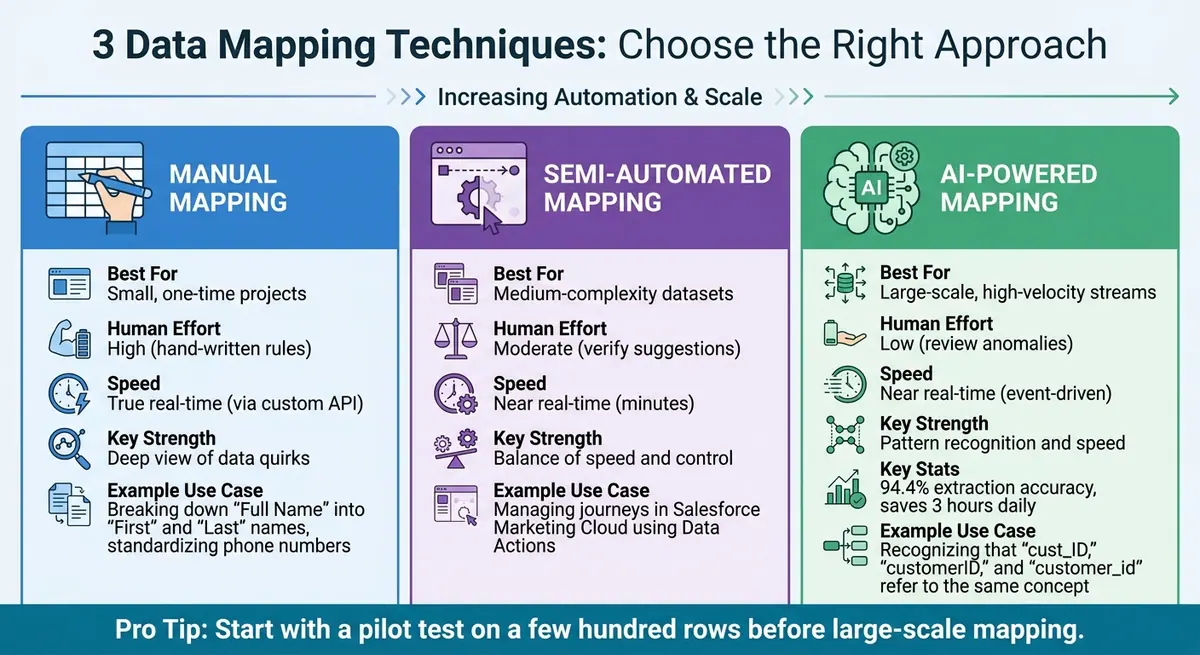
Comparison of Manual, Semi-Automated, and AI-Powered Data Mapping Techniques
Choosing the right data mapping method depends on factors like project size, available technical resources, and how quickly results are needed. Each approach serves different needs within Salesforce Marketing Cloud, offering flexibility for a range of scenarios. Building on the detailed mapping process described earlier, here’s how these techniques adapt to various project requirements.
Manual Mapping provides a hands-on way to control data fields. Developers can hard-code transformation rules, or analysts might document mappings in spreadsheets. This method is particularly useful for catching subtle data issues. For example, converting "$1,250.00" into a numeric field ensures dashboards function correctly. It’s perfect for smaller projects requiring precision, like breaking down a "Full Name" field into "First" and "Last" names or standardizing inconsistent phone numbers. To decide whether to map custom fields manually, use the Three-Question Test: Do you report on it? Do you segment by it? Do you automate from it? If the answer is "no" to all three, consider archiving the field instead. This level of control is especially effective in real-time integration scenarios.
Semi-Automated Data Mapping strikes a balance between speed and control. Tools with drag-and-drop interfaces suggest connections between source and target fields, which you can then verify or tweak. This approach works well for medium-complexity datasets, especially when using tools like Salesforce Data Cloud's "Data Actions" to manage journeys in Salesforce Marketing Cloud (SFMC). Gina Nichols, a Director on the Data Cloud product team at Salesforce, explains:
"Data Actions can be likened to the conductors of the data symphony in the cloud... enabling you to harness the power of data and insights available in Data Cloud to optimize business metrics".
One thing to keep in mind: SFMC Data Extension fields must adhere to strict naming conventions, such as ObjectAPIName_AttributeAPIName (e.g., ssot__Case__dlm_ssot__AccountId__c). This method is ideal for near real-time needs where a slight delay of a few minutes is acceptable, ensuring a steady data flow from earlier mapping stages.
AI-Powered Automated Mapping uses machine learning to analyze data patterns and suggest field matches on a large scale. Unlike manual methods that depend on exact field names, AI can recognize semantic similarities. For instance, it understands that "cust_ID", "customerID", and "customer_id" all refer to the same concept. A 2026 case study highlights how a sales organization used Energent.ai to map CRM data by uploading a "sales_pipeline.csv" file into a chat-based interface. The AI agent automatically structured the data, creating a live HTML dashboard that visualized deal stage durations and win/loss ratios, achieving a 3.8% conversion rate. Advanced AI platforms can reach 94.4% extraction accuracy, saving enterprise teams an average of three hours daily by automating the extraction and structuring processes. This approach is well-suited for high-speed environments managing thousands of inputs, and it can flag anomalies like a shift from U.S. ZIP codes to European postal formats.
The table below summarizes the strengths and ideal use cases for each technique:
| Feature | Manual Mapping | Semi-Automated Mapping | AI-Powered Mapping |
|---|---|---|---|
| Best For | Small, one-time projects | Medium-complexity datasets | Large-scale, high-velocity streams |
| Human Effort | High (hand-written rules) | Moderate (verify suggestions) | Low (review anomalies) |
| Speed | True real-time (via custom API) | Near real-time (minutes) | Near real-time (event-driven) |
| Key Strength | Deep view of data quirks | Balance of speed and control | Pattern recognition and speed |
Before diving into large-scale mapping, start with a pilot test on a few hundred rows to ensure your rules work as expected. For any field that doesn’t have a direct map, clearly document transformation rules (e.g., IF lead_status = "Dead" THEN lifecycle_stage = "Disqualified") to avoid last-minute issues on cutover day.
Best Practices for Salesforce Marketing Cloud Data Mapping
When working with Salesforce Marketing Cloud, following these practices can help maintain data accuracy and consistency throughout your mapping process.
Aligning Data Schemas Across Sources
To ensure smooth data integration, start by aligning schemas across your data sources. This means addressing schema-level alignment before diving into individual field mappings. For instance, Salesforce Leads might need to map to Contacts with a specific lifecycle stage, while Accounts could translate into Companies. Establishing this groundwork minimizes confusion, especially when managing hundreds of field mappings.
It's crucial to define your primary and foreign keys clearly. Also, verify that source and target fields have compatible data types - text fields should map to text, numbers to numbers, and dates to dates. When importing data, always load Parent objects (like Companies or Accounts) first, followed by Child objects (such as Contacts), to ensure proper association links. Using Salesforce's Customer 360 Data Model can help standardize disparate data sources into unified Data Model Objects (DMOs). Additionally, implementing Fully Qualified Keys (FQKs) can prevent key conflicts during the harmonization process.
For custom fields, apply a simple three-question test to determine their necessity, and archive any that aren't essential. Document your transformation rules thoroughly, especially for complex mappings. For example, if you're merging multiple source status values into a single destination value, outline the specific IF-THEN logic. These steps create a strong foundation for data validation.
Data Validation and Quality Assurance
Before going live, validate your setup with a trial import of around 100 records. This step can uncover hidden issues, such as data that imports without triggering error messages but appears incorrectly in the destination fields. Keep an eye on record statuses through the History tab.
To normalize incoming data formats, use formula fields like PARSEDATE() and NUMBER() during data ingestion. This ensures that the data aligns with your target schema. For engagement data, always map the Event Time Field and review the relationship cardinality (e.g., one-to-one or many-to-one) before finalizing mappings. These settings are critical for segmentation and cannot be changed later. Lastly, double-check that system-generated mappings align with your business rules before activating them.
Thorough validation sets the stage for smooth data format conversions.
Format Conversion Techniques
Formatting issues can lead to data loss during migration, so handling these carefully is essential. For numeric fields, strip formatting like dollar signs and commas before mapping. For example, convert "$1,250.00" to "1250" using functions such as SUBSTITUTE(), TRIM(), and EXTRACT().
The table below highlights common conversion risks and the transformations required:
| Source Type | Destination Type | Risk Level | Transformation Needed |
|---|---|---|---|
| Text | Picklist | Risky | Ensure values match allowed picklist options exactly. |
| Text | Number | Risky | Remove non-numeric characters (e.g., commas). |
| Currency | Number | Risky | Strip currency symbols and separators. |
| Date | DateTime | Safe | Append "T00:00:00Z" to the date string. |
| Checkbox | Text | Safe | Standardize to "True/False" or "1/0" strings. |
For phone numbers, map mobile fields to the "Formatted E164 Phone Number" field in the Contact Point Phone DMO to ensure global compatibility with SMS and voice communications. Similarly, normalize email addresses to lowercase for consistency. Use the Data Stream history tab to troubleshoot any errors related to format mismatches or processing issues.
Tools for Real-Time Data Mapping
The right tools can make real-time data mapping between forms and Salesforce Marketing Cloud much easier. These tools go beyond simple field matching, offering AI-driven suggestions, data transformation options, and no-code interfaces - eliminating the need for custom development.
ETL/ELT Tools with Mapping Features
ETL (Extract, Transform, Load) and ELT tools are essential for enterprise data mapping. They enable real-time data movement and transformation. The best tools offer bidirectional sync and multi-object mapping, allowing seamless updates to multiple Salesforce records - like Leads, Contacts, Accounts, and Opportunities - from a single form submission. This ensures data relationships remain intact across your Salesforce model.
AI-powered features can analyze field names and suggest matches, speeding up the setup process.
When choosing a tool, look for compliance with security standards like HIPAA, GDPR, SOC 2, and FedRAMP to ensure safe data transfers. Additionally, robust error handling is critical - features like logging, notifications, and automatic retry mechanisms are essential for managing sync failures.
For businesses seeking more focused solutions, tools like Reform offer specialized options for integrating forms directly with CRMs.
Reform for Form-to-CRM Integration
Reform streamlines real-time data mapping with a no-code visual interface that connects form submissions directly to Salesforce - no coding required. Its "Add Mapping" button enables users to instantly link enriched data fields to form inputs, making it accessible for non-technical marketing teams. This is especially helpful for implementing the real-time mapping strategies discussed earlier.
Reform’s two-part enrichment setup simplifies operations by letting team owners configure data sources (like ExactBuyer) at the team level. These configurations automatically apply to individual forms, ensuring accurate and consistent CRM data entry. Additionally, the platform’s Form Shortening feature dynamically hides fields when enrichment data is available, reducing user effort while still collecting the necessary details for Salesforce. This feature, enabled by default, helps lower cognitive load and improves form completion rates.
For backend processes, Reform supports hidden fields to capture enrichment data, such as company size or industry, without displaying it to users. These fields map directly to CRM records for tasks like routing and scoring. Reform also ensures object-level alignment, distinguishing between Salesforce Leads (pre-conversion) and Contacts (post-conversion), so data is accurately placed within the correct Salesforce object. Combining an intuitive interface with strong backend functionality, Reform is a powerful choice for businesses aiming to improve lead quality and maintain high conversion rates in Salesforce Marketing Cloud campaigns.
Conclusion
Real-time data mapping brings Salesforce Marketing Cloud to life by integrating live data streams seamlessly. It replaces outdated batch processes with actionable, live CRM insights, removing the need for tedious manual CSV exports. This ensures campaigns are powered by up-to-date customer information, making operations smoother and delivering a noticeable boost to business outcomes.
When systems share data effectively, marketing, sales, and service teams gain access to the same live dataset, cutting down on miscommunication and improving revenue forecasting. As Toms Krauklis from NC Squared explains:
"Lead conversion mapping serves as the essential data bridge that directs information from Lead records to the appropriate Account, Contact, and Opportunity fields during qualification".
Without this bridge, critical fields like buying intent or tech stack can vanish during conversion, leaving sales teams in the dark and creating gaps that disrupt the sales process.
Key Takeaways
To ensure success with real-time mapping, focus on these principles:
- Schema alignment: Match field types precisely (e.g., text to text, picklist to picklist). Gartner research highlights field type mismatches as a major cause of data integrity issues. Test your mappings with sample data, including edge cases, before deploying them.
- Quarterly audits: Regularly review mapping configurations to keep up with business changes. Use Global Value Sets for picklists across multiple objects, standardize naming conventions for Leads and Opportunities, and always test journeys before launching. Even minor mapping errors in real-time systems can lead to significant problems.
For teams aiming to minimize reliance on technical staff, tools like Reform offer a no-code solution for building and maintaining mappings. Meanwhile, ETL platforms are ideal for handling more complex multi-object synchronizations in enterprise environments.
FAQs
What’s the fastest way to choose between manual, semi-automated, and AI-powered mapping?
To make a quick decision, consider three key factors: the complexity of your data, its volume, and the level of accuracy required.
- Manual mapping is a good fit for smaller, straightforward datasets. It gives you full control but can be time-consuming for larger sets.
- Semi-automated mapping is great for handling repetitive tasks in larger datasets. It strikes a balance between speed and manual oversight.
- AI-powered mapping leverages advanced algorithms to automatically match fields. This approach minimizes effort and errors, making it ideal for handling complex data or high volumes.
How do I handle deletes if my real-time pipeline only supports inserts and updates?
If your real-time pipeline is limited to handling inserts and updates, a soft delete strategy can be a practical solution. To implement this, include a status field in your schema, such as IsDeleted. This field can be toggled between true and false to indicate whether a record is deleted.
With this approach, deletions are treated as updates within the pipeline. This not only maintains data consistency but also allows downstream systems to manage deleted records effectively. For example, they can simply exclude records marked as deleted (IsDeleted = true) from active datasets.
What should I validate in a test sync before enabling real-time mapping in Salesforce Marketing Cloud?
Before turning on real-time mapping, run through these checks during a test sync:
- Ensure field mappings are accurate: Double-check that all fields are mapped and connected to the right counterparts.
- Test the data flow: Confirm that data transfers smoothly and maintains the correct formatting.
- Verify target field data: Make sure data populates as expected in the target fields and complies with validation rules.
- Assess data quality: Look for consistency, completeness, and accuracy across all records.
These precautions help guarantee a smooth and dependable data flow once real-time mapping is live.
Related Blog Posts
Get new content delivered straight to your inbox

The Response
Updates on the Reform platform, insights on optimizing conversion rates, and tips to craft forms that convert.




Drive real results with form optimizations
Tested across hundreds of experiments, our strategies deliver a 215% lift in qualified leads for B2B and SaaS companies.
