
.webp)
Personalized Emails: Strategies for Lead Nurturing


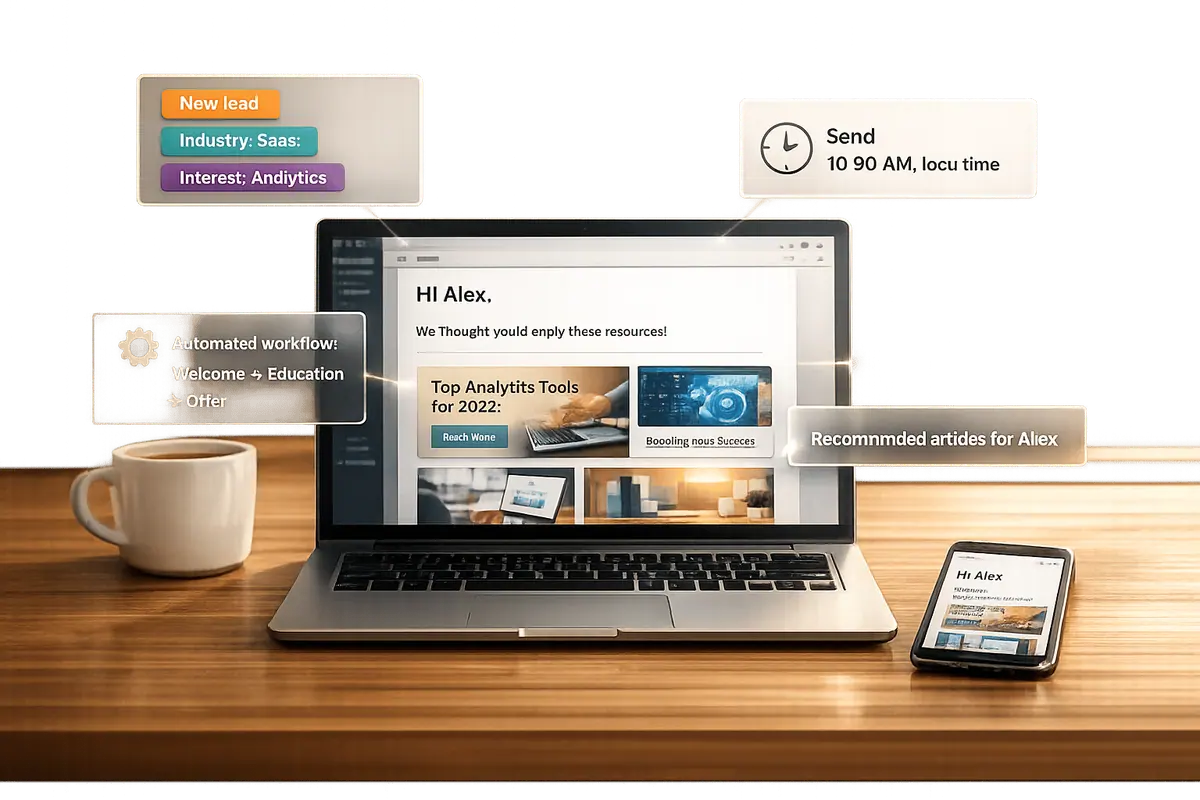
Personalized emails outperform generic ones. Why? They feel relevant. Emails tailored to a recipient’s needs, actions, or interests can generate 6x higher transaction rates, 29% higher open rates, and 41% higher click-through rates. Companies that excel in lead nurturing see 50% more sales-ready leads while cutting costs by 33%.
Here’s how to make it work:
- Use data effectively: Collect accurate lead information through tools like multi-step forms and enrich it with firmographic details.
- Segment your audience: Group leads by demographics, behavior, or engagement history for targeted messaging.
- Leverage dynamic content: Customize email elements (e.g., name, company, recent actions) for a personal touch.
- Focus on pain points: Address specific challenges your leads face rather than pushing features.
- Use timing wisely: Trigger emails based on user actions (e.g., form submissions, pricing page visits) for better engagement.
- Automate campaigns: Scale personalized communication without sacrificing quality.
Personalization isn’t optional anymore - 72% of consumers only engage with emails that feel personal. Start by refining your segmentation, adding dynamic content, and automating responses. The result? Higher engagement, trust, and conversions.
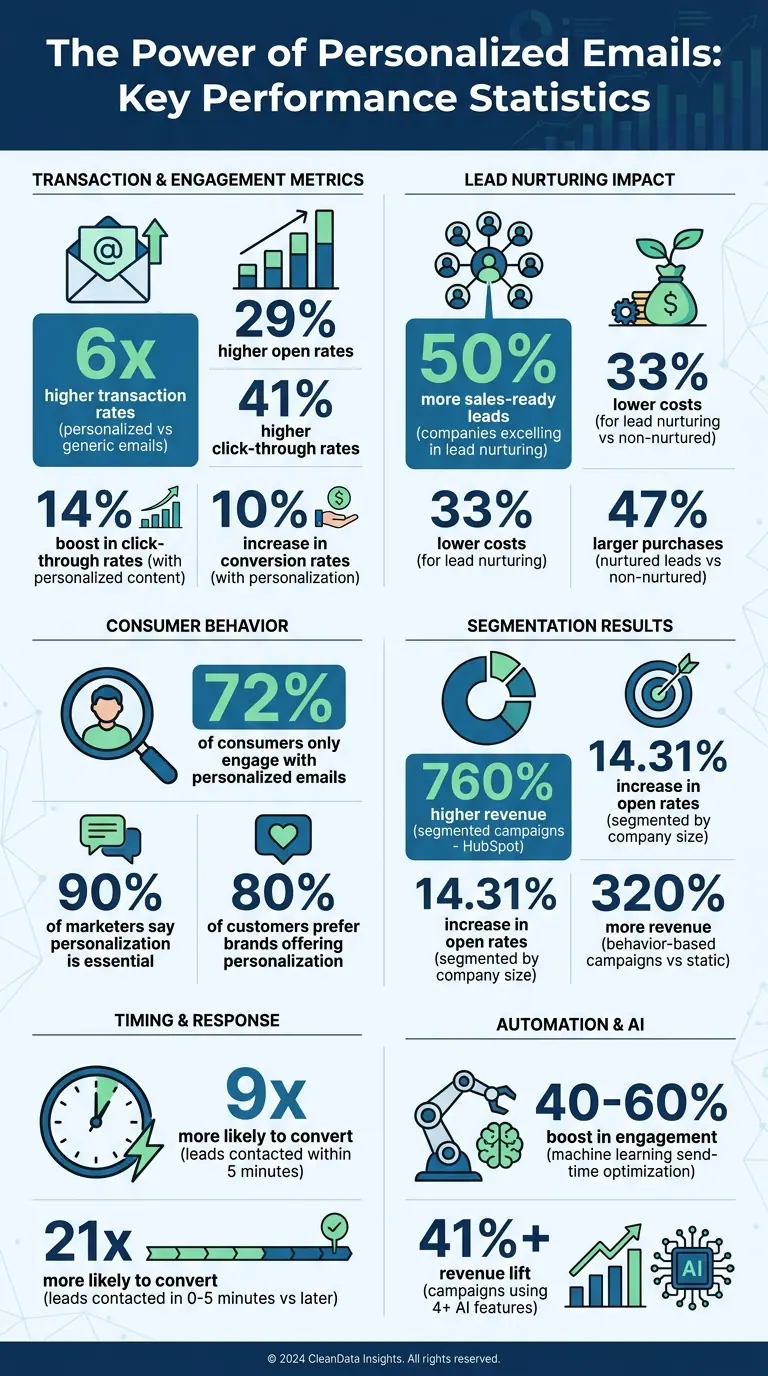
Email Personalization Statistics: Impact on Engagement and Revenue
The Lead Nurture Email Playbook: What Works and What Doesn’t
sbb-itb-5f36581
Using Data to Personalize Your Emails
Personalizing emails effectively starts with having accurate data about your leads. Forms play a crucial role in this process. Tools like Reform make this easier by using multi-step forms and conditional routing to gather information in a way that feels natural and engaging. These tools guide potential leads through a conversational experience, making data collection less overwhelming.
Collecting Quality Lead Data
High-quality data collection is all about lead enrichment. Reform takes this a step further by automatically pulling in firmographic details - like company size, industry, and LinkedIn data - straight from form submissions. This automation helps cut down on manual errors by up to 40% and provides a more complete picture of your leads. Plus, built-in email validation and spam prevention keep your CRM data clean and reliable. According to EmailOctopus, opt-in forms that capture personalized details can increase open rates by 20–30%, thanks to the ability to send more relevant and targeted messages.
Once you have enriched data, the next step is to use it to segment your leads effectively.
Segmenting Leads for Targeted Messages
With the data you've collected, you can divide your leads into meaningful segments based on factors like demographics (job title, location, company size), behavior (pages they visited, forms they completed), and engagement history (email opens and clicks). For example, a B2B marketer using Reform saw a 35% increase in qualified leads by validating email addresses, scoring submissions, and creating focused segments, such as high-intent demo candidates.
Practical segmentation examples include sending introductory content to new subscribers or re-engagement offers to leads who’ve opened multiple emails but haven’t clicked. Research backs this up - HubSpot’s 2023 benchmarks revealed that segmented campaigns can drive up to 760% higher revenue. Similarly, ActiveCampaign found a 14.31% increase in open rates when leads from Reform forms were segmented by company size rather than lumped together.
Adding Dynamic Content to Emails
After segmenting your audience, dynamic content can take personalization to the next level. This feature allows you to automatically customize elements of your emails based on recipient data. For instance, using merge tags like {{FNAME}}, {{COMPANY}}, or {{RECENT_ACTION}}, you can tailor messages without manually editing each one. If a lead submits "Challenge: Scaling team" through a Reform form, your email might say: "Solutions for scaling your team at {{COMPANY}}."
The results speak for themselves. Campaign Monitor reports a 22% boost in engagement with dynamic content, while Reform users have seen an 18% increase in conversions when tailoring calls-to-action using enriched fields like industry. One user even added a dynamic footer showing "Your last visited page: /lead-nurturing", which led to a 28% jump in click-through rates. To make this work seamlessly, map your form fields to merge tags (like {{FNAME}}, {{COMPANY}}, or {{PAIN_POINT}}) so every recipient feels like the email was crafted just for them.
Writing Emails That Connect with Recipients
Effective lead nurturing begins with creating high-converting lead forms to capture the right data. Once you’ve segmented your audience, the next challenge is crafting emails that truly resonate. Here’s how to turn your data into messages that engage and inspire action.
Addressing Specific Pain Points
The most effective emails zero in on what matters most to your audience: their challenges. Instead of diving straight into product features, focus on the problems your recipients are trying to solve. For instance, mattress brand Casper nails this approach with their welcome emails. Rather than pushing products, they use a call-to-action like "Let's get sleepy", which links to content on sleep hygiene - directly addressing the core issue of poor sleep.
Use the insights from your data to tailor your messaging. Highlight industry-specific trends, job-related struggles, or even recent milestones your recipient’s company has achieved. This level of personalization goes beyond just using their name; it shows you understand their unique position.
To take it a step further, segment your audience by the challenges they face - whether it’s improving efficiency, solving visibility issues, or automating tasks. Emails that speak directly to these pain points often deliver much stronger results.
Including Customer Success Stories
While addressing individual challenges is key, adding real-world success stories can significantly boost your credibility. Dynamic content blocks can help here - automatically displaying case studies that align with the recipient’s industry. For example, a retail prospect should see a retail-specific success story, not a generic one.
Position these stories thoughtfully in your email sequence. They work best as part of a nurture campaign, showing up in the second or third email to build trust over time. Even something as simple as including a short testimonial or a link to a relevant case study in your email signature can ensure your success stories get noticed.
Referencing shared connections or relatable success stories can also create a sense of trust. As Adam Grant puts it:
"We bond when we share uncommon commonalities, which allow us to feel that we fit in and stand out at the same time."
The numbers back this up: nurtured leads tend to make 47% larger purchases compared to those who aren’t nurtured.
Keeping Emails Short and Focused
With the average worker receiving at least 121 emails daily, your message needs to grab attention fast. If your point isn’t clear within the first few lines, it’s likely to be overlooked.
"If they need to read three paragraphs to understand the point, the personalization isn't strong enough." - Hypergen
Each email should focus on one specific goal tied to your key performance indicators. For example, if your email addresses pricing, don’t also include a demo invitation or a case study - it’s too much at once. A single-topic approach keeps your message clear and prevents overwhelming your audience.
Take Columbia, the outdoor clothing company, as an example. Their abandoned cart emails highlight the exact item left behind and inform users of a price drop for that product. The focused "Reveal New Price" call-to-action encourages users to return without cluttering the email with unrelated offers.
When emails are clear and focused, the results speak for themselves: personalized emails can boost click-through rates by 14% and conversion rates by 10%.
Timing Your Emails for Better Results
Getting the timing right in email communication can significantly improve lead conversion rates. For instance, leads contacted within 5 minutes of a high-intent action, like requesting a demo, are 9 times more likely to convert compared to those contacted after 30 minutes.
The days of sticking to generic schedules - like sending emails to everyone at 10:00 AM on a Tuesday - are fading. Today, successful email strategies focus on behavior-based timing, triggering emails based on specific actions taken by recipients. And the results? They speak volumes.
Sending Emails Based on User Actions
Automated emails triggered by user behavior are powerful tools. In fact, behavior-based campaigns generate 320% more revenue than static ones.
For maximum impact, respond quickly to high-intent actions:
- Within 0–5 minutes: Actions like demo requests, form submissions, or webinar sign-ups. Leads contacted this quickly are 21 times more likely to convert.
- Within 1–24 hours: For less urgent actions like email opens, clicks, or general website visits.
- Within 24–48 hours: Follow up on educational content downloads, such as case studies or whitepapers, to maintain interest without appearing too eager.
- Within 4–6 hours: When a prospect visits your pricing page, follow up promptly to align with their active research phase.
"The gap between 'lead acquired' and 'lead converted' isn't a mystery - it's a sequence you haven't built yet." - Prospeo Team
To avoid overwhelming your leads, use frequency throttling. For example, limit emails to three per week, even during periods of high activity. If a lead performs a high-intent action during a waiting period, use adaptive delays to respond immediately rather than sticking to a rigid schedule.
For disengaged leads, consider sending a "breakup" email after 14 days of inactivity. This can re-engage them or help you decide whether to move them to a lower-priority list.
Once you've established behavior-based triggers, the next step is optimizing overall send times and email frequency.
Testing Send Times and Frequency
Behavioral triggers handle immediate responses, but scheduled emails still need to land at the right time. The "best time" to send emails varies depending on your audience and industry, making testing essential.
- B2B audiences: Engagement tends to peak Tuesday through Thursday, between 9:00 AM and 11:00 AM in the recipient's local time zone.
- Retail and e-commerce: Thursdays and Fridays, between 10:00 AM and 2:00 PM, often yield better results. For example, one retailer shifted their campaign from Monday morning to Wednesday at 10:30 AM and saw a 15% increase in open rates.
"The real secret is that your best time may vary, depending on your unique subscribers." - Sean Tinney, AWeber
Modern tools use machine learning to analyze a contact's last 90 days of engagement - like opens and clicks - to predict the optimal time for each individual. This approach can boost engagement rates by 40% to 60% compared to blanket scheduling.
When it comes to frequency, data reveals an interesting trend: sending emails twice per week results in the lowest unsubscribe rate (0.33%), outperforming weekly (0.38%) and monthly (0.87%) schedules. Regular communication keeps your brand top-of-mind, while infrequent emails risk being forgotten.
Frequency also impacts engagement. Nurture emails generate 4 to 10 times higher response rates than standalone blasts, and nurtured leads spend 47% more on average. Testing different frequencies allows you to find the balance that keeps your audience engaged without overwhelming them.
Once you've optimized timing and frequency, refine your strategy further by tailoring it to specific segments.
Adjusting Email Frequency by Segment
Behavioral triggers are just the foundation. To truly connect with your audience, email frequency should align with the recipient's role and stage in the buying journey.
Different stakeholders within an organization often have distinct preferences. For example, technical evaluators might engage on Tuesday afternoons, while financial decision-makers lean toward Friday mornings. By 2025, 75% of business buying teams will consist of individuals aged 25 to 44, who predominantly favor digital-first interactions with occasional personal touches during critical decision points.
The buying journey also plays a significant role:
- Awareness stage: Send emails every 2–3 days with educational and problem-solving content.
- Consideration stage: Weekly emails featuring comparisons and case studies work well.
- Decision stage: Increase frequency to 2–3 times per week, focusing on demos, trials, and ROI insights.
- Retention stage: Monthly or quarterly updates with tips and product news help maintain relationships without overloading customers.
"The most common B2B nurture mistake is trying to compress the timeline... That's not nurturing - that's pestering." - Braedon, Mailflow Authority
Use engagement branching to adjust frequency automatically. For instance, after three unanswered emails, shift the contact to a monthly newsletter. This approach protects your sender reputation and ensures your efforts are focused on engaged leads. Hot leads should receive immediate responses, while others benefit from slower, more educational cadences.
Data supports this segmented approach: 63% of leads convert within three months when nurtured regularly, and follow-ups sent while your brand is still fresh in the recipient's mind lead to a 220% increase in responses.
Automating Personalized Email Campaigns
Automation takes the personalized strategies we've discussed and makes them scalable, ensuring every lead gets the attention they deserve. While manual outreach has its limits, automation handles thousands of leads effortlessly, delivering tailored messages at just the right time.
The key? Build workflows that respond to user behavior instead of sticking to rigid schedules. Modern tools can detect triggers like form submissions, link clicks, or cart abandonment, and instantly launch personalized email sequences. According to Forrester Research, lead nurturing can boost sales-ready leads by 50% while cutting conversion costs by 33%.
Personalization is a big deal. Ninety percent of marketers call it essential, and 80% of customers prefer brands that offer it. Automation makes this possible on a large scale, turning behavioral data into targeted messaging - no manual effort required.
Setting Up Welcome Email Sequences
Your welcome sequence is an opportunity to make a strong first impression. Done well, it sets the tone for a long-term relationship. Done poorly, it risks losing the lead's interest right away.
The best welcome sequences focus on delivering value rather than pushing for a quick sale. A multi-email series works best, starting with your brand's story, building credibility with social proof, and offering genuinely useful resources like guides or educational content. The idea is simple: earn trust before asking for anything.
| Email Number | Timing | Purpose | Content Focus |
|---|---|---|---|
| Email 1 | Immediate | Confirm subscription | Thank the subscriber, set expectations, deliver promised content |
| Email 2 | 1–2 days later | Introduce brand | Share your story, mission, and what sets you apart |
| Email 3 | 3–4 days later | Provide value | Share tips, educational content, or exclusive resources |
| Email 4 | 5–7 days later | Build credibility | Include testimonials, case studies, or success stories |
| Email 5 | 8–10 days later | Soft call-to-action | Encourage the next step, like a demo or trial |
Keep the designs simple and mobile-friendly to ensure better engagement.
Creating Action-Triggered Email Campaigns
Once your welcome sequence is in place, the next step is to create campaigns that respond to specific actions in real time. This is where automation shines - by reacting to behaviors like downloading a whitepaper, visiting a pricing page multiple times, or abandoning a cart.
For instance, about 80% of online shoppers abandon their carts during checkout. An automated sequence addressing cart abandonment - starting with a reminder, followed by an incentive, and ending with an urgency-driven email - can help recover these potential sales.
Align your automated emails with the sales funnel stages:
- Awareness stage: Send educational content and brand introductions to new leads.
- Consideration stage: Share product comparisons, case studies, or in-depth feature details when leads show interest.
- Decision stage: Offer demos, personalized discounts, or ROI calculators when leads visit pricing or product pages.
To make your efforts more effective, use lead scoring. Assign scores to leads based on their activity and demographics, and focus your resources on those with the highest scores. This ensures you're prioritizing the most promising prospects.
Connecting Reform to Your Email Tools
To get the most out of your automated campaigns, your forms and email tools need to work together seamlessly. This integration ensures that no lead slips through the cracks.
Reform makes this easy with direct integrations to CRMs and marketing platforms. For example, if someone fills out a demo request form at 2:00 PM on a Friday, they’ll be added to your welcome sequence within seconds - long before the start of the next business day.
Reform also offers lead enrichment, gathering extra details like company size or industry during form submissions without adding friction. This background data enables highly personalized messaging, making your emails more relevant without requiring extra effort from the lead.
Spam prevention is built in, so only high-quality leads enter your campaigns. And if you’re using tools like HubSpot, Salesforce, or ConvertKit, Reform syncs automatically. For instance, a lead who downloads a case study through a Reform form can immediately trigger a three-email drip campaign - no manual work required.
The impact? Nurtured leads spend up to 47% more than those who aren’t nurtured, and automation ensures no lead is forgotten, even during your busiest times.
Tracking and Improving Email Performance
Once your automated campaigns are up and running, the next step is keeping a close eye on how they perform. Automation ensures your emails are delivered efficiently and feel personalized, but tracking their success helps you understand if they’re actually driving engagement and revenue.
Metrics like open rates, which were once a go-to for marketers, have lost their reliability. Thanks to Apple Mail Privacy Protection, about 50% of recipients now have tracking pixels pre-loaded, artificially inflating open rates. Instead, shift your focus to metrics like Revenue Per Recipient (RPR), click-through rates, and conversion rates. These numbers provide a clearer view of actual engagement and how well your emails are moving leads through your sales funnel. Considering that 80% of new leads never convert into sales, identifying where leads drop off is crucial.
Metrics to Monitor
To truly measure your email program’s success, start with metrics that tie directly to revenue. Revenue Per Recipient (calculated by dividing total campaign revenue by the number of recipients) is a key indicator for email health in 2026. It cuts through superficial metrics and highlights the real value each email generates.
Other important metrics include:
- Click-through rates: These measure actual engagement and aren’t affected by Apple’s privacy changes.
- Conversion rates per send: This connects your emails to tangible business outcomes by tracking how many recipients take action after receiving an email.
- Unsubscribe rates: A high unsubscribe rate can signal issues with email frequency or content relevance.
- Sales cycle time: If leads are taking longer to convert, your data can help pinpoint where they’re getting stuck.
Personalization plays a huge role in boosting engagement - personalized emails generate click-through rates that are 2.5 times higher than generic ones. If your metrics aren’t where they should be, it might be a sign that your personalization efforts need fine-tuning.
These quantitative metrics provide the foundation for actionable insights, but qualitative feedback can take your strategy even further.
Using Feedback to Refine Your Approach
While metrics tell you what is happening, feedback reveals why. Direct responses to emails and quick surveys can uncover insights that numbers alone can’t provide. For instance, when someone replies to an email with a question or shares a specific pain point, it gives you valuable clues about what’s working and what isn’t.
Keep surveys short to encourage participation. Headspace, for example, uses a single-question format to reduce friction. Similarly, Yappy personalizes review requests by mentioning details like a pet’s name, making it more engaging for customers. You can also embed simple questions directly into your emails, such as, “What’s your biggest challenge right now?” This type of question is a great addition to a lead capture form to gather data early. This approach not only gathers useful feedback but also helps you refine your segmentation for future campaigns.
The key is acting quickly on the feedback you receive. Use it to adjust your messaging, experiment with new ideas, and fine-tune your audience segments. While 90% of marketers believe personalization is essential, it only works if it’s backed by genuine customer input.
Once you’ve gathered feedback, the next step is to validate your changes through structured testing.
Testing and Refining Your Strategy
A/B testing is a powerful way to turn guesses into data-driven decisions. Experiment with subject lines, email designs, and call-to-action buttons to see what resonates with different segments. Even small tweaks can lead to noticeable improvements - AI-optimized subject lines, for instance, can boost open rates by up to 50% compared to manually written ones.
For a more rigorous approach, try incremental holdout testing. This involves excluding a random 10% of your subscriber list from personalized campaigns and comparing their behavior to the rest of the group. It’s an effective way to measure the actual revenue lift from your personalization efforts.
As you refine your strategy, consider gradually incorporating AI tools. For example, campaigns using just one AI feature, like send-time optimization, can see an 8-14% revenue increase. Meanwhile, campaigns leveraging four or more AI features can achieve revenue lifts of 41% or more. Just be sure your send-time optimization relies on click-based engagement data instead of open-rate data to avoid skewed results caused by Apple’s privacy updates.
Conclusion
Personalized email campaigns go far beyond simply adding a recipient's first name - they create genuine connections that guide leads through your sales funnel. By combining strong data collection practices with thoughtful segmentation, behavioral triggers, and dynamic content, you can turn generic outreach into tailored conversations that resonate with each recipient.
The stats tell a clear story: businesses that excel at lead nurturing can generate 50% more sales-ready leads at 33% lower costs, while personalized emails achieve 6× higher transaction rates. Despite this, nearly 70% of brands still struggle to use personalization effectively, leaving a huge opportunity for those ready to adopt smarter strategies. These numbers highlight how personalization can be a powerful driver of business growth.
Will Gordon, Sr. Director of Marketing at Nutshell, sums it up perfectly: "The difference between success and failure in email outreach often comes down to one critical factor: personalization". Success means addressing real problems and leveraging past interactions. Automation plays a key role here, enabling businesses to scale personalization without losing quality.
As discussed earlier, automation doesn’t replace the human touch - it amplifies it. By using trigger-based sequences, lead scoring, and ongoing testing, you can maintain personalized communication, even across thousands of leads. With 72% of consumers engaging only with personalized messaging, every email you send should reflect thoughtful preparation and relevance.
Start with one tactic from this guide - whether it’s refining your audience segmentation and routing, experimenting with dynamic content, or linking your forms to email tools like Reform - and build from there. The secret lies in continuous testing, monitoring key metrics like Revenue Per Recipient and click-through rates, and fine-tuning your approach based on real-time feedback. Delivering relevant, high-quality experiences consistently turns leads into loyal customers and advocates for your brand.
FAQs
What data should I collect first to personalize emails without hurting conversions?
Start with basic customer data - their name, purchase history, and how they interact with your brand. These details allow you to craft emails that feel personal without being pushy. Stick to information that's relevant and easy to digest so you don't overwhelm or alienate potential leads.
How do I choose the best segments for a lead-nurture email sequence?
To create an effective lead-nurture email sequence, start by grouping leads based on their behaviors, interests, and where they are in the buyer’s journey. Pay attention to actions like downloading content, browsing your website, or overall engagement levels. This approach allows you to send personalized, targeted emails that align with each group’s needs, boosting both engagement and conversions. Avoid sending generic messages to everyone - customize your communication to guide each segment through their journey more effectively.
What metrics can I use to measure personalization impact if open rates are unreliable?
If open rates aren't giving you the full picture, shift your attention to metrics that matter more: revenue per recipient, click-through rates, and predictive segmentation performance. These metrics offer a deeper understanding of engagement and ROI, allowing you to gauge how effective your personalized emails really are.
Related Blog Posts
Get new content delivered straight to your inbox

The Response
Updates on the Reform platform, insights on optimizing conversion rates, and tips to craft forms that convert.



Drive real results with form optimizations
Tested across hundreds of experiments, our strategies deliver a 215% lift in qualified leads for B2B and SaaS companies.
