
.webp)
How to Scale Lead Nurturing with Automation Tools


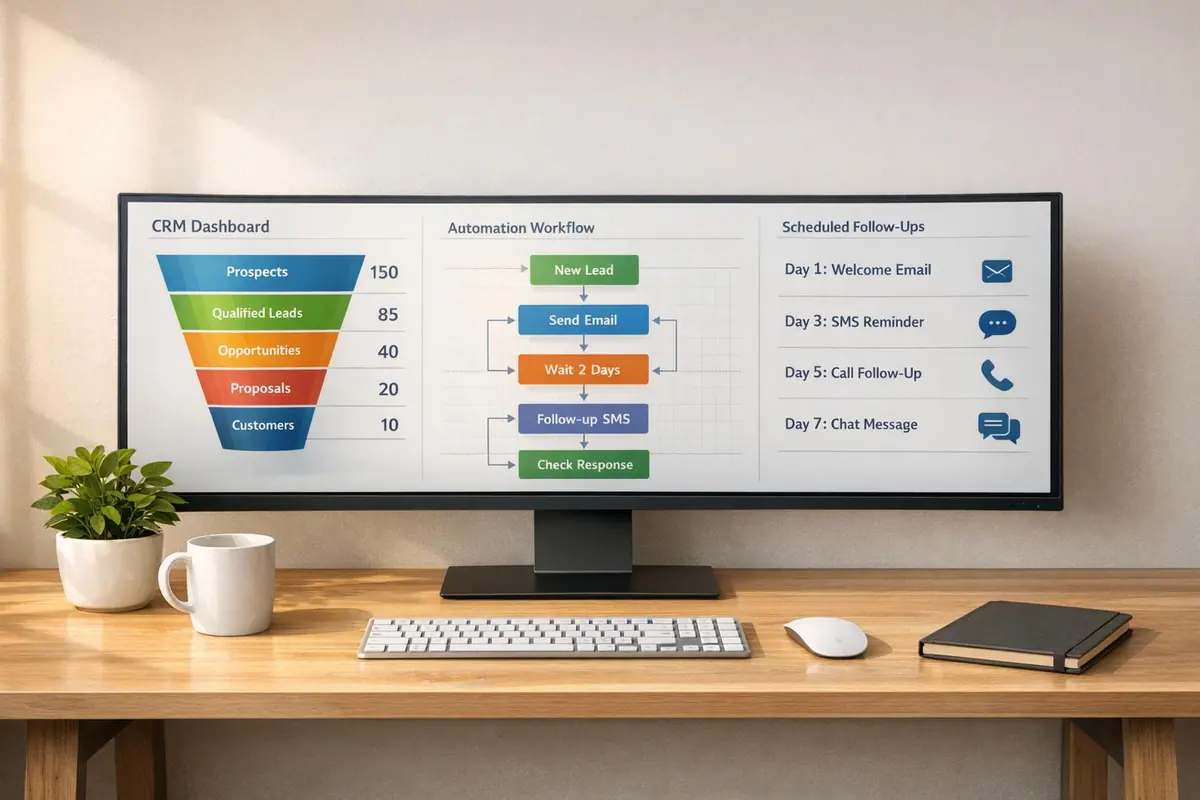
Scaling lead nurturing is all about automating repetitive tasks to save time, improve lead quality, and close deals faster. Here’s why automation matters:
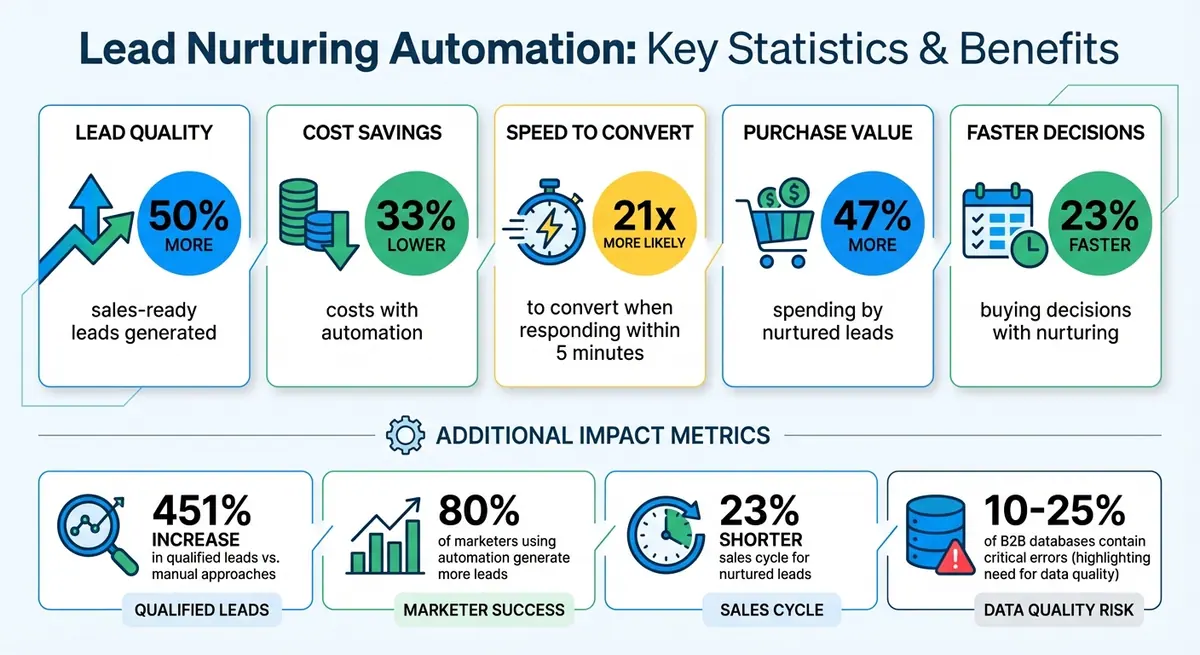
- Businesses using automated lead nurturing generate 50% more sales-ready leads while reducing costs by 33%.
- Responding to leads within 5 minutes makes you 21x more likely to convert them.
- Manual processes like data entry and follow-ups waste time and lead to missed opportunities.
Automation tools handle tasks like instant lead capture, personalized follow-ups, lead scoring, and multi-channel outreach. This allows your team to focus on selling rather than admin work.
The key steps include:
- Choosing tools with CRM integration, conditional logic, and multi-channel support.
- Creating workflows that qualify, segment, and nurture leads based on behavior.
- Tracking metrics like response rates and conversion times to refine processes.
With the right tools and workflows, automation can transform lead nurturing into a faster, more effective process.
Lead Nurturing Automation Statistics and ROI Benefits
Lead Nurturing Basics and Scaling Problems
What is Lead Nurturing?
Lead nurturing is all about building relationships with potential customers by offering them targeted, meaningful content over time. It’s the art of staying connected with prospects who aren’t quite ready to make a purchase, keeping the conversation alive until they are. Many leads need time to do their research and develop trust in your brand. By consistently showing up across platforms like email, social media, and even mobile, you can build loyalty and turn potential buyers into advocates. And the rewards? They’re hard to ignore: nurtured leads tend to spend about 47% more and make their buying decisions 23% faster.
"If you are not nurturing your leads, you're leaving a lot of money on the table." – Syed Ali Nemath, Senior SEO Manager, Pipedrive
But while nurturing leads is effective, scaling this process comes with its own set of hurdles.
Common Problems When Scaling Lead Nurturing
As lead volumes grow, manual lead nurturing starts to break down, making automation a necessity. Without it, scaling becomes a logistical nightmare.
One major challenge is maintaining personalization. Tailoring messages to each lead is critical, but doing so manually for hundreds - or thousands - of prospects quickly becomes unmanageable. The result? Generic messages that fail to resonate. Manual follow-ups are another pain point. They’re time-consuming, prone to mistakes, and can leave sales teams feeling drained. Missed follow-ups or incorrect information can frustrate potential customers, while slow response times - sometimes taking hours or even days - give competitors a chance to swoop in.
Data quality is another stumbling block. Outdated or poorly managed CRM data can misdirect your nurturing efforts, wasting time on leads that are unlikely to convert. Leads generated at different times often get lumped together, ignoring their unique stages in the buyer’s journey. And then there’s the issue of channel fragmentation. Tracking leads across platforms like social media, ads, and webinars can feel like trying to piece together a puzzle with missing pieces.
Take the sports camera company Veo as an example. They were overwhelmed by the sheer number of leads pouring in from Facebook and Instagram each month. By using Zapier to automate the flow between their lead generation tools, CRM, and marketing platform, they slashed their cost-per-lead by 20% and boosted their lead conversion rate to 7.5%. In just a year and a half, this automated system helped the company double in size.
How to Choose Automation Tools for Lead Nurturing
Must-Have Features in Automation Tools
Choosing the right automation tool can turn lead nurturing from a tedious task into a seamless process. Look for tools that come equipped with these essential features:
Real-time CRM integration is a must. Your automation platform should sync instantly with your CRM - be it HubSpot, Salesforce, or Pipedrive - so you can act on leads without delay. Why is this so important? Fast integration ensures you can engage leads promptly, which significantly improves conversion rates. On the flip side, slow syncs or manual CSV uploads can undermine your efforts.
Conditional logic and branching allow for a personalized touch. This feature lets you tailor follow-ups based on how leads interact with your content. For instance, someone clicking on your pricing page could receive a different follow-up than someone downloading a case study. This level of customization is what separates effective nurturing from generic email campaigns.
Lead scoring and segmentation help you focus your time and energy on the most promising prospects. Automation tools can assign points to leads based on their behavior and profile, making it easy to identify those who are sales-ready. Companies using automation for lead nurturing report a 451% increase in qualified leads compared to manual approaches. Advanced segmentation also ensures your outreach is always relevant by grouping leads based on factors like job role, buying stage, or engagement patterns .
Multi-channel capabilities are essential because relying on email alone won't cut it anymore. Your tool should support communication across multiple channels such as LinkedIn, SMS, email, and retargeting ads, all within a unified workflow. Features like lead enrichment and email validation further ensure your data is accurate and your messages reach the right audience .
Next, let’s dive into how Reform leverages these features to enhance your lead nurturing efforts.
Why Reform Works Well for Lead Nurturing

Reform takes a unique approach by addressing lead quality right at the source - the form itself. While many automation tools assume you’re starting with clean, qualified leads, Reform ensures the leads you capture are primed for nurturing from the get-go.
With multi-step forms and conditional routing, Reform lets you qualify leads as they fill out your form. For example, you can customize questions based on previous answers, automatically directing enterprise prospects into one workflow and small businesses into another. This process creates pre-segmented, high-quality leads ready for immediate follow-up.
Lead enrichment and email validation are built into the system. Reform verifies email addresses in real time and can even append firmographic data before leads are sent to your CRM. This proactive approach tackles common data issues head-on, which is crucial given that 10% to 25% of B2B marketing databases often contain critical errors.
What’s more, Reform’s no-code setup gives your marketing team full control. You can design, test, and tweak forms without waiting on developers. Features like A/B testing, conditional logic, and real-time analytics make it easy to fine-tune your lead capture process. And because Reform integrates seamlessly with major CRMs and marketing platforms, your high-quality leads flow directly into your existing workflows without any hiccups.
How to Set Up Automation Workflows with Reform
Creating Forms That Trigger Workflows
Design forms that actively qualify and guide leads based on their responses. Reform’s multi-step design makes lead capture more approachable by breaking it into manageable steps, keeping prospects engaged without overwhelming them.
Start with a simple and inviting first step to minimize friction. For example, ExactBuyer used Reform’s multi-step forms with dynamic routing and real-time enrichment, achieving a 90% demo engagement rate and reducing form exit rates by 26.4%. As Edan Krolewicz, Founder and CEO, explained:
"Multi-step form → Higher engagement. Dynamic routing → Better qualified leads. Real-time enrichment → Improved experience."
Leverage conditional routing to direct leads into the right nurturing paths automatically. In 2024, Tim McMinn, Director of Growth and Operations at heyMarvin, implemented multi-step forms with routing logic that funneled leads into two separate Account Executive Calendly flows. This approach filtered out unqualified leads and reduced calendar spam within just two weeks.
To capture leads even if they don’t complete a form, enable partial submissions on longer forms. This feature, updated in January 2025, ensures you still collect key contact details, speeding up lead qualification. Additionally, integrating tools like Calendly allows qualified leads to schedule meetings directly from the form, eliminating manual back-and-forth and streamlining your workflow.
Finally, connect these forms to your CRM and marketing tools to fully automate your lead workflows.
Connecting Reform to Your CRM and Marketing Tools
Integrating Reform with your CRM is straightforward. In the form editor, click "Integrations" in the left-hand menu, select your CRM (like HubSpot or Salesforce), and sign in to authorize access. Advanced integrations, including HubSpot and Salesforce support, are available with the Reform Pro plan ($35/month or $350/year).
Once connected, map form fields to CRM properties such as Contact, Company, or Deal fields. Don’t forget to include hidden UTM fields to track lead sources effectively.
Use this data to trigger automated workflows in your CRM. For example, set up sequences to send welcome emails, assign leads to specific sales reps based on criteria like company size or industry, or update records automatically. You can also configure re-enrollment settings so leads can enter the same workflow multiple times, which is helpful for prospects who engage with different resources over time.
Before going live, test a submission to ensure data flows correctly into your CRM. You can toggle the integration on or off directly in the Reform editor, giving you full control over when and how data syncs into your automated workflows.
sbb-itb-5f36581
Building and Improving Lead Nurturing Sequences
Creating Multi-Step Nurturing Campaigns
Lead nurturing is all about crafting a series of concise, targeted steps that guide prospects through the buyer's journey. Each sequence should include prompt responses, timely follow-ups, and content tailored to their specific interests.
A key strategy is to use conditional branching, which adjusts the flow based on a prospect's behavior. For example, if someone clicks on your pricing page, you could shift them to a more direct path that includes a calendar booking option, rather than continuing with general educational content. Actions like form submissions, whitepaper downloads, or pricing page visits can trigger workflows that place prospects into the most relevant sequence.
Modern campaigns also leverage multiple channels. Email sequences work best when combined with SMS alerts, remarketing ads, and CRM tasks that prompt sales reps to connect with leads on platforms like LinkedIn. Start by mapping out the key touchpoints - such as form submissions, pricing page visits, or periods of inactivity (e.g., no activity for 7 days) - before setting up automation.
To avoid delays, use real-time data syncing between tools like Reform and your CRM. This ensures autoresponders are triggered instantly, without the need for manual CSV uploads. Set workflows to pause automatically when a lead replies and resume only if the conversation stalls.
Content should align with each stage of the funnel. For awareness-stage leads, send short, value-packed emails. Consideration-stage leads benefit from case studies, while decision-stage leads need social proof and meeting links. Businesses that excel in lead nurturing see 50% more sales-ready leads at 33% lower costs, and nurtured leads tend to make 47% larger purchases compared to those who aren't nurtured.
Once your campaigns are running smoothly, the next step is refining lead scoring and segmentation.
Automating Lead Scoring and Segmentation
To get a complete picture of lead quality, combine explicit data (like job title or company size) with implicit signals (like website visits or email clicks). Start with a simple point system: for instance, assign 5 points for a whitepaper download, 20 points for a demo request, and 15 points for leads that match your ideal customer profile.
Set up behavior-based triggers to automatically re-segment leads when they take high-intent actions. For example, if someone visits your pricing page or downloads a specific case study, move them into a more aggressive nurture sequence. High-scoring leads should be routed directly to sales for immediate follow-up, while medium-scoring leads remain in automated workflows.
To keep your scoring system relevant, apply score decay. This ensures that leads who engaged recently are prioritized over those who haven't interacted in months. This way, your sales team focuses on warm prospects rather than wasting time on cold ones. As Hannah Recker, Growth Marketer at Coefficient, puts it:
"Lead scoring transforms lead nurturing from a spray-and-pray approach to a targeted strategy".
Segment your leads based on demographics, survey responses, email engagement, funnel stage, and website behavior. This ensures your messaging stays relevant. Automation plays a big role here - 80% of marketers using automation report generating more leads than those who don't. The key is delivering the right message to the right segment at the right time.
Once your scoring and segmentation system is in place, keep an eye on performance to fine-tune your efforts.
Tracking and Adjusting Workflows for Better Results
Tracking the right metrics is essential to improving your lead nurturing efforts. For early-stage leads, focus on engagement metrics like email opens and content views. For late-stage leads, measure conversions to sales meetings. Avoid falling into the "set it and forget it" trap - refresh email content regularly with updated assets and industry-specific insights to keep your audience engaged.
Use A/B testing to experiment with subject lines, email content, and send times. For leads that are unengaged, try bold new tactics like direct mail or unconventional messaging, since there's little risk with contacts who are already inactive. Keep an eye on metrics like "Time to MQL/SQL" to see if your workflows are speeding up the sales cycle.
Here’s a quick breakdown of key metrics and how to act on them:
| Metric | What It Indicates | Adjustment Action |
|---|---|---|
| Open Rate | How well subject lines and timing resonate | A/B test subject lines or adjust send times |
| Click-Through Rate | How engaging your content or offer is | Revise body copy or test new formats like video |
| Conversion Rate | Lead readiness to take the next step | Optimize CTAs or refine segmentation |
| Time to MQL/SQL | Workflow efficiency and pipeline speed | Adjust timing between touches or streamline steps |
Make sure your CRM acts as the single source of truth, ensuring both sales and marketing teams have access to the same data. Tools like Reform offer real-time analytics, helping you monitor form performance and lead quality. This allows you to quickly identify drop-offs and adjust workflows. On average, nurtured leads experience a 23% shorter sales cycle.
Build Your Own AI Lead Nurturing Agent That Works for You using Make.com and ChatGPT
Conclusion
Scaling lead nurturing effectively combines automation with personalized communication. And the results speak for themselves: companies using automation see 50% more sales-ready leads while cutting costs by 33%. Plus, nurtured leads tend to spend 47% more on purchases.
It all starts with clean data. Tools like Reform ensure high-quality leads by validating emails and blocking spam, keeping workflows smooth and efficient. Speed matters, too - contacting a lead within five minutes increases the likelihood of conversion by a staggering 21 times. This makes clean data and quick follow-ups the foundation of any scalable lead nurturing strategy.
Success doesn’t stop there. Keep refining your approach by tracking key metrics, experimenting with different tactics, and tweaking workflows based on performance. By staying adaptable, you can shorten sales cycles, boost conversion rates, and enhance overall efficiency. With the right tools and mindset, scaling lead nurturing becomes a powerful engine for growth.
FAQs
What features should I prioritize in a lead nurturing automation tool?
When choosing a lead nurturing automation tool, focus on features that simplify processes and ensure your data flows effortlessly between systems. For instance, integrations with your CRM and email platforms are a must to keep data synchronized without manual effort. Tools with trigger-based workflows can handle tasks like sending follow-up emails or updating lead statuses automatically when specific actions occur - like a form submission or a link click.
Look for tools that include segmentation options, which let you group leads based on their behavior, industry, or role. This makes it easier to send personalized, targeted messages that resonate. Features like lead scoring and enrichment help you zero in on your most promising prospects, while analytics dashboards provide insights into performance metrics like email open rates and conversions, helping you refine your strategy.
If you're working with Reform's no-code form builder, you’ll find features such as multi-step forms, conditional routing, spam prevention, and real-time analytics. These ensure your lead data stays accurate and well-organized, making it easier to fuel your automated nurturing processes effectively.
How does automation enhance lead nurturing personalization?
Automation takes lead nurturing to the next level by making it feel more personal and timely, all without the need for constant manual effort. It ensures that every message reaches the right person at just the right moment, creating a seamless and relevant experience.
With automation, you can group leads dynamically based on their actions, preferences, or details - allowing you to send content tailored to each segment. For instance, triggers can be set to respond instantly to specific actions, like filling out a form or clicking on an email link, ensuring you can follow up in real-time. Plus, automation allows you to personalize messages further by including details like names, company information, or recent activities, making your communication feel genuinely one-on-one.
What’s more, automation adjusts your messaging based on how leads interact with your content. By constantly analyzing engagement and updating lead segments, these tools help fine-tune your approach, ensuring your messages stay relevant and effective as time goes on.
What challenges do businesses face when scaling lead nurturing, and how can automation solve them?
Scaling lead nurturing comes with its fair share of hurdles. For starters, manual follow-ups can quickly spiral out of control as your lead volume increases, leading to missed opportunities or sluggish response times. On top of that, keeping contact data organized and segmented without a centralized system can get messy. This often results in sending irrelevant messages - or worse, bombarding the same audience with too many communications. And let’s not forget the headaches of coordinating outreach across multiple channels like email, SMS, or in-app notifications. Timing becomes especially tricky when it hinges on specific lead actions. To top it off, scaling usually demands more resources, which isn’t always an option for smaller or leaner teams.
This is where automation becomes a game-changer. Automated workflows can handle repetitive tasks, like triggering personalized emails or updates based on a lead’s actions, ensuring timely and consistent engagement without lifting a finger. Tools with features like segmentation and conditional routing make it easier to deliver the right message to the right audience, cutting down on unnecessary or irrelevant communication. Automation also keeps your data cleaner and helps identify high-priority leads, freeing up your team to focus on closing deals rather than drowning in administrative work. Best of all, automation allows you to scale your lead nurturing efforts without the need to hire extra staff, making it both efficient and budget-friendly.
Related Blog Posts
Get new content delivered straight to your inbox

The Response
Updates on the Reform platform, insights on optimizing conversion rates, and tips to craft forms that convert.




Drive real results with form optimizations
Tested across hundreds of experiments, our strategies deliver a 215% lift in qualified leads for B2B and SaaS companies.
