
.webp)
Best Practices for Securing Form Data Backups


Protecting backups is non-negotiable. Form data backups often contain sensitive information like customer details, payment data, and health records. Without proper security, they can become prime targets for ransomware attacks or breaches, leading to legal fines, reputational loss, and operational disruptions. Here’s what you need to know:
- Encryption: Use AES-256 for stored data and TLS 1.3 for transfers. Avoid storing encryption keys with the data.
- Access Controls: Implement Role-Based Access Control (RBAC), follow the Principle of Least Privilege, and enforce Multi-Factor Authentication (MFA).
- Testing & Monitoring: Regularly test backups for reliability using the 3-2-1-1-0 rule. Monitor for anomalies like failed jobs or unusual data changes.
- Immutable & Offsite Storage: Prevent tampering with Write Once, Read Many (WORM) policies and store backups in separate, secure locations.
Platforms like Reform simplify secure data handling with features like encrypted exports, role-based access, and compliance-friendly integrations. By adopting these measures, you can ensure your backups remain safe, recoverable, and compliant with regulations like GDPR, HIPAA, and PCI DSS.
Best Practices for Backups: 3-2-1-1-0, Encryption, and Immutability
sbb-itb-5f36581
Encryption Methods for Form Backup Data
Encryption turns form data into unreadable ciphertext using algorithms, ensuring that even if storage devices are stolen or databases are breached, the information remains inaccessible without the correct decryption key. With ransomware now targeting backup systems in an alarming 96% of attacks, encryption plays a key role in safeguarding data. Let’s break down how encryption works for stored data, data in transit, and specific sensitive fields.
Encrypting Stored Data
AES-256 (Advanced Encryption Standard with 256-bit keys) is widely recognized as the go-to method for securing stored backups. It uses a single secret key for both encryption and decryption, offering a combination of speed and strong security. This makes it a cornerstone of secure backup practices.
However, encryption keys should never be stored alongside the encrypted data. Tools like AWS KMS or Azure Key Vault are excellent for managing keys separately, reducing the risk of a single breach compromising both the backups and their keys. Pair this with strict access controls to further protect your data.
Encrypting Data During Transfer
TLS 1.3 (Transport Layer Security) is the latest standard for encrypting data during transfer, offering stronger protection and faster connection setup compared to earlier versions. It’s essential for preventing interception when data moves between systems. When sending backups to offsite locations, avoid using unencrypted methods like email or FTP. Instead, rely on secure encrypted tunnels such as VPNs, enforce HTTPS connections, and reject expired or mismatched certificates.
Modern browsers now flag non-HTTPS forms as "Not Secure", underscoring the dangers of unencrypted transfers. Enabling HTTP Strict Transport Security (HSTS) headers can ensure browsers only use secure connections, blocking protocol downgrade attacks. To avoid lapses, set up automated alerts for SSL/TLS certificate expirations.
Field-Level Encryption for Sensitive Information
Encrypting entire databases is effective, but encrypting specific fields - like those containing Social Security numbers, payment details, or other personal data - adds another layer of security. This application-level encryption ensures sensitive information remains protected, even if someone gains access to the database.
For backups, asymmetric encryption methods, such as RSA or GPG, provide an extra advantage. These methods use a public key for encryption and a private key for decryption. By storing the public key on the backup server and keeping the private key in a secure, separate location, you reduce the risk of exposure. As Krzysztof Ksiazek from Severalnines explains:
"If you use asymmetric encryption... you don't really have to care about the public key. Even if it would be compromised, it will still not allow for any kind of access to the data from backups." – Krzysztof Ksiazek, Severalnines
Avoid stream ciphers for backup encryption, as even minor corruption in a backup segment can cause decryption to fail. Regularly rotate encryption keys and test your backups to ensure they can be decrypted successfully during restoration. These practices, combined with broader strategies like access controls, create a comprehensive approach to data protection.
Access Controls and Authentication
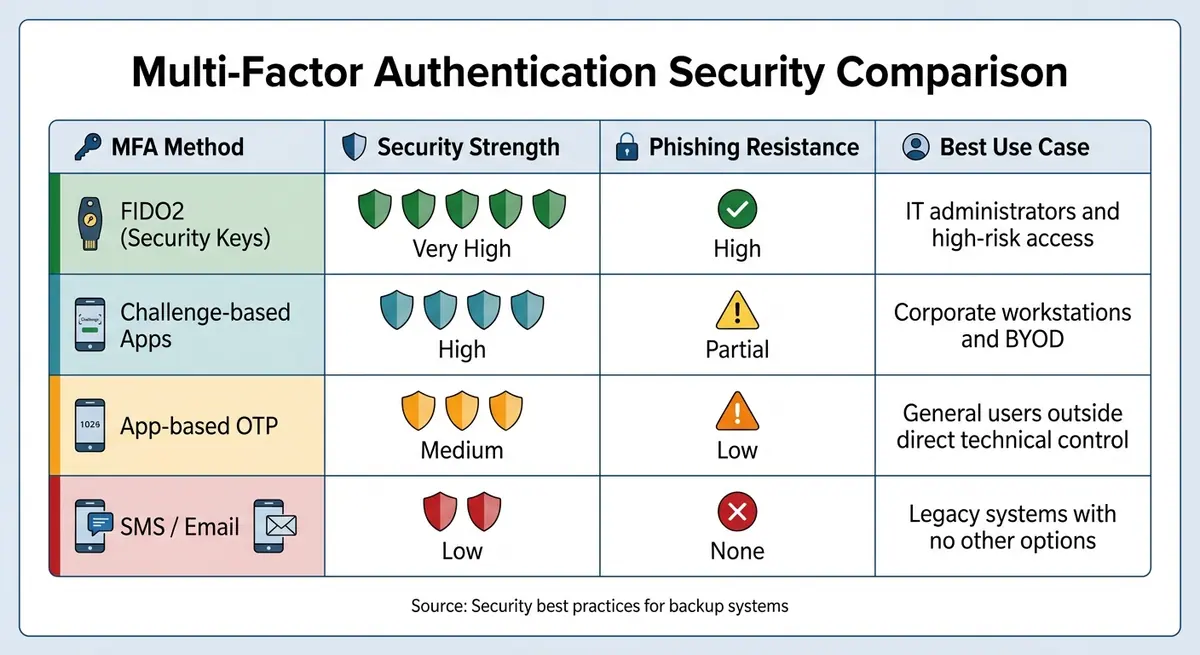
MFA Security Methods Comparison for Backup Systems
Protecting form data backups goes beyond encryption - it demands strict access controls and continuous monitoring. Even the strongest encryption won't help if unauthorized individuals can access your backups. With 89% of organizations reporting that attackers targeted backup repositories in ransomware incidents by 2025, managing access effectively is non-negotiable. A solid access control strategy starts with well-structured role management.
Role-Based Access Control and Least Privilege
Role-Based Access Control (RBAC) assigns permissions based on job functions, ensuring users only access what they need for their roles. This limits the potential damage if an account is compromised. Similarly, the Principle of Least Privilege (PoLP) restricts access to the bare minimum required for a task. For instance, a finance analyst might need permission to view billing data but shouldn't be able to modify backup schedules or delete restore points. It’s best to start new users with zero access and incrementally grant permissions as needed, rather than starting with full access and scaling back later.
Segregation of Duties (SoD) is another key practice, ensuring no individual has complete control over sensitive operations. For example, deleting backups might require managerial approval.
To streamline access control, integrate RBAC with systems like LDAP or Active Directory. This allows for automated access revocation when roles change. Be sure to immediately revoke access when an employee leaves the organization. Regular access reviews are also critical - every 6–12 months for standard accounts and quarterly for high-risk roles.
Multi-Factor Authentication
Access control doesn’t stop at role assignments; verifying user identity is equally important. Multi-factor authentication (MFA) adds an extra layer of security by requiring a second verification factor beyond a username and password. This additional step is a critical safeguard against unauthorized access, especially if credentials are stolen through phishing or breaches. Backup systems, often a "single point of failure", are particularly vulnerable without MFA.
For high-risk access, prioritize FIDO2 credentials like YubiKeys, Windows Hello, or Touch ID, which are highly resistant to phishing attacks. Challenge-based authentication apps with number matching can help prevent "prompt fatigue" attacks, where users unknowingly approve malicious login attempts. Avoid relying on SMS or email-based MFA whenever possible, as these methods are susceptible to interception.
| MFA Method | Security Strength | Phishing Resistance | Best Use Case |
|---|---|---|---|
| FIDO2 (Security Keys) | Very High | High | IT administrators and high-risk access |
| Challenge-based Apps | High | Partial | Corporate workstations and BYOD |
| App-based OTP | Medium | Low | General users outside direct technical control |
| SMS / Email | Low | None | Legacy systems with no other options |
During MFA setup, generate 5–10 one-time-use backup codes and store them securely - either in a password manager or offline. Never save them in plaintext. These codes act as a safety net, ensuring access to critical backup systems if a primary MFA device is lost or fails.
Immutable Audit Logs
After securing access, the next step is maintaining tamper-proof records to detect and investigate breaches. Standard logs can be altered, but immutable logs remain permanent and unchangeable. These logs provide a reliable chronological record for identifying misuse, conducting root-cause analyses during breaches, and meeting regulatory requirements like HIPAA, GDPR, and SEC Rule 17a-4. For instance, Vietnam's Quyết định 8297/QĐ-BCA-A05 mandates audit logs that are "detailed, complete, and immutable", reflecting a growing global emphasis on secure logging.
To create immutable logs, implement append-only logic at the application layer. This ensures that entries can only be added and never modified. Strengthen log integrity by anchoring entries externally, such as hashing them on an independent service. Limit access to the logs to highly privileged users and track all attempts to access them. Tools like Microsoft 365's "Preservation Lock" can prevent anyone, including administrators, from altering or reducing the retention period for audit data.
Testing and Monitoring Protocols
Access controls and encryption lose their value if your backups fail when you need them most. Over 60% of backups are incomplete, and nearly half of restore attempts fail when systems aren't tested consistently. With the average global cost of a data breach hitting $4.45 million in 2025, much of that loss stems from downtime and unrecoverable data. This is why testing and monitoring are critical to ensuring your backup strategy works when it matters.
Regular Backup Testing
To prove a backup is reliable, it must be restored successfully. Regular full recovery drills are far more effective than simply confirming that a file exists. Software engineer Shanika Wickramasinghe captures the essence of this:
"A backup is only useful if it works when you need it most. Carry on tests regularly to check whether your backups are complete and restorable".
Testing should confirm your RTO (Recovery Time Objective) - the time it takes to restore data - and RPO (Recovery Point Objective) - the maximum acceptable data loss. If your business expects recovery within four hours but testing shows it takes six, you've spotted a problem before it becomes a disaster.
The 3-2-1-1-0 rule is widely regarded as the gold standard: keep three copies of your data on two types of media, with one copy stored off-site, one copy immutable or offline, and zero errors verified through automated testing. That "0" is non-negotiable. Use cryptographic hashes and checksums to confirm data hasn't been corrupted or altered during backup or storage. Automated integrity checks should run after every backup, flagging failures immediately instead of during a critical restore.
Adopt tiered testing based on the importance of the data. For instance, run checksums for every backup, extract tests daily, restore databases weekly, and perform full application restores monthly. Nawaz Dhandala from OneUptime sums it up perfectly:
"A backup that has never been restored is just hope stored on disk".
Test different scenarios, including both file-level restores (individual documents) and system-level restores (entire databases), to uncover various failure points, much like how impressive multi-step form design prevents user-side errors.
| Test Type | Frequency | Duration | What It Validates |
|---|---|---|---|
| Checksum Verification | Every backup | Seconds | File integrity intact |
| Extract Test | Daily | Minutes | Access verified |
| Database Restore | Weekly | 30–60 minutes | Data structure is intact |
| Full Application Restore | Monthly | 2–4 hours | System is fully functional |
| Disaster Recovery Drill | Quarterly | 4–8 hours | Cross-region failover works |
Real-Time Monitoring
While testing ensures backups work, real-time monitoring spots problems as they arise. Backup systems should continuously track unusual activity or threats. Since ransomware targets backup files in 96% of attacks to block recovery, early detection is critical.
Integrate backup metrics into your observability stack to monitor performance alongside production systems. Watch for anomalies like unexpected data volumes, which may signal ransomware encryption or unauthorized data exfiltration. Alerts should also flag sudden spikes in file encryption - a common early sign of an attack.
Set up notifications for failed backup jobs or incomplete processes to enable immediate fixes. As Konfirmity advises:
"Backup jobs need real‑time monitoring with alerts for failures".
Manual backups often fail unnoticed, making automated schedules, retention, and replication vital. Monitoring tools can flag missed jobs and other issues.
AI-driven predictive monitoring is now transforming backup systems. Splunk explains:
"AI is making backups smarter by predicting problems before they happen. It analyzes data usage patterns to detect early signs of failure".
This proactive approach shifts monitoring from reactive to preventive. Keep an eye on key metrics like job completion status, data volume changes, and access logs. Set thresholds for restore times to ensure you stay within your RTO.
Disaster Recovery Simulations
Testing individual backups is one thing; disaster recovery simulations take it a step further by evaluating your entire recovery process under realistic conditions. These drills reveal weak spots in your backup strategy and build preparedness for real emergencies.
Backups can fail silently due to issues like bit rot, incomplete writes, schema drift, or lost encryption keys. Simulations catch these problems before they escalate. Simply having a backup isn't enough - simulations verify the data is usable and applications can query it successfully. As the AWS Storage Blog notes:
"Automated backup validation is no longer optional: it's a fundamental requirement for modern business continuity".
Run restore simulations in isolated environments to avoid affecting production data. Use event-driven functions, like AWS Lambda, to automate post-restore checks such as verifying object counts or running smoke tests on restored applications. Feed these results into monitoring tools like Prometheus and set up alerts via Slack or on-call systems for immediate attention.
Match testing frequency to your retention periods. For example, if backups are kept for 14 days, test them at least once during that time. Automated testing also helps meet regulatory requirements, such as the EU's Digital Operational Resilience Act (DORA) and the NYDFS Cybersecurity Regulation. Tools like AWS Backup Audit Manager can track restore times and generate compliance reports for auditors.
These simulations not only validate your backups but also lay the groundwork for implementing immutable and offsite backup strategies, strengthening your data security framework.
Immutable and Offsite Backup Strategies
Once you've confirmed your backups can be successfully restored, the next step is to safeguard them from tampering. Why? Because in 96% of ransomware attacks, backups are the first target. Attackers corrupt or delete backups before encrypting production systems, leaving you with no recovery options. By combining thorough testing with immutable and offsite strategies, you can ensure your backups remain intact, even during sophisticated ransomware attacks.
Immutable Backups
An immutable backup is a copy of your data that cannot be altered, deleted, or encrypted during its retention period. This is achieved through Write Once, Read Many (WORM) policies, which make the data tamper-proof. Even if attackers gain access to administrative credentials, the backups stay locked and secure.
Przemyslaw Szanowski from Object First sums it up perfectly:
"By making backup data physically unalterable for a defined retention period, immutability ensures that you always have a clean, trusted recovery path when ransomware strikes".
This approach has earned widespread trust - 81% of IT leaders believe immutable backup storage is the most reliable defense against ransomware. For instance, Hans Hundegger AG, a global CNC joinery machine leader, implemented storage-level immutability with Veeam. The result? Their average restore time dropped by 66%, from six hours to just two, while their data remained safe from ransomware.
Immutability options vary based on your requirements:
- Time-based immutability: Applies a fixed retention window, ideal for meeting regulatory standards like GDPR or HIPAA.
- Legal hold immutability: Locks specific backups indefinitely until manually released, a key feature for audits or legal cases.
- Air-gapped backups: Physically disconnected from networks, offering complete isolation from remote attacks.
Immutability is also a cornerstone of the 3-2-1-1-0 backup rule. To ensure your backups are truly locked, regularly test them by attempting deletions with privileged accounts.
| Immutability Type | Description | Best Use Case |
|---|---|---|
| Time-based | Fixed retention period applied at policy level | Regulatory compliance (e.g., GDPR, HIPAA) |
| Legal Hold | Locks backups indefinitely until manually removed | Audits, litigation, investigations |
| Air-Gapped | Physically disconnected from networks | Maximum protection against remote attacks |
Offsite Storage and Encryption Key Management
While immutability protects data integrity, offsite storage shields backups from physical and network-based disasters. Storing backups in a separate location safeguards against events like fires or floods. However, encryption is essential to protect data during storage and transfer. The gold standard here is AES-256 encryption, which is virtually impossible to crack with current computing power.
Encryption keys must be stored separately from backups. If attackers access both the backups and the corresponding keys, encryption becomes useless. Services like AWS Key Management Service (KMS) or Google Cloud KMS allow you to define strict access policies, ensuring only authorized users can access encryption keys. For extra security, Hardware Security Modules (HSMs) provide hardware-level protection, preventing keys from being extracted in plaintext.
As Nawaz Dhandala from OneUptime warns:
"Unencrypted backups are a data breach waiting to happen. They contain the same sensitive data as your production systems but often with weaker access controls".
"An encrypted backup you cannot decrypt is worse than no backup at all".
This highlights the importance of automated key rotation. Rotate encryption keys quarterly or annually, and re-encrypt recent backups with the new keys. This limits the damage if a key is compromised. Additionally, enable logging tools like AWS CloudTrail to monitor every instance of key access. Regularly test decryption by conducting restoration drills to ensure your keys and recovery processes are functional.
For disaster recovery, multi-region key management simplifies the process by securely replicating keys to offsite storage regions. To add another layer of protection, keep separate authorization mechanisms for your data vault and encryption keys. Even if the vault is accessed, the data remains encrypted and unreadable.
| Regulation | Encryption Requirements |
|---|---|
| GDPR | Requires "appropriate" security measures, including encryption of personal data |
| HIPAA | Mandates encryption for electronic protected health information (ePHI) |
| PCI-DSS | Requires strong cryptography for stored cardholder data |
| SOC 2 | Specifies encryption for data in transit and at rest |
Automated Retention and Deletion Policies
Encryption and access controls are just part of the equation. Automated retention policies ensure data is deleted as soon as it reaches its retention limit, preventing backups from lingering longer than necessary. Manual deletion risks leaving sensitive data exposed, while automated policies eliminate this gap. Modern backup systems support enforced retention periods ranging from 1 day to 99 years.
Google Cloud explains this concept clearly:
"A backup's enforced retention period cannot be removed or reduced. When you store backups in a backup vault, you are preventing those backups from ever being deleted before their enforced retention period has been satisfied".
Vault locking mechanisms add another layer of security, preventing even privileged users from deleting backups, altering lifecycle settings, or shortening retention periods. For example, AWS Backup Vault Lock enforces a 72-hour cooling-off period before any configuration changes become permanent. This gives you time to test retention settings thoroughly.
To maintain compliance, align backup retention policies with your primary data policies. For instance, you might retain contact form submissions for one year while keeping sales data for the length of the sales cycle plus a buffer. Automated deletion workflows should also include detailed logging to track what was deleted, when, and under whose authority - this is crucial for compliance audits. Under GDPR, fines for data breaches can reach up to 4% of global annual revenue. Locked retention policies protect you from both external threats and internal mistakes that could lead to these penalties.
Using Reform for Secure Form Data Management

Reform simplifies secure data handling by building on strong immutable and offsite backup strategies. Its design incorporates verification systems and integration options to support best practices.
Exporting Form Data Securely
Reform ensures secure data exports with webhook signature verification. Each webhook includes a SHA-256 HMAC signature in its "Signature" header, which safeguards against man-in-the-middle attacks. To verify integrity, Reform compares this signature with a locally created one, generated using the secret key found in the Reform dashboard. When a form submission occurs, a form.submitted event is triggered, allowing your backup systems to receive data instantly.
Each payload includes a detailed audit trail, such as the form ID, submission ID, timestamp, and a list of answers. Unique IDs for each answer ensure data consistency, even if the form layout changes over time. For added security, you can also route Reform data through Zapier into encrypted storage systems, creating an extra layer of protection.
Pro Plan Features for Backup Security
For those seeking enhanced security, Reform's Pro Plan offers advanced features designed to strengthen data management. At $35 per month (or $350 annually), the Pro Plan allows users to collect file uploads, including documents and images, and securely transfer them to backup systems. It also integrates with CRMs like HubSpot, with Salesforce integration on the horizon.
Another standout feature is incomplete response tracking, which saves draft responses to prevent data loss. The Pro Plan also introduces role-based access controls, enabling teams to manage permissions for both form management and data exports. Additionally, custom CSS and JavaScript options allow organizations to tailor workflows to fit their backup infrastructure. Together, these tools create secure, automated data pipelines that align with encryption and access control standards.
Reform Plan Comparison
| Feature | Basic Plan ($15/mo) | Pro Plan ($35/mo) |
|---|---|---|
| Webhook Signature Verification | Included | Included |
| Google Sheets / Zapier Export | Included | Included |
| File Uploads | Excluded | Included |
| CRM Integrations | Basic (Notion, ConvertKit) | Advanced (HubSpot, Salesforce) |
| Incomplete Response Tracking | Excluded | Included |
| Team Access | Excluded | Included |
| Custom CSS & JavaScript | Excluded | Included |
| Spam Prevention | Included | Included |
Both plans offer unlimited responses and conditional logic, but the Pro Plan provides the advanced integrations and collaboration tools that are crucial for enterprise-level backup and security needs.
Conclusion
Protecting form data backups demands a layered strategy that integrates strong encryption, strict access controls, and regular testing. With data breaches costing businesses millions annually, and ransomware targeting backups in 96% of attacks, it's clear that backup systems need the same level of security as the original data.
By using proven methods, creating a reliable backup system is entirely possible. Employ TLS 1.3 for securing data in transit and AES-256 for encrypting data at rest. Limit internal access with role-based access controls and multi-factor authentication, and make routine testing a priority - especially when downtime can come with a hefty price tag.
"Secure data backup is a combined approach using advanced backup methods and security measures designed to keep your data fully protected, recoverable, and resilient against cyber threats." – Sterling Wilson, Technology Strategist, Object First
Modern platforms like Reform simplify secure form data management. For instance, their Pro Plan includes encrypted data exports and advanced team access controls, allowing businesses to focus on growth without worrying about encryption key management. Reform's integrations ensure data is securely routed while meeting GDPR, HIPAA, and other regulatory requirements.
Every layer of protection - from encryption to automated retention policies - fortifies defenses against potential threats. Considering the cost of a comprehensive security setup (often between $10,000 and $25,000) is far less than the expense of recovering from a breach, which can take up to 287 days. Ultimately, safeguarding form data backups goes beyond compliance - it’s about maintaining the trust of your customers and securing your organization’s future.
FAQs
How do I store encryption keys so they can’t be stolen with the backups?
To keep encryption keys safe from being stolen through backups, it's crucial to store them separately from the encrypted data. Enforce strict access controls to limit who can handle these keys. Using key management tools can help manage access securely, while implementing privileged access workflows ensures that restore operations remain controlled.
Additionally, make it a habit to audit access regularly and maintain immutable audit trails. This way, you can ensure that only authorized personnel have access to the keys, significantly lowering the risk of theft.
What backup tests should I automate to ensure restores work?
To make sure restores are dependable, set up automated tests to validate data integrity and successful recovery. Here’s what to focus on:
- Data integrity checks: These confirm that your backups are accurate and free from corruption.
- Restoration tests: These ensure backups can be restored without errors or losing any data, which is especially important for critical information like form data.
By automating these tests, you’ll boost the reliability, security, and compliance of your backup system.
How do I make backups immutable without locking myself out of recovery?
To keep backups safe from changes while still being accessible for recovery, consider storage options that enforce write-once, read-many (WORM) policies. A good example is AWS Backup Vault Lock, which prevents any deletion or modification during the retention period. At the same time, it ensures you can access the data for recovery. This method safeguards your data from accidental or malicious alterations while maintaining its integrity and ensuring recovery remains possible when needed.
Related Blog Posts
Get new content delivered straight to your inbox

The Response
Updates on the Reform platform, insights on optimizing conversion rates, and tips to craft forms that convert.




Drive real results with form optimizations
Tested across hundreds of experiments, our strategies deliver a 215% lift in qualified leads for B2B and SaaS companies.
