
.webp)
How Backup Integrity Impacts Compliance Standards



Ensuring backup integrity means your data is accurate, uncorrupted, and recoverable - key for meeting compliance standards like HIPAA, SOC 2, and GDPR. Regulators now demand proof that backups are retrievable and intact, with incomplete or corrupted data classified as compliance failures.
Key takeaways:
- Ransomware risk: Attackers often hide in systems for 21 days, corrupting backups unnoticed.
- Testing matters: 50% of restore attempts fail due to untested backups.
- Financial impact: U.S. data breaches in 2025 averaged $10.22M; healthcare breaches alone compromised 186M records.
- Compliance penalties: Fines can reach up to €20M (GDPR) or involve severe HIPAA sanctions.
To stay compliant, follow the 3-2-1-1-0 rule, test backups regularly, and use encryption (AES-256) and access controls (MFA, RBAC). Without these measures, you risk data loss, audit failures, and hefty penalties.
Five Steps to a Secure Cloud Backup Architecture
sbb-itb-5f36581
How Backup Failures Create Compliance Problems
Backup failures can lead to serious compliance violations. Regulatory frameworks demand that businesses provide evidence their data is both recoverable and intact. If you cannot produce clean, verified backups during an audit or investigation, you're at risk of falling out of compliance.
This issue isn't limited to technical glitches. Modern compliance standards like HIPAA, SOC 2, and GDPR require that backups ensure data availability, integrity, and security throughout their entire lifecycle. A backup log that says "completed successfully" doesn’t mean much if the data is corrupted, incomplete, or infected.
Types of Backup Integrity Failures
Backup failures can take many forms, each with its own set of compliance challenges.
Silent corruption occurs when hardware issues or software bugs degrade data without detection. Even if the system marks the backup as successful, the data might be unreadable or inconsistent.
Incomplete backups happen when changes to your systems - like adding new directories or databases - aren’t captured by automated backup schedules. Take GitLab’s 2017 incident as an example: an 18-hour outage caused by an accidental database deletion resulted in six hours of lost production data. Despite having multiple backup systems, misconfigurations and untested procedures left the company unable to recover. This highlights how operational oversights can lead to compliance breaches.
Dormant malware is another major problem. Attackers can linger undetected in your network for weeks, during which time your backups may unknowingly copy infected files. These backups might look fine - checksums match, restoration works - but the malware will reinfect your systems as soon as you restore them.
"A backup can be technically perfect - checksums match, restoration succeeds, applications start - while containing dormant malware that will reinfect everything the moment you restore."
- Sabith Venkitachalapathy, Enterprise Cloud Architect
In a high-profile case from 2014, Code Spaces shut down after an attacker gained access to their Amazon EC2 control panel and deleted both primary data and all backups. Without off-site or immutable backups, recovery was impossible.
The retention gap is another critical failure point. If attackers compromise your systems and remain undetected long enough, older, clean backups may age out of your retention window. On average, organizations with compromised backup repositories recover only 57% of their data. This directly affects their ability to meet regulatory recovery requirements and pass audits.
When these failures occur, the consequences can be both regulatory and operational.
Consequences for Regulatory Compliance
The technical issues outlined above often result in regulatory violations and steep penalties. For instance, under HIPAA, healthcare organizations must maintain "retrievable exact copies" of electronic protected health information (ePHI) and restore it within 72 hours after an incident. Corrupted or incomplete backups mean failing to meet the Contingency Plan standard (§164.308(a)).
In 2025, BST & Co. CPAs, LLP faced a $175,000 settlement after a ransomware attack compromised the data of 170,000 individuals. Investigators found the firm had inadequate risk analysis and lacked proper backup and security measures for ePHI.
SOC 2 audits focus on Availability (A1.2) and Confidentiality (C1.1). If backup failures prevent you from meeting your Recovery Time Objective (RTO), auditors may classify it as a control failure. This often results in a "qualified opinion", signaling a supply chain risk.
"For auditors, lost data is likely to mean something else: a control failure."
- Łukasz Dydek, Xopero Software / Gitprotect.io
Under GDPR, backups qualify as data processing, which means they must adhere to strict requirements for lawful use, purpose limitation, and security. Failures in these areas can lead to fines of up to €20 million or 4% of annual global revenue.
The operational fallout can be just as severe. For healthcare providers, backup failures during ransomware attacks can delay surgeries, divert ambulances, and jeopardize patient care. For SaaS companies, the inability to restore services may lead to contractual breaches and a loss of customer trust.
Recent data shows that 67% of companies failing compliance audits cite inadequate data backup and recovery procedures as a primary factor. The financial toll is staggering: in 2025, the average cost of a data breach in the U.S. hit $10.22 million, while healthcare-specific breaches averaged $7.42 million.
| Compliance Standard | Backup Requirement | Consequence of Failure |
|---|---|---|
| HIPAA | Retrievable exact copies; 72-hour restoration | Civil monetary penalties; notification violations |
| SOC 2 | Availability (A1.2) & Confidentiality (C1.1) | Qualified audit opinion; loss of enterprise trust |
| GDPR | Security of Processing (Article 32) | Fines up to €20M or 4% of annual turnover |
| ISO 27001 | Information Backup (Annex A.8.13) | Certification failure; ISMS control deficiency |
New reporting requirements add another layer of complexity. Under CIRCIA, critical infrastructure organizations must report major incidents within 72 hours and ransomware payments within 24 hours. Similarly, the SEC mandates that public companies disclose material cyber incidents within four business days. Without reliable backups to pinpoint when corruption began, meeting these reporting deadlines becomes nearly impossible.
Compliance Standards That Require Backup Integrity
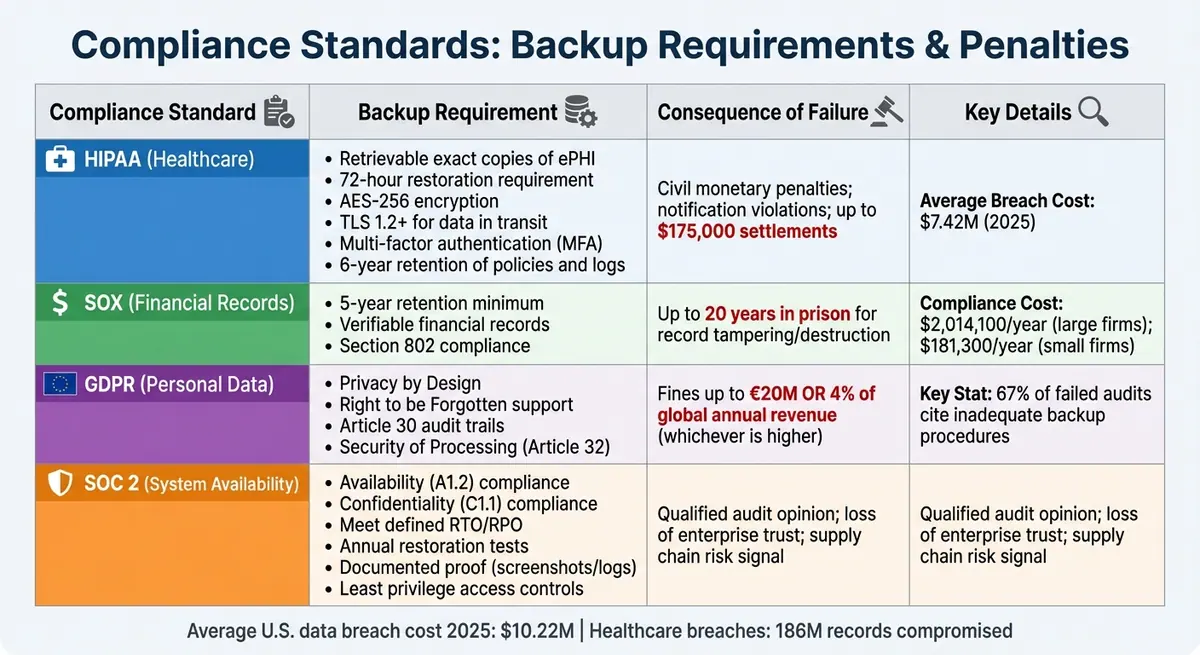
Compliance Standards Backup Requirements and Penalties Comparison
Regulatory frameworks establish specific rules for how backups should be stored, protected, and verified. Here's a closer look at what HIPAA, SOX, GDPR, and SOC 2 demand to ensure backup integrity.
HIPAA: Healthcare Data Protection Requirements
HIPAA's Contingency Plan standard (§164.308(a)) outlines safeguards for electronic protected health information (ePHI). The 2026 updates bring stricter requirements, including AES-256 encryption for data at rest, TLS 1.2 or higher for data in transit, and multi-factor authentication (MFA) for all access points. Organizations must restore systems within 72 hours, with immutable cloud backups typically enabling recovery in 4–6 hours. Additionally, policies, risk assessments, and backup logs must be retained for six years. Any third-party ePHI handlers are required to sign a Business Associate Agreement (BAA).
SOX: Financial Record Retention Requirements
While healthcare regulations focus on protecting sensitive data, SOX emphasizes the retention and verifiability of financial records. Under the Sarbanes-Oxley Act, companies must retain financial records for at least five years. Section 802 enforces penalties of up to 20 years in prison for tampering with, destroying, or falsifying records that could obstruct federal investigations. Compliance costs vary significantly: large firms (over $10 billion in revenue) spend an average of $2,014,100 annually, while smaller firms (under $25 million in revenue) average $181,300.
GDPR and SOC 2: Personal Data and System Availability
GDPR enforces a "Privacy by Design" approach, requiring backup systems to support the "Right to be Forgotten." This means organizations must identify and remove specific personal data from all backup sets. Article 30 also mandates detailed audit trails, with non-compliance fines reaching up to €20 million or 4% of global annual revenue.
SOC 2, on the other hand, prioritizes Availability and Confidentiality. Organizations must demonstrate their ability to restore data within defined Recovery Time Objectives (RTO) and Recovery Point Objectives (RPO). Evidence, such as screenshots or logs from successful restoration tests, is critical. Without this proof, auditors may issue a "qualified opinion", signaling potential risk for enterprise clients. Annual restoration tests are required, though more frequent testing is advised for mission-critical systems. Backup management must also follow strict access controls, applying the principle of least privilege.
"Backup And Recovery For SOC 2 is not merely an IT checkbox; it is the primary evidence your enterprise clients require to trust you with their data resilience."
- Amit Gupta, Founder & CEO, Konfirmity
How to Maintain Backup Integrity
Maintaining reliable backups isn't just about creating copies of your data - it’s about ensuring those backups are secure, functional, and recoverable when needed. A systematic approach is essential to meet compliance standards and reduce risks. Here’s how you can safeguard backup integrity effectively.
Using the 3-2-1-1-0 Backup Rule
The 3-2-1-1-0 rule is widely regarded as the benchmark for backup reliability. It emphasizes:
- Keeping three copies of your data (original + two backups)
- Storing them on two different types of media (e.g., local disk and cloud)
- Keeping one copy offsite in a separate location
- Maintaining one immutable or air-gapped copy
- Ensuring zero errors through automated verification
An immutable backup is critical for defending against ransomware. Attackers often target backup files alongside live data, aiming to force ransom payments. Using tools like Write-Once-Read-Many (WORM) storage or S3 Object Lock, you can create a "locked" backup that even internal threats can't delete.
"The 3-2-1-1-0 backup strategy... introduces immutability, isolation, and verification as first-class design principles, not optional add-ons." - Joshua Silvia, Scality
While initial costs for small businesses may range from $1,300 to $3,300 (with monthly fees between $80 and $140 for 500 GB of immutable cloud storage), this investment is far less than the potential financial fallout of ransomware attacks. Downtime alone averages three weeks, with ransom demands often exceeding $5 million. However, backups are only as good as their reliability - which brings us to testing.
Methods for Verifying Data Integrity
Creating backups is just step one. Verifying their reliability is equally important. Here are some ways to ensure your backups are trustworthy:
- Checksum and hash validation: Algorithms like SHA-256 generate unique values for your original data and backups. If these match, your backup is an exact copy. However, this method doesn’t guarantee that systems will boot or function properly after recovery.
- Restore testing: Regularly test your backups by restoring small data subsets weekly or monthly. Perform full system restores quarterly to confirm your Recovery Time Objectives (RTO). Documentation of these tests, including dates, datasets, RTO targets, and outcomes, ensures you have audit-ready evidence.
- Instant recovery verification: This faster method involves mounting backups as virtual machines to confirm that the operating system boots correctly. Modern tools even use machine learning to analyze boot screens for automated verification.
"If you don't test your backups for recoverability, you really don't have backups at all." - Acronis
Access Controls and Encryption Standards
Protecting your backups from unauthorized access is non-negotiable. Start with Role-Based Access Control (RBAC) and the Principle of Least Privilege to limit access strictly to authorized personnel. Adding Multi-Factor Authentication (MFA) for critical backup operations further reduces the risk of breaches through compromised credentials.
Encryption is another cornerstone of backup security. Use AES-256 encryption for data at rest and TLS 1.2 or higher for data in transit. Keep encryption keys separate from the data itself, ideally in a Key Management System (KMS) or Hardware Security Module (HSM). Regularly rotate these keys and implement additional measures like IP whitelisting and location-based restrictions to secure backup consoles.
Comprehensive audit logging is also essential. Track key usage, restore operations, and administrative changes to meet compliance standards like SOC 2 and ISO 27001. When paired with immutable storage, these measures create a "cyberdefense bunker", making it nearly impossible for attackers to tamper with your backup chains.
How Reform Supports Data Backup Integrity

Reform goes beyond traditional backup practices by ensuring the integrity of data collected through form submissions. While many businesses prioritize backing up core systems, form data often gets neglected - despite its critical role as an entry point for customer information that must adhere to compliance standards. Reform tackles this issue by embedding backup integrity directly into its form infrastructure.
Secure Form Data Storage and Encryption
Reform employs AES-256 encryption alongside SSL/TLS protocols to safeguard form submissions from unauthorized access or tampering. This dual-layer security ensures that data remains intact both during storage and recovery, meeting strict compliance standards. Additionally, Reform provides comprehensive audit logs that document every instance of access, modification, or restoration. These logs serve as verifiable proof for HIPAA audit trails and SOC 2 monitoring requirements.
CRM and Marketing Tool Integration
With Reform's HubSpot integration, data syncing happens automatically, eliminating manual errors and ensuring that backups are complete and accurate. Validated leads are transferred in real-time, ensuring that your CRM reflects the same high-quality data as your forms. These integrations also incorporate role-based access controls (RBAC) and multi-factor authentication (MFA) during data transfers, aligning with compliance standards like SOX and GDPR. Additionally, automated alerts notify users of any transfer failures, helping monitor backup success rates and recovery objectives.
Pro Plan Features for Data Reliability
Reform's Pro Plan ($35/month or $350/year) offers advanced tools designed to enhance data reliability. Features like file upload validation, incomplete response tracking, and retention controls enforce the 3-2-1-1-0 backup rule, ensuring verified and immutable copies of your form data. The plan also includes email validation, lead enrichment, and spam prevention to filter out invalid or malicious entries before storage, reducing the risk of corrupted backups. By automatically populating fields with accurate data from verified sources, lead enrichment minimizes manual errors and further strengthens data integrity.
Conclusion
Backup integrity has become a daily necessity, serving as a cornerstone for both compliance and resilience. As previously highlighted, "Backup And Recovery For SOC 2 is not merely an IT checkbox; it is the primary evidence your enterprise clients require to trust you with their data resilience".
With 96% of ransomware attacks targeting backup repositories and the global average cost of a data breach projected to hit $4.88 million in 2024, the stakes for maintaining uncompromised backups couldn't be higher. A single failure in backup reliability can lead to businesses facing costly operational rebuilds, not to mention penalties under regulations like GDPR, which can reach up to €20 million or 4% of global annual turnover.
To stay ahead, organizations must follow the 3-2-1-1-0 backup rule, utilize WORM (Write Once, Read Many) storage for immutability, and conduct quarterly restore drills to ensure backups are both functional and audit-ready. Security measures such as AES-256 encryption, role-based access controls, and multi-factor authentication further safeguard backups against external and insider threats. These aren't just technical recommendations - they're critical steps to shift compliance from a mere checklist to active risk management.
Regular integrity testing and maintaining detailed audit logs bridge the gap between operational readiness and regulatory requirements. It's one thing to have backups; it's another to prove their reliability with documented logs, test results, and measurable success rates. By prioritizing backup integrity as a key technical control, businesses not only meet compliance standards but also strengthen their defenses against disruptions, safeguarding both their data and their reputation.
FAQs
What proof do auditors expect to verify backup integrity?
Auditors often ask for evidence to confirm that backups are both functional and uncorrupted. This can include:
- Successful restore tests: Proof that data can be restored accurately from backups.
- Validation reports: Documentation showing that backups meet necessary standards.
- Clear documentation: Detailed records that outline the backup process and its reliability.
These steps not only demonstrate compliance but also ensure that data restoration will work when needed.
How often should we run restore tests to stay compliant?
Performing backup restore tests at least once a year is a smart move to ensure your data is safe and recoverable when you need it most. Regular testing helps confirm that your backups are reliable, align with compliance standards, and minimize the risk of losing critical information or facing recovery issues.
Make sure to follow industry guidelines and any specific regulatory requirements tied to your business sector. This way, you can stay compliant while safeguarding your operations against potential data disasters.
How can we delete personal data from backups for GDPR requests?
When handling GDPR requests, it’s crucial to permanently erase personal data from backups using certified methods such as NIST 800-88 or DoD 5220.22-M. Simply deleting or modifying files won’t cut it - these actions don’t guarantee the data is unrecoverable.
To stay compliant and minimize risks, make sure the erasure process is thoroughly documented. Proper documentation not only demonstrates compliance but also provides a clear audit trail if needed.
Related Blog Posts
Get new content delivered straight to your inbox

The Response
Updates on the Reform platform, insights on optimizing conversion rates, and tips to craft forms that convert.



Drive real results with form optimizations
Tested across hundreds of experiments, our strategies deliver a 215% lift in qualified leads for B2B and SaaS companies.
