
.webp)
E-Commerce Data Retention: Best Practices


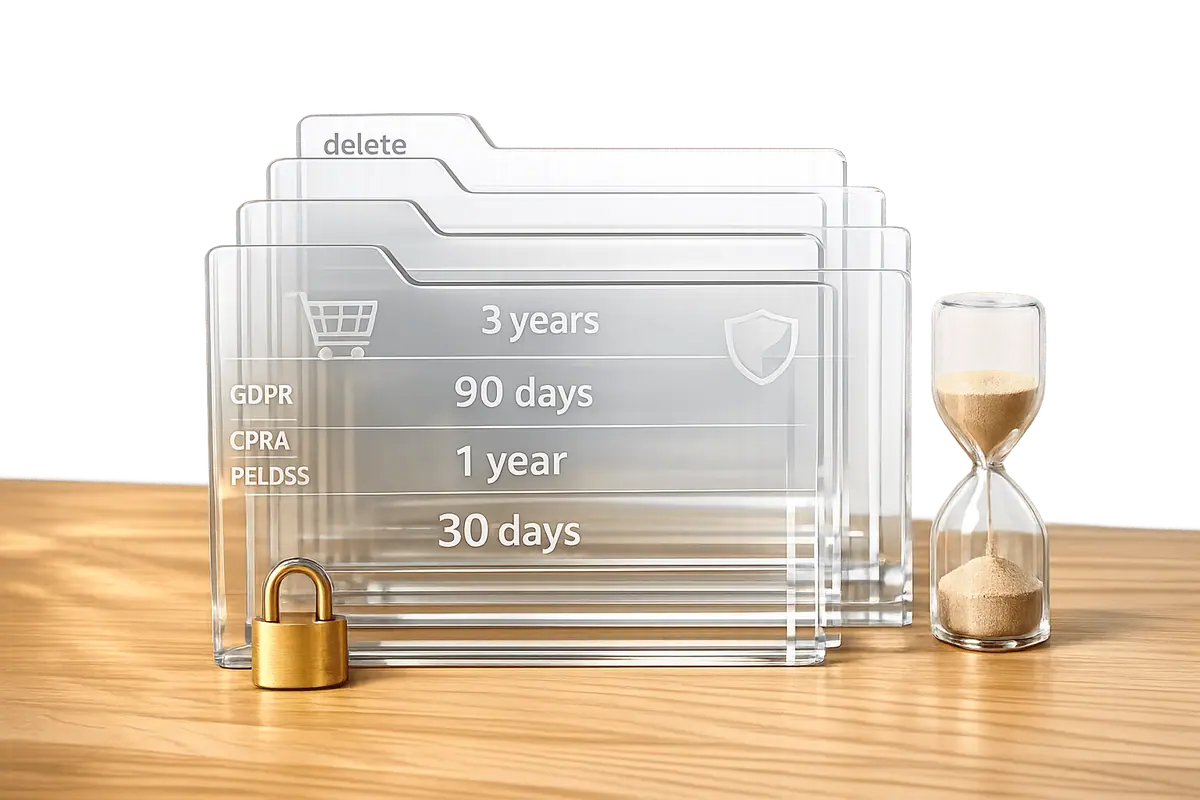
- Compliance Risks: Laws like GDPR and CPRA require businesses to limit how long they store personal data. Non-compliance can lead to fines of up to €20 million or $7,500 per violation.
- Security Concerns: Holding data longer than needed increases vulnerability to breaches. For example, the BlueLeaks breach exposed 270 GB of decades-old data.
- Cost Savings: Proper data retention policies can reduce storage costs by 40–60%.
- Customer Trust: Only 21% of consumers trust current data practices, but 85% want more transparency.
Key Takeaways:
- Legal Compliance: Follow specific rules for GDPR, CPRA, and PCI DSS to avoid penalties.
- Retention Policies: Define clear timelines for keeping data based on type and purpose (e.g., 7 years for tax records, 12–24 months for marketing data).
- Automation: Use tools to tag, schedule, and delete data automatically.
- Secure Storage: Encrypt data at rest and in transit, and limit access using role-based controls.
- Deletion Practices: Automate workflows to delete unnecessary data and handle customer deletion requests promptly.
By implementing these practices, you can reduce risks, cut costs, and build trust with your customers.
Set and Monitor Your Data Privacy Compliance
Legal Requirements for Data Retention
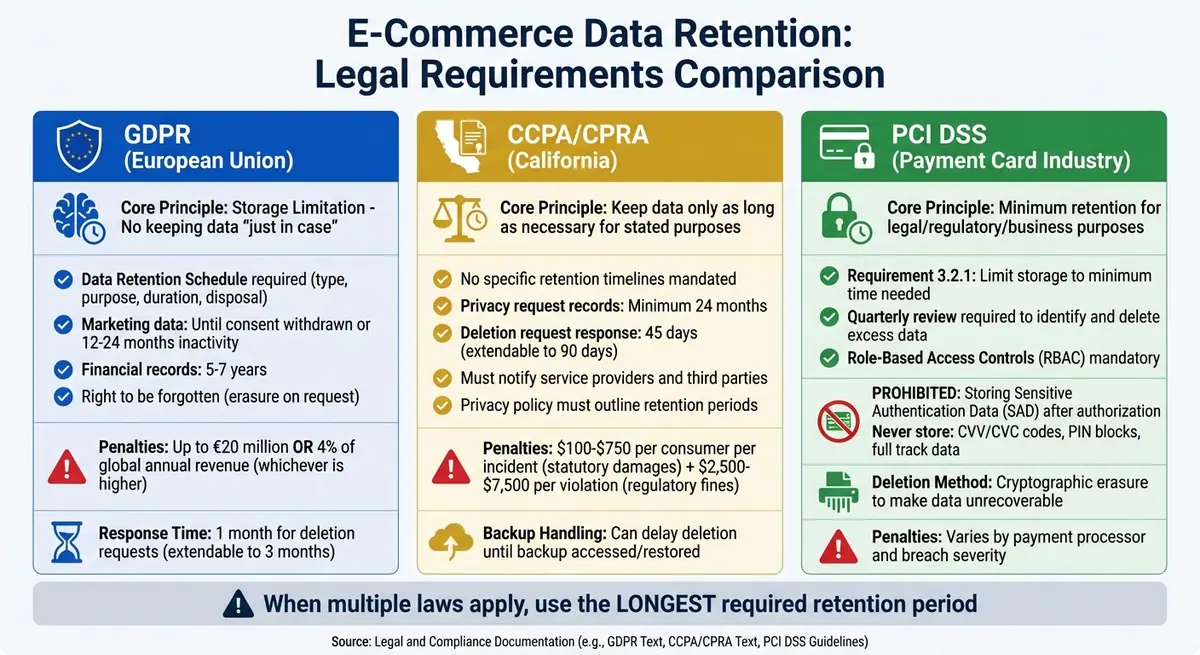
E-Commerce Data Retention Requirements: GDPR vs CCPA vs PCI DSS Compliance Guide
E-commerce businesses operate under strict regulations regarding how long customer data can be stored and when it must be deleted. These rules vary based on the location of your customers and the type of data you're handling. Missteps in compliance can lead to steep fines and fractured customer trust. Let’s start with U.S. standards before diving into international regulations.
CCPA and CPRA Retention Rules
California's privacy laws, including the California Consumer Privacy Act (CCPA) and the California Privacy Rights Act (CPRA), don’t dictate exact timelines like “retain data for three years.” Instead, they require businesses to hold personal information only as long as necessary to fulfill the stated purposes. After that, you’ll need a separate legal or operational reason to keep it.
However, there are clear rules for handling consumer privacy requests. For instance, you must keep records of all privacy-related requests - whether they involve data deletion, access, or correction - and your responses for at least 24 months. If a consumer submits a valid deletion request, you must respond within 45 days (extendable to 90 days with notice). The data must be erased from active systems, and any service providers or third parties handling the data must be notified to do the same.
"Under CPRA, companies can no longer simply hold on to individuals' personal data forever, at least not without justification and not without notifying consumers, employees and other stakeholders of the decision and rationale for doing so." - PwC
Your privacy policy must clearly outline retention periods for each type of personal information collected or explain the criteria used to determine those periods. Non-compliance can result in statutory damages ranging from $100 to $750 per consumer per incident, with regulatory fines between $2,500 and $7,500 per violation.
GDPR Data Minimization and Retention Limits
If your business serves customers in the European Union, the General Data Protection Regulation (GDPR) applies. Its storage limitation principle prohibits keeping personal data in identifiable form longer than necessary for the original purpose. You can’t retain data "just in case" it might be useful later.
To comply, you need a Data Retention Schedule detailing the type of data stored, its purpose, retention duration, and disposal method. For example, marketing data is typically kept until consent is withdrawn or after 12–24 months of inactivity, while financial records often require retention for 5–7 years to meet accounting laws.
Penalties for GDPR violations are steep: up to €20 million (approximately $24.6 million) or 4% of global annual revenue, whichever is higher. Additionally, EU customers have the "right to be forgotten", meaning you must delete their personal data upon request if it’s no longer needed for its original purpose. These regulations also intersect with industry-specific standards like PCI DSS, which governs payment data security.
PCI DSS Standards for Transaction Data
For businesses handling credit card transactions, PCI DSS (Payment Card Industry Data Security Standard) imposes strict rules on transaction data management. While the standard doesn’t specify exact retention periods, Requirement 3.2.1 mandates that storage be limited to the minimum time needed for legal, regulatory, or business purposes.
One key restriction is the prohibition of storing Sensitive Authentication Data (SAD) after transaction authorization. This includes CVV/CVC codes, PIN blocks, and full track data - even if encrypted. To ensure compliance, businesses must conduct a quarterly review to identify and securely delete cardholder data that exceeds retention limits.
"Any storage of sensitive authentication data (including full track data, card verification codes/values, and PIN block data) is prohibited after authorization per PCI DSS Requirement 3.3.1." - PCI Security Standards Council
When disposing of payment data, secure deletion methods like cryptographic erasure should be used to make the data unrecoverable. Access to cardholder information must also be tightly controlled through Role-Based Access Controls (RBAC), limiting access to employees with a valid business need.
Creating Data Retention Policies
To create an effective data retention policy, you need to go beyond understanding the legal requirements - you must translate them into clear, actionable steps your team can follow. A well-thought-out policy strikes a balance between staying compliant with regulations and ensuring your operations run smoothly. The process starts with understanding exactly what data you’re working with.
Set Retention Periods by Data Type
Begin by conducting a thorough data inventory. Identify and categorize all the types of information your organization collects, such as customer profiles (e.g., contact details and purchase history), transaction records (like invoices and receipts), and behavioral logs (including website analytics and cookies). Instead of lumping everything into a general category like "Customer Information", break it down into more specific groups such as "Financial", "Marketing", or "HR." This approach allows you to assign appropriate retention periods to each category.
When setting retention periods, consider both legal requirements and business needs. For example, the IRS mandates keeping tax records for seven years, while marketing data might only need to be retained until consent is withdrawn or after 12–24 months of inactivity. If multiple laws apply, use the longest required retention period and document why that decision was made.
| Data Category | Typical Retention Period | Justification |
|---|---|---|
| Customer Transactions | 7 years | IRS/Tax requirements |
| Marketing Data | Until consent withdrawal or 12–24 months inactivity | Legitimate interest/Consent management |
| Website Analytics | 14 months to 2 years | Business performance measurement |
| System/Server Logs | 30–90 days | Security monitoring and troubleshooting |
Document Policies with Clear Timelines
Creating a retention policy is only part of the process - documenting it thoroughly is just as critical. Your retention schedule should be easily accessible to all relevant stakeholders, from marketing teams to legal advisors. A simple four-column spreadsheet can be an effective tool, listing the data description, retention period, responsible department or individual, and notes on deletion methods.
Be specific about both timelines and disposal methods. For example, define secure disposal methods such as cryptographic erasure, physical destruction, or irreversible anonymization for data retained for analytical purposes. A lack of clarity can lead to costly mistakes, as illustrated by a vision care company fined $600,000 by the New York Attorney General for retaining personal data in an employee email account for six years. This data should have been either securely transferred or deleted once it was no longer needed.
"The data that's removed is as important, perhaps more important, than the data that's retained."
– PwC
To stay on top of compliance and operational needs, align your retention policies with business and legal priorities and review them annually. Automating these processes can make them more efficient and less prone to errors.
Automate Retention Schedules
Manually managing data retention is both time-consuming and prone to errors. Instead, use automation to tag data, set retention periods, and schedule deletions. This not only reduces the workload on your team but also ensures your organization stays compliant. For instance, platforms like Reform offer built-in tools to manage retention timelines and automate deletion workflows, making it easier to handle form submissions and other types of data according to your policies.
Automation can also be tied to specific events rather than relying on arbitrary dates. For example, retention periods can be triggered by account closures, contract terminations, or warranty expirations. Many cloud storage solutions allow you to configure lifecycle policies that automatically archive or delete data when its retention period ends. This approach not only simplifies compliance but can also cut storage costs by 40–60% by eliminating unnecessary data.
Secure Data Storage Practices
Once you've defined retention policies and automated your schedules, the next critical step is safeguarding stored data. Protecting sensitive e-commerce data goes beyond meeting compliance standards - it's about maintaining customer trust and preserving your business's reputation. A data breach can result in hefty fines and irreparable damage to customer confidence. With retention policies in place, securing stored data becomes a top priority.
Encrypt Stored Customer Data
Encryption transforms your data into an unreadable format, accessible only with the correct decryption key. For e-commerce businesses, this means shielding customer payment details, addresses, and purchase histories from unauthorized access.
Start by categorizing your data - public, internal, confidential, and highly confidential. This classification helps you decide which encryption methods to apply. For sensitive customer data, AES-256 (256-bit Advanced Encryption Standard) is the go-to algorithm for encrypting data at rest in databases, archives, and other storage systems. It's trusted across industries for its reliability.
Securing data in transit is equally important. Use TLS protocols to protect information moving between servers, payment processors, and customer browsers. This ensures that sensitive data, like payment details exchanged during checkout, cannot be intercepted. Together, encryption at rest and in transit creates a robust defense for your data.
Key management is another essential piece of the puzzle. Centralized systems like AWS KMS allow you to create, control, and rotate encryption keys automatically, adhering to FIPS 140-2 Level 3 standards. Automating key rotation schedules limits the exposure of data to a single compromised key, reducing potential risks.
| Encryption Type | Description | Use Case |
|---|---|---|
| At Rest | Protects stored data in databases or archives | Securing customer PII and transaction records |
| In Transit | Secures data moving between systems or users | Protecting checkout processes and API communication |
| In Use | Safeguards data actively being processed | Minimizing risks during real-time data manipulation |
For businesses handling payment card information, advanced methods like tokenization or format-preserving encryption (FPE) are excellent options to meet PCI DSS requirements.
"Encryption is a fundamental cybersecurity tool for protecting sensitive data in the digital age... safeguarding this valuable information through robust encryption practices is an essential component of a comprehensive data protection strategy." – Kurt Kumar, Amazon Web Services
While encryption secures the content of your data, managing who can access it is just as critical.
Use Role-Based Access Controls
Role-based access controls (RBAC) ensure that only authorized personnel can access specific data based on their job roles. This approach minimizes the risk of insider threats - whether accidental or intentional - and establishes a clear audit trail.
Define granular permissions tied to organizational roles. For instance, your marketing team might need access to customer email addresses and engagement data but shouldn't have visibility into full payment details or transaction histories. Conversely, your finance team requires access to invoices and payment records but not website analytics.
Adopt a Zero Trust framework, which requires verification for every access attempt, regardless of whether the request originates from inside or outside your network. Even employees in your office must authenticate their identity and prove they have the necessary permissions.
Integrate your data classification system with access controls. Automated tools can restrict access to sensitive categories like personally identifiable information (PII). For encrypted data, enforce policies that limit which roles can use cryptographic keys for decryption. Accessing encrypted data should require permissions for both the storage service and the decryption key.
Enable multi-factor authentication (MFA) for high-risk actions, such as deleting critical data or modifying versioning settings. MFA adds an extra layer of security beyond just a password, reducing the likelihood of accidental or malicious data loss. Regularly audit permissions to identify compliance gaps and ensure your team understands their responsibilities.
"Ensure that only authorized personnel can access, modify, or delete data according to their roles and responsibilities." – FileCloud
Use Cloud Storage Solutions
Cloud storage platforms bring built-in security features, scalability, and cost efficiency that are hard to match with traditional on-premises setups. For e-commerce businesses managing vast amounts of customer data, cloud solutions provide enterprise-grade protection without requiring a dedicated IT security team.
Amazon S3, for example, includes features like Object Lock, which supports "Write Once, Read Many" (WORM) compliance. It also offers default encryption to meet regulatory requirements and protect stored data. For block-level storage, Amazon EBS (Elastic Block Store) encrypts all new volumes by default, while Amazon RDS and Aurora handle automated backups and snapshots with encryption at rest.
Google Cloud Storage takes a unique approach to logical data deletion by employing cryptographic erasure. This method renders data permanently unreadable by deleting its encryption keys, even before the physical storage is overwritten. It's particularly effective for large datasets.
To enhance security, configure your cloud storage to block public access by default for buckets, snapshots, and encryption keys unless public access is explicitly needed. Tools like Amazon Macie can help by automatically discovering, classifying, and securing sensitive data like PII, giving you greater visibility across your data environment.
Cloud platforms also offer cost-saving opportunities. For example, Amazon EC2 Spot instances can save up to 90% on non-critical workloads, while serverless options like AWS Glue and Athena charge only for resources actively used.
"The Nitro System is designed to have workload confidentiality and no operator access. With the Nitro System, there's no mechanism for any system or person to log in to EC2 servers, read the memory of EC2 instances, or access any data stored on instance storage and encrypted EBS volumes." – AWS
sbb-itb-5f36581
Data Deletion and Minimization Strategies
Once secure storage is in place, the next step is reducing your data footprint. Keeping only the data you truly need lowers storage costs, reduces breach risks, and simplifies compliance. The goal is to collect only what’s necessary for your business and delete it once it’s no longer needed. Below are strategies to automate deletions, handle customer data requests, and document every action.
Set Up Automated Deletion Workflows
Manually deleting large amounts of data isn’t practical. Automated workflows ensure outdated data is removed on time without constant monitoring.
Start by categorizing data at the time it’s collected. Assign tags to records - such as customer account info, marketing data, or transaction history - and set retention periods based on legal and business requirements. For instance, financial records may need to be kept for 5–7 years for tax purposes, while server logs might only need 30–90 days for security monitoring.
Leverage tools like Amazon S3 lifecycle policies and DynamoDB TTL to tag data with expiration dates and automate deletions. Event triggers can also help. For example, delete data after specific events like account closure, contract termination, or prolonged inactivity in marketing campaigns.
Organize databases by time to make deletions more efficient. Structuring data lakes or warehouses into time-based partitions allows you to remove older segments without disrupting entire datasets. For databases with referential integrity, redact sensitive data while preserving key structures to maintain functionality.
A real-world example: In October 2022, the FTC ordered Drizly LLC to implement a strict data minimization program after a breach impacted 2.5 million consumers. Drizly was required to destroy unnecessary data within 60 days, publish its retention schedule online, and provide the FTC with written proof of what was deleted. This highlights the importance of clear, documented deletion practices.
Handle Data Subject Requests
Automated workflows also simplify compliance with customer rights, such as the right to request data deletion under privacy laws like GDPR and CCPA. Your business must have a clear process to verify, process, and document these requests within legal timeframes.
Under GDPR, customers can request data erasure verbally or in writing, without needing specific legal terms. Train employees to recognize these requests and log them immediately. GDPR requires responses within one month, with a possible two-month extension for complex cases. CCPA imposes similar deadlines.
Verify the requester’s identity before proceeding; deny the request if verification fails. Once verified, delete the data using methods like permanent erasure, anonymization, or aggregation.
Inform third parties about the deletion request if you’ve shared the data with them, unless it’s impossible or overly burdensome.
Handling backup data can be tricky. GDPR requires putting backup data "beyond use" immediately, even if physical deletion waits for the next backup cycle. CCPA permits delays until the backup system is accessed or restored. Document these processes to demonstrate compliance.
| Feature | GDPR (Right to Erasure) | CCPA/CPRA (Request to Delete) |
|---|---|---|
| Request Format | Verbal or written | Specific methods (e.g., toll-free number, web form) |
| Response Time | One month (extendable by 2 months) | Specific statutory timelines |
| Deletion Methods | Erasure or irreversible anonymization | Erasure, de-identification, or aggregation |
| Backup Handling | Must put "beyond use" immediately | Can delay until next access/restoration |
If a request must be denied - for example, due to tax record retention laws - explain the reason clearly. Inform the individual of their right to complain to a regulator and pursue legal remedies.
Track Compliance with Audit Logs
Audit logs provide a permanent record of what data was deleted, when it was deleted, and who authorized it. This documentation is essential for regulatory audits and investigations.
Your logs should capture every deletion event across all environments - production, testing, and development. Include details like the data category, affected records, deletion date and time, method used (automated or manual), and the business or legal reason.
Make sure these logs are immutable to ensure they can’t be altered. Regulators rely on such records to evaluate your data practices.
"The data that's removed is as important, perhaps more important, than the data that's retained." – PwC
Audit logs also help you spot compliance issues. For instance, they can reveal patterns like data being kept too long or workflows failing to execute. Regular reviews not only ensure compliance but also make responding to customer data requests faster and easier. These logs complete your data lifecycle management process.
Tools for Managing Form-Based Lead Data
Managing form-based lead data goes hand-in-hand with automated deletion workflows and secure storage practices. For e-commerce businesses, forms are a goldmine of lead data - whether it’s newsletter signups, checkout details, contact forms, or survey responses. But with this data comes responsibility: it needs to be securely stored, retained only as long as necessary, and deleted promptly when it’s no longer needed.
Thankfully, modern form tools make this process easier. They can automate retention settings, clearing out outdated records and syncing data directly with CRM or marketing platforms. This reduces the need for manual oversight and helps lower compliance risks. Platforms like Reform take this a step further, offering solutions tailored to meet industry-specific retention requirements.
Reform Features for Retention Management

Reform is designed to help businesses comply with key data retention regulations. One of its standout features is the ability to tag and automatically route form submissions. For example, data can be sent to platforms like HubSpot or Salesforce, where predefined retention periods can be applied - like keeping marketing data for 12–24 months or deleting incomplete submissions after 30 days.
Reform also excels at precision. Its conditional routing system ensures that each lead type gets the right retention tag from the moment it’s collected. For incomplete submissions, shorter retention periods can be applied, while custom code support allows businesses to create retention logic that fits their unique needs. This targeted approach not only reduces risk but also ensures compliance by keeping only the data that’s absolutely necessary.
Conclusion
Data retention isn’t just about ticking a compliance box - it’s a critical practice that safeguards your e-commerce business from security threats, hefty fines, and damaged customer trust. In 2023 alone, data breaches cost businesses an average of $4.45 million and compromised over 350 million records worldwide. Pair that with the fact that only 21% of consumers trust how companies handle their data, and it’s clear: having a transparent and effective data retention policy can set you apart from competitors.
The days of "keep everything just in case" are behind us. Modern regulations demand that businesses adopt a "keep only what’s necessary" approach. Failing to comply with privacy laws can lead to severe financial penalties, with fines varying based on the nature and intent of violations. Regulatory bodies are actively enforcing these rules, requiring companies to implement strict data minimization and retention programs.
As noted earlier, managing what you delete is just as important as managing what you keep. This highlights the strategic importance of retention management in today’s data-driven world.
By following best practices like legal compliance, secure storage, and efficient deletion protocols, businesses can mitigate risks. Proper retention practices not only lower storage costs but also simplify responses to consumer data requests and reduce exposure during security incidents. Over-retention, on the other hand, can lead to unnecessary risks - many breaches have exposed decades-old data that should have been deleted long ago.
Start with a comprehensive data inventory, establish clear retention timelines, automate deletion processes, and conduct regular audits. Whether you’re handling transaction data under PCI DSS or managing form submissions through tools like Reform, the principle remains the same: collect only what’s necessary, keep it secure, and delete it once it’s no longer needed. By adopting these strategies, e-commerce businesses can responsibly manage data while boosting compliance, security, and customer confidence.
FAQs
What steps can e-commerce businesses take to comply with GDPR and CPRA data retention rules?
To meet the requirements of GDPR and CPRA, e-commerce businesses must create clear policies for how long personal data is stored and ensure it’s either deleted or anonymized once it’s no longer necessary. Both regulations emphasize the importance of justifying retention periods, being transparent about practices, and avoiding indefinite storage without legitimate reasons.
One effective approach is to develop a data retention schedule. This document should outline:
- How long different types of data will be retained.
- Who is responsible for managing the data.
- The specific actions to take when the retention period ends, such as deletion or anonymization.
It’s crucial to review and update this schedule regularly to align with current legal requirements and business operations. Additionally, ensure these policies are well-documented and that your team is trained to implement them consistently. This not only promotes transparency but also ensures accountability across the organization.
By following these steps, businesses can safeguard customer privacy, minimize legal risks, and maintain compliance with GDPR and CPRA guidelines.
Why is automating data deletion important for e-commerce businesses?
Automating the deletion of data in e-commerce plays a key role in safeguarding security, adhering to data privacy laws, and managing storage effectively. By routinely clearing out outdated or unnecessary information, businesses can lower the chances of data breaches and handle sensitive customer details with care.
Automation also cuts down on manual work, saving both time and reducing the likelihood of mistakes. On top of that, it helps keep storage costs in check by avoiding the buildup of unused data, enabling companies to allocate resources to more pressing priorities.
How does encryption protect e-commerce data during storage and transfer?
Encryption plays a crucial role in protecting e-commerce data by transforming it into an unreadable format. Only those with the proper decryption keys can access this information, adding a strong layer of security - especially during storage or transfer, when data is most at risk of breaches or interception.
By encrypting sensitive details like customer information, payment data, and transaction records, businesses can block unauthorized access and safeguard customer trust. This approach is a cornerstone of today’s data protection practices in e-commerce.
Related Blog Posts
Get new content delivered straight to your inbox

The Response
Updates on the Reform platform, insights on optimizing conversion rates, and tips to craft forms that convert.



Drive real results with form optimizations
Tested across hundreds of experiments, our strategies deliver a 215% lift in qualified leads for B2B and SaaS companies.
