
.webp)
Why CRM Backup Matters for Lead Management


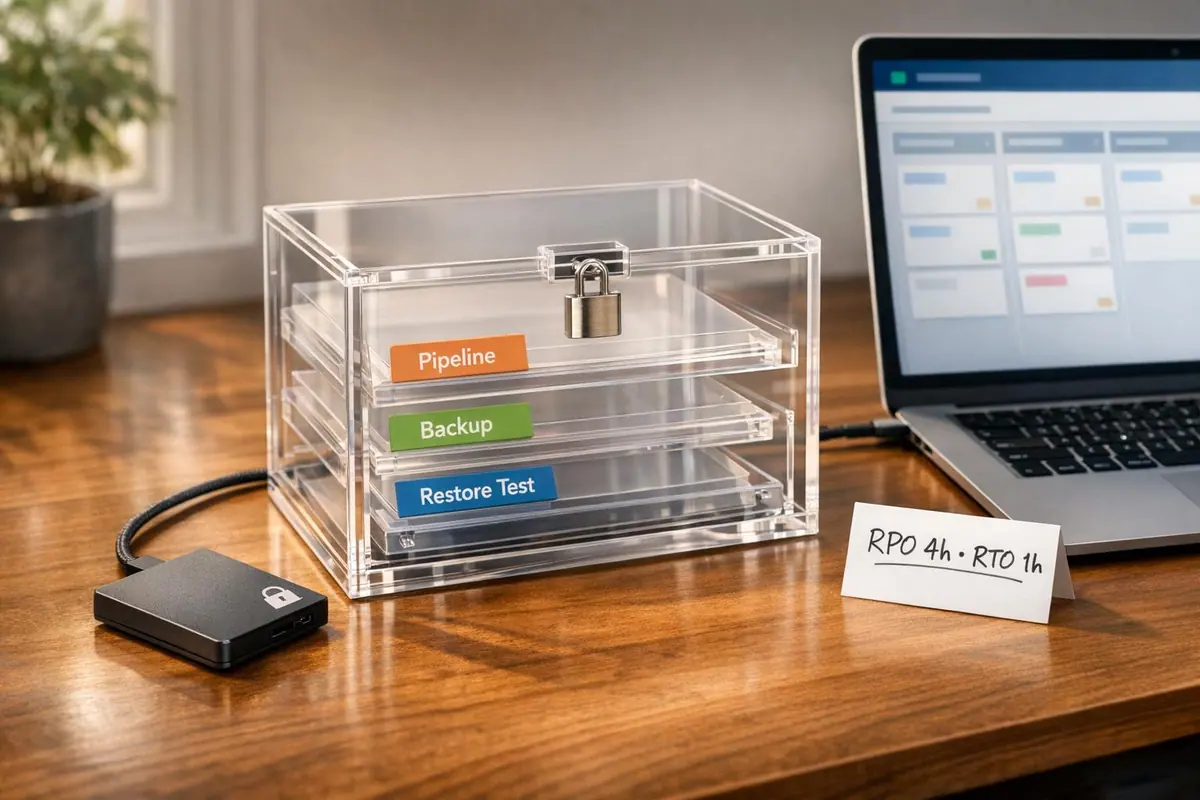
Losing CRM data is like losing the engine of your business. Without backups, you risk losing critical lead information, disrupting sales pipelines, and damaging customer relationships. Here's why CRM backups are essential and how they protect your lead management:
- Lead Data Drives Revenue: CRM systems store contact details, communication history, and deal progress - key components of your sales and marketing efforts. Poor data quality costs businesses $12.9M annually.
- Data Loss is Common: Human errors, technical glitches, and cyberattacks frequently result in missing or corrupted data. For example, 20% of data loss incidents stem from human mistakes.
- Backups Ensure Continuity: Regular backups protect against disruptions, saving time and money. They prevent downtime, ensure accurate data recovery, and safeguard sensitive lead information.
Actionable Steps:
- Automate backups to reduce errors.
- Use encryption and multi-location storage for security.
- Test backups quarterly to ensure they work when needed.
Without a proper backup plan, you risk revenue loss, operational delays, and customer trust. Investing in backups is a safeguard for your business's future.
Automatically Backup Lead Data in Real Time
sbb-itb-5f36581
The Problem: What Happens When You Lose Lead Data
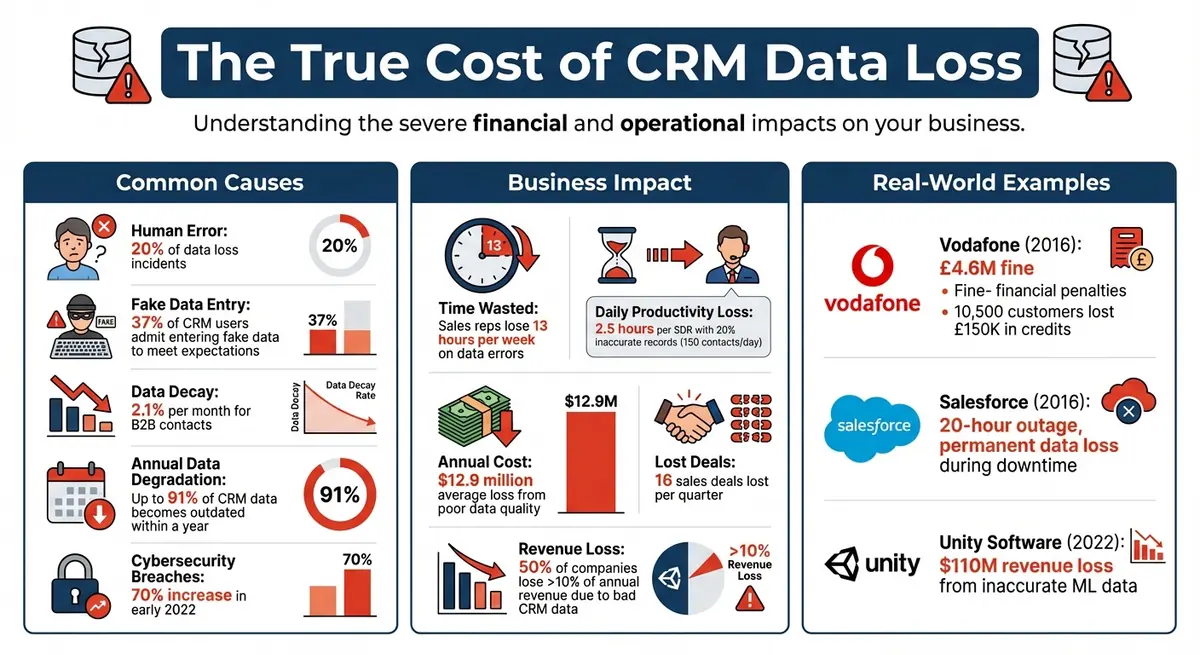
The Cost of Poor CRM Data: Key Statistics on Data Loss and Business Impact
Common Causes of Lead Data Loss
Losing lead data can happen for several reasons, and the culprits often include technical issues, human mistakes, and the natural decay of data over time. Human error is a big one - think accidental deletions, typos during manual data entry, or creating duplicate records. In fact, 37% of CRM users admit that fake data sometimes gets entered just to meet leadership expectations. Then there are technical failures, like hardware crashes, power outages during backups, or glitches that mess up data storage. Bulk CSV imports without proper field mapping can also wreak havoc, erasing critical lead source information and wiping out attribution history.
Data decay is another silent problem. B2B contact details degrade at an alarming rate - about 2.1% per month. That means within a year, up to 91% of your CRM data could be outdated, incomplete, or duplicated. And let’s not overlook cybersecurity threats. Data breaches and unauthorized access are on the rise, with breaches increasing by 70% in early 2022. These attacks can corrupt or permanently delete sensitive lead records.
The result? These issues collectively disrupt how your business operates.
How Lead Data Loss Affects Your Business
Losing lead data throws a wrench into your revenue operations. Sales pipelines can grind to a halt when leads are misrouted or left unassigned. Hot leads can go cold if lifecycle stages don’t update on time. And sales reps? They end up wasting precious hours - up to 13 hours a week - searching for missing details or fixing errors. For example, if 20% of lead records are inaccurate, a sales development rep (SDR) working with 150 contacts daily could lose around 2.5 hours every day just trying to track down correct information.
"Making key business decisions off of unreliable CRM data is like driving with faulty tires – there's no way it doesn't hurt the passengers." - Nektar.ai
The financial hit is just as severe. Poor data quality costs companies an average of $12.9 million annually and can result in losing about 16 sales deals per quarter. Half of all companies estimate they lose more than 10% of their annual revenue due to bad CRM data. And it’s not just about the numbers - customer relationships take a hit too. Duplicate records might mean multiple reps contacting the same lead, while incomplete data can lead to impersonal outreach, like emails still containing placeholder tags ("{First Name}"). On top of that, finance teams struggle with skewed pipeline metrics and forecasts based on deals that don’t actually exist.
This is why having a solid CRM backup plan is non-negotiable. Real-world examples show just how damaging these issues can be.
Examples of CRM Failures
Real-world incidents highlight the risks of losing CRM data. Back in October 2016, Vodafone faced a £4.6 million fine from UK telecom regulator Ofcom after a botched 2013 migration project. The company tried to move 28.5 million customer accounts to a single Siebel CRM system, but data migration errors caused 10,500 customers to lose £150,000 in credits.
Even tech giants aren’t immune. On May 10, 2016, Salesforce experienced a database failure on its "NA14" instance, leading to a 20-hour outage. While they eventually restored the system using backups, any data recorded during the downtime was permanently lost, leaving teams scrambling without critical lead information.
Perhaps the most striking example is from May 2022, when Unity Software revealed during its Q1 earnings call that inaccurate data had been fed into a key machine learning model for ad targeting. The result? A projected $110 million revenue loss for the year. These cases serve as powerful reminders of what can go wrong without proper CRM data protection in place.
The Solution: How to Set Up CRM Backup Strategies
Steps to Create a CRM Backup Plan
Start by conducting a thorough audit of your CRM to pinpoint essential lead data such as contacts, deals, tasks, custom fields, and attachments. Recognizing that not all data carries the same importance, categorize it based on its sensitivity and business value. This step helps you focus your backup efforts where they matter most. Afterward, define your RPO (Recovery Point Objective) to determine the maximum acceptable data loss and your RTO (Recovery Time Objective) to establish the maximum time allowed for data restoration. These two metrics will serve as the backbone of your backup strategy.
Backup frequency should match the pace at which your data changes. For example, high-volume transactional data might need daily or even hourly backups, while less dynamic records could suffice with weekly updates. Select a backup method that fits your needs - whether that's exporting data directly from your CRM (e.g., CSV/Excel), using API-based integrations, or employing third-party automated tools - and automate the process to minimize human error. Always include unique identifiers, like vid for contacts or dealId for deals, to avoid creating duplicate records during restoration.
| Backup Component | Recommended Frequency | Reason |
|---|---|---|
| High-Volume Leads | Daily or Hourly | Active pipelines update frequently |
| Static Lead Data | Weekly | Historical records rarely change |
| System Updates | Before/After Changes | Captures key integration or configuration updates |
To secure your backups, use encryption, multi-factor authentication, and role-based access controls. Store backups in multiple locations - one cloud-based and one offline - to safeguard against localized disasters. Regularly test your backups by simulating data loss scenarios to confirm that all files are complete and the restoration process works as expected.
Now, let’s explore how external tools can simplify and strengthen your backup process.
Connecting CRM Backups with External Tools
Manual backups are prone to errors, and over 60% of SaaS data loss incidents are caused by accidental deletions. To mitigate these risks, consider API-based integrations. Unlike manual exports, these tools maintain critical associations - such as the links between contacts, companies, and deals - ensuring your CRM’s structure remains intact during restoration. They also capture custom fields and complex relationships that manual methods might overlook. Additionally, API-based solutions allow for granular recovery, enabling you to restore specific records or fields without overwriting the entire database.
Independent storage options, like Amazon S3 or Google Drive, provide an extra layer of protection against CRM-specific outages or vendor disruptions. Many third-party tools enhance security with features like end-to-end encryption, often surpassing what native CRM solutions offer. Automated backups also support compliance by ensuring reliable audit trails and proper data retention. Regular disaster recovery drills - such as restoring a single lead or opportunity - are critical for verifying that your backups are functional and your team is prepared for emergencies.
How Reform Protects Lead Data
Reform simplifies backup management as part of a comprehensive CRM data protection strategy. By integrating with platforms like HubSpot or Klaviyo, Reform ensures that lead data is captured the moment a form is submitted. This real-time sync eliminates any delay between data collection and backup, providing instant redundancy.
Reform also enhances data quality through features like lead enrichment and email validation, ensuring that only accurate and complete information enters your CRM. This reduces the risk of corrupted or incomplete records, which can complicate recovery efforts. With seamless integrations, your lead data flows automatically into your CRM and other connected tools, creating multiple secure storage points. This distributed system ensures that even if one platform encounters an issue, your lead data remains safe across your tech stack.
Best Practices for Backing Up Lead Data
Set Up Automated and Scheduled Backups
Jeff Arnold, Founder of 4Spot Consulting, highlights the importance of automation in backup strategies:
"Manual backups are prone to human error, inconsistency, and often get overlooked in busy operational environments. The cornerstone of an efficient CRM data backup strategy is automation".
Automating backups can significantly reduce errors, cutting manual intervention mistakes by 50%. The frequency of these backups should match the pace of your lead updates. For high-volume environments, daily or even real-time backups (every 15–30 minutes) are ideal, while less dynamic data can be backed up weekly.
The 3-2-1 backup strategy is a tried-and-true method: keep three copies of your data, store them on two different types of media, and ensure at least one copy is offsite or in a separate cloud system. This approach can boost your chances of successful data recovery during emergencies by 80% to 97%.
Defining your Recovery Point Objective (RPO) and Recovery Time Objective (RTO) is also critical. These metrics help determine how much data loss is acceptable and how quickly you need to restore data during a crisis. Regular testing of these systems ensures they work effectively when needed.
Test and Validate Your Backup Systems
Even with automated backups, regular testing is essential to ensure they work as expected. Alarmingly, 67% of businesses only discover corrupted or incomplete backups during emergencies, and 30% of backups fail to restore properly. Tested systems, however, boast a 95% recovery success rate, compared to just 60% for untested ones.
Consider the case of an Ohio-based manufacturing company with 150 employees. In March 2024, they discovered that a silent storage configuration error had caused their backups to fail for eight months. When a ransomware attack hit, they were unable to recover any data. This oversight led to $2.3 million in losses, the loss of two major contracts, and a year-long effort to rebuild customer trust.
To avoid such disasters, perform quarterly test restores. Randomly select files from different backup sources and restore them in an isolated environment. Pay special attention to maintaining relationships between objects, such as contacts linked to deals or companies, as restoring disconnected data can disrupt your CRM structure. Organizations that conduct regular restoration drills recover data 90% faster than those that don’t. Keep detailed records of each test, including dates, results, and any corrective actions taken - this can improve recovery speeds by up to 30% during real emergencies.
Data Security and Retention Policies
Backing up lead data isn’t just about storage - it’s about protection. Use AES-256 encryption for data at rest and SSL/TLS for data in transit to safeguard against unauthorized access. Alison Connor, Sr. Global Product Marketing Manager at Veeam, emphasizes:
"Data encryption is critical for safeguarding information from unauthorized access or interception... ensuring that even if a breach occurs and your data is stolen, the compromised data remains unreadable and unusable".
Adding Multi-Factor Authentication (MFA) and Role-Based Access Control (RBAC) further limits backup access to authorized users. To protect against regional disasters, store backups in multiple geographic locations. Additionally, enable file versioning for 30–90 days to recover from accidental deletions or malicious data corruption.
Retention policies must balance data protection with compliance. For example, daily backups often require a 30-day retention period, weekly backups can be kept for six months, and monthly backups may need to be retained for a year or more to support historical analysis. Certain records, such as those needed for tax or legal purposes, might need to be stored for seven years or longer. Automate cleanup of outdated backups to manage storage costs while keeping essential data intact.
Finally, ensure your backup policies align with regulations like GDPR, CCPA, or HIPAA. With 41% of organizations facing regulatory enforcement actions related to privacy and data protection, compliance is essential to safeguarding your lead data and maintaining customer trust.
Conclusion: Why CRM Backups Matter for Lead Management
Key Takeaways for Businesses
Strong CRM backups are essential for keeping your lead management running smoothly. Your CRM system is the backbone of your sales and marketing operations - it holds deal pipelines, communication records, and contact details that drive revenue. Without reliable backups, a system failure, cyberattack, or even accidental deletion could disrupt your workflow and damage customer trust. The financial impact of significant data loss can reach millions.
Jeff Arnold, Founder of 4Spot Consulting, emphasizes this point:
"A proactive and robust CRM data backup and recovery strategy is not merely a technical safeguard; it's a fundamental pillar of business continuity and operational resilience."
The best strategies include automation, frequent testing, and geographic redundancy. Set clear recovery objectives like RPO (Recovery Point Objective) and RTO (Recovery Time Objective) to ensure timely restoration. Keep backups in separate locations from your primary CRM provider, encrypt data during storage and transfer, and test your recovery systems quarterly to confirm they’ll perform when needed.
In addition to backups, maintaining clean and accurate data from the start further strengthens your lead management efforts.
How Reform Helps Secure Lead Data
Reform complements these backup strategies by focusing on data quality at the source. While backups protect your existing data, avoiding errors in the first place is just as important. Reform ensures clean, enriched lead data through its optimized forms, which include built-in lead enrichment and spam prevention tools. By integrating directly with your CRM, Reform guarantees that leads are captured accurately and routed correctly, reducing the risk of sync-related errors or data corruption.
When paired with a solid backup plan, Reform’s focus on data quality creates a comprehensive protection framework. This dual approach safeguards your sales pipeline, protects customer relationships, and ensures your business can weather unexpected challenges without missing a beat.
FAQs
How often should I back up my CRM?
Backing up your CRM is a smart move to ensure data resilience and keep your business running smoothly. For systems handling large volumes of data, daily backups are highly recommended. Why? Because unexpected system failures can happen, and having a recent backup minimizes the risk of losing critical information.
Regular backups protect essential lead management data, helping you maintain seamless operations even when the unexpected occurs. It’s a straightforward yet effective way to safeguard your business from potential disruptions.
What’s the difference between RPO and RTO?
RTO (Recovery Time Objective) is the longest period a system or application can be offline after an incident before it must return to normal operations. Think of it as the maximum acceptable downtime.
On the other hand, RPO (Recovery Point Objective) defines how much data loss is tolerable during recovery. It’s all about the amount of data you can afford to lose if something goes wrong.
To put it simply: RTO is about downtime, while RPO is about data loss. Both are critical in planning for disaster recovery and ensuring business continuity.
How do I know my backups will actually restore?
To make sure your backups are dependable, it’s crucial to test both the backup and restore processes on a regular basis. Conduct periodic restore tests to verify that the data remains intact and works as expected. Keep well-documented backup policies in place, and implement automated error monitoring to catch problems before they escalate. Consistent testing and validation help ensure your backups will work when you need them most.
Related Blog Posts
Get new content delivered straight to your inbox

The Response
Updates on the Reform platform, insights on optimizing conversion rates, and tips to craft forms that convert.




Drive real results with form optimizations
Tested across hundreds of experiments, our strategies deliver a 215% lift in qualified leads for B2B and SaaS companies.
