
.webp)
Common Field Mapping Errors and Fixes


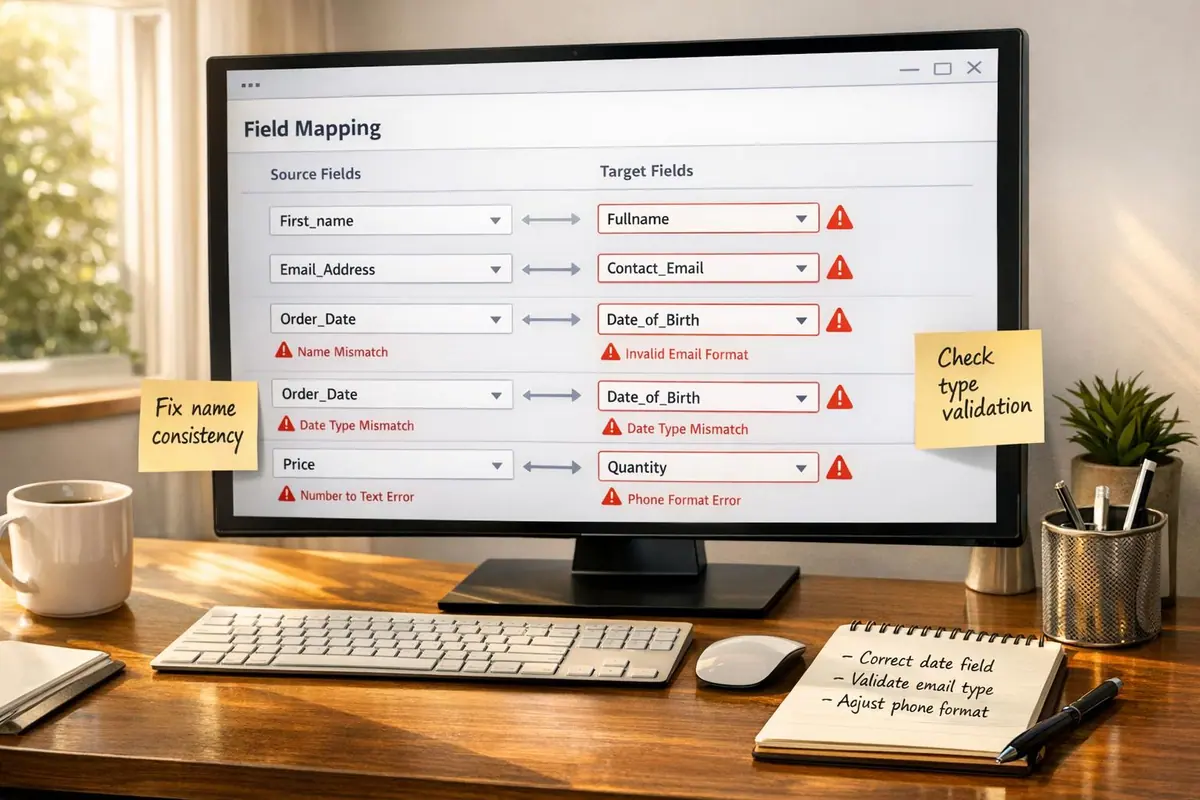
Field mapping errors can cause major disruptions in your data workflows, leading to sync failures, incomplete records, and unreliable reporting. Here’s a quick breakdown of the most frequent issues and how to address them:
- Mismatched Data Types: Mapping incompatible data types (e.g., text to date) leads to sync problems or silent data corruption. Always validate data types before syncing.
- Inconsistent Field Names: Variations in field labels (e.g.,
first_namevs.FirstName) can fragment your data. Standardize naming conventions across systems to ensure alignment. - Field Length and Constraints: Ignoring length limits or formatting rules (e.g., truncating 500 characters to 255) can result in lost data or failed submissions. Set constraints in forms to match system requirements.
Solutions:
- Validate Data Types: Use tools like schema validation libraries to catch mismatches early.
- Standardize Naming: Align field names across platforms to prevent misalignment.
- Enforce Constraints: Apply character limits, required formats, and default values to avoid errors.
By implementing these practices and monitoring field mappings regularly, you can maintain clean, reliable data flows and avoid costly disruptions.
Common Field Mapping Errors and Their Impact
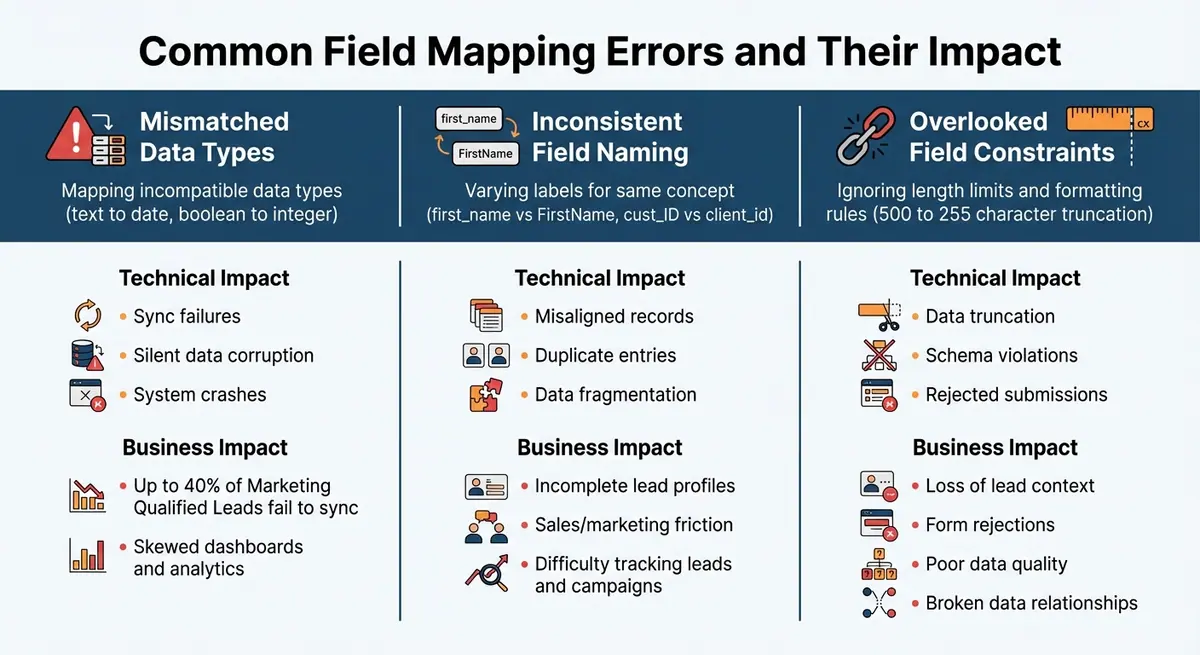
Common Field Mapping Errors: Types, Technical Impact, and Business Consequences
Field mapping errors can wreak havoc on data workflows. Here are three key mistakes that often cause the most damage:
Mismatched Data Types
When data types don't align - like trying to map a text string into a date field or a boolean into an integer - problems arise. These mismatches can lead to sync failures, silent data corruption, or even system crashes. The worst part? The damage might go unnoticed, quietly skewing dashboards and analytics.
Inconsistent Field Naming Conventions
Different systems often use varying labels for the same concept. For example, one system might call a field first_name, while another uses FirstName, or cust_ID versus client_id. These inconsistencies fragment data, making it harder to track leads or analyze campaigns. If platforms like HubSpot and Salesforce don't align their field names, sales teams might end up with incomplete lead data, and marketing teams may struggle to measure campaign success. This misalignment can create frustration and inefficiencies across teams.
Overlooking Field Length and Constraints
Ignoring field length limits or system constraints can lead to serious issues like data truncation or rejected submissions. For instance, mapping a 500-character field into one with a 255-character limit can silently cut off important details. Worse, submissions might fail entirely if they don't meet formatting rules - like specific phone number formats or date structures - or if they violate foreign key dependencies. These errors can break data relationships and disrupt workflows.
| Error Type | Technical Impact | Business Impact |
|---|---|---|
| Mismatched Data Types | Sync failures, silent corruption, system crashes | Up to 40% of Marketing Qualified Leads fail to sync |
| Inconsistent Naming | Misaligned records, duplicate entries | Incomplete lead profiles, sales/marketing friction |
| Overlooked Constraints | Data truncation (500 to 255 characters), schema violations | Loss of lead context, form rejections, poor data quality |
These common errors underscore the importance of precise field mapping. Up next, we'll explore practical solutions to prevent these pitfalls.
How to Fix Field Mapping Errors
Once you’ve pinpointed field mapping issues, the next step is to resolve them. Let’s break down how to tackle these problems step by step.
Validating Data Types and Formats
To avoid type mismatches, use schema-based validation tools like Zod. These libraries let you define data structures upfront, ensuring compatibility before data hits the target system. This works for data ranging from simple text fields to intricate nested objects. Reform’s integration previews are particularly helpful here - they allow you to check type compatibility and catch mismatches early in the process.
For fields with specific formats, it’s essential to validate data at the source. For example, Boolean fields like "Include in Surface" should stick to accepted formats such as "Yes/No", "True/False", or "0/1". Enabling strict mode during setup can help flag issues before they escalate.
Once you’ve validated data types, the next step is to align field names to minimize errors.
Standardizing Field Names
Keep field names consistent across your forms and target systems. For instance, if your CRM uses first_name, ensure your forms also use first_name - not variations like FirstName or fname. Reform simplifies this process by enabling direct field mapping without the need for additional translation layers.
Collaboration with platform administrators is key. As Sid Kohli, Solutions Architect at Tray.io, suggests:
Instead of depending on display names, rely on object IDs for fields linked to other objects. When setting up a bidirectional sync, plan carefully to avoid automation-triggered loops that could cause endless changes in your source.
Before finalizing your integrations, audit dropdown menus to ensure internal values - not just their labels - are consistent across systems. This alignment is crucial to maintaining smooth and reliable data integration.
Enforcing Field Constraints in Forms
Set up validation rules in your forms to match the constraints of your target system. Reform allows you to define character limits, required formats, and data type restrictions directly in your forms. This way, incompatible data is blocked before it ever reaches your CRM or marketing platform.
| Constraint Type | Purpose | Example Use Case |
|---|---|---|
| Required/Mandatory | Ensures no blank submissions | Contact names, Order IDs |
| Text Length | Limits the number of characters | ZIP codes (5 digits), Phone numbers |
| Dropdown List | Restricts input to predefined options | Product categories, Employee names |
| Numeric | Accepts only numerical values | Quantities, Prices |
For complex fields, layer multiple restrictions. Take a ZIP code field, for example - it should require numeric input and enforce exactly five digits. For date-sensitive fields, you can set start and end dates to restrict entries to valid ranges.
After setting constraints, focus on handling exceptions like null or missing values to ensure your mapping process is airtight.
Handling Null and Default Values
Once constraints are in place, it’s time to address exceptions. Set default values for optional fields to prevent sync errors. For example, if your CRM requires a value but the corresponding form field is optional, you can use a default like "Not Provided" for text fields or "0" for numeric fields. Reform’s conditional logic can even apply different defaults based on user inputs, ensuring data integrity even when certain fields are left blank.
For fields without a match in the target system, use the "skip" option. This prevents unmapped data from causing sync errors while keeping your destination records clean and organized.
Preventing Schema Drift and Evolving Field Mappings
Managing evolving field mappings is crucial for maintaining data integrity over time. Schema drift - those unplanned changes in field structures, names, or data types - is a leading cause of data pipeline failures, accounting for 30% to 40% of incidents. These failures don’t come cheap, costing businesses an average of $35,000 per incident and potentially up to $2.1 million annually for larger enterprises.
When systems evolve independently, they can create misconfigurations that lead to data loss, synchronization errors, and broken analytics workflows. For example, if your CRM decides to rename "Customer ID" or changes its data type from a number to a string, it could cause your forms to send data to the wrong place - or even reject submissions entirely. Without real-time monitoring, these issues can remain hidden for weeks, quietly wreaking havoc. That’s why real-time monitoring is no longer optional; it’s essential.
Monitoring Mappings with Real-Time Analytics
Keeping an eye on field mappings in real-time can help you catch schema drift before it spirals out of control. Reform’s real-time analytics dashboard pinpoints failing fields and explains why they’re failing. This continuous tracking allows you to address field-level errors as they happen.
Organizations that adopt dynamic schema management report impressive results: 99.2% data consistency and a 67% reduction in time spent on manual data reconciliation. By setting up alerts for mismatched data types, you can act immediately when issues arise. For instance, if a text field tries to populate a numeric field, Reform will flag the problem, enabling you to fix it on the spot instead of days later.
Using Conditional Routing for Dynamic Adjustments
Monitoring is important, but it’s only half the battle. To truly safeguard your data, you need systems that adapt automatically to schema changes. Reform’s conditional routing feature lets you build flexibility into your forms, ensuring they can handle unexpected changes without breaking. For example, if a previously optional field in your CRM suddenly becomes mandatory, you can use conditional logic to apply a default value like "Pending Review", keeping submissions flowing seamlessly.
For bi-directional syncs, you can set up rules like "latest timestamp wins" to avoid conflicting updates. When you pair conditional routing with regular mapping audits, you create a robust system that preserves data integrity even as your tech stack evolves.
sbb-itb-5f36581
Best Practices for Reliable Field Mapping
Getting field mappings right is crucial for maintaining data accuracy and ensuring smooth CRM integrations. Think of your mappings as a dynamic component of your data architecture, not a one-time setup. And remember, this knowledge shouldn't be locked away in the mind of the developer who built the integration - sharing and documenting it is key to avoiding future headaches with troubleshooting and errors.
Preview and Test Field Mappings
Always test your mappings in a sandbox environment before going live. Use sample data that reflects real-world scenarios to validate how the mappings will perform. Tools like Reform's preview feature allow you to test mappings with sample data, helping you catch potential issues such as mismatched data types or incorrect field orders before they impact actual submissions.
Once you've applied a mapping, take a close look at the action logs to verify the results of the data transformation. For example, check that numeric formats meet the expected standards to avoid formatting errors. This extra step can save you from costly mistakes down the line.
After testing, make sure to document your configurations thoroughly. This will help maintain data integrity over time and simplify any future updates or troubleshooting.
Document and Review Mapping Configurations
Once your mappings are validated, documenting them becomes critical for ensuring long-term reliability. Proper documentation can prevent integration issues and save significant time and effort in the future.
Create a mapping registry that includes detailed information for each integration, such as field names, data types, transformation rules, how null values are handled, and any constraints. Treat this documentation like code - use version control tools like Git to track changes and roll back configurations if something goes wrong. Companies like Skuid have reported saving months of engineering time by combining automated transformation tools with robust documentation practices.
For two-way syncs, ensure your documentation captures the entire data flow in both directions. Make it accessible to analysts, engineers, and auditors - not just the person who originally built the mappings. Regular reviews of your documentation are essential for spotting changes in upstream or downstream systems, such as renamed or deprecated fields, which could lead to silent data loss. Keep a record of original field names and their merged equivalents to simplify troubleshooting and onboarding new data sources.
Conclusion
Field mapping errors can throw a wrench into your data integrations, causing sync failures, lost records, and a breakdown in customer trust. The good news? Many of these issues can be avoided. By focusing on validating data types, standardizing field names, and enforcing constraints right from the start, you set the stage for smooth and reliable data flows between your forms and downstream systems.
But it doesn’t stop there. Maintaining this foundation requires ongoing attention. As ZigiOps aptly puts it:
Field mapping is not a 'set and forget' process - it's a dynamic, business-critical layer of your data architecture.
Regular monitoring is crucial to detect schema drift before it disrupts your integrations.
This is where Reform can make a difference. With tools like integration previews and conditional logic, you can test mappings, set fallback values for mandatory fields, and catch type mismatches or formatting errors early. Plus, real-time analytics lets you keep a close eye on your mapping health, helping you avoid cascading failures. These proactive measures ensure your data pipeline stays dependable and efficient.
FAQs
How can I avoid errors caused by mismatched data types during field mapping?
To avoid errors from mismatched data types, it's crucial to ensure that the data type of each source field (like integer, decimal, date, or text) matches the expected type in the destination field. Before finalizing the mapping, review the schemas for both systems and make any necessary adjustments. When a mismatch can't be avoided, use conversion functions (such as toNumber() or toDate()) to properly format the data during synchronization. Running small test batches is a smart way to catch and resolve potential issues early in the process.
Maintaining consistency at the source is just as important. Standardize formats to avoid confusion - for example, use commas for thousands, periods for decimals, and US-style dates (MM/DD/YYYY). Tools like Reform can simplify this process by offering built-in field validation for things like email addresses, numbers, dates, and currency, along with real-time error messages. These features help ensure that data meets the target system's requirements before submission.
It's also a good idea to periodically review and update your field mappings as schemas change over time. Document the expected data types, incorporate validation steps into your workflows, and schedule regular audits. By combining schema alignment, consistent formatting, and automated checks, you can significantly reduce field mapping errors and keep your data accurate and reliable.
How can I standardize field names to prevent mapping errors?
To avoid mapping errors and ensure consistency, start by establishing a clear naming convention for your team. This should outline specific rules for capitalization (like snake_case or camelCase), permitted characters, word separators, and any prefixes or suffixes (e.g., cust_ for customer-related fields). Stay away from spaces or special characters, and aim for uniformity, especially for common data types such as dates or IDs.
Create a data dictionary to serve as a central reference for all standardized field names. This dictionary should include key details such as definitions, data types, and which systems use each field. Use it to align inconsistent or outdated field names with the new standards, and document any unresolved discrepancies for further action.
Lastly, incorporate these standards into your data governance process. Set up schema reviews or validation checks to flag non-standard names, provide your team with training on the naming guidelines, and schedule regular audits to maintain consistency. These steps will simplify data integration, boost collaboration, and reduce errors across your systems.
Why is real-time monitoring crucial for accurate field mapping?
Real-time monitoring plays a crucial role in maintaining the integrity of your data. It lets you spot mapping errors as they occur, stopping them before they ripple through connected systems. Even a minor issue, like a missing email address, can snowball into lost leads, time-consuming manual corrections, and a hit to customer trust.
By keeping a close eye on data flows, you can quickly detect mismatches, halt syncing, and fix problems immediately. This approach keeps your integrations reliable, scalable, and error-free, while safeguarding the accuracy and quality of your data.
Related Blog Posts
Get new content delivered straight to your inbox

The Response
Updates on the Reform platform, insights on optimizing conversion rates, and tips to craft forms that convert.




Drive real results with form optimizations
Tested across hundreds of experiments, our strategies deliver a 215% lift in qualified leads for B2B and SaaS companies.
