
.webp)
2-Way Data Flow: Key Features to Look For



Two-way data flow, or bidirectional sync, ensures seamless updates between your CRM and email tools, creating a unified record for your team. Unlike one-way sync, which only pushes data in one direction, two-way sync keeps everything consistent and eliminates manual updates. This is critical for improving efficiency and reducing errors.
Key Benefits of Two-Way Sync:
- Real-time updates ensure accurate and timely data.
- Boosts email campaign performance with CRM-driven insights.
- Saves time by automating data entry and reducing manual work.
Top Tools for Two-Way Data Flow:
- Reform: Ideal for lead-focused teams, offering instant data sync with CRM through forms.
- Tool A: Designed for enterprises, providing real-time updates and AI-powered conflict resolution.
- Tool B: A cost-effective option with scheduled syncs and strong data mapping for smaller teams.
Quick Tip: Choose tools based on your sync speed needs - real-time for immediate action or scheduled for less urgent tasks. Accurate data flow is essential for better decision-making and smoother operations.
Two-way CRM sync
sbb-itb-5f36581
1. Reform
Reform simplifies two-way data flow with fast and reliable CRM integrations. It’s built for teams that need instant lead data transfers without the hassle of manual processes or complex coding.
Real-Time Synchronization
Reform ensures that form submissions are routed to your CRM the moment they’re completed. By eliminating delays and batch processing, this real-time lead routing helps improve response times - which can directly impact conversion rates. For multi-step forms, Reform's API integration handles state management, authentication, incremental updates, and error handling to maintain data accuracy.
Next, let’s look at how Reform’s field mapping ensures your data aligns perfectly with your CRM.
Data Mapping
Reform’s field mapping tool allows you to connect form fields directly with CRM fields using a straightforward "Add Mapping" option in the form’s enrichment settings. You can set up multiple mappings for each form, ensuring all critical data points are captured. Hidden field mapping is another handy feature - it works behind the scenes to sync data for lead scoring, routing, and CRM updates without disrupting the user experience. Additionally, its "Form Shortening" feature dynamically adjusts field visibility: fields are hidden when enrichment data is available but remain visible as a fallback if no match is found.
"With the Reform <> Close integration, you can map Reform fields to Contact, Lead, and Custom Fields in Close. Gather new leads, enrich existing ones, or both."
These tools work together to ensure smooth, automatic data synchronization.
Automatic Synchronization
Form submissions are directly stored in integrated systems like Close CRM, where they’re used to automatically create new leads or update existing records in the appropriate CRM categories.
2. Tool A
Tool A uses an integration cloud to provide real-time synchronization and workflow automation, making it ideal for large-scale enterprise operations.
Real-Time Synchronization
With its unified architecture, Tool A ensures instant interaction at the data layer. It supports bidirectional data flow between CRMs, ERPs, and databases, so any change made in one system is immediately updated in the others. This eliminates delays often caused by batch processing, a critical feature for businesses managing high transaction volumes across multiple platforms. This real-time syncing also sets the stage for handling data conflicts effectively.
Conflict Resolution
When data inconsistencies appear, Tool A uses AI-powered detection to maintain accuracy. It creates a single source of truth by combining sales, service, marketing, and analytics data into unified customer profiles.
The AI continuously scans for discrepancies and automatically merges duplicate entries that might arise from different input sources. This feature is especially helpful for preventing data fragmentation, a common issue when leads are generated through multiple channels like web forms, email campaigns, or direct sales efforts.
Data Mapping
To further strengthen data consistency, Tool A includes advanced data mapping capabilities. Its API-driven mapping ensures smooth alignment across systems by managing state and authentication during intricate, multi-step processes. This is particularly useful for scenarios that demand progressive synchronization across diverse platforms.
3. Tool B
Maintaining a dependable two-way data flow requires both accurate updates and reliable data alignment. Tool B tackles these needs by providing a scheduled approach that prioritizes precision.
Tool B is an affordable option for businesses that prefer scheduled updates instead of real-time synchronization. It integrates CRM systems with over 200 cloud applications, including email and marketing tools, making it a flexible choice for organizations juggling multiple data sources.
Automatic Synchronization
This platform automates data updates, reducing the risk of errors from manual input. For example, if a contact's email address is updated in your CRM, Tool B ensures that change is automatically reflected across all connected systems. This kind of automated synchronization is especially helpful for marketing teams, who need consistent and up-to-date contact information across email platforms and customer databases without having to make manual adjustments.
Data Mapping
Tool B goes beyond syncing data by offering strong mapping capabilities to maintain consistency. It supports data alignment through advanced tools like filtering, mapping, and aggregation. These features let users customize integrations to fit specific field structures and business rules. The platform also uses ETL (Extract, Transform, Load) processes and data replication tools to ensure records stay accurate as they move between systems. On top of that, its built-in data backup features help safeguard sensitive information and meet compliance standards during synchronization.
For businesses that prioritize cost-effectiveness and accuracy, Tool B's scheduled update model is a practical and reliable solution.
Pros and Cons
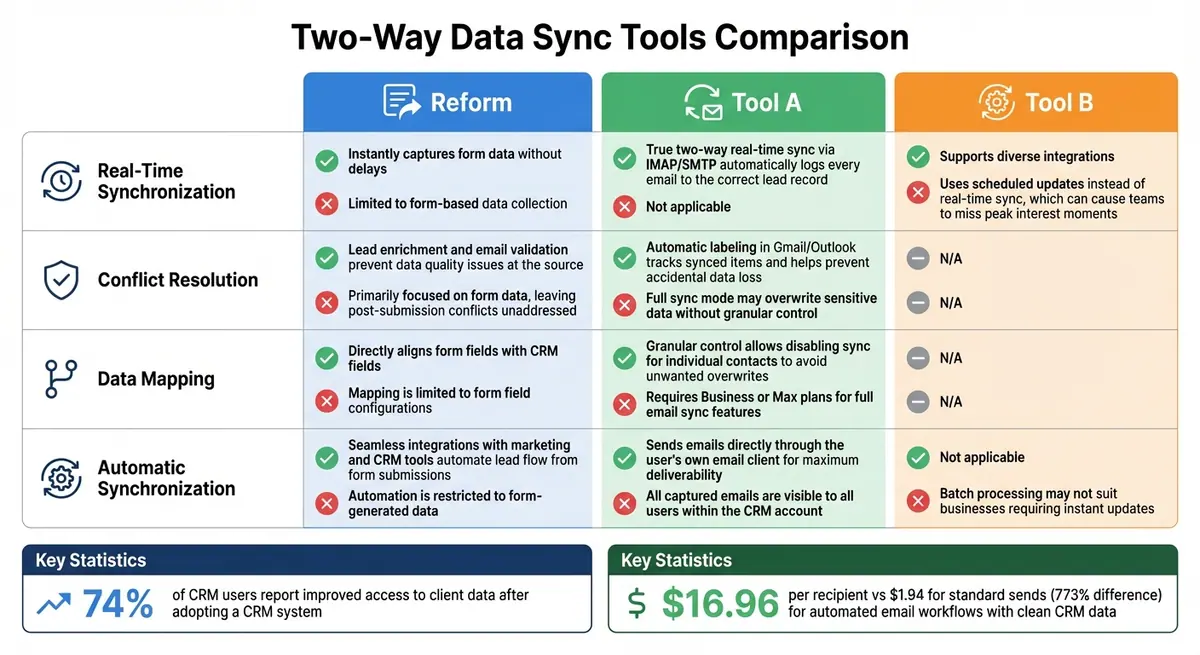
Comparison of Two-Way Data Sync Tools: Reform vs Tool A vs Tool B Features
The table below summarizes the key strengths and weaknesses of the tools discussed, offering a quick comparison of their essential features.
| Feature | Reform | Tool A | Tool B |
|---|---|---|---|
| Real-Time Synchronization | Pros: Instantly captures form data without delays. Cons: Limited to form-based data collection. |
Pros: True two-way real-time sync via IMAP/SMTP automatically logs every email to the correct lead record. Cons: Not applicable. |
Pros: Supports diverse integrations. Cons: Uses scheduled updates instead of real-time sync, which can cause teams to miss peak interest moments. |
| Conflict Resolution | Pros: Lead enrichment and email validation prevent data quality issues at the source. Cons: Primarily focused on form data, leaving post-submission conflicts unaddressed. |
Pros: Automatic labeling in Gmail/Outlook tracks synced items and helps prevent accidental data loss. Cons: Full sync mode may overwrite sensitive data without granular control. |
Pros: Not applicable. Cons: Not applicable. |
| Data Mapping | Pros: Directly aligns form fields with CRM fields. Cons: Mapping is limited to form field configurations. |
Pros: Granular control allows disabling sync for individual contacts to avoid unwanted overwrites. Cons: Requires Business or Max plans for full email sync features. |
Pros: Not applicable. Cons: Not applicable. |
| Automatic Synchronization | Pros: Seamless integrations with marketing and CRM tools automate lead flow from form submissions. Cons: Automation is restricted to form-generated data. |
Pros: Sends emails directly through the user's own email client for maximum deliverability. Cons: All captured emails are visible to all users within the CRM account. |
Pros: Not applicable. Cons: Batch processing may not suit businesses requiring instant updates. |
Real-time synchronization plays a critical role in enabling immediate sales actions. Research indicates that 74% of CRM users report improved access to client data after adopting a CRM system. This highlights the importance of minimizing delays - timely updates can directly influence performance.
Conflict resolution is another key factor, especially for teams managing sensitive communications. Features like automated labeling and lead enrichment help maintain data accuracy and prevent overwrites. Additionally, precise data mapping ensures that information flows seamlessly between systems, reducing the risk of errors.
Ultimately, the comparison underscores how synchronization speed, conflict resolution, and mapping accuracy contribute to maintaining data integrity and optimizing CRM-email integrations.
Conclusion
When choosing a tool for email-CRM integration, focus on your data sources and how quickly updates are needed. The main difference between tools lies in their sync architecture: some provide real-time, bidirectional updates that capture every email interaction as it happens, while others rely on batch updates, which can delay critical information by hours.
Reform stands out for capturing clean, validated leads through forms, ensuring only high-quality data enters your CRM. For teams prioritizing lead generation and data accuracy at the point of capture, Reform minimizes issues before they arise. However, for ongoing synchronization of emails with your CRM - such as logging replies, bounces, and opens in real time - you’ll need a tool designed specifically for that purpose.
Clean data at the point of capture has a direct impact on CRM performance. Consider this: automated email workflows built on clean CRM data generate $16.96 per recipient, compared to just $1.94 for standard sends. That’s a staggering 773% difference, highlighting the importance of synchronization quality. To maximize efficiency, prioritize tools that offer two-way logging so your sales team can access complete conversation histories - not just names and email addresses.
Before integrating, take the time to standardize your data dictionary. Define consistent field names, establish your CRM as the single source of truth, and clean up existing records to avoid spreading duplicate entries. Skipping this step can lead to unnoticed automation errors that derail your workflows.
Finally, match your tool’s sync model to your business needs. If your team requires instant follow-ups, real-time sync is a must. On the other hand, scheduled updates might work for less time-sensitive tasks. Missing critical moments of customer interest can cost you deals, so align sync speed with your response-time goals. In the end, successful email-CRM integration depends on real-time syncing, accurate conflict resolution, and precise data mapping.
FAQs
How do I know if I need real-time sync or scheduled sync?
If your team relies on immediate updates, like sales or customer support needing the latest data at all times, real-time sync is the way to go. It ensures that changes are reflected instantly, cutting down on delays and keeping everyone on the same page.
On the other hand, scheduled sync works best when instant updates aren't essential. For example, if updates every hour or once a day are sufficient, this option helps conserve system resources.
When deciding, think about how important up-to-date data is for your operations and whether your system can handle the demands of real-time syncing.
What should be the 'source of truth' when CRM and email data conflict?
When there’s a conflict between CRM and email data, the CRM should always be considered the 'source of truth.' As the main hub for managing customer information, it acts as the definitive reference point. Relying on the CRM in cases of data discrepancies helps maintain consistency and ensures the accuracy of your customer data.
How can I prevent duplicates and bad data before syncing?
To keep your CRM data clean and reliable when syncing form data, prioritize data validation, cleaning, and accurate mapping. Leverage tools that automatically check for errors and prevent duplicate entries. Regularly audit your data mappings to ensure they align with your CRM's structure, and apply rules to standardize formats like phone numbers or email addresses. Additionally, maintaining database hygiene - such as removing outdated or duplicate records - helps ensure your data stays accurate and ready for syncing.
Related Blog Posts
Get new content delivered straight to your inbox

The Response
Updates on the Reform platform, insights on optimizing conversion rates, and tips to craft forms that convert.




Drive real results with form optimizations
Tested across hundreds of experiments, our strategies deliver a 215% lift in qualified leads for B2B and SaaS companies.
