
.webp)
Tracking Offline Conversions from Form Submissions



When someone fills out a form on your website, it’s just step one. The real challenge? Connecting that form submission to actual sales or deals that happen later - offline. Without this connection, ad platforms like Google Ads only see half the picture, optimizing for lead volume instead of lead quality. That’s where offline conversion tracking comes in.
Here’s how it works:
- Google Click ID (GCLID) tracks the user from ad click to form submission.
- This data is stored in your CRM, where leads are nurtured offline (e.g., calls, demos, contracts).
- Once a deal closes, the CRM sends the conversion data back to Google Ads for accurate attribution.
Why does this matter? Businesses that sync offline conversions with ad platforms see better lead quality, smarter bidding strategies, and improved ROAS. For example, some report a 23% lower cost per qualified lead and a 53% revenue boost.
Key steps include:
- Using hidden fields to store tracking data like GCLIDs and UTM parameters.
- Integrating CRM systems with Google Ads for automated data syncing.
- Prioritizing revenue-driving events (like closed deals) over basic form submissions.
Offline conversion tracking ensures your campaigns focus on what truly matters - driving revenue, not just leads.
Google Ads Offline Conversion Tracking Set Up in 2025
sbb-itb-5f36581
How Offline Conversions Are Tracked from Form Submissions
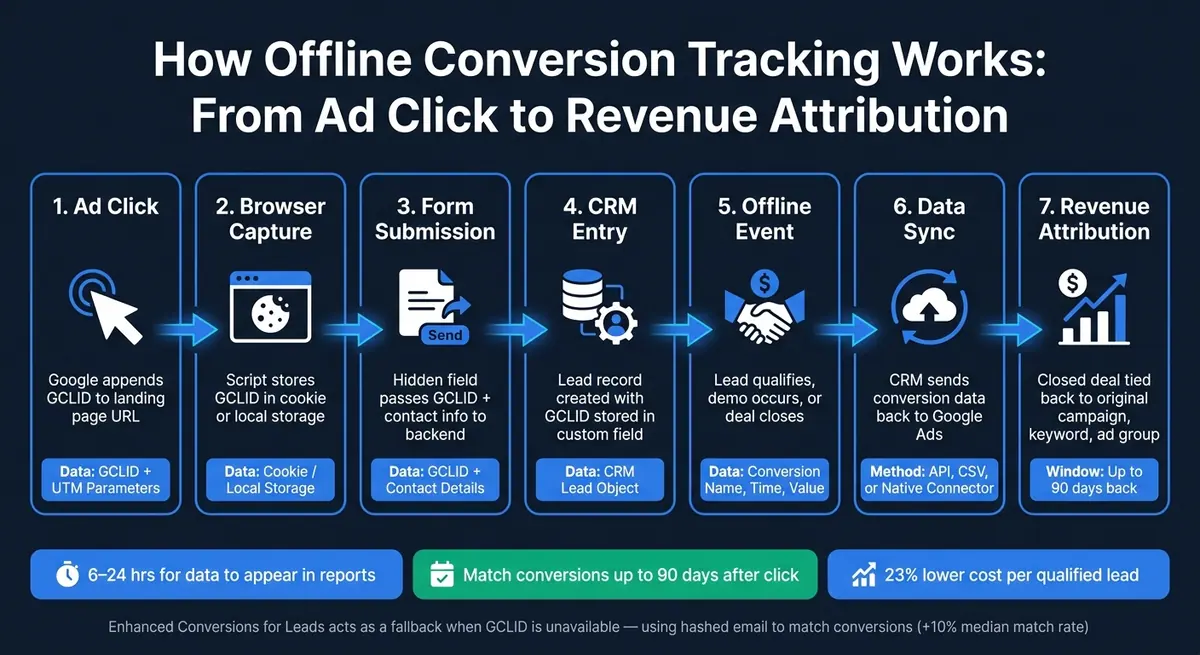
How Offline Conversion Tracking Works: From Ad Click to Revenue Attribution
Data Flow from Online Interaction to Offline Outcome
Tracking offline conversions begins the moment someone clicks on an ad. Google automatically attaches a Google Click ID (GCLID) to the URL of the landing page. A script on the website captures this ID and stores it in the user's browser using cookies or local storage.
When that visitor fills out a form, the GCLID is sent alongside their contact information into your CRM system. From there, the lead is nurtured offline - whether it’s through a discovery call, a demo, or eventually signing a contract. Once the offline event takes place, the CRM sends the GCLID and conversion details back to Google Ads, enabling accurate revenue attribution.
Here’s a simplified breakdown of the process:
| Step | Action | Data Involved |
|---|---|---|
| Ad Click | GCLID added to URL | GCLID, UTM parameters |
| Browser Capture | Script stores ID in cookie/local storage | Cookie or local storage |
| Form Submission | Hidden field sends ID to backend | GCLID + contact details |
| CRM Entry | Lead record created with click ID | CRM lead object |
| Offline Event | Lead qualifies or deal closes | Conversion name, time, value |
| Data Sync | CRM sends data back to Google Ads | API, CSV, or native connector |
| Attribution | Revenue tied to original click | Campaign, keyword, ad group |
One key point: Google Ads allows you to match offline conversions to clicks that occurred up to 90 days earlier. Once the data is uploaded, it usually takes 6 to 24 hours to process and show up in your reports.
This system relies on hidden fields to keep tracking parameters intact throughout the customer journey.
Using Hidden Fields and Tracking Parameters
Hidden fields are essential for capturing tracking data, like GCLIDs and UTM parameters, without requiring any action from the user. They ensure that a closed deal can be traced back to the specific keyword or campaign that initiated the process. By using hidden fields, you create a seamless link between online tracking and offline outcomes, giving you a complete view of the conversion path.
Make sure auto-tagging is enabled in Google Ads to allow the capture script on your site to collect GCLIDs and UTM parameters. Hidden fields can also store additional data, such as utm_source, utm_medium, and utm_campaign, providing deeper insights into which channels are driving high-quality leads - not just form submissions.
"Enhanced conversions for leads is an upgraded version of offline conversion import that uses user-provided data, such as email addresses, to supplement imported offline conversion data to improve accuracy and bidding performance." - Google Ads Help
When GCLIDs are unavailable - due to cookie restrictions or privacy settings - Enhanced Conversions for Leads steps in. This feature uses a hashed version of the lead's email address to match conversions. Combining this with standard GCLID tracking can increase matched conversions by a median of 10%.
CRM Integration and Automation Workflows
Once tracking parameters are captured, integrating them into your CRM ensures offline events are accurately tied back to the original online interaction. To maintain consistency, store the GCLID in a custom field in your CRM to prevent it from being overwritten during the sales process. From there, you can map each stage of the CRM lifecycle (MQL, SQL, Opportunity, Closed Won) to specific conversion actions in Google Ads. This helps train Google’s bidding algorithm to identify and prioritize quality leads, improving both lead quality and overall performance.
Data can be sent back to Google Ads through native CRM integrations (like HubSpot or Salesforce), automation tools like Zapier or Make, or directly via the Google Ads API. Deduplication is critical here - use a unique Order or Transaction ID to avoid counting the same conversion multiple times. B2B advertisers who close the loop by importing offline conversions report a 23% lower cost per qualified lead compared to those who optimize only for form submissions.
If you’re uploading hashed personally identifiable information (PII) for Enhanced Conversions, ensure the data is normalized first. For example, convert emails to lowercase and format phone numbers using E.164 standards before applying SHA-256 hashing.
Measuring the Impact of Offline Conversion Tracking
Improvements in Lead Quality and Conversion Rates
One of the most noticeable benefits of offline conversion tracking is the shift in focus - from simply generating form submissions to targeting leads that actually result in closed deals using effective lead generation strategies. When closed-deal data flows back into Google Ads, the algorithm learns to prioritize clicks that generate real revenue rather than just form completions.
"Without offline conversion data, Smart Bidding optimizes for lead volume rather than lead quality. It will happily drive hundreds of form fills from people who never answer the phone or who are completely unqualified." - Alexander Perleman, Head of Product, groas
This shift leads to better lead quality, which in turn sets the stage for measurable cost savings and improved campaign performance.
Effects on Cost Metrics and ROAS
Offline conversion data doesn’t just improve lead quality - it also has a direct impact on cost metrics and return on ad spend (ROAS). For instance, Ink Factory reported a 53% increase in revenue and a 903% ROAS, representing a 67.7% improvement, all while reducing ad spend by 9.1% over six months.
"It didn't take long for us to notice that certain keywords we thought were underperforming due to a relatively higher cost per lead were actually bringing in the biggest confirmed sales." - Pilot Digital
This highlights a crucial takeaway: keywords with higher cost per lead (CPL) often deliver the most valuable customers. Without offline data, businesses might mistakenly pause these campaigns, cutting off a significant revenue stream.
By providing precise revenue attribution, offline conversion tracking not only improves cost efficiency but also enables smarter adjustments to bidding strategies.
Optimization of Ad Campaign Strategies
With better lead quality and improved cost metrics in place, offline data unlocks advanced bidding strategies. By integrating real revenue signals, businesses can adopt Value-Based Bidding approaches like Target ROAS (tROAS), which focus on clicks likely to generate high-value outcomes rather than just maximizing conversion volume.
A practical approach involves designating bottom-of-funnel events - such as "Closed Won" deals - as Primary conversion actions for bidding. Meanwhile, top-of-funnel events like form submissions can be set as Secondary, ensuring the algorithm doesn’t overemphasize early-stage signals that don’t correlate with revenue. Google advises waiting at least 4 weeks (or three full conversion cycles) to gather enough offline data before making this switch. Rushing this process can destabilize campaigns due to insufficient data.
Finally, uploading actual deal values is key to optimizing bids for maximum revenue. This ensures that your campaigns focus on what truly matters - driving the highest possible return.
Challenges and Success Factors in Offline Conversion Tracking
Data Quality and Attribution Issues
One of the biggest hurdles in offline conversion tracking is maintaining data quality. A common issue is missing or dropped GCLIDs. For example, out of 100 uploaded conversions, only about 85 might successfully match in Google Ads, often due to missing identifiers or formatting errors.
Attribution also becomes tricky when tracking parameters, like UTM tags, disappear mid-session. These parameters exist only in the URL, so once a visitor navigates away from the landing page, they’re lost unless stored in cookies.
"UTM parameters only exist in one place: the URL. The moment a visitor navigates away from the page they landed on, those parameters are gone." - Marc-Antoine Thiriat, LeadSources.io
Other factors like redirects, subdomain changes, and multi-step or iFrame-embedded forms can strip query strings, leading to misattribution. Inconsistent naming conventions across teams can also create further confusion.
"If your CRM calls something 'SQL' while your marketing team calls it 'Sales Qualified Lead' and your attribution platform labels it 'qualified_lead,' you'll struggle to connect the data." - Cometly
To address these issues, consider capturing UTMs and GCLIDs with hidden fields and storing them in first-party cookies. Also, standardize naming conventions across teams to ensure clarity and consistency.
Technical and Workflow Complexity
The technical demands of offline conversion tracking can be overwhelming. Managing scripts, CRM workflows, and integrations simultaneously increases the likelihood of unnoticed errors. As Alexander Perleman of groas points out, "If your tracking is wrong, your bidding is wrong. There is no error message. There is no alert. Google will happily optimize toward whatever broken signal you give it."
One way to simplify this complexity is by using native CRM integrations. Tools like Salesforce, HubSpot, and Zapier provide direct links to Google Ads, automating data flow and reducing the need for manual uploads. For teams relying on data warehouses, Google Ads Data Manager supports automated imports from platforms like BigQuery, Redshift, and Snowflake.
Timing also plays a crucial role. After setting up a new conversion action, wait 4–6 hours before uploading data, as it can take up to two days for conversions to appear in reports. Additionally, ad platforms optimize for conversions within a 7–30 day window, so uploading data after 90 days won’t influence bidding. For businesses navigating strict privacy regulations, Consent Mode V2 can help. It allows Google to model conversions when users decline cookies, maintaining signal quality without breaching consent rules.
These challenges highlight the importance of adopting best practices, which are discussed in the following success factors.
Key Success Factors
Overcoming data quality and technical challenges requires a strategic approach. First, capturing accurate data is essential. Storing the GCLID at the point of entry ensures you can link ad clicks to eventual conversions.
As a safeguard, Enhanced Conversions for Leads uses hashed first-party data, like email addresses or phone numbers, to attribute conversions when GCLID capture fails due to issues like redirects or blockers. This method acts as a backup rather than a replacement.
Team alignment is another critical factor. Sales and marketing teams need to agree on definitions for each funnel stage and use consistent labels across all systems. Clearly mapping milestones - such as MQL, SQL, Opportunity, or Closed Won - to conversion actions provides ad algorithms with clear, revenue-focused signals. B2B accounts that import offline conversions benefit significantly, often achieving a 23% lower cost per qualified lead compared to those optimizing solely for form submissions.
Lastly, regular reconciliation audits are essential. Comparing CRM conversion counts with those reported in ad platforms on a weekly or monthly basis helps identify and fix data discrepancies early, preventing prolonged periods of optimization based on faulty data.
How to Optimize Form-Based Lead Generation for Offline Conversion Tracking
Improving offline conversion tracking starts with refining your form design and streamlining data flow. These steps ensure higher-quality leads and better campaign results.
Designing High-Performing Forms
A well-designed form is the cornerstone of effective offline conversion tracking. At a minimum, forms should capture an email address and phone number. These two data points are essential for ad platforms to match form submissions with offline outcomes. Email addresses, in particular, are highly reliable since they are unique and rarely altered when integrated into a CRM.
In addition to basic contact fields, hidden fields play a crucial role in collecting data for offline attribution. These fields can capture URL parameters without requiring user input, ensuring accurate tracking. For forms embedded via iFrames, the window.postMessage method can transfer event data, bypassing restrictions tied to third-party cookies.
Tools like Reform simplify the process by offering built-in support for hidden fields, multi-step forms, and conditional routing. This allows you to gather all necessary data without adding unnecessary complexity for users. For those needing greater control, server-side tracking via webhooks is an even more reliable solution. Unlike browser-based methods, server-side tracking operates independently of ad blockers and privacy settings.
Keeping Data Accurate for Offline Conversions
Even the best forms won't deliver results if the data isn't clean and consistent. Data normalization at the point of entry is key. This includes trimming extra spaces, converting email addresses to lowercase, and formatting phone numbers to the E.164 standard (e.g., +12025550143). These small but impactful adjustments improve match rates when uploading conversion data to platforms like Google Ads.
Spam submissions and invalid emails can harm your data pipeline. To combat this, Reform offers email validation and spam prevention tools that filter out junk data before it enters your system. Additionally, assigning a unique transaction or order ID to each submission helps prevent duplicate entries.
Client-side tracking alone often falls short. Studies indicate that browser-based pixels can miss 30% to 60% of conversions due to ad blockers, privacy features, and cross-device activity. Combining Google Tag Manager (GTM) tracking with server-side webhooks provides a more accurate picture, typically capturing 85–95% of actual conversions.
Once your data is clean and reliable, the next step is to align your form metrics with revenue objectives.
Aligning Metrics with Revenue Goals
A form submission is just the beginning. The real value lies in connecting those submissions to revenue-generating events like qualified leads, created opportunities, and closed deals. Without this connection, platforms like Google Ads may optimize for submission volume rather than meaningful conversions.
To solve this, map your CRM stages to Google Ads conversion actions. Label key milestones - such as "Sales Qualified Lead" or "Closed Won" - as primary conversion actions and assign each a monetary value, even if it's an estimate. This setup allows you to use value-based bidding strategies like Target ROAS, which focus on revenue rather than just lead count. Secondary actions, such as button clicks or page views, can still be tracked but should not distract from revenue-centric goals.
Another way to sharpen your focus is by shifting from cost-per-lead (CPL) to revenue-per-lead as your guiding metric. Feeding closed-deal values back into platforms like Google Ads enables their algorithms to identify and prioritize clicks that drive revenue.
"Feeding closed-deal data back to Google Ads lets the algorithm distinguish high-value clicks from low-value ones and adjust bidding accordingly." - Alexander Perelman, Head Of Product @ groas
Conclusion: Why Offline Conversion Tracking Matters for Modern Businesses
Many dashboards give the impression of healthy campaign performance, but they often fail to capture the full sales pipeline. They might highlight strong lead numbers, but those figures don’t always tell the real story - what happens after the lead is generated. Offline conversion tracking bridges this gap by linking digital actions, like ad clicks or form submissions, to real-world outcomes, such as closed deals or new customers. This connection is crucial for understanding how online efforts translate into actual sales.
Businesses that adopt offline tracking often discover their campaigns deliver 30% to 60% more value than what platform-reported metrics suggest. Without this data, Smart Bidding algorithms focus on the wrong targets, like lead volume, instead of prioritizing lead quality. As Alexander Perelman, Head of Product at groas, explains:
"The advertisers who win in 2026 are not the ones with the most sophisticated bidding strategies or the largest budgets. They are the ones whose data is clean, complete, and correctly flowing into the systems that make every bidding decision."
The solution lies in capturing persistent identifiers, such as GCLIDs, through hidden form fields, syncing CRM data with revenue-driving events, and marking only key offline actions - like "Closed Won" deals - as primary conversion events for bidding. Tools like Reform simplify this process with features like built-in hidden fields, GTM event triggers (e.g., onFormCompleted), and seamless HubSpot integration that maps form submissions to deal-level properties, enabling accurate revenue attribution.
Setting up offline conversion tracking typically requires 4 to 16 hours, and meaningful data for optimization starts to appear within 30 to 90 days. These few hours of effort can lead to annual savings of $10,000 to $50,000. At the end of the day, the difference between true growth and guesswork boils down to one thing: ensuring your conversion data aligns with your actual revenue outcomes.
FAQs
What offline events should I import as conversions?
To connect offline events with online ad interactions, you can import data like lead form submissions containing user details (email, phone number, or address) and a Google Click ID (GCLID). Examples include signed contracts, phone sales, or in-person purchases. Make sure the GCLID or other identifiers are captured in your offline systems and uploaded within 90 days. Using enhanced conversions with user data can further refine accuracy and reporting.
How do I handle missing GCLIDs or low match rates?
To handle missing GCLIDs, make sure your forms include a hidden field to pass the GCLID and use scripts to capture it across all pages. Tools such as Google Tag Manager can simplify and automate this process.
If you're dealing with low match rates, consider enhancing your GCLID data with hashed first-party user information, like emails or phone numbers. Additionally, upload your conversion data regularly - preferably within 90 days - to ensure more accurate attribution.
How long until offline conversion data improves bidding?
Offline conversion data can improve bidding precision within 4–6 hours of setup. That said, seeing noticeable changes in performance usually requires around 3 conversion cycles or approximately 4 weeks.
Related Blog Posts
Get new content delivered straight to your inbox

The Response
Updates on the Reform platform, insights on optimizing conversion rates, and tips to craft forms that convert.




Drive real results with form optimizations
Tested across hundreds of experiments, our strategies deliver a 215% lift in qualified leads for B2B and SaaS companies.
