
.webp)
Threshold Settings For Spam Prevention


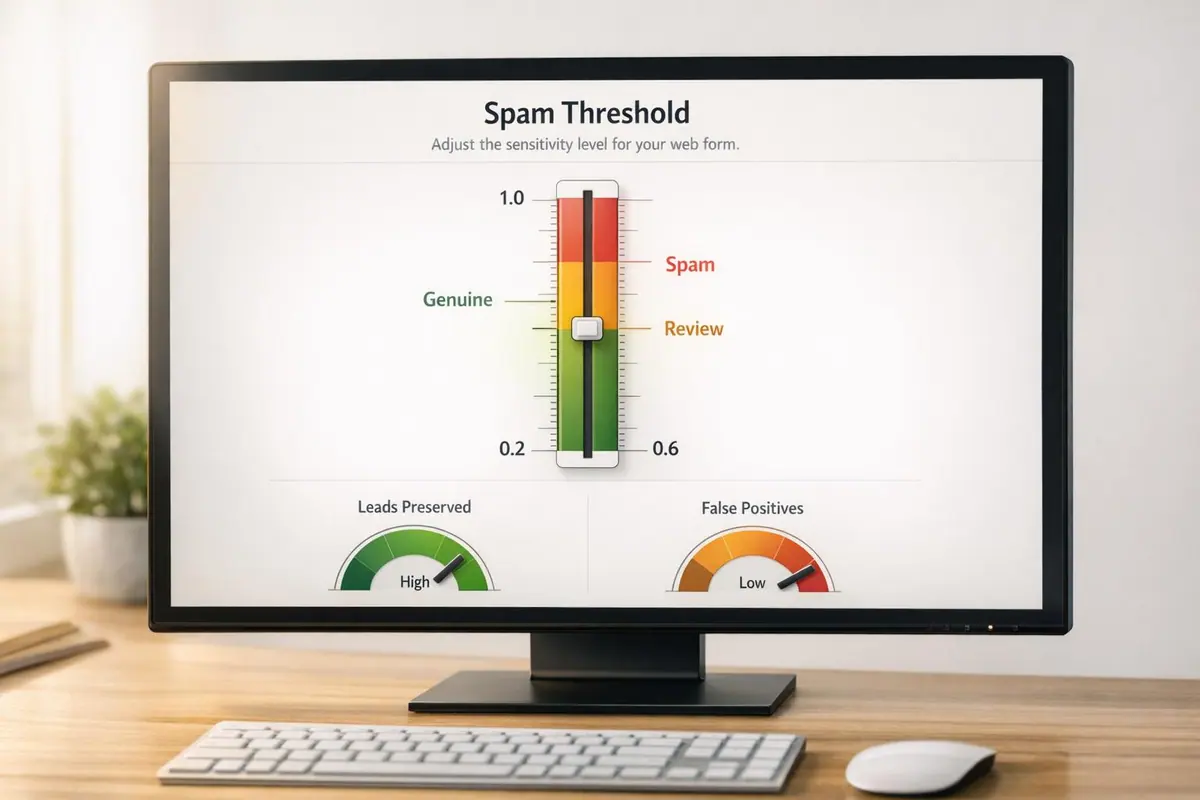
When it comes to stopping spam while keeping legitimate leads intact, understanding threshold settings is essential. These settings determine whether a form submission enters your CRM, gets flagged for review, or is discarded as spam. Here's the core idea:
- Spam Scoring: Submissions are rated on a scale from 0.0 (likely a bot) to 1.0 (likely human).
- Threshold Models:
- Permissive: Blocks minimal spam (scores ≥ 0.9); ideal for low-spam environments.
- Balanced: Default for most businesses (blocks at ≥ 0.7); balances spam filtering with lead retention.
- Conservative: Strict approach (blocks at ≥ 0.5); for high-risk spam-prone forms.
With 62% of spam now mimicking human-like text (as of Q1 2026), traditional filters are no longer enough. Modern systems, like Reform, SpamAssassin, and Trend Micro, use advanced scoring methods, including AI and behavioral analysis, to improve accuracy. Reform, for example, blends heuristics and AI for a layered defense, while SpamAssassin and Trend Micro offer customizable thresholds for varying needs.
For most businesses, starting with a Balanced model is a practical choice. Adjust thresholds based on spam levels and flagged submissions to optimize lead quality without overwhelming your CRM. Tools like Reform also provide manual review options for borderline cases, ensuring genuine leads aren't lost.
Choosing the right threshold depends on your priorities: maximizing lead volume or filtering out low-quality submissions. Either way, a multi-layered spam prevention strategy is key to maintaining lead integrity and saving time for your sales team.
Threshold Models and Their Effects
Spam prevention systems rely on three main threshold models: Conservative, Balanced, and Permissive. These models determine how submissions are handled - whether they're delivered, flagged for review, or blocked outright.
| Model | Sensitivity | Auto-Block Threshold | Review Threshold | Best For |
|---|---|---|---|---|
| Permissive | Low | >= 0.9 | >= 0.6 | Low-spam forms; maximizes lead delivery |
| Balanced | Medium | >= 0.7 | >= 0.3 | Most businesses; default starting point |
| Conservative | High | >= 0.5 | >= 0.2 | Forms under active spam attack |
Let’s break these down further.
The Balanced model is widely considered the standard. With an auto-block threshold of 0.7, it effectively captures most spam while keeping false positives - legitimate submissions mistakenly flagged as spam - between 1.5% and 3%. Reform uses this as its default setting, making it a reliable choice for most contact and high-converting lead forms without requiring initial manual adjustments.
The Conservative model tightens the threshold to 0.5, blocking a broader range of potentially suspicious submissions. This makes it well-suited for high-risk forms that are frequent spam targets. However, the tradeoff is higher rates of legitimate submissions being flagged for review or blocked outright. On the other hand, the Permissive model operates with a much looser threshold, blocking only submissions scoring 0.9 or higher. This approach is ideal for forms with minimal spam activity, where capturing every potential lead outweighs the risk of letting some spam through.
Modern systems enhance these models by introducing a "gray zone" for borderline cases. Instead of outright rejecting such submissions, platforms like Reform flag them for manual review. This approach addresses the challenge of automated systems struggling to make perfect decisions. Recent data highlights how difficult it can be to draw a definitive line. Advanced configurations often include an AI verification layer, blending heuristic signals (40%) with an AI confidence score (60%) to improve decision accuracy.
For most users, starting with the Balanced model is a practical choice. A good strategy is to review around 50 flagged submissions weekly. If more than 5% turn out to be legitimate leads, consider shifting to the Permissive model. Conversely, if spam frequently bypasses the system and enters your CRM, moving toward the Conservative model may be necessary. To prevent bots from adapting, auto-blocked submissions return a fake 200 OK response.
sbb-itb-5f36581
1. Reform
Reform takes a layered approach to spam prevention, using three stages of defense: passive heuristics, content analysis, and AI verification. Every submission is assigned a spam score ranging from 0.0 (completely clean) to 1.0 (definitely spam).
Rather than automatically rejecting or accepting submissions, Reform introduces a middle ground. Submissions that fall into a "gray zone" are flagged for manual review. This approach ensures spam is filtered out while still preserving legitimate leads.
Reform also works seamlessly with Google reCAPTCHA. Setting it up is straightforward - head to the Integrations tab and input your Site Key and Site Secret for a one-time configuration.
2. SpamAssassin
SpamAssassin offers a more detailed approach to spam filtering compared to standard threshold models. This open-source tool evaluates messages using local rules, network checks, and Bayesian analysis, assigning each message a cumulative score. The key parameter here is the required_score: any message that meets or exceeds this value is flagged as spam.
By default, SpamAssassin sets this threshold at 5.0, which the Apache Software Foundation describes as "quite aggressive":
"5.0 is the default setting, and is quite aggressive; it would be suitable for a single-user setup, but if you're an ISP installing SpamAssassin, you should probably set the default to be more conservative, like 8.0 or 10.0." - Apache Software Foundation
For lead generation purposes, this low threshold can cause issues, as legitimate inquiries might get flagged and never make it into your CRM. The table below breaks down how different thresholds balance spam blocking with the risk of false positives:
| Threshold Score | Classification | Spam Block Rate | False Positive Risk |
|---|---|---|---|
| 1.0–3.0 | Very Aggressive | Extremely High | Very High |
| 5.0 | Default | Balanced | Moderate |
| 8.0–10.0 | Conservative | Moderate | Very Low |
| 15.0+ | Passive | Low | Negligible |
To avoid unnecessary complaints, Apache advises against automatically deleting flagged messages:
"It is not recommended to automatically delete or discard messages marked as spam, as your users will complain, but if you choose to do so, only delete messages with an exceptionally high score such as 15.0 or higher."
Using SpamAssassin effectively requires a moderate to high level of setup and maintenance. Its Bayesian classifier needs at least 200 examples each of legitimate and spam emails to properly function. Regular updates are also essential. This involves running sa-update via cron jobs to ensure rules remain current and manually fine-tuning rule scores in local.cf to account for industry-specific terms that might otherwise trigger false positives. This ongoing calibration demands a significant time investment.
Next, we’ll take a closer look at how Trend Micro's system builds upon these strategies.
3. Trend Micro

Trend Micro takes a different approach compared to SpamAssassin. Instead of asking administrators to set a raw numerical threshold, it simplifies the process by offering named sensitivity levels - ranging from Lowest to Highest. Each level corresponds to a specific spam score. The Trend Micro Anti-Spam Engine (TMASE) evaluates incoming messages, assigning each one a score. If a message's score meets or exceeds the set threshold for the chosen sensitivity level, it’s flagged as spam.
Here’s a table showing how sensitivity levels align with threshold values across various Trend Micro products:
| Sensitivity Level | TM Email Security (TMEMS) | Cloud App Security (TMCAS) | ScanMail for Domino (SMD) |
|---|---|---|---|
| Highest | 4.0 | - | - |
| High | 4.5 | 4.0 | 4.0 |
| Moderately High | 5.0 | - | - |
| Medium / Moderate | - | 5.0 | 5.0 |
| Moderately Low | 7.0 | - | - |
| Low | 8.0 | 7.0 | 8.0 |
| Lowest | 10.0 | - | - |
As with SpamAssassin, there’s a balancing act: lower thresholds catch more spam but increase the chances of blocking legitimate emails. For example, emails from shared IPs or less common domains might get mistakenly quarantined. Trend Micro suggests starting with the Medium (or default) setting and gradually increasing sensitivity if spam continues to slip through. This step-by-step adjustment helps avoid overly aggressive filtering.
To minimize false positives, Trend Micro includes a diagnostic tool. The X-TMASE-Result header provides details about a message's spam score in the format <TrendType>-<Spam Score>-<Spam Threshold>. Additionally, the Retro Scan & Auto Remediate feature can automatically restore emails that were incorrectly marked as spam, offering a useful fallback option.
However, there’s one potential drawback: enabling the Virtual Analyzer for advanced threat analysis can delay email delivery by 5 to 30 minutes. If your workflow relies on quick response times - like following up on leads - this delay could be an issue. It’s important to weigh the benefits of enhanced threat detection against the possible impact on time-sensitive communications when setting up your system.
Pros and Cons
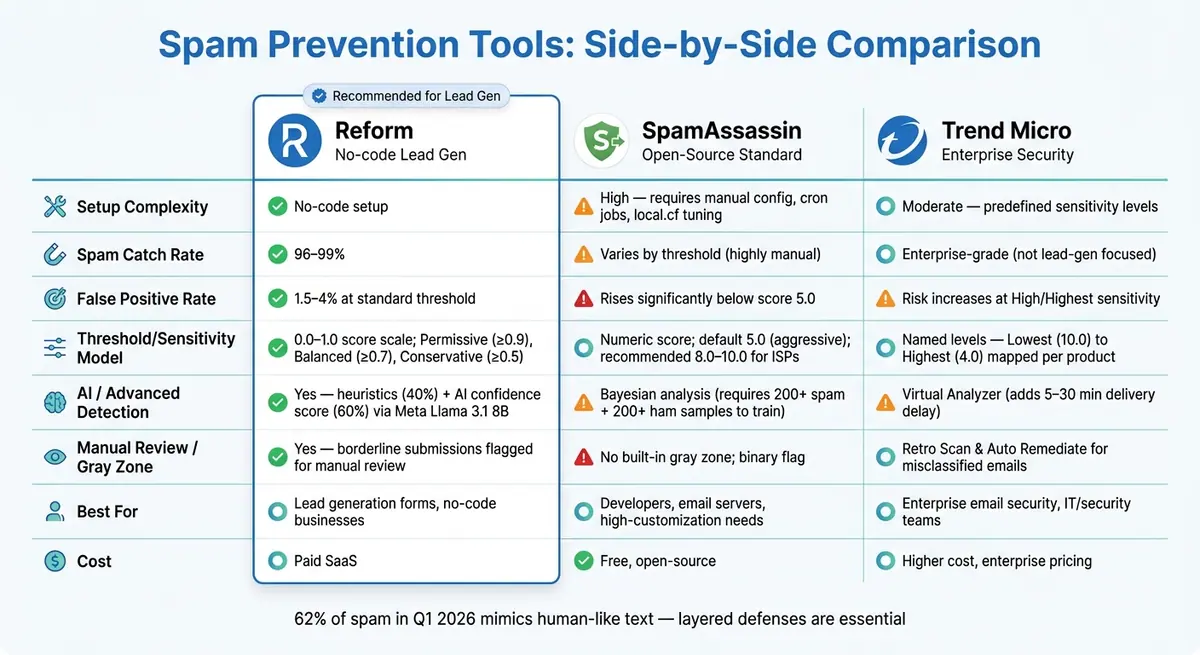
Spam Prevention Threshold Models: Reform vs SpamAssassin vs Trend Micro
Each tool tackles spam prevention differently, and these variations become clear when you evaluate factors like false positive rates, lead quality, and the effort required to manage them.
| Tool | Pros | Cons |
|---|---|---|
| Reform | Real-time AI scoring, lead enrichment, no-code setup, seamless user experience (no visible CAPTCHAs), 96–99% spam catch rate | May require threshold adjustments for niche industries; AI flags about 1.5–4% of legitimate submissions |
| SpamAssassin | Free and open-source, highly customizable rule sets, ~700 independent scoring rules, widely used | Difficult to configure; not designed for lead generation forms; false positives rise significantly with thresholds below 5.0 |
| Trend Micro | Strong threat intelligence, enterprise-grade security with predefined sensitivity levels | Higher cost; less emphasis on lead quality or conversion optimization |
The table highlights the trade-offs between these tools, particularly in terms of management effort and lead quality. Reform stands out for its layered approach, combining honeypots, behavioral timing, and AI classification to block spam without disrupting the user experience. On the other hand, SpamAssassin offers extensive customization, but its complexity can lead to challenges - such as finding the right threshold to avoid blocking legitimate leads while still catching spam. For instance, a threshold of 3.0 might block a valid lead scoring 4.5, while a threshold of 10.0 could let obvious spam slip through.
Trend Micro, however, serves a different purpose altogether. It’s tailored for enterprise email security, prioritizing robust threat detection over conversion rates or lead generation.
As spam submissions increasingly mimic legitimate leads, relying solely on keyword-based filters has become less effective. Tools that incorporate behavioral signals - like time spent on a page or IP reputation - are better equipped to handle these evolving threats while minimizing the risk of blocking genuine leads.
"A well-trained form classifier runs 1.5–4% false positives at the standard threshold. The number that matters more than the rate is the distribution - what kinds of legitimate submissions get flagged." - Raman Makkar, Founder of splitforms
These considerations are crucial for assessing overall system performance and its impact on lead generation optimization.
Conclusion
Deciding on the right threshold model boils down to one key consideration: do you want to focus on capturing every possible lead, or would you rather protect your sales team from wasting time on low-quality submissions? For businesses focused on high-volume lead generation, settings like Low or Medium sensitivity (auto-block at >= 0.9 or >= 0.7) strike a balance by minimizing false positives while ensuring legitimate leads aren't filtered out. On the other hand, high-intent lead capture - such as B2B demo requests or enterprise-level inquiries - benefits from a High sensitivity setting (auto-block at >= 0.5). While this approach may slightly increase false positives, it aligns better with the need for precision in capturing serious prospects.
The key takeaway here? Relying solely on binary "block or allow" systems is outdated. With an estimated 62% of spam submissions in Q1 2026 being generated by LLMs that mimic human-like text, it's clear that layered defenses outperform traditional methods.
This is why adopting a multi-layered, conversion-focused strategy is so important. This often includes using multi-step form designs to qualify users while maintaining engagement. Reform exemplifies this approach by blending passive heuristics, behavioral timing, and AI-driven scoring - leveraging Meta Llama 3.1 8B - to sort submissions into delivered, review, or spam categories. Configurable sensitivity levels and silent rejection mechanisms ensure that bot operators can't easily adapt to the system.
While tools like SpamAssassin and Trend Micro offer their own strengths, they aren't tailored for lead generation needs. For businesses prioritizing high-quality form submissions, specialized solutions consistently deliver better results by safeguarding data integrity and boosting conversion rates.
"Clean form data directly impacts your conversion optimization efforts - when your reps trust that submissions are legitimate, they respond faster and close more deals." - OrbitForms Guide
FAQs
How do I pick the right spam threshold for my form?
To find the right balance for your spam threshold, aim to prevent spam while keeping false positives to a minimum. A good starting point is a moderate setting - try a spam score of 0.7 or a timing threshold of 3-5 seconds. Keep an eye on flagged submissions and tweak the settings as needed: lower the threshold if valid entries are being blocked, or increase it if spam persists. Using a mix of strategies, like honeypots, timing checks, and AI-based scoring, can help improve overall accuracy.
How can I tell if my threshold is blocking real leads?
To ensure you’re not missing legitimate inquiries, review your spam log or submission data for entries that include real names and clear, coherent messages. Take note of the submission volumes both before and after you adjusted the threshold. If you notice genuine messages being flagged as spam, monitor the rate of these false positives closely. From there, tweak your settings to strike a better balance.
What should I do with 'gray zone' submissions?
To tackle 'gray zone' submissions - those that aren't clearly spam but seem suspicious - it's a good idea to flag them for review or use AI verification tools to evaluate their nature. By combining heuristic methods (like rule-based checks) with AI-generated scores, you can make more informed decisions: whether to accept, review, or block these submissions. This balanced approach helps improve spam filtering without compromising the quality of potential leads.
Related Blog Posts
Get new content delivered straight to your inbox

The Response
Updates on the Reform platform, insights on optimizing conversion rates, and tips to craft forms that convert.




Drive real results with form optimizations
Tested across hundreds of experiments, our strategies deliver a 215% lift in qualified leads for B2B and SaaS companies.
