
.webp)
How to Prevent Spam in PrestaShop Forms



Spam in PrestaShop forms can waste your time, skew analytics, and even harm your store's reputation. Without built-in protections like CAPTCHA, PrestaShop forms are vulnerable to bots exploiting predictable structures. Here's how you can stop spam effectively:
- Honeypot Fields: Add hidden fields bots will fill but humans won't see. Combine with time-based checks for better accuracy.
- CAPTCHA and reCAPTCHA: Use tools like Google reCAPTCHA (v2 or v3) to block bots while minimizing disruption for real users.
- Email Verification: Require users to confirm their email addresses via real-time validation or double opt-in methods.
- IP Blocking: Identify and block IPs linked to spam activity, but use caution to avoid blocking legitimate users.
- Layered Defense: Combine methods like honeypots, CAPTCHAs, and email verification to create a multi-layered system.
Spam bots are evolving, but a mix of these techniques can protect your forms and ensure real users have a smooth experience. Keep your defenses updated to prevent fake submissions from affecting your business metrics.
Say Goodbye to Spam Emails using PrestaShop Captcha - reCaptcha module
sbb-itb-5f36581
Why Spam Targets PrestaShop Forms
PrestaShop forms often become a magnet for spam due to certain vulnerabilities in the platform. One key issue is that PrestaShop doesn't include CAPTCHA protection by default. This is because implementing CAPTCHA requires third-party configuration and specific PHP libraries, which aren't always available on all servers. As a result, forms are left exposed right from the start. When you combine this lack of built-in protection with the platform's predictable framework, it becomes an easy target for automated attacks.
Spammers often exploit standard PrestaShop hooks like displayCustomerAccountForm and displayContactFormAfter. These hooks follow a consistent structure, making it simple for bots to identify and exploit them. In fact, the problem became so severe in 2018 that PrestaShop permanently removed its "Send to a Friend" module starting with version 1.6.1.19, after spammers used it to send unwanted emails.
Even with added security measures, some attackers manage to bypass defenses. As matks, a PrestaShop contributor, points out:
ReCAPTCHA will prevent quick spam on your website. Unfortunately there is services that use humans to solve ReCAPTCHA challenges in 10 seconds so these services can still spam you.
How Spam Affects Your Business
The impact of spam goes far beyond the annoyance of junk messages. For starters, your customer support team ends up wasting valuable time sorting through spam instead of assisting real customers. Then there’s the issue of disposable email signups, which can drain your marketing budget by sending campaigns to fake accounts. On top of that, spam distorts your analytics, making it harder to trust your conversion metrics.
The financial damage can escalate quickly. In 2024, the average cost of breaches involving stolen credentials reached $4.81 million. For e-commerce businesses, spam-related activities like card testing attacks can lead to higher transaction fees.
Common Spam Methods
Spam bots have evolved, using advanced tactics to target PrestaShop forms. Contact form spam is a major issue, flooding inboxes with junk messages, phishing links, and affiliate URLs. Automated scripts also create fake customer accounts, often embedding spam links in registration fields.
In 2024 alone, spam bots submitted over 99 billion junk form entries globally, with bad bots making up 37% of all internet traffic. These bots are now powered by AI, enabling them to bypass traditional protections with ease. For example, they can solve CAPTCHAs with an impressive 96% accuracy, far surpassing human success rates of 50-86%. By mimicking human behavior - such as replicating mouse movements, typing speed, and session cookies - these bots are harder than ever to detect. Some even use tools like AkiraBot, which leverages OpenAI to craft personalized messages for each site, slipping past conventional content filters.
Recognizing these tactics highlights just how critical it is to implement strong anti-spam measures for your PrestaShop forms.
Methods to Prevent Spam in PrestaShop Forms
Here are some practical ways to protect your PrestaShop forms from spam without requiring advanced coding skills.
Adding Honeypot Fields
Honeypot fields are a clever way to catch bots. The idea is simple: add a hidden input field to your form using CSS (display:none or visibility:hidden). Human users won’t see it, but bots often fill out every field they find. If data is submitted in this hidden field, it’s a clear sign of spam, allowing you to reject the submission on the server side. To make this trick even more effective, use a generic-sounding name like "website", "middle_name", or "phone_2" instead of something obvious like "honeypot."
For an added layer of protection, combine this with a time-based check. For example, flag submissions completed in under 3 seconds since bots often submit forms at lightning speed. If you prefer a plug-and-play solution, modules like "Contact Form Ultimate" or "Advanced Anti-Spam System" come with built-in honeypot functionality. These can even blacklist offending IP addresses automatically. To further strengthen your defenses, consider pairing honeypots with CAPTCHA tools.
Setting Up CAPTCHA and reCAPTCHA
CAPTCHA solutions are another powerful way to keep bots out. To get started, you’ll need a Site Key and Secret Key from providers like Google reCAPTCHA, hCaptcha, or Cloudflare Turnstile. Once you have these, configure the CAPTCHA module in your PrestaShop back office.
Google reCAPTCHA offers options like the v2 checkbox ("I’m not a robot") and v3, which is invisible and uses behavioral analysis to assess user activity. Invisible options are less intrusive and only activate when suspicious behavior is detected. For reCAPTCHA v3, start with a score threshold of 0.5 and adjust it based on your website’s traffic patterns to strike the right balance between security and user convenience. Server-side verification ensures that even sophisticated bots can’t bypass the system. Some advanced modules can even auto-detect and secure forms without additional setup.
Using Email Verification
Email verification is a straightforward way to ensure submissions come from real users. This can be done in two ways:
- Real-time validation: Checks the email’s syntax and filters out disposable email domains as the user types.
- Double opt-in: Sends a confirmation link to the user’s email, requiring them to verify their address.
As Anh Thu from PrestaHero explains:
Email verification adds an extra layer of authentication. Users must confirm their email addresses, deterring casual spammers who may hesitate to go through this additional step.
This approach is especially useful for newsletters and user registrations. It not only reduces spam but also improves your email deliverability rate. Just be sure your form validates email formats and filters disposable domains without being overly strict, as this could frustrate legitimate users.
Blocking Spam IP Addresses
Blocking IP addresses associated with spam can be an effective final layer of defense. You can identify problematic IPs by looking for those that repeatedly trigger honeypot fields or fail CAPTCHA challenges. Use PrestaShop modules or your hosting control panel to block these IPs. However, be cautious - blocking legitimate users on shared networks or VPNs can backfire. IP blocking works best when combined with other methods like CAPTCHA and honeypot fields, creating a multi-layered defense system.
Comparing Spam Prevention Methods
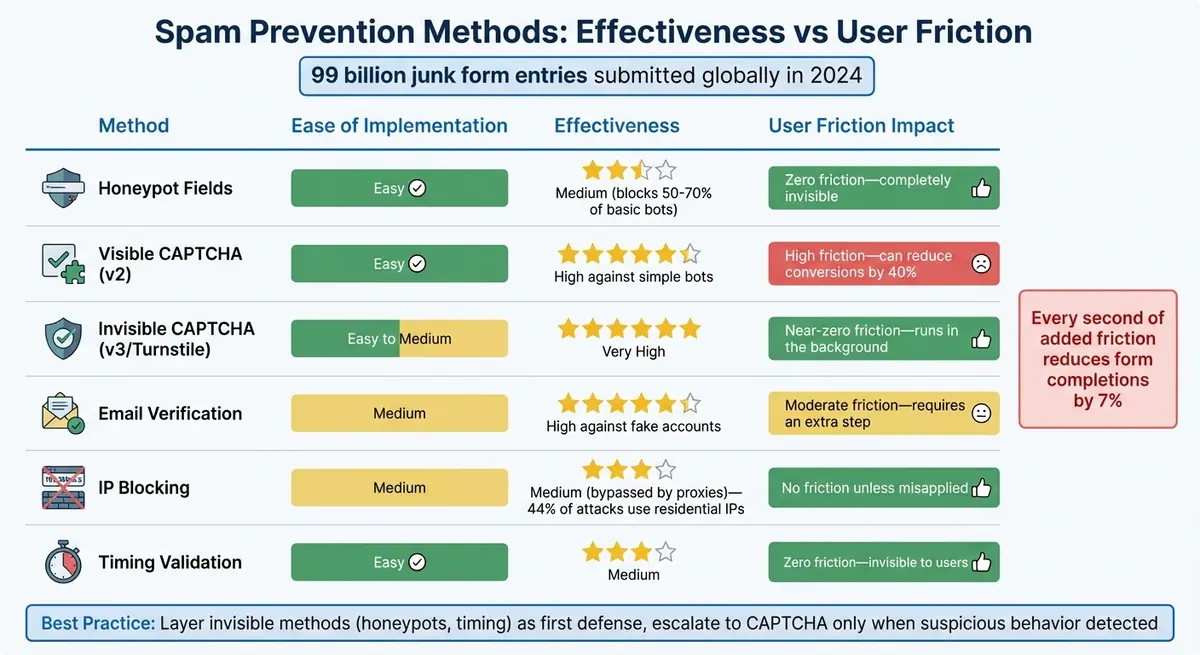
PrestaShop Spam Prevention Methods Comparison: Effectiveness vs User Friction
When considering spam prevention techniques, it's essential to weigh their impact on security, ease of use, and how they affect user experience. Striking the right balance can make all the difference in keeping forms secure while maintaining high conversion rates.
For example, visible CAPTCHAs, while effective, can reduce form completions by anywhere from 12% to 40%. On the other hand, invisible methods like honeypot fields offer a seamless experience for legitimate users. As phpcaptcha.org puts it:
"The goal isn't to block every bot - it's to make attacking your form more expensive than it's worth."
With modern AI-powered bots capable of bypassing traditional CAPTCHAs, a layered approach becomes critical. Start with low-friction, invisible checks like honeypots or timing validation. Then, escalate to more robust methods only when suspicious behavior is detected. This way, you maintain security without unnecessarily disrupting legitimate users.
Method Comparison Table
| Method | Ease | Effectiveness | Friction |
|---|---|---|---|
| Honeypot Fields | Easy | Medium (blocks 50–70% of basic bots) | Zero friction - completely invisible |
| Visible CAPTCHA (v2) | Easy | High against simple bots | High friction - can reduce conversions by 40% |
| Invisible CAPTCHA (v3/Turnstile) | Easy to Medium | Very High | Near-zero friction - runs in the background |
| Email Verification | Medium | High against fake accounts | Moderate friction - requires an extra step |
| IP Blocking | Medium | Medium (bypassed by proxies) | No friction unless misapplied - 44% of attacks use residential IPs |
| Timing Validation | Easy | Medium | Zero friction - invisible to users |
This table highlights the importance of using a layered defense strategy for your PrestaShop forms. Invisible methods like honeypots or timing validation should serve as the first line of defense, as they create no barriers for genuine users.
However, when dealing with high-security forms, such as those for registrations or payments, combining behavioral analysis with email verification can ensure data accuracy without slowing down legitimate customers. Keep in mind that every second of added friction in a form can reduce completions by 7%, so keeping the user experience smooth is just as important as keeping bots at bay.
How Reform Helps Prevent Spam
Reform takes spam prevention to a whole new level by combining ease of use with powerful features, making it an excellent alternative to the often complicated setups required by PrestaShop. While PrestaShop provides basic form functionality, enhancing it typically demands technical skills or additional modules. Reform eliminates these hurdles by offering an integrated, no-code solution that empowers store owners to fight spam effectively - no coding required.
Reform's Spam Prevention Features
Reform packs a punch with features designed to keep spam at bay while improving the quality of your leads. Real-time email verification ensures that only valid email addresses make it through, reducing bounce rates and improving your contact database. Its multi-step form layout, which shows one question per page, not only improves user experience but also makes it tougher for bots to spam your forms. Conditional routing adds another layer of intelligence, directing high-value leads to specific paths so your sales team can focus on prospects that matter most.
For extra lead qualification, Reform offers lead enrichment, which automatically pulls additional information from the web for each submission. Even incomplete forms are valuable - Reform saves entered data from abandoned forms, so you don’t lose out on potential leads. And the setup? It’s as simple as copying a single code snippet or using headless forms for more customization.
"Reform is a simple, fast forms solution. A no-brainer to reach for anytime I need to (quickly!) throw up a form without hacking around with code."
These features not only tackle spam but also improve the overall performance and usability of your forms.
Benefits of Using Reform for PrestaShop Forms
Reform stands out as an all-in-one solution that simplifies spam prevention, eliminating the need for multiple modules or technical know-how. It consolidates essential tools like CAPTCHA, email validation, and spam filters into one seamless platform. Plus, with unlimited responses on all plans, including a free tier with no credit card required, it’s a budget-friendly option for businesses of all sizes.
Reform also ensures your forms maintain your brand's look while staying optimized for conversions. As Derrick Reimer, Founder of SavvyCal, puts it:
"Reform is what Typeform should have been: clean, native forms that can be set up swiftly. Reform does the job without a bunch of ceremony."
Integration is another strong point. With deep CRM connections, Reform automatically handles duplicate leads and maps custom fields, saving you from manual data clean-up. When paired with tools like Zapier, HubSpot, or Salesforce, spam entries are filtered out before they ever reach your system.
Reform’s layered approach not only strengthens spam prevention but also ensures your forms remain highly effective at capturing quality leads.
Conclusion
Spam prevention is essential for safeguarding your business, maintaining lead quality, and ensuring a positive user experience. The sheer scale of spam attacks, as highlighted by recent statistics, emphasizes the importance of staying vigilant.
A strong defense involves layering multiple tactics, such as honeypots, invisible CAPTCHAs, email verification, and IP blocking. Tools like reCAPTCHA v3 and Cloudflare Turnstile offer seamless security by working quietly in the background, helping to maintain form conversion rates. For more advanced threats, server-side verification is crucial, as it can counter bots capable of bypassing traditional image-based CAPTCHAs. Integrated solutions simplify this multi-layered approach, making it easier to secure your forms effectively.
Striking the right balance between security and usability is key. Platforms like Reform bring these techniques together, combining spam prevention, email validation, and lead enrichment into one streamlined solution. This eliminates the hassle of juggling multiple tools while keeping forms fast, visually appealing, and optimized for conversions.
To get started, focus on securing your most vulnerable entry points - like customer registration forms, contact forms, and newsletter signups. Regularly monitor traffic patterns to fine-tune your security measures as needed. With a solid spam prevention strategy, you can dedicate your energy to nurturing genuine leads instead of filtering out fake ones.
FAQs
Which PrestaShop forms get spammed the most?
PrestaShop's contact forms, especially the native "Send to a Friend" module and the general contact form, tend to attract spam. This is a bigger issue in older versions like 1.6 and 1.7, where spammers often exploit vulnerabilities. To combat this, it's crucial to keep your PrestaShop installation updated and apply effective spam prevention measures.
How do I add a honeypot without breaking my form?
To integrate a honeypot into your PrestaShop form seamlessly, you can add a hidden input field that only spam bots are likely to complete. Use CSS (like display: none;) to ensure this field is invisible to genuine users. Then, set your form to reject any submissions where this hidden field contains data. This approach keeps the user experience intact while effectively filtering out spam submissions.
What reCAPTCHA v3 score should I start with?
reCAPTCHA v3 assigns scores ranging from 0.0 to 1.0, where higher scores suggest a greater chance that the user is genuine. Many websites begin with a score threshold between 0.5 and 0.7 as a baseline. However, this isn't a one-size-fits-all solution - adjustments should align with your site's specific spam levels and the user experience you aim to deliver. Regular testing and careful adjustments are essential to strike the right balance.
Related Blog Posts
Get new content delivered straight to your inbox

The Response
Updates on the Reform platform, insights on optimizing conversion rates, and tips to craft forms that convert.




Drive real results with form optimizations
Tested across hundreds of experiments, our strategies deliver a 215% lift in qualified leads for B2B and SaaS companies.
