
.webp)
Personalization with Predictive Email Forms



Most email form campaigns lose leads because they send everyone to the same form. I’d fix that by using first-party data and behavior signals to show each person the form they’re most likely to finish.
In plain English, this means:
- I use email clicks, site visits, CRM stage, product usage, and past form activity to estimate intent
- I send low-intent leads to short forms with light offers
- I send high-intent leads to deeper forms for demos, trials, or sales follow-up
- I change timing, frequency, CTA copy, and field count based on predicted likelihood to convert
- I track form completion rate, field drop-off, lead quality, and pipeline impact
- I keep the setup aligned with CAN-SPAM, CCPA, clear opt-ins, editable prefilled fields, and easy unsubscribe links
A few numbers matter right away: for colder leads, I’d keep forms to 2 to 4 fields. For new contacts with less than 90 days of history, I’d ask direct onboarding questions until enough behavior data builds up. And if model accuracy drops by more than 5% from baseline, I’d retrain.
Here’s the core idea: predictive personalization is not just “Hi, Sarah.” It changes the whole form path based on intent, so the ask matches the buyer stage instead of forcing every click into the same flow.
If I were putting this into practice, I’d focus on four things:
- Clean data Match email, site, CRM, and form records with one contact ID, usually the email address.
- Intent-based forms Show shorter forms for early-stage leads and more detailed forms for sales-ready accounts.
- Routing and timing Tie form versions to behavior signals, send-time patterns, and frequency caps.
- Measurement and trust Test one change at a time, watch downstream conversion, and make data use plain to the user.
| Area | What I’d do |
|---|---|
| Data | Combine first-party signals and keep records clean |
| Form design | Use progressive profiling, conditional logic, and short forms where friction is high |
| Campaign setup | Route users by intent score, CTA type, and send timing |
| Measurement | Track completions, abandonment, SQLs, opportunity rate, and model drift |
| Compliance | Use clear consent language, editable fields, and simple opt-out paths |
So if the goal is more completed forms and better lead quality, the answer is simple: stop using one fixed form for everyone, and let intent shape the experience.
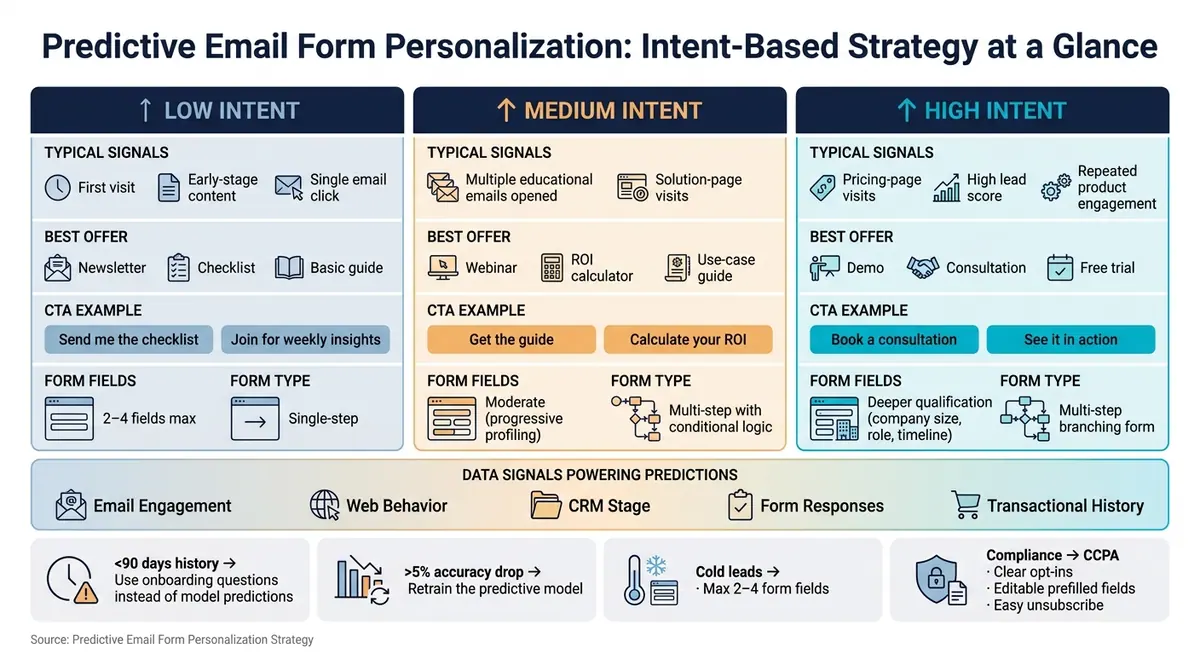
Predictive Email Form Personalization: Intent-Based Strategy at a Glance
1. Build the Data Foundation for Predictive Email Forms
Before you personalize forms, bring your email, web, CRM, and form data into one place. If records stay split across tools, predictions get shaky fast.
Once that layer is in place, use only the inputs that help the form make better decisions. More data doesn't always mean better output.
Choose the right data sources without overcomplicating the model
Start with the highest-signal first-party inputs: email engagement, web behavior, CRM stage, and form responses. Bring in transactional or contextual data only when it improves prediction quality.
| Data Category | Specific Signals | Predictive Output |
|---|---|---|
| Behavioral | Page views, clicks, time on site | Content interest, buying intent |
| Engagement | Email opens, click-throughs, inactivity | Optimal send time, frequency |
| Transactional | Past purchases, renewals, upgrades | Predicted lifetime value, churn risk |
| Zero-Party | Form responses, stated intent | Personalized form logic, segment assignment |
| Contextual | Device, location, time of interaction | Contextual relevance, localized offers |
If you don't have much history yet, ask directly instead of making the model guess.
For subscribers with fewer than 90 days of history, use onboarding questions to gather zero-party preferences until enough behavioral data builds up.
Map predictive touchpoints across the email journey
Signals before form submission - like pricing-page visits, cart abandonment, and repeated engagement with product-specific emails - can help set the offer and decide how many fields to show. Signals after submission, such as feature adoption and lower engagement, can shape follow-up and flag churn risk.
Use each predictive touchpoint to set the offer, field count, and CTA.
After you spot the right moments, set clear tracking rules so those predictions can actually be used.
Define conversion events, data hygiene rules, and team ownership
Predictive programs tend to fall apart when teams don't agree on conversion events, data hygiene, or contact IDs. Get marketing, ops, and data aligned on all three. That includes deduping, validation, field mapping, and how contact identifiers match across your form, CRM, and email tools.
A consistent identifier - usually the email address - across every tool is non-negotiable. Without it, website behavior won't line up with email engagement data, and one person can end up scored as several contacts.
Real-time email validation at the point of entry helps keep invalid addresses out of the model. Reform supports email validation, spam prevention, and custom mapping so leads sync with the right data.
Audit the system every quarter. If accuracy drops by more than 5% from baseline, retrain the model.
With the data layer set, the next move is using those signals to build forms that shift based on predicted intent.
sbb-itb-5f36581
2. Design Forms That Adapt to Predicted Intent
Once your data layer is set up, the next move is simple: let those signals change the form experience. A predictive form doesn't just collect leads. It helps qualify them while the form is being filled out. That means you can use intent signals to shape the field count, the offer, and where the lead goes next.
Adjust fields, offers, and CTA copy by predicted intent
Your offer and CTA copy should line up with where the visitor is in the buying journey. Someone who has come back a few times and checked your pricing page is not in the same place as a person who landed from an early-stage blog post. They shouldn't see the same form.
| Intent Level | Typical Signals | Best Offer | CTA Example |
|---|---|---|---|
| High | Pricing-page visits, high lead score, repeated product engagement | Demo, consultation, free trial | "Book a consultation" / "See it in action" |
| Medium intent | Multiple educational emails opened, solution-page visits | Webinar, ROI calculator, use-case guide | "Get the guide" / "Calculate your ROI" |
| Low intent | First visit, early-stage content, single email click | Newsletter, checklist, basic guide | "Send me the checklist" / "Join for weekly insights" |
High-intent forms can ask for a bit more, like company size, role, or timeline. The upside of that conversion makes the extra step worth it. Low-intent forms should stay lean, often just an email address. At that stage, the goal is to start the relationship, not push for the close.
Use progressive profiling and conditional logic to cut friction
Progressive profiling means you collect data in stages instead of asking for everything up front. On the first touch, ask only for what you need to begin the conversation, usually an email address and one preference. After that person engages more, later forms or follow-up emails can ask for role, company size, or budget. This helps lower abandonment and keeps the first ask light.
Conditional logic pushes this further. It shows or hides fields based on earlier answers or data you already know. If someone selects "I'm comparing vendors", the next step can show a timeline question. If they identify as a student, the form can steer them to educational content instead of a sales demo. One form can support several paths without feeling messy.
Set up forms built for predictive routing
Put those intent rules into your form builder so each path stays aligned. Use multi-step forms, conditional routing, hidden fields, and validation to keep forms short and make sure the data stays usable.
3. Put Predictive Logic to Work in Email Form Campaigns
Target form experiences using behavior and propensity signals
Once your form paths are set, tie them to email triggers and routing. The key is simple: look at combined signals, not one-off actions.
That means mapping intent tiers to the right CTA and the right form destination. For example, a trial user near the end of a 14-day trial who has already activated core features should see "Talk to a product specialist". That CTA can send them to a multi-step form that branches by use case through conditional logic. If you’re using predictive models, each lead’s score can be recalculated on a rolling basis, so assignments change on their own without manual reassignment.
Getting the right landing page form in front of someone is a big part of the job. But it’s not the whole thing. Timing and cadence often decide whether that lead even opens the email, let alone fills out the form.
Personalize timing, frequency, and form length
Use recent engagement patterns to set send time, frequency, and suppression rules. Send-time optimization looks at each recipient’s past open and click behavior, then sends the email during that person’s predicted high-engagement window. In form-heavy campaigns like trial expiration emails or onboarding nudges, that can have a direct effect on how many people actually see the form and complete it.
Set a clear frequency cap, then adjust it based on engagement level.
- Leads with recent high-intent activity can handle a few more touchpoints during an evaluation window.
- Leads with no recent activity should move to light re-engagement attempts, then to suppression if they stay inactive.
If you send several "complete this form" emails back-to-back to cold contacts, you can hurt sender reputation with U.S. mailbox providers and push unsubscribe rates up. No one likes being chased down in their inbox.
Form length should follow the same pattern. High-propensity, late-stage prospects are more likely to finish a longer multi-step form with deeper qualification fields, especially when the payoff is a custom demo or ROI analysis. A colder lead asking for a checklist should get a single-step form with two to four fields at most.
Rule-based vs. predictive personalization for email forms
Here’s the clean split: use rule-based logic for simple, explicit segments. Use predictive logic when behavior signals are strong enough to shape routing, timing, and form length.
Rule-based logic works well when the path is obvious. Predictive logic makes more sense when behavior shifts faster than manual rules can keep up with.
A practical way to roll this out is to start with rules for your core segments, then move routing, timing, and form depth toward predictive signals as your data gets better.
4. Measure Results, Protect Trust, and Scale What Works
Once predictive routing is live, the next step is simple: find out if it improves form completion and pipeline quality, not just clicks.
Track the metrics that show real business impact
Opens and clicks tell you whether someone noticed your message. They do not tell you whether the form did its job.
Focus on the numbers that tie back to business results:
- Form completion rate
- Field-level abandonment
- Time to complete
- Qualified-lead conversion
- Submission-to-opportunity rate
It also helps to watch for signs of friction inside the form itself. Look at field hesitation, scroll depth, corrections, and backtracking. Those signals can show where people get stuck or second-guess what to do next.
Segment-level reporting matters too. A strong average can hide a weak spot. Break performance out by mobile vs. desktop, new vs. returning visitors, and referral source like organic, paid, or email. That way, you can see whether one group is hitting more friction than another.
Beyond form behavior, track downstream sales metrics such as SQL conversion rate, deal size, sales cycle length, and prediction accuracy. Compare expected completion rates with actual completion rates to spot drift. If the model says a user is likely to finish and they keep dropping off, something changed.
Use those results to isolate one change at a time in testing.
Run controlled tests and keep data clean
Test one variable at a time. That rule saves a lot of confusion.
If you change the offer, timing, and form length in the same send, you won't know what moved the result. A better approach is to pick one variable, like form length for a mid-funnel segment, run it against a static control, and compare results against a clean baseline.
That baseline only stays useful if your data stays clean. Validate inputs, test one variable at a time, and retrain when user behavior shifts. Reform's built-in email validation and spam prevention help keep low-quality submissions out of your lead data, which makes model inputs more reliable.
When one version keeps winning over time, roll it out in stages instead of changing everything at once.
Scale with guardrails and a phased rollout
Start small. Use one high-traffic form, set a baseline, and expand only after performance improves. Scale the form paths that match predicted intent and lead to stronger downstream conversion.
If a form changes based on predicted intent, give people a clear backup path. A full-form fallback or a "Skip to advanced details" option helps users stay in control instead of feeling boxed in.
A few guardrails matter here:
- Keep prefilled fields editable
- Include clear opt-ins
- Add a plain-language data-use statement
- Make unsubscribe options easy to find
That keeps the experience transparent, supports U.S. compliance standards such as CCPA, and helps maintain subscriber trust as you scale.
FAQs
How do predictive email forms work?
Predictive email forms use artificial intelligence and machine learning to study both past and live behavior data, including previous clicks, website browsing, and engagement patterns.
Instead of relying on fixed rules, they spot patterns in each person’s behavior to predict what they may do next, such as which content they’re most likely to engage with or when they’re most ready to take action. That gives brands a way to adjust forms and delivery logic for a more personal experience.
What data do I need to get started?
Start with high-signal data that backs your qualification model. Put your focus on the attributes most likely to predict conversion for your ideal customer profile, like role seniority, company size, use case, or purchase urgency.
Swap out generic fields for questions that show intent. Then use structured inputs like dropdowns so the data is easy to score. With Reform, conditional logic lets you collect these details without making the form feel like a chore.
How can I personalize forms without hurting trust?
Personalize forms with a simple goal in mind: make them easier to fill out.
With Reform, you can hide fields that can be enriched automatically. That means people spend less time typing and face fewer distractions on the page. Fewer fields often leads to a smoother experience and less mental effort.
Still, personalization only works when it feels clear and useful. Tell users why the form is tailored to them, and make that tailoring feel helpful instead of intrusive. If something touches on more sensitive data, it’s smart to use opt-ins so people stay in control of their information.
You can also use hidden fields for backend processes, which helps keep the form clean without getting in the user’s way.
Related Blog Posts
Get new content delivered straight to your inbox

The Response
Updates on the Reform platform, insights on optimizing conversion rates, and tips to craft forms that convert.



Drive real results with form optimizations
Tested across hundreds of experiments, our strategies deliver a 215% lift in qualified leads for B2B and SaaS companies.
