
.webp)
Ensuring CRM Works with Existing Systems


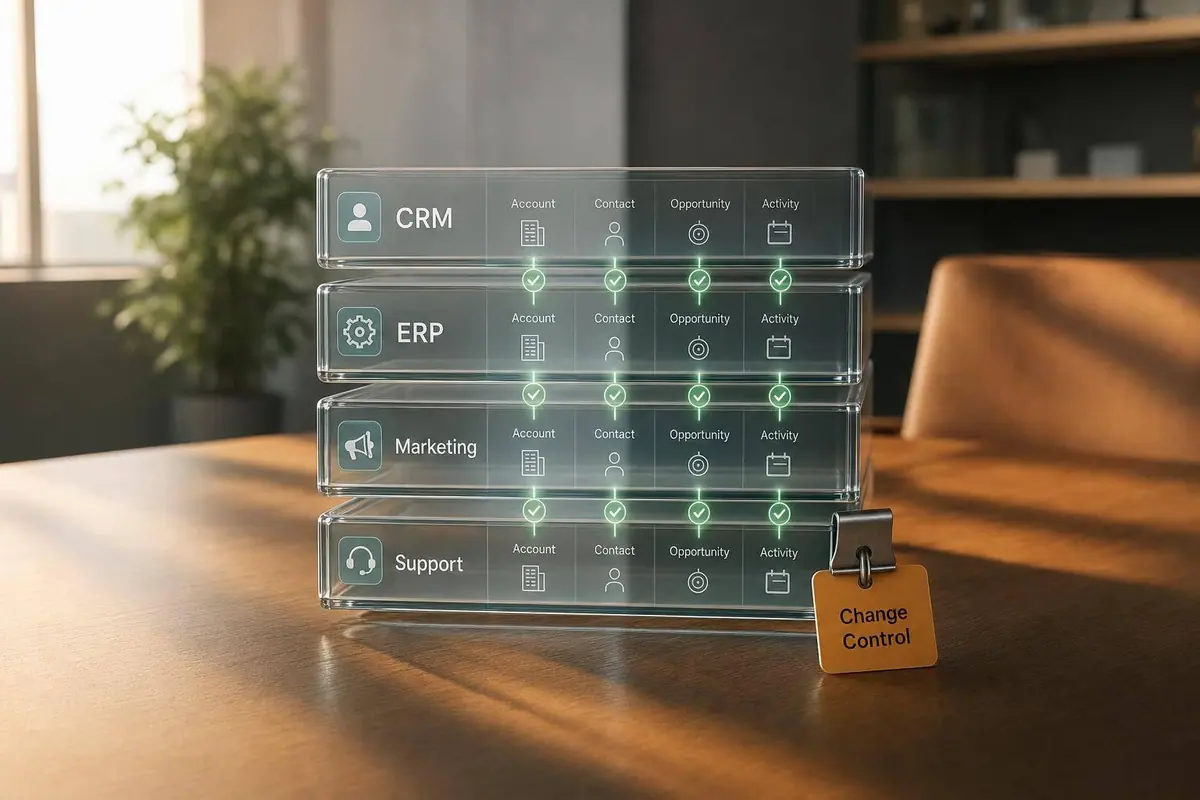
If your CRM doesn’t stay in sync with the rest of your stack, your team pays for it in lost leads, duplicate records, bad reports, and manual cleanup.
I’d boil this article down to a few points:
- Most CRM problems start between systems, not inside the CRM
- The main failure points are data mapping, sync timing, and field ownership
- Duplicate records are a major cost: one report found 75% of companies lost customers because of bad data and duplicate or poor outreach
- Form data matters just as much as CRM setup because bad inputs can break routing and reporting before records even land
- Long-term success depends on rules, monitoring, and change control, not just launch-day setup
In plain terms, I’d make sure:
- each field has one source of truth
- form inputs match CRM rules
- sync failures are watched every day
- duplicate rates stay low
- schema changes are reviewed before they go live
- access for integration users is kept tight
A simple way to think about it: clean input, clear ownership, steady syncs, and regular checks keep the CRM useful.
| Area | What to check | Common issue |
|---|---|---|
| Data mapping | Field formats, IDs, picklists | Mismatches and duplicates |
| Sync behavior | Timing, retries, overwrite rules | Stale data and broken routing |
| Security | API permissions, audit logs | Excess access and weak traceability |
| Form setup | Validation, dropdowns, hidden source fields | Bad leads entering the CRM |
| Governance | Owners, reviews, rollback plans | Drift after changes |
I see this article as a practical guide to finding those weak spots early and keeping your CRM aligned with the systems around it.
The 3 Biggest CRM Integration Mistakes (And How to Avoid Them)
sbb-itb-5f36581
Common CRM Integration Problems and How to Spot Them
Most CRM problems don't begin inside the CRM. They start where one system hands data to another.
That's why the first warning signs tend to look familiar: duplicate outreach, holes in reporting, and leads that never get routed where they should. According to Validity's State of CRM Data Management report, 75% of companies say duplicate or inadequate outreach driven by bad data has caused them to lose customers. In most cases, the cause comes back to three things: data mapping, sync timing, or system ownership.
Data Mismatches and Duplicate Records
Data mismatches show up when two systems speak slightly different "languages." One tool stores dates as MM/DD/YYYY, while another uses YYYY-MM-DD. That may sound minor, but it's enough to break a sync, reject a record, or create a duplicate contact that no one spots until a rep is on a call.
The problem gets worse when unique identifiers are missing. If the CRM can't match an incoming record to one that already exists - maybe the email field is blank or formatted in a different way - it creates a new record instead of updating the old one. That's not a random data mistake. It's a translation problem between systems.
PayFit ran into exactly this issue. They found that 25–30% of their HubSpot accounts and contacts were duplicates before a cleanup project brought that number down to 9% for companies and 19% for contacts.
Workflow Conflicts and Unreliable Sync Timing
Batch syncs and shared field ownership often lead to stale routing and overwritten lead status.
Here's the common mess: marketing automation and the CRM both write to the same lead-status field, but no one has set a clear rule for which system controls it. So one update overwrites another. Then lead scoring breaks, duplicate follow-up tasks fire, and pipeline reports stop lining up with what's happening in sales.
At that point, adding more syncs won't help. The better fix is simple: set clear ownership rules for each field.
Security Gaps and Weak Error Handling
Integration accounts with more access than they need create a quiet but serious risk. If a sync user has full admin access, one bad rule or one stolen credential can affect far more data than intended. The fix is pretty direct: use least-privilege access, so integration users can only read or write the fields and objects they need.
Weak error handling causes a different kind of damage. If an API call fails halfway through, the CRM may save only part of the record. Without retry logic or a queue for failed records, those broken entries can sit there unnoticed until a rep tries to use them. Missing audit trails add compliance risk and leave behind orphaned records that are hard to trace.
Most of these failures come back to the same three pressure points: mapping, timing, and ownership.
Integration Patterns That Keep Systems Aligned
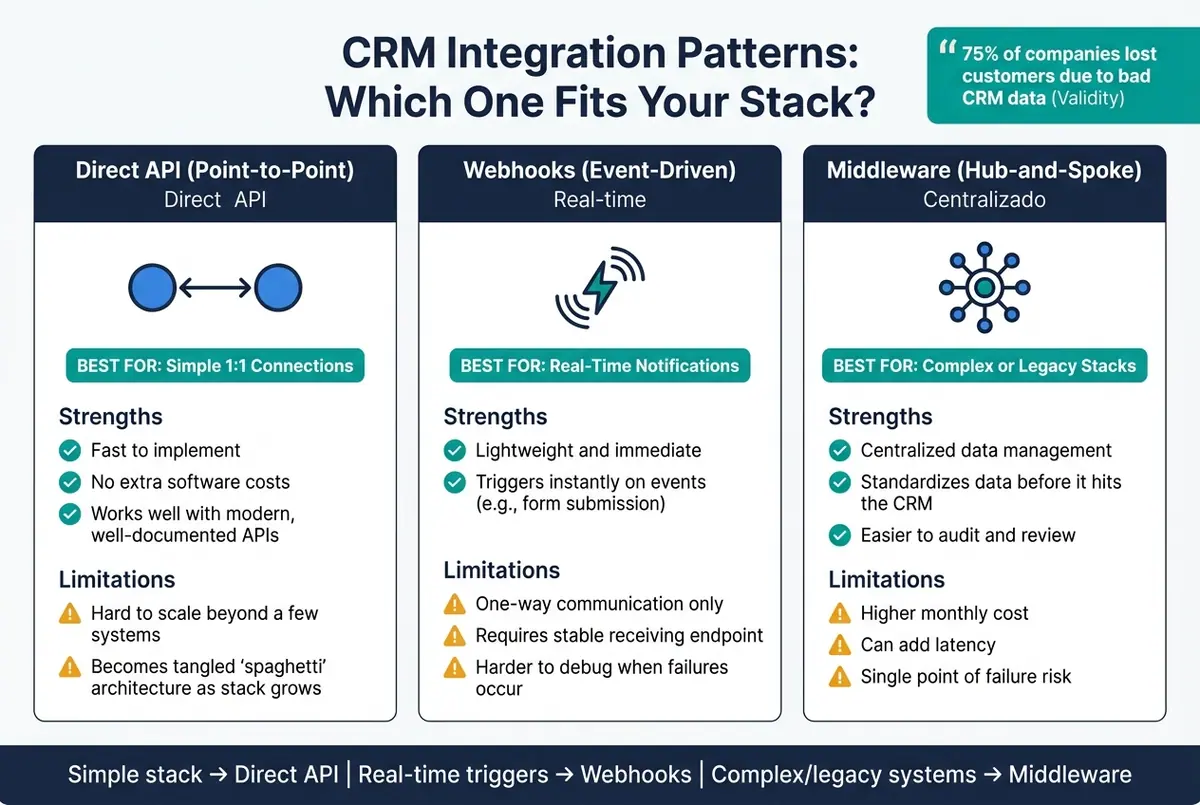
CRM Integration Patterns Compared: Direct API vs Webhooks vs Middleware
Those failures lead to the next call you need to make: which integration pattern will protect data flow without becoming a maintenance headache later. The right choice depends on your stack, how much cleanup the data needs, and how much upkeep your team can handle.
Direct APIs, Webhooks, or Middleware: Which to Use
A direct API connection makes sense when you're connecting two modern systems and both have clear, well-documented APIs. It's fast to set up and doesn't bring extra software costs. The catch? As more systems get added, point-to-point connections can turn into a mess that's hard to support.
Webhooks are a better fit when timing matters and you need updates right away. Say a new lead submits a landing page form. A webhook can notify the CRM at once. They're light and fast, but they only push data one way, and they depend on a stable endpoint that can receive those events. When something breaks, tracking down the issue can take time.
Middleware is usually the better path when the stack gets more complex, includes legacy systems, or needs heavy data transformation before records land in the CRM. It puts the logic in one place, cleans and standardizes data before it enters the CRM, and makes the flow easier to review. The trade-off is pretty simple: higher cost, added latency, and one more place where things can fail.
| Integration Pattern | Best Fit | Strengths | Limits |
|---|---|---|---|
| Direct API (Point-to-Point) | Simple, 1:1 connections between modern systems | Fast implementation; no additional software costs | Hard to scale; becomes hard-to-maintain architecture as the stack grows |
| Webhooks (Event-Driven) | Real-time notifications and simple push updates | Lightweight and immediate | One-way communication; requires a stable endpoint to receive data |
| Middleware (Hub-and-Spoke) | Complex stacks with legacy systems or heavy data transformation needs | Centralized management; standardizes data before it hits the CRM | Higher monthly costs; can add latency or become a point of failure |
Standardize Data Mapping and Define System Ownership
Pattern choice fixes the transport layer. Ownership rules fix the data layer.
"A poorly designed integration doesn't just create data problems, it actively undermines the trust your team places in the CRM as a source of truth." - Matt Collis, StackGo
Each field should have one owner. For example, marketing automation owns lead source, while the CRM owns deal status. One field, one source system. Write it down so nobody has to guess later.
You should also normalize values before they hit the CRM. That includes phone numbers, addresses, and U.S. dollar amounts so they match the CRM schema.
Test With Real Business Scenarios Before Launch
Once mapping and ownership are set, test the integration against the way the business actually works.
In a sandbox, run real scenarios instead of made-up ones. Submit a U.S. form lead, create a USD deal, inject a duplicate contact, and run the sync with a least-privilege API key. That helps surface field errors, routing problems, and permission issues before launch. It's a lot better to catch those problems in testing than after live records start moving.
Making Form Capture Work Cleanly With CRM Data
Even a solid CRM mapping can fall apart if the form sends bad data.
In many cases, the trouble starts before a record ever hits the CRM. Bad field values, invalid formats, and picklist mismatches can break routing, reporting, and automation. That means the form is the first control point in the lead pipeline, not the CRM.
Align Form Fields With CRM Requirements
Start by lining up each form field with the CRM values needed for record creation and automation. Field ownership only holds up when the form sends values the CRM can actually accept.
Use dropdowns for CRM-controlled fields like Industry, Lead Source, Lifecycle Stage, and Company Size. If those fields feed routing or reporting, they need controlled inputs, not free-text boxes where every person types something different.
For U.S. forms, these fields tend to have the biggest effect on CRM sync and routing:
| Form Element | CRM Mapping Need | Validation Rule | Integration Risk if Ignored |
|---|---|---|---|
| Email address | Primary contact identifier | Format check, block disposable domains, enforce uniqueness | Duplicate contacts, failed outreach, broken email automation |
| Phone number (U.S.) | Standardized phone field for routing | Enforce 10-digit format, strip non-numeric characters, allow +1 | Uncallable leads, misrouted territories, manual cleanup |
| ZIP code (U.S.) | Location/territory field | Enforce 5-digit or ZIP+4 numeric format | Incorrect territory assignment, broken geo-based workflows |
| Industry dropdown | CRM industry picklist | Only allow values that exist in CRM | Inconsistent segmentation, failed industry-based automation |
| Lead source (hidden) | Attribution field | Set via URL parameter or campaign ID, not user-entered | Inaccurate attribution, misleading ROI data |
| Consent checkbox | Marketing permission/compliance field | Explicit checkbox, required for email marketing | Compliance violations, restricted use of contact in campaigns |
Populate lead source and UTM values automatically from the URL.
Use Reform to Reduce Bad Data Before It Enters the CRM
The fastest way to enforce those rules is at the moment of capture.
Reform helps teams match CRM rules at the form level with validation, spam filtering, conditional routing, lead enrichment, and multi-step forms. In plain English, it helps stop weak or incomplete records from getting into the CRM in the first place and cuts down on cleanup after submission.
Review Mappings When Forms or CRM Schemas Change
Form changes and CRM changes rarely happen at the same time.
That gap is where mappings start to fail. A renamed field, a new required property, or an updated picklist can quietly break the flow between form and CRM. A quarterly review cadence works for stable setups. For faster-moving teams, tie reviews to picklist updates, new required fields, and renamed lifecycle stages. Review form mappings any time fields, picklists, or campaigns change so new submissions don't break routing or reporting.
Maintaining CRM Compatibility Over Time
After launch, CRM compatibility doesn't just take care of itself. It depends on clear governance and steady monitoring.
Even a stable integration can drift over time. Schemas change. Tools get swapped out. Team ownership shifts. And little cracks can turn into big reporting or sales problems if no one is watching.
Document Rules, Owners, and Change Control
Once your mappings are live, document who owns each field, rule, and credential. Keep one governance document that covers:
- Field mappings
- Sync direction
- Lifecycle definitions
- Integration credentials and rotation schedules
- The owner for each system
Ownership needs to be explicit. Revenue Operations owns pipeline fields and lifecycle definitions. IT or Systems Administration owns credentials, security controls, and integration infrastructure. Data or Analytics owns reporting validation.
That way, if a field breaks or a sync stops, no one is left asking, Who handles this?
For schema changes, require lightweight approval before anything hits production. The change record should include the affected systems, the business reason, testing evidence, and a rollback plan.
Monitor Failures Before They Affect Sales and Reporting
Waiting for a sales rep to spot a missing lead is too late. Keep sync success above 99%. If it drops below 95%, investigate right away.
Set alerts when more than 1% of syncs fail in a one-hour window. Review failed webhook queues every day so issues get fixed or escalated within 24 hours.
It also helps to watch duplicate rates each week. A well-governed stack should stay under 2%. And after major changes, recheck revenue and attribution reports.
Maintenance cadence:
| Task | Frequency | Owner | Systems Affected |
|---|---|---|---|
| Review sync error logs and failed syncs | Daily | RevOps / CRM Admin | CRM, middleware, API layer |
| Check duplicate rates | Weekly | Data Operations | CRM, marketing automation, form sources |
| Reconcile record counts and key fields | Weekly | RevOps | CRM, marketing automation, finance |
| Audit field mappings and schema changes | Quarterly | CRM Admin | CRM, middleware, connected apps |
| Rotate API keys and service account credentials | Quarterly | IT / Security | CRM, middleware, third-party apps |
| Review permissions and audit logs | Quarterly | IT / Security | CRM, integration platforms |
| Recheck revenue and attribution reports | After major updates | Analytics | CRM, BI tools, marketing automation |
| Full end-to-end integration regression test | Semiannual | RevOps / IT | CRM, billing, marketing, support |
Conclusion: A Straightforward Path to a CRM That Fits Your Stack
With ownership, change control, and monitoring in place, the CRM stays aligned as systems change.
It also helps to stop bad data before it gets in. Controlling data quality at the point of entry - including using Reform to enforce validation, filter spam, and enrich leads before they reach the CRM - cuts down the number of bad records governance teams need to fix later. That keeps the CRM a reliable base for revenue operations instead of a constant source of firefighting.
FAQs
How do I know which system should own each CRM field?
Define a clear system of record for each data point before you set up integrations. Skip this step, and you’re much more likely to run into integration problems.
When you map fields, use object IDs instead of display names. It’s a simple move, but it helps prevent mix-ups and keeps your data aligned.
If it fits your setup, Reform can help capture and map form data so validated lead information syncs to the right CRM fields.
What’s the best way to prevent duplicate records across systems?
Use your integration tool’s duplicate-handling features. Reform helps with built-in duplicate prevention through custom mapping, so lead data is handled in a dependable way before it reaches your CRM.
Also, start by syncing only the data you need most. Set a clear source of truth too, so you can protect data integrity and avoid accidental overwrites between systems.
How often should I review CRM integrations after launch?
Review CRM integrations on a regular basis instead of sticking to a fixed schedule. Updates or config changes can break things in ways that aren't obvious, and some failures happen quietly with no visible error codes.
That's why proactive monitoring matters. Data problems can drag on for days or even weeks while dashboards still look normal. Reform can help support accurate, reliable lead data with validation and real-time monitoring.
Related Blog Posts
Get new content delivered straight to your inbox

The Response
Updates on the Reform platform, insights on optimizing conversion rates, and tips to craft forms that convert.




Drive real results with form optimizations
Tested across hundreds of experiments, our strategies deliver a 215% lift in qualified leads for B2B and SaaS companies.
