
.webp)
5 Throttling Rules for Lead Enrichment APIs


If you don’t control API traffic before launch, one spike in form fills can lead to 429 errors, duplicate writes, stale lead data, and missed CRM updates.
I’d boil the article down to this: set limits early, protect live syncs first, and treat retries and failover as part of the same system. The five rules are simple:
- Set rate caps by endpoint, not just by account
- Limit concurrency by tenant and job type
- Retry only 429s and 5xx errors, with exponential backoff and jitter
- Block old enrichment data with TTL and timestamp checks
- Queue failed writes and use a DLQ or fallback path during outages
A few hard facts shape all of this:
- HTTP 429 means you hit a limit
- HubSpot uses per-second and daily API limits
- Salesforce uses daily API limits
- Shared API keys can let one batch job burn through quota before 9:00 AM
The main idea is straightforward: your CRM usually sets the pace, not your form tool. So I’d protect CRM writes first, move batch jobs to off-hours, and watch per-endpoint usage before errors start piling up.
| Rule | What it stops | What to put in place |
|---|---|---|
| Per-endpoint caps | API limit overruns | Endpoint-level rate limiter |
| Concurrency caps | One job crowding out live syncs | Per-tenant and per-job worker limits |
| Retry timing | Retry storms after failures | Backoff, jitter, Retry-After |
| TTL and freshness | Old data overwriting new CRM data | Timestamp checks and TTL filters |
| Failover | Lost records during outages | Queue, DLQ, idempotent replays |
If I were setting this up, I’d treat these five rules as one checklist for the full form-to-CRM path. If you need help implementing these, consider expert form strategies to optimize your lead generation.
How API Rate Limiting Actually Works and How to Build Your Own
sbb-itb-5f36581
Why Throttling Rules Matter Before You Sync Enriched Leads
Real-time syncs and batch refreshes put very different pressure on the same API quota. Real-time submissions need delivery in seconds. Nightly enrichment can wait. But both jobs draw from the same pool, and that’s where things go sideways. Without clear throttling rules, a bulk job can burn through your daily allocation before the 9:00 AM rush even begins.
Traffic patterns change based on the trigger. Real-time routing tends to come in bursts. Webhook updates can swamp middleware after large CRM actions. Batch backfills and nightly runs are more steady, but they move a lot of volume and can drain daily quotas fast.
The CRM usually sets the tightest limit. Your enrichment tool may feel fast, but the CRM on the other end controls the pace. HubSpot enforces both per-second and daily API request limits, and Salesforce enforces daily API limits. If a background job chews through that allocation overnight, real-time lead routing can fail during business hours. When limits are shared, concurrency and retry rules matter just as much.
Shared API keys make this even messier. If your backend, your CI pipeline, and your nightly cron job all use the same key, one runaway process can starve everything else. A batch backfill that runs long can block live lead writes at the worst possible time.
A simple way to think about it: treat business hours like the fast lane for real-time syncs, and push bulk enrichment to overnight windows. That’s why per-endpoint caps should be one of the first rules you set.
1. Per-Endpoint Rate Caps
A lot of teams think of API limits as one big quota. In practice, that’s not how it works.
Per-endpoint caps apply to specific API routes, not your whole account. So your search endpoint, enrichment detail endpoint, and CRM write endpoint can each have their own limit. And they do not share spare room.
That matters because each step in the workflow puts a different kind of load on the API. A form submission lookup is light. Pulling firmographic fields for a matched lead is heavier. CRM writes usually have the tightest limits, which means your enrichment speed can’t go past your write capacity.
If you go over a cap, the API returns HTTP 429. Use Retry-After to decide how long to wait, and use X-RateLimit-Limit plus X-RateLimit-Remaining to watch available capacity. Hitting the API again right after a 429 is a classic mistake. It can turn a small traffic spike into a bigger mess, because failed retries add more requests and keep the limit window maxed out.
Track RPS or RPM for each endpoint, not just total call volume. Also track the 429 rate by endpoint and slow traffic before it starts hitting live lead syncs. If you wait until the cap is already failing requests, you’re late. Set alerts early.
| Endpoint Type | Purpose | Limit Sensitivity |
|---|---|---|
| Search/Lookup | Find a lead ID by email or domain | High |
| Enrichment/Detail | Pull firmographic and contact fields | Medium |
| CRM Write/Update | Push enriched data into the CRM | Low |
| Auth/Token | Refresh API access tokens | Very Low |
Set budgets by endpoint, then match concurrency to the slowest one. Once you know those endpoint limits, the next bottleneck is how many jobs can run at the same time.
2. Concurrency Limits by Tenant and Job Type
Once you’ve set endpoint caps, the next step is to split concurrency by tenant and by job type. In plain English: give each tenant its own lane, and don’t let one high-volume account eat up all the worker slots or API room. That way, live form submissions don’t get pushed aside by bulk backfills.
In most setups, the downstream platform sets the hard ceiling. That matters because these limits decide how fast enriched leads can land in the CRM. And in practice, downstream limits often win: Salesforce caps daily API requests, HubSpot enforces per-second and daily limits, Google Sheets uses per-minute quotas, Close limits per-second traffic, and Slack applies method tiers.
If you go past a concurrency cap, APIs will often return HTTP 429 and pause writes until the limit window resets. At that point, retries need care. Retry only after deduplicating on event ID; if you skip that step, you can end up writing duplicate lead records.
It also helps to watch the tightest downstream limit like a hawk. That might be Salesforce’s daily allocation or HubSpot’s per-second rate. Set alerts before you hit the ceiling, not after. Once concurrency is capped, retry timing becomes the next guardrail.
3. Retry Timing with Exponential Backoff and Jitter
After concurrency caps, retries help protect the CRM write path from short-term failures. But not every error should get another shot.
Retry transient errors only, such as 429 and 5xx. Skip permanent errors like 400, 401, 403, and 404. Once you've sorted retryable errors from non-retryable ones, the next step is simple: decide how long to wait between attempts.
Use exponential backoff, which means each retry waits longer than the one before it. Add jitter, a small random delay, on top of that. If you skip jitter, a high-volume sync can send every failed request back at nearly the same time, which can hammer an already strained endpoint all over again.
If the API returns a 429, check for a Retry-After header. When it's there, use that value instead of calculating your own delay. That timing only holds up if repeated attempts stay safe.
Keep retries idempotent by event ID. That way, if the same event gets retried, you don't end up writing duplicate data.
Also keep an eye on 429 frequency. Track it in sync logs for enrichment and CRM writes. If that number starts climbing, your retry timing or concurrency is too aggressive.
4. Stale Data Freshness and TTL Rules
After retry timing, the next guardrail is freshness. Retries can change write order, which means old enrichment data can end up overwriting newer CRM changes.
Drop enrichment that has passed TTL or is older than the CRM record’s last update. Use event id dedupe plus timestamp checks to stop out-of-order writes. The rule is simple: only write enrichment data when its timestamp is newer than the CRM record’s last update timestamp. In practice, that makes TTL an active filter in the sync layer, not just a data-quality note.
Here’s the catch: when queue backlogs slow writes, records can sit around long enough to age past TTL before they even run. So this isn’t just a data issue. It’s often a queue issue too.
Track stale-write rejects and TTL drops. If those numbers start climbing, that usually points to:
- Slow queues
- Missing timestamp checks
- TTLs that are too long
If a record is too old to trust, route it to failover instead of writing it.
5. Failover Paths for Partial Syncs and Outages
When a record is too old to write, failover steps in. That process should begin when the CRM or destination app hits its limit - not when the enrichment API does. If you don't have a clear path in place, records can fail without any obvious warning.
The safe default is simple: queue failed writes instead of dropping them. Then retry those writes when capacity opens back up. Use a unique event ID too, so reprocessed leads stay idempotent. If your stack doesn't include built-in retry logic or dead-letter handling, add your own DLQ for failed webhook deliveries. Otherwise, failed syncs can sit in the dark until someone spots that CRM data looks thin.
You should also track the unsynced share of enriched leads. If that number starts climbing, it's usually a sign that your queue or DLQ isn't catching failures the way it should. In a form-to-CRM workflow, this setup lets live submissions keep moving while deferred records wait safely in queue.
How These Rules Fit Into a Form-to-CRM Workflow
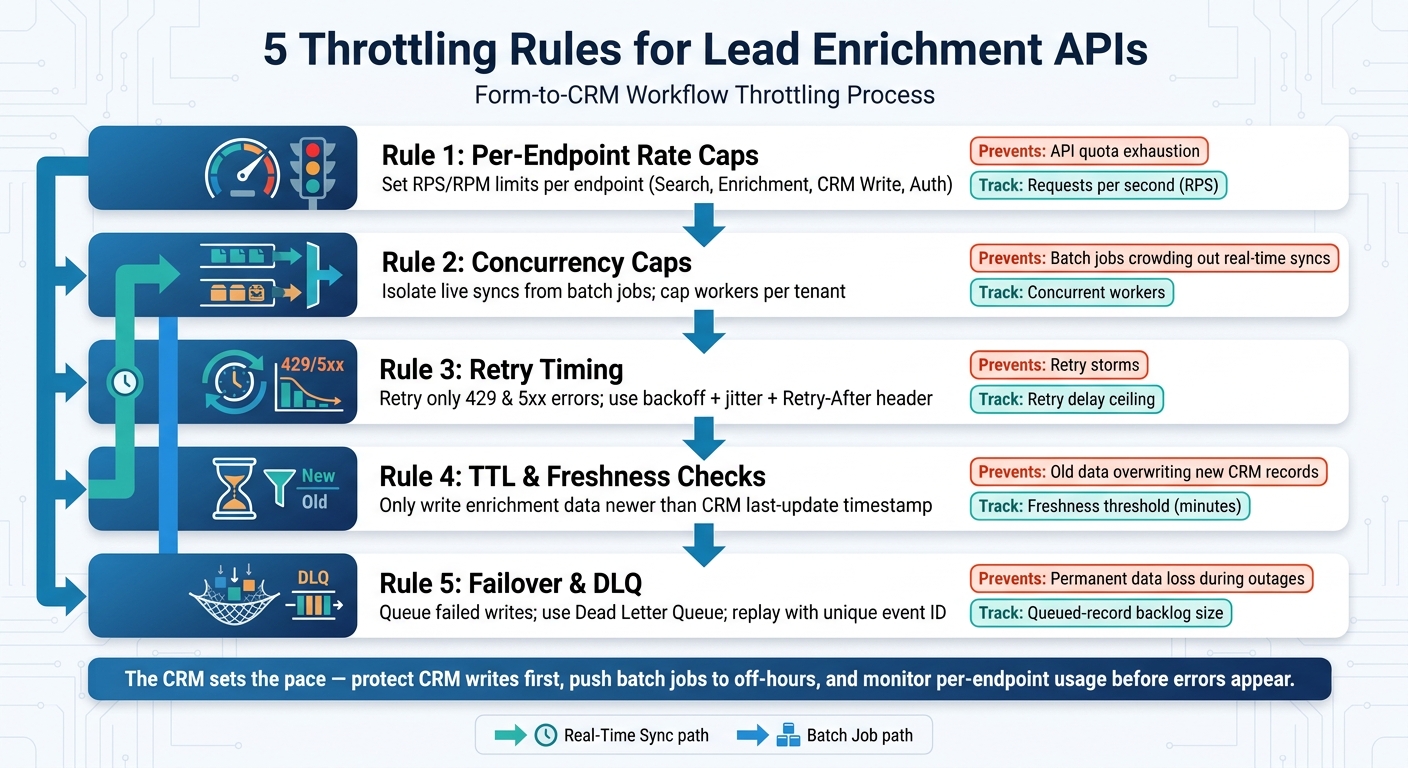
5 Throttling Rules for Lead Enrichment APIs: Form-to-CRM Workflow
The five rules each deal with a different point of failure, but they make the most sense when you use them in order. Taken together, they protect the same path from start to finish: capture, enrichment, retry, freshness, and recovery.
A new lead submits a form and then moves into an async queue, so enrichment doesn’t slow down the user experience. From there, middleware manages throughput before the first API call ever leaves the queue.
The key point here is simple: middleware, not the form layer, controls traffic. It enforces per-endpoint caps and concurrency limits before any enrichment request goes out. That keeps downstream quotas in check without repeating each provider’s rules in multiple places. Once throughput is under control, the next guardrail is retry behavior when calls fail.
If an enrichment API returns 429, middleware uses the retry policy from Rule 3 before requeuing the event. After that, freshness checks make sure delayed data doesn’t overwrite current CRM values.
Before any write happens, middleware checks freshness so stale enrichment data can’t replace newer CRM data. If a record still can’t move forward, middleware sends it to failover for recovery.
Quick Reference Table
Use this table to match each throttling rule to the failure it helps avoid, the control to put in place, and the metric to track. Think of it as a middleware checklist for the form-to-CRM path. It’s a handy final pass before you launch form-to-CRM syncs.
| Rule | Risk Prevented | Recommended Control | Key Metric |
|---|---|---|---|
| Per-Endpoint Rate Caps | Downstream API exhaustion | Outbound rate limiter | Requests per second (RPS) |
| Concurrency Caps | Overwhelming downstream systems with too many simultaneous connections | Per-tenant worker caps | Concurrent workers |
| Retry Timing | Retry storm / lockout | Exponential backoff with jitter | Retry delay ceiling |
| Stale Data / TTL | Wasted API credits / redundant processing | Timestamp-based freshness checks | Freshness threshold (minutes) |
| Failover Paths | Permanent data loss during outages | DLQ or fallback webhook | Queued-record backlog size |
Conclusion
These five rules fit together like parts of the same system. Per-endpoint caps should line up with downstream quotas. Concurrency limits help stop bursts. Backoff with jitter cuts down retry storms. Freshness rules stop stale writes. And failover paths keep leads moving when an outage hits. Use the checklist below to make sure each rule is in place before go-live.
Before launch, use this checklist:
- Review downstream quotas: Pull the exact per-second, per-minute, or daily limits for every destination in your stack.
- Test retry behavior: Simulate HTTP 429 and 500-series errors to confirm your backoff logic works the way you expect.
- Define TTL rules: Set a clear TTL for enriched records.
- Document the fallback path for failed enrichment.
In most cases, downstream API limits set the pace, not the form layer or middleware. Catch that before launch, and the sync stays stable.
FAQs
Which API limits should I check first before launch?
Before launch, check the basics first:
- Request caps per minute, hour, and day
- Concurrency or job limits on the sync side
- Retry and backoff behavior for 429s and temporary errors
Also confirm burst behavior. And make sure you can monitor rate-limit headers like X-RateLimit-Remaining on every response.
How do I choose a safe TTL for enriched lead data?
Choose a safe Time-to-Live (TTL) by balancing data accuracy with API usage cost. External lead data may change only once a month, or on some other periodic schedule, so a shorter TTL doesn't always give you better info.
Set the TTL based on how time-sensitive your use case is and how much data you're processing. For high-volume workflows, batch enrichment is often a better fit when you don't need data updated in real time. If you do need real-time updates, watch your API usage limits and use caching to avoid sending the same request over and over.
When should failed writes go to a DLQ instead of being retried?
Send failed writes to a dead-letter queue (DLQ) when the problem won’t go away on its own, the payload is malformed, or you’ve already used up your retries.
That usually means cases like missing required fields, identity conflicts, data that violates CRM custom rules, and non-retryable responses such as 400 or 403.
A DLQ cuts down on useless retry noise and gives teams a clean place to inspect failures, fix the root cause, and replay the record later.
Related Blog Posts
Get new content delivered straight to your inbox

The Response
Updates on the Reform platform, insights on optimizing conversion rates, and tips to craft forms that convert.




Drive real results with form optimizations
Tested across hundreds of experiments, our strategies deliver a 215% lift in qualified leads for B2B and SaaS companies.
