
.webp)
How API Rate Limits Impact Form Integrations



API rate limits can disrupt your form integrations if not managed properly. Every form submission might trigger multiple API calls - logging leads, validating emails, and syncing data. But when traffic spikes, such as during product launches, hitting these limits can cause silent failures, like missing or incomplete records.
To avoid this, you need strategies like batching requests, using webhooks instead of polling, and implementing retry logic for errors like HTTP 429 Too Many Requests. Proactively monitoring API usage and handling limits with throttling and backoff techniques ensures smooth workflows, even under pressure.
Key takeaways:
- Rate limits vary by provider: Examples include 100 requests/second for Stripe and 375 requests/minute for Google Forms.
- Critical bottlenecks: CRM deduplication, email validation, and lead enrichment often strain API limits.
- Solutions: Use batching, prioritize critical requests, and monitor API headers like
X-RateLimit-Remaining.
Understanding and addressing rate limits upfront helps prevent data loss and operational headaches.
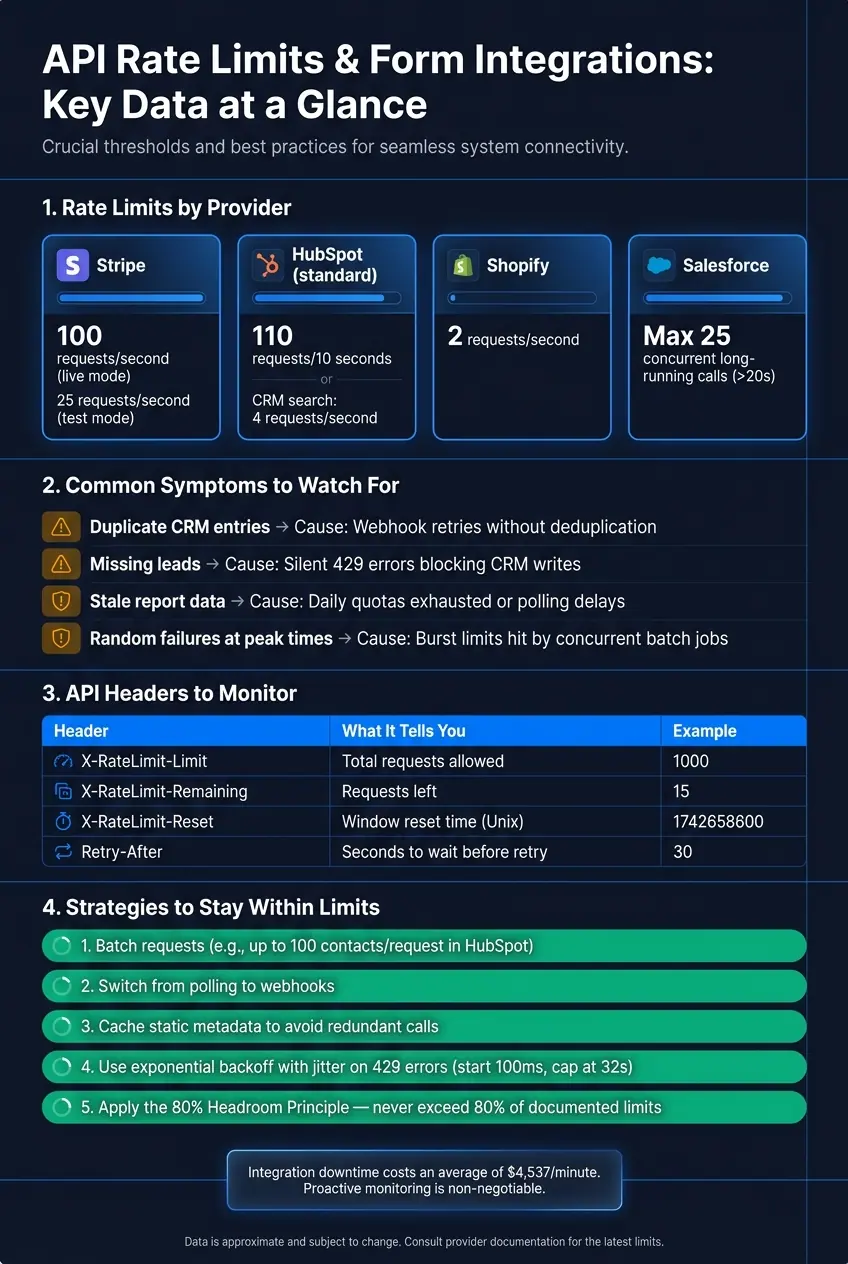
API Rate Limits Cheat Sheet: Limits, Symptoms & Fixes for Form Integrations
The subtle art of API Rate Limiting
How API Rate Limits Work in Form Workflows
Let's dive deeper into how API rate limits operate within form workflows.
How API Rate Limits Are Enforced
API rate limits are typically managed using algorithms like fixed/sliding windows, token bucket, and leaky bucket. Each approach has its nuances:
- Fixed windows reset counters at set intervals. However, this can lead to request spikes at the reset points, a phenomenon known as "boundary bursting."
- Sliding windows continuously evaluate requests over a rolling time frame, helping smooth out those spikes.
- Token bucket models allow short bursts of activity. For instance, Stripe permits up to 100 requests per second.
- Leaky bucket models ensure a steady flow by processing requests at a constant rate. Shopify, for example, allows 2 requests per second.
Additionally, some APIs impose concurrent request limits to manage server load. For instance, Salesforce caps long-running API calls (those exceeding 20 seconds) at 25 simultaneous requests.
Where Rate Limits Show Up in Form Integrations
Rate limits can create bottlenecks at various stages of a form workflow, often in ways that aren't immediately obvious.
CRM submissions and deduplication calls are common pressure points. Platforms like HubSpot and Salesforce enforce strict limits on these operations, which can slow or block data flow during high-traffic events like product launches or bulk imports. For example, HubSpot's CRM search endpoint is capped at 4 requests per second, much lower than its standard endpoints. If your form checks for duplicate contacts before creating a new record, this restriction can quickly become a choke point.
Email validation and lead enrichment introduce additional API calls per form submission. Each service involved has its own rate limit, and these limits can stack up. A single form submission might trigger three or four separate API calls, each needing to stay within its own constraints.
"The HubSpot API rate limit isn't something you bolt on later – it's a core architectural concern." - Anze Koprivec, Cofounder, Scopious Digital
How Systems Signal Rate Limit Errors
When rate limits are exceeded, APIs communicate this through specific responses. Most commonly, you'll see an HTTP 429 Too Many Requests status, accompanied by a Retry-After header. This header tells you exactly how long to wait before retrying, either as a number of seconds (e.g., 30) or a specific HTTP date. It's best to rely on this value rather than guessing the wait time.
Many APIs also provide quota tracking headers to help you monitor usage before hitting a limit. These headers offer essential insights:
| Header | Description | Example Value |
|---|---|---|
X-RateLimit-Limit |
Total requests allowed in the current window | 1000 |
X-RateLimit-Remaining |
Requests left before hitting the limit | 15 |
X-RateLimit-Reset |
When the current window resets (Unix timestamp) | 1742658600 |
Retry-After |
Seconds to wait before retrying | 30 |
"Rate limiting is not just protection. It is communication. A good API tells clients when to slow down and how to recover." - Muiz, Builder of NetworkSpy
Properly managing these responses is essential to keeping form integrations running smoothly. One key detail: if your form integration operates in the browser, rate limit headers won't be accessible to JavaScript unless the server explicitly includes them in the Access-Control-Expose-Headers list. Missing this step can make debugging much harder.
How Rate Limits Affect Form Integrations in Practice
This section dives into the real-world effects of API rate limits on form integrations. Knowing how and where these limits disrupt workflows can help you prevent data loss and operational headaches.
Where Rate Limits Hit Hardest in Form Workflows
Rate limits tend to create bottlenecks at critical points in form workflows. These issues often arise during high-demand scenarios like nightly syncs, bulk imports, or traffic spikes from marketing campaigns. In these cases, multiple processes compete for the same API allowance.
Take real-time deduplication, for example. This process often requires several search calls. HubSpot's CRM search endpoint, for instance, allows just 4 requests per second. If one form submission triggers multiple searches, the rate limit can quickly become a problem. Add in lead enrichment or email validation services - each with their own API calls - and the bottleneck intensifies.
"Burst limits are the ones that bite you... a single 'contact sync' can easily take 3–4 API calls. Multiply that by a few hundred records in a batch job and you've burned through your burst window before the first log entry finishes writing." - Anze Koprivec, Cofounder, Scopious Digital
Common Signs of Rate Limit Problems
Rate limit issues in form workflows often produce subtle, yet frustrating, operational symptoms. One of the biggest challenges is how these problems can remain hidden. For example, a user might see a success message after submitting a form, even though a 429 error has silently blocked the data from syncing.
"A 429 that isn't handled correctly often doesn't surface as a visible error; instead, it drops data or skips records, and the integration continues running as if nothing happened." - Michael Halka, Technical Account Manager, Prismatic
Here are some common warning signs to watch for:
| Symptom | Likely Cause |
|---|---|
| Duplicate entries in your CRM | Webhook retries without proper deduplication |
| Missing leads | 429 errors silently blocking CRM writes |
| Stale or out-of-date data in reports | Daily quotas exhausted or polling delays |
| Random failures during peak times | Burst limits hit by concurrent batch jobs |
Business Costs of Rate Limit Issues
The consequences of rate limit problems go far beyond a few missing records. When sync delays occur, lead routing can break down. This might mean lifecycle stage updates aren’t processed on time, leads are assigned to the wrong sales reps, or worse, leads are completely lost in the shuffle. In some cases, one team’s bulk export can hog the entire API budget, leaving no room for real-time form submissions to sync.
Throttling can also disrupt marketing campaigns. For instance, if rate limits prevent contacts from syncing, only 60% of recipients might receive campaign emails, leaving a 40% gap that only becomes apparent during manual checks.
"Most MarTech integration failures are invisible - they don't crash your stack, they just quietly drop records, skip contacts, and deliver stale data until someone reconciles numbers by hand days later." - House of MarTech
When leads go missing or data syncs incorrectly, the impact ripples across sales and support teams. They’re forced to spend extra time tracking down missing records or fixing errors manually. This doesn’t just waste time - it can also result in missed opportunities and added friction every time the integration falters.
sbb-itb-5f36581
How to Optimize Form Integrations to Stay Within API Rate Limits
To tackle the challenges of API rate limits, it’s essential to adopt strategies that make your API usage more efficient.
How to Assess Your Provider's Rate Limits
Start by diving into your API provider's documentation. Pay attention to three key limit types: burst limits (short-term maximums), daily quotas, and per-endpoint restrictions. For example, HubSpot’s public OAuth apps allow 110 requests every 10 seconds, while Stripe permits 100 requests per second in live mode and 25 in test mode. These limits vary widely depending on the provider and the specific endpoint.
Once your integration is live, monitor API headers like X-RateLimit-Remaining and X-RateLimit-Reset in real time. A good rule of thumb is to use only 80% of the documented rate limit. This buffer accounts for timing inconsistencies and ensures other processes using the same credentials can operate without issues.
"If you want a HubSpot integration that holds up under real usage, you have to design for throttling, batching, caching, queueing, and reconciliation from day one." - Tim Ritchie, CEO of Integrate IQ
Ways to Cut Down on API Calls
Reducing the number of API calls is critical to staying within rate limits. One effective approach is batching. For instance, instead of creating contacts one by one, use batch endpoints. HubSpot, for example, allows up to 100 contacts per request, which can significantly lower the number of calls during bulk operations.
Here are three more strategies to reduce call volume:
- Switch from polling to webhooks: Polling wastes requests by repeatedly checking for changes that haven’t happened. Webhooks, on the other hand, trigger only when an event occurs, making them far more efficient.
- Cache static metadata: Data like object schemas or property definitions doesn’t change often. By caching this information, you avoid redundant API calls.
- Segment traffic into priority lanes: Separate real-time user actions (like form submissions) from scheduled tasks (like nightly imports). This ensures bulk processes don’t exhaust the API budget needed for time-sensitive operations.
These methods not only cut down on API usage but also prepare your integration for throttling and backoff, which we’ll cover next.
Using Throttling and Backoff to Handle Rate Limits
Throttling and backoff are two sides of the same coin. Throttling is proactive, designed to pace requests before hitting a limit, while backoff is reactive, slowing down after a 429 error.
For consistent workloads, you can use a loop with fixed delays. For example, if your limit is 100 requests per minute, aim for 80% of that by adding a 750ms delay between requests. For handling 429 errors, implement exponential backoff with jitter. Start with a short delay (around 100ms), double the wait time with each retry, cap it at 32 seconds, and add a random offset to avoid synchronized retries.
"Jitter is not optional. Without it, every integration instance that hits a rate limit backs off for the same interval and then retries simultaneously." - Michael Halka, Technical Account Manager, Prismatic
Always prioritize the Retry-After header in 429 responses. This header specifies the exact wait time, making it more reliable than any estimate. For persistent errors, consider using a circuit breaker. If repeated 429 errors occur, pause all requests for a cooldown period (30 seconds is a common default) to prevent overwhelming the endpoint.
| Situation | Recommended Strategy |
|---|---|
| Occasional 429 errors | Exponential backoff with jitter |
| Predictable bulk syncs | Rate-aware scheduling (proactive pacing) |
| Syncing collections of records | Batching to reduce total request count |
| Mix of real-time and bulk work | Priority lane segmentation |
| Multiple systems sharing one API key | Centralized throttling/concurrency controls |
Error Handling and Monitoring for Rate Limit Issues
How to Handle Rate Limit Errors Correctly
When you encounter a 429 response, don’t treat it as a failure - view it as an opportunity to retry. Proper error handling involves more than just retrying requests; it requires proactive measures like monitoring rate limit headers and implementing effective retry logic. This ensures your form submissions remain uninterrupted, even when API limits are reached.
Pay close attention to the Retry-After header. If it’s not provided, adopt an exponential backoff strategy with jitter to space out retries. One often-overlooked detail is accounting for clock differences between your system and the API server. Add a 100–200ms buffer to calculated wait times to avoid premature retries.
The combination of smart error handling and proactive monitoring is key to maintaining seamless integration performance.
How to Monitor Form Integration Performance
Monitoring plays a vital role in identifying rate limit issues before they escalate. Log the X-RateLimit-Remaining header with every response - not just errors.
"Read and log rate limit headers on every response. Even when requests succeed, X-RateLimit-Remaining: 3 is a warning - you're about to hit the wall." - APIScout
Set up alerts to trigger when your remaining capacity drops below 20% of the total limit. This gives you time to adjust - throttling requests or rescheduling bulk tasks - before hitting the rate limit. Key metrics to track include the percentage of 429 responses, total retries, and average retry delays. A spike in any of these metrics signals that your integration may be under strain.
For teams using multi-instance deployments, localized monitoring won’t cut it. Use a shared counter, like one stored in Redis, to coordinate across all workers. This helps prevent exceeding the API limit collectively.
Here’s a critical financial angle: integration downtime costs businesses an average of $4,537 per minute, while the median detection time for webhook issues is 42 minutes. That’s a potential $190,000+ loss if your monitoring setup is reactive instead of proactive.
Using Reform's Analytics to Track Submission and API Activity
Reform’s Analytics tool complements strong monitoring practices by providing a unified view of submission and API activity. Each webhook payload includes a unique submission ID and an occurred_at timestamp, making it easy to trace submission spikes back to API errors in your CRM or marketing tools.
Reform also employs advanced spam detection, analyzing factors like keystrokes, mouse movements, and field sequencing to block bot-driven submissions before they hit your systems. This reduces the risk of sudden API call surges caused by bots.
For additional flexibility, you can connect Reform webhooks to external tools like Zapier to create custom dashboards or set up Slack alerts. These can track submission volumes alongside your API health metrics. If you’re gearing up for a major traffic event - such as a product launch or marketing campaign - Reform’s support team can assist in reviewing historical data to help you plan your API usage effectively.
Conclusion and Key Takeaways
Summary of Key Points
API rate limits can create serious challenges for businesses relying on form integrations. By the time you encounter a 429 error, the damage is often already done. To stay ahead, you need a mix of reactive and proactive strategies.
Techniques like exponential backoff with jitter help you recover gracefully when limits are hit, while proactive measures - such as client-side throttling, batching requests, and prioritizing critical API calls - help you avoid hitting those limits in the first place. The 80% Headroom Principle is another critical tool, offering a buffer to account for timing differences and shared credential issues.
Michael Halka, Technical Account Manager at Prismatic, highlights the broader challenge:
"At scale, rate limiting is an architectural problem... 80% of integration code ends up being infrastructure rather than the business logic."
This perspective emphasizes the importance of treating rate limits as an architectural issue, not just a coding problem. By adopting this mindset, you’ll build integrations that can handle high-pressure scenarios without breaking.
Next Steps and Recommendations
These strategies lead to actionable steps. Start by auditing your existing integrations to ensure they align with your API provider's documented rate limits. Confirm that you're tracking X-RateLimit-Remaining in every response and have alerts ready to notify you when usage approaches 80% of your limit. For scheduled jobs, stagger their start times by 0–5 minutes to avoid unnecessary traffic spikes.
If you're using Reform, make the most of its tools to reduce API strain. Features like spam prevention and lead enrichment can cut down on unnecessary calls. Connect Reform webhooks to your CRM or marketing tools for near real-time data updates, and use the analytics dashboard to monitor submission trends. For high-traffic moments, such as product launches, analyze historical data to predict and manage API usage, ensuring smoother operations during peak demand.
FAQs
How do I estimate API calls per form submission?
To figure out how many API calls happen with each form submission, multiply the number of submissions you expect in a given time frame (like an hour) by the number of API calls each submission triggers (e.g., creating a contact or updating a deal). Then, compare this total against your API provider's rate limits. For example, if your provider caps requests at 12 per second, make sure your submission volume stays within that limit to prevent HTTP 429 errors.
What should I do when my integration gets a 429 error?
A 429 error indicates that your integration has surpassed the API rate limits. To fix this, you can implement exponential backoff with jitter - this method staggers retries by gradually increasing the delay between attempts, adding randomness to avoid further conflicts.
If the API response includes a Retry-After header, make sure to pause for the duration specified before trying again.
To avoid hitting these limits in the future, consider these strategies:
- Throttle requests using a centralized queue to regulate the flow of API calls.
- Use batching to group multiple requests into fewer API calls.
- Implement caching to store and reuse responses, reducing unnecessary requests.
- Leverage webhooks for event-driven workflows instead of constant polling.
These practices will help maintain a smooth and efficient integration while minimizing the risk of repeated errors.
How can I keep peak traffic from dropping leads?
To keep leads from slipping through the cracks during peak traffic, try leveraging exponential backoff and queuing strategies to handle 429 rate-limit errors. By introducing small, randomized delays before making outbound calls, you can prevent sudden surges in concurrent requests that might overwhelm the system.
Additionally, think about adding a normalization layer. This can help you manage rate limits in a consistent way across different providers, simplifying operations. Finally, make sure to validate your system's capacity with load testing. This step ensures your setup can handle the pressure during those high-volume periods, keeping everything running smoothly.
Related Blog Posts
Get new content delivered straight to your inbox

The Response
Updates on the Reform platform, insights on optimizing conversion rates, and tips to craft forms that convert.




Drive real results with form optimizations
Tested across hundreds of experiments, our strategies deliver a 215% lift in qualified leads for B2B and SaaS companies.
