
.webp)
Real-Time vs Batch: API Integration for Lead Generation



When deciding between real-time and batch API integration for lead generation, the main difference comes down to speed and data handling. Real-time APIs provide instant data updates, ideal for time-sensitive tasks like contacting leads immediately after engagement. Batch processing, on the other hand, processes large volumes of data at scheduled intervals, making it cost-effective for non-urgent tasks like CRM updates.
Key Points:
- Real-Time APIs: Deliver data instantly, enabling immediate actions like lead validation and follow-ups. Best for fast-paced workflows but requires more complex infrastructure.
- Batch Processing: Processes data in bulk on a schedule. Perfect for large-scale tasks where immediacy isn’t critical, offering lower costs and simpler implementation.
Quick Comparison:
| Feature | Real-Time Integration | Batch Integration |
|---|---|---|
| Speed | Instant (milliseconds) | Delayed (hours to days) |
| Data Freshness | Always current | Snapshot of past data |
| Cost per Record | Higher | Lower |
| Use Cases | Lead validation, AI outreach | CRM updates, data cleaning |
The choice depends on your needs: prioritize real-time for speed and responsiveness or batch for managing large datasets efficiently.
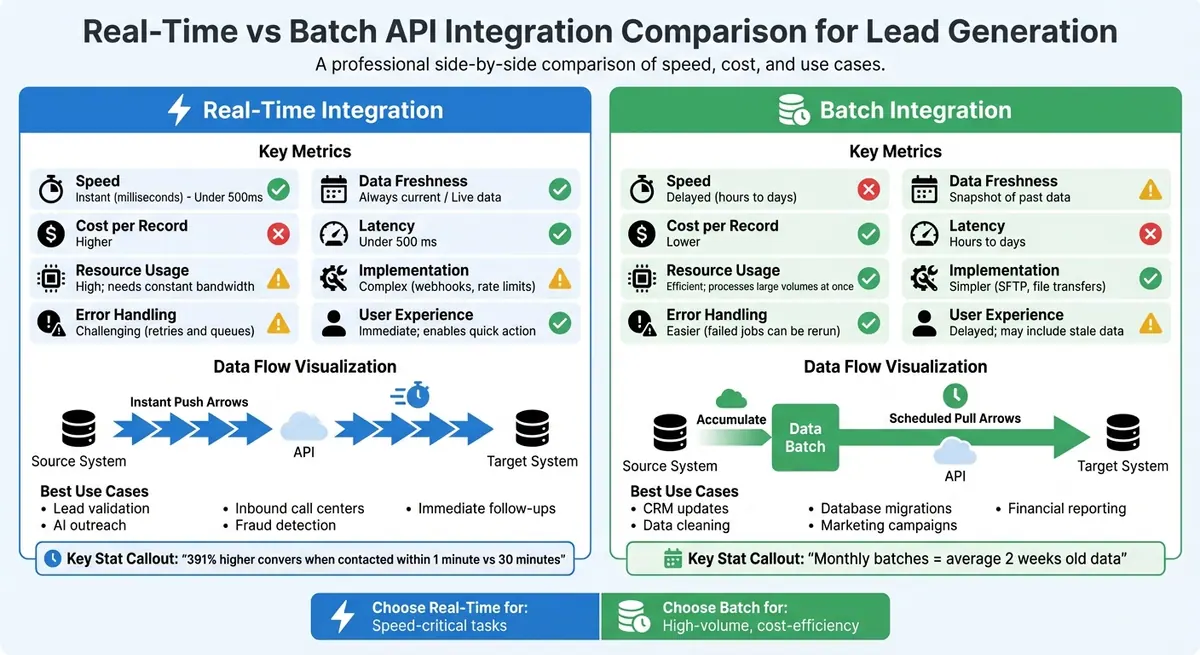
Real-Time vs Batch API Integration Comparison for Lead Generation
What Is Real-Time API Integration?
Real-time API integration allows data to move between systems instantly as events happen. For example, when a lead fills out a form or takes a specific action, that information is immediately sent to your CRM, marketing platform, or other connected tools. This instant data transfer is essential for quick and effective lead engagement.
This method relies on an event-driven setup. Essentially, a trigger - like a form submission - initiates an immediate response across connected systems. Unlike batch processing, which operates on a schedule, real-time integration ensures your data stays current. It uses synchronous API calls, which wait for data to return, and asynchronous webhooks, which send updates as soon as they’re ready. This eliminates the need for constant polling. Some systems also allow live data retrieval on demand, ensuring the freshest information is always available. These design choices shape the core benefits of real-time integration, especially for time-sensitive workflows.
In lead generation, this means your sales team can act fast - reaching out to prospects while their interest is still high, validating contact details instantly, and making decisions based on the most recent insights. This real-time responsiveness stands in stark contrast to the delays of batch updates.
Key Features of Real-Time Integration
Real-time integration’s defining trait is its speed. Data moves from source to destination in just seconds. This rapid transfer enables instant lead validation, such as verifying phone numbers or email addresses as they’re entered, helping to filter out bad data before it even enters your system.
Another advantage is continuous syncing. Whenever a lead’s status changes in one platform, every connected tool updates immediately. This ensures no one is working with outdated or conflicting information.
Real-time systems also allow live data retrieval, pulling the latest information exactly when it’s needed instead of relying on older, cached data. This is especially useful for workflows where timing is everything, like responding to inbound leads, detecting fraudulent activity, or tailoring marketing campaigns on the fly.
These features are game-changers in scenarios where speed directly influences outcomes - think high-volume lead generation, busy call centers, or AI-driven outreach where having the right context at the right moment prevents missteps.
Pros and Cons of Real-Time Integration
| Advantage | Drawback |
|---|---|
| Sales teams can contact leads immediately while they’re still interested. | Infrastructure demands can raise costs per record. |
| Decisions are based on current, accurate data instead of outdated snapshots. | Managing webhooks, rate limits, and callbacks adds complexity. |
| Instant responses improve customer experience, building trust and reducing friction. | Continuous system activity can strain resources and impact performance. |
| Poor-quality data is filtered out at the point of entry. | Errors require immediate fixes, making resolution more complex than in batch systems. |
| Systems can quickly adapt to market changes or trigger events. | Keeping data consistent during simultaneous updates across platforms can be tricky. |
Real-time integration shines in situations where speed and accuracy are critical - whether for compliance or maximizing conversions. However, it does come with challenges, like higher technical complexity and increased resource demands. The key is to align this approach with workflows where instant data processing delivers real value.
What Is Batch API Integration?
Batch API integration processes data in bulk at scheduled intervals - daily, weekly, or monthly - using ETL (Extract, Transform, Load) pipelines. Instead of handling data as events occur, this method gathers information over time and processes it all at once. Typically, large volumes of data are sent as bulk CSV or JSON files via SFTP or through specific bulk API endpoints. Unlike real-time integration, which pushes updates instantly, batch processing operates on a pull model, where the receiving system requests data at set times.
The downside? Monthly batches can lead to data delays of up to 30 days, with an average data age of about two weeks. This lag makes batch integration unsuitable for scenarios requiring immediate action. For instance, contacting a lead within one minute of engagement increases conversion chances by 391% compared to waiting thirty minutes. However, for tasks where speed isn't critical, batch processing offers substantial cost savings and operational reliability. It focuses on efficiency and stability rather than immediacy, making it a stark contrast to real-time integration.
Batch processing is ideal for large-scale backend tasks like database cleanup, financial reporting, data migrations, and market analysis. It’s designed to handle thousands - or even millions - of records in one go, reducing network strain and computational costs compared to processing data individually.
Key Features of Batch Integration
Several features make batch integration a practical choice for managing high data volumes efficiently:
- Bulk data processing: This is the core of batch integration. By handling large datasets in one go, it reduces per-call costs and network overhead. Vendors often price bulk data more affordably than per-call API credits, creating significant savings.
- Scheduled updates: These run at predefined intervals or when data reaches a specific volume (e.g., 1,000 records or 1GB). Teams often schedule these jobs during off-peak hours to optimize resource use and avoid disrupting live systems.
- Resource efficiency: Processing one large file is far less resource-intensive than making thousands of individual API calls. This approach typically lowers cloud costs and simplifies implementation, often using no-code or low-code ETL pipelines.
- Improved data quality control: Batch systems allow time for validating and reconciling data before it’s loaded into the target system. If a batch job fails, it doesn’t disrupt live applications or user experiences. Instead, users continue accessing the last successful data snapshot while the batch is rerun during the next cycle.
Pros and Cons of Batch Integration
| Advantage | Drawback |
|---|---|
| Lower costs per record due to bulk processing. | High latency means data delays based on the batch schedule. |
| Easier setup with no-code or low-code tools. | Unsuitable for time-sensitive tasks like lead follow-up or fraud detection. |
| Failures don’t affect live users; jobs can be rerun automatically. | Data delays - monthly batches can average two weeks old information. |
| Efficiently handles massive volumes, processing thousands or millions of records at once. | Limited responsiveness makes it less viable for immediate decisions. |
| Data validation ensures accuracy before loading into the system. | Updates only appear during the next scheduled batch. |
For large-scale, non-urgent data updates, batch integration provides a cost-effective and stable solution. It complements real-time systems in a hybrid API strategy. For example, teams might use batch processing to update CRM records for millions of users at a low cost while reserving real-time APIs for high-priority accounts or time-critical actions. This balanced approach ensures both efficiency and responsiveness where they’re needed most.
Real-Time vs Batch: Key Differences
Real-time integration operates on a "push" model, transferring data instantly as events occur. In contrast, batch integration uses a "pull" model, retrieving data at scheduled intervals. This fundamental difference influences infrastructure requirements and user experience. Grasping these distinctions helps navigate the technical and operational challenges involved.
From an operational standpoint, real-time integration demands constant endpoint availability, while batch integration relies on maintaining a reliable, queryable database. This difference shapes the complexity of implementation and the approach to handling failures or downtime.
When it comes to integration quality, the focus isn't just on network latency - it's about data freshness. For example, even if an API responds in milliseconds, stale data from a database that updates monthly won't deliver the desired results. Real-time integration ensures data reflects the latest conditions, which is critical for lead generation. Studies show that contacting a lead within one minute can increase conversion rates by 391% compared to waiting 30 minutes.
Comparison Across Key Metrics
Here’s a breakdown of how real-time and batch integration compare across essential metrics:
| Metric | Real-Time Integration | Batch Integration |
|---|---|---|
| Latency | Under 500 ms | Hours to days |
| Data Freshness | Live; reflects current data | Snapshot of the past; data may be weeks old |
| Cost per Record | Higher; requires advanced infrastructure | Lower; benefits from bulk processing |
| Resource Usage | High; needs constant bandwidth | Efficient; processes large volumes at once |
| Implementation | Complex; involves webhooks and rate limits | Simpler; uses file transfers like SFTP |
| Error Handling | Challenging; involves retries and queues | Easier; failed jobs can be rerun |
| User Experience | Immediate; enables quick action | Delayed; may include stale data |
Real-time integration is ideal for industries where speed is critical - like insurance or mortgage - where responding quickly can make or break a deal. On the other hand, batch integration shines in tasks like cleaning CRM databases, populating data warehouses, or launching large-scale campaigns. In these scenarios, cost-efficiency and handling high volumes take precedence over instant updates.
Choosing the Right Integration Method
When deciding between real-time and batch integration, the choice isn't about which is "better" - it's about finding the method that fits your business needs. Factors like the urgency of lead follow-ups, the volume of data you handle, and your available resources will guide this decision.
Factors to Consider
Start by evaluating your speed and volume requirements. If immediate action on leads is critical - especially in industries where lead value can drop by 10% per hour - real-time integration is the way to go. On the other hand, if you're processing large amounts of data, batch integration offers a more cost-effective solution by reducing the overhead of constant API calls.
Real-time systems require a more complex setup, including always-on infrastructure and specialized oversight, which can drive up costs. Meanwhile, batch integration uses simpler methods, like CSV uploads, making it a more budget-friendly option for teams without dedicated technical resources.
Each method has its strengths. Real-time integration allows instant validation of data, such as verifying phone numbers or emails as they come in. Batch processing, however, is better suited for tasks like bulk data cleaning and enrichment. These differences make it easier to align the integration type with specific business scenarios.
Scenarios for Each Integration Type
Real-time integration shines in situations where speed is everything. Think inbound call centers, fraud detection, AI-driven outreach, or tracking updates to key contact details. As Leadgen-Economy highlights:
"A lead has 391% higher conversion probability when contacted within one minute compared to thirty minutes".
Batch integration, by contrast, is ideal for managing large-scale data tasks where speed takes a backseat to volume. Examples include customer data maintenance, data migration, or periodic marketing campaigns. Chris P. from Crustdata puts it this way:
"Choose batch uploads if you need to manage, clean, or migrate large volumes of data on a recurring basis".
Additionally, batch processing works well for training machine learning models, creating internal reports, or pre-loading millions of records into a CRM while keeping costs in check.
Many businesses are now opting for a hybrid approach, combining the strengths of both methods. For example, you could use real-time webhooks for immediate lead delivery and batch APIs for historical data queries, bulk updates, or reporting. This layered strategy helps balance costs with efficiency. A common workflow might look like this: check your internal cache first, use batch data for general needs, and reserve real-time processing for high-priority tasks or critical events. This blended approach ensures both speed and scalability, setting the stage for smooth technical execution.
sbb-itb-5f36581
Implementation Tips
Integrating APIs effectively can feel straightforward when you have the right infrastructure in place. These tips build on earlier discussions about trade-offs, ensuring your chosen method aligns with your lead generation goals.
Technical Requirements for Real-Time Integration
Real-time integration uses webhooks to transfer data instantly as events happen - like when someone submits a form. This approach avoids the delays and resource demands of polling methods. Setting up webhooks involves three simple steps: enabling them in your dashboard, pasting the destination URL, and configuring event triggers.
Security is a top priority for real-time systems. Use a signature header with a SHA-256 HMAC signature and a unique secret key to verify data integrity. On the receiving end, implement signature verification to confirm the data remains unchanged and originates from a trusted source. If you need to trigger actions across multiple platforms - such as updating both your CRM and email marketing tool from a single lead event - set up multiple webhook URLs.
To handle live API interactions efficiently, incorporate asynchronous patterns with circuit breakers and enforce strict rate limits. While maintaining an always-on infrastructure can be costly, the benefit lies in immediate action on high-value leads.
Real-time integration focuses on instant data flow, but batch integration offers a different approach, ideal for managing large volumes of data with scheduled precision.
Setting Up Batch Integration
Batch integration complements real-time methods by focusing on stability and processing high volumes of data. This approach typically involves an ETL (Extract, Transform, Load) pipeline to move large CSV or JSON files using secure protocols like SFTP or bulk API endpoints. A staging area is essential for validating data before uploading.
Automating data syncs during off-peak hours with scheduling tools can ensure smoother operations. Adding simple retry logic lets you rerun failed jobs without disrupting live systems.
For teams lacking dedicated developers, no-code platforms and CSV-based bulk upload tools simplify large-scale data migrations and cleaning. Additionally, APIs designed for bulk records can help identify issues like invalid emails, incorrect addresses, or disconnected phone numbers during the staging phase.
Both real-time and batch integration methods are essential for maintaining accurate customer data and maximizing the return on investment from your efforts.
Using Reform for Lead Generation
Reform combines the benefits of real-time and batch integrations into a single, efficient tool for lead generation. When a visitor submits a form, Reform instantly sends the lead data to your CRM via webhooks. This immediate transfer allows sales teams to act quickly, engaging prospects while their interest is still fresh. This approach is particularly effective in fast-paced settings like inbound call centers or live product demos, where timing can make or break a conversion.
In addition to its real-time capabilities, Reform handles large-scale data management with ease. For teams managing extensive datasets or running scheduled campaigns, Reform supports batch workflows. These workflows aggregate submissions at specific intervals, performing thorough error checks along the way. This setup is perfect for tasks that don’t require immediate action, ensuring your system isn’t overwhelmed.
To enhance lead quality, Reform includes automatic lead enrichment and email validation. It adds details like company information, job titles, and social profiles, while also verifying domain authenticity. In real time, this enrichment enables personalized follow-ups, and in batch mode, it processes large volumes of data efficiently at scheduled times.
Reform integrates seamlessly with CRMs like Salesforce, HubSpot, and Pipedrive through an easy-to-use, no-code interface. Real-time integrations send leads directly into CRM workflows, while batch setups handle bulk uploads according to your schedule. This flexibility empowers teams to create hybrid workflows without needing custom development.
The platform’s user-friendly interface makes configuring both real-time and batch integrations simple. Plus, detailed guides in the documentation ensure you can set everything up effortlessly.
Conclusion
Deciding between real-time and batch API integration comes down to aligning the approach with your specific business goals. Real-time integration is all about speed - delivering lead data in milliseconds. It’s ideal for scenarios where quick action is critical, like when your sales team needs up-to-the-minute information or when AI-driven outreach relies on current context. On the other hand, batch integration shines when managing large data volumes efficiently, making it a great fit for tasks like scheduled CRM updates, data warehousing, or processes where slight delays are acceptable.
Cost is another important factor. Real-time systems require always-on infrastructure and more intricate engineering, which can drive up the cost per record. In contrast, batch processing leverages economies of scale, offering a more cost-effective solution for handling large data sets. Understanding the trade-off between fast API responses and up-to-date data can often mean the difference between closing a deal and missing out.
FAQs
When should I choose real-time vs batch for lead gen?
When immediate action is necessary - like instant follow-ups, fraud detection, or handling time-sensitive responses - real-time integration is the way to go. It allows for real-time verification, stops spam in its tracks, and quickly updates CRMs, helping to improve conversions.
On the other hand, batch processing is perfect for managing large amounts of data in less urgent scenarios, such as generating reports or running email campaigns. It's more budget-friendly, easier to set up, and works well for periodic data updates or optimizing resources.
Can I use both real-time and batch together?
Yes, it's possible to use both real-time and batch API integration methods to suit your needs. Real-time integration is perfect for tasks that need immediate updates, like following up on leads as they come in. On the other hand, batch processing is ideal for handling large-scale data updates at scheduled times, making it great for tasks that aren't time-sensitive. By combining these methods, you can streamline workflows - taking quick action on critical data while efficiently managing bulk updates - boosting both responsiveness and operational efficiency.
What breaks most often in real-time integrations?
Failures in real-time integrations often arise due to data synchronization problems, network interruptions, unexpected API updates, or security weaknesses. These issues can lead to corrupted records, delays in processing, or even create security risks. To reduce the impact of such disruptions, it's important to have strong monitoring systems in place and to address potential problems proactively.
Related Blog Posts
Get new content delivered straight to your inbox

The Response
Updates on the Reform platform, insights on optimizing conversion rates, and tips to craft forms that convert.




Drive real results with form optimizations
Tested across hundreds of experiments, our strategies deliver a 215% lift in qualified leads for B2B and SaaS companies.
