
.webp)
Real-Time Sync vs Batch Sync for Leads



Want to keep your lead data current and actionable? Choosing between real-time sync and batch sync depends on your goals, timing needs, and budget.
- Real-time sync updates data instantly (milliseconds to seconds). Best for fast follow-ups, high-conversion multi-step forms, inbound lead routing and capture, and SLA-bound operations. It’s ideal when speed directly impacts conversions.
- Batch sync processes data in bulk at scheduled intervals (e.g., daily or weekly). Perfect for large-scale data updates, database hygiene, and cost-effective reporting.
Quick takeaway: Use real-time sync for time-sensitive workflows, and batch sync for tasks where delays are acceptable. Many businesses benefit from combining both methods for efficiency and accuracy.
Quick Comparison:
| Factor | Real-Time Sync | Batch Sync |
|---|---|---|
| Speed | Instant (milliseconds) | Delayed (minutes to days) |
| Use Cases | Lead routing, scoring | Database updates, reports |
| Cost | Higher per record | Lower per record |
| Setup | Complex (APIs, webhooks) | Simpler (CSV, ETL) |
| Volume Handling | Moderate | Large datasets |
Your choice depends on how quickly you need to act, your system’s capacity, and your budget. Many teams find a hybrid approach works best - real-time for immediate needs and batch for large-scale tasks.
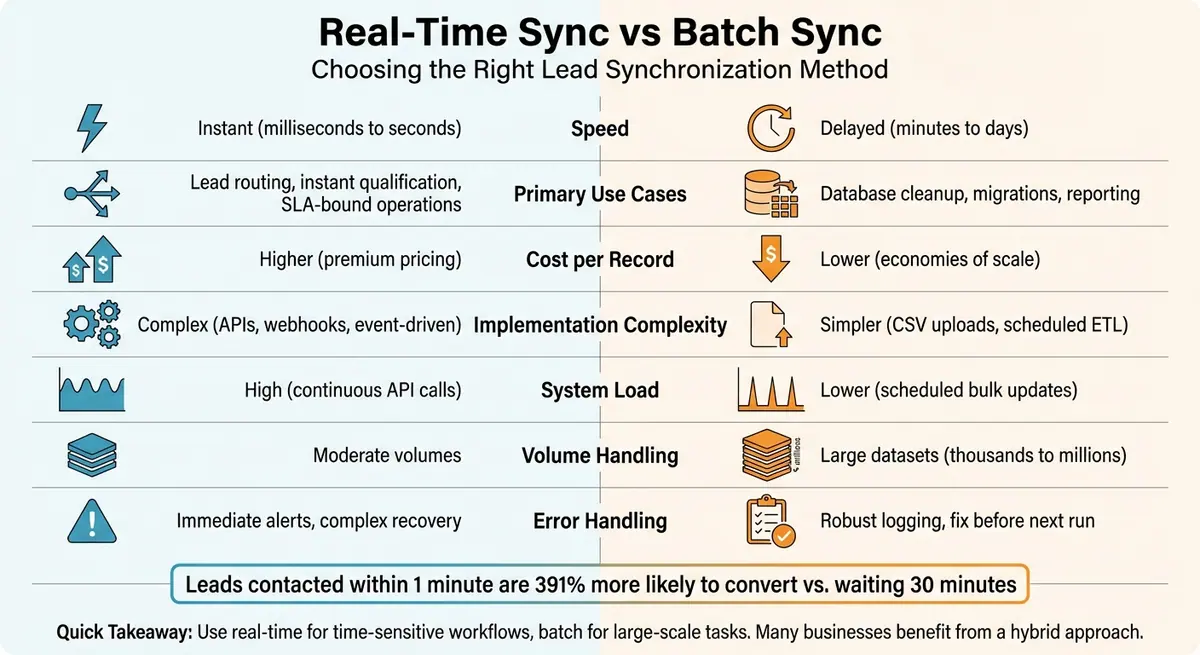
Real-Time vs Batch Sync Comparison: Speed, Cost, and Use Cases
Real-time vs Batch Processing: A Beginner's Guide
sbb-itb-5f36581
What Is Real-Time Lead Synchronization?
Real-time lead synchronization ensures that lead data moves instantly between systems the moment it's captured. For example, when someone submits a form, event-driven triggers like form submissions or record creations kick off immediate data transfers using webhooks and APIs.
Webhooks can update data in less than 500 milliseconds, while API polling typically adds a delay of 5–15 seconds. This difference in speed matters - a lot. Studies show that contacting a lead within one minute makes them 391% more likely to convert compared to waiting thirty minutes. In competitive industries, where lead value can drop by up to 10% per hour, having data available instantly can make or break your conversion rates.
As LeadGen Economy puts it:
"In the lead generation industry, delivery method determines whether your leads arrive in milliseconds or minutes, whether your buyers can act immediately or chase cold prospects, and whether your operation scales smoothly or collapses under technical debt." – LeadGen Economy
Key Features of Real-Time Sync
Real-time sync ensures that sales teams have immediate access to leads the moment they’re captured. It uses an event-driven architecture, relying on triggers like form submissions or webhook payloads to push data instantly.
Another advantage? The system automatically validates and enriches data as it’s captured. For example, it can filter out invalid phone numbers or emails right away, keeping your database clean. Some companies simplify forms by asking for just an email address initially, while real-time enrichment adds extra details - like company size, industry, and job title - in the background.
When to Use Real-Time Sync
Real-time sync shines when speed is essential for success. In industries where lead value declines quickly, instant follow-up can prevent missed opportunities. This is especially critical for inbound leads, where routing prospects to the right team member immediately can significantly boost conversion rates. Implementing expert form strategies can further streamline this process by automating qualification and routing.
It’s also a must-have for operations with strict service level agreements (SLAs). High-volume lead generation teams and inbound call centers rely on instant access to leads to meet performance benchmarks. Additionally, real-time sync is perfect for automated lead scoring systems, where quick workflows based on behavior or firmographic data can make all the difference. Reserve this approach for high-value leads where a fast response is directly tied to better outcomes.
Up next, we’ll explore how batch syncing provides an alternative way to handle lead data.
What Is Batch Lead Synchronization?
Batch synchronization processes lead data in groups at scheduled intervals - whether daily, weekly, or monthly. Instead of handling records one by one as they arrive, this method processes them all at once during a single operation.
The process generally follows an ETL (Extract, Transform, Load) structure: extract the data, process it, and then load the updated information back into your CRM. This makes it highly scalable, capable of managing thousands or even millions of records in one go.
Batch sync often relies on straightforward methods like CSV uploads rather than complex API configurations. This simplicity makes it accessible to marketing and operations teams, even without needing a developer's help.
Another advantage is the ability to schedule syncs during off-peak hours, which helps reduce system strain. Additionally, batch processing tends to be more cost-effective per record compared to real-time API calls, making it a practical option for managing large volumes of data on a budget.
Key Features of Batch Sync
Batch sync operates on a fixed schedule rather than responding to instant triggers. Whether it’s every night at midnight, every Monday morning, or once a month, this predictable timing allows teams to plan around system resources and avoid operational conflicts.
This method is particularly effective for handling massive datasets. For instance, if you need to process 100,000 records, you can divide them into smaller chunks of around 10,000 to avoid timeouts or exceeding system limits. Most batch sync tools also require minimal setup, enabling teams to handle uploads and scheduling without needing to write code.
These features make batch sync a reliable choice for managing large-scale data processing while keeping costs and complexity low.
When to Use Batch Sync
Batch sync shines in scenarios where real-time data transfer isn’t essential but scalability and simplicity are key.
It’s ideal for maintaining database hygiene. Regular batch runs ensure your CRM stays accurate by capturing updates such as job changes, company acquisitions, or other shifts in contact information.
This method is also perfect for large-scale migrations or initial database imports. Whether you're moving historical data or uploading extensive lists, batch processing can handle the volume without overwhelming your systems.
For outbound campaign preparation, batch sync is a smart choice. Before launching a campaign, you can process target segments in bulk to standardize data, enrich contact details, and verify technographics. When campaigns are planned ahead, the focus is on thorough, cost-effective processing rather than instant data transfer.
Lastly, batch sync works well for reporting and analytics. For tasks like monthly performance reports or quarterly audits, scheduled runs provide the necessary data updates without requiring real-time accuracy.
"Batch enrichment processes records in bulk... works well when time sensitivity is low and volume is high. You don't need the data in milliseconds; you need thousands of records processed cost-effectively." – Jan from Databar.ai
Real-Time Sync vs Batch Sync: Key Differences
These two synchronization methods differ significantly in timing, costs, resource demands, and how they handle errors.
The most noticeable difference is data freshness. Batch sync introduces delays based on its aggregation intervals, which can range from minutes to days. But speed doesn't always mean up-to-date data. Chris P. from Crustdata clarifies:
"The biggest confusion in this space comes from mixing up speed with freshness. A B2B data API might respond to your request in milliseconds... however, if that API is serving data from a monthly snapshot, the information itself could be 30 days old" - Chris P. from Crustdata
Beyond timing, cost and resource usage also set these methods apart. Batch sync is typically more economical when dealing with large datasets, benefiting from economies of scale. On the other hand, real-time sync often comes with higher costs due to the infrastructure needed for low-latency, high-availability APIs. Additionally, batch processes can run during off-peak hours, reducing system strain. In contrast, real-time sync imposes a continuous load that scales with data volume.
Error handling is another area where the two differ. Batch sync allows errors to be logged and corrected before the next scheduled run, minimizing disruptions for users. Real-time sync, while offering instant error detection, requires more advanced safeguards to handle issues on the fly. For instance, a failed batch job can be rerun, but a real-time webhook failure might result in missing data.
Jan from Databar.ai provides a helpful perspective:
"Batch enrichment and real-time enrichment aren't competing strategies, they solve different operational challenges. Most teams eventually need both" - Jan from Databar.ai
Here's a quick breakdown of how these two methods compare:
Comparison Table: Real-Time vs Batch Sync
| Factor | Real-Time Sync | Batch Sync |
|---|---|---|
| Data Freshness | Instant (milliseconds to seconds) | Delayed (minutes to days) |
| Primary Use Case | Inbound lead routing, lead qualification | Database cleanup, migrations, reporting |
| Cost per Record | Higher (premium pricing) | Lower (economies of scale) |
| Implementation | Complex (APIs, webhooks, event-driven) | Simpler (CSV uploads, scheduled ETL) |
| System Load | High (continuous API calls) | Lower (scheduled bulk updates) |
| Error Handling | Immediate alerts with complex recovery | Robust logging; errors fixed before next run |
| Scalability | Costs increase linearly with volume | Efficient for processing massive datasets |
| Accuracy Focus | Point-of-entry validation | Historical data hygiene and enrichment |
How to Choose the Right Synchronization Method
When deciding on a synchronization method, it’s all about finding the right balance between speed, system capacity, and cost. The choice often boils down to how quickly you need to act on the data, how much your systems can handle, and what your budget allows.
Time Sensitivity
Timing is usually the biggest factor. If leads lose interest within minutes, real-time synchronization becomes essential. For example, sales teams that need to reach out seconds after a form submission can't afford to wait. On the other hand, tasks like updating marketing lists or preparing weekly reports are better suited for batch processing, which is more cost-effective and doesn’t require immediate updates.
API Limits and Technical Resources
Your system’s technical capacity also matters. Real-time sync involves setting up custom webhook listeners and managing API calls, which means you’ll need ongoing developer support to handle retry logic, error management, and orchestration. Batch processing, however, is more straightforward - often relying on CSV uploads or scheduled ETL pipelines that non-technical teams can manage.
Budget Considerations
Cost is another critical piece of the puzzle. Real-time synchronization can be expensive due to its constant processing demands. As John Kelleher, Founder and CEO of SpotDev, explains:
"While real-time updates offer the allure of instant data syncing, they can also come with a hefty price tag in terms of middleware usage and costs." - John Kelleher, Founder and CEO of SpotDev
Questions to Ask Before Deciding
Here are some key questions to help you determine the best approach:
-
How fast does your team need to act?
If immediate action is crucial, go for real-time sync. For less urgent needs, batch processing can save money. -
What are your system's API limits?
Be aware of your CRM’s rate restrictions to avoid hitting your quota. -
Do you have developer support?
Real-time sync requires ongoing technical maintenance, while batch processing is less resource-intensive. -
How will the data be used?
Data for human-facing tasks like sales or support often needs real-time delivery. Analytics or reports, however, can rely on scheduled batch updates. -
What’s your lead volume?
Real-time sync works for moderate volumes but can strain resources at scale. Batch processing handles large-scale tasks more efficiently.
Answering these questions will help you decide whether you need a single method or a mix of both.
When to Use Both Methods Together
For teams that need both rapid response and large-scale data management, a hybrid approach is often the best solution. Jan from Databar.ai puts it well:
"Batch enrichment and real-time enrichment aren't competing strategies, they solve different operational challenges. Most teams eventually need both." - Jan from Databar.ai
A hybrid strategy typically involves three steps:
- Start with batch processing to clean up historical data and ensure quality.
- Add real-time sync for new leads to prevent data issues from piling up.
- Schedule periodic batch updates (e.g., monthly or quarterly) to capture changes like job transitions or company updates.
This approach balances cost and performance. Use real-time sync for critical workflows such as instant lead assignments, sales routing, or AI-driven outreach. Meanwhile, reserve batch processing for tasks like database cleanup, marketing re-engagement campaigns, and large-scale data migrations.
Chris P. from Crustdata sums it up:
"The question isn't whether to choose batch or real-time, but rather which layer should handle which accounts and triggers." - Chris P. from Crustdata
For example, you might use real-time sync for high-value prospects submitting contact forms, while batch updates handle broader database maintenance. If real-time sync feels too costly or complex, consider near-real-time updates (within 5–15 seconds). This method uses short-interval polling or buffered event streaming to deliver fast updates while keeping costs under control.
Conclusion
Deciding between real-time and batch synchronization isn't about picking a "better" option - it’s about selecting the right tool for your business needs. Real-time sync is perfect when speed is critical, like instantly routing leads to your sales team. On the other hand, batch processing shines when you need cost-effective scalability for tasks like database maintenance, migrations, or situations where a slight delay won’t hurt your operations.
Most businesses find value in combining both methods. This approach ensures you capture leads immediately while maintaining long-term data accuracy. Start with batch processing to clean up your existing data and establish a solid foundation. Then, use real-time synchronization to keep new leads up-to-date. Considering that B2B data decays at about 2% per month, scheduling regular batch updates - monthly or quarterly - can help keep your CRM accurate as contacts change roles or companies revise their information.
When deciding, think about how quickly you need to act, the technical resources at your disposal, and your budget. If fast lead follow-up is a priority for driving conversions, real-time sync is essential. For tasks like re-engagement campaigns or annual database cleanups, batch processing is a practical and cost-effective solution.
Your synchronization strategy should balance speed and efficiency. Reform supports both approaches, offering real-time webhooks and API integrations alongside batch workflows for managing large volumes of data. With features like built-in email validation and spam prevention, Reform ensures only clean, reliable data enters your system.
There’s no one-size-fits-all answer here. Take the time to evaluate your workflows, identify where speed is critical and where efficiency takes precedence, and build a strategy that adapts to your needs. The right synchronization approach can directly boost your conversion rates and keep your CRM a powerful tool for seizing opportunities.
FAQs
How do I decide what lead actions must be real-time?
When dealing with high-priority tasks, opt for real-time processing. Tasks like lead follow-ups, fraud detection, or any time-sensitive interactions demand immediate action to maintain momentum and deliver timely results. Similarly, anything that directly affects the sales pipeline or customer experience benefits from real-time responsiveness.
On the other hand, for less urgent tasks - such as updating reports or handling large-scale data enrichment - batch processing is a smarter choice. It’s more efficient in terms of resource usage and can handle bigger workloads without the need for constant monitoring.
Often, the best approach combines both methods, allowing you to strike the perfect balance between speed and efficiency based on the specific needs of each task.
What happens if a real-time webhook fails?
When a real-time webhook fails, there’s often an opportunity to retry or resend it to ensure the data gets where it needs to go. To handle these situations smoothly, it's crucial to have proper error-handling mechanisms in place. This might include addressing server timeouts or managing incorrect responses, both of which can help reduce disruptions and quickly resolve any issues that arise.
Can I use a hybrid sync without developers?
Yes, you can configure hybrid sync without needing developers by using tools like Reform. It offers built-in integrations, webhooks, and handy features like email validation and lead enrichment. This makes it simple to set up real-time, near real-time, or batch synchronization with CRMs.
Related Blog Posts
Get new content delivered straight to your inbox

The Response
Updates on the Reform platform, insights on optimizing conversion rates, and tips to craft forms that convert.




Drive real results with form optimizations
Tested across hundreds of experiments, our strategies deliver a 215% lift in qualified leads for B2B and SaaS companies.
