
.webp)
HubSpot API Integration: Real-Time Sync Use Cases



Real-time HubSpot API integration transforms how businesses manage CRM data. By syncing data instantly across systems, you can ensure accurate, up-to-date information, enabling faster decisions and better workflows. Key use cases include:
- Lead Enrichment: Automatically fill missing contact details like job titles or LinkedIn profiles using APIs.
- ERP Sync: Align financial data (e.g., subscriptions, renewals) between systems like Stripe and HubSpot.
- Inventory Updates: Connect CRM and inventory systems to streamline order fulfillment and tracking.
- Bi-Directional Sync: Ensure updates flow both ways without data conflicts or duplicates.
- Financial Data Sync: Automate invoice and payment tracking for real-time revenue insights.
- Workflow Triggers: Use webhooks to automate actions based on live events like landing page form submissions or payments.
- Error Handling: Implement safeguards like timestamp checks and retry mechanisms to maintain data accuracy.
These integrations reduce manual work, improve response times, and enhance collaboration across teams. Whether you're enriching leads, syncing financials, or automating workflows, real-time API sync ensures your CRM remains a reliable source of truth.
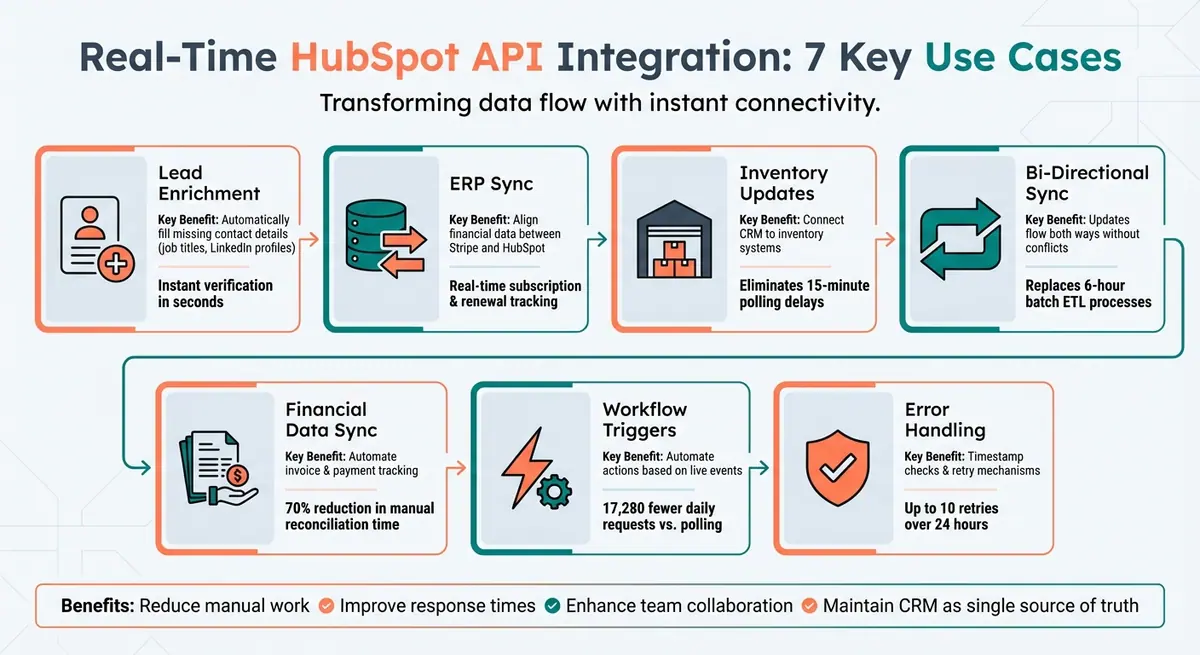
7 Real-Time HubSpot API Integration Use Cases for CRM Optimization
1. Lead Enrichment
Instant Contact Data Completion
When a lead provides only a name and email address, real-time enrichment through the HubSpot API steps in to fill the gaps. The data is sent to services like Clearbit or ZoomInfo, which return verified details directly to your CRM in seconds. This process creates a solid base for managing leads effectively.
"Your CRM is only as powerful as the data inside it. And let's face it - most HubSpot databases are filled with contacts missing critical information." - Surfe
Using the HubSpot Record ID as an externalID, the enrichment process maps essential details like job titles (jobtitle), LinkedIn profiles (hs_linkedin_url), mobile numbers (mobilephone), and company domains (hs_email_domain). Inaccurate or incomplete data can cost businesses a lot in missed opportunities and revenue.
Beyond simply completing data, routing strategies can improve how quickly you respond to leads. For instance, you can use real-time API sync for high-priority leads like demo requests and batch processing for nurture campaigns, which also helps manage API costs. Tools like Reform can automate this enrichment when a high-value form is submitted, ensuring your sales team gets the full context immediately.
To maintain the quality of your records, focus on syncing data with high validation scores. This avoids overwriting already accurate information and keeps your CRM reliable.
This approach to real-time data enrichment ties into a larger strategy of seamless synchronization using HubSpot's API integration framework.
sbb-itb-5f36581
2. ERP Sync
Keeping Financial Data and CRM Records Aligned
ERP sync plays a key role in making your CRM a central hub for accurate, up-to-date data.
When your billing system and CRM aren't connected, sales teams risk working with outdated or incomplete information. Using the HubSpot API, ERP sync ensures that subscription statuses, renewal terms, and entitlements are consistently updated across systems. This means your CRM always reflects the latest financial data, enabling better decision-making.
"A customer's subscription status needs to stay consistent between HubSpot and Stripe. Changes in either system automatically update the other, keeping your teams aligned and your automation reliable." - Karin Tamir, RevOps Leader, Glare Marketing
Custom API integrations take this a step further by mapping ERP data - like plan types, feature limits, and add-ons - into HubSpot Custom Objects, bypassing the limitations of standard apps. This two-way sync ensures that any subscription status changes in Stripe are instantly reflected in HubSpot, keeping the renewal pipeline in perfect sync with the account's actual status.
3. Inventory and Order Updates
Eliminating Delays Between Sales and Fulfillment
Real-time inventory and order updates ensure that logistical operations keep pace with CRM changes - no lag, no confusion.
When a CRM deal closes, warehouse teams need to act immediately. With real-time webhooks, orders are pushed directly to inventory systems like Fishbowl or NetSuite, bypassing the typical 15-minute polling delay.
"The 15-minute delay was a constant source of frustration... 'Just wait a few minutes' isn't a great answer when you're trying to run a tight operation." - Chris Eustace, Eustace Consulting
This two-way integration also means fulfillment updates - like tracking numbers, shipping statuses, and installation dates - show up instantly in HubSpot. Sales reps can monitor shipping progress in real time, and customers get immediate notifications. On top of that, syncing payment statuses ensures smooth collaboration between sales, fulfillment, and finance, with instant logging reducing reconciliation headaches.
For added reliability, especially during network hiccups or to address HubSpot's rate limits, you can schedule a daily reconciliation sync at 6:00 AM. This ensures data accuracy stays intact across all systems.
4. Bi-Directional Sync
Keeping Both Systems Aligned Without Data Loss
Bi-directional sync ensures that updates flow both ways - from HubSpot to your product and back - without causing duplicates or overwriting critical information.
For example, when a sales rep updates a deal stage in HubSpot, that update immediately triggers workflows in your application. At the same time, your app sends engagement signals and usage metrics back to HubSpot, giving reps a real-time view of how customers are interacting with your product. This approach replaces outdated batch ETL processes that might only run every six hours, which can’t keep up with the fast pace of sales cycles.
A critical part of this setup is defining field ownership. HubSpot might handle lifecycle stages and contact properties, while your app takes responsibility for usage metrics and feature adoption data. This clear division prevents conflicting updates and ensures each system remains the trusted source for its respective data.
"Stale CRM data is a revenue problem, not just an annoyance." - Truto Blog
To prevent infinite update loops, implement origin tagging - mark every outbound write with a source identifier like _sync_source. When your system receives a webhook, check the source tag to determine if it originated from your own system and skip processing if needed. Pair this with "compare-before-write" logic: retrieve the current value from the remote system and only push updates if the fields have genuinely changed. This approach saves API calls and avoids unnecessary updates. And since webhooks can occasionally fail, schedule a daily reconciliation job to catch any missed changes and ensure data accuracy.
5. Financial Data Sync
Automating Invoice and Payment Tracking Across Systems
With real-time financial data sync, your billing platform connects directly to HubSpot, ensuring every billing event is instantly reflected in your CRM. For example, when a customer pays an invoice in Stripe, the corresponding HubSpot invoice status updates from open to paid right away. This instant visibility gives your sales and customer success teams access to crucial financial details - like outstanding invoices, payment history, and subscription status - right within the contact or company record. These updates enable immediate operational responses.
Thanks to these integrations, billing actions are mirrored in real time. If a payment fails, a webhook alert is sent instantly to the Customer Success Manager. Similarly, subscription upgrades automatically update HubSpot's MRR properties, providing the revenue team with up-to-date forecasts without waiting for end-of-month reconciliations. Using the HubSpot Payments API, payment records can be linked to at least 12 CRM objects, including invoices (Association Type ID 542) and subscriptions (ID 393).
In September 2025, a SaaS subscription billing provider implemented a custom HubSpot–QuickBooks integration using Node.js middleware on AWS Lambda with SQS for retries. This setup synchronized invoices, payments, and refunds into HubSpot custom objects, cutting manual reconciliation time by 70%. Within just six months, the business achieved full ROI through faster cash collection. This case highlights how efficient financial data sync can improve response times and streamline revenue tracking.
"Creating contacts is easy. Syncing actionable subscription revenue data is hard." - Rachel Decker, Cofounder & CPO, ClearSync
To maintain accuracy, define clear data ownership. Let your billing system handle invoice totals and payments, while HubSpot manages deal stages. Use unique identifiers like invoice_id or SyncToken to avoid duplicate financial records and implement idempotency checks to prevent webhook retries from creating duplicate payment entries. Locking critical financial fields in HubSpot ensures automated sync data isn’t overwritten by manual edits, and detailed audit logs help maintain compliance.
6. Workflow Triggers
Automating Actions Based on Real-Time Events
Webhooks bring a whole new level of efficiency to HubSpot workflows by enabling instant responses to external events. Instead of relying on scheduled checks, webhooks push data in real time. For instance, when a document is signed in PandaDoc or a payment is processed in Stripe, a webhook sends the information immediately, triggering automated actions in HubSpot without any delay. This eliminates the need for repetitive polling, where systems constantly check for updates, and ensures that workflows respond instantly to important business events.
To put this into perspective, polling every 5 seconds results in a staggering 17,280 unnecessary requests per day, while webhooks only trigger when an actual event occurs. This "push" approach allows your sales team to act at the perfect moment - whether it's when a lead signs up for a trial, attends a webinar, or reaches a key milestone like activating a product.
"The biggest advantage of webhooks is real-time communication. They eliminate the need for constant polling... by letting third-party platforms notify HubSpot as soon as an event takes place." - Jordan Mikilitus, Aptitude 8
HubSpot takes this further with Custom Code actions, which allow workflows to call external APIs during their execution. This feature enriches data on the fly, making real-time CRM updates even more powerful. For example, in July 2025, 6sense shared a framework where a form submission triggers a Python script. This script calls the 6sense People Enrichment API, automatically updating contact details like job title and company name based on the email provided. By enriching leads in real time, workflows can seamlessly move on to tasks like routing or scoring.
To use webhook triggers securely, it’s crucial to verify the X-HubSpot-Signature header with SHA-256 hashing and include idempotency checks to handle duplicate deliveries safely. HubSpot also retries failed webhooks for up to three days using exponential backoff, except in cases of 4XX errors (other than a 429 rate limit) [24, 26].
7. Change Detection and Error Handling
Preventing Data Discrepancies with Smart Monitoring
Real-time integration is great - until something goes wrong. That’s where smart monitoring steps in to ensure data stays accurate and up-to-date.
One common issue is when systems miss changes or errors slip through unnoticed. HubSpot’s webhook infrastructure helps tackle this by including essential event-level metadata in each payload. For instance, every webhook contains an occurredAt timestamp (in milliseconds) and a unique eventId to handle deduplication. Since HubSpot uses at-least-once delivery semantics, duplicate events are possible, making these safeguards crucial for keeping updates accurate and timely.
Another challenge? Webhooks sometimes arrive out of order. HubSpot doesn’t guarantee the sequence of webhook delivery. Imagine receiving a contact update from 2:05 PM before one from 2:00 PM. Without proper checks, older data could overwrite newer information. To avoid this, always compare the occurredAt timestamp before processing. If the incoming event is older than what’s already stored, discard it. This simple step ensures that your data remains current and avoids issues outlined in bi-directional sync.
Infinite sync loops are another potential headache. To prevent them, inspect the changeSource field in the webhook payload. Ignore events tagged as "INTEGRATION" or "API" to avoid reprocessing updates your own system triggered.
Handling Errors Proactively
Error recovery is just as important as preventing them in the first place. HubSpot retries failed webhooks up to 10 times over 24 hours. To avoid unnecessary failures:
- Respond with a
200 OKstatus within 5 seconds. - Offload heavy processing tasks asynchronously.
- Use a dead letter queue for webhook attempts that have failed multiple times.
For environments where webhooks aren’t an option, the CRM Search API can act as a backup. Filter records using the hs_lastmodifieddate field and your last sync timestamp to identify changes. This approach ensures you can still track updates and keep your data aligned.
Here’s a quick guide to handling specific error codes that might pop up:
| Error Code | What It Means | How to Handle |
|---|---|---|
423 Locked |
High-volume write conflict | Pause for at least 2 seconds before retrying |
429 Too Many Requests |
Rate limit exceeded | Apply exponential backoff with jitter |
207 Multi-Status |
Partial batch success | Check both the results and errors arrays |
502/504 Timeouts |
Processing limits hit | Pause briefly and retry |
Conclusion
Real-time HubSpot API sync transforms CRM management by allowing your sales team to connect with active prospects immediately. This quick response capability, paired with automated workflows and improved data precision, gives your team an edge in staying competitive.
The examples above illustrate how these integrations cut down on manual data entry and reduce errors, ensuring your data remains accurate and up-to-date. When critical details like job titles, company sizes, or contact information are updated instantly, your outreach becomes more timely and tailored.
For optimal API usage and cost efficiency, combine real-time sync for high-priority leads with batch processing for larger operations. You can also configure enrichment to activate only during key moments, such as when a lead score surpasses a set threshold or a lifecycle stage changes. This approach ensures your budget focuses on the most promising opportunities.
Additionally, Reform simplifies lead capture by instantly sending form data to HubSpot while verifying email addresses to create or update contacts. Features like partial form submission tracking for multi-step forms and advanced spam filtering ensure only authentic, high-quality data enters your CRM. Reform offers this integration through its Pro Plan, starting at $35/month or $350/year.
FAQs
When should I use real-time sync vs batch sync in HubSpot?
Real-time sync is your go-to option when immediate updates are a must. Think of situations like responding to fresh leads, instantly updating contact details, or triggering workflows based on the latest activity. This approach keeps your data accurate and ensures your team can act quickly.
On the other hand, batch sync works better for tasks that don’t require immediate attention. For example, it’s ideal for periodic data enrichment or importing large data sets. Batch sync helps you manage large volumes of data efficiently while conserving system resources and avoiding issues like hitting API rate limits.
How can I prevent duplicates and sync loops in bi-directional sync?
To keep your bi-directional HubSpot sync running smoothly and avoid issues like duplicates or sync loops, you'll need a solid plan in place. Here's what to focus on:
- Deduplication keys and unique identifiers: Assign unique IDs to records to ensure the same data isn't processed multiple times. This is your first line of defense against duplicates.
- Idempotency controls: Implement controls that recognize and ignore repeated operations. This prevents unnecessary processing and keeps things efficient.
- Conflict resolution rules: Decide in advance which system's data should take priority when conflicts arise. This avoids confusion and ensures updates are consistent.
Additionally, handle webhook bursts carefully to avoid triggering repeated syncs, which can lead to infinite update cycles. By following these strategies, you'll maintain clean, consistent data across systems.
What’s the safest way to handle HubSpot webhooks failing or arriving out of order?
When dealing with failing or out-of-order HubSpot webhooks, it's crucial to have a plan in place to keep things running smoothly. Start by watching out for retry storms, which can happen when persistent errors - like repeated 401 responses - cause the system to keep retrying. To manage this, use the safe receiver pattern, which helps control retries and keeps your system stable.
Make sure to regularly test your recovery processes and capture detailed error logs. This ensures you can quickly address issues while maintaining data accuracy and system reliability. By following these steps, you can minimize disruptions and avoid overwhelming your system during webhook failures.
Related Blog Posts
Get new content delivered straight to your inbox

The Response
Updates on the Reform platform, insights on optimizing conversion rates, and tips to craft forms that convert.




Drive real results with form optimizations
Tested across hundreds of experiments, our strategies deliver a 215% lift in qualified leads for B2B and SaaS companies.
