
.webp)
Multi-Step Forms: API Integration Basics



Multi-step forms simplify complex data collection by breaking it into smaller steps, improving user experience and reducing form abandonment. When paired with API integration, these forms become powerful tools for automating data flow into systems like CRMs or email platforms, saving time and reducing errors. Here's what you need to know:
- Multi-Step Forms: Divide forms into steps, use conditional logic, and maintain progress with features like progress bars.
- API Integration: Automates data transfer, supports real-time lead management, and enhances data collection with additional details like UTM parameters.
- Technical Setup: Understand API documentation, set up access credentials (API keys, OAuth 2.0), and configure headers for secure data transfer.
- Implementation: Capture data at each step, send it via API requests, and handle responses effectively to ensure smooth workflows.
- Testing & Debugging: Use tools like Postman or cURL to test APIs, validate inputs, and manage errors such as authentication failures or rate limits.
Tools like Reform simplify this process by offering pre-built integrations, conditional routing, and lead enrichment, reducing the need for custom development. Proper setup and ongoing monitoring are key to ensuring a seamless user experience and reliable data flow.
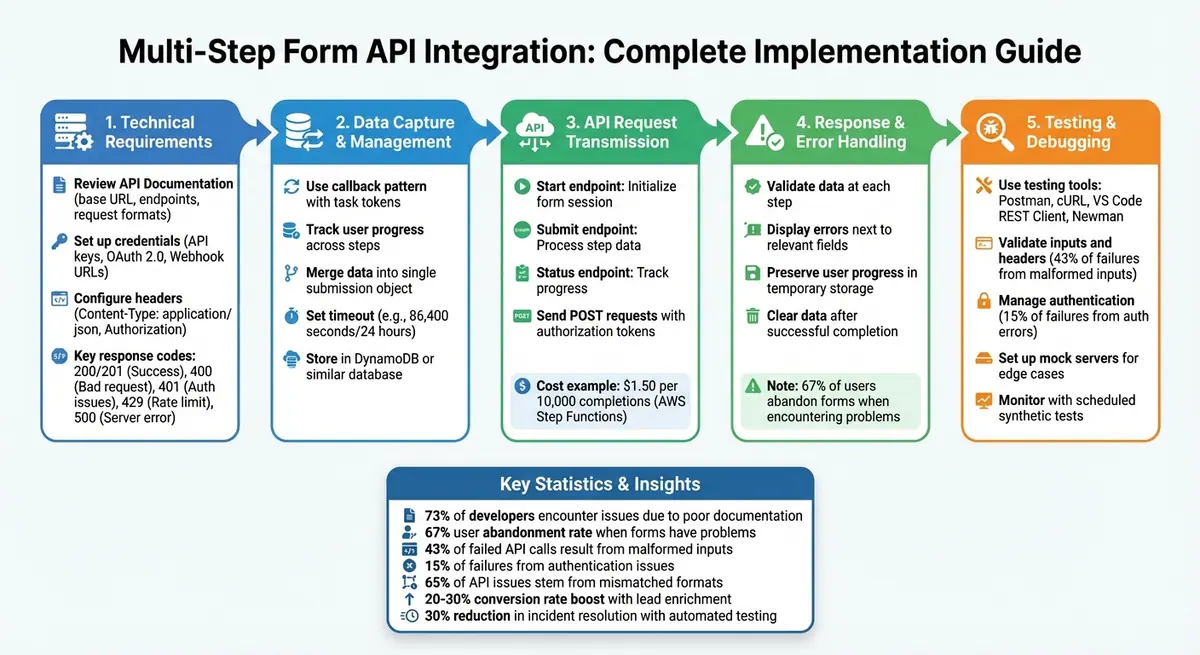
Multi-Step Form API Integration Implementation Workflow
APIs for Beginners - How to use an API (Full Course / Tutorial)
sbb-itb-5f36581
Technical Requirements for API Integration
Before diving into integration, make sure you have the right technical tools and a solid understanding of how the API operates. This groundwork helps avoid errors and ensures a smoother process. Once you're ready, take the time to thoroughly review the API documentation.
Understanding API Documentation
The first step in any API integration is studying its documentation. This is where you'll find key details like the base URL, available endpoints, and the required request formats. For example, multi-step forms often use POST to create new records, while updates may call for PUT or PATCH methods, depending on the system.
Focus on three key sections in the documentation:
- The "Getting Started" guide, which walks you through the initial setup.
- The "Authentication" section, which outlines security requirements.
- The endpoint specifications, which explain where and how data should be sent.
You'll also learn where to place parameters - whether in the header (commonly for authentication tokens like Authorization: Bearer [token]), the body (often for JSON-formatted form data), or as query parameters (useful for filtering data).
Equally important is understanding response codes. For instance:
- 200 or 201: Success.
- 400: Bad request.
- 401: Authentication issues.
- 429: Rate limit exceeded.
- 500: Server errors.
Each of these codes signals a different issue, requiring specific handling logic in your integration.
Setting Up Access Credentials
Once you're familiar with the API's structure, the next step is to set up access credentials. Most modern APIs rely on one of three methods:
- API keys: Simple, password-like strings.
- OAuth 2.0: Token-based access that often requires registering an application.
- Webhook URLs: Used to push data to custom endpoints.
You'll typically generate these credentials through the platform's "Developer" or "Settings" section. Make sure to store API keys securely on the server side.
"Treat this [API key] like a password and store it securely." - Orbit Forms
When sending requests, configure headers such as "Content-Type: application/json" and include the required authorization details.
To ensure robust error handling, implement fallback mechanisms like local storage for failed requests or notifications via email or Slack. Testing these with invalid credentials can help confirm that your setup is ready to handle unexpected issues, keeping data flows smooth and automated.
How to Implement Multi-Step Form APIs
With your credentials set up, the next step is building the integration itself. The objective here is to capture user data at each step, send it to the appropriate endpoint, and handle responses effectively - whether they confirm success or flag errors.
Capturing and Managing Data Across Steps
Multi-step forms require tracking user progress as they move through each stage. A callback pattern using task tokens is a common approach. In February 2026, Nawaz Dhandala from OneUptime shared an example of a serverless insurance application backend that used AWS Step Functions and API Gateway. The system employed a waitForTaskToken resource to pause the workflow during steps like CollectPersonalInfo and CollectAddressInfo. A Python-based Lambda function stored task tokens in a DynamoDB table named form-task-tokens. This setup allowed the submission endpoint to resume the workflow once valid data was received.
"The callback pattern with task tokens is the key enabler - it lets your workflow pause indefinitely until the user submits the next step." - Nawaz Dhandala, OneUptime
As users complete each step, the data should be merged into a single object that represents the entire form submission. To prevent abandoned sessions from cluttering the system, set a timeout - such as 86,400 seconds (24 hours). This timeout can trigger cleanup actions or send reminder emails if users fail to return. Capturing data in this way ensures smooth transmission and error management later on.
Sending Form Data via API Requests
Once data is captured for a step, the next task is transmitting it through structured API requests. Your API workflow should have clear endpoints, such as:
- Start endpoint: Initializes the form session and generates a unique ID.
- Submit endpoint: Processes data for each step.
- Status endpoint: Tracks the form's progress.
For each completed step, send a POST request containing the step's data. Include the authorization token in the header and the step-specific fields in the request body. The backend should validate the data before advancing the workflow. If validation succeeds, the API sends a success signal to proceed; if it fails, it returns error details for the user to correct their input.
For example, a standard 4-step form using AWS Step Functions costs about $1.50 for every 10,000 completions. If your form is designed to be completed in under five minutes, consider using Express Workflows to reduce costs further.
Handling API Responses and Errors
Once the data is sent, handling API responses properly becomes crucial. APIs typically respond with structured messages that indicate success or highlight issues. A successful submission is often marked by a 200 or 201 status code, while errors like validation failures might return 400 or 422 codes. These error responses often include a body that identifies specific issues, such as {"email": "This email is already registered"}.
It's essential to validate data at each step before moving forward. If an error occurs, display the issue next to the relevant field and return the user to that step, ensuring their progress is preserved through temporary storage. This is critical because over 67% of users abandon forms when they encounter problems during the process.
Error-handling routines should catch and process validation errors efficiently. Once the final API response confirms that the submission is complete, make sure to clear all temporary data to finalize the process cleanly.
Testing and Debugging API Integrations
After setting up your API integration, thorough testing and debugging are essential to ensure the data flows smoothly across all steps of your form. Statistics show that around 73% of developers encounter integration issues due to undocumented or poorly documented endpoints. By using the right tools and techniques, you can identify and resolve issues early, ensuring that every part of your multi-step form works as intended.
Tools for API Testing
Several tools can simplify API testing, each suited to specific scenarios:
- Postman: A versatile tool for chaining requests with dynamic data like IDs or tokens. Its free tier includes features like environment management, scripting, and collection runners. The Postman Console is particularly useful for inspecting raw HTTP traffic, including headers and network details.
- cURL: Perfect for quick, terminal-based tests. Pre-installed on most operating systems, it supports a wide range of protocols and is great for straightforward endpoint checks.
- VS Code REST Client: This plugin allows you to send requests directly from Visual Studio Code, making it convenient for testing during development without switching tools.
- Newman: A command-line runner for Postman collections. It integrates well into CI/CD pipelines, enabling automated testing. Teams that use Newman have reported a 30% reduction in incident resolution times.
The table below highlights these tools and their best use cases:
| Tool | Best Use Case | Key Feature |
|---|---|---|
| Postman | Comprehensive testing & automation | Environments, scripting, and collection runner |
| cURL | Quick, one-off terminal tests | Pre-installed on most systems; supports many protocols |
| VS Code REST Client | Exploration during development | Send requests directly from the code editor |
| Newman | CI/CD integration | Command-line execution of Postman collections |
Common Debugging Techniques
When issues arise with your API integration, these debugging strategies can help pinpoint and resolve the problem:
- Simplify Requests: If a specific step in your multi-step form fails, create minimal API requests that replicate the failing step. This approach isolates the problem without the noise of the full workflow.
-
Validate Input and Headers: About 43% of failed API calls result from malformed inputs rather than server downtime. Always ensure the
Content-Typeheader matches the payload format. For example, mismatched headers likeapplication/jsonvs.application/x-www-form-urlencodedcan easily result in 400 errors. - Authentication Management: Authentication errors, such as missing or expired tokens, account for roughly 15% of failures in major SaaS platforms. Automate token handling with environment variables and pre-request scripts to minimize these issues.
- Understand Status Codes: Knowing the difference between similar status codes can save time. For instance, a 401 Unauthorized error means credentials are missing or invalid, while a 403 Forbidden indicates valid credentials but insufficient permissions.
"Ignoring subtle differences among similar status codes undermines troubleshooting. For example, a 403 Forbidden suggests you've got credentials, just not the rights to access the resource, unlike a 401." - Ana Crudu, MoldStud
- Use Mock Servers: Mock servers are invaluable for simulating edge cases, such as "429 Too Many Requests" or slow response times, without impacting production systems.
Since 65% of API-related issues stem from mismatched request and response formats, it’s crucial to validate responses at every step of the workflow. This ensures that data flows correctly between endpoints, reducing downstream errors.
Finally, consider setting up scheduled synthetic tests to proactively monitor your API integrations. These tests can identify potential issues before they affect users, helping to maintain a smooth and reliable form workflow.
Using Reform for Multi-Step Form Integrations
Reform takes the complexity out of building multi-step forms with its no-code platform, allowing seamless API integration without writing code. Using a drag-and-drop interface, you can connect forms directly to your CRM and marketing tools. This simplifies the process of managing multi-step data flows while leveraging Reform's built-in API integration features.
Built-in Features for API Integration
Reform's platform is designed to simplify API integration while maintaining efficiency. One standout feature is conditional routing, which triggers specific API calls based on user inputs. For instance, if a user selects "enterprise" in the first step, Reform can automatically send a detailed API call to a sales endpoint, ensuring that only qualified leads are routed to your CRM. This dynamic branching minimizes unnecessary CRM entries and streamlines workflows.
Another key feature is lead enrichment through Reform's integration with ExactBuyer. After a user provides their email, the system appends additional details like company information, industry type, and contact data. Reform's Smart Hiding feature takes this a step further by concealing fields that are successfully populated through the API. If enrichment fails, the fields reappear for manual input. This functionality has been shown to boost conversion rates by 20–30%. Additionally, you can map enriched data to hidden fields for backend tasks like lead scoring and CRM updates, keeping the user interface clean while maintaining robust data for your API endpoints.
Reform also provides real-time analytics dashboards to monitor key metrics like form abandonment rates, API call performance, and conversion funnels. All data is formatted for US audiences, using MM/DD/YYYY dates and USD currency (e.g., $1,234.56). For deeper insights, webhooks can push analytics data to external tools, helping you pinpoint issues like high error rates at specific steps in the submission process.
Customizing Multi-Step Forms with Reform
Reform offers extensive customization options to tailor forms to your specific needs. Setting up webhooks is quick and straightforward: go to Integrations > Webhooks in the dashboard, enter your API endpoint URL (e.g., POST https://api.crm.com/leads), and map form fields to the appropriate JSON keys. Reform consolidates multi-step data into a single payload upon form completion but also allows progressive data submission if your API workflow requires it.
For design flexibility, Reform supports full CSS customization, enabling you to use custom fonts, branded progress bars, and other elements that align with your design system. To optimize API workflows, you can create custom payload mappings to ensure JSON objects meet your endpoint's requirements. Hidden fields can be used to securely pass credentials, keeping sensitive information protected.
Reform also caters to US-specific formatting needs, such as imperial measurements for fields like height and weight, ensuring your forms meet local expectations while maintaining smooth data integration with your APIs.
Conclusion
Integrating multi-step forms with APIs becomes manageable when you focus on maintaining state, managing task tokens, validating data at each step, and preparing for potential errors. Whether you're using tools like AWS Step Functions and API Gateway or another platform, these core principles remain consistent.
Building custom API integrations can give you complete control but comes with a hefty workload. You'll need to develop endpoints for starting forms, submitting data step-by-step, and tracking progress. This approach works best for teams with unique architectural needs and the resources to handle the development and ongoing upkeep.
On the other hand, tools like Reform simplify the process significantly. With features like pre-built API integrations, visual configuration, and built-in validations (including email verification and spam prevention), Reform reduces the need for custom backend development. Its conditional routing and lead enrichment functionality save time while delivering reliable results.
Once your integration is live, ongoing monitoring is essential. As mentioned earlier, thorough testing with tools like Postman helps ensure everything works as expected. After deployment, keep a close eye on API responses, track user abandonment rates, and analyze real-time data to spot and fix any issues. The ultimate goal is to create a smooth experience where user data flows effortlessly into your backend systems.
FAQs
Should I send data after each step or only at the end?
When dealing with multi-step forms, it's a good idea to send data after completing each step. Why? It streamlines the process, minimizes errors, and enhances the user experience by providing real-time feedback and validation. Submitting data incrementally also makes it easier to manage issues like errors, conditional logic, and data validation. This way, you can ensure that the information from each step is correctly recorded before progressing to the next one.
How do I keep a multi-step form session secure and resumable?
To keep multi-step form sessions secure and allow users to pick up where they left off, it's crucial to implement strong authentication protocols. Options like OAuth2.0 or Basic Access Authentication help safeguard data during transmission. Additionally, storing intermediate form data on a secure server - such as Redis - can prevent any loss of information. By combining proper authentication and encryption, users can safely resume their session later, even if they temporarily leave the process.
What’s the best way to handle API errors without losing user progress?
When dealing with API errors in multi-step forms, it's crucial to validate and process each step independently. This approach ensures that progress isn't lost if something goes wrong. Temporarily storing data - like in session storage - can be a lifesaver, allowing users to pick up right where they left off in case of an error.
Providing clear error messages and offering retry options can make the recovery process seamless for users. For more intricate workflows, leveraging state persistence mechanisms can maintain data integrity and help users continue without starting over.
Related Blog Posts
Get new content delivered straight to your inbox

The Response
Updates on the Reform platform, insights on optimizing conversion rates, and tips to craft forms that convert.




Drive real results with form optimizations
Tested across hundreds of experiments, our strategies deliver a 215% lift in qualified leads for B2B and SaaS companies.
