
.webp)
How Time-Based Analysis Reduces Form Spam



Form spam is a growing issue, with bots accounting for 27.7% of online traffic and 62% of spam submissions crafted by advanced AI. These fake submissions clog systems, waste time, and dilute lead quality. Timing-based analysis offers a simple solution: it tracks how long users take to complete forms. Bots submit forms in milliseconds, while humans naturally take longer. By flagging submissions that fall outside normal time ranges, businesses can effectively block spam without disrupting genuine users.
Key Points:
- Form spam problem: Bots submit fake entries, disrupting workflows and analytics.
- Timing-based analysis: Tracks time-to-submit to distinguish bots from humans.
- Bot behavior: Submissions under 500ms are clear indicators of automation.
- Human behavior: Genuine users take 1.5–30 seconds, depending on form complexity.
- Advantages: Works silently in the background, unlike CAPTCHAs, maintaining user experience.
This method, when combined with other anti-spam tools like honeypots, drastically reduces spam rates while preserving lead quality. Businesses can set timing thresholds tailored to their forms and refine them over time for optimal results.
Key Timing Metrics Used to Detect Spam
Form Completion Time
Form Completion Time measures how long it takes from when a form is loaded to when it's submitted. Humans naturally need time to read, think, and type, even for something as simple as a three-field contact form. Bots, on the other hand, can submit forms in under 500 milliseconds, which is a clear red flag for automated behavior.
To counteract this, you can establish a minimum submission time based on the form's complexity. For example:
- Simple contact forms (3–4 fields): Require a minimum of 2–5 seconds for submission. This accounts for the time it takes to read and type basic details.
- Multi-step forms (8+ fields): These forms need more time, typically 8–10 seconds, as users navigate through multiple fields and think about their responses.
- Forms with file uploads: At least 15 seconds should be allowed, giving users enough time to select and upload files.
Here's a quick breakdown:
| Form Type | Minimum Threshold | Explanation |
|---|---|---|
| Simple Contact (3–4 fields) | 2–5 seconds | Time needed for basic reading and typing |
| Multi-step / Lead Gen (8+ fields) | 8–10 seconds | Extra time for navigating and filling out more fields |
| Forms with File Uploads | 15 seconds | Ensures enough time for file selection |
| Stale Session Limit | 60 minutes | Prevents reuse of outdated form tokens |
These timing benchmarks provide a foundation for identifying spammy behavior by analyzing how long users take to complete forms.
Field-Level Timing Metrics
Beyond overall completion time, how users interact with individual fields offers deeper insights into their authenticity. Humans tend to have an irregular typing rhythm - they pause, correct mistakes, and vary their typing speed.
"A real person's typing rhythm is never perfectly uniform." - Priyanshi Sharma, Clearout
Bots, in contrast, often type with consistent, evenly spaced keystrokes or skip typing altogether by pasting pre-filled data into fields. Detecting pasted inputs can help flag automated submissions. Additionally, tracking focus and blur events (when a user clicks into or out of a field) can reveal bots that bypass normal browser interactions altogether.
Session Timing and Anomalies
Looking at session-wide behavior can uncover broader patterns of automated activity. For example, if a form submission happens more than 60 minutes after the form was loaded, it could indicate that a bot is reusing an old session token instead of completing the form in real-time.
Another telltale sign of a bot is the absence of natural user behavior, such as scrolling, mouse movements, or hovering over fields. Bots often remain static while using programmed delays (e.g., setTimeout) before submitting the form. This lack of interaction, combined with deliberate delays, is a strong signal of automation. By analyzing these patterns, you can fine-tune spam detection and improve the quality of your leads.
Research Findings: Human vs. Bot Timing Patterns
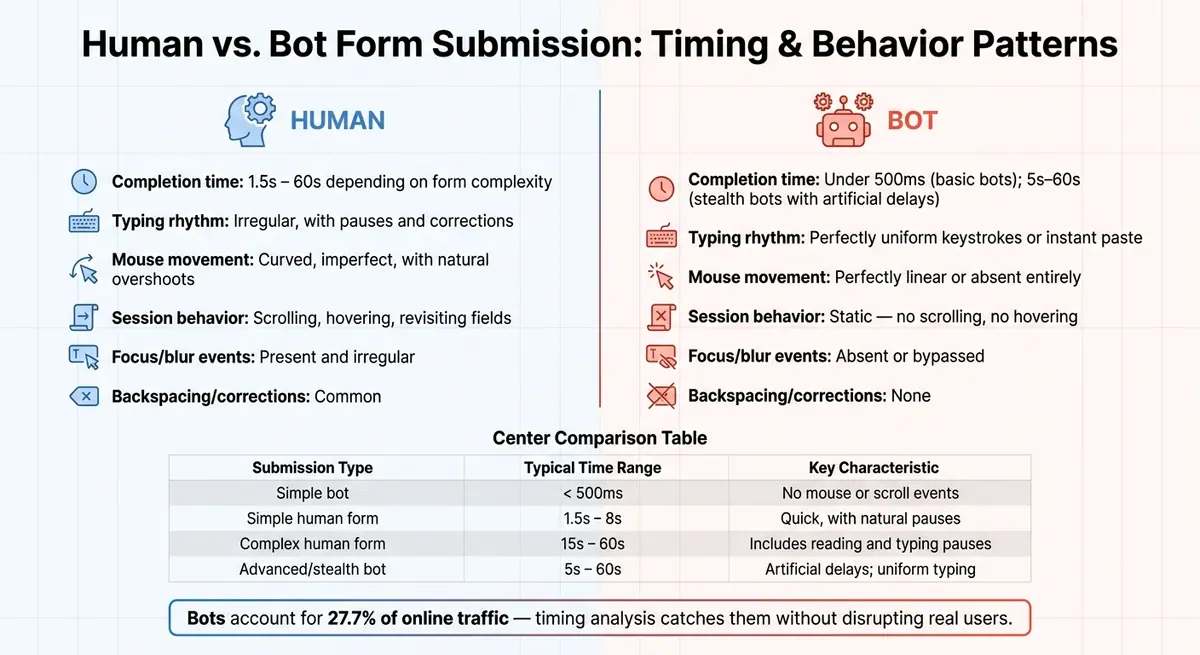
Human vs. Bot Form Submission: Timing & Behavior Patterns
Typical Human Form Completion Times
Studies reveal that human form completion times can vary significantly based on the complexity of the task. For straightforward forms, users might take as little as 1.5 seconds to respond. However, more involved forms - like job applications or multi-step lead generation forms - usually take anywhere from 15 to 60 seconds to complete. This variation stems from natural human behavior: reading through fields, pausing to think, reconsidering inputs, and even backspacing. These irregular patterns are a hallmark of genuine human interaction. On the other hand, bots operate with a speed and consistency that starkly contrast human variability.
Common Bot Timing Patterns
Bots, powered by automated scripts, process forms at lightning speed. They can analyze a form’s structure, fill it out, and submit it in under 500 milliseconds, a pace no human could achieve. The table below highlights the differences in submission timing and behavior between humans and bots:
| Submission Type | Typical Time Range | Key Characteristic |
|---|---|---|
| Simple bot | < 500ms | No mouse or scroll events |
| Simple human form | 1.5s – 8s | Quick, with natural pauses |
| Complex human form | 15s – 60s | Includes reading and typing pauses |
| Advanced/stealth bot | 5s – 60s | Artificial delays; uniform typing |
Besides speed, bots are often exposed by their typing patterns. Their keystrokes are unnaturally consistent - uniformly spaced, with no backspacing or corrections. Humans, on the other hand, pause unpredictably, correct errors, and type with a rhythm that automated systems struggle to imitate. Even as bots become more advanced, their timing often gives them away.
How Advanced Bots Still Leave Timing Signatures
Even the most advanced bots, designed to mimic human behavior, can’t fully replicate the nuances of natural interaction. Basic bots are easy to spot due to their speed, but stealthier bots attempt to blend in by introducing artificial delays. For instance, they might use functions like setTimeout to pause for 5 to 60 seconds before submitting a form. Some even simulate mouse movements or hover events to deceive detection systems. However, these advanced bots often fail to replicate dynamic session behaviors. While a genuine user might scroll, click, or revisit fields during their time on a page, bots tend to remain static - no scrolling, no hovering, and no focus changes - just a timer ticking down before submission.
Mouse movement is another giveaway. Human cursor paths are naturally uneven, marked by slight adjustments and occasional overshoots.
"Real mouse paths are curved and imperfect; bots move too mechanically or perfectly linear." - Clearout
Even when bots mimic mouse movements, their paths often appear too straight or calculated, making them stand out in interaction logs. By combining timing data with session activity monitoring, it becomes easier to differentiate genuine users from even the most sophisticated bots.
How to Implement Timing-Based Spam Prevention
Setting Timing Thresholds
When setting timing thresholds for forms, consider the complexity of the form itself. For instance, a basic newsletter signup form should take at least 2–5 seconds to complete, even for the fastest typists. A standard contact form might require 5–10 seconds, while a more detailed, multi-step form could need 15–30 seconds or more to allow users time to read and respond thoughtfully.
| Form Type | Recommended Minimum | Maximum Limit |
|---|---|---|
| Newsletter / Simple Signup | 2–5 seconds | 60 minutes |
| Standard Contact Form | 5–10 seconds | 60 minutes |
| Complex Lead / Multi-step | 15–30+ seconds | 60 minutes |
The 60-minute maximum is equally important. If submissions arrive long after the page has loaded, it often indicates automated scripts recycling old form tokens.
"A well-chosen threshold means better protection with minimal impact on genuine submissions." - Comfyform Docs
Once you've established these thresholds, make sure to enforce them with strong server-side validation.
Server-Side Timing Validation
Start by recording a timestamp when the form loads. You can do this through server-side rendering or by using a JavaScript function like new Date().toISOString(). Store this timestamp in a hidden field. When the form is submitted, the server calculates the elapsed time and flags submissions that fall below the minimum threshold.
For added security, use HMAC-signed timestamps instead of plain hidden fields. This prevents bots from tampering with the load time and ensures accuracy, even if the user has multiple tabs open with the same form.
If a submission fails the timing check, the server should send a "200 OK" success response rather than an error. This "silent rejection" strategy prevents bots from learning how to bypass your defenses.
Monitoring and Refining Thresholds Over Time
Timing thresholds aren't a "set it and forget it" solution. Real-world use can reveal edge cases, such as users with slow internet connections, those using screen readers, or browser auto-fill features that submit forms very quickly. These scenarios may require fine-tuning.
To refine your system, log flagged submissions and manually review a sample of about 50 entries weekly. For example, Raman Makkar, founder of Splitforms, ran a 90-day test where he combined a 2-second minimum time-to-submit with a honeypot field. This reduced spam from 89% to just 8% across 3,920 submissions, with a false-positive rate of only 0.7%. Regular adjustments like this can significantly cut down on spam while ensuring genuine leads aren't lost.
Incorporate timing as part of a broader scoring system. For instance:
- Submissions under 2 seconds: Assign a high spam score (+0.5)
- Submissions between 2–5 seconds: Assign a moderate score (+0.15)
- Submissions over 5 seconds: Assign a normal score (+0.0)
This layered approach helps balance spam prevention with user experience, reducing false positives without weakening your defenses.
sbb-itb-5f36581
How Timing-Based Analysis Affects Spam Rates and Lead Quality
Reduction in Spam Submissions
Timing-based filters have proven to be highly effective in cutting down spam submissions. During a 90-day test from February to April 2026, Raman Makkar, founder of Splitforms, applied a honeypot and a 2-second minimum submission time to a B2B SaaS contact form. The results were striking: spam submissions dropped from 89% (3,427 entries) to just 8% (312 entries) out of 3,920 total submissions. The false-positive rate was a mere 0.7%, meaning almost no legitimate leads were mistakenly blocked.
When compared to ReCAPTCHA v3, which achieved a 4% spam rate but caused a -2.9% conversion drop, the honeypot-plus-timing approach was more efficient. It resulted in a smaller -1.2% conversion delta while maintaining fewer false positives.
"A 95% block rate with 0.5% false positives beats a 99% block rate with 3% false positives in almost every B2B context." - Raman Makkar, Founder, Splitforms
By dramatically reducing spam, this method not only ensures cleaner data but also improves the quality of incoming leads.
Better Lead Quality and Less Manual Review
When spam is filtered out at the source, sales teams can focus solely on legitimate prospects. Timing-based filters prevent bots from clogging your CRM, saving your team from wasting time on irrelevant entries. With spam rates as high as 89% in some cases, the value of lead metrics only resurfaces when genuine submissions are allowed through. Timing analysis ensures that the data entering your pipeline reflects real human intent.
The impact on CRM data quality is substantial. Marketing decisions - like segmentation, lead scoring, and attribution - become far more accurate when based on clean data. Plus, because timing-based filters operate invisibly, they avoid the 3–12% conversion loss often associated with visible anti-spam challenges. For legitimate users, the process feels seamless, as they’re unaware of the filter’s presence.
Combining Timing Analysis with Other Anti-Spam Methods
While timing analysis is effective on its own, its real strength lies in being part of a larger anti-spam strategy. Spam detection works best when multiple methods are layered together, as different bot behaviors require different detection techniques. Combining methods helps cover gaps where one approach might fall short.
This layered approach uses a cumulative scoring system, assigning risk levels from each defense measure. Timing analysis contributes its score, honeypots add theirs, and IP reputation data provides another layer. Submissions are flagged only when the total score exceeds a safe threshold, ensuring strong spam protection while keeping false positives low.
"The 'best' tool is rarely a single tool. Your highest ROI usually comes from layering low-friction defenses first." - isapp.be
For most forms, starting with timing filters and honeypots can address the majority of spam issues. More intensive checks can then focus on the small number of submissions that make it past these initial defenses.
How Reform Supports Timing-Based Spam Prevention
Reform is designed to tackle spam filtering without requiring any coding skills. Its spam prevention tools work quietly in the background, ensuring legitimate users have a smooth experience while bots are consistently blocked. This user-friendly, no-code setup leverages proven timing metrics to effectively stop spam.
Built-In Timing Metrics and Analytics
Reform uses timing-based detection to track how long it takes for each submission to be completed. Submissions that fall outside normal timing patterns are flagged as suspicious. By applying established timing thresholds, the platform ensures that only entries meeting the minimum timing requirements are treated as genuine human input.
Additionally, Reform identifies and blocks multiple rapid submissions from the same source, which is a common tactic in automated spam attacks. For instance, between December 2020 and August 2021, kalmoya.com successfully blocked over 3,505 spam attempts by combining timing detection with honeypot technology within the Reform system.
Customizable Spam Prevention Settings
Reform allows you to adjust timing thresholds based on the complexity of your form. This flexibility helps minimize false positives while maintaining strong protection against spam. By tailoring these thresholds, your form can better accommodate genuine user behavior while keeping bots at bay.
"The goal is to catch bots, not frustrate users. A well-chosen threshold means better protection with minimal impact on genuine submissions." - Comfyform Docs
Timing detection is just one layer of Reform's anti-spam toolkit. It works alongside other features like honeypot fields, filters for disposable email addresses, and limits on links to ensure comprehensive protection. This multi-layered approach aligns with the strategies discussed earlier, where combining multiple defenses leads to stronger results and fewer false positives.
These customizable settings are further enhanced by real-time analytics, allowing you to refine your spam prevention measures as needed.
Using Real-Time Data to Improve Results
Reform's analytics dashboard offers a real-time breakdown of spam attempts, displayed in 31-day intervals. This data makes it easier to identify trends, such as sudden surges in rapid submissions, and adjust your timing thresholds accordingly.
Timing thresholds shouldn't remain static. Regularly reviewing submission data and comparing flagged entries with legitimate ones helps you fine-tune these settings over time. If you notice a drop in spam block rates or an increase in false positives, the analytics provide the insights needed to quickly make adjustments.
Conclusion: Why Timing Belongs in Every Spam Prevention Strategy
Research shows that analyzing the timing of interactions plays a key role in improving spam prevention and boosting lead quality. Form spam continues to be a major challenge, with bad bots making up about 37% of all internet traffic in 2024. By Q1 2026, approximately 62% of spam submissions included human-like text capable of slipping past traditional keyword filters. These trends make it clear that spam prevention strategies must go beyond just analyzing content - they need to account for submission behavior as well.
Timing analysis stands out for its straightforward approach: bots typically submit forms in under 500 milliseconds, while humans take anywhere from 1.5 to 30 seconds. Raman Makkar, the Founder of Splitforms, emphasizes this shift in focus:
"The new defense has to stop reading the text and start reading everything else: how the form was filled, by whom, from where, in what time, with what behaviour, and only then what was actually said."
Combining timing analysis with other tools, such as honeypots, creates a seamless and cost-effective defense system. This layered approach stops basic, rapid bots early, reducing the need for more advanced checks.
FAQs
What timing threshold should I use for my form?
Setting a timing threshold of at least 2 seconds for your form submissions can help filter out bots. Why? Genuine users usually take more time to fill out a form, while bots can submit almost instantly. By rejecting submissions made faster than this, you can effectively block automated spam and ensure better-quality leads.
How do I prevent bots from faking the load timestamp?
Preventing bots from faking the load timestamp calls for multiple defenses working together. One effective method is adding a hidden timestamp field to your form that records when the form was loaded. When the form is submitted, compare this timestamp to the current time. If the form is filled out suspiciously fast - faster than a human could reasonably complete it - you can flag it as potentially spam.
To make your defenses even stronger, pair this approach with other anti-spam tools like honeypots or CAPTCHA. This combination makes it much harder for bots to imitate real human behavior, helping to cut down on spam submissions significantly.
Will timing checks block fast users or autofill submissions?
Timing checks, such as Timetrap, are tools used to detect and block submissions that occur unnaturally fast - often a sign of bot activity. These checks are generally designed to allow legitimate users, including those using autofill features, to proceed as long as their submission time aligns with what’s considered normal human behavior.
Related Blog Posts
Get new content delivered straight to your inbox

The Response
Updates on the Reform platform, insights on optimizing conversion rates, and tips to craft forms that convert.




Drive real results with form optimizations
Tested across hundreds of experiments, our strategies deliver a 215% lift in qualified leads for B2B and SaaS companies.
