
.webp)
Keystroke Dynamics for Form Security Guide



Keystroke dynamics helps me spot risky form activity by looking at how someone types, not just what they submit. In short: I can use typing speed, pauses, corrections, and paste behavior to score risk, cut bot spam, and protect signups, checkout flows, and lead forms with low user friction.
Here’s the article in plain terms:
- What it is: A behavior-based signal built from typing timing
- What it checks: Dwell time, flight time, pauses, typo fixes, and paste events
- What it helps find: Bots, mass spam, account takeover, and identity mismatch
- How to collect it: Use
keydown/keyupevents, derive features in the browser, and send a small JSON payload - How to score it: Compare sessions to a baseline, use anomaly models, or train classifiers
- How to act on it: Allow low risk, challenge medium risk, review or deny high risk
- How to keep it private: Store only what I need, separate it from PII, and set short retention rules
- How to launch it: Start with one form, run in shadow mode, review false positives, then turn on actions
A few numbers stand out. One study cited in the article says keystroke dynamics caught 86% of account takeover attacks that got past older controls. Another found bot keystrokes fell under 0.05 seconds about 21.49% of the time, versus 5.82% for humans. And one fraud study reported 95.5% accuracy when detecting people typing someone else’s data.
If I had to boil the full guide down to one point, it would be this: keystroke dynamics works best as one signal in a layered form-security setup, with tight data collection, clear thresholds, and close review of conversion impact.
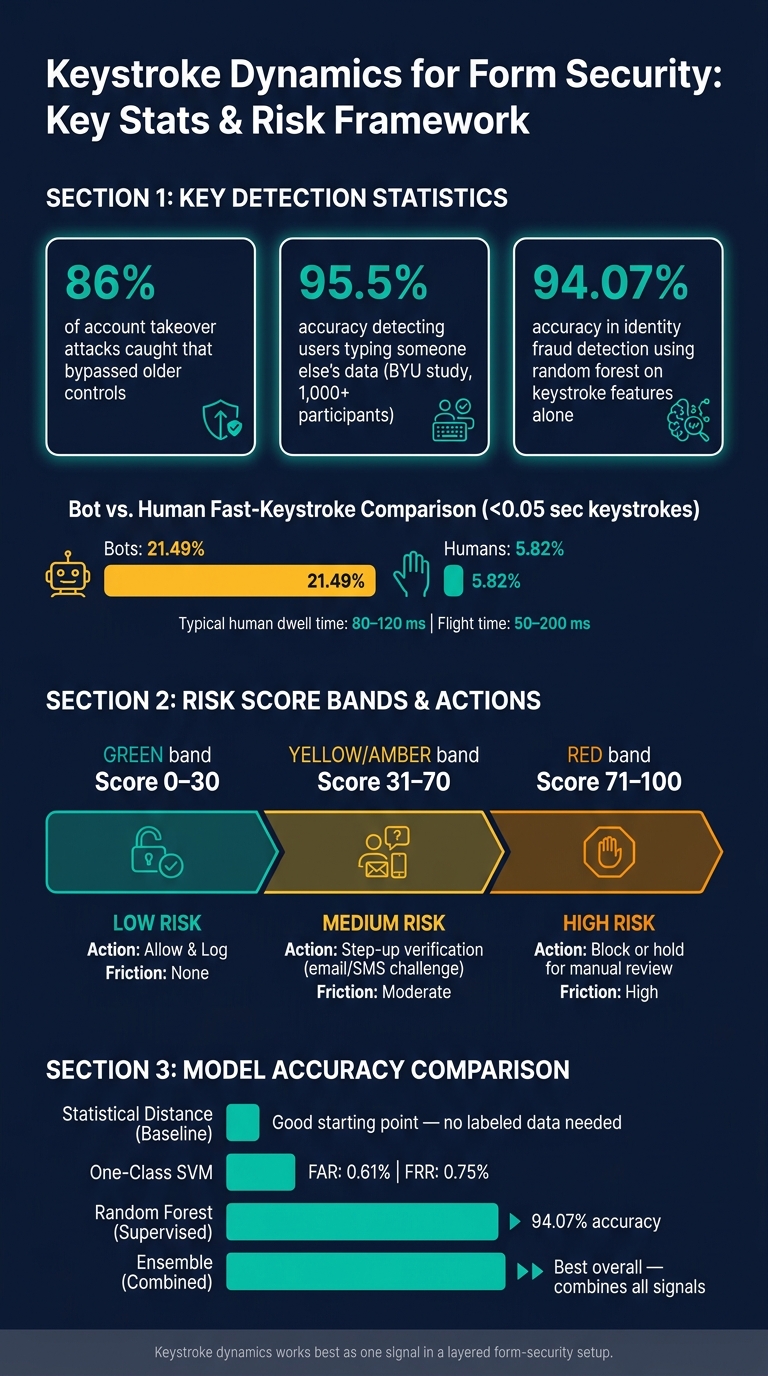
Keystroke Dynamics: Key Stats & Risk Score Framework for Form Security
1. Core concepts and the signals keystroke dynamics measures
Keystroke dynamics as a behavioral biometric
Keystroke timing can act as a risk signal for forms. It looks at how someone types, not what they type. The focus is rhythm, pace, and small timing habits that can help assess identity and risk.
In forms, this usually works in two modes. Static analysis looks at a single field or action, like how a person types an email address during signup. Continuous analysis follows timing across the whole session, which makes it better at spotting behavior changes in the middle of a visit. Those signals only help if you define and collect them the same way every time.
Key terms: dwell time, flight time, digraphs, and error patterns
A small set of signals does most of the work in keystroke-based scoring:
| Signal | What it measures | Why it matters |
|---|---|---|
| Dwell time | How long a key is held down (keydown → keyup) | Humans vary this on their own; bots often show flatter patterns |
| Flight time | Gap between releasing one key and pressing the next | Shows personal typing rhythm and finger movement between keys |
| Two- or three-character timing | Timing across 2- or 3-character sequences (for example, "th" or "ing") | Stable enough to compare across sessions |
| Error patterns | Backspace rate, corrections, retyping | A normal error rate often points to human activity |
| Paste events | Field filled via paste rather than keystroke | Skips timing data and can change risk on sensitive fields |
Paste events need their own tracking because they bypass timing data. On sensitive fields, that can shift the risk picture fast.
Next, you need to capture and move these signals safely into your risk workflow.
Threats keystroke dynamics can help detect
Once the signals are clear, the next step is mapping them to risk.
The most obvious use case is bot detection. Scripted bots often fill fields with flight times that look oddly even, with no corrections at all. Human typing is messier. It has pauses, uneven gaps, and the kind of small mistakes people make without thinking.
Mass spam and lead-gen abuse can look similar, but there’s a twist. You may see hundreds of submissions with almost the same keystroke distributions, very low error rates, and pasted values across identity fields like name, email, and phone. That pattern points more toward automated form filling from a contact list than actual interest.
Account takeover is where continuous analysis starts to matter more. If a returning user’s dwell and flight time distributions shift in a major way from their stored profile - faster overall, different two-character timing on their own email address, or odd paste activity on payment fields - you should treat that session as higher risk.
Identity mismatch on sensitive onboarding forms is a related case. If high-stakes fields like Social Security Numbers or tax IDs are pasted instead of typed, with no corrections, that pattern fits automated filling or stolen-data abuse more than careful manual entry.
sbb-itb-5f36581
2. How to collect keystroke data from forms safely
Browser events and field-level capture
Once you know which signals matter, the next step is simple: collect the least amount of timing data you need to score them.
For each security-relevant field - email, company name, and other non-sensitive free-text inputs - attach keydown and keyup listeners. Each listener should record a high-resolution timestamp with performance.now() for every key event. Those timestamps should be tied to a session ID and field ID, not raw character data, and kept in memory until the user submits the form.
A few edge cases matter here.
If someone pastes into a field, track the paste event and down-weight that field’s timing data. Autofill behaves differently too. It often triggers input or change events without keystrokes at all. Mobile devices add another wrinkle, since virtual keyboards create different event patterns. So it helps to flag mobile sessions on their own, which lets your scoring model handle them correctly instead of treating them like something suspicious.
Long pauses between keystrokes can also tell you a lot. Instead of blending those pauses into standard flight times, store them as separate pause features.
Feature extraction, transmission, and storage
Do the feature extraction in the browser before the form is submitted, then send a small JSON payload of derived features to the server. In plain English, that means calculating things like:
- average dwell time per field
- average and standard deviation of flight times
- digraph latencies for common character pairs such as
thor@.in email addresses - counts of backspace or delete events
That gives you the signal you need without sending a full keystroke log.
When you transmit those features, use HTTPS with HSTS. Send them to a dedicated endpoint so access control and logging for timing data stay separate from the rest of your application.
On the storage side, keep timing vectors in a separate table or collection, linked to submissions only through a pseudonymous ID. That separation matters. If one store is exposed, it should not automatically reveal both identity data and behavior data.
For highly sensitive fields like Social Security Numbers or tax IDs, don’t store key codes at all. Keep only aggregate timing metrics. And detailed timing data shouldn’t sit around forever. Hold it only for as long as you need it, then aggregate or delete it.
Those derived features become the inputs for scoring and threat rules.
Using Reform in the implementation flow
Reform gives you a clean way to add this to high-value forms like lead capture or sign-up flows without changing your backend setup. The script can attach keydown and keyup listeners to the fields that matter most, then serialize timing features into the submission payload before it leaves the browser.
Because Reform supports multi-step forms and conditional routing, you can also send high-risk submissions to manual review instead of pushing them through a normal CRM sync.
These features feed the risk scores and rules in the next section.
3. Scoring models, risk rules, and form actions
From timing features to a risk score
Turn timing features into a risk score your team can use.
A simple place to start is statistical distance scoring. Compare the current session’s feature vector against a reference distribution, either a known user’s past baseline or population-level norms, with methods like Mahalanobis distance or z-score aggregation. If the session sits far from that reference, the risk score goes up. It’s a good first step because it doesn’t need labeled fraud data. Start with baseline comparison, then move to anomaly or supervised models as your data gets better.
If you have plenty of normal traffic but only a small number of confirmed attacks, use one-class anomaly detection. Methods like a one-class SVM or isolation forest can spot bots and fraud before you’ve built a large labeled attack set. Research shows a one-class SVM applied to a three-dimensional keystroke feature vector can achieve a false acceptance rate as low as 0.61% and a false rejection rate of 0.75%.
Once you have labeled outcomes, such as confirmed spam, fraud chargebacks, or manual review decisions, supervised classifiers like random forests or gradient boosting start to make sense. A random forest trained on keystroke features alone has reached 94.07% accuracy in identity fraud detection scenarios. These models can also take in extra signals like device fingerprint and IP reputation alongside timing features. The model outputs then become the thresholds that drive form actions.
In production, it often makes sense to use an ensemble. Combine a statistical distance score, an anomaly model output, and a classifier probability into one composite score. Then map that score into three bands:
- 0–30 = low risk
- 31–70 = medium risk
- 71–100 = high risk
Tune those cutoffs with past fraud cases and A/B testing. And don’t use one threshold for every form. A lead-gen form and a payment form carry very different risk tolerance.
Threat rules for bots, fraud, and identity mismatch
Scoring models give you a continuous signal. Rules turn that signal into something your team can act on and audit later.
The clearest bot signal is near-zero variance in dwell and flight times across a session. Research on bot detection found that about 21.49% of bot keystrokes fell below 0.05 seconds, compared with only 5.82% of human keystrokes in that same fast-timing range. Typical human hold times are 80–120 ms and flight times are 50–200 ms.
For fraudulent form completion, where someone fills out a form using another person’s information, the pattern looks different. Instead of flat, machine-like timing, you often see hesitation on fields the real user would type with confidence, like their own email address or date of birth. Researchers at BYU built a keystroke fraud detection system that identified when users typed someone else’s information in online forms with 95.5% accuracy across more than 1,000 participants. That result shows this hesitation pattern is a strong signal.
Keystroke signals get stronger when you add device, network, and submission context. For example, flag high risk when both the keystroke anomaly score and device risk pass your threshold. That helps cut false positives while still catching attacks that could slip past either signal on its own.
Actions to take at each score level
The table below maps each band to a clear playbook:
| Risk band | Score range | Recommended action | User friction | Typical use case |
|---|---|---|---|---|
| Low | 0–30 | Allow and log; proceed with normal routing | None | Lead capture matching population norms or a known user's baseline |
| Medium | 31–70 | Step-up verification (email/SMS confirmation, lightweight challenge); flag in CRM for conditional trust | Moderate - one extra step | Checkout or account recovery with a new device, mildly unusual timing |
| High | 71–100 | Block or hold for manual review; suppress from core systems and route to fraud queue | High - visible friction or denial | Near-zero timing variance, unrealistic speed, full-field pastes on sensitive inputs, strong device/network anomalies |
For medium-risk submissions, tag the lead as conditional trust and slow automated follow-up. For high-risk submissions, block the submission, hold it for review, or send it to a fraud queue based on the form type.
Thresholds shouldn’t stay frozen. As attacker behavior shifts and labeled data grows, revisit them. After the scoring rules are in place, the next piece is privacy and rollout: how to collect and use these signals with minimal data and clear consent.
4. Privacy, setup steps, and reading analytics
Privacy, consent, and data minimization
Once scoring is in place, the next job is governance. You need clear rules for what you collect, how long you keep it, and who gets access.
Treat keystroke timing as sensitive behavioral data. Collect only the timing signals you need for security. Keep them separate from PII, and tie them to a pseudonymous submission ID. Limit access by role, log each access event, and store re-identification keys in a protected service layer.
Keep raw timing data only as long as you need it for model tuning, dispute review, and alert validation. After that, delete it or roll it up into aggregated data. Derived scores can stay longer if you need them for audit trails. Put this into an internal retention schedule that spells out exactly when each data class is purged or anonymized.
Before launch, align your privacy notice with legal and compliance. Use plain language. Tell users the form collects interaction timing to detect spam, fraud, and automated abuse. If you store only derived features and risk scores, say that plainly too, and point people to the privacy policy for retention and sharing details.
A simple rollout plan for production forms
Don’t try to instrument every form on day one—multi-step forms beat static ones for complex data collection, but start simple. Start with one high-value form, like account creation, checkout, or a main lead-capture page, where abuse is already a known issue.
Before you write any capture code, define the threat goal. Maybe you're filtering bots. Maybe you're trying to spot identity mismatch. Maybe you're defending against credential stuffing. That choice shapes which fields you instrument and which timing signals matter most.
From there, add browser event listeners only to the targeted fields. Then run in shadow mode long enough to build a baseline from live traffic. Log scores, but don’t act on them yet. Make sure that baseline covers desktop, mobile, browsers, and accessibility contexts.
Use that baseline to tune thresholds on a held-out slice of traffic, not on internal test submissions. Then check false positives through manual review of flagged sessions, and break results out by device, browser, and traffic source. A decent top-line number can hide trouble in one segment. For example, mobile users on autocorrect-heavy keyboards may trigger anomaly flags far more often than desktop users.
Start with the lightest action first: review, not block. Once the false-positive rate is steady and you can explain it, map scores to review, challenge, or block actions.
You’ll also need upkeep. Behavioral models drift as people change how they type and as attackers change tactics. Set a recurring review cycle to check threshold performance and retrain when needed. Early on, review threshold drift, conversion impact, and review accuracy every week.
Use those baseline thresholds in production to watch score distribution, false positives, and conversion impact.
How to read keystroke results in analytics
Once the system is live, seven metrics tell you if it’s doing its job.
| Metric | Healthy trend | Warning sign | What to adjust |
|---|---|---|---|
| Volume of scored submissions | Tracks overall site traffic trends | Sudden drop despite steady traffic | Check event listeners and script |
| Risk-score distribution | Most users cluster in the low-risk band | Spike in high-risk scores without a traffic surge | Investigate bot patterns or tighten feature extraction |
| False-positive rate | Low and steady based on manual review | Spike in support tickets or clean leads in spam queue | Relax feature weights |
| Bot catch rate | High-risk scores correlate with known spam signatures | Spam reaching the CRM despite high-risk flags | Tighten thresholds or add digraph signals |
| Review accuracy | Reviewers confirm most flagged sessions as suspicious | Reviewers consistently clearing flagged sessions as legitimate | Re-calibrate baseline against verified human sessions |
| Conversion impact | Completion rate stable or improved after launch | Significant drop in submissions post-launch | Move checks to post-submission; check script latency |
| Qualified-lead lift | Higher share of MQLs and SQLs reaching the CRM | No quality improvement despite active bot blocking | Revisit threshold leniency or fraud definition |
If analytics show the model is stopping bots but hurting conversion, don’t loosen every threshold at once. First find the source of the drop. It may be the score cutoff, the action tied to that score, or a feature set that’s too broad.
A few common fixes:
- Switch from hard blocks to soft challenges for medium-risk sessions
- Limit capture to the fields with the strongest signal
- Exempt trusted traffic segments where abuse risk is clearly low
The goal is to cut abuse without dragging down conversion.
For teams using Reform, this can plug into routing and review without extra backend work. If you use Reform, send high-risk submissions to review or extra verification through real-time analytics and conditional routing.
Better Security? Keystroke Dynamics
Conclusion: The role of keystroke dynamics in form security
When you use it the right way, keystroke dynamics turns typing timing into a practical security signal. It adds passive behavioral data to your forms without adding friction for users. And that matters. It can help flag bots, spam, fraud, and identity mismatches that look perfectly normal once the form is submitted. For lead capture, checkout, and account forms, that can mean better data quality and less risk down the line.
That said, keystroke dynamics should never stand on its own. It's one signal, not the whole defense. Typing patterns can be copied, and they also change based on the device, the user, and the situation. So the smart move is to use it as one layer in a broader mix of controls.
In practice, a lot comes down to discipline. Success depends on narrow field capture, clear scoring thresholds, and regular review. Only instrument the fields that help you make better risk decisions. Then review flagged sessions every week or month so you can track false positives, conversion impact, and drift before those issues start hurting performance.
The same kind of discipline matters for privacy too. Keystroke timing is sensitive behavioral data. Tell users in plain language that timing data is collected to prevent fraud. Collect only the features you need, keep retention limits tight, and restrict access.
A simple rollout tends to work best: start with one high-value form, run a monitor-only baseline, and expand only after the data shows stable performance. Done this way, keystroke dynamics can improve security without hurting conversion.
FAQs
How accurate is keystroke dynamics in real-world forms?
Keystroke dynamics and broader behavioral scoring can help separate automated bots from human users in real-world forms. But they’re not perfect on their own.
People type, pause, scroll, and move the mouse in messy, uneven ways. That kind of behavior is hard for bots to fake, which makes these signals strong evidence of live interaction.
That said, accuracy is only moderate in absolute terms. Some legitimate users type very fast, use autofill, rely on assistive tools, or just behave in ways that look unusual. So while behavioral signals are useful, they work best as one layer in a larger security setup, not as a standalone filter.
Can keystroke dynamics work on mobile devices?
Yes. Keystroke dynamics and behavioral analysis can work well on mobile devices, but they work a bit differently than they do on desktop.
Instead of tracking mouse movement, these systems look at signals such as screen taps, scrolling behavior, typing rhythm, and time spent on a page. When you combine that with device and network data, it becomes much easier to tell the difference between a human user and an automated script, without forcing people through annoying challenges.
What data should I avoid storing for privacy?
Avoid storing sensitive personal information in hidden form fields. Those fields should hold ONLY operating metadata, like routing tags, campaign IDs, and session context.
For behavioral tracking, keep profiles limited to a small set of meaningful flags instead of a raw event log. This is data minimization in plain English: collect less, and you cut risk, storage costs, and legal exposure.
Related Blog Posts
Get new content delivered straight to your inbox

The Response
Updates on the Reform platform, insights on optimizing conversion rates, and tips to craft forms that convert.




Drive real results with form optimizations
Tested across hundreds of experiments, our strategies deliver a 215% lift in qualified leads for B2B and SaaS companies.
